
IT Terms in Plain English: 40 Words Your Provider Uses
IT terms in plain English: 40 words your IT provider, installer or insurer uses, grouped by situation, each with a plain meaning and a question to ask back.

IT terms in plain English, grouped by where you hear them: the network installer, the email and accounts setup, the backup plan, the security alert or insurance form, and the provider's quote. Each of the 40 entries below gives the meaning in a sentence or two, the question to ask back, and the page on this site that goes further. Definitions follow NIST, CISA, the FBI, IETF standards or vendor documentation, linked in each entry; the few terms with no standard definition (SaaS backup, break-fix, co-managed IT) are explained in plain terms and marked as such.
Start with the group that matches what you are reading right now, or type the word into the finder below.
| Where you hear it | Group | Terms inside |
|---|---|---|
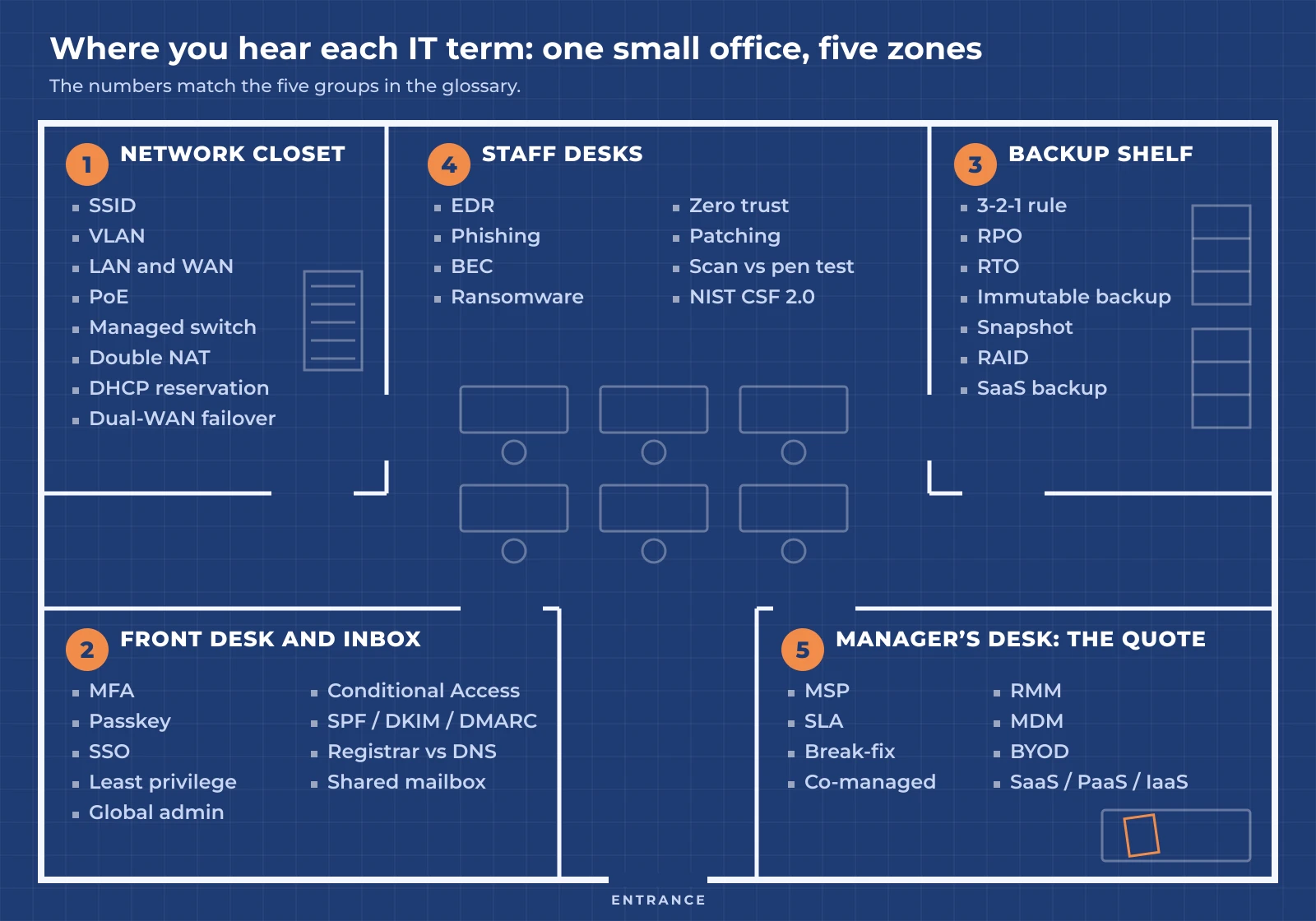
| A cabling or Wi-Fi quote, a slow-network visit | Network | SSID, VLAN, LAN and WAN, PoE, managed switch, double NAT, DHCP reservation, dual-WAN |
| Email setup, a new hire, an admin change | Accounts and email | MFA, passkey, SSO, least privilege, global admin, Conditional Access, SPF/DKIM/DMARC, registrar, shared mailbox |
| A backup proposal, an outage | Backup | 3-2-1, RPO, RTO, immutable, snapshot, RAID, SaaS backup |
| A security alert, an insurance form | Security | EDR, phishing, BEC, ransomware, zero trust, patching, scan vs pen test, NIST CSF |
| A provider's quote or contract | Buying and providers | MSP, SLA, break-fix, co-managed, RMM, MDM, BYOD, SaaS/PaaS/IaaS |
How to use this glossary
Each entry gives the meaning, a question to ask back, and a longer guide on this site where one exists.
The "Ask" line turns the word into a decision: who does it, what it costs, how you would know it works. Two words in the provider group, break-fix and co-managed, are trade usage with no standard definition; for those, have the provider write down what they mean by it.
The plan below places each group where you are likely to hear it.
What do network terms like VLAN, PoE and double NAT mean?
A VLAN splits one network into separate ones, PoE powers devices through the network cable, and double NAT is two routers translating in a row.
You hear these when someone quotes cabling, Wi-Fi or a new gateway, or explains why the network is slow. Each one names a setting you can ask to see.
SSID
The name a wireless access point broadcasts so devices can tell networks apart (NIST). One access point can broadcast several, for example one for staff and one for guests.
Ask: "Which SSIDs do we have, and what can each one reach?" More in what SSID means.
VLAN
A virtual network carved out of one physical network, so groups of devices are kept apart even on the same switches (NIST; the standard is IEEE 802.1Q). Traffic between VLANs has to pass through a router, which is where the rules sit (Netgear).
Ask: "Are guests, cameras and staff on separate VLANs, and what is allowed between them?" More in VLANs explained.
LAN and WAN
A LAN links devices in a small area such as one office; a WAN spans a larger area (NIST LAN, NIST WAN). On a small office gateway, the WAN port is the side that faces the internet provider.
Ask: "Which port is our internet line on, and is anything else plugged into the WAN side?" More in WAN vs LAN.
PoE
Power over Ethernet: power and data travel on the same network cable, so a camera or access point needs no outlet nearby (Cisco). Different PoE standards deliver different amounts of power per port.
Ask: "How much PoE power does the switch have in total, and how much will the devices draw?" The PoE guide covers power budgets.
Managed vs unmanaged switch
A managed switch can be configured and monitored; an unmanaged one is plug and play (Cisco). Netgear positions unmanaged switches for buyers who do not need VLANs or traffic management (Netgear).
Ask: "If we want separate networks later, will this switch support it?" More in managed vs unmanaged switches.
Double NAT
Two devices in a row both translating addresses, typically your own router behind the internet provider's gateway (Netgear). It can break port forwarding and some VPN connections; Ubiquiti suggests putting the provider's box in bridge mode, so it passes the connection through without routing (Ubiquiti).
Ask: "Are we double-NATed, and does the provider's gateway support bridge mode?" How to detect and fix double NAT walks through it.
DHCP reservation
A setting that makes the network always hand one device the same address, matched to its hardware (MAC) address, the fixed identifier built into its network port (Microsoft Learn). Printers, cameras and anything other devices need to find by address are the usual candidates.
Ask: "Which devices have reservations, and where is that list written down?"
Dual-WAN and failover
A gateway with two internet lines; in failover mode, traffic moves to the backup line when the main one drops and moves back when it recovers (UniFi). A second line fits when a dead connection stops sales, phones or card payments.
Ask: "Which of our services keep working on the backup line, and how will we know we switched?" More in the dual-WAN guide.
What do account and email terms like MFA, SSO and DMARC mean?
MFA asks for two proofs at sign-in, SSO lets one sign-in open many apps, and DMARC tells receivers what to do with mail that fails sender checks.
These come up when email is set up and when someone joins or leaves. The admin entries matter most: whoever holds them can reset everyone else.
MFA
Multifactor authentication: signing in with two or more separate kinds of proof, such as something you know, something you have or something you are (CISA). CISA calls phishing-resistant MFA the standard to aim for.
Ask: "Is MFA required for every account, including admins, or only offered?"
Passkey
A sign-in credential based on FIDO standards, kept on a phone, computer or security key and approved with the device's own unlock instead of a typed password (FIDO Alliance). Because there is nothing to type, there is nothing to hand to a fake sign-in page.
Ask: "Which of our main accounts accept passkeys, and what happens if someone loses the phone?" The passkeys implementation guide covers the rollout.
SSO
Single sign-on: signing in once with one account and then opening several apps without signing in to each (NIST; Microsoft Learn). It also gives one place to switch off access to every app on SSO when someone leaves.
Ask: "Which apps are on SSO, and which still have their own passwords?" Related: removing a former employee's access.
Least privilege
Each person or system gets only the access the job needs, and no more (NIST). Fewer admin accounts means fewer accounts whose theft can change everything.
Ask: "Who in our company has admin rights today, and does each of them need it?"
Global admin and super admin
The top role in each suite. Microsoft's Global Administrator can change almost every setting in Entra ID and the Microsoft services that use it, and Microsoft advises keeping it to fewer than five people (Microsoft Learn). Google's super administrator can manage everything in the Admin console, and Google recommends at least two, so one can reset the other's password (Google Workspace Admin Help).
Ask: "Who holds these roles, and is at least one held by someone inside the business?" See what to do when your IT person quits.
Conditional Access
Microsoft's policy engine that looks at who is signing in, from what device, where and to which app, then allows, blocks or asks for more proof (Microsoft Learn). It needs Microsoft Entra ID P1, which Microsoft 365 Business Premium customers can use; the simpler security defaults are available to all customers.
Ask: "Are we on security defaults or Conditional Access, and why?" More in the Microsoft 365 plan comparison.
SPF, DKIM and DMARC
Three DNS-based email checks. SPF lists the servers allowed to send for your domain (RFC 7208); DKIM adds a signature receivers can check (RFC 6376); DMARC ties both to the visible From address and tells receivers what to do when a message fails (RFC 9989, published May 2026).
Ask: "Are all three set up for our domain, and what does our DMARC policy tell receivers to do?" More in SPF, DKIM and DMARC explained and the DMARC guide.
Domain registrar vs DNS host
The registrar is the company through which your domain name is registered (ICANN). The DNS host runs the records that point the name at your website and email. One company can do both, but they are two separate jobs, sometimes with two separate logins.
Ask: "Who is our registrar, who hosts our DNS, and who can sign in to each?" More in who owns your business domain.
Shared mailbox
In Microsoft 365, a mailbox several people use for an address such as info@; as of November 2026 it can hold up to 50 GB without a license of its own, and the people who use it need their own licensed mailboxes (Microsoft Learn).
Ask: "Is info@ a shared mailbox, a group or an alias, and who can send as it?" More in business email on your own domain.
What do backup terms like RPO, RTO and 3-2-1 mean?
RPO is how much recent work you can afford to lose, RTO is how long you can be down, and 3-2-1 means three copies with one off-site.
RPO and RTO are the two to settle with your provider in numbers, because every other backup choice follows from them.
3-2-1 rule
Keep three copies of important data, on two different kinds of storage, with one copy off-site (CISA). The off-site copy covers the cases that take out the whole office at once.
Ask: "Where are our three copies, and which one is off-site?" More in the 3-2-1 backup rule guide.
RPO (recovery point objective)
The point in time your data must be recoverable to after an outage (NIST). In plain terms: how much recent work you can afford to lose. A nightly backup means up to a day of work can be gone.
Ask: "What RPO does our current backup actually give us?" The disaster recovery guide shows how to set one.
RTO (recovery time objective)
Where RPO measures lost work, RTO measures lost time: how long systems can stay in recovery before it starts to harm the business (NIST). In practice, count the whole wait, from noticing the problem to people working again.
Ask: "How long did our last test restore take from start to finish?" More in testing backup restores.
A worked example (an illustration, not a client case). A seven-person office sets two targets: lose no more than one business day of work (RPO) and be working again within four business hours (RTO). Its file server backs up nightly. The last good copy finishes Friday at 6 p.m.; the server fails Monday at 8 a.m.; files are restored and staff are working by Tuesday at 10 a.m.
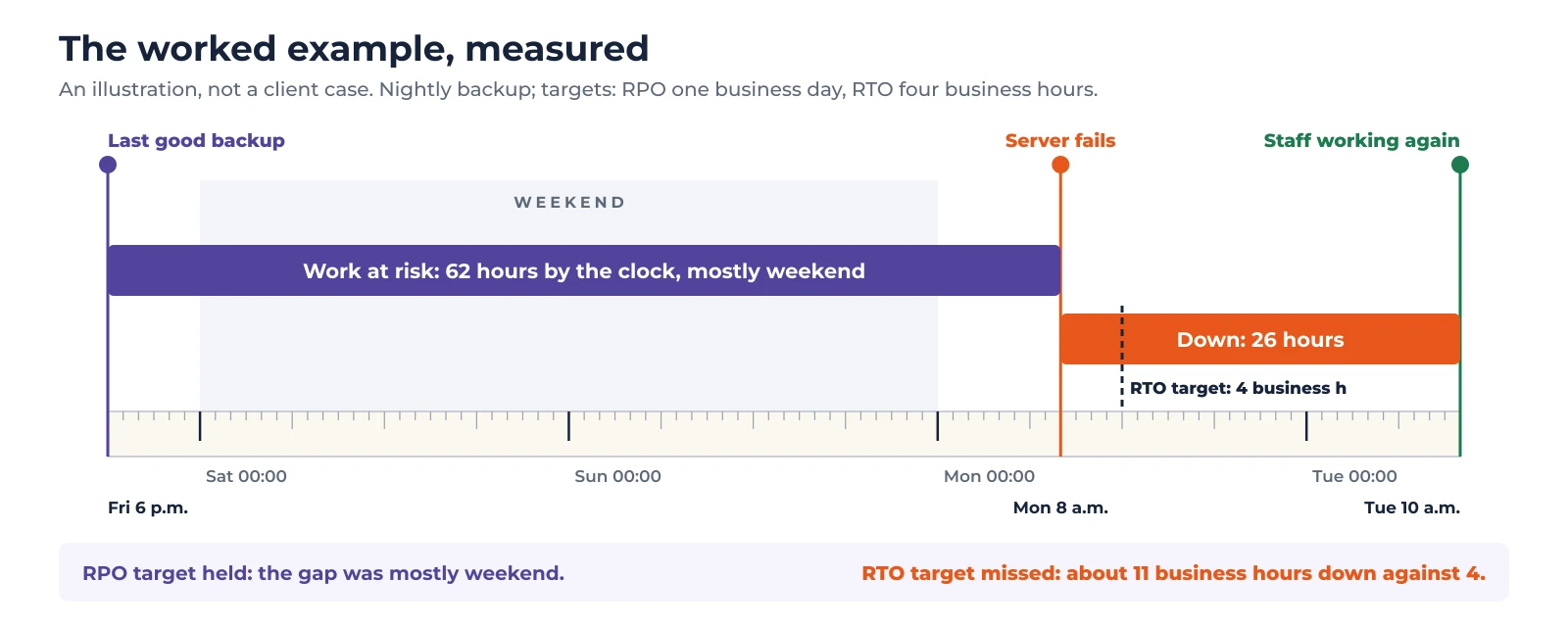
The recovery point was 62 hours old by the clock, but almost all of that was a weekend, so little work was lost and the RPO target held. On a weekday the same nightly backup would lose up to a day of work, which is still inside the target. The downtime was 26 hours by the clock, about 11 business hours on an 8-to-5 day, against a four-business-hour target, so the RTO target was missed. The useful question back is about the second number: "What would get a restore down to four hours: a local copy, a standby machine, or a tested runbook (written restore steps)?"
Immutable backup
A backup locked so it cannot be changed or deleted until a set date, using a write-once, read-many model (Backblaze; AWS). In the strictest (compliance) mode not even an administrator can delete it early, so the copy survives someone getting into the backup account; a looser (governance) mode can be overridden by accounts with special permission.
Ask: "Is any of our backup immutable, in which mode, and for how many days?"
Snapshot
A point-in-time copy you can roll back to, such as a disk or a shared folder as it was at 9 a.m. (Microsoft Learn; Synology). A snapshot on the same device as the original shares that device's fate, so it is a fast undo, not the off-site copy.
Ask: "Where do our snapshots live, and where is the copy that is not on that device?" More in Synology snapshots explained.
RAID
Several drives combined into one storage pool; most RAID levels (not RAID 0) keep a server or NAS running when one drive fails (QNAP). RAID guards against hardware failure; it does not protect against deletion, ransomware or theft, so it is not a backup.
Ask: "If a drive fails, who gets the alert, and where is the separate backup?" RAID explained compares the levels.
SaaS backup
A common industry term rather than a standard one: a backup of the data you keep in a cloud service such as Microsoft 365 or Google Workspace, stored separately from that service. The reason to want one is independence: a copy outside the service you can restore from on your own terms.
Ask: "If someone deletes a mailbox or a shared drive, how far back can we restore, and from where?" More in does Microsoft 365 need backup and SaaS backup vs cloud storage.
What do security terms like EDR, BEC and zero trust mean?
EDR watches computers for attacks, BEC is email fraud aimed at payments, and zero trust checks every user and device before granting access.
These name the threats in an alert and the controls an insurance application asks about. Two products with the same label can do quite different amounts of work.
EDR
Endpoint detection and response: software on laptops and servers that records what happens on the device, detects attacks and lets someone investigate and respond (Microsoft Learn). The "response" part assumes a person is watching the alerts.
Ask: "Who looks at the alerts, how fast, and outside business hours?" More in EDR vs antivirus.
Phishing
A message by email, text, social media or phone that tries to trick you into clicking a link, opening an attachment or handing over information (CISA; FTC).
Ask: "What should staff do when they think they clicked something, and who do they tell?" More in how to spot a phishing email and what to do after a click.
Business email compromise (BEC)
A scam aimed at businesses and individuals who send payments: the scammer takes over or poses as a trusted email account to get money transferred (FBI IC3). The FBI advises confirming any change to payment details through a second channel.
Ask: "What is our rule for confirming a changed bank detail, by phone, on a known number?" More in AI voice and deepfake fraud.
Ransomware
Malicious software that blocks access to files or systems, often by encrypting them, until a ransom is paid (FBI; CISA).
Ask: "After a ransomware attack, which backup would we restore from, and when was it last tested?" More in double extortion ransomware.
Zero trust
An approach that grants no automatic trust because of where a device sits on the network; every user and device is checked before it reaches a resource (NIST SP 800-207; CISA). It is a direction of travel, not a single product.
Ask: "When you say zero trust, which product or setting do you mean?" VPN vs zero trust applies it to remote access.
Patch management
The routine of finding, prioritizing, getting, installing and confirming software updates (NIST SP 800-40 Rev. 4). NIST frames it as preventive maintenance, like servicing company vehicles to avoid breakdowns.
Ask: "How do we know updates actually installed on every device, and how long does a critical one wait?" Setting up automatic updates covers each device type.
Vulnerability scan vs penetration test
A vulnerability scan is a check, usually run by software, for known weaknesses; a penetration test has people imitate real attacks to see whether they can get past the defenses (NIST scanning; NIST penetration testing). The two differ in depth, effort and price.
Ask: "Is this quote for a scan or a test, and what will the report tell us to fix?" More in the network security audit guide.
NIST Cybersecurity Framework (CSF) 2.0
A voluntary framework organized around six functions: Govern, Identify, Protect, Detect, Respond and Recover (NIST CSWP 29). NIST also publishes a small-business quick start.
Ask: "Which of the six functions are we weakest in, in your view?" More in the NIST CSF guide for small businesses.
What do provider and contract terms like MSP, SLA and RMM mean?
An MSP runs your IT under contract, an SLA is its written service promise, and RMM is the remote tool it uses to manage your computers.
A note before this group: iFeelTech is an IT provider. The questions below work with any provider, us included, and none of them assumes bad faith; they make the agreement concrete.
MSP
A managed service provider: a company that delivers, runs or manages IT services for customers under a contract, which usually means it holds trusted connections and admin access to their systems (CISA).
Ask: "Which accounts do you hold admin access to, and how is your own access protected?" More in questions to ask a network security provider.
SLA
A service level agreement: a written commitment that sets the provider's responsibilities and what the customer can expect (NIST). Response time and fix time are different promises; read which one the number refers to.
Ask: "Is that response time or resolution time, and what happens when it is missed?" The business internet SLA guide shows what to look for.
Break-fix vs managed IT
Common trade terms with no standard definition. Break-fix usually means paying per job when something breaks; managed IT usually means a recurring fee for ongoing monitoring and support. Break-fix fits when the setup is simple and problems are rare; a managed plan fits when you want someone accountable for updates, backups and accounts every month.
Ask: "What exactly is included in the monthly fee, and what is billed on top?" More in the managed IT pricing guide and when to stop doing IT yourself.
Co-managed IT
Also trade usage: an outside provider working alongside an in-house IT person or team. It fits when you have someone on staff who handles daily requests but want help with projects, security or cover for holidays.
Ask: "Who does what, written down, and who decides when both of us could?" More in what to do when your IT person quits.
RMM
Remote monitoring and management: software IT staff and MSPs use to support computers remotely, manage the network and run security tasks (CISA). CISA has also warned that criminals misuse legitimate remote tools, so access to the provider's RMM matters.
Ask: "Which RMM tool is on our computers, who can reach it, and is MFA required to sign in to it?"
MDM
Mobile device management: running phones, tablets and laptops through a management service that enrolls them, sets security and apps, and can wipe a lost device (NIST; Microsoft Intune).
Ask: "If a laptop is lost, what can we lock or wipe, and who does it?" For Macs and iPhones, see the Apple Business Manager guide.
BYOD
Bring your own device: staff use their own phones or tablets for work, and the business often manages only the work apps and data rather than the whole device (NIST SP 800-124 Rev. 2). The decision is about what the company can see and remove on a personal phone.
Ask: "On a personal phone, what can the business see and what can it wipe?"
SaaS, PaaS and IaaS
NIST's three cloud service models (NIST SP 800-145). SaaS: you use the provider's applications, such as email or accounting software. PaaS: you run your own applications on the provider's platform. IaaS: you rent computing, storage and networks and run your own systems on them.
Ask: "For each service we pay for, who is responsible for backing up our data?" More in SaaS backup vs cloud storage.
Same word, different meaning: the pairs that get mixed up
Snapshots and RAID are not off-site backups, a passkey is one way to meet MFA, and your registrar is not always your DNS host.
| What you hear | What it can mean | What to ask |
|---|---|---|
| "We have a shared inbox" | Microsoft: a shared mailbox. Google: a shared inbox (an admin-created mailbox with delegates, being rolled out in phases) or a collaborative inbox (a Groups feature) | "Which one, and who can send as it?" |
| "It's backed up, it has snapshots" | A snapshot is a point-in-time copy, often on the same device | "Where is the copy that is not on that device?" |
| "It's safe, it's RAID" | RAID keeps running through a drive failure; it is not a copy | "Where is the separate backup?" |
| "We use MFA" vs "we use passkeys" | MFA is the rule (two proofs); a passkey is one way to meet it | "Which method does each person use?" |
| "Our domain is with X" | X may be the registrar, the DNS host, or both | "Who holds each login?" |
| "Response time is one hour" | Usually time to acknowledge, not time to fix; check the contract | "And the time to resolve?" |
Five questions that work for any IT term
Ask what it includes in writing, what it costs, who can reach it, how it is tested, and what happens if you cancel.
When a word is not on this page, these five turn it into something you can decide on.
- What does it include, in writing? A term is only as useful as the scope next to it.
- What does it cost each month, per user or per device? That makes two quotes comparable.
- Who can reach it, and is MFA required? Admin access is the access worth protecting most.
- How do we test it? A backup, a failover line or an alert that has never been tried is untested.
- What happens if we cancel? Find out who keeps the accounts, the data and the passwords.
Related Resources
These guides go deeper on the groups above.
- Managed IT Services Pricing Guide — What monthly IT plans include and how quotes are built.
- Questions to Ask a Network Security Provider — A longer question list for choosing a provider.
- Small-Business IT Handover Checklist — Which accounts and records to collect when a provider changes.
- The 3-2-1 Backup Rule — How to lay out three copies on two kinds of storage with one off-site.
- SPF, DKIM and DMARC Explained — The three email records, step by step.
- VPN vs Zero Trust — What zero trust means for remote access in a small office.
Frequently Asked Questions
Related Articles
More from IT Guides

Managed IT Services Pricing: Per-User Costs and What to Budget in 2026
Budget $125 to $250 per user for managed IT using our South Florida estimates. Compare pricing models, exclusions, setup costs and quotes in this 2026 guide.
12 min read
Why IT Recommendations Get Ignored (And What It's Costing Your Business)
IT consultants design good systems. Businesses don't always implement them. Here's why that gap exists — and what it actually costs when it does.
7 min read
When to Stop Managing IT Yourself: A Small-Business Decision Guide
When should a small business outsource IT? Compare five support models, nine warning signs, current costs, and the minimum safe DIY baseline.
12 min read