

Dual WAN for Business: Why One Internet Connection Isn't Enough
Why a single ISP is a single point of failure, how to verify real route diversity, and which dual-WAN gateway and backup connection fit a rack network or a simple branch office.

Quick Summary
- Two ISP bills don't confirm two independent paths. Carrier diversity (different provider names) and route diversity (physically separate entrance points) are different things, and we regularly find the gap during site surveys.
- A second connection without a dual-WAN gateway isn't automatic failover. Without one, switching to it during an outage requires someone to notice and reconfigure the network manually.
- Our default is failover-only, not load balancing — most business networks run something (a VPN, a static-IP-anchored service, a SIP trunk) that needs to stay on one WAN's IP address.
- The right hardware depends on whether you have a rack. A rack-based network and a small branch office can both use dual WAN, but they need different gateways.
Affiliate Disclosure: This article contains affiliate links. If you make a purchase through these links, we may earn a small commission at no extra cost to you. As an Amazon Associate, iFeelTech earns from qualifying purchases.
Prices, specifications, and licensing details below were verified against manufacturer or authorized-retailer information as of July 22, 2026, with sources linked inline where available. Vendors change pricing and packaging often — confirm current terms before ordering.
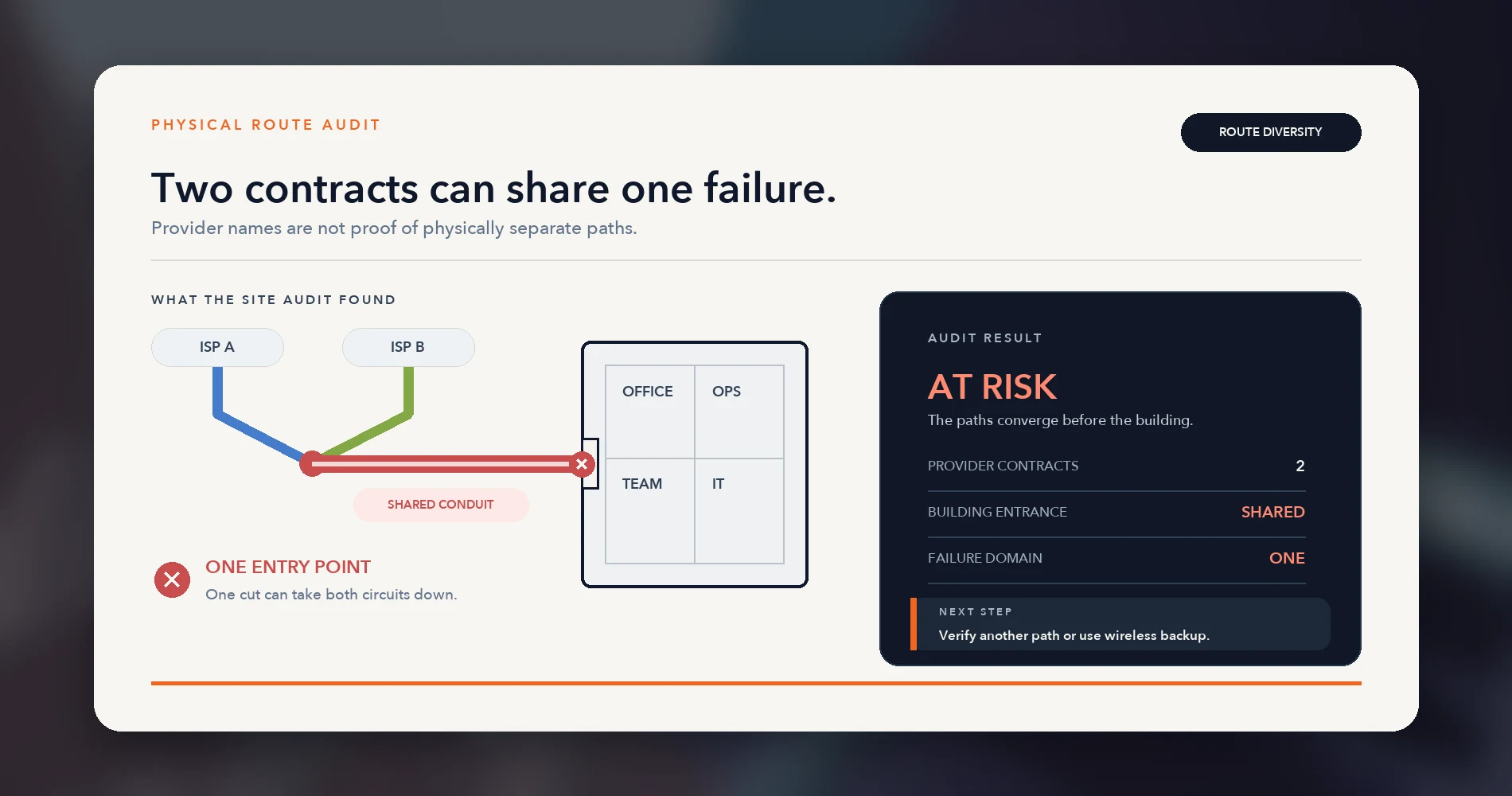
In our site surveys, we've repeatedly found that separate provider contracts share the same building entrance — a cable line and a fiber line, installed months apart, entering through the same conduit or utility easement. We now verify the physical route before treating two circuits as independent, rather than assuming two invoices means two paths.
This guide covers what actually makes an internet connection redundant, when a second connection is worth paying for, why we default to failover instead of load balancing on most client networks, and which gateway and backup connection fit two different real-world setups: a business network built around a rack, and a small office or branch location without one.
Prefer to watch? This nine-minute video follows an office internet outage through the backup options that actually work. The written guide follows below.
Backup Internet for a Small Office: What Actually Works in 2026?
Why Can Two Internet Connections Still Fail Together?
Two ISP contracts don't provide redundancy if both circuits share the same physical path.
Carrier diversity means using separate network operators — two different provider names on two different bills. Route diversity means the circuits use physically separate building entrances, conduits, and outside plant, and ideally separate upstream facilities as well.
A different provider name doesn't prove physical separation. Resellers can use the same last-mile network, and competing carriers may share ducts, poles, or property-entry infrastructure. Conversely, one provider may be able to contractually supply physically diverse routes. Verify the actual path rather than relying on the provider name.
| Looks redundant | Verified redundant | |
|---|---|---|
| Provider names | Two different ISPs | Independently owned or contractually diverse circuits, with the physical separation confirmed |
| Physical entrance | Assumed separate | Confirmed separate conduit, pole, or vault |
| Last-mile technology | Often both wired | Ideally different — wired plus cellular, or wired plus satellite |
| Failure scenario covered | A billing or account issue with one provider | Construction damage, pole damage, a localized outage, storm damage |
The gap matters most in exactly the scenarios a backup connection is meant to cover: construction work on a neighboring lot, a damaged utility pole after a storm, a contractor cutting the wrong line nearby. Those events affect whatever is physically in the ground or on the pole at that location, regardless of whose name is on the invoice.
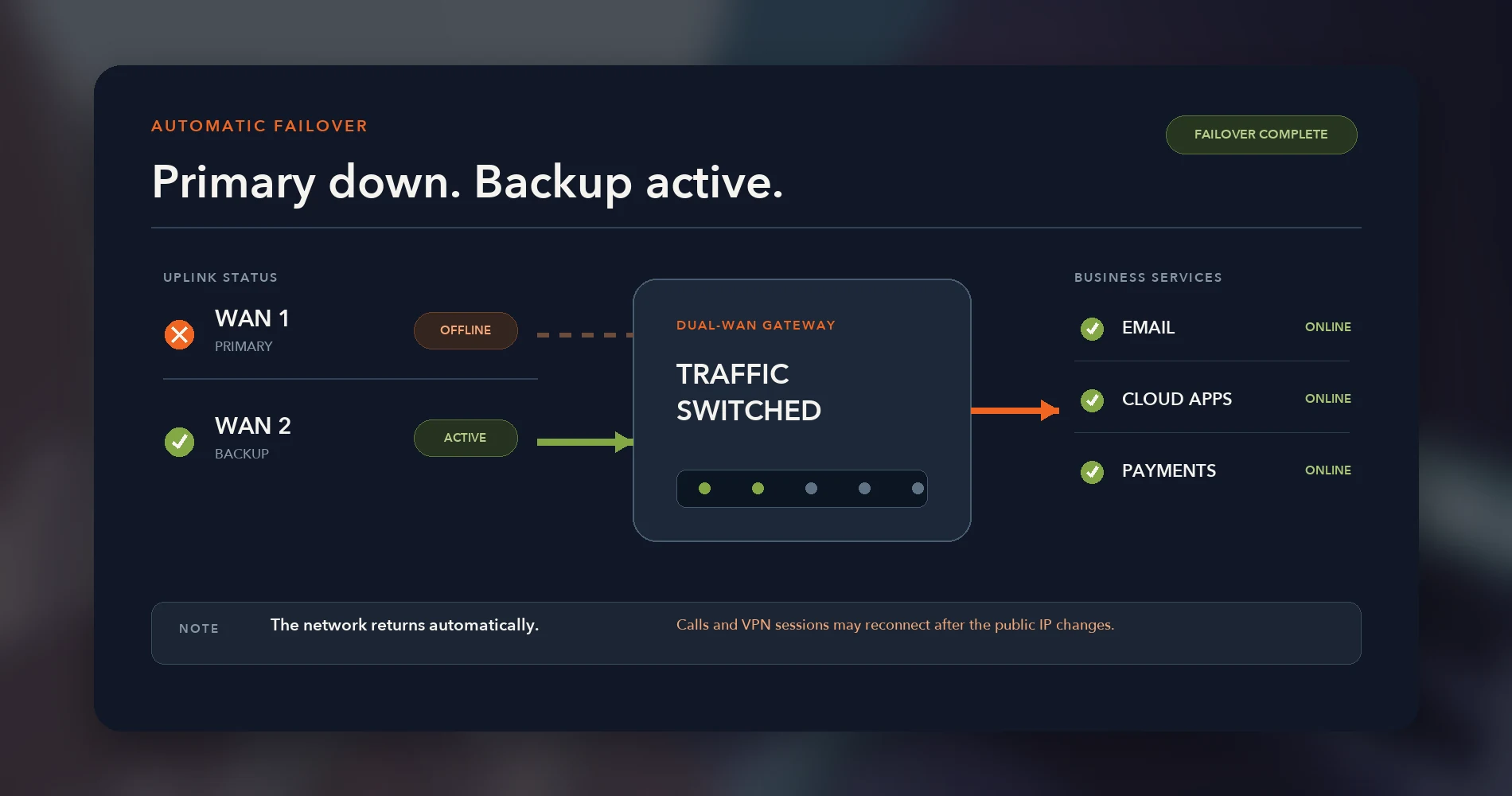
This is also where a dual-WAN router matters, separate from the ISP question. A second internet line without a gateway that monitors both connections and switches traffic automatically requires someone to notice the outage, then manually reconfigure the network to use it — which can take 15–30 minutes or more in our experience, and longer if the person who knows how isn't on site. With a dual-WAN gateway, the switch to a working connection typically happens within seconds to under a minute, depending on configured health-check thresholds. That said, it isn't seamless: an ordinary failover usually changes the network's public IP address, and active VoIP calls, VPN tunnels, and other in-progress sessions will generally need to reconnect on the new connection rather than continuing uninterrupted.
Route-Diversity Audit: What to Verify Before Ordering
Verify each circuit's entrance, conduit, last-mile owner, upstream facility, and power dependency before signing a second contract. In Miami-Dade, our business internet map shows which providers report service near an address, which helps you shortlist a second path before you request site surveys.
During site surveys, we repeatedly find circuits from different providers sharing the same entrance or easement. We therefore verify the physical path on every redundancy visit.
Before signing, ask the provider (or your installer) to confirm:
- The building entrance and demarcation point — where does the circuit physically enter the building, and where does the provider's responsibility end?
- Whether the local loop is owned or resold — is this the provider's own physical plant, or a resold network that may share infrastructure with another retail brand?
- Whether the circuits share a conduit, pole line, vault, node, or central office — get this in writing where possible, not just from a sales conversation.
- Whether diverse routing is written into the order — some carriers can commit to a specific diverse path if you ask for it explicitly; it's rarely offered proactively.
- Which equipment requires local backup power — the ONT, modem, gateway, and any cellular or satellite hardware all need power to fail over; a shared power outage defeats circuit-level diversity entirely.
Once you've verified the physical path, test it. Schedule a recurring failover test — the full procedure is later in this guide — rather than trusting an unverified backup connection to work when you need it.
When Is a Second Internet Connection Worth the Cost?
Buy a second connection when expected annual downtime costs more than the backup service and hardware.
Use a simple break-even calculation:
Annual redundancy cost ÷ hourly downtime cost = outage hours needed to break even
Annual redundancy cost should include the second service, hardware amortized over its expected life, cellular data or satellite service, any recurring licenses, monitoring, installation, and backup power. Hourly downtime cost is specific to your business — idle payroll, missed calls, and delayed client work, not just direct lost revenue.
For a fuller downtime-cost model and three business scenarios, use our business internet SLA guide. This article assumes the business case is established and focuses on architecture.
Should Your Business Use Failover, Load Balancing, or Bonding?
Use failover for simplicity, load balancing for capacity, and bonding when active sessions need to survive an outage.
| Architecture | Normal operation | What happens when a WAN fails | Best fit |
|---|---|---|---|
| Active/passive failover | WAN1 carries all traffic | WAN2 takes over automatically; in-progress sessions typically reconnect on the new connection | Most SMBs |
| Per-session load balancing | Both WANs carry different flows, split by policy | Flows on the failed WAN drop and retry; flows already on the healthy WAN continue | Capacity-constrained offices without IP-anchored services |
| Policy-based routing | Selected users, apps, or services are pinned to a specific WAN | Behavior depends on the policy for that traffic | Networks with static-IP, VPN, or data-cap requirements that still want to use both links |
| Bonding / hot failover (SD-WAN) | Traffic is bonded across multiple WANs through a tunnel | Sessions can survive the outage if the tunnel and endpoint stay up | VoIP-heavy offices, call centers, POS, or critical VPNs |
Failover-only (Active/Passive) remains our default for most client networks, but it's worth being precise about what it does and doesn't do. During normal operation, every session stays on WAN1's IP address. When WAN1 fails and the gateway switches to WAN2, the public IP address changes — so existing VPN tunnels, SIP registrations, and other stateful sessions typically need to reconnect rather than continuing through the switch. The network comes back online automatically; specific active sessions generally don't survive the transition itself.
Load balancing (Active/Active) doesn't automatically break every IP-anchored service the way it's sometimes described. The real issue is that per-session load balancing sends different flows out on different WAN IPs, so anything that depends on a single, consistent source IP — a VPN peer, a SIP trunk, a whitelisted API connection — can fail intermittently depending on which WAN a given session happens to use. Policy-based routing solves this without giving up load balancing entirely: you can pin the specific IP-sensitive services to one WAN while everything else uses both connections. This is a meaningful middle ground that a lot of comparison content skips.
A bonded, tunnel-based SD-WAN design with hot failover can preserve active sessions during a WAN outage. Peplink SpeedFusion is one example, but it requires a compatible tunnel endpoint and the PrimeCare, SpeedFusion Connect, or feature entitlement that applies to the selected SKU. This is more expensive and involved than most small offices need initially.
Recommended WAN Combinations by Market
Choose WAN links based on address-level availability and independent failure domains, not provider brand alone.
The table below reflects combinations we investigate first on a site walk across our client base — concentrated in Miami, with additional deployments in New York and Texas. Treat it as a starting point for evaluation, not a guarantee that any specific pairing is diverse at your address — verify using the checklist above before committing.
| Market | Fiber WAN1 | WAN2 | Optional WAN3 |
|---|---|---|---|
| Miami / South Florida | AT&T Business Fiber | Comcast Business (cable), after confirming a separate local route | UniFi 5G failover (UniFi networks) |
| New York | Verizon Business Fios | Optimum Business (cable), after checking building entrance and last-mile ownership | UniFi 5G failover (UniFi networks) |
| Texas | AT&T Business Fiber | Cellular failover from an independently selected carrier, fixed wireless, or satellite | Starlink Business (currently under evaluation for this client) |
| No fiber available (any market) | — | Business cable as WAN1 | Tested cellular or satellite backup |
Where fiber is available, it's the primary connection we reach for most often — in our experience, it tends to hold up well, though reliability at any given address still depends on the local plant, construction quality, the provider's restoration practices, the SLA terms, and the customer-premises equipment, not on the technology label alone. Our Texas deployments illustrate that the right WAN2 isn't fixed: rather than pairing fiber with a second wired circuit as we typically do in Miami and New York, that client runs AT&T Fiber with UniFi 5G failover, and is currently evaluating adding Starlink as a third connection — a live example of a business moving from two connections to three as its resilience needs grow.
Where it's available, AT&T Business Fiber is the WAN1 we reach for most often across our Miami and Texas deployments.

AT&T Business Fiber — 1 Gig
Symmetric fiber with an optional wireless failover feature on eligible 1 Gig+ plans. See our full AT&T Business Fiber review for our deployment notes and plan-by-plan detail.
- Symmetric upload and download speeds
- No annual contract required
- Optional wireless failover on eligible 1 Gig+ plans
- $140/mo standalone or $90/mo with an eligible AT&T Business wireless bundle
*Price at time of publishing
Worth knowing before you rely on it: AT&T's included wireless backup on 1 Gig+ plans is useful, but it isn't fully independent redundancy. It runs through the same gateway as your fiber line, needs local power to function (it won't help during a power outage without a UPS), and keeps you within the same AT&T service relationship rather than a separate carrier. It also doesn't preserve your static IP or AT&T VoIP service during a failover event. Our AT&T built-in failover guide and our full AT&T Business Fiber review cover both the feature and its limits in detail.
When fiber isn't available at the address, the recommendation flips: a business cable connection becomes WAN1, with tested cellular as the WAN2 failover.
For the technology-specific setup steps once you've picked a combination — Starlink configuration and CGNAT handling, UniFi 5G hardware options, or exactly what AT&T's built-in failover covers — see the dedicated guides linked in the WAN2 options section below. This section is about the decision; those guides cover the configuration.
Dual-WAN Gateways for Rack Networks
For UniFi racks, the UDM Pro Max is our default when 5 Gbps inspection or redundant NVR storage justifies the cost over the standard Pro.
If you're running or planning a rack — centralized switching, PoE for cameras and access points, a UPS, and possibly surveillance storage — these gateways handle multi-WAN without becoming the bottleneck:
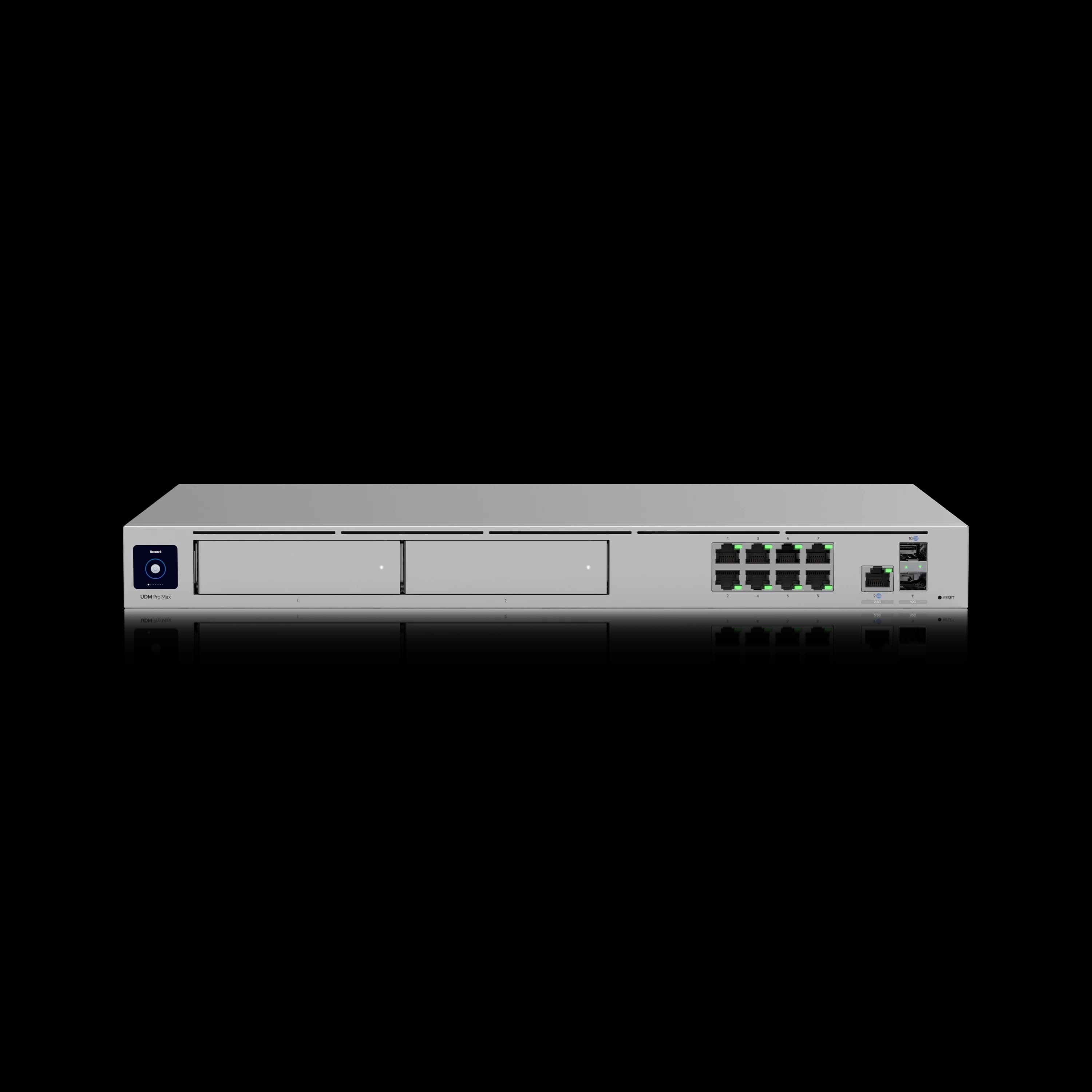
- UniFi Dream Machine Pro Max — $599. One 10G SFP+ WAN port and one 2.5GbE RJ45 WAN2 port by default (full specifications), 5 Gbps IDS/IPS throughput, and dual 3.5" HDD bays for RAID-1 NVR storage. Shadow Mode (VRRP) high availability requires a second matching UDM Pro Max — it isn't built-in redundancy from a single unit. Best fit: UniFi-standardized racks that need multi-WAN plus on-box camera storage. Skip if: 3.5 Gbps inspected throughput and a single drive bay already cover your needs — the standard Pro is $220 cheaper. Ongoing costs: none required; the optional CyberSecure Standard subscription is $99/year as of July 22, 2026 (a $499/year Enterprise tier also exists for higher-end gateways).
UniFi Dream Machine Pro Max
1x 10G SFP+ WAN + 1x 2.5GbE WAN2, 5 Gbps IDS/IPS, dual HDD bays (RAID 1). Shadow Mode HA requires a second matching unit — not included with one gateway.
- 5 Gbps IDS/IPS Throughput
- 10G SFP+ WAN + 2.5GbE WAN2
- Shadow Mode HA (needs 2nd unit)
- Dual 3.5" HDD Bays (RAID 1)
*Price at time of publishing
- UniFi Dream Machine Pro — $379. 3.5 Gbps IDS/IPS, one 10G SFP+ WAN port, one HDD bay. The better value when you don't need RAID or the Pro Max's extra throughput headroom.
- UniFi Dream Machine Beast — $1,499. 25 Gbps IDS/IPS, eight 10GbE ports. Reserve this for large or high-throughput environments — it's unnecessary for most SMB racks.
- Cisco Meraki MX. A reasonable choice if you're already standardized on Meraki for switching and wireless. Automatic WAN failover and uplink load balancing are included on every MX license tier — you don't need a premium license just for basic dual-WAN failover. What the premium tiers add is IDS/IPS, content filtering, and malware protection (Advanced Security) or deeper SD-WAN capability (Secure SD-WAN Plus), and that's where the recurring licensing cost climbs. See Cisco's official MX licensing documentation for current tier details, and our gateway comparison guide for how the multi-year cost compares to UniFi's license-free model.
- TP-Link Omada ER8411 — $399.99 at B&H. Up to ten WAN-capable ports with load balancing. It can run in standalone mode without an Omada controller — a controller (including the free Omada Cloud Essentials cloud tier) adds centralized management and some advanced features, but isn't required for basic operation. See TP-Link's official ER8411 specifications for the full port and feature breakdown.
- Firewalla Gold Pro — $939 (regularly $999). 10 Gbps packet processing, policy-based routing (route specific traffic to specific WANs, not just failover-or-nothing), and an official 1U rack mount kit. A solid fit when policy routing and throughput matter more than staying inside one hardware ecosystem.
- Peplink. Worth evaluating if true SD-WAN bonding matters more than price, but only with an exact SKU, hardware generation, and SpeedFusion/PrimeCare entitlement confirmed directly with Peplink or an authorized reseller — Peplink's lineup and cellular-module options change by configuration, and pricing isn't meaningfully comparable without pinning those down first. The Balance 310 5G is a current model worth starting that conversation with for new rack deployments.
Match the gateway to your actual device count and multi-WAN port needs, not the largest number on the spec sheet — our gateway comparison guide has a full device-count and throughput framework if you're unsure which tier you need.
Dual-WAN Gateways for Small Branches
Small branches need two usable WAN paths and manageable recurring costs — not rack hardware.
A two-to-ten-person office, a single closet shelf, or a branch location doesn't need a rack to get real dual-WAN protection, and rack-tier hardware is over-scoping for this case, not extra safety:
- UniFi Cloud Gateway Ultra — $129. Up to 1 Gbps IDS/IPS. WAN2 is enabled by reassigning a LAN port. Good for straightforward small-office failover on connections under roughly 800 Mbps.
- UniFi Cloud Gateway Max — from $199. 2.3 Gbps IDS/IPS with more native WAN flexibility and optional NVMe storage.
- UniFi Cloud Gateway Fiber — $279. 5 Gbps IDS/IPS with multi-gig WAN options for higher-speed connections.
- UniFi Dream Router 7 — $279. Dual-WAN capable with integrated Wi-Fi 7 built in.
- Firewalla Gold SE — $499. Two Ethernet WAN-capable ports plus two LAN ports — a genuine fit for two ordinary wired circuits. Pricing per Firewalla's official comparison guide.
- Firewalla Orange — $389. Two 2.5GbE ports and built-in Wi-Fi 7. Its Wi-Fi interface can serve as a secondary WAN, making it suitable for one wired connection plus hotspot or WISP backup. Choose the Gold SE when you need two conventional wired WANs.
- TP-Link Omada ER605 — around $50. The budget entry point here. Confirm the hardware revision (V2 vs. V2.20) before ordering — port counts and feature support differ between them.
- ASUS ExpertWiFi EBG15 — $89.99 / EBG19P — $179.99. ASUS's current business line (model comparison). The EBG15 supports multiple WAN-capable ports plus IPS and Layer 7 firewall features; the EBG19P adds eight PoE+ ports (123W budget) for powering access points directly, plus up to three Ethernet WANs and a USB WAN. A legitimate option for a two-person branch office on a tight budget.
- Peplink Balance 20X. Bundles an embedded cellular modem for a branch that wants cellular WAN2 without a separate 5G device — but pricing and availability vary by cellular-module configuration, and some older module SKUs have been discontinued in favor of newer ones. Confirm the current SKU and SpeedFusion/PrimeCare terms with Peplink before budgeting.
Most gateways at this tier are designed as desktop units and lack redundant power supplies, though some — Firewalla's Gold-series devices, for instance — offer optional rack-mount kits if you outgrow the shelf later. For most branch offices, a desktop gateway is the correct tradeoff for the size of the network — a ten-person office running a Cloud Gateway Max is properly scoped, not under-protected.
WAN2 Options and Trade-Offs
Choose WAN2 based on failure independence, usable capacity, data limits, latency, and power needs — not headline speed.
| WAN2 type | Primary advantage | Main limitation |
|---|---|---|
| Second wired circuit | Usually the most predictable sustained capacity and the least restrictive data allowance | May share a conduit, pole, node, or power feed with WAN1 if route diversity wasn't verified |
| 5G / LTE cellular | Fast to deploy; a genuinely different last-mile medium than wired service | Coverage and congestion vary; often behind CGNAT; data plans are usually capped |
| Fixed wireless | Can provide an independent last-mile path that avoids the primary circuit's street-level infrastructure | Still depends on upstream backhaul, the provider's own facilities, and local power. Coverage must be surveyed at the address, and some deployments require clear or near-line-of-sight depending on the provider, frequency, and antenna design. |
| Starlink (satellite) | Strong infrastructure independence from both wired and cellular networks | Needs a clear sky view, draws continuous power, and is affected by weather and latency; also behind CGNAT on most plans |
| ISP-integrated backup (e.g., AT&T's built-in wireless failover) | Simple to enable, no separate hardware to buy | Often shares the provider, the gateway, the billing relationship, and the power dependency with WAN1 |
A few notes on specific options:
- Cellular (5G/LTE) is the WAN2 we deploy most often where coverage is strong. Our 5G failover setup guide covers UniFi hardware and configuration, and our UniFi 5G Backup review covers the $99 device specifically. The $99 is hardware only: in the US, Ubiquiti's eSIM service runs on T-Mobile, with standalone data packs starting at $79/year and a bundled 10GB pack currently priced at $60/year — confirm current data pack pricing on the product page before budgeting.
- Satellite (Starlink) is the right call where cellular coverage is weak or full infrastructure independence matters. Our Starlink Business failover guide covers plan selection, the CGNAT issue, and UniFi configuration end to end.
- Already on AT&T Business Fiber? Check what's included before adding anything separately — see the caveats above and our AT&T built-in failover guide for what it does and doesn't cover.
How Should You Test Cellular Signal Before Using It as WAN2?
Measure RSRP, RSRQ, and SINR indoors and outdoors before selecting modem or antenna placement.
Indoor cellular signal is inconsistent — concrete construction, metal roofing, and interior placement all degrade it. Rather than assuming an outdoor-mounted modem or antenna will fix a weak signal, run a signal survey first: check RSRP, RSRQ, and SINR at a few candidate locations, both indoors and outside. If outdoor mounting is the right call, plan for a weather-rated enclosure, surge protection, proper grounding, and cable runs short enough to avoid excessive antenna/cable loss. This is a standard part of a proper cellular failover install, not a one-size-fits-all fix.
Quarterly Failover-Testing Procedure
Test failover and failback on a recurring schedule, recording detection time, session loss, throughput, alerts, and data use.
Do not treat a backup connection as reliable until it has passed a controlled failover test. Run this procedure on a regular schedule — quarterly for most offices, more often for session-critical sites:
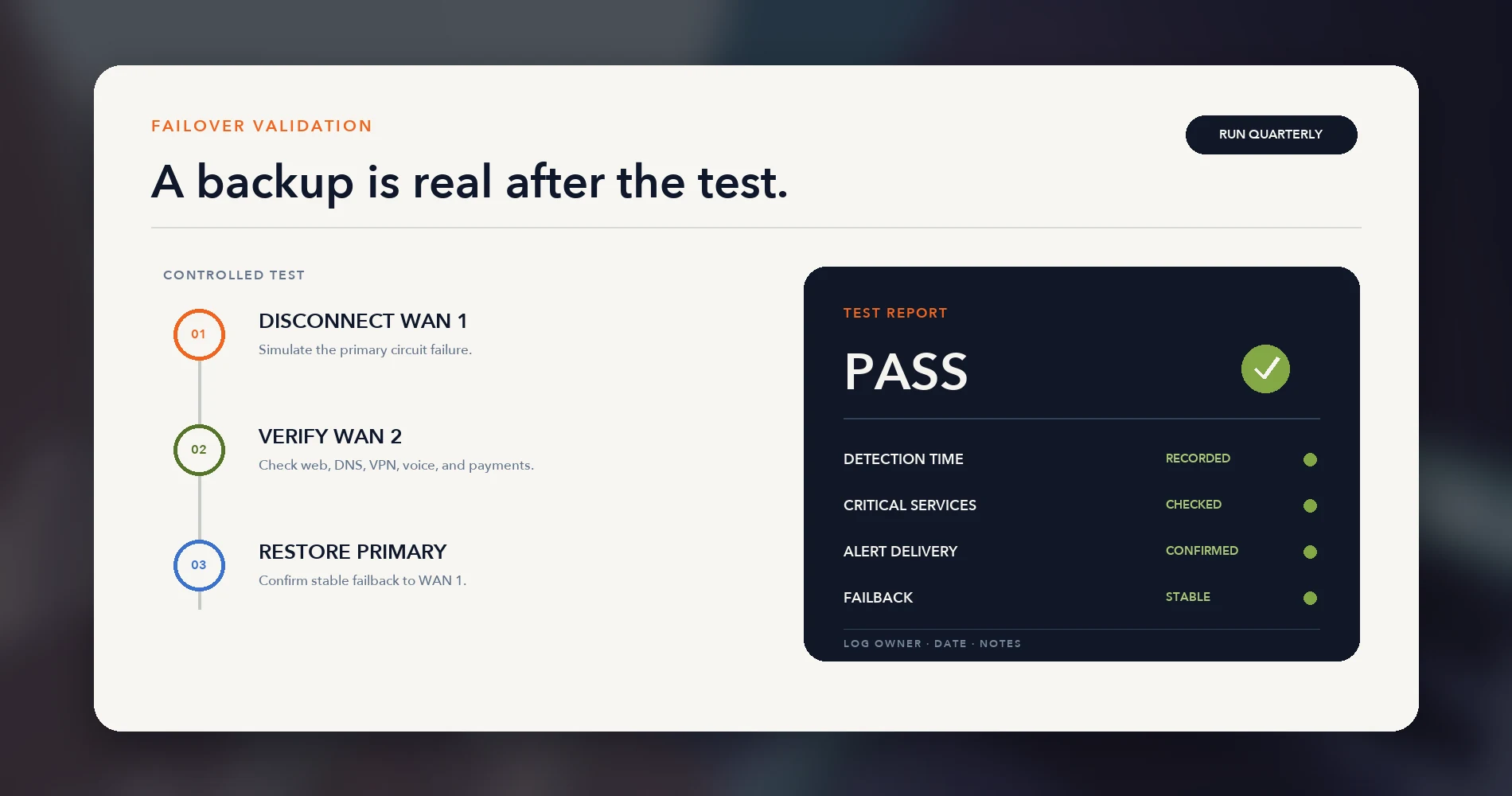
- Record the baseline. Note the expected public IP address, the gateway's health-check targets, and the failover threshold before you start.
- Disconnect the primary circuit upstream of the gateway (not just at the gateway's WAN port, if you can access the demarcation point).
- Measure detection and switchover time — how long until the gateway marks WAN1 down and traffic moves to WAN2.
- Test the services that matter: DNS resolution, general web access, VoIP calls, VPN connectivity, POS transactions, cloud apps, and any inbound services.
- Confirm alerts fired, and check cellular data usage and backup-connection throughput if WAN2 is cellular or satellite.
- Restore WAN1 and verify the network fails back automatically and stays stable.
- Log the results — detection time, what worked, what didn't, and anything different from the previous test.
Session-critical sites (call centers, POS-heavy retail, anything running SD-WAN bonding) should test more frequently, and should also test the UPS supporting the ONT, modem, gateway, switches, and access points — dual WAN through a single unpowered gateway is still a single point of failure during a power outage. See our battery backup guide for a modem and router for sizing that UPS.
Frequently Asked Questions
These answers cover the questions businesses most often ask before deploying dual WAN.
Is a dual-WAN router the same thing as a backup internet connection?
No. A backup internet connection is just a second ISP line. A dual-WAN router is the hardware that detects when your primary connection fails and switches traffic to the second one automatically. Without it, using a second line during an outage requires someone to manually reconfigure the network.
Do two internet providers guarantee redundancy?
No. Two different provider names don't confirm physical separation — a reseller can ride the same last-mile network as the original carrier, and two competing carriers can still share a conduit, pole, or vault. Verified redundancy comes from confirmed physical route diversity: separate entrances, separate outside plant, and ideally a different last-mile technology such as fiber plus cellular.
Should a small office use failover or load balancing?
Most small offices should start with failover-only (Active/Passive). It's simpler to manage, though active calls, VPN tunnels, and other in-progress sessions typically need to reconnect when the network switches to the backup WAN. Load balancing can work alongside policy-based routing, which pins IP-sensitive services like VPNs and SIP trunks to a single WAN while still using both connections for everything else. Session continuity through a failover — where calls and tunnels don't drop — generally requires a bonding/SD-WAN product like Peplink's SpeedFusion, which needs a tunnel endpoint and its own subscription, not just a multi-WAN router.
Do I need a rack to set up dual WAN?
No. Compact gateways like the UniFi Cloud Gateway Ultra or Max, and desktop-class devices like the Firewalla Gold SE, support dual WAN without any rack infrastructure. A rack becomes worthwhile once you're also centralizing switching, PoE, UPS, and surveillance storage — not because dual WAN itself requires one.
What's the best ISP combination for business internet redundancy?
There's no universal pair. It depends on what's physically available and independent at your address. We start by listing every provider that can reach the building, then verify which combinations use genuinely separate entrances, conduits, and last-mile infrastructure — rather than assuming two provider names means two paths.
The Bottom Line
Reliable dual WAN requires independent paths, automatic failover, backup power, and routine testing.
A second contract only helps if the backup path and equipment actually cover the failures that matter to your business. Verify route diversity first, choose the failover architecture that matches what your network depends on, protect the local equipment with a UPS, and test the whole setup on a schedule rather than assuming it will work when you need it.
If the physical route or the failover behavior on your current setup is undocumented, that's the first thing worth resolving — before adding a third connection on top of two that might already share one failure point.
Related Resources
These guides cover the ROI, setup, and troubleshooting steps referenced in this article.
- Miami Business Internet Map — Providers reporting business service near a Miami-Dade address, to find a second path.
- Business Internet SLA Guide — The ROI math for whether a second connection is worth it, plus what your uptime guarantee actually covers.
- What to Do When Your Business Internet Goes Down — Immediate triage steps if you don't have redundancy in place yet.
- 5G Failover Setup for Business — UniFi cellular hardware options and full configuration steps.
- UniFi 5G Backup Review — The $99 entry-level cellular failover device in detail.
- Starlink for Business: Complete Failover Setup Guide — Satellite as WAN2, including plan selection and CGNAT.
- AT&T Fiber's Built-In 5G Failover — What's already included on eligible AT&T Business Fiber plans, and its limits.
- UniFi Gateway Comparison Guide — Full specs and device thresholds for every UniFi gateway, rack and desktop.
- UniFi Gateway Alternatives — Deeper detail on Firewalla, Meraki, and pfSense for mixed-vendor networks.
- Multi-Location Business Networking Guide — For connecting multiple offices together, rather than adding redundancy at one site.
Related Articles
More from Network Infrastructure
Starlink for Business: The Complete Failover Setup Guide (2026)
How to set up Starlink as a business internet failover with UniFi — including CGNAT fixes, plan selection, dual-WAN configuration, and testing before you need it.
16 min read
How Often Should You Replace Your Router? The Security Signs We Look For on Every Job
Forget the 'every 3–5 years' rule. Here's the field checklist we run on a client's router before replacing it — plus what 4 years of fleet data says about how long networking gear actually lasts.
12 min read

VLANs Without the Jargon: What They Are, What to Separate, and Why It Matters
A plain-language guide to VLANs for small business owners. Understand what network segments you already need — guest WiFi, IoT cameras, VoIP phones — and what belongs in each one.
12 min read