

Managed IT Services Pricing: Per-User Costs and What to Budget in 2026
Budget $125 to $250 per user for managed IT using our South Florida estimates. Compare pricing models, exclusions, setup costs and quotes in this 2026 guide.


For a business with 10 to 50 supported users, our South Florida budgeting range for standard managed IT is $125 to $250 per user per month. At an illustrative $175 per user, a 25-user company pays $4,375 a month, or $52,500 a year, before separately quoted licenses, hardware and projects.
Managed IT services means paying a provider a recurring fee to maintain agreed systems and support your staff. The price only becomes useful when you know which systems, working hours and security responsibilities it covers. This guide helps an owner or office manager estimate the budget, compare proposals and identify costs beyond the monthly fee.
The short answer
Use $125 to $250 per user per month as a starting range for standard coverage in our market. Our estimate for broader security and compliance support is $300 to $400. Published Florida plans start lower, at roughly $75 to $150 per user, and often list security, servers or licenses separately. A monitoring plan with separately billed repairs is a different service. Compare the full recurring bill and the first-year total before choosing.
Where these figures come from. Prices are in US dollars. The ranges reflect iFeelTech's quoting experience and proposals from other providers that clients have shared, as described in our South Florida IT cost report. They are field estimates for budgeting. The $175 used in the examples is the midpoint of our $150 to $200 planning band, and any calculator assumption or hypothetical example is labeled where it appears.
What managed IT costs by level of coverage
Providers use different package names. These are the coverage categories used by our guide and Managed IT Cost Calculator, rather than industry-standard tiers.
| Coverage | Regional budgeting range | Scope to check in the proposal |
|---|---|---|
| Monitoring only | $99 to $150 a month for the plan, with repairs at $175 to $350 an hour | Covered device count, alerts, patching and who acts on an alert. The plan price alone does not establish coverage for an entire office. |
| Standard managed IT | $125 to $250 per user a month | Help desk, monitoring, patching, backup administration and endpoint security. Confirm tools, licenses, supported systems and working hours. |
| Broader security and compliance support | $300 to $400 per user a month | Documented controls, human security monitoring and evidence or reporting work, as explicitly contracted. |
Monitoring and repairs need separate budgets. For 15 users, our calculator's illustrative monitoring scenario is $1,225 monthly: two $125 plan blocks plus 3.75 repair hours at $260. The block size of ten users and 0.25 repair hours per user per month are modeling assumptions, not observed averages. Its higher-cost scenario reaches $2,925 using two $150 blocks and 7.5 hours at $350. Standard support at $175 per user is $2,625. The two scenarios show how much the bill depends on how often something needs fixing.
Security scope matters at every price. A higher-priced package may include more security work, hosting or project labor, but none follows automatically from the price. Likewise, a business outside a regulated industry may still need human security monitoring or after-hours response.
A provider's “compliance-grade” label does not establish compliance. For example, HHS describes HIPAA safeguards in terms of risk analysis and appropriate risk management, rather than a required MSP pricing tier. Ask which obligations apply to your business and who implements, documents and verifies each control. Our small business security and compliance guide outlines the common frameworks, and the free Business Security Score shows where your own controls stand before you request quotes.
Per-user, per-device and bundled pricing
Per user, per month. You pay for each supported person. Our standard planning range is $125 to $250. Confirm what counts as a billable user, whether part-time staff count, and how many devices the fee covers. Servers, shared workstations, personal devices and additional locations may be separate charges.
Per device, per month. You pay for covered endpoints. Our regional planning bands are $50 to $100 per workstation and $100 to $400 per server, with network equipment quoted separately. This can suit shift workers sharing computers, but count every covered device before comparing. A lower workstation rate may also buy less help-desk or security coverage.
Tiered or bundled packages. These describe the scope, not necessarily the billing unit. A provider can offer three tiers and price each per user. Compare the inclusions, monthly minimum, device limits and overage charges in each tier.
Co-managed IT. Your internal team and a provider split responsibilities. Decide who owns support, patching, security alerts, vendor escalation and recovery. Our calculator models the provider fee at 60 to 80% of full managed support. That percentage is our assumption, and the real price depends on how much work stays in-house. Your own employee's cost stays in the budget.
Whichever unit a proposal uses, send every provider the same inventory and service requirements so the quotes can be compared. Per-user plans often cap the number of devices per person, and per-device plans add a charge for each extra laptop.
Monthly and annual costs for 10, 25 and 50 users
The following arithmetic assumes standard support, no extra server or site charges, and no monthly minimum above the listed headcount. Annual figures equal twelve monthly payments, with no renewal increase during that period.
| Supported users | Monthly at $125 to $250 per user | Monthly at the $175 example rate | Annual at $175 |
|---|---|---|---|
| 10 | $1,250 to $2,500 | $1,750 | $21,000 |
| 25 | $3,125 to $6,250 | $4,375 | $52,500 |
| 50 | $6,250 to $12,500 | $8,750 | $105,000 |
At $300 to $400 per user for broader security and compliance support, the monthly bands become $3,000 to $4,000, $7,500 to $10,000 and $15,000 to $20,000 respectively. These are support scenarios, not whole-company IT budgets.
Small teams should check the minimum. A five-user office may pay a minimum monthly fee instead of five times the advertised rate. Our calculator assumes a minimum of eight billed users, which is a modeling choice. Volume discounts also vary by provider. Ask for the price at your current headcount and after your next planned hires.
How published Florida prices compare
Some providers list their plans publicly, which gives an outside reference point. The table shows four Florida providers' published monthly prices, checked on October 25, 2026. Plans change, and each provider's scope differs, so read the last column before comparing the numbers.
| Provider (area) | Published price | What the listing says is included or extra |
|---|---|---|
| Harmony MSP (Orlando) | $90 per user | Flat rate with unlimited remote and on-site help desk, 24/7 monitoring, patching and vendor management. |
| Simply IT (Florida) | $75, $125 or $150 per user, by tier | The $75 tier adds unlimited remote support. The full security stack starts at $125, and compliance alignment at $150. Microsoft 365 ($15 per user) and phones are extra. |
| Nerd Teks (Florida, remote) | $59 co-managed, $99 fully managed, $145 compliance, per user | Servers are $149 to $349 each per month. Cybersecurity Essentials ($29 per user) is recommended with the fully managed plan. |
| D2 Tech Solutions (Tampa Bay) | $129 per user, falling to $116 at 20 or more users | Covers two devices per user, with $29 for each extra device. Onboarding is a one-time $495, and Microsoft 365 licenses are passed through at list price. |
Three points stand out. Published entry prices sit below our $125 to $250 budgeting range, and several providers list security, servers or licenses as separate lines. Prices also fall with headcount at some providers, which is why the quote for your size matters more than a headline rate. And a published price describes that provider's own scope in its own market, so it is a reference rather than a quote for your office. Our range is for planning a full-scope, Miami-area agreement; the first quote you collect will show where your business falls.
What changes the price
The main question is how much work the provider takes responsibility for.
- Systems and condition. Legacy servers, unsupported equipment, undocumented accounts and specialist applications can add support work or require an initial cleanup project.
- Security and recovery. Identify endpoint detection and response, email protection, multi-factor authentication administration, backup storage, restore testing and incident response separately. Backup administration does not necessarily include storage or recovery labor, and our guide to backup restore testing shows what a proper test involves.
- Working hours. Automated 24/7 monitoring, human security monitoring and an overnight help desk are different services. Confirm who responds, what action they take and whether labor is included. The calculator's $20 per-user after-hours allowance is an assumption.
- Sites and on-site work. Multiple locations, travel and hands-on response commitments can change the quote, even when headcount is unchanged.
- Documentation and reporting. Evidence collection, risk reviews and compliance-related work need a defined scope and responsible party.
- Projects and growth. Ask whether adding users, replacing computers, migrating applications and moving offices count as routine support or separately quoted projects.
What is outside the monthly fee?
Check these lines even when a proposal says “all-inclusive.” Some providers bundle them, so do not add them twice.
| Cost to check | What to establish |
|---|---|
| Productivity and business software | Which licenses are bundled, who owns the subscription and what happens when you leave. |
| Security and backup | Included products, storage limits, retention, restore testing and recovery labor. |
| Hardware and connectivity | Computers, network equipment, internet and phone service; distinguish purchases from equipment rental. |
| Onboarding and remediation | Documentation, tool deployment and migration, plus any work to bring existing systems up to the provider's standard. |
| Projects and assessments | Migrations, office moves, independent audits and specialist assessments. Request a scope before a price. |
| Usage and contract charges | After-hours labor, travel, extra devices or sites, taxes where applicable, renewal increases and exit assistance. |
First-year cost = 12 × the full monthly recurring bill + onboarding + required remediation + planned projects and purchases. Add taxes where applicable and disclose any contingency separately. A monthly support estimate alone is not a first-year budget.
Ask when recurring billing starts and whether old and new providers overlap during handover. A lower monthly price can still produce a higher first-year total if setup work is excluded.
How to compare two managed IT quotes fairly
Start with one inventory: supported people, devices, servers, sites, applications, working hours and recovery requirements. Give it to both providers, then ask them to identify every gap against that scope.
Here is a hypothetical comparison for 25 users. The add-on prices demonstrate the calculation; they are not iFeelTech rates or market estimates. Assume both proposals deliver the same agreed coverage after the additions.
| Monthly charge | Quote A | Quote B |
|---|---|---|
| Headline support | $110 × 25 = $2,750 | $175 × 25 = $4,375 |
| Required security tools | $20 × 25 = $500 | Included |
| Backup administration | $15 × 25 = $375 | Included |
| Agreed after-hours coverage | $35 × 25 = $875 | Included |
| Comparable recurring total | $4,500 | $4,375 |
| Effective cost per user | $180 | $175 |
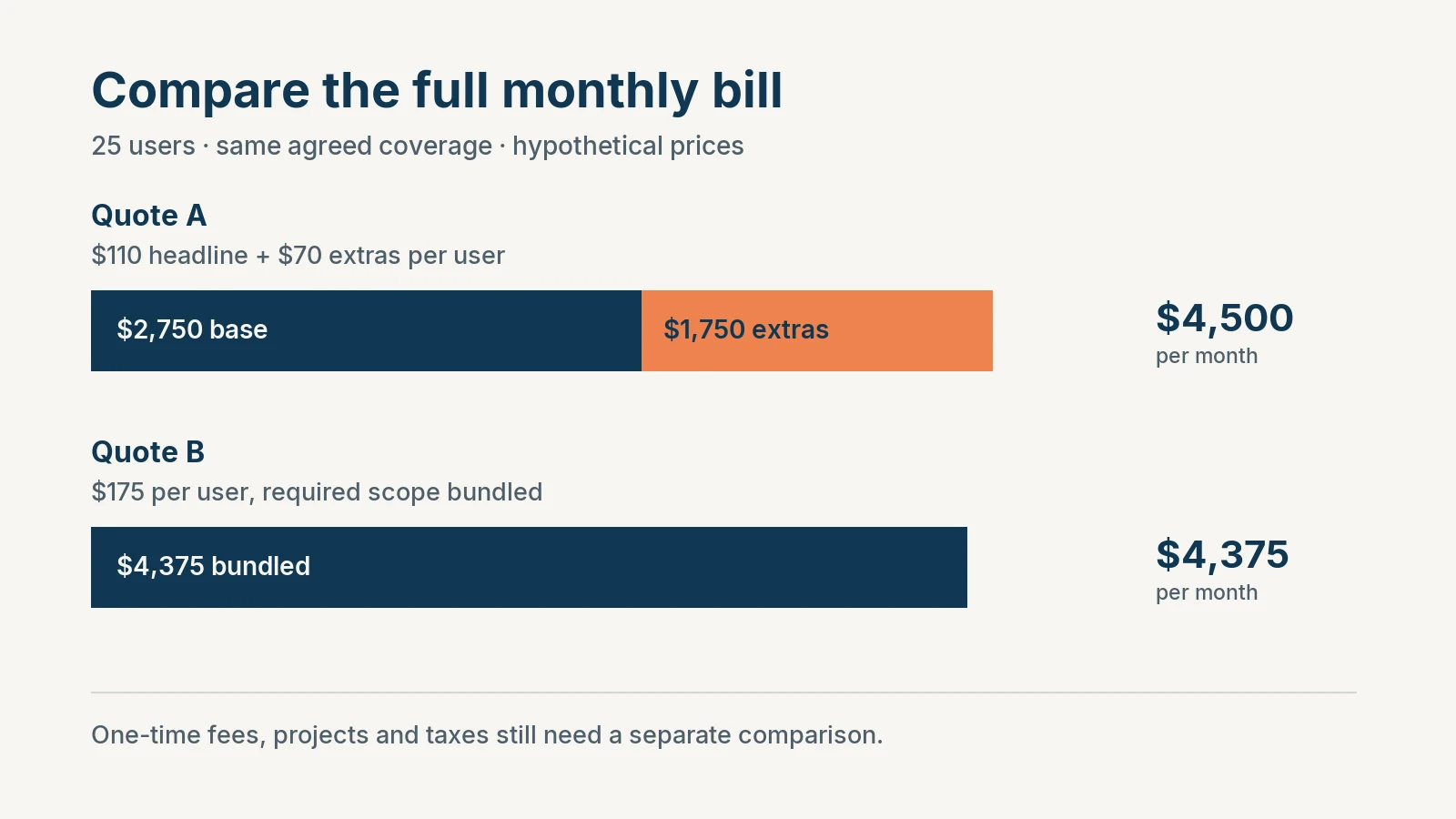
Quote B costs $125 less each month, or $1,500 less over twelve months, before any differences in onboarding, projects or taxes. Different extras could reverse that result. The lesson is to total the required scope, then compare the contract and service commitments.
Seven questions before you sign
- Scope: Which users, devices, servers, applications and sites are supported? What does “unlimited” exclude, and are new-hire setup and replacement computers included? Our new-employee IT onboarding checklist lists the tasks that setup usually covers.
- Security and recovery: Which tools and licenses are included? Who responds to a security alert, tests restores and performs recovery, and what costs extra?
- Hours and response: What are the staffed hours and priority-based response commitments? Is the commitment to acknowledge the ticket or start work? A response target is not a restoration guarantee.
- Extra work: How are onboarding, remediation, on-site visits, travel, projects and after-hours labor approved and billed?
- Billing and renewal: What is the minimum fee, when can headcount change, and how do annual increases, renewal notice and cancellation work?
- Ownership and exit: Does your business control its tenant, domain, credentials, backups and documentation? What handover assistance is included, on what timetable and at what price?
- People and accountability: Who owns your account, how does escalation work, and who covers technician absences or a provider outage?
NIST's definition of a service-level agreement includes responsibilities, performance expectations, reporting, resolution and termination. Use the agreement to record those specifics so you can assess the service after signing.
Managed IT versus an in-house hire or DIY
At the $175 example rate, standard support for 25 users is $52,500 annually. That buys the contracted share of a provider's team; it is not a dedicated employee.
For a hiring reference, BLS reports a May 2025 national median salary of $61,860 for computer user support specialists. Salary excludes employer costs. Adding an illustrative 30 to 50% allowance produces about $80,400 to $92,800 annually. The allowance is our own budgeting assumption, and BLS publishes only the salary. A network administrator or IT manager is a different role and needs its own benchmark.
Our calculator uses a separate $90,000 example for a fully loaded support hire. Dividing that by $175 × 12 gives roughly 43 users at equal annual spending, which is a useful reference point but not a rule for when to hire. The employee may provide application knowledge and daily on-site work the MSP does not; the MSP may provide specialist escalation and absence coverage the employee needs help with. Budget tools, security services, projects and backup staffing consistently on both sides, avoiding duplicate charges for tools already in the MSP fee.
Co-managed support suits a business that already has an internal IT person and needs a specific added capability, such as security monitoring or after-hours cover. The decision depends on the gap to fill more than on headcount.
DIY also has an opportunity cost. Four hours a week valued at $100 an hour equals $20,800 across 52 weeks. That is time diverted from other work, not necessarily a cash saving you can recover by hiring a provider. Our guide on when to stop doing IT yourself helps you count it.
What to expect in Miami
Our regional cost report gives more context on infrastructure and whole-company IT budgets. For your support quote, ask whether on-site coverage reaches your actual locations and whether building access, cabling or equipment replacement requires separate project work.
Our own published range is $125 to $175 per user per month for clients on infrastructure we installed. That condition matters: another environment may need assessment and remediation before we can offer comparable coverage. This range is published in our cost report; a written proposal defines your actual inclusions and price.
We have served Miami businesses for over 15 years. If you are still building a shortlist, our comparison of the best IT companies in Miami covers what each local provider specializes in. If you already have a proposal, send it to us for a second opinion and we will review its scope and exclusions during a free consultation. Our managed IT services page explains how we work.
Related resources
- Managed IT Cost Calculator: Change the headcount and assumptions behind your estimate.
- The Real Cost of IT for South Florida Small Businesses: See the regional field estimates and wider software, hardware and connectivity budget.
- Best IT Companies in Miami: Compare local providers by specialty before you request quotes.
- When to Stop Doing IT Yourself: Assess the time you already spend on support.
- Small Business IT Budget Planning: Build an annual budget around recurring fees and planned work.
- Managed IT Services: See what an iFeeltech managed agreement covers.
Frequently Asked Questions
Related Articles
More from IT Guides

Why IT Recommendations Get Ignored (And What It's Costing Your Business)
IT consultants design good systems. Businesses don't always implement them. Here's why that gap exists — and what it actually costs when it does.
7 min read

When to Stop Managing IT Yourself: A Small-Business Decision Guide
When should a small business outsource IT? Compare five support models, nine warning signs, current costs, and the minimum safe DIY baseline.
11 min read

Small Office IT Checklist: Your Annual 12-Stop Walk-Through
A small office IT checklist with 12 stops, from UPS battery and power strips to Wi-Fi and backups. Rate each one and print your own fix list.
14 min read