

Managed vs Unmanaged Switch: What a Small Office Needs
Managed or unmanaged switch? Match the choice to what your office runs: Wi-Fi, cameras, phones and guest networks, with a scenario table and PoE costs.

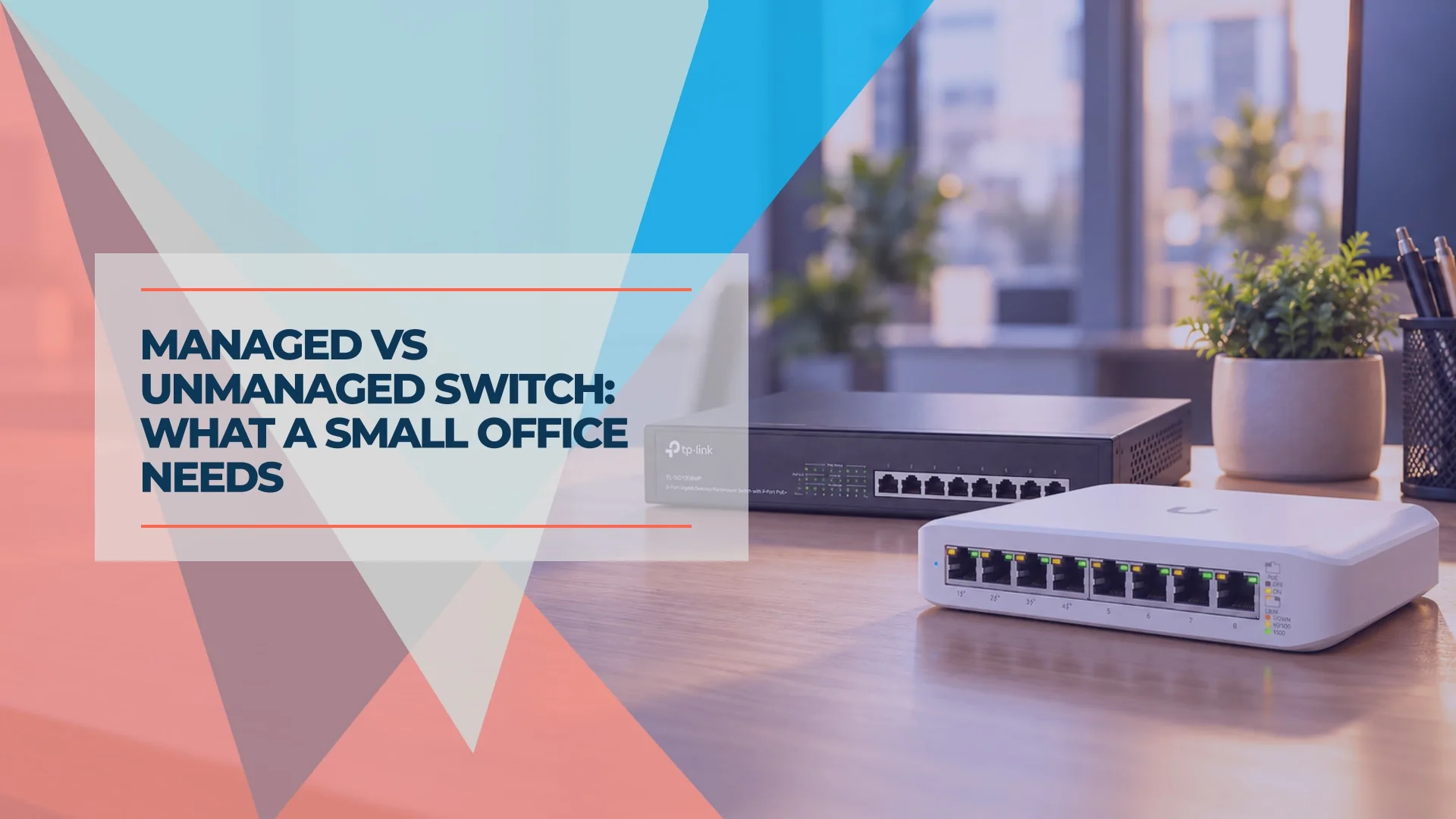
A switch is the least-discussed box in most offices: it sits in a closet and does its job until it does not. When the time comes to buy one, the first question is usually whether to pay more for a managed model. The answer depends less on how big the business is than on what the network has to do. A dozen computers and a printer rarely need anything beyond plug-and-play. Add cameras, VoIP phones, a guest Wi-Fi network or a need to restart a stuck access point without a site visit, and the case for a managed switch changes. This guide sorts the decision by what your office runs.
Affiliate Disclosure: This article contains affiliate links. If you make a purchase through these links, we may earn a small commission at no extra cost to you. As an Amazon Associate, iFeelTech earns from qualifying purchases.
Quick Verdict
Ask one question: does any wired device need to live on a different network from your staff computers, or do you need to see and restart ports without a site visit?
If both answers are no, an unmanaged switch is the right purchase, and a managed one adds configuration time you will not use. If either answer is yes, choose a smart or managed switch. Everything else in this guide (Wi-Fi, PoE, phone count) refines that one question.
Do You Need a Managed Switch? The Short Answer, by Scenario
An unmanaged switch is enough while everything shares one trusted network; a smart or managed switch is needed once wired devices must be separated or ports must be managed remotely. Find your office in the table below. "Separate network" means a VLAN (virtual LAN): a group of devices that cannot freely reach the others.
| Your office runs | An unmanaged switch fits when | A smart or managed switch fits when |
|---|---|---|
| PCs, a printer, maybe a NAS | Everything is staff-owned, sits on one network, and you only need more ports. | You want to see which port is misbehaving, or you expect to add cameras, phones or guest Wi-Fi within two years. |
| Plus Wi-Fi access points | Wi-Fi is staff-only and the access points hang off a PoE switch. | You want to restart an access point remotely, or you plan to add a guest network (see the next section). |
| Plus cameras and an NVR | The cameras plug into the recorder's own PoE ports, or the camera system has the switch to itself. | Cameras share the switch with staff PCs and you want them on their own network, or you want an alert and a remote restart when one drops. |
| Plus VoIP phones | Phones are few, traffic is light, and calls stay clear during backups and large file transfers. | You want a voice VLAN and QoS (traffic prioritization), or call quality drops when the network is busy. |
| Plus guest or IoT segmentation | Only guest Wi-Fi needs separating, your gateway and access points support VLANs, and you have tested that the switch passes the tags. | Any wired device (door controller, smart TV, printer, camera) must sit apart from staff computers. |
| A remote or unattended site | A site visit to fix a problem is cheap and acceptable. | Nobody is on site and you need port restarts, logs and alerts from a distance. |
One managed-switch cell is enough to change the purchase, because a single switch serves every row you checked.
Why two sensible guides give opposite answers
Search this question and you will find two camps. One says anything with guest Wi-Fi, IoT devices, VoIP or cameras needs VLANs and therefore a managed switch. The other says small businesses do not necessarily need VLANs at all. Each is right for part of the question, and the split comes down to where the separation happens.
Wireless separation happens at the access point and the gateway. The access point tags guest traffic with a VLAN ID, and the gateway's firewall isolates it. The switch in the middle only carries those tagged frames. A switch with no VLAN support forwards frames by destination address and usually leaves the tag intact, so guest Wi-Fi often works through one. Usually is not always: some unmanaged switches drop tagged frames or strip the tag, and a tag adds four bytes that a strict switch may treat as an oversized frame. Because the switch ignores the tags, every port on it also receives all of the tagged traffic.
Wired separation happens at the switch port. A camera plugged into a wall jack lands on whatever network that port is assigned to, and only a VLAN-aware switch can assign it. No gateway setting changes that.
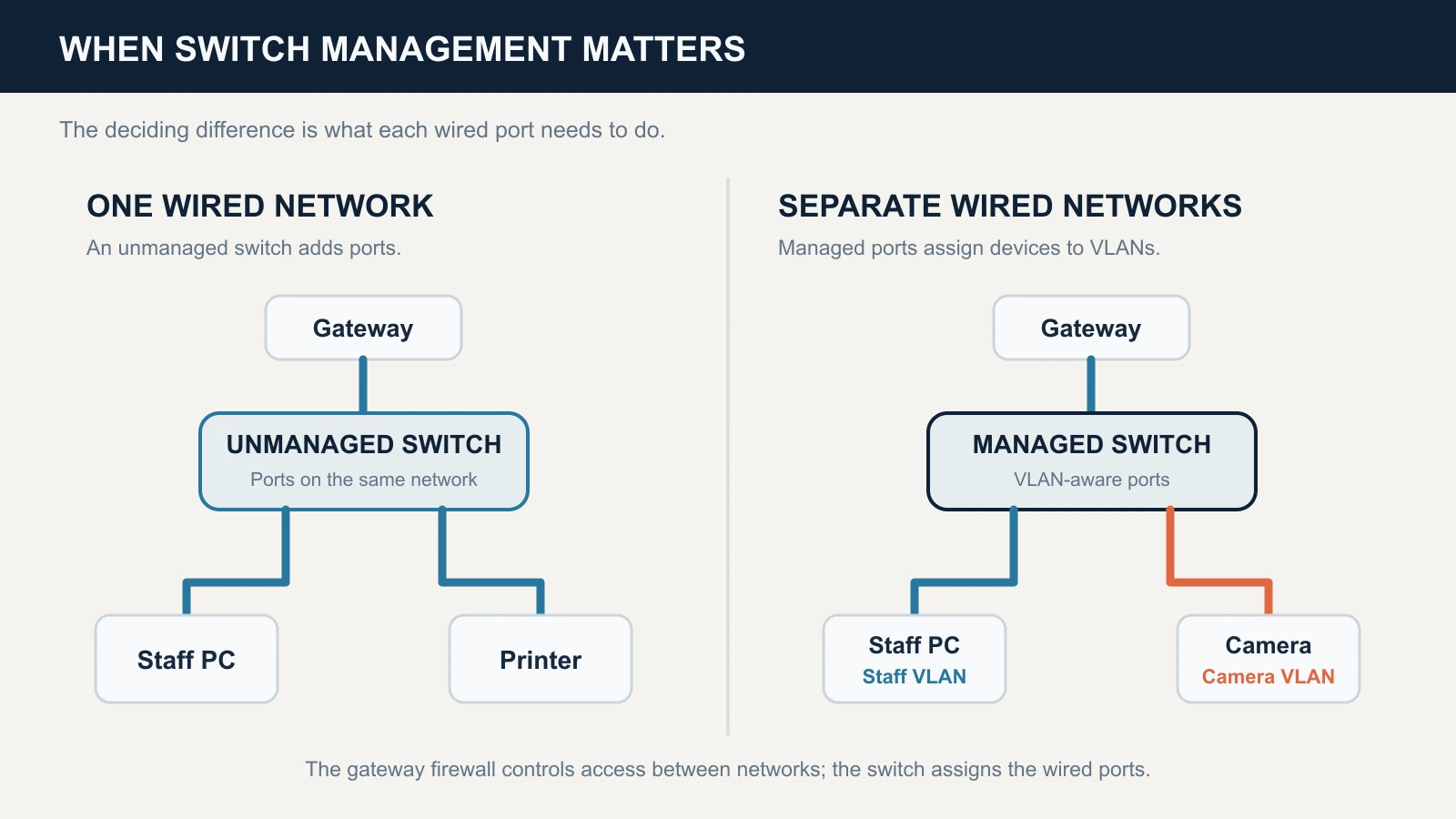
So guest Wi-Fi alone can survive an unmanaged switch if you test it, and anything wired cannot. Because a smart or managed 8-port PoE switch costs only about $19 to $35 more at list price (see the cost section below), we would not rely on undefined behavior in a segmentation plan to save that money. Our VLAN guide lists the segments most offices need, and the guest Wi-Fi VLAN setup guide and guest Wi-Fi decision guide cover the guest side in full.
Cameras with their own PoE ports may not need a VLAN
Many recorders include built-in PoE ports (the two in our Reolink vs Lorex comparison each have eight), and on many of them the cameras plugged in sit on the recorder's own internal network instead of your office LAN. Confirm how your model handles this in its manual. If the cameras connect directly to the recorder, the switch you buy has little to do with camera isolation.
What Is a Managed Switch, and What Does It Add?
A managed switch is a switch you can configure and monitor, through a web page, a command line or a controller app. An unmanaged switch has no settings: plug it in and it forwards traffic. These are the six capabilities that separate them, in plain terms.
- VLANs. A VLAN-aware switch assigns each port to a network and carries several networks over one cable between switches and access points, using 802.1Q tags. This is the feature most buyers are really shopping for.
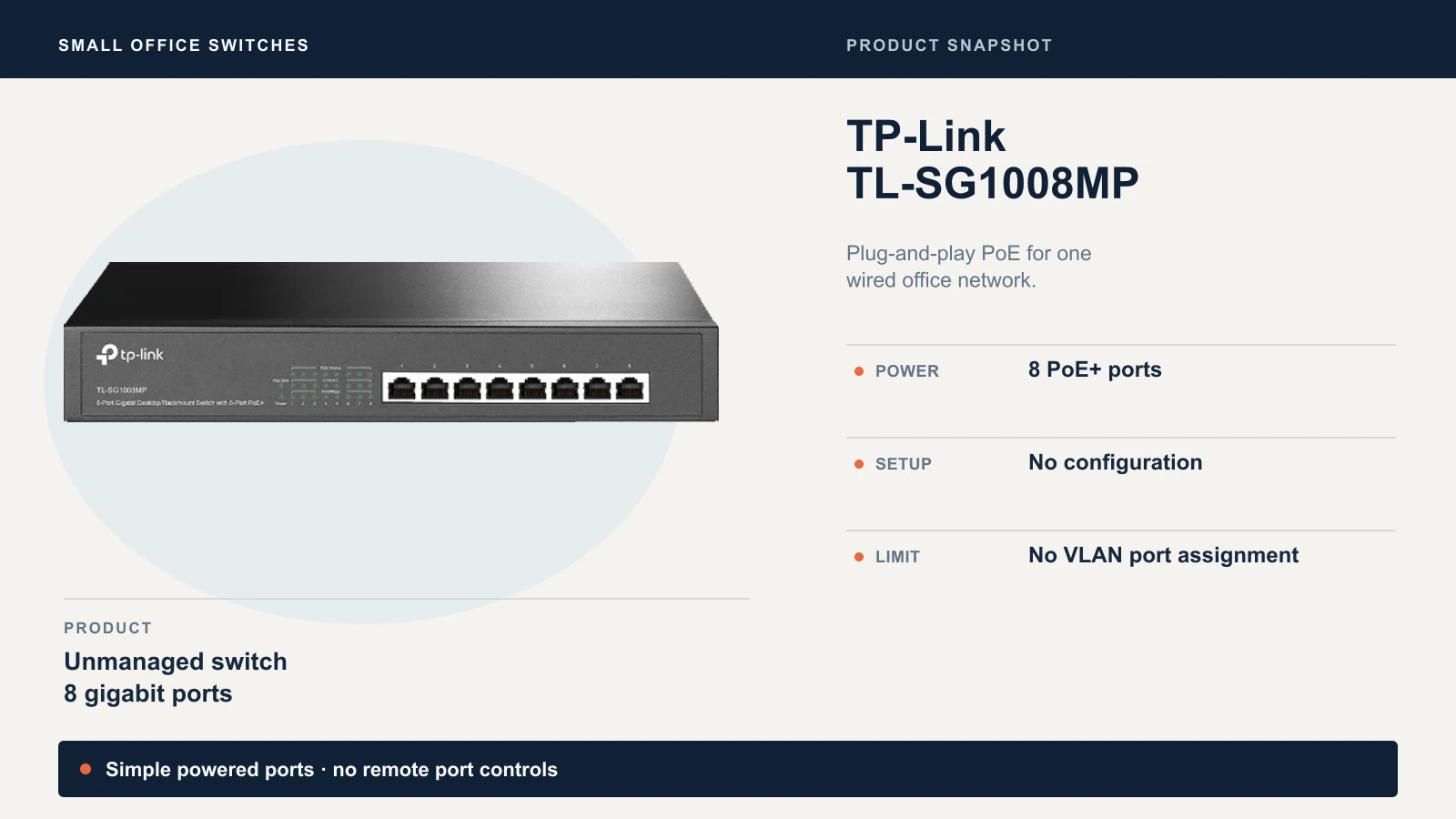
- PoE port control. Turn a port's power off and on, choose which ports lose power first when the budget runs out (power priority), and see what each port draws. Restarting a frozen camera becomes a click instead of a drive. Some unmanaged PoE switches have a fixed overload priority, such as TP-Link's TL-SG1008MP, but you cannot see or change it. Our PoE guide covers budgets and port limits.
- Link aggregation (LACP). Bundles two or more cables between devices into one logical link. It adds total bandwidth and a fallback path, which helps a switch-to-switch uplink or a NAS serving several people. A single file copy generally still uses one cable.
- Loop protection (STP/RSTP). Spanning Tree Protocol blocks an accidental loop, such as someone patching two wall jacks together. Without protection, a loop floods the network with broadcast traffic until performance drops across the whole office.
- Monitoring and logging. Per-port error counters, link-up and link-down history, and port mirroring (copying one port's traffic to another for capture). SNMP, the Simple Network Management Protocol, lets monitoring tools poll the switch, and syslog sends its event log elsewhere. This is how you find the one port that keeps flapping.
- QoS (quality of service). Prioritizes voice and video over bulk transfers so a backup does not break a phone call.
Managed does not mean faster
Port speed and uplink speed set throughput. A managed gigabit switch moves data no faster than an unmanaged gigabit switch. What you gain is control and visibility, and a switch that ships with those features does not stop working when you never touch them: in the factory state most smart and managed models forward traffic the way an unmanaged one does.
Smart Switch vs Managed Switch: The Middle Option
A smart switch sits between the two: a web interface and the common features, without the full toolset of a managed model. The label is vendor marketing, not a standard, so one maker's "smart" can be another's "managed."
| Unmanaged | Smart / lite-managed | Fully managed | |
|---|---|---|---|
| Configured through | Nothing to configure | Web page or vendor utility | Web, command line, SNMP or a controller |
| VLANs | None | Basic port-based and 802.1Q VLANs | Full VLAN features, plus ACLs and 802.1X on many models |
| PoE control | Power delivery only | Varies by model | Per-port control, priority, scheduling |
| Monitoring | Link lights | Basic port statistics, mirroring | SNMP, syslog, mirroring |
| Typical vendor names | Unmanaged | TP-Link Easy Smart, Cisco smart lite | TP-Link Smart and L2 managed, Cisco managed |
Sources: TP-Link switch tiers, Omada switch comparison, Cisco unmanaged, smart and managed. Cisco adds that managed switches cost more and take more expertise to provision. Capabilities vary by model.
TP-Link's entry tier shows how real the model-to-model differences are. Its Easy Smart user guide covers VLANs, QoS, link aggregation and port mirroring, but in that guide PoE configuration is available on only three models (the TL-SG1016PE, TL-SG1218MPE and TL-SG1428PE) and not on the TL-SG108PE, TL-SG105PE or TL-SG1210MPE. The switch also works in only one VLAN mode at a time (port-based, 802.1Q or MTU), and changing the mode discards the existing VLAN configuration.
Before buying any smart switch, check three things on the exact model:
- 802.1Q VLAN support, so one port can carry several tagged networks to an access point.
- PoE control on that model, if you plan to restart cameras or access points remotely.
- The VLAN limit, which is 32 on the TL-SG1016PE. That is plenty for a small office and tight for a multi-tenant building.
What Unmanaged Does Well
An unmanaged switch is the right tool when the network has one job: it costs the least, needs no setup, and has fewer settings that can be wrong.
- No configuration. Nobody has to log in, remember a password or document a setup.
- Lowest price per port. An 8-port PoE+ unmanaged switch lists at $89.99 in the cost section below.
- PoE works. Unmanaged PoE switches power cameras, access points and phones. PoE and management are separate features.
- It stays useful in bigger networks. A conference room or a row of desks rarely needs its own network, so an unmanaged switch there adds ports at no complexity cost.
The limits are just as real. You cannot see which port is saturated or erroring, and you cannot separate one device from another. Many unmanaged switches have no loop protection, so one mis-patched cable can disrupt the whole network. If you can name only one kind of traffic on your network and expect that to hold, none of those limits matter.
The TP-Link TL-SG1008MP in the cost comparison below illustrates that tradeoff: eight PoE+ ports without VLAN assignment or remote port controls.
PoE Injector vs PoE Switch
A PoE injector powers one device through one cable, while a PoE switch powers many devices and also moves their data. Most offices need a switch, and an injector earns its place in a narrower case.
| PoE injector | PoE switch | |
|---|---|---|
| Powers | One device | Several devices, within a shared power budget |
| Needs | A power outlet and a non-PoE switch or router port | A power outlet in the closet |
| Management | None | None on unmanaged models; port control on smart and managed models |
| Best for | One or two devices far from a PoE switch | Three or more PoE devices, or any closet that is being built or rebuilt |
Our rule of thumb: for one or two devices on an existing non-PoE switch, an injector is the cheaper fix; at three or more, a PoE switch is cheaper, tidier and easier to put on a UPS. Two things apply to both:
- Use standards-compliant (IEEE 802.3af/at/bt) equipment. Passive PoE injectors apply voltage without detection and can damage a device that does not expect it. The PoE guide explains the difference.
- Match the power class to the device. A 15.4W port cannot run a camera that needs 25W at night with its infrared on. The PoE guide's budget formula works for a switch or a stack of injectors.
Controller-Managed Switches: What "Managed" Means in a Small Office
In a small office, "managed" usually means managed from a controller: you define a network once in an app, and it applies to the switch ports, the Wi-Fi networks and the gateway together. UniFi and Omada both work this way.
The practical differences from a traditional managed switch:
- One place to work. A VLAN is created once and assigned to ports and Wi-Fi networks from the same screen, with no logging in to each device.
- A controller dependency. UniFi switches are configured through the UniFi Network application, which runs on a UniFi gateway, a self-hosted server, or Ubiquiti's cloud. Omada switches can use the Omada controller, and models such as the SG2210P also offer standalone web, CLI and SNMP management.
- An ecosystem decision. It is cheapest and easiest when the gateway and access points come from the same vendor.
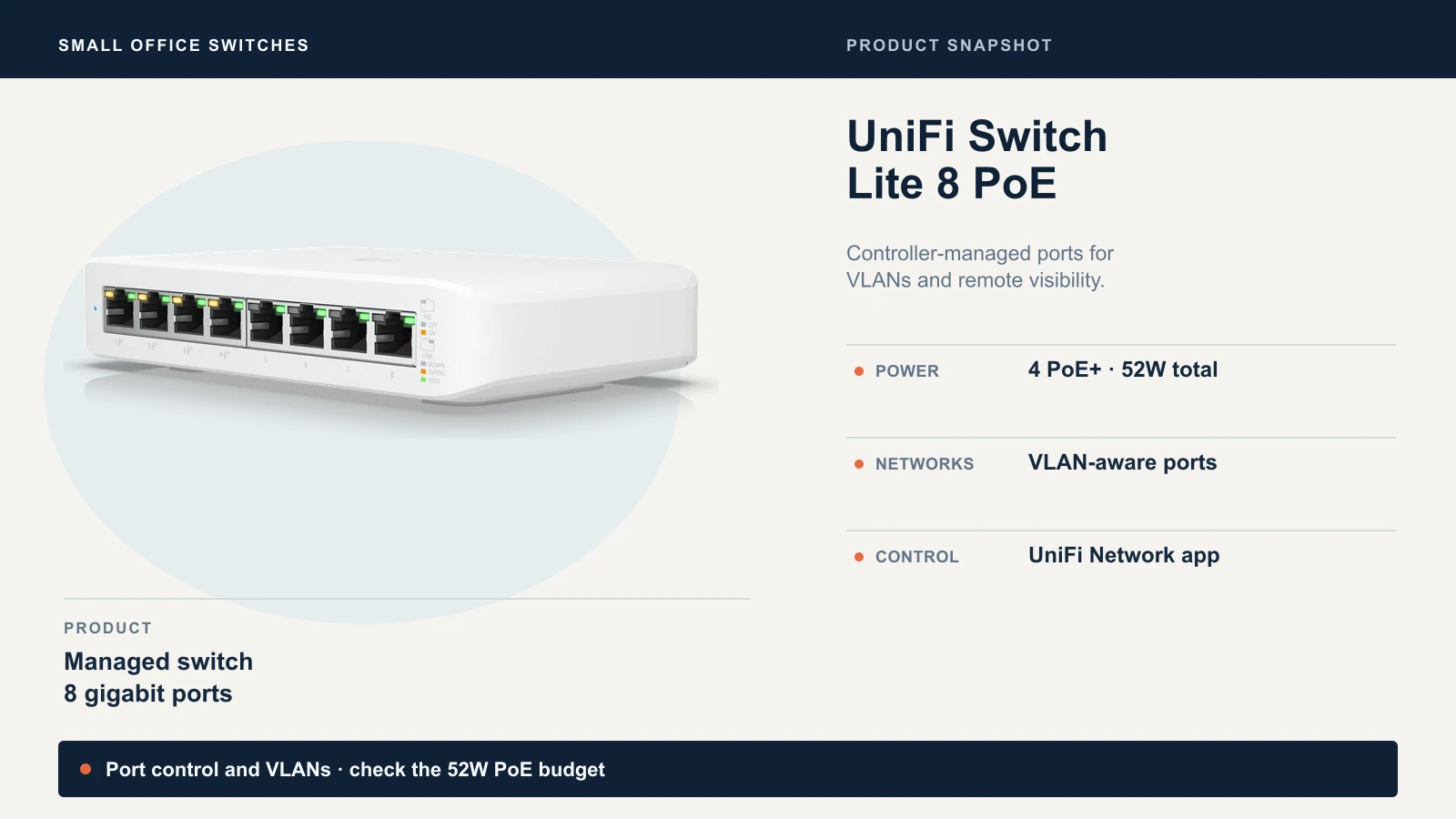
The small end of the range is the UniFi Switch Lite 8 PoE: eight gigabit ports, four of them PoE+, with a 52W total PoE budget. Its tech specs list 1,000 VLANs, port isolation, loop protection, voice VLAN and DHCP snooping. That 52W budget covers one access point and two or three cameras, and not much more. For larger deployments, our best UniFi switches guide sorts the lineup by port count and PoE budget, and the Omada controller guide covers the TP-Link side.
What It Costs to Get It Wrong
Buying the wrong switch costs a replacement in one direction and a few minutes of setup in the other. The table shows how small the price gap is at 8 ports, and where the real difference sits.
| Switch | Tier | PoE ports and budget | Price (Oct 20, 2026) |
|---|---|---|---|
| TP-Link TL-SG1008MP | Unmanaged | 8 PoE+ ports, 126W on the linked listing (153W on V2) | $89.99, Amazon US |
| UniFi Switch Lite 8 PoE | Controller-managed | 4 PoE+ ports (8 total), 52W | $109 list, plus a checkout surcharge (see below) |
| Omada SG2210P | Smart, controller optional | 8 PoE+ ports plus 2 SFP, 61W | $124.99 Omada store; $114.99 at Amazon |
| TP-Link TL-SG1016PE | Easy Smart | 8 PoE+ ports (16 total), 150W on the linked listing (110W on V1) | $149.99, Amazon US |
The Omada store link uses our TP-Link Impact partnership; Amazon is currently $10 less for the same model. Choose the seller and final checkout total that suit you. The linked TL-SG1008MP offer describes a 126W unit, while TP-Link's V2 specifications list 153W. TP-Link lists 110W for the TL-SG1016PE V1 and 150W for V2; check the revision on the unit you buy. Ubiquiti's U.S. store has been adding a memory-cost surcharge to many products at checkout, so confirm that final total too. Prices move; treat these as an October 20 snapshot.
If you buy unmanaged and later need VLANs, you replace the switch. There is no upgrade path. The old switch can move to a conference room, so the real loss is the labor of re-patching the closet and the downtime that comes with it. If you buy managed and never use the features, you pay roughly $19 to $35 more at 8 ports plus whatever time you spend learning an interface you may not need.
The price gap is not where managed switches cost you. The budget column is. The two cheapest managed options in the table supply less than half the PoE wattage of the unmanaged one, so a managed switch with enough PoE for your devices costs more than the headline price suggests. The worked example in our PoE guide (four cameras, two Wi-Fi 7 access points and six phones) needs 140W before margin and 168W with our standard 20% margin. None of the four switches above reaches 168W. That office needs a larger switch whether it chooses managed or not.
The setup time is modest too. Our VLAN guide puts a first guest VLAN on UniFi at about ten minutes and a full guest, camera and phone setup at one to two hours for an IT contractor. The Miami Beach hotel in our UniFi switch guide enforces camera and guest isolation from a single managed switch, and the switch and gateway together came in under $1,100.
Before You Buy: A Checklist
Work through these before you order. Each one avoids a common purchasing mistake.
- Port count, with growth. Count every wired device today, then add the ports for what you plan to install in the next 12 to 24 months. A switch that is full on day one leaves no room to grow.
- PoE budget in watts. Add each device's maximum draw (not its typical draw) and apply a design margin. Our PoE guide has the formula. Confirm the per-port class too, because some switches cap each port at 15.4W.
- Uplink and port speed. A gigabit uplink limits every access point behind it, and Wi-Fi 7 access points can outrun it. If you plan multi-gig Wi-Fi, see the uplink section of the UniFi switch guide; if you are weighing 2.5 GbE against 10 GbE for a NAS or workstations, our 2.5 vs 10 Gigabit guide covers the tradeoff.
- Where it will live. If the switch goes in an unconditioned closet, as it does in some South Florida offices, check the maximum operating temperature: the TL-SG1016PE and Lite 8 PoE both list 40°C. A fanless model suits an open office. If you are weighing long cable runs to one closet against smaller switches in each zone, our centralized vs distributed network guide walks through it.
- Your segmentation list. Write down the networks you need (staff, guest, cameras, phones) before you shop. If the list has more than one entry for wired devices, you are buying smart or managed.
- Who will configure it. Web page, controller app or command line: match the interface to whoever will log in. If nobody on staff will touch it, choose a controller-managed switch with guided setup, or have an IT provider configure it once and document it (we handle UniFi network design and installation for South Florida offices). A smart switch nobody understands adds little over an unmanaged one.
Which One Should You Buy?
Choose unmanaged when staff computers, printers and PoE devices share a single trusted network, with no guest Wi-Fi and no plan for wired segmentation. It is the cheapest and simplest option, and it fits many small offices.
Choose a smart switch when you need a few VLANs and light monitoring on a budget, the office is a single site, and someone is comfortable with a web interface. Check the model's PoE control and VLAN limits first.
Choose a controller-managed or fully managed switch when cameras, phones or guest Wi-Fi share the network with staff devices, when nobody is on site to restart a port, or when you want one screen for the gateway, switches and access points.
Still unsure? Return to the one question: a wired device that needs its own network, or ports you must manage remotely, means smart or managed. Otherwise buy the unmanaged switch and spend the difference on a UPS for the closet.
Related Resources
- VLANs Without the Jargon — Which networks a small office needs and what belongs on each.
- Best UniFi Switches — The UniFi lineup sorted by port count, PoE budget and office size.
- Power over Ethernet Guide — PoE standards, budget math and cabling limits.
- Centralized vs Distributed Network Architecture — When to run more cable and when to add switches.
- UniFi Guest Wi-Fi VLAN Setup — A step-by-step guest network on managed hardware.
- How to Set Up Guest Wi-Fi for a Small Business — The broader decision tree for guest access.
- TP-Link Omada Controller Guide — Software, hardware and cloud controller options for Omada switches.
- 2.5 Gigabit vs 10 Gigabit Ethernet — Port and uplink speed choices for NAS and Wi-Fi 7.
Frequently Asked Questions
Related Articles
More from Network Infrastructure
What Network Gear IT Contractors Actually Buy for Small Business Jobs (2026)
The actual kit list an IT contractor uses for small business network installs in 2026 — Cat6, patch panel, UniFi gateway decision, PoE switching, XG/XGS APs, and UPS. With the real reasoning behind each choice.
18 min read
Dual WAN for Business: Why One Internet Connection Isn't Enough
Why a single ISP is a single point of failure, how to verify real route diversity, and which dual-WAN gateway and backup connection fit a rack network or a simple branch office.
19 min read
How Often Should You Replace Your Router? The Security Signs We Look For on Every Job
Forget the 'every 3–5 years' rule. Here's the field checklist we run on a client's router before replacing it — plus what 4 years of fleet data says about how long networking gear actually lasts.
12 min read