

Microsoft 365 Price Increase 2026: New Business Pricing and What to Do
Microsoft 365's July 2026 prices are now active. Compare Business Basic, Standard, Premium, and Copilot, then decide whether to renew, right-size, upgrade, or switch.

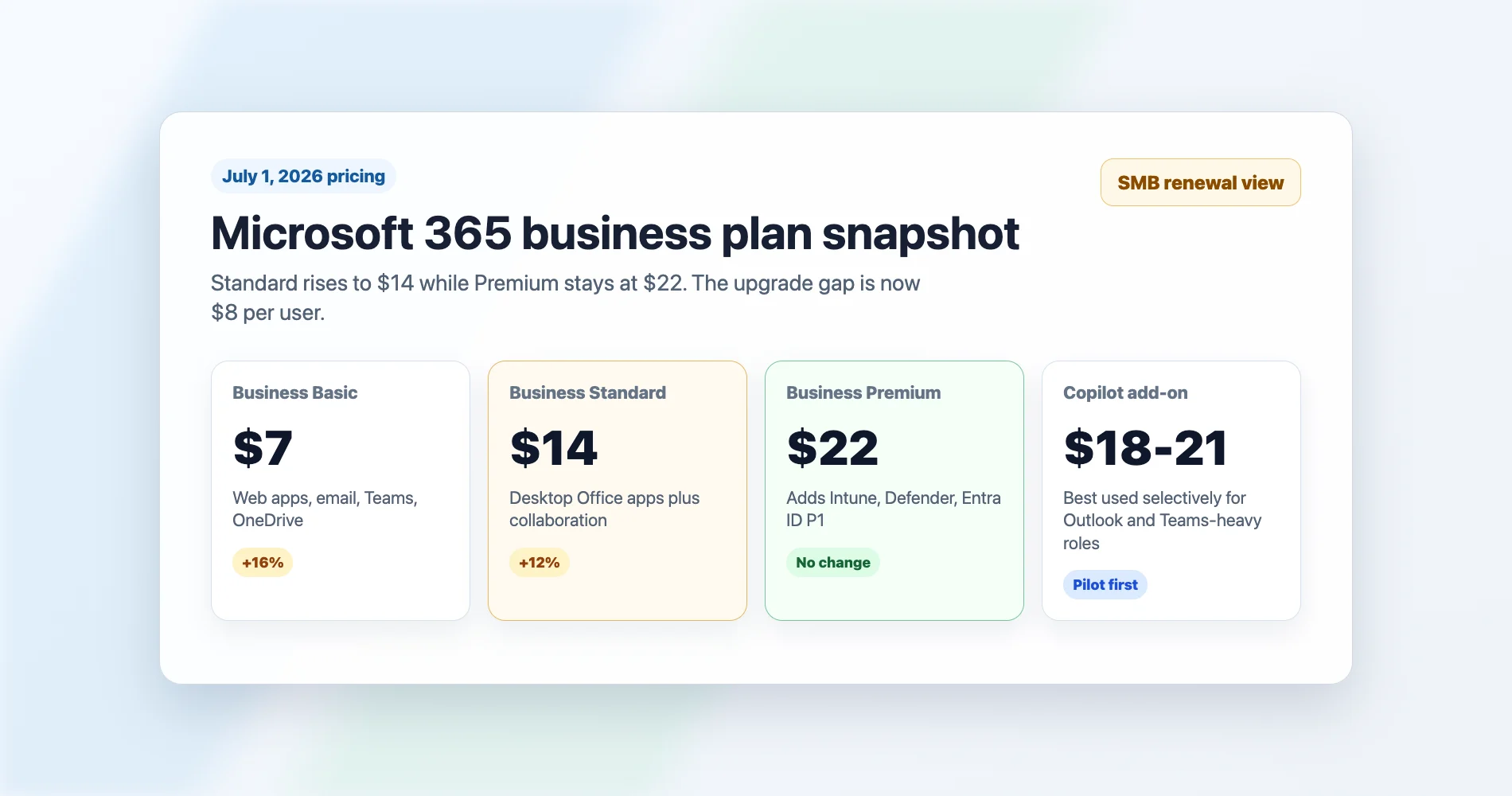
Microsoft's 2026 commercial price changes are now in effect. Business Standard is $14/user/month, Business Basic is $7, and Business Premium holds at $22.
The increases took effect July 1, 2026, but Microsoft doesn't move existing customers to the new rate until their next contract renewal — so if you haven't renewed since then, you're likely still on your prior price. That makes the practical question no longer whether to beat a deadline. It's whether to renew as-is, right-size your seat count, upgrade to Premium, or use the renewal as a trigger to review the whole stack.
The standalone Copilot Business add-on — the SMB-specific SKU for organizations with 1–300 users — lists at $21/user/month, with a 15% promotional discount bringing it to approximately $18/user/month. Microsoft's public pricing page lists that discount as running through September 30, 2026, though partner channels have extended the window through December 31, 2026. The enterprise Microsoft 365 Copilot SKU (for E3/E5 plans) remains a separate product at $30/user/month.
But the number worth paying attention to is the one that didn't change: Business Premium stays at $22 per user per month while Standard rose to $14. As part of the summer 2026 packaging update, Microsoft is rolling out 50GB of additional mailbox storage and Copilot Chat enhancements across all Business plans. The storage increase (from 50GB to 100GB per mailbox) is being deployed tenant by tenant through September 30, 2026 — verify your current quota in the Exchange admin center, as not all tenants have received the update yet. Premium remains the plan that includes Microsoft's SMB security and device-management stack: Entra ID P1, Intune Plan 1, Defender for Business, and Defender for Office 365 Plan 1. The value gap between Standard and Premium is stronger than it was before the Standard price increase — the $8/seat difference now buys more relative capability.
All prices in this article are US commercial list prices for plans with Teams, on annual commitment with annual billing, before tax. Microsoft also sells no-Teams variants at lower rates (Basic $5.40, Standard $10.79, Premium $18.79) where available. Direct, CSP, and volume-licensing prices may differ. Microsoft 365 Business plans apply to organizations with up to 300 users — larger organizations should evaluate E3/E5 licensing.
For our South Florida SMB clients, the right move isn't always to avoid the increase. Sometimes it makes upgrading the smarter financial decision. Here's the framework we use with every client at renewal.
Affiliate Disclosure: This article contains affiliate links. If you make a purchase through these links, we may earn a small commission at no extra cost to you. As an Amazon Associate, iFeelTech earns from qualifying purchases.
Renew, Upgrade, Right-Size, or Switch?
Every renewal decision under the new pricing comes down to one of four paths.
- Renew as-is if your current plan meets your needs and the switching cost of moving tiers or platforms exceeds the annual increase.
- Right-size by removing unused add-ons, splitting license tiers by role instead of putting everyone on the same plan, and checking for inactive seats — the simplest cost reduction available at any renewal.
- Upgrade to Premium if you're already paying separately for MFA enforcement, device management, or endpoint protection; the $8/seat gap to Premium often costs less than those tools combined.
- Switch or evaluate an alternative if privacy, vendor concentration, or ecosystem independence is the real driver behind your renewal review — not the price increase itself. If that is the conversation you are having, start with our guide to fixing the setup before switching platforms, then see the Proton Workspace vs. Microsoft 365 comparison.
Quick Answer: Which Plan Should You Choose?
| Plan | Best for | Avoid if |
|---|---|---|
| Business Basic ($7) | Frontline users, email, Teams, web apps only | Users need desktop Office apps |
| Business Standard ($14) | Office-heavy users without advanced security needs | You need managed devices, EDR, or conditional access |
| Business Premium ($22) | Security-conscious SMBs, regulated firms, remote teams | You only need basic email and Office apps |
| Copilot via bundle ($9.50–10 increment) or add-on ($18–21) | Email-heavy and meeting-heavy roles (Outlook, Teams) | Users rarely live in Outlook or Teams |
The short version:
- Stay on Basic if users only need web apps, email, Teams, and light collaboration.
- Stay on Standard if users need desktop Office apps but you already have security covered elsewhere.
- Upgrade to Premium if you need conditional access, device management, endpoint protection, and advanced email protection.
- Add Copilot selectively — start with users who live in Outlook and Teams, and price the bundle SKU before the standalone add-on.
- Check your renewal date with your CSP so you know which price applies to you.
What Changed July 1, 2026 (and What Didn't)
Business Basic and Standard prices rose; Business Premium is the one plan that held steady.
| Plan | Previous price (through June 30) | Current price (from July 1) | Change |
|---|---|---|---|
| Microsoft 365 Business Basic | $6.00/user/month | $7.00/user/month | +16% |
| Microsoft 365 Business Standard | $12.50/user/month | $14.00/user/month | +12% |
| Microsoft 365 Business Premium | $22.00/user/month | $22.00/user/month | No change |
| Copilot Business (standalone add-on) | — | $21.00/user/month (list); ~$18 promo | SMB SKU, separate from $30 Enterprise Copilot |
| Business Basic + Copilot (promotional bundle) | — | $21.00/user/month (promo through Dec 31, 2026) | New promotional bundle |
| Business Standard + Copilot (permanent SKU) | $22.00 promo bundle | $23.50/user/month | Permanent SKU replaces promo |
| Business Premium + Copilot (permanent SKU) | $32.00 promo bundle | $32.00/user/month | Promo rate became permanent |
The pricing applies to all new subscriptions and renewals from July 1, 2026 onward. If you're mid-term on an annual agreement, you keep your current rate until your next renewal date — Microsoft's licensing FAQ confirms existing customers aren't moved to the new pricing mid-term.
Business Premium's per-seat cost holds at $22 while Business Standard rises to within $8 of it. The summer packaging additions (storage, Copilot Chat) go to all Business plans, but Premium's security and device-management stack remains the differentiator.
What All Business Plans Got (Summer 2026)
Rolling out between June and September 2026 across Business Basic, Standard, and Premium (MC1304290):
- 50GB additional mailbox storage — target is 100GB per user, but Microsoft's Exchange Online limits documentation still lists 50GB for Business Basic and Standard as of this writing. The additional storage is being provisioned tenant by tenant through September 30, 2026. Check your Exchange admin center to confirm your current quota.
- Copilot Chat enhancements — inbox and calendar awareness, plus access to Word, Excel, and PowerPoint agents. This is the free Copilot Chat included in all plans — not the paid Copilot Business add-on (see comparison below).
- URL time-of-click protection (Basic and Standard) — scans links at click time to block malicious destinations. This is a meaningful security improvement for lower tiers, but it does not include the full Defender for Office 365 Plan 1 protection (Safe Attachments, advanced anti-phishing) that Premium provides.
What makes Premium different isn't these summer additions — it's the security and management stack that was already included: Defender for Office 365 Plan 1 (Safe Links, Safe Attachments, anti-phishing), Defender for Business (endpoint EDR), Intune Plan 1, and Entra ID P1. These have been part of Premium for years and are not available in Basic or Standard.
Note: Intune Remote Help, Intune Advanced Analytics, and Intune Plan 2 are being added to Microsoft 365 E3 and above — not Business Premium.
Copilot Chat vs. Copilot Business: What's Free, What's Paid
These are different products with the same name prefix, which causes confusion:
- Copilot Chat (free, included in all M365 Business plans) — AI chat grounded in web data, with inbox and calendar awareness added summer 2026. Useful for drafting, summarizing, and quick research, but it does not access your organization's files or meeting data.
- Copilot Business ($21 list / $18 promo, add-on or bundle) — the full Copilot experience embedded in Word, Excel, PowerPoint, Outlook, and Teams, grounded in your organization's Microsoft Graph data. This is the product that generates meeting recaps, drafts from your documents, and analyzes your spreadsheets.
- Microsoft 365 Copilot ($30, enterprise E3/E5 add-on) — functionally identical to Copilot Business but licensed for enterprise plans. Includes the same features; the price difference reflects the licensing tier, not additional capabilities.
When this article discusses "adding Copilot," it refers to the paid Copilot Business add-on or a with-Copilot bundle SKU — not the free Copilot Chat.
The New Upgrade Math: Standard vs. Premium
At $14 versus $22, the Standard-to-Premium gap is $8 per user per month. For a 20-person company, that's $160/month or $1,920/year for the entire team.
Here's what Premium includes that Standard doesn't:
- Microsoft Entra ID P1 — conditional access policies, MFA enforcement, self-service password reset (note: risk-based conditional access using sign-in and user-risk signals requires Entra ID P2, which is not included in Business Premium)
- Microsoft Intune (Plan 1) — device management (enrollment, compliance policies, remote wipe, app deployment)
- Microsoft Defender for Business — EDR-grade endpoint protection with threat investigation
- Defender for Office 365 Plan 1 — advanced email threat protection with Safe Links, Safe Attachments, and anti-phishing
- Azure Information Protection P1 — sensitivity labels, document encryption, rights-management capabilities
Now price out what a Business Standard customer pays to replicate those capabilities with third-party tools:
| Capability | Third-Party Equivalent | Approximate Cost |
|---|---|---|
| MFA enforcement + conditional access | Duo Essentials/Advantage or similar | $3–6/user/month |
| Basic MDM (device compliance, remote wipe) | Mosyle, Hexnode, or standalone Intune Plan 1 | $4–8/user/month |
| Endpoint protection (EDR) | Bitdefender GravityZone, SentinelOne | $3–6/user/month |
| Advanced email security | Proofpoint Essentials, Avanan | $2–4/user/month |
These are illustrative ranges from our client environments and may be billed per user, per device, or through an MSP bundle — use them as planning numbers, not quoted pricing. Standalone Intune Plan 1, for example, lists at $8/user/month; Duo ranges from $3 (Essentials) to $9 (Premier). A Standard customer already paying for a standalone MFA tool and a basic MDM is spending $7–14/user/month on capabilities that Premium includes at the $8/seat gap.
The Upgrade Math
If your Business Standard team currently pays for any two of these — a standalone MFA enforcer, a device management tool, or an endpoint security product — the $8/seat jump to Premium likely costs less than what you're already spending separately. The math gets more compelling if you're buying all three.
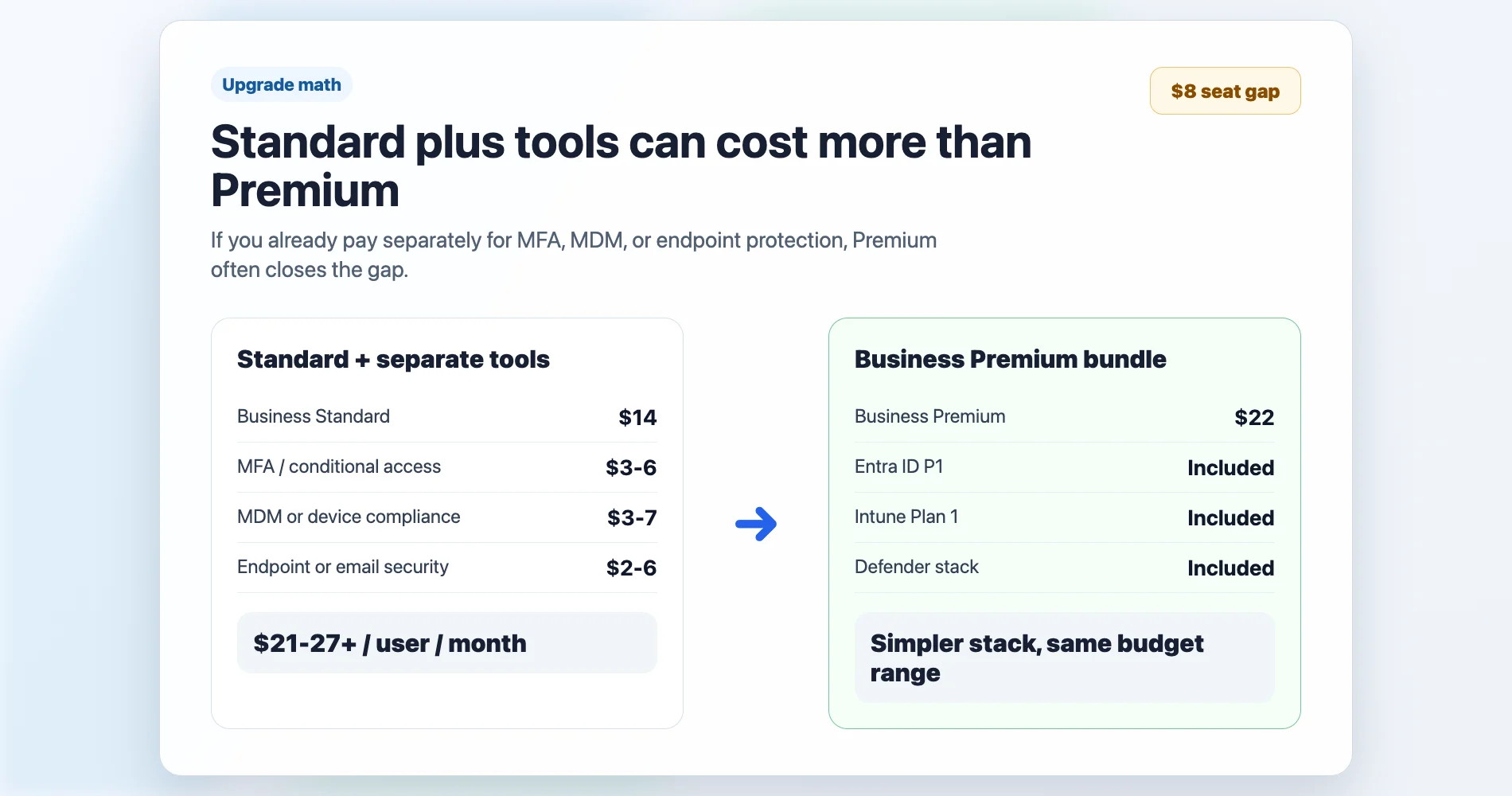
Based on deployments we've managed across South Florida professional services firms: the most common pattern we see is a Business Standard customer paying $4–5/user/month for Duo (MFA) and $3–4/user/month for basic endpoint protection. That's $7–9/user/month in third-party security spend that Premium eliminates. The $8 gap pays for itself before you even count Intune, Defender for Office 365, or the Azure Information Protection capabilities.
Premium's Defender features improve threat response, but neither plan covers you on the backup side — M365's native retention isn't backup, and that's a separate conversation.
Should You Add Copilot? A Practitioner's Read
Copilot Business is Microsoft's SMB-specific Copilot SKU for organizations with 1–300 users. It delivers the same capabilities as the enterprise Microsoft 365 Copilot ($30/user/month for E3/E5), but at $21/user/month list — a 30% lower price point. A 15% promotional discount brings it to approximately $18/user/month. Microsoft's public pricing page lists that promotion through September 30, 2026; partner channels have extended it through December 31, 2026. Confirm the active window with your CSP before budgeting.
There are now three paths to Copilot for Business plan customers:
Path 1: With-Copilot bundle SKUs (assigned per user — you choose which users get them)
- Business Basic + Copilot: $21/user/month (promotional through December 31, 2026)
- Business Standard with Copilot: $23.50/user/month (permanent SKU)
- Business Premium with Copilot: $32/user/month (permanent SKU)
Path 2: Standalone Copilot Business add-on on top of any existing Business plan
- $21/user/month list; ~$18/user/month at the current promotional rate
Path 3: No Copilot — keep the base plan as-is
The bundle SKUs do not force Copilot on every employee. Microsoft 365 Business licenses are assigned per user, so a company can put power users on "Business Standard with Copilot" at $23.50 and keep everyone else on regular Business Standard at $14. This makes the effective Copilot increment through the bundle path significantly cheaper than the standalone add-on:
| Copilot path | Effective Copilot cost per user |
|---|---|
| Standard → Standard with Copilot bundle | $9.50/user/month ($23.50 − $14) |
| Premium → Premium with Copilot bundle | $10/user/month ($32 − $22) |
| Any plan + standalone add-on (promo) | $18/user/month |
| Any plan + standalone add-on (list) | $21/user/month |
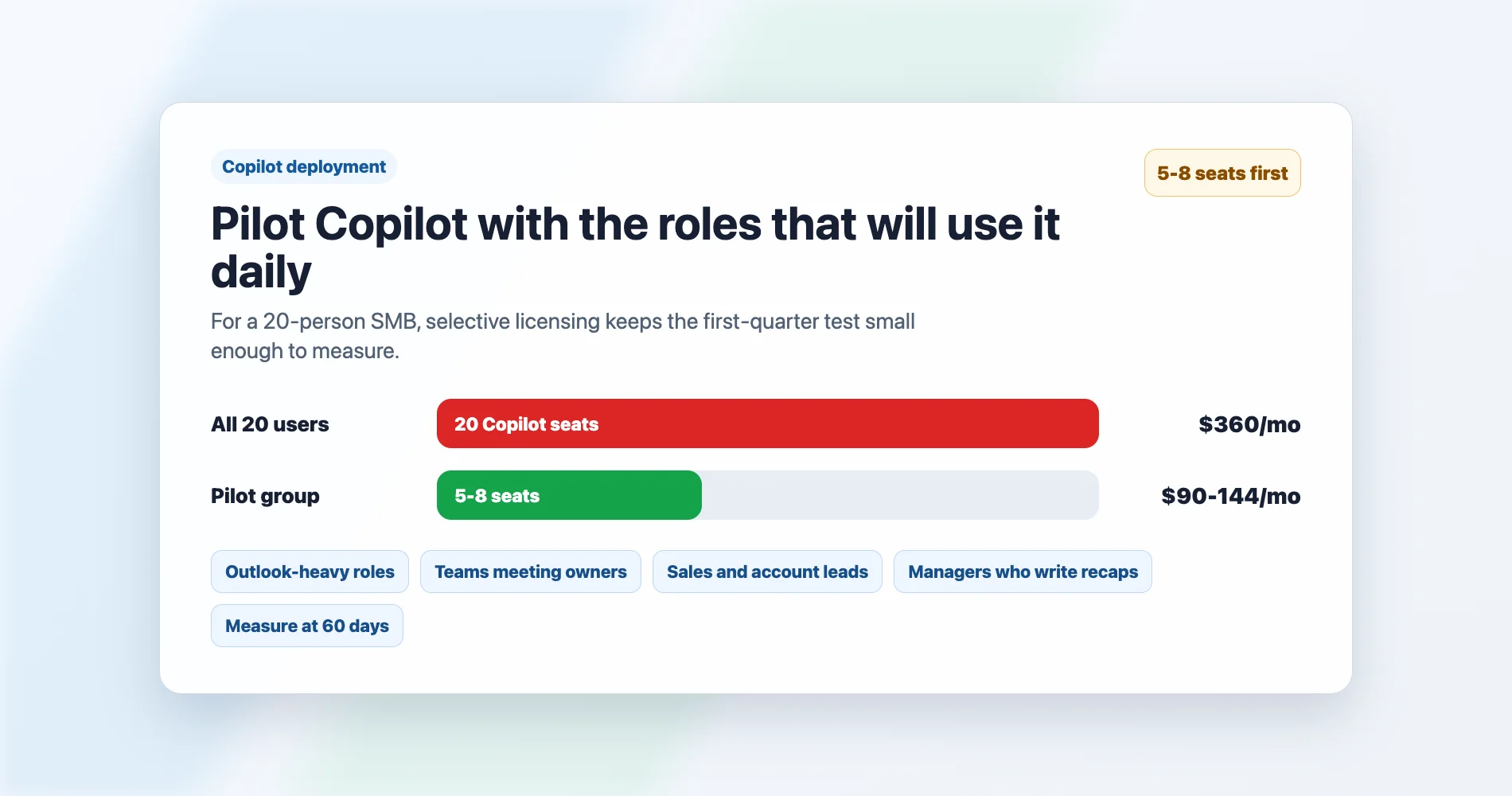
For a 20-person company putting 8 users on Copilot, the difference matters: 8 × $9.50 = $76/month via the Standard bundle path versus 8 × $18 = $144/month via the standalone add-on. That's $816/year in savings.
When the standalone add-on still makes sense: when switching a user's underlying SKU is impractical mid-term, when your CSP's migration path doesn't support mixed bundle and non-bundle licenses cleanly, or when you need the flexibility to add and remove Copilot monthly without touching the base subscription. In those cases, the higher per-seat cost buys operational simplicity.
What Actually Gets Used
Based on deployments we've managed across South Florida professional services firms, here's what Copilot adoption actually looks like at 90 days in a 15–30 person company:
| Copilot Feature | Adoption Level | Why |
|---|---|---|
| Outlook (email drafting, summarization) | High | Saves real time on every email-heavy role |
| Teams (meeting recaps, action items) | High | Eliminates note-taking; meeting recap requires transcription to be enabled and depends on organizer settings and meeting policy |
| Word (first draft from brief) | Moderate | Useful for proposals and documentation roles |
| Excel (formula generation, analysis) | Low | Most SMB Excel use is simpler than what Copilot optimizes for |
| PowerPoint (slide generation) | Low | Output quality requires heavy editing for most business contexts |
The ROI case for Copilot at the SMB level rests almost entirely on Outlook and Teams. If your team runs 3+ meetings per day and processes high email volume, the time savings are measurable — especially at the $9.50–10/seat bundle increment. If your team mostly uses M365 for file storage and basic email, even the bundle path is hard to justify across all users.
Deploy Copilot Selectively, Not Universally
The most cost-effective Copilot deployment for a 20-person SMB isn't 20 licenses — it's 5–8 licenses on the roles that live in Outlook and Teams. Price these using the with-Copilot bundle SKU first ($9.50 or $10 effective Copilot cost per user), then fall back to the standalone add-on ($18 promo / $21 list) if your CSP or mid-term licensing makes the bundle path impractical. Start with the pilot group, measure adoption at 60 days, then expand to roles that demonstrate usage.
Audit Permissions Before Enabling Copilot
Copilot Business is grounded in your organization's Microsoft Graph data — it can surface anything a user has access to in SharePoint, OneDrive, Teams, and Exchange. Before deployment, audit your SharePoint site permissions and Teams channel access. Overshared folders, stale guest access, and broadly scoped SharePoint sites will become visible through Copilot prompts in ways they weren't before. Clean up permissions first; enable Copilot second.
The Four Decisions: Mapping Your Current Plan to the Right Move
Your next step depends on where you're starting from and whether Copilot is on the table:
Decision Framework
Currently on Business Basic, not adding Copilot → Stay. Absorb the $1/seat/month increase. Basic is still the right plan for frontline workers, shared devices, and users who primarily need email and Teams without desktop Office apps.
Currently on Business Basic, want Copilot → Use the promotional Basic + Copilot bundle at $21/user/month (available through December 31, 2026) for selected users, keeping everyone else on regular Basic at $7. Alternatively, add the standalone Copilot Business add-on at $18 promo / $21 list on top of existing Basic licenses. The bundle is simpler; the standalone add-on is more flexible if you're mid-term.
Currently on Business Standard, not adding Copilot → Evaluate the Premium upgrade. The gap narrowed from $9.50 to $8/seat. Audit your current third-party security spend — if you're paying for MFA enforcement, MDM, or endpoint protection separately, Premium may already cost less than your current Standard + tools combination.
Currently on Business Standard, want Copilot → Price the permanent Business Standard with Copilot bundle first: at $23.50/user/month, the effective Copilot increment is only $9.50/user — roughly half the standalone add-on's promotional rate. Assign bundle licenses to power users and keep everyone else on regular Standard at $14. Fall back to the standalone add-on ($18 promo / $21 list) if mid-term licensing or CSP migration rules make the bundle impractical. Also consider whether Premium + selective Copilot ($32/user via the Premium bundle) might be a better allocation for users who need both security and AI.
Currently on Business Premium, not adding Copilot → Stay. Premium holds at $22 and now has the strongest relative value of any Business tier. If you're not using Defender for Business, Intune, or conditional access, audit whether your team actually needs Premium — but most Premium customers should keep it.
Currently on Business Premium, want Copilot → Use the permanent Business Premium with Copilot bundle at $32/user/month for selected users (effective Copilot increment: $10/user). Keep non-Copilot users on regular Premium at $22. This is cheaper than the standalone add-on at $18–21 per seat.
Copilot Pricing: Promotions, Bundles, and Billing Terms
Here's the current state as of this refresh, verified against Microsoft's live pricing page and partner announcements:
Active promotions (confirm dates with your CSP):
- Standalone Copilot Business add-on: $18/user/month (15% off the $21 list). Microsoft's public storefront lists this through September 30, 2026; partner channels have extended it through December 31, 2026.
- Business Basic + Copilot bundle: $21/user/month (25% off). Available through December 31, 2026.
Permanent (non-promotional) bundle SKUs since July 1:
- Business Standard with Copilot: $23.50/user/month
- Business Premium with Copilot: $32/user/month
These are durable products — not promotions. Available to new and existing customers with 1–300 users.
Billing Terms Affect Every Price
All prices above assume annual commitment with annual billing (NCE annual/annual term). Two other billing options carry premiums:
- Annual commitment, monthly billing: approximately 5% more per seat (e.g., $22.05/user/month for the standalone Copilot add-on instead of $21). This uplift has been standard since April 2025.
- Monthly commitment, monthly billing: approximately 20% more per seat (e.g., $25.20/user/month for the standalone Copilot add-on). Promotional pricing is generally not available on month-to-month terms.
Before making licensing changes, confirm your specific billing terms and promotional eligibility with your Microsoft CSP or partner.
If you're still evaluating whether M365 is the right platform for your team at all, our Google Workspace vs Microsoft 365 comparison covers that decision separately. If the renewal has triggered a broader platform review — particularly around privacy and vendor concentration — see our Proton Workspace vs Microsoft 365 comparison. This article assumes you're committed to the Microsoft ecosystem and choosing between tiers within it.
What to Do Before Your Next Renewal
Whether your renewal hits in 30 days or 90, here's the checklist:
-
Find your actual renewal date. Log into the Microsoft 365 admin center and confirm it — this determines whether you're still on the old price or already on the new one. There's no early-renewal discount available anymore; the relevant question now is simply which rate applies to your next term.
-
Audit your current plan and seat count. Confirm exactly which plan each user is on. Remove inactive licenses — this is the simplest cost reduction. In our experience, most businesses in the 15–50-seat range carry 2–5 unused seats they're still paying for.
-
Identify which Premium-exclusive features you're buying separately. If you're paying for Duo, a standalone MDM tool, or endpoint protection outside of M365, add up that per-seat cost. Compare it against the $8/seat gap to Premium. This is the math that most often tips the decision — and it's specific to your environment, not a generic recommendation. Our IT budget planning guide walks through this exercise in detail.
-
Run the Copilot pilot math. Don't project Copilot cost × all seats. Identify the 5–8 people whose roles are email-heavy and meeting-heavy. Price the with-Copilot bundle SKU first ($9.50 effective increment on Standard, $10 on Premium) — it's roughly half the cost of the standalone add-on ($18 promo / $21 list). Use the standalone add-on when mid-term licensing makes the bundle impractical. Budget against the rate your CSP actually quotes, and expand only after measuring adoption at 60 days.
-
Confirm you're on annual commitment with annual billing. NCE month-to-month billing carries an approximately 20% premium. Annual commitment with monthly billing carries approximately 5%. Annual/annual is the lowest-cost option and unlocks promotional eligibility for Copilot.
-
Contact your Microsoft CSP or partner to confirm renewal terms. Promotional eligibility and billing terms vary by channel. Don't assume a rate you saw online applies to your subscription type without confirming it.
Worked Example: Mixed Licensing for a 20-Person Company
Here's how the math plays out for a 20-person professional services firm on Business Standard, where 8 roles are email-heavy and meeting-heavy:
| Role group | Seats | License | Per-seat cost | Monthly total |
|---|---|---|---|---|
| Office staff (no Copilot) | 12 | Business Standard | $14.00 | $168.00 |
| Power users (Copilot) | 8 | Business Standard with Copilot | $23.50 | $188.00 |
| Total | 20 | $356.00/month ($4,272/year) |
Compare with the standalone add-on approach: 20 × $14 + 8 × $18 = $424/month ($5,088/year). The bundle path saves $816/year.
If those same 8 power users also need Premium security features, the Premium bundle path costs: 12 × $14 (Standard) + 8 × $32 (Premium with Copilot) = $424/month ($5,088/year) — and eliminates third-party MFA and endpoint protection costs for the users who need them most.
After You Upgrade: What to Configure First
Choosing Premium gives you the tools — but someone still has to configure them. The license activates the capability; it doesn't automatically protect you. Here's the post-upgrade checklist in priority order:
- Configure conditional access policies — start with requiring MFA for all users, then add location-based and device-compliance conditions.
- Enroll devices in Intune — set compliance policies (encryption required, minimum OS version, screen lock) and decide whether to allow BYOD.
- Onboard endpoints to Defender for Business — enable EDR, configure alert notifications, and verify devices appear in the Defender portal.
- Enable Safe Links and Safe Attachments — these are part of Defender for Office 365 Plan 1 but may need explicit policy configuration.
- Review admin roles — confirm who has Global Admin, Security Admin, and Exchange Admin. Remove unnecessary privileged access.
- Set up sensitivity labels — start with a basic classification scheme (Internal, Confidential, Highly Confidential) before getting more complex.
- Confirm your backup plan — Premium includes better security, but it still doesn't include true backup. Ensure your M365 data is backed up separately.
In our experience, the initial policy configuration (steps 1, 4–6) typically takes 2–4 hours for a sub-50-seat tenant. Device enrollment (step 2) and endpoint onboarding (step 3) extend beyond that, depending on device count, OS mix, BYOD decisions, and user scheduling — plan for a phased rollout across days rather than a single session. If you're a South Florida business that wants this done correctly the first time, we handle these deployments regularly.
Need a Second Opinion?
If you're managing Microsoft 365 for a South Florida business and want a practitioner's read on which plan makes sense at your next renewal — including the Copilot decision, the Premium upgrade math, and the permissions audit before Copilot deployment — we're available for a consultation.
Related Resources
- Google Workspace vs Microsoft 365: An IT Pro's Implementation Guide — If you're still deciding between platforms, start here before choosing a plan tier.
- Does Microsoft 365 Back Up Your Data? — Neither Standard nor Premium includes true backup. Here's what the Shared Responsibility Model means for your data.
- Microsoft 365 Backup Guide: Best Solutions for Business — Once you've chosen your plan, here's how to protect the data inside it.
- Small Business IT Budget Planning Guide — Framework for auditing your full per-seat software and security spend.
- Windows 11 Pro vs Enterprise for Business — If Intune (included in Premium) is part of your decision, this guide covers what it enables for your Windows fleet.
- Proton Workspace vs Microsoft 365 — If you're evaluating a privacy-first alternative to Microsoft 365, this comparison covers real migration costs, trade-offs, and who should switch.
- Microsoft 365 to Proton Workspace Migration Guide — If you decide to leave Microsoft 365, the step-by-step migration and tenant cleanup sequence.
- Before You Buy New Technology: A Small-Business Readiness Checklist — Before choosing a plan, make sure your data, access controls, and processes are ready for the migration. This checklist covers the foundation work.
Frequently Asked Questions
Related Articles
More from Business Software

Google Workspace vs Microsoft 365: An IT Pro's Implementation Guide for SMBs
Practical guidance on Google Workspace vs Microsoft 365 based on real-world SMB implementations — when each platform excels and which fits your specific situation.
9 min read
Excel vs Google Sheets: Which Should Your Business Use?
A practical comparison of Excel and Google Sheets for small businesses in 2026: where Google has caught up, where Excel still leads, and how to decide.
11 min read

Gemini in Google Workspace: Plans, Pricing, Features, and Real-World Limits
Gemini is built into all Google Workspace paid plans. Here's what each tier includes, how the add-ons work, and which AI features hold up in daily use — last checked July 19, 2026.
22 min read