

Business Internet SLA Guide: Uptime Guarantees, Static IPs, and Contract Terms
What business internet SLA terms actually mean — uptime math, static IP, MTTR, and when to add a second line. Plain-language guide for SMBs.

Most business internet plans include a service level agreement — a contract that defines uptime guarantees, credit provisions, and what the provider commits to delivering when service goes down. The speed tier looks right. The price is reasonable. The contract is three years.
Before signing, four provisions are worth understanding clearly: what the uptime percentage actually permits, whether the plan includes a static IP, what the SLA delivers when service goes down, and whether a second internet line is worth adding.
This guide covers all four. If you're shopping providers, read the companion ISP comparison first. If you're about to sign, start here.
Quick Summary
- 99.9% uptime = 8.76 hours of permitted downtime per year. One 90-minute storm outage accounts for 17% of the year's entire permitted allowance.
- Standard SLAs give you a billing credit, not a fast repair. Most SMBs receive a prorated bill credit capped at one month's service — not a technician response guarantee.
- A backup line is cheaper than 4 hours of downtime. A $35–$55/month cellular or Starlink backup pays for itself after a single avoided 4-hour outage for most cloud-dependent teams.
What Does a 99.9% Uptime Guarantee Actually Mean?
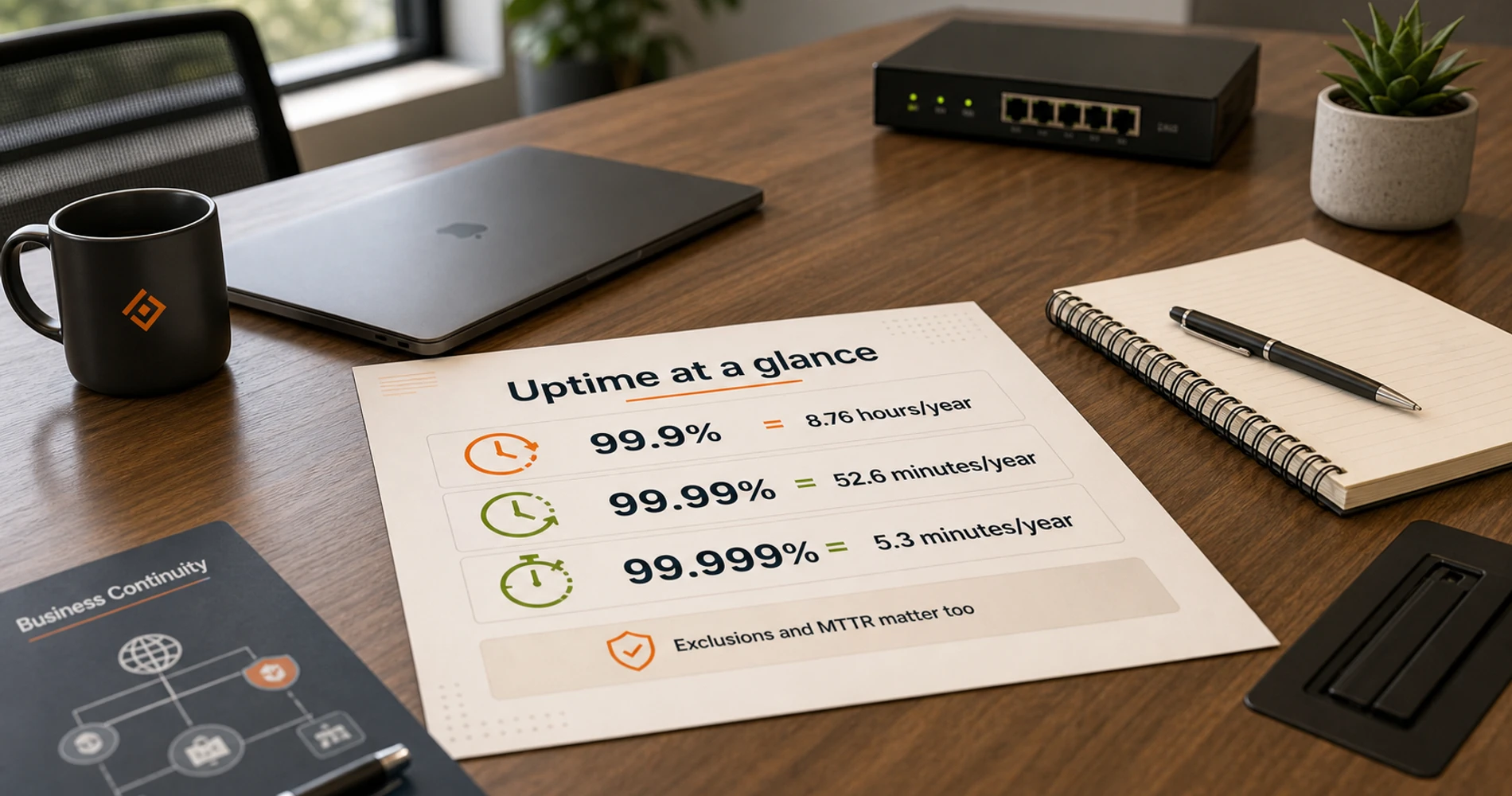
A 99.9% uptime SLA allows for 8.76 hours of permitted downtime per year before the provider is in breach of contract.
Before signing any service agreement, translate the uptime percentage into hours.
| Uptime SLA | Permitted downtime per year | Permitted downtime per month |
|---|---|---|
| 99.9% | 8.76 hours | 43.8 minutes |
| 99.99% | 52.6 minutes | 4.4 minutes |
| 99.999% | 5.3 minutes | 26 seconds |
Most standard business cable and fiber plans — Comcast Business, Spectrum Business, regional providers — advertise 99.9% uptime. That's 8.76 hours of permitted downtime per year before the SLA is technically violated. For a business where the internet goes down for 90 minutes during a storm, that single event consumed nearly 17% of the year's entire permitted downtime allowance.
The SLA exclusions clause narrows this further.
The Exclusions Clause: What 'Downtime' Doesn't Count
Nearly every business internet SLA excludes some or all of the following from its uptime calculation:
- Scheduled maintenance — carrier-planned maintenance windows don't count as downtime
- Customer-premises equipment issues — if the gateway, your router, or the inside wiring is the problem, the outage doesn't count
- Weather events and natural disasters — acts of God are explicitly carved out
- Third-party network failures — upstream peering issues, backbone outages outside the carrier's network
- Power outages at your location — if your power goes out and takes the internet with it, the clock doesn't start
A carrier can deliver 94% real-world uptime in a given year and still satisfy a 99.9% SLA if the outages fall into excluded categories. Read the exclusions section before evaluating any uptime claim.
The uptime percentage is useful for comparing products within a tier — DIA versus standard business fiber, for example. But for most SMBs, the MTTR (mean time to repair) commitment matters more: how fast does the carrier commit to restoring service once an outage is confirmed? A carrier with 99.9% uptime and a 4-hour MTTR commitment is better than one with 99.99% uptime and no repair timeline guarantee.
The Three Types of Business Internet SLAs
Business internet SLAs fall into three distinct tiers: dedicated circuits (DIA), standard shared business fiber or cable, and residential-grade plans sold under a business label.
The type of connection your business uses determines the SLA terms available to it.
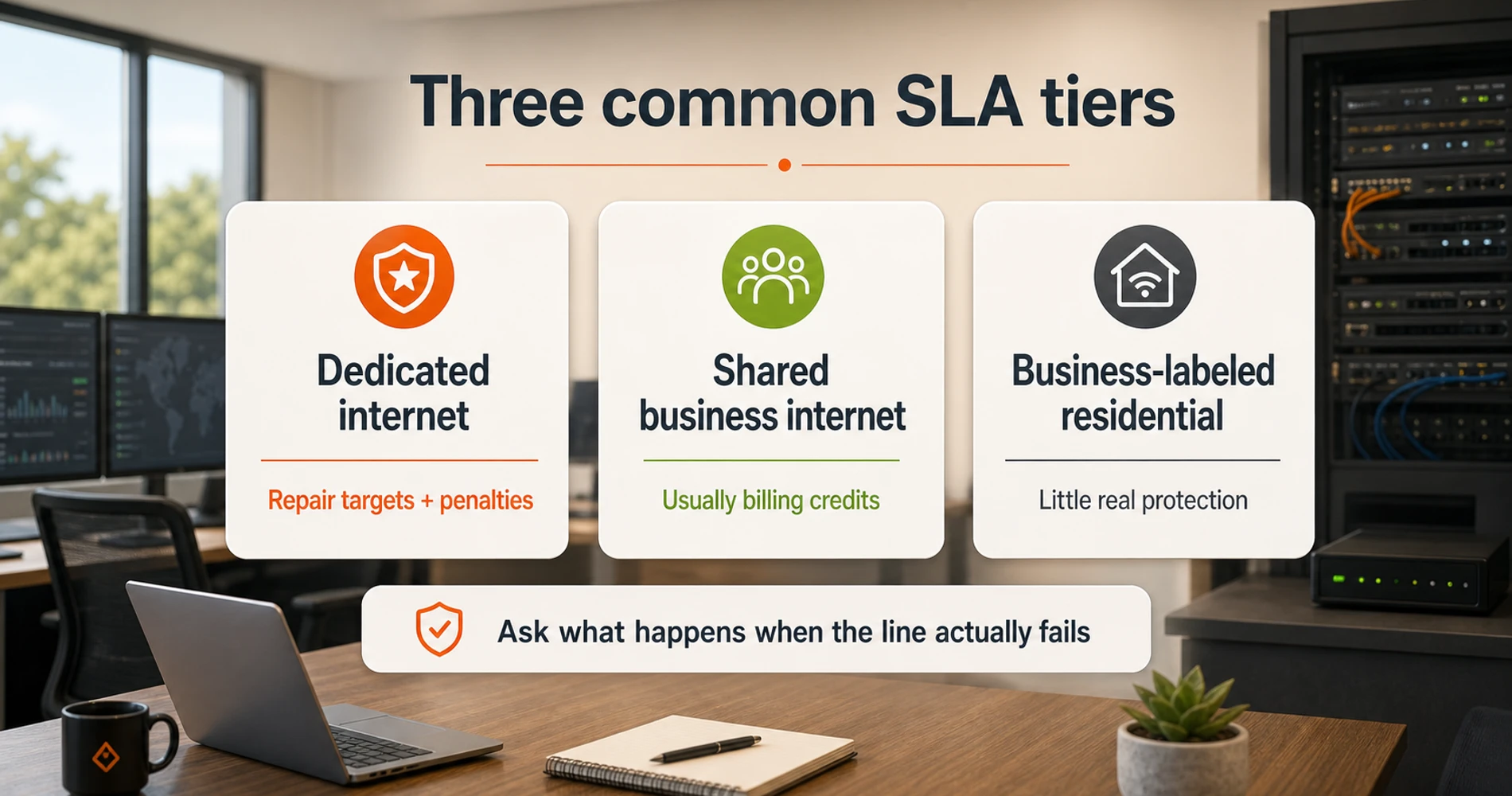
Type 1: DIA (Dedicated Internet Access) True dedicated circuits — your own fiber strand or connection with bandwidth reserved exclusively for your business, not shared with other customers. DIA products carry genuine SLA commitments: uptime percentages (often 99.99% or better), MTTR targets (typically 4–8 hours), latency and jitter guarantees, and financial penalties when those commitments are missed. These are enterprise-grade products at enterprise-grade prices — expect to pay $300–$1,000+/month for a DIA circuit, versus $60–$300 for standard business internet. If your business is a medical practice, law firm, or financial services operation where connectivity is directly tied to client service, DIA is worth evaluating.
Type 2: Standard Business Internet (Cable, Fiber) This is what most SMBs sign. AT&T Business Fiber, Comcast Business, Spectrum Business — shared infrastructure with a business-labeled tier. An SLA exists, but the remedy is almost always a billing credit rather than a guaranteed restoration window. AT&T's Business Guarantee, for example, credits you for fiber downtime lasting more than 20 minutes — but the credit is a bill credit equal to the proportional monthly cost, not a guarantee that a technician arrives within 4 hours.
One important practical limit: SLA credits are almost universally capped at 100% of your Monthly Recurring Charge (MRC). On a $140/month plan, the maximum credit for any outage — regardless of business impact — is $140, and a prorated credit for a typical 3-hour outage is often under $15. The credit compensates the carrier's missed SLA commitment; it does not reimburse business losses. This gap between SLA remedy and actual downtime cost is the financial argument for a backup line rather than relying on credit provisions alone.
Standard business internet is where most SMBs operate — and where understanding the distinction between plan descriptions and the actual contractual SLA terms matters most. "Business-grade" means priority support access and credit-based uptime terms. It does not mean a dedicated circuit.
Type 3: Residential Plan with a Business Name Some smaller providers and some promotional tiers are effectively residential service with a business-friendly name. No SLA, no credit terms, no MTTR commitment. If you're paying $50/month and haven't signed an actual service agreement with SLA language, this is likely what you have. It's fine for a sole proprietor with offline fallback options; it's a risk for any business where internet loss means idle staff or lost transactions.
If You've Already Had an Outage
If your business internet has gone down and you're navigating the response, the outage response checklist covers the immediate steps — including how to file for the credit your SLA entitles you to.
How to File an SLA Credit Request
Most carriers do not issue SLA credits automatically. The process requires your action:
- Document the outage window. Note the exact start and restoration times, plus any automated outage notifications received from the carrier.
- Open or reference a support ticket. Most carriers require a corresponding support case tied to the outage to validate a credit request.
- Locate the credit request channel. AT&T Business customers use the myAT&T Business portal; Comcast Business customers use the Comcast Business Customer Center.
- Submit within 30 days. Most business internet SLAs require the credit request within 30 days of the event; after this window, the credit is typically forfeited.
- Expect the credit on the next statement. SLA credits appear as a billing adjustment on the following invoice — not a cash refund.
Do You Need a Static IP for Business Internet?
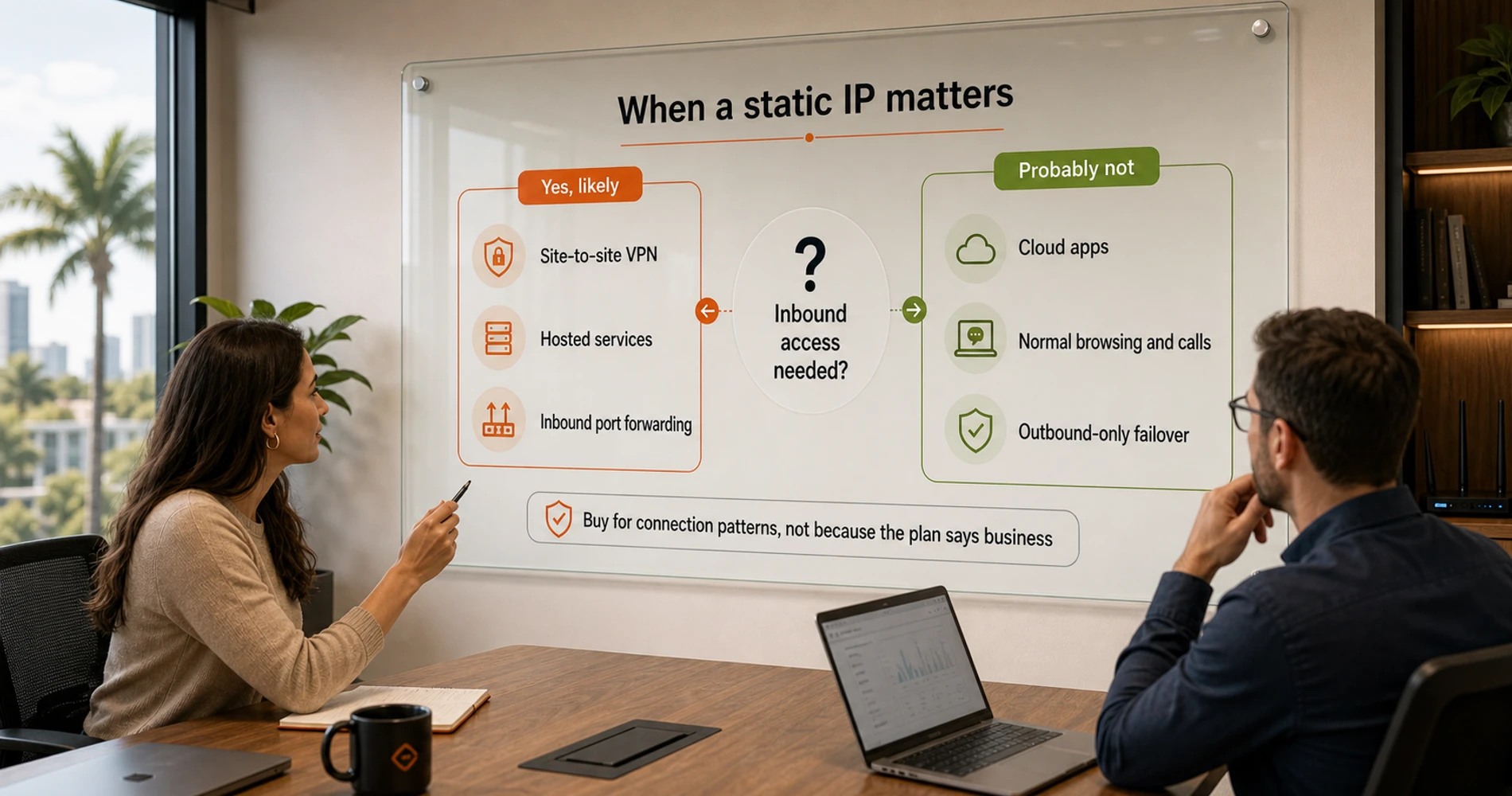
A static IP is required for site-to-site VPNs, self-hosted servers, and VoIP systems that authenticate by IP address; most other businesses can manage with dynamic DNS.
A static IP is a fixed internet address — the same every session. Standard business plans assign a dynamic IP that rotates periodically. If your network doesn't host inbound services or require peer IP authentication, dynamic DNS (DDNS) is typically sufficient.
You need a static IP if your business has:
- A site-to-site VPN using IKEv2 or IPsec (peer authentication often requires a known IP)
- Servers accessible from outside your network (web server, SFTP, RDP, NAS)
- Self-hosted email with custom MX records and SPF/DKIM authentication
- Inbound port forwarding for any reason (remote access, security cameras, POS systems with IP-authenticated trunks)
- VoIP systems with carrier trunks that authenticate by IP address
If none of those apply, you probably don't need one. Dynamic DNS (DDNS) services can handle many remote-access scenarios that people assume require a static IP, and they're worth evaluating if cost is a factor.
Where to get one:
AT&T Business Fiber offers static IP as a paid add-on — check your plan's service details or call business support, as it's not always prominently listed on the plan page. Comcast Business includes static IP on higher-tier plans (Performance and above); it's available as an add-on on lower tiers. T-Mobile 5G Business Internet offers static IP as a paid upgrade on the Business Advanced tier ($50+/month) — the base Small Business Grow plan does not support static IP assignment.
T-Mobile 5G Business Internet: Static IP Requires Business Advanced Tier
T-Mobile's entry-level Small Business Grow plan uses CGNAT (Carrier-Grade NAT), meaning public IP addresses are shared across customers and inbound routing is not possible on the base plan. The Business Advanced tier ($50+/month) offers a Static IP upgrade — the correct choice for businesses that need a consistent address for VPN peer authentication, remote access, or IP-authenticated VoIP trunks.
If you're deploying T-Mobile strictly as a failover line, CGNAT on the base tier is manageable — failover scenarios typically don't require inbound routing. Our 5G failover guide covers the dual-WAN configuration for T-Mobile as a secondary WAN.
One note on Starlink: standard Starlink residential and basic business plans also use CGNAT. Starlink Business Priority plans ($250+/month for global priority) include a publicly routable IPv4 address, but that's a significantly different product and price point than the standard $55/month business tier. For most small businesses using Starlink as a primary or backup connection, plan on CGNAT and design your remote access accordingly.
IPv6 and Prefix Delegation: T-Mobile 5G Business Internet and Starlink both support IPv6 with Prefix Delegation (PD) on their business plans, which assigns a routable IPv6 subnet to your network. IPv6 PD does not resolve CGNAT for IPv4 inbound routing — the two address families are independent — but it enables native IPv6 connectivity for devices on your LAN. For IT staff managing modern application stacks: worth enabling on both carriers even if you remain behind CGNAT on IPv4.
Hidden Clauses in Business Internet Contracts
Business internet contracts routinely include auto-renewal provisions, early termination fees structured as remaining monthly payments, and annual price escalation clauses.
Five provisions in particular are worth reviewing before you sign.
1. Auto-renewal clauses Most business internet contracts — especially multi-year agreements — include an automatic renewal clause. When the term ends, the contract renews for another full term unless you notify the carrier within a specific cancellation window. That window is typically 30 to 90 days before the contract end date. Miss the window, and the contract renews for another full term at prevailing rates. In my experience advising South Florida clients, this is the clause that generates the most frustration — not because it's hidden, but because it's easy to forget about a contract you signed two years ago. The fix is simple: calendar the cancellation window deadline the day you sign.
2. Early termination fees calculated as remaining monthly payments ETFs are commonly described as "the cost of breaking the contract," but the math isn't always a flat fee. Many carriers structure the ETF as the sum of all remaining monthly payments. A 3-year contract at $200/month with 24 months remaining has a potential ETF of $4,800. Some contracts offer a declining ETF — higher early in the term, lower toward the end — which is more reasonable but still substantial. Before signing, ask: "What is my early termination fee if I cancel in year two?" and get the answer in writing.
3. Price escalation clauses A contract doesn't always mean a fixed price. Many business internet contracts permit price increases of 3–5% annually during the term. The Comcast Business 5-year price lock guarantee is notable because it explicitly locks your service rate — but that's specifically marketed as a feature because it's not the default. Check whether your proposed contract contains a "we may adjust pricing" clause and how much notice they're required to give.
4. Installation and provisioning timelines Fiber build-outs to locations that don't already have fiber infrastructure can take 4–12 weeks. The SLA clock — including the uptime guarantee — doesn't start until the connection is active and accepted. Signing a contract doesn't mean you have internet service. For businesses moving into a new location or switching providers, ask your carrier to put the estimated installation timeline in writing (even informally, via email) and have a contingency plan for the gap.
5. Acceptable use policies and application restrictions Some consumer-leaning "business" plans have acceptable use policies that restrict hosting servers or running commercial applications. This rarely affects standard office use but matters if your setup is non-standard — anything running inbound connections, a hosted service, or high-volume outbound traffic. Read the AUP before signing if your use case is outside normal office browsing and cloud app territory.
Most of These Are Negotiable
For businesses with 10+ employees, multiple service locations, or multi-year commitments, most of these terms are negotiable before you sign. ETF caps, reduced auto-renewal windows, and written installation timelines are reasonable asks that many business representatives will accommodate rather than lose a multi-year deal. Negotiating these terms is significantly easier before you sign than after the contract is in place.
When to Add a Backup Business Internet Line
A secondary internet line is justified when the hourly cost of downtime exceeds the annual cost of the backup connection, accounting for realistic outage frequency.
The right answer depends on your business model and actual outage history.
The ROI framework:
Estimate your hourly revenue at risk during an outage — not just lost sales, but idle staff, missed deadlines, and delayed client work. For a 10-person team using cloud-based tools (SaaS apps, VoIP, cloud storage), a conservative estimate might be $150–$300/hour in combined productivity loss.
Now estimate your realistic outage hours per year. If you've been on your current provider for two years without a significant outage, the historical rate is low. If you've had two 2-hour outages in the past year, you have real data.
T-Mobile 5G Business Internet starts at $35/month (Small Business Grow plan). Starlink Business Local Priority starts at $55/month with a $349 one-time hardware cost. Even at 0 outages per year, ongoing service fees run $420–$660 annually for these options. That's roughly equivalent to 2–4 hours of the productivity loss scenario above. Industry data from the Uptime Institute puts the average duration of a US business internet outage event at approximately 3–4 hours — which makes the 4-hour scenario used in the ROI framework a realistic baseline, not a worst case.
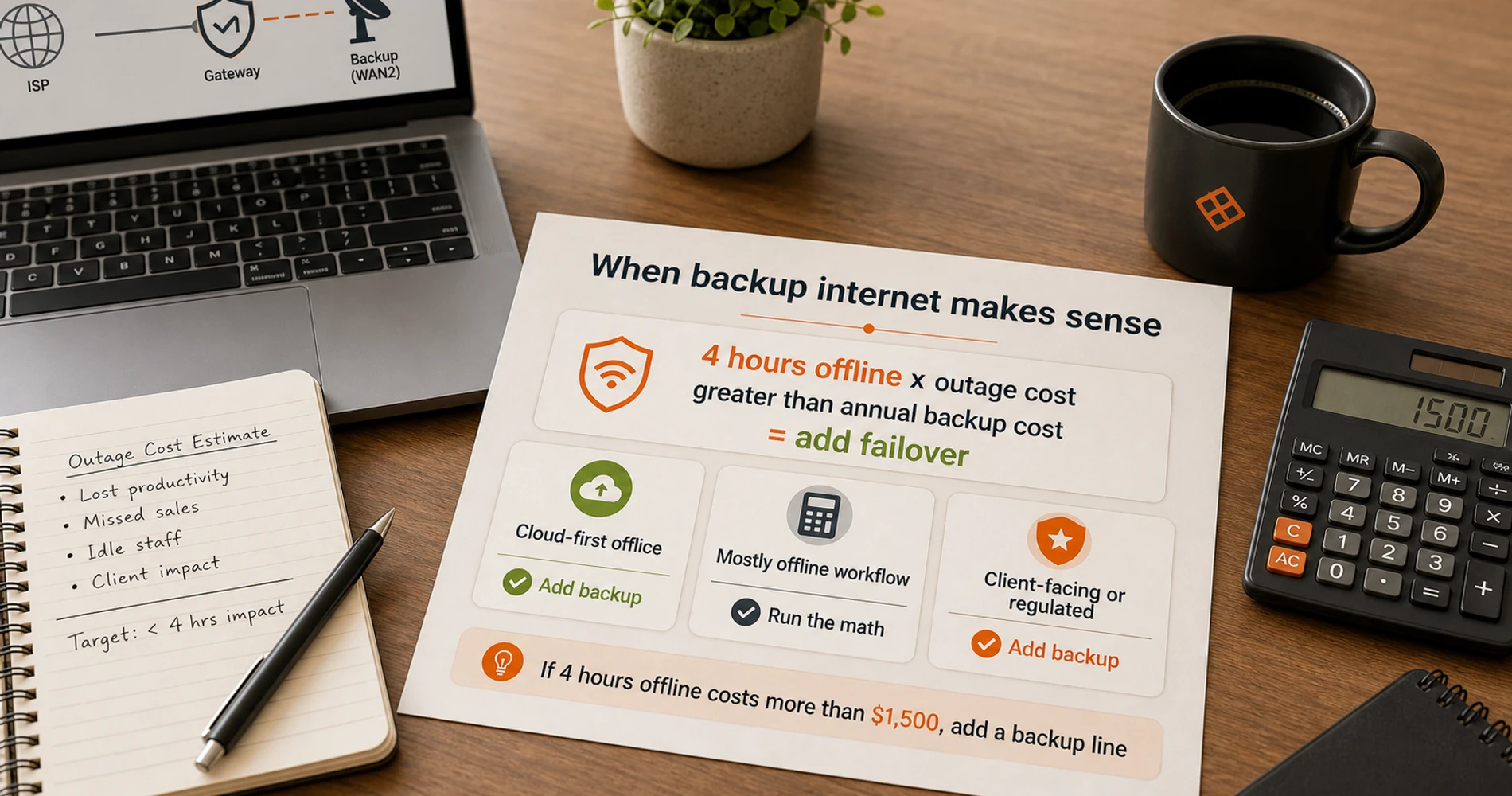
Three scenarios:
Scenario A: Cloud-first office, 5–25 employees All your core tools — email, CRM, project management, video calls, VoIP — run over the internet. An outage means your team is idle or on cell hotspots until it's resolved. A cellular or Starlink backup line at $35–$150/month is almost always justified. Even one avoided 4-hour outage per year pays for half the annual cost. Add the backup line. See our Starlink Business failover guide or the 5G failover setup guide for the implementation.
Before adding a failover line, also confirm your primary line is correctly sized using the bandwidth requirements calculator — a backup line doesn't help if the primary line is undersized for your actual usage.
Scenario B: Light internet use, mostly offline workflow A contractor, specialty trade, or retail business where the internet handles email and maybe a POS terminal — and staff can continue working during an outage using paper processes or mobile devices. Here the math is less clear. If your last outage cost you one lost transaction and 30 minutes of minor inconvenience, a $100/month backup line has a very long payback period. Evaluate based on your actual past outage impact, not a hypothetical worst case.
Scenario C: Medical, legal, financial, or other client-facing regulated business Compliance requirements, client-facing systems, or patient/client safety implications mean the cost of a single extended outage can exceed many months of backup line costs — in lost client confidence, regulatory exposure, or contractual penalties. The answer here is yes on a backup line, and also worth reviewing the SLA language on your primary line. See AT&T Business Fiber's built-in 5G failover option if you're already on AT&T — it's included at no extra cost on 1 GIG and higher plans.
The Rule of Thumb
If losing internet for 4 hours would cost your business more than $1,500 in lost revenue or productivity, add a cellular or Starlink backup line. If it wouldn't, calculate whether the annual backup cost justifies the protection based on your actual outage history.
Active/Passive vs. Active/Active WAN
Many businesses add a backup line and let it sit completely idle until needed (Active/Passive). A more resilient configuration is Active/Active: use a dual-WAN router (UniFi, pfSense, or a dedicated SD-WAN appliance) to load-balance traffic across both connections simultaneously. Active/Active eliminates failover delay, distributes bandwidth load, and means the backup line is continuously exercised by real traffic — rather than sitting untested until an outage actually occurs. That said, Active/Active isn't the default we recommend for most client networks — VPNs, static-IP-anchored services, and SIP trunks tied to one connection's IP address routinely break under load-balanced routing. See our full dual-WAN architecture guide for why failover-only is the safer starting point for most businesses, and when Active/Active or true SD-WAN is worth the added complexity.
Don't Overlook Internal Infrastructure
A 99.99% SLA and a multi-gigabit service line are only as good as the internal infrastructure routing traffic to your devices. Outdated Cat5e cabling, aging Wi-Fi 5 access points, or an undersized core switch can create bottlenecks indistinguishable from ISP problems. Before investing in a higher-tier plan or a redundant backup line, verify that your internal LAN is not the actual constraint.
How to Negotiate a Business Internet Contract
Negotiate static IP inclusion, written installation timelines, and a capped ETF structure before signing — all are reasonable requests that most carriers will accommodate.
These are the terms worth addressing during the sales process:
Static IP add-on: Almost always available, almost never offered proactively. Ask directly: "Does this plan include a static IP, and if not, what does it cost to add one?" If you need one, get it in the original order rather than as a support ticket after activation.
Installation timeline in writing: Not every provider will give you a guaranteed installation date, but you can ask for an estimated window in writing — even via email from your account representative. This matters most for new locations or fiber builds that require outside construction.
Month-to-month option: If your office is in a short-term lease or you're uncertain about your location, ask whether a month-to-month option exists. Most carriers offer it at a price premium (typically 10–20% higher monthly rate) but it's available. Paying a premium to avoid a 3-year ETF commitment is sometimes the right call for early-stage businesses.
Early termination fee structure: Ask specifically: "How is the ETF calculated if I cancel in year two?" A flat fee is better than remaining monthly payments. Some carriers will agree to cap the ETF or use a declining structure if you ask.
Service tier pricing gaps: Before committing to a tier, ask about the next tier up. Pricing gaps between tiers are sometimes smaller than the list prices suggest, especially if you're willing to bundle or commit to a longer term. The 1 GIG tier at AT&T often makes more sense than the 500Mbps tier once you account for the built-in 5G backup.
Bundling: Comcast and AT&T both offer rate reductions when you bundle internet with phone service or mobile lines. Sometimes the bundled price is genuinely lower. Sometimes it adds a product you don't want. Run the numbers on the bundle versus standalone before accepting the offer.
One thing to know going in: the rep handling your account may not have authority to modify the ETF structure or written installation commitments. Ask to speak with a business account manager rather than a general sales line if you're trying to negotiate specific terms.
South Florida Business Internet Providers Compared
South Florida business internet options include AT&T Business Fiber, Comcast Business DOCSIS, T-Mobile 5G, and Starlink — each with distinct SLA structures and backup capabilities.
The South Florida market has real variation that generic ISP comparison articles miss. Here's what I've observed across deployments in the Miami, Fort Lauderdale, and Boca Raton areas.
| Provider | SLA Type | MTTR Commitment | Static IP | Built-in Backup | Starting Price |
|---|---|---|---|---|---|
| AT&T Business Fiber | Credit-based | Same/next-day appt | Paid add-on | Yes (1 GIG+) | $60/mo |
| Comcast Business | Credit-based | None published | Higher tiers included | Wireless Connect add-on | $60/mo |
| T-Mobile 5G Business | No SLA | None | Biz Advanced upgrade | N/A | $35/mo |
| Starlink Local Priority | SLA (Priority tiers) | None | Priority tiers only | N/A | $55/mo + $349 HW |
South Florida Market Context
SLA terms, plan availability, and service quality vary by location. The observations below reflect South Florida deployments and may differ in other markets. For a full regional ISP comparison, see the Miami business internet guide.
AT&T Business Fiber is the strongest option in most South Florida locations where it's available. The AT&T Guarantee — crediting outages lasting more than 20 minutes — is better than most competitors' credit policies in the same tier. The exclusions are standard (weather, premises equipment, planned maintenance), but the same-day or next-day technician appointment language means you get a repair timeline, not just a credit claim process. The built-in 5G backup on 1 GIG and higher plans is a genuine differentiator — it uses the WNC-CGW452 gateway to automatically fail over to AT&T's 5G network if the fiber goes down. One important limitation: static IP addresses assigned to the fiber connection do not carry over during a 5G failover event — the gateway receives a dynamic IP from the cellular network until fiber is restored. If your business relies on IP-authenticated services (VPNs, hosted servers, VoIP trunks), plan for this gap. In practice, the AT&T fiber network in South Florida has been reliable in the deployments I've managed, with outages typically isolated to brief maintenance windows and weather events. See our full AT&T Business Fiber review for plan-by-plan details.
Comcast Business runs on DOCSIS shared infrastructure across most of South Florida. It's available in more locations than AT&T fiber, especially in older buildings and areas where fiber construction hasn't reached. The SLA language is credit-based with no published MTTR commitment — you're in a support queue, not guaranteed a restoration window. That said, Comcast Business support tends to be more responsive than residential Xfinity in my experience, and the 5-Year price lock guarantee is a meaningful contractual protection against price creep. Comcast's "Wireless Connect" backup is available as an add-on — it uses a cellular connection to maintain basic connectivity if the primary line goes down. The $60/month entry price reflects enrollment in Auto Pay, Paperless Billing, and at least one qualifying add-on (SecurityEdge™, Wireless Connect, or Comcast Business Mobile); the standard 1-year rate without those conditions is $70/month.
Starlink has become a practical primary option for locations where AT&T fiber isn't available and Comcast service quality is poor — particularly in more rural areas at the edges of South Florida. The Starlink Business Local Priority plan ($55/month, $349 hardware, CGNAT) works well for cloud app usage and general office connectivity. If you need a static IP or a genuine SLA, you're looking at the Priority tier at substantially higher cost. For most South Florida SMBs, Starlink makes more sense as a failover line than as a primary — the latency (20–60ms typical) is acceptable for most applications but slightly higher than fiber. The Starlink vs. fiber comparison covers this decision in more detail.
T-Mobile 5G Business Internet works well as a backup line in South Florida — T-Mobile's network density in the metro area is strong. Starting at $35/month (Small Business Grow plan), it's typically the most cost-effective failover option in most South Florida deployments. The CGNAT limitation matters if your primary VPN or any inbound service runs through it, but for pure failover (keeping staff online and cloud tools accessible during a primary outage), it does the job reliably. See the AT&T built-in 5G failover guide if you're already on AT&T fiber — the included backup is often more convenient than a separate T-Mobile line.
The conversation I have with most South Florida business clients before a contract signing covers three things: verify the connection type (fiber vs. DOCSIS), review the exclusions clause in the SLA, and understand what happens on day one of a major outage. The answers to those three questions give you a clear picture of what you're committing to and what to expect when the connection needs repair.
Frequently Asked Questions
Related Articles
More from Network Infrastructure

Dual WAN for Business: Why One Internet Connection Isn't Enough
Why a single ISP is a single point of failure, how to verify real route diversity, and which dual-WAN gateway and backup connection fit a rack network or a simple branch office.
19 min read

Best Business Internet Providers in 2026: Fiber, Cable, and 5G Compared
A practical comparison of the best business internet providers in 2026 — AT&T Fiber, Comcast Business, Verizon Fios, T-Mobile 5G, and Starlink. What the specs don't tell you.
24 min read
Managed vs Unmanaged Switch: What a Small Office Needs
Managed or unmanaged switch? Match the choice to what your office runs: Wi-Fi, cameras, phones and guest networks, with a scenario table and PoE costs.
15 min read