

Who Owns Your Business Domain Name? How to Check and Secure It
Check your domain's registrar, registrant and account access. Recover control from a former provider and protect website and email service during a transfer.


To find out who owns a business domain, look up the registrar at ICANN Lookup, then check the registrant details inside the registrar's account. The registrant is the registered name holder. Public lookup results often hide that identity.
Check account control separately: who can sign in, receive renewal notices and recover access? A domain can be registered to your business while a former web designer controls the account. A forgotten password does not mean they own it.
This guide takes you from that check to a documented handover, a transfer if needed, and a renewal setup that a second person can manage.
Three checks you can do today
- Find the registrar at lookup.icann.org.
- Confirm the registrant's name and organization, who can sign in, and where account recovery and renewal emails go.
- Confirm the renewal deadline in the registrar account. Put a reminder in a shared calendar two months before it; if renewal is close, resolve that before planning a move.
What Does Domain Ownership Mean?
You register the right to use a domain for a renewable term, typically one to ten years. Four roles matter:
| Role | What it does |
|---|---|
| Registrant | The person or organization recorded as the registered name holder. This should accurately identify the business or its appropriate legal holder. |
| Registrar | Manages your registration, contact details, renewal and transfers. GoDaddy, Namecheap and Cloudflare are examples. |
| Registry | Operates the database for the extension, such as .com. Your registrar deals with it on your behalf. |
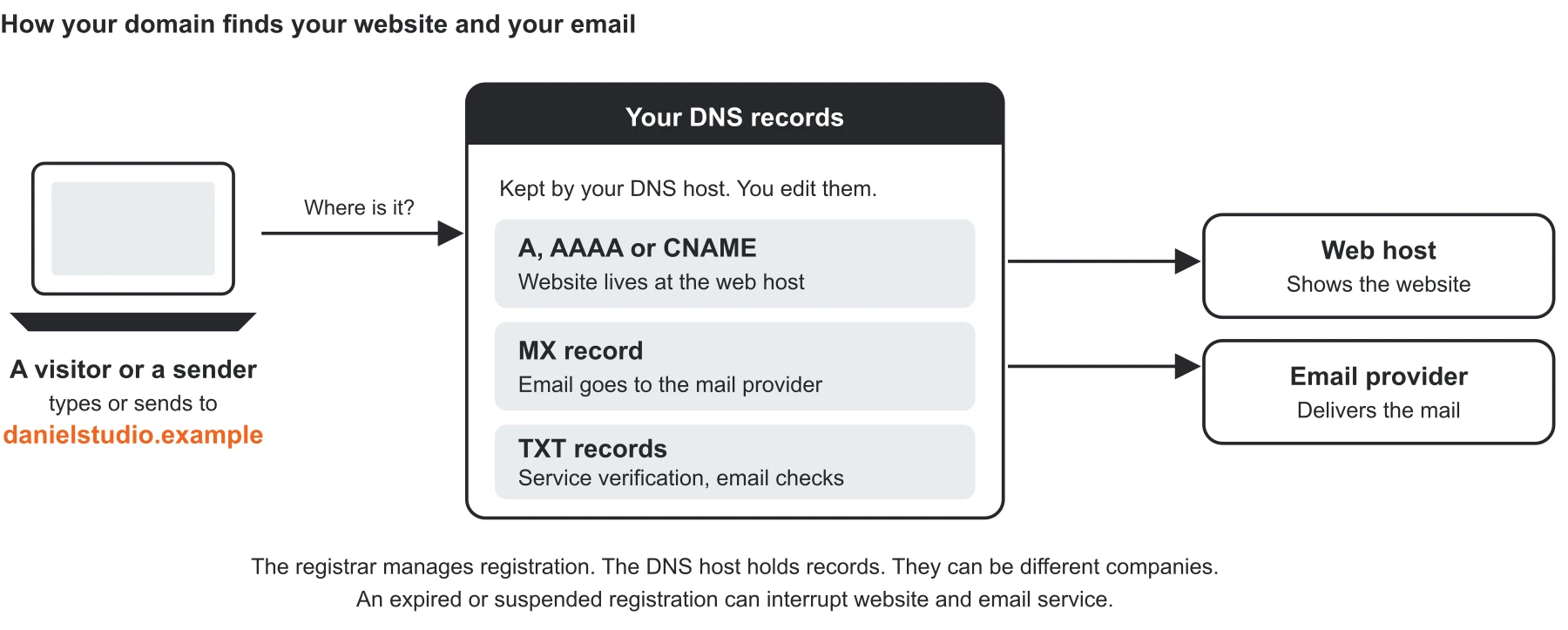
| DNS host | Holds the records that direct traffic to your website and email provider. It can be a different company from the registrar. |
The person who built the website, pays the bill or can edit DNS is not necessarily the registrant. Registration details are important evidence, but a dispute about legal rights can also involve contracts and trademark rights. The registrar account alone does not settle that dispute.
One provider can play several of these roles at once. Our GoDaddy-to-Proton migration walkthrough shows a registrar, DNS host and email reseller that were separate decisions to change.
Step 1: Find the Registrar and Check the Registrant
In short: ICANN Lookup tells you the registrar, and the registrar's account tells you the registrant.
Enter the domain, such as example.com, in ICANN Lookup. Look for Registrar, registration and expiry dates, Domain Status, and Name Servers. Record what is available, then confirm the renewal deadline in the registrar's account.
People still call this a WHOIS lookup. ICANN's tool uses RDAP, the replacement protocol for accessing registration data. In our experience, the public lookup is useful for finding the registrar and status, but it usually doesn't tell you whose account holds the domain. Details may be redacted under law or policy, or hidden by a privacy or proxy service; that is not evidence that anything is wrong. See ICANN's lookup FAQ.
For a country-code domain, such as .uk, use the extension's registry lookup if ICANN does not return the information. The ICANN transfer rules discussed below apply to covered generic domains such as .com; country-code extensions can use different procedures.
Sign in through the registrar's own website using an account you are authorized to manage. If needed, use its password recovery process. Check the registrant contact, including the organization field, as well as the account email. They may be different. A reseller's name on your invoice may also differ from the registrar shown in the lookup.
Write down the registrar, registered holder, renewal deadline and account administrator. If you cannot see the registrant details, ask the current administrator or registrar to confirm them through its verification process.
Step 2: Recover Account Access or Request a Handover
The business is the registrant, but you cannot sign in. Start with account recovery. Ask the registrar what proof it requires from an authorized business representative. For example, GoDaddy has a domain-access recovery route for a listed registrant who cannot access the account. Requirements vary; do not assume an invoice alone is enough.
You control the account, but the registrant details need updating. Check Step 3 before changing the name, organization or email if you also plan to change registrars. If you are staying with the registrar, use its registrant-change process to enter accurate business details and complete any required approvals or verification.
The domain is in a designer's, agency's or former employee's account. Ask for a documented handover into a business-controlled account. Keep the request specific:
Please confirm the registrant details and renewal date for our domain, and help move it into our business account. Before starting, please confirm where DNS is hosted and whether it will continue working after the move.
There are two different moves:
- Account push: moves the domain between accounts at the same registrar. It may also require a registrant change and acceptance by the recipient. Eligibility and timing depend on the registrar.
- Inter-registrar transfer: moves the registration to another registrar, using an authorization code, also called an AuthInfo or EPP code, for many generic domains. This does not automatically change the registrant.
You may only need an account push. You do not have to switch registrar to put the registration under the business's control. GoDaddy, for example, keeps DNS settings during an eligible account transfer, but connected website and email products do not move with it.
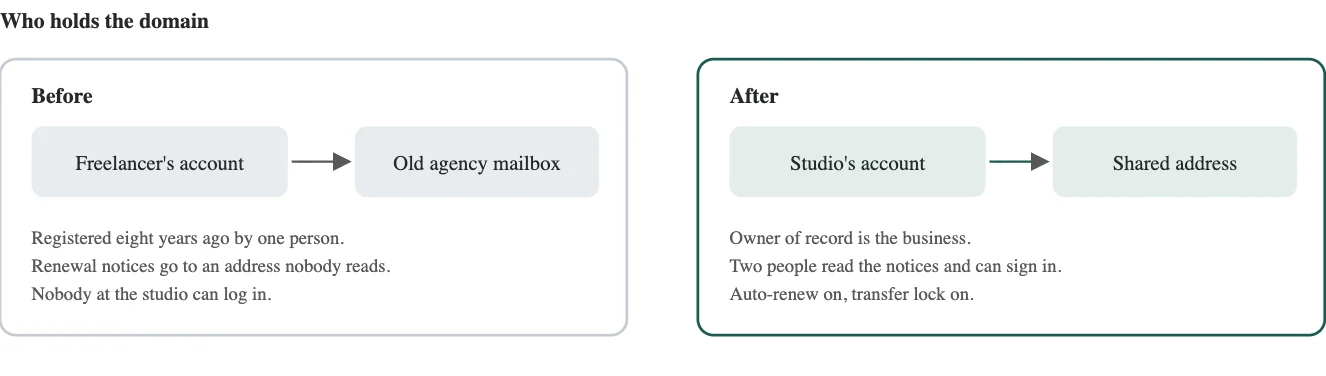
Illustrative studio example from the Handbook; this is not a client case study.
If the Current Holder Will Not Cooperate
Keep the website agreement, domain invoices, payment records and correspondence. Ask for the handover in writing and keep renewal arrangements clear while the disagreement is resolved.
If the business is already the registrant, pursue the registrar's recovery route. If someone else is the registered holder and disputes the business's rights, take the records to a lawyer familiar with domain disputes. ICANN directs entitlement disputes to the parties, courts or an appropriate dispute-resolution process; a complaint to ICANN does not itself award the domain to your business.
The Uniform Domain Name Dispute Resolution Policy (UDRP) is a process for qualifying trademark abuse, not a general remedy for a disagreement with a former supplier. Keep the domain renewed while the disagreement is resolved.
Step 3: Protect DNS and Get the Transfer Order Right
Before an account push or registrar transfer, identify the DNS host and export the DNS records. At minimum, preserve the website records, MX records for incoming email, and TXT or CNAME records used for verification and email authentication. Record the name servers too.
Ask both providers whether the existing DNS service will continue after the move. A registrar transfer does not automatically copy the DNS zone. Namecheap's transfer guidance distinguishes independently hosted DNS from the old registrar's default DNS, which may need preparation to avoid interruption. Keep existing hosting and email services active until you have verified the result.
Our Proton custom-domain guide shows why this matters: records are edited where the name servers point, which may not be the registrar, and changing where mail is hosted does not require moving the domain.
If the move requires new name servers, prepare and check the new DNS zone first. If DNSSEC is enabled, follow the providers' DNSSEC migration instructions; stale signing information can prevent the domain from resolving. Cloudflare, for example, requires an active Cloudflare DNS setup before a registrar transfer. Have the person managing DNS handle this part if you are unsure.
Check the Waiting Periods Before Changing Contacts
Under the currently published ICANN Transfer Policy, a registrar may deny an inter-registrar transfer during the first 60 days after registration or a previous registrar transfer. A material registrant change normally triggers a 60-day inter-registrar lock; a registrar may offer an opt-out before that change.
If changing both registrar and registrant, arrange the authorized registrar transfer first where possible. If an account push changes the registrant, ask whether it will trigger a lock before planning an onward transfer. Existing locks, disputes or other restrictions can still prevent a move.
As of October 29, 2026, ICANN has adopted transfer-policy recommendations, while its implementation tracker lists the review in the implementation queue. Adoption is not an effective date. Check the registrar's current rules when scheduling the move.
A transfer sequence to follow
- Confirm the business's authority, renewal deadline, DNS continuity and transfer eligibility.
- Open a business-controlled account with recovery email that does not depend on this domain. Protect that mailbox with two-step sign-in too.
- Have the authorized holder remove the transfer lock and obtain the authorization code. Send it securely to the person handling the transfer.
- Submit the transfer at the new registrar and complete its approvals. Allow several days; ask the provider for its expected timing.
- After completion, update registrant details through the approved process, complete verification, confirm DNS, and test the website and incoming and outgoing email. Check the expiry date and restore the transfer lock.
For covered domains, if the registrar provides no self-service facility, it must supply the registered holder's authorization code and remove the transfer-prohibited status within five calendar days of the holder's request, subject to applicable restrictions. This deadline does not require a designer to hand you a code within five days; see ICANN's transfer FAQ.
What Will the Move Cost?
Check the destination's transfer fee, next renewal price and any restoration charge before paying. A registrar transfer commonly includes a one-year extension, but exceptions apply; Cloudflare's FAQ explains the post-expiry renewal exception. An account push has different terms. There is no single price that applies across registrars and extensions.
Step 4: Set Up Renewal and Recovery
Once the domain is in a business-controlled account, check these settings:
| Setting | What to check |
|---|---|
| Auto-renew | Turn it on and confirm the next scheduled charge. Keep a separate calendar reminder. |
| Payment method | Use a current business payment method and review it when the card changes. Multi-year registration does not remove that task. |
| Registration term | Consider two to five years if the extension supports it and the renewal cost suits the business. This is a planning choice, not a security requirement. |
| Transfer lock | Turn it on. clientTransferProhibited is the usual registrar-level status; it blocks registrar transfers, not every account or DNS change. |
| Two-step sign-in | Prefer a supported security key or passkey; use an authenticator app if that is the available option. Give each authorized user their own sign-in where supported. |
| Recovery and notices | Use a business-controlled address independent of this domain. Confirm two people can read notices and that recovery methods work. |
CISA recommends phishing-resistant MFA; one-time authenticator codes can still be phished.
Keep the registrar credentials and recovery codes in the appropriate restricted business password-manager vault. If the registrar supports only one login, document how a second authorized person can recover it without depending on the first person's phone.
For a critical domain, ask about a registry lock. It adds registry-level restrictions and extra verification through the provider. Availability and charges vary. Neither it nor a registrar lock replaces account security; ICANN's status-code guide explains the distinction.
If the Domain Has Already Expired
Contact the current registrar as soon as you notice. Website and email service can be interrupted, but the timing depends on the registrar and extension. Expiration alone does not automatically prohibit a transfer; other eligibility restrictions still apply.
For covered generic domains, the Expired Registration Recovery Policy provides a 30-day redemption period after registry deletion, with exceptions such as sponsored domains. This is not 30 guaranteed days from the expiry date. If the status is redemptionPeriod, restore it through the current registrar before attempting a transfer. Restoration can cost extra. If it has progressed beyond redemption, ask what recovery options, if any, remain.
Step 5: Write Down the Domain Record and Test Access
Keep one record per domain with:
- Domain, registrar, registered holder and account administrator
- Primary and second authorized person; password-manager entry and recovery method
- Renewal deadline, next auto-renew charge, renewal price and payment-card reference
- Transfer-lock status
- DNS host, name servers and location of the DNS export
- Date the second person last checked access
Record the card's last four digits and expiry month, not the full card number. Store passwords and recovery codes in the password manager rather than on this record.
Done-check: ask the second person to sign in, find the renewal date, confirm the registered holder and locate the DNS copy. The task is complete when the business can manage and recover the registration without relying on its former provider or one person's availability.
If you are changing IT providers, our IT handover checklist includes domain and registrar control among the first things to verify. If the account administrator was an employee, use the offboarding checklist to review their other access too.
Related Resources
- Small-Business IT Handover Checklist — Verify domain, email, backup and billing access when an IT provider changes.
- What to Do When Your IT Person Quits — Revoke access, audit systems and document everything when your IT person quits.
- Former Employee Access Security — Review access when an employee leaves.
- How to Get Your Small Business Online — Domain registration, business email and authentication, in the order to set them up.
- SPF, DKIM and DMARC Explained — Understand the DNS records used to authenticate business email.
Frequently Asked Questions
Related Articles
More from IT Guides

Small-Business IT Handover Checklist for Changing IT Providers
Changing IT providers? Use this small-business IT handover checklist and free template to verify domain, email, backups, admin access and billing ownership.
16 min read

Managed IT Services Pricing: Per-User Costs and What to Budget in 2026
Budget $125 to $250 per user for managed IT using our South Florida estimates. Compare pricing models, exclusions, setup costs and quotes in this 2026 guide.
12 min read

Small Office IT Checklist: Your Annual 12-Stop Walk-Through
A small office IT checklist with 12 stops, from UPS battery and power strips to Wi-Fi and backups. Rate each one and print your own fix list.
14 min read