

SPF, DKIM and DMARC Explained for Small Business
SPF, DKIM and DMARC explained for small businesses: what each record does, how alignment works, what our own domain's C grade showed, and what to fix first.


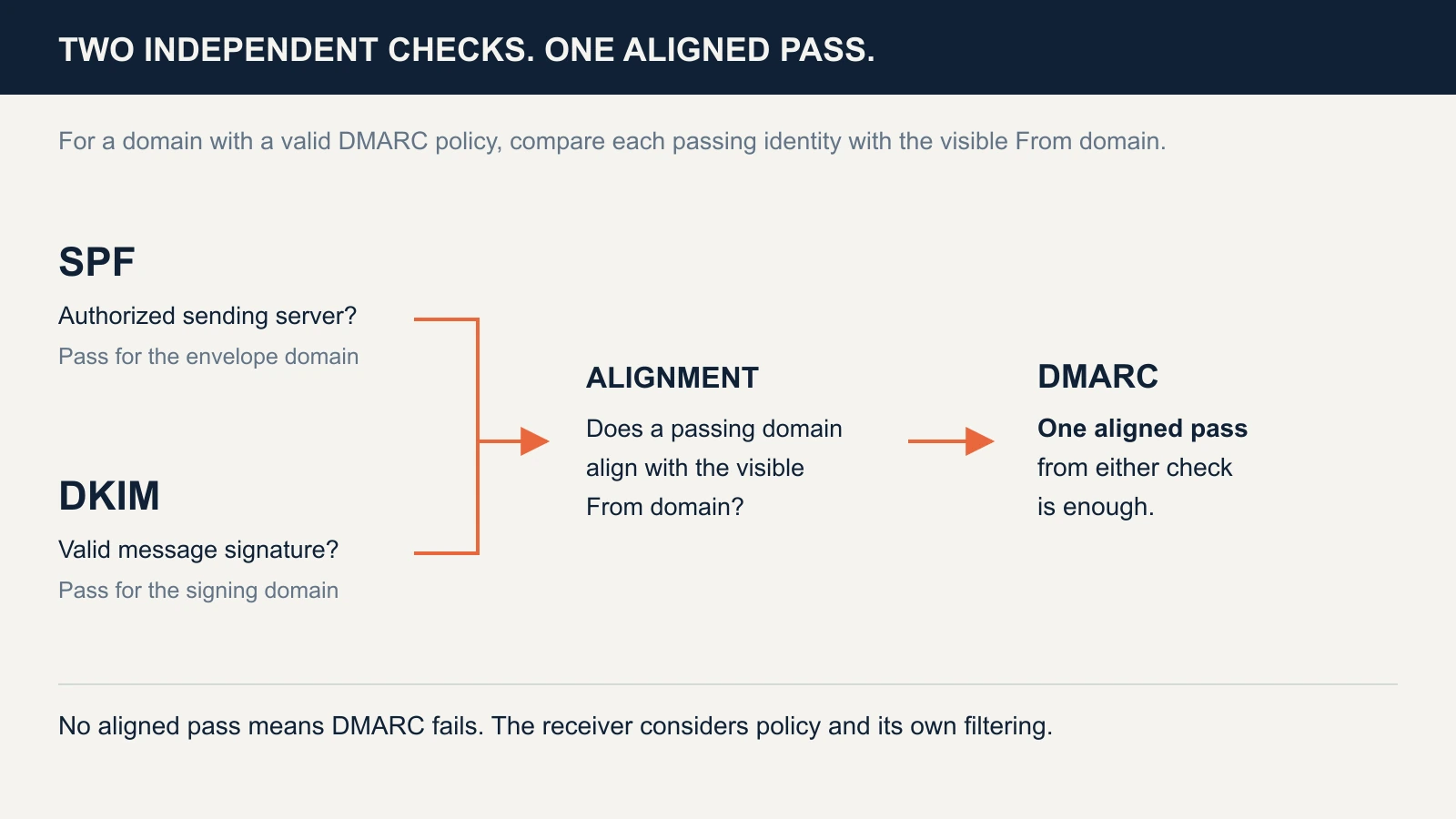
SPF, DKIM and DMARC help a receiving mail service decide whether a message is authorized to use your domain. They solve different problems: SPF checks the sending server, DKIM checks a signature, and DMARC checks alignment with the From address people see.
We ran our own domain, ifeeltech.com, through our email checker and it scored a C, even though we publish a quarantine policy, DMARC reporting and Google's SPF record. This guide explains what each record does, what that grade did and did not tell us, and the order to fix things in so that legitimate mail keeps flowing.
Affiliate Disclosure: This article contains affiliate links. If you make a purchase through these links, we may earn a small commission at no extra cost to you. As an Amazon Associate, iFeelTech earns from qualifying purchases.
The short version
Set up all three, then test a real message from every service that sends as your domain. DMARC passes when either SPF or DKIM passes and matches the From domain, so one aligned pass is enough, and having both is more reliable. If you have no DMARC record yet, start with p=none and reports. If you already have a working policy, leave it in place. These records help receivers recognize mail that falsely uses your exact domain. They do not make a message safe or guarantee inbox delivery.
What is the difference between SPF, DKIM and DMARC?
| Check | What it verifies | What a pass does not prove |
|---|---|---|
| SPF — Sender Policy Framework | The connecting server is authorized for the envelope-sender domain | That this domain matches the visible From address |
| DKIM — DomainKeys Identified Mail | A cryptographic signature validates for a signing domain and signed content | That the signer matches the From domain, or the message is harmless |
| DMARC — Domain-based Message Authentication, Reporting and Conformance | A passing SPF or DKIM identity aligns with the visible From domain | That every receiver will deliver it, or that a mailbox has not been compromised |
An envelope analogy helps, with limits. SPF resembles an approved courier list. DKIM resembles a tamper-evident seal over the signed parts. DMARC checks whether the approved courier or valid seal belongs to the organization named in the From address, then publishes a handling preference for failures.
A receiver can evaluate SPF and DKIM independently; there is no universal fixed order. It needs the connecting IP and message identities/signature, not just your domain name.
SPF: is this server authorized for the envelope domain?
SPF is published as a DNS TXT policy at the domain used for the SMTP envelope sender, also called MAIL FROM. That is often your main domain, but a sending platform may use a bounce subdomain or its own domain. It is separate from the visible From line. SPF also handles the sending server's HELO identity in relevant cases.
Our main-domain SPF policy, queried on 23 October 2026, is:
v=spf1 include:_spf.google.com ~all
That authorizes the sources covered by Google's policy. It is a Google Workspace example, not a template for a business with different senders. Use the value supplied for the particular service and SPF identity:
| Service | Common include |
|---|---|
| Google Workspace | include:_spf.google.com |
| Microsoft 365 commercial cloud | include:spf.protection.outlook.com |
| Proton Mail | include:_spf.protonmail.ch |
Google and Microsoft document their configurations. GoDaddy-resold Microsoft 365 can use a different record: GoDaddy lists include:secureserver.net, with an exception for Advanced Email Security. Always check the account's instructions.
For a third-party newsletter or invoicing platform, find out which envelope domain it actually uses. Adding a vendor include to your root record will not fix alignment if messages still use the vendor's unrelated envelope domain. Custom DKIM signing or a custom return-path configuration may be needed.
One SPF policy per hostname, the usual cause of permerror
Do not add a second SPF TXT record when adding a sending service. Merge the required authorization into the policy for that hostname. Two selectable SPF policies produce permerror; unrelated verification TXT records do not.
Subdomains are different owner names and can have their own SPF policies. Also, one TXT record can contain several quoted chunks that together form a single policy. Count records, not quotation marks.
The ten-lookup limit and empty lookups
SPF's standard, RFC 7208, limits the number of evaluated DNS-querying terms to ten. include, a, mx, ptr, exists and redirect can count, including nested evaluation. ip4, ip6 and all do not count toward that term limit. Exceeding it produces permerror.
At the time of our check, _spf.google.com listed IP ranges without nested includes. Our simple main-domain policy therefore has one include term on that path today. Provider records can change; this is not a permanent allowance for nine other services.
The standard also recommends a limit of two void lookups—queries returning an empty answer or a nonexistent name. Exceeding that limit, rather than merely reaching two, produces permerror in implementations applying it. A dead include can cause an error for other reasons too, so inspect the full policy rather than only counting top-level entries.
Remove obsolete authorizations first. Flattening vendor includes into IP addresses requires ongoing maintenance as those addresses change; it should not be an automatic fix.
Softfail and fail are results, not delivery commands
~all tells receivers that an unlisted source is a softfail; -all tells them it is a fail. Receivers weigh that result alongside DKIM, DMARC and their own filtering, so neither ending guarantees that a message is accepted or rejected. Our record uses ~all, as Google's example does. Use the ending your provider recommends, and check how forwarded mail behaves before tightening it.
DKIM: does the signature verify?
The sending service signs selected headers and body content with a private key. A receiver retrieves the corresponding public key from DNS and verifies the signature. DKIM does not encrypt the message or identify the person who wrote it.
A signature can survive forwarding if the signed content remains valid. Rewriting a signed subject, adding a footer or otherwise changing protected content may break it. This is why DKIM can preserve a useful authentication path when forwarding disrupts SPF, but neither check is guaranteed to survive every intermediary. RFC 6376 defines DKIM's signing model.
Selectors explain many “not found” results
A signed message carries two useful DKIM fields:
d=: the signing domain.s=: the selector identifying a key under that domain.
For d=example.com and s=google, the receiver queries google._domainkey.example.com. A checker that guesses only selector1 can miss that key. A DNS lookup failure or timeout is also different from a key being absent.
A published DKIM record looks like this. Ours is shortened here:
google._domainkey.ifeeltech.com TXT "v=DKIM1; k=rsa; p=MIIBIjANBgkqhkiG9w0BAQEFAAOCAQ8A…"
The p= value is the public key. The private key that creates the signatures stays with the sending service.
| Provider | Common selectors or record names |
|---|---|
| Google Workspace | google by default; configurable |
| Microsoft 365 | selector1 and selector2 |
| Proton Mail | protonmail, protonmail2, protonmail3 |
Use the sender's current values. Microsoft's DKIM guide provides two account-specific CNAME targets; older and newer target formats exist. Do not construct them from another company's example.
A key being published does not prove the service is signing. Google Workspace, for example, has separate generation, DNS publication and activation checks in its DKIM setup instructions. Configure each sending service, then inspect its real messages.
DMARC: does a pass align with the visible From?
DMARC combines the authentication results with the domain in the From line the recipient sees. It passes when at least one SPF or DKIM pass is aligned with that domain. Two passes for unrelated domains are not enough.
With relaxed alignment, identities can share an organizational domain: mail.example.com can align with example.com. Strict alignment requires an exact domain match. Alignment does not compare the display name or the part before @.
A DMARC policy is normally published at _dmarc.example.com. For a new monitoring rollout, an illustrative record is:
v=DMARC1; p=none; rua=mailto:dmarc-reports@example.com
Replace the reporting destination with a real mailbox or your reporting service's value. Update an existing record rather than publishing a second one, and preserve a working enforcement policy.
What the three policies request
| Policy | Requested treatment of DMARC failures | Practical role |
|---|---|---|
p=none | No quarantine/rejection requested by this policy | Observe traffic before an enforcement change |
p=quarantine | Treat as suspicious | Enforce after validating legitimate senders |
p=reject | Reject | Stronger enforcement when legitimate traffic is accounted for |
Receivers apply their own filtering and can override the request, so a policy is a strong signal rather than a guarantee. Reports only arrive if the record includes a valid rua destination; p=none by itself does not turn reporting on. Our DMARC guide for small business walks through the full rollout from monitoring to enforcement.
The current DMARC standard, RFC 9989, was published in May 2026. It removed the old pct percentage tag. Do not rely on percentage-based enforcement instructions built around pct= for a new rollout.
Reports show traffic that participating receivers observed
Aggregate reports contain counts, sending IPs and authentication/alignment results. They are XML data, so a parser or monitoring service can help. EasyDMARC is one option; its documentation describes parsing and grouping aggregate reports. That is a convenience for ongoing review, not a requirement to buy software before fixing DNS.
Reports are not a complete inventory of every message or a proof of inbox placement. Some receivers do not report, low-frequency senders may be absent from a short sample, and apparent unfamiliar sources can be forwarders rather than attackers.
When reports go to another domain, the recipient typically needs to authorize them in DNS, possibly through a wildcard record. RFC 9990 specifies that process. A valid authorization permits report delivery; it does not prove anyone receives or reads the reports. Failure reports requested with ruf are a separate feature and are not sent by every receiver.
What email spoofing looks like: SPF and DKIM pass, DMARC fails
Email spoofing means sending a message that displays your domain in the From line without your authorization. The example below is illustrative and uses reserved .example domains. A message displays billing@harbordental.example, but its sender authenticates only as attacker-mailer.example:
spf=pass     smtp.mailfrom=bounce.attacker-mailer.example
dkim=pass    header.d=attacker-mailer.example
dmarc=fail   header.from=harbordental.example
SPF and DKIM pass for the attacker's domain. Neither aligns with the dental business's From domain, so DMARC fails. The business's published policy requests how the receiver should treat that failure; it does not dictate the outcome at every receiver.
The same pattern can happen with a legitimate invoicing platform that has not been configured for your domain. A DMARC failure points to an authentication or alignment problem to investigate; it does not show the sender's intent by itself.
How do you stop email spoofing of your domain? Publish a DMARC policy and read the reports. Once they show that every legitimate sender passes with an aligned domain, move from p=none to p=quarantine or p=reject, so receivers know what to do with mail that fails. The DMARC guide covers that sequence.
These controls do not block a lookalike domain such as harbor-dental.example, a deceptive display name or a compromised account sending properly authenticated mail. Our phishing guide covers those distinctions. They also do not encrypt message content or replace multi-factor authentication.
What Gmail, Outlook.com and Yahoo require
Provider minimums differ from the practical recommendation to configure all three. The following is an authentication summary checked on 23 October 2026, not a complete bulk-mail compliance checklist:
| Receiving service | Scope | Authentication requirement |
|---|---|---|
| Personal Gmail | All senders | SPF or DKIM |
| Personal Gmail | Bulk senders, close to 5,000 or more messages in 24 hours | SPF, DKIM and DMARC, with alignment; p=none is permitted |
| Outlook.com consumer mail | Domains sending more than 5,000 messages daily | SPF, DKIM and DMARC; Microsoft announced rejection of noncompliant mail with 550 5.7.515 from May 5, 2025 |
| Yahoo-hosted consumer mail | All senders; additional rules for bulk senders | SPF or DKIM generally; bulk senders need both and passing DMARC with at least p=none |
Google counts traffic across a primary domain and its subdomains, and says a sender remains classified as bulk after qualifying. Its requirements apply to personal Gmail recipients, not Google Workspace inbound mail. Google also states that, since November 2025, it has been enforcing the requirements more strictly, including temporary and permanent rejections of noncompliant mail. See Google's requirements and bulk-sender FAQ.
Microsoft's announcement and April 2025 update concern Outlook.com, Hotmail and Live consumer mail. Do not confuse them with every Microsoft 365 business mailbox or with an outgoing sending limit.
Yahoo's requirements and FAQ do not specify a numerical bulk threshold. Marketing senders must also check unsubscribe, complaint-rate, DNS and other provider requirements; passing these three checks alone is not complete compliance.
Our domain: a checker grade and the DNS behind it
Our lightweight Valydex Email Security Tester gave ifeeltech.com a C (75%). We reproduced that result on 23 October 2026: the page showed SPF as pass, with DKIM and DMARC warnings. The score is a DNS-configuration heuristic, not a measured percentage of email security or delivery success.
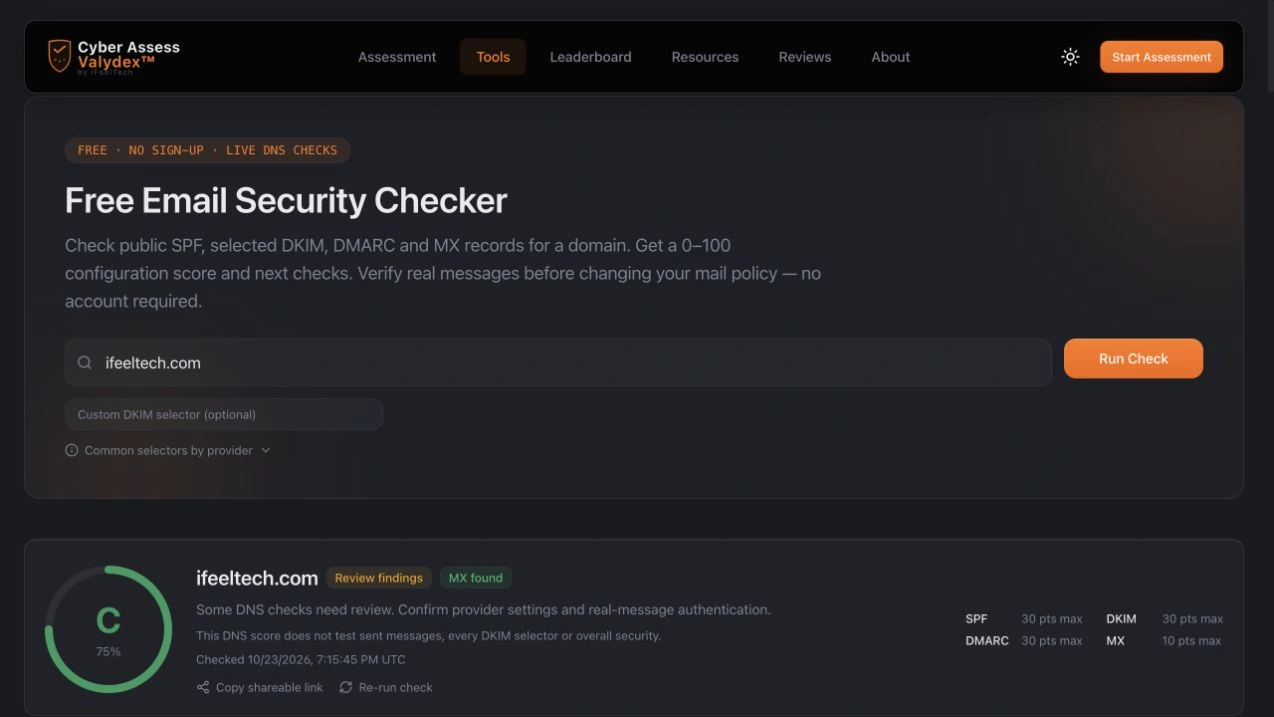
We inspected ifeeltech.com on 23 October 2026. The useful result is a record-by-record view, with clear limits on what public DNS can establish:
| Item | Observed | What remains to test |
|---|---|---|
| SPF | One policy: v=spf1 include:_spf.google.com ~all; Google's referenced policy contained IP ranges without nested includes | Real sending IPs, envelope domains and any other sending services |
| DKIM | A 2048-bit RSA public key at google._domainkey.ifeeltech.com | Whether each outgoing message is signed and validates with an aligned domain |
| DMARC | p=quarantine, three aggregate-report destinations, and ruf/fo failure-report settings | Report arrival, coverage of legitimate traffic and receiver outcomes |
| External report destinations | Both external domains responded with DMARC report authorization records | Whether the reporting accounts are active and monitored |
A DNS-only score cannot settle the questions in the last column. We reproduced the score and inspected public DNS, but did not send a message or read private reports for this audit. The tool found our google key and listed seven other selectors as not found. That display alone does not establish which scoring rules produced the C or prove that those unused names reduced the score. A published key also does not establish that outgoing signatures validate.
We have not changed our DNS because of the grade. We have since built our own free Email Health Check, which reads the same public records and publishes its scoring rubric. On the same unchanged DNS it scores ifeeltech.com 95/100 (A): SPF, a 2048-bit DKIM key and DMARC quarantine with reporting all earn full points, and the five points it withholds are for not using p=reject. Two checkers giving one domain different grades is a reminder that a grade summarizes someone's rubric; it is not a measurement of security. We built this one, so read its published rubric rather than taking the letter on trust.
The more useful next step is the one described below: test real messages from each sending service and read the reports.
The next useful evidence is a message from each real sending service plus reports covering its normal sending cycle. A busy mailbox, monthly invoicing tool and occasional newsletter need different observation windows; an arbitrary number of weeks is not proof of completeness.
Common failures and the first fix to try
| Finding | First check |
|---|---|
spf=permerror | Duplicate policies, syntax, nested lookup terms and obsolete includes |
| SPF passes but DMARC fails | The envelope domain may not align with the visible From |
| DKIM “not found” | Read d= and s= from an actual message rather than guessing selectors |
| Published DKIM key but no signature | Check signing activation in the service, then send again |
| DKIM fails after forwarding | Check whether an intermediary modified signed content |
| Reports never arrive | Check rua, external authorization and participating receiver coverage |
Do not automatically whitelist an unfamiliar sender or add its IP to SPF. Identify the service and confirm that it belongs in the authorized inventory first.
What order should you fix things in?
- Inventory senders and save existing DNS. Include employee mail, invoices, newsletters, website forms, scanners and helpdesk systems. Record their actual envelope and signing domains. If you are setting up a brand-new domain, our small business online setup guide covers domain registration, email and authentication in sequence.
- Check SPF and enable DKIM. Keep one SPF policy per relevant hostname, inspect lookup terms and use each provider's exact DKIM values. These jobs can proceed together, and our free Email Health Check reads all three records from public DNS and shows the exact records to change.
- Verify DMARC and reporting. Preserve an existing working policy. If starting without one, monitoring with
p=noneand a validruadestination can identify sources before enforcement. - Test messages from every service. In Gmail on the web, open a received message and choose More → Show original, as Google documents. Check the receiver-added authentication results and domains. Aim for three passes on a direct test, while remembering that DMARC itself needs only one aligned pass.
- Review normal traffic before tightening policy. Resolve legitimate failures and account for infrequent senders and forwarding paths. Then consider quarantine or reject according to the evidence and business requirements.
- Recheck after changes. A new provider, changed return-path, key rotation or website integration can alter the results.
A passing test applies to that message and path. DNS inspection, actual headers and ongoing reports complement one another. If authenticated mail still lands in spam, follow the delivery troubleshooting guide for reputation, content and recipient-filtering checks.
For a provider-specific example, our Proton custom-domain guide covers records, cutover and incoming-mail tests.
When to get help
A review is useful when you cannot identify a sending source, several systems use the domain, or enforcement is affecting legitimate messages. We help small offices across South Florida review those dependencies and plan changes. See our cybersecurity services or contact us.
Related Resources
- DMARC for Small Business — The phased rollout from monitoring to enforcement, and the tools that read DMARC reports.
- Email Health Check — Free tool that tests your domain's SPF, DKIM and DMARC and shows the DNS records to fix.
- Why Business Email Goes to Spam — Troubleshooting beyond authentication.
- Proton Mail Custom Domain Setup — A provider-specific configuration and verification guide.
- How to Spot Phishing Emails — Attacks that domain authentication does not prevent.
- How to Get Your Small Business Online — Domain registration, business email and authentication, in the order to set them up.
Frequently Asked Questions
Related Articles
More from Cybersecurity

Proton Mail Custom Domain Setup: DNS and Authentication Checks
How to set up a custom domain on Proton Mail: verify it, add SPF, DKIM, DMARC and MX records, then test a real message. Includes DNS examples and fixes.
12 min read
DMARC for Small Business: 2026 Google & Microsoft Requirements Guide
Complete DMARC implementation guide for 2026 Google, Yahoo, and Microsoft email requirements. Learn SPF, DKIM setup, policy phases, and PCI DSS v4.0 compliance to prevent email spoofing and ensure deliverability.
16 min read

Your Employee Just Clicked a Phishing Link. What Do You Do in the Next Hour?
Your employee clicked a phishing link. Follow these 6 steps in the next 60 minutes to contain the threat, protect your data, and prevent the incident from escalating into a full breach.
20 min read