

Small-Business IT Handover Checklist for Changing IT Providers
Changing IT providers? Use this small-business IT handover checklist and free template to verify domain, email, backups, admin access and billing ownership.


Start with one question. If your IT contractor were unavailable from today, could someone else in the business sign in to the email tenant, renew the domain and restore a file this week?
Most owners of a 5-to-25-person business assume the answer is yes because a document exists somewhere. A document is a claim. The handover packet below is built to test the claim, and it works whether your provider is retiring on good terms, being replaced, or has become difficult to reach.
The three checks to make today
Before any inventory work, confirm these three things yourself:
- Ownership. Sign in to your domain registrar and your email tenant with a company-controlled account, not a shared one your provider set up in their own name.
- A second way in. Confirm at least one other authorized person can recover each of those two accounts if the first person is unavailable.
- A restore, not a backup. Pick one file from at least 30 days ago and bring it back. A green backup report is not evidence.
If any of the three fails, that is your starting point. Everything else in this article is the orderly version of the same work.
Who this checklist is for
This covers the handover from an IT contractor, a managed service provider or an internal IT administrator: the person or firm holding domain, email, network and backup control. It is not an employee equipment-return form, and it is not a software-project handover template. If you are offboarding a staff member rather than an IT provider, our former employee access checklist is the closer fit. If your only IT person has just resigned and you are still working out what they managed, start with what to do when your IT person quits and come back here for the verification sequence once the immediate risk is contained.
Do not start with a password reset
The instinct when a provider leaves is to change everything at once. In a cooperative transition it is usually the wrong first move, and we see the damage regularly: a blanket reset takes down a mail connector, a scheduled backup job, a payment integration or a monitoring agent that was authenticating with a service account nobody had written down. The business then has a second problem to diagnose, and the person best placed to explain it has already moved on.
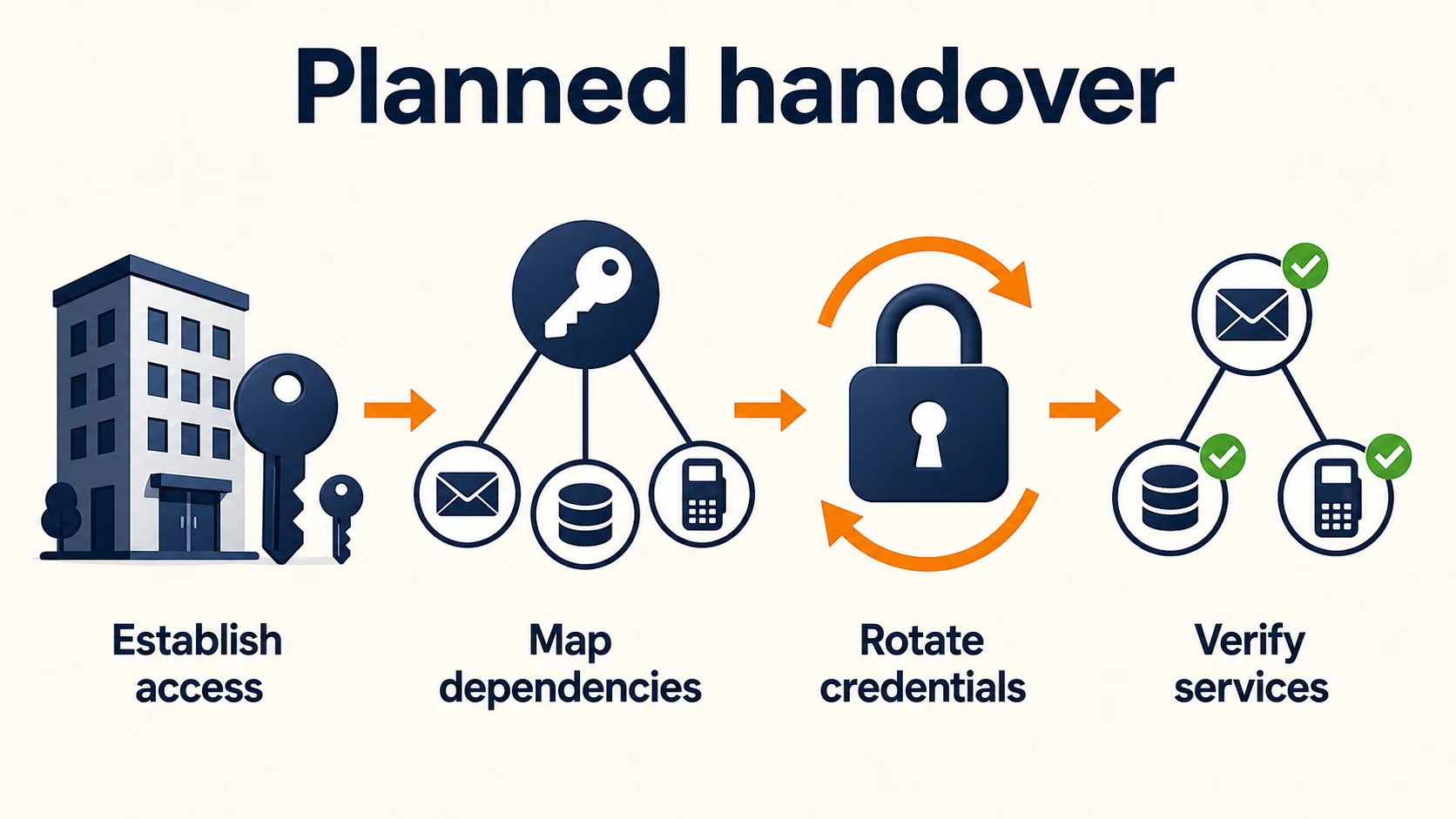
Sequence matters more than speed here. Establish your own access first, find out what depends on the old access second, then rotate in a planned order and check that each service still works.
Two situations that need different speeds
A planned, cooperative transition. The provider is available, the relationship is intact, and you have days or weeks. Work through the packet with them, test as you go, and rotate credentials on an agreed schedule.
A suspected compromise or a hostile departure. Privileged access is different from ordinary employee access. Our former employee access checklist puts credential rotation in a within-24-hours tier, which is a reasonable tempo for a salesperson with a CRM login. It does not apply to someone holding domain registrar control, DNS, tenant global admin or backup console access. Those can control several of the recovery paths you would need afterwards, including the email address that receives your password reset links. Treat it as an incident: revoke sessions and privileged roles immediately, secure the registrar and the email tenant first, then work outward.
The staged checklist below assumes the first situation. It is not permission to leave risky access live while you fill in a spreadsheet.
Download the handover template
Free template, no email required
The full packet is a spreadsheet with one row per system and the evidence columns described below already in place, including criticality, status, MFA and recovery method, evidence location, contract owner, acceptance sign-off and due dates.
- Handover packet (XLSX) — 37 pre-filled system rows, dropdowns for criticality and status, and a How-to-use sheet carrying the evidence standard.
- Handover packet (CSV) — imports cleanly into Google Sheets or any other tool.
Free to copy and adapt. No email address, no sign-up.
Never put secrets in this table
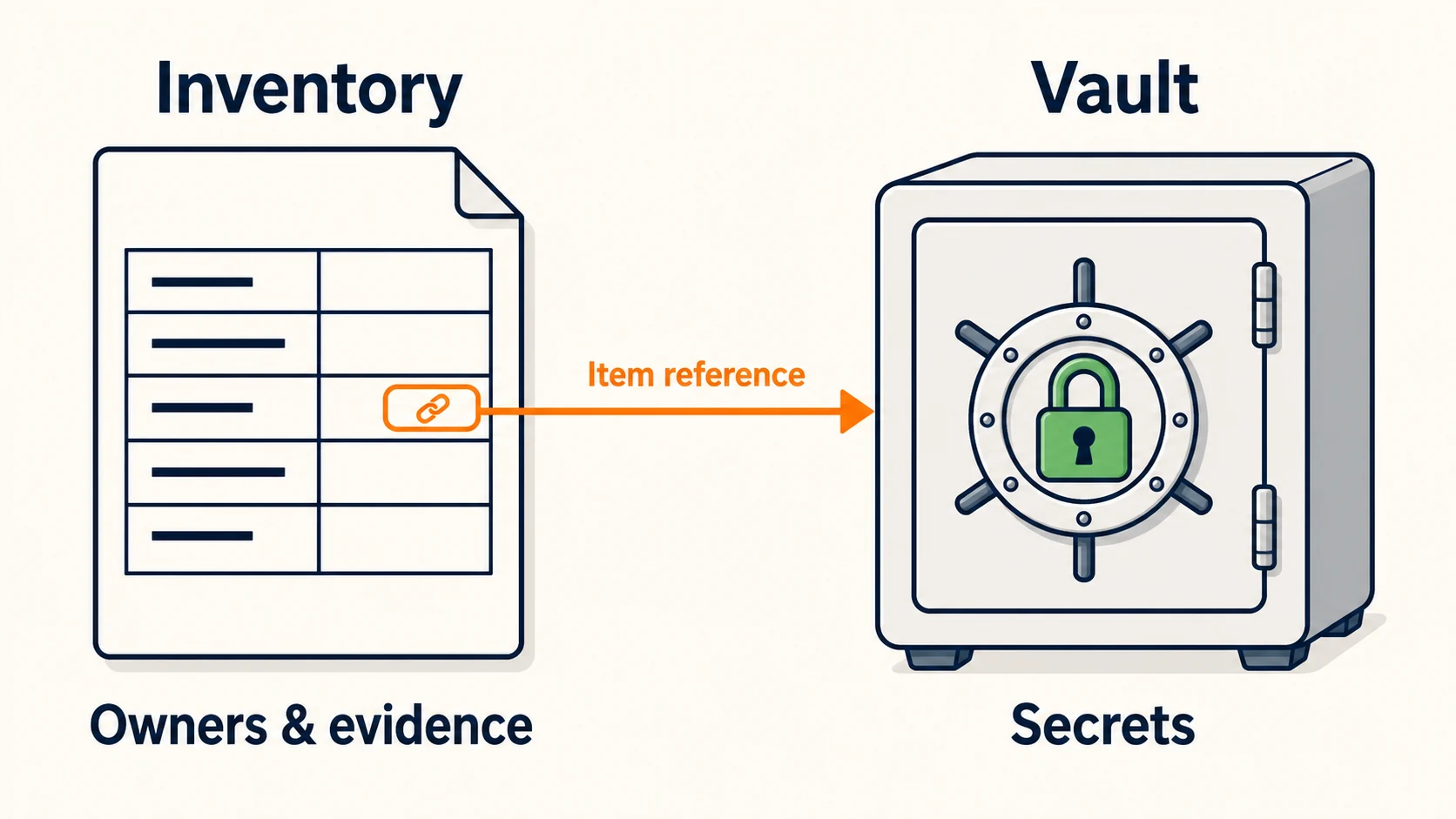
The packet is an inventory, not a vault. No passwords, no recovery codes, no private keys, no seed phrases. Where a secret is needed, the Documentation location column names the vault item — "Vault: Company Admin, item: Registrar owner login" — and the vault controls who can open it. A shared document tends to end up in email, in a chat thread, and eventually on a laptop that is being returned.
What to inventory
These categories cover the core systems in most small businesses we onboard. Work through them roughly in this order, because the early ones control the recovery paths for the later ones. Mark anything that does not apply rather than deleting it, so the next person can see it was considered.
Ownership and identity
- Domain, registrar and DNS. Who the registrant is, which account holds the domain, where DNS is hosted, and whether those are the same provider.
- SSL/TLS certificates. Where they were issued, what renews them, and whether renewal is automated or manual. Public certificates now last 200 days at most, so manual renewals come around more often; our guide to the 200-day SSL certificate limit covers how to inventory and automate them.
- Email and identity tenant. Microsoft 365 or Google Workspace: the tenant, the global admin identities, and which of them belong to the company rather than to a person who is leaving.
- Email security and filtering. Anything sitting in front of the mail flow, plus the DNS records it depends on.
Web and customer-facing
- Website hosting, CMS and e-commerce. Hosting account, publishing platform, payment gateway connection.
- Source-code repositories and deployment accounts. For anything custom, including the CI or hosting account that publishes it.
- Social media, advertising and business-profile accounts. Ownership of a Google Business Profile is a recurring gap.
Network and connectivity
- Internet circuit. Account number, the name on the account, the support line, and whether the router is yours or the carrier's.
- Network and cloud controllers. Firewall, switches, access points, and the cloud console that manages them.
- Network documentation. Diagrams, IP ranges, VLANs, and current device configuration backups.
- VoIP and business telephone numbers. Numbers are portable assets and are often held in the provider's account.
- Remote access and remote support tools. VPN, and whatever the provider used to reach the machines.
Endpoints and security
- Endpoint management. Whatever enrolls and wipes laptops and phones, plus the local administrator accounts on those machines.
- Security stack. EDR or antivirus, vulnerability scanning, log collection or SIEM if present.
Data and applications
- Cloud infrastructure and server hosting. Any servers or cloud accounts running under the provider's billing.
- File storage. Where working files live, and who owns them at the platform level.
- Backup accounts. Where backups are stored, who administers them, and what is covered.
- Line-of-business software. The systems the business cannot invoice or deliver without.
- Accounting, payroll, payment and banking integrations. Including the API connections between them.
Commercial and record
- Software licenses and vendor contracts. What is licensed to the business and what is licensed to the provider.
- Hardware inventory, warranties and leased equipment. Especially anything the provider supplied.
- Cyber insurance and compliance evidence. Policy number, broker, incident-response hotline, and any evidence the insurer expects you to hold.
- Open tickets, known defects and temporary workarounds. These are easy to lose in a transition and awkward to rediscover.
- Documentation and support contacts. Where the written record lives and who to call for each vendor.
A document is not proof of access
This is the step that separates a real handover from a folder of PDFs. A row is only finished when you have produced evidence yourself, not when someone has told you it is fine.
The evidence standard for a verified row:
- A named, company-owned account signs in without the departing provider's help. Not a shared login, not the provider's account, not a screenshot they sent you.
- The MFA factor is held by the business, and the recovery method has been tested or independently confirmed. An authenticator app on a phone that is leaving with the contractor is a gap, not a control.
- The renewal and billing notice goes to an address more than one authorized person reads. A renewal notice sent to a former contractor's inbox is a common cause of an expired domain, and it is avoidable.
- The configuration export is stored, for any system that produces one — firewall, controller, DNS zone.
- Where backups apply, one file has been restored to a scratch location and opened in its native application. Our restore testing guide covers the full quarterly procedure; for a handover, a single verified file is enough to prove the account works and the data is real.
- The incoming technical owner accepts the row, in writing, as something they are now responsible for.
- The business owner signs off on anything still unresolved, with the impact stated plainly.
Record the date beside each one. An untested row is a gap, and gaps are the output of this exercise.
A filled example
The rows below are an illustration for a fictional eight-person marketing firm, written to show the level of detail that makes a row useful. They are not a client record. The downloadable template carries the fuller column set; this is the readable core of it.
| System | Business owner | Admin identity | Recovery custodian | Billing owner | Renewal date | Documentation location | Last access test | Last restore test | Gap | Next action |
|---|---|---|---|---|---|---|---|---|---|---|
| Domain + registrar | Dana (owner) | dana@example-firm.com | Marcus (ops) | Company card ending 4417 | 2027-03-14 | Vault: Company Admin | 2026-08-28 | n/a | Registrant contact still lists the former contractor | Correct the registrant, and check whether the registrar allows an opt-out from the 60-day transfer lock before doing it |
| Email / identity tenant | Dana | admin@example-firm.com | Marcus | Company card ending 4417 | 2027-01-09 | Vault: Company Admin | 2026-08-28 | 2026-08-29 | Only one global admin, no emergency access accounts | Add a second administrator and two cloud-only emergency access accounts |
| Backup platform | Marcus | ops-admin@example-firm.com | Dana | Company card ending 4417 | 2026-11-02 | Vault: Company Admin | 2026-08-29 | 2026-08-29 | None | Re-test at the next quarterly review |
| Line-of-business app | Priya (delivery) | priya@example-firm.com | Dana | Provider invoices monthly | Monthly | Shared doc: Ops Handbook | 2026-08-27 | Not applicable to plan | Provider holds the only tenant admin | Request a company-owned admin account before the transition date |
| Network controller | Marcus | ops-admin@example-firm.com | Dana | n/a | n/a | Vault: Company Admin | 2026-08-30 | 2026-08-30 | Local device passwords unknown | Retrieve or reset device credentials during the handover meeting |
Every row above was tested, and four of the five still carry a named gap with an owner and a next action. That is a better position than ten rows of confident text nobody has tested.
A workable transition timeline
In our experience, the transitions that go badly are usually the ones compressed into a single afternoon.
Two to four weeks before. Build the inventory. Pull the contracts. Identify which accounts are in the provider's name. Introduce the incoming provider and agree who does what on the day. If you are still choosing that provider, our questions to ask a network security provider covers the evaluation.
Three to five days before. Finish the access and recovery testing. Run the restore test. Export configurations — firewall, controller, DNS zone, mail flow rules. Close anything that needs the departing provider's cooperation while you still have it.
Handover day. Transfer authority: registrar account, tenant roles, billing ownership. Revoke sessions and roles that are no longer needed. Rotate the high-risk credentials in the planned sequence below.
Twenty-four to seventy-two hours after. Verify mail flow, backup jobs, monitoring alerts, payment integrations and remote access. A service account that broke during rotation usually shows up in this window.
Thirty days after. Close the remaining gaps, confirm the billing has actually moved, and archive the signed packet where the next person will find it.
Transferring responsibility without breaking anything
Establish before you remove. Add your replacement admin and a second recovery path first. Confirm both work. Only then reduce the departing provider's access.
In Microsoft 365 specifically, one additional global administrator is not the whole answer. Microsoft's guidance is to create two or more dedicated emergency access accounts, each permanently assigned the Global Administrator role. They should be cloud-only accounts on the .onmicrosoft.com domain, not federated or synchronized from on-premises, not associated with any individual employee, using phishing-resistant authentication (a FIDO2 passkey, or certificate-based authentication) different from your everyday admin sign-in, excluded from the Conditional Access policies that could lock them out, and validated at least every 90 days. If you use Privileged Identity Management, the role assignment should be permanently active rather than eligible, so nothing has to be activated during an outage. Two accounts rather than one, so a single unavailable credential does not return you to the starting position.
Find what authenticates without a person. Service accounts, OAuth grants and app passwords, API keys, scheduled tasks and scripts, and any automation tied to the provider's own identity. This is where post-handover outages come from. Ask directly: which automated jobs run under your account?
Rotate in a planned sequence, then verify. Change the credential, restart or re-authorize the dependent service, and confirm it still runs. Mail flow, backup jobs, payment integrations and monitoring alerts are the four worth checking explicitly.
Preserve before you delete. In Microsoft 365, the documented order is to block sign-in, preserve the mailbox, wipe company data from mobile devices, forward mail or convert to a shared mailbox, and grant another employee access to the OneDrive and Outlook content — all before deleting the account. One caveat from Microsoft's delete-a-user guidance: an account that has been converted to a shared mailbox, or that is still forwarding mail, still needs to exist, so keep it rather than deleting it.
Deleting starts a 30-day window in which the account and its mailbox can normally be restored, subject to any retention policy or legal hold that applies. OneDrive runs a separate clock: the retention period for a deleted user's OneDrive defaults to 30 days and is configurable, after which the OneDrive is moved to the site collection recycle bin and kept there for a further 93 days, where recovering it can require PowerShell rather than the admin center. None of that is a reason to delete first and sort it out later — the access grant belongs before the deletion, while the content is still where you expect it.
Google Workspace runs its own transfer process, and the ownership rule differs: files in a shared drive belong to the organization and survive the member's deletion, while files in an individual's My Drive belong to that person and need an explicit transfer. Verify each platform separately rather than assuming one pattern covers both.
Sharing history is not the same as revoked access
Removing someone from a vault stops future access. It does not retract a secret that was already copied. For any credential a departing provider could have opened, rotate it and revoke active sessions rather than relying on permission removal alone.
The commercial side of the handover
The technical work assumes cooperation. The contract is what you rely on when cooperation thins out, so read it before the last week rather than during it.
- Notice and termination. How much notice each side owes, and what triggers the end of the engagement.
- Data export obligations. What the provider must hand over, in what format, and by when.
- Documentation ownership. Whether network diagrams, configurations and runbooks belong to the business or to the provider's own knowledge base.
- Return or deletion of company data. Including copies held in their RMM, backup or ticketing systems.
- The cooperation period and its cost. Many agreements bill transition support hourly. Agree a budget rather than discovering the rate afterwards.
- Equipment ownership. Firewalls, switches, access points and licenses supplied under a managed agreement are often the provider's, and leave with them.
- Final invoices and prepaid subscriptions. Annual licenses bought through the provider may need reassignment rather than repurchase.
If a provider stops responding, most platforms have an account-recovery or ownership-dispute process: the registrar for a domain, the vendor for a tenant, the carrier for a circuit. Those processes need documentation — incorporation records, billing history, proof of the account email — so gather it before you open the case. If the business cannot regain control of a system it depends on, or company data appears to have been taken or withheld, that is the point to involve legal counsel, and to call the incident-response number on your cyber-insurance policy rather than after you have tried a few things yourself.
The handover acceptance meeting
This is the final review, not the testing session. Book 60 to 90 minutes with the owner and the departing provider once the access and recovery tests above are already done. Work down the packet row by row, confirm the recorded evidence, and re-test the highest-criticality systems live — the domain, the email tenant, the backup platform, and whatever the business cannot invoice without. The provider demonstrates; the business signs in.
Anything that fails gets four things written next to it: an owner, the impact if it stays unresolved, a due date, and — once the business owner has agreed to carry the risk in the meantime — a signature and a date. A named gap with an owner, an impact and a due date is properly documented, but it stays open until it is resolved or formally accepted as a temporary risk. A row marked "to be confirmed" is neither.
Keeping it useful afterwards
The packet decays quietly. Review it when the people change — someone joins, leaves, or changes role — when the provider changes, and when a system changes: a new controller, a migrated mailbox, a replaced backup target. Beyond that, a short scheduled look twice a year keeps it honest without turning into a compliance exercise. A yearly walk through the office, such as our 12-stop small office IT checklist, is a practical moment to check that the packet still matches what is on the shelves.
The test never changes. Someone other than the person who set it up signs in, and someone other than the last person to touch the backup restores a file. If both still work, your business would keep running.
Businesses across South Florida often bring us in mid-transition, sometimes after a provider has already become hard to reach. The packet above is the same one we build on those engagements. If you would rather have it done with you than by you, our team handles the verification and the rotation sequence as part of a managed IT engagement.
Optional: choosing a business password manager
Affiliate Disclosure: This article contains affiliate links. If you make a purchase through these links, we may earn a small commission at no extra cost to you. As an Amazon Associate, iFeelTech earns from qualifying purchases.
Start with the vault the business already pays for. If it can hold shared items, name a second person who can recover a locked-out account, and remove a user cleanly, you do not need a new subscription to finish this packet.
If you are replacing it, 1Password Business is $8.99 per user per month billed annually, and lets you create a custom group carrying only the Recover Accounts permission, so a second person can restore access without inheriting administrative control. Note that recovery codes are an individual and family feature — they are deactivated when an account joins a business plan, so business recovery is always assisted by someone else. 1Password's own guidance is to keep at least two owners for exactly that reason.
Proton Pass Business is $1.99 per user per month for Pass Essentials and $4.49 for Pass Professional, both billed annually with a three-user minimum. Admin-led account recovery is included on both tiers, though the exact path depends on how the organization is configured; group sharing and CLI access are Professional-tier features. Proton's Emergency Access — up to five trusted contacts with a configurable waiting period — is a personal contingency feature that requires Proton Mail addresses on both sides, not a substitute for delegated business recovery.
The two products handle assisted recovery, administration and privacy differently, so compare them on your own four tasks rather than treating them as equivalent. And a vault does not recover a domain registered under someone else's name, open a personal vault you were never shared on, or bypass a platform's own recovery process. Those stay rows in the packet. If you do adopt a new vault, our password manager rollout guide covers piloting recovery, migrating in batches and offboarding.
Sources and verification
Fact-checked August 31, 2026 and re-checked against the Microsoft, ICANN and 1Password sources below on October 6, 2026. Pricing for 1Password and Proton Pass was verified on the vendors' own pricing pages on that date and is quoted in USD with annual billing; confirm at checkout, as plans and prices change.
- ICANN Transfer Policy — Change of Registrant and the 60-day inter-registrar transfer lock, including the opt-out.
- Microsoft: remove a former employee and delete a user — the preservation order and the restore windows.
- Microsoft: restore a deleted OneDrive — retention period and the 93-day site collection recycle bin.
- Microsoft Entra: manage emergency access accounts — two or more accounts, cloud-only, phishing-resistant, validated at least every 90 days.
- 1Password: recovery codes, account recovery and business security practices.
- Proton Pass business pricing and Emergency Access.
- NIST SP 800-34 Rev. 1 — contingency plan testing, which is why a restore beats a backup report.
Related Resources
- Who Owns Your Business Domain Name? — How to check who holds the domain and move it into the company's name without tripping the 60-day transfer waits.
- Former Employee Access Security — The offboarding sequence for a departing employee, with same-day, 24-hour and one-week tiers.
- Small Business IT Policy Templates — The governance documents that sit alongside this operational inventory.
- How to Run a Backup Restore Test — The full quarterly restore procedure behind the acceptance test above.
- 1Password Business Review — Admin console, recovery model and real costs after dozens of SMB deployments.
- Proton Pass Business Review — Two years of deployment notes, pricing tiers and recovery options.
- What to Do When Your IT Person Quits — The unplanned version of this transition: containing the immediate risk when a departure was not scheduled, plus the hire-or-outsource decision.
- Questions to Ask a Network Security Provider — Evaluating whoever takes over, before you hand them the packet.
- Small Business Disaster Recovery Guide — Where this inventory fits into a wider continuity plan.
- New Employee IT Onboarding Checklist — Setting up the named account your replacement IT contact will need.
Frequently Asked Questions
Related Articles
More from IT Guides

Who Owns Your Business Domain Name? How to Check and Secure It
Check your domain's registrar, registrant and account access. Recover control from a former provider and protect website and email service during a transfer.
10 min read

Small Business Disaster Recovery: Building IT Resilience That Actually Works
A practical disaster recovery guide for small businesses. Learn the 3-2-1-1-0 backup rule, understand RTO/RPO, and build a recovery plan that protects against ransomware, outages, and data loss.
15 min read

Managed IT Services Pricing: Per-User Costs and What to Budget in 2026
Budget $125 to $250 per user for managed IT using our South Florida estimates. Compare pricing models, exclusions, setup costs and quotes in this 2026 guide.
12 min read