

AI Vishing and Deepfake CEO Fraud: What Small Businesses Need to Know (and Do) in 2026
AI voice cloning now drives 40% of BEC attacks. Learn how they work, why standard training misses them, and three controls a small business can deploy this week.

Three seconds of recorded audio is enough to clone a voice. A voicemail greeting, a conference call, a YouTube interview — any of them can be fed into a voice cloning tool that costs under $20. The result is a phone call that sounds exactly like the CEO, the CFO, or whoever your employee most trusts to authorize something urgent.
By early 2026, industry research puts AI-generated voice, video, or text in roughly 40% of business email compromise (BEC) attacks — up from under 5% in 2023 — with average per-incident losses for AI-augmented attacks above $4.1 million, more than triple the figure for traditional phishing. The pattern shows up wherever anyone measures it. Gartner found that 62% of organizations have already experienced a deepfake attack involving social engineering, and in its survey of 302 security leaders, 43% had fielded at least one cloned-audio phone call. Verizon's 2026 Data Breach Investigations Report, published in May, documents attackers using synthetic voice to talk their way past help desk identity checks — and mobile social engineering succeeding 40% more often than a year earlier.
What makes this different from the phishing emails your training already covers is that the attacker isn't asking anyone to click anything. They're calling. They sound like someone your employee knows. They create urgency, invoke authority, and ask for something plausible — a wire transfer, a password reset, a payroll redirect. Roughly three-quarters of BEC attacks demand action within 24 to 48 hours — a deadline short enough to discourage verification.
How Does an AI Vishing Attack Work?
An AI vishing attack uses public audio samples, caller ID spoofing, and social media reconnaissance to impersonate executives over live phone calls. The audio requirement is minimal: current voice-security research puts a usable clone — an 85% acoustic match to the original speaker — at roughly three seconds of source audio, produced with consumer tools rather than specialist software. The attack runs in three stages.
Reconnaissance. Your company website lists the leadership team. LinkedIn shows who runs finance and who reports to whom. The owner posted last week that she's speaking at a conference in Orlando on Thursday. That's the entire intelligence phase — public information, assembled in an afternoon.
Voice synthesis. The owner has a two-minute appearance on a local business podcast and a recorded webinar on the company's YouTube channel. Either is more source material than a cloning tool needs.
Delivery. Caller ID spoofing — making the call appear to come from the owner's actual cell number — requires no technical skill and costs almost nothing. The attacker calls your finance manager on Thursday morning, while the owner is known to be at the conference and hard to reach. The voice, the number, and the story all check out: "I'm about to walk into a session. We need to get a deposit out to the new vendor today or we lose the contract terms. I'll send the details — can you get it moving in the next hour?"
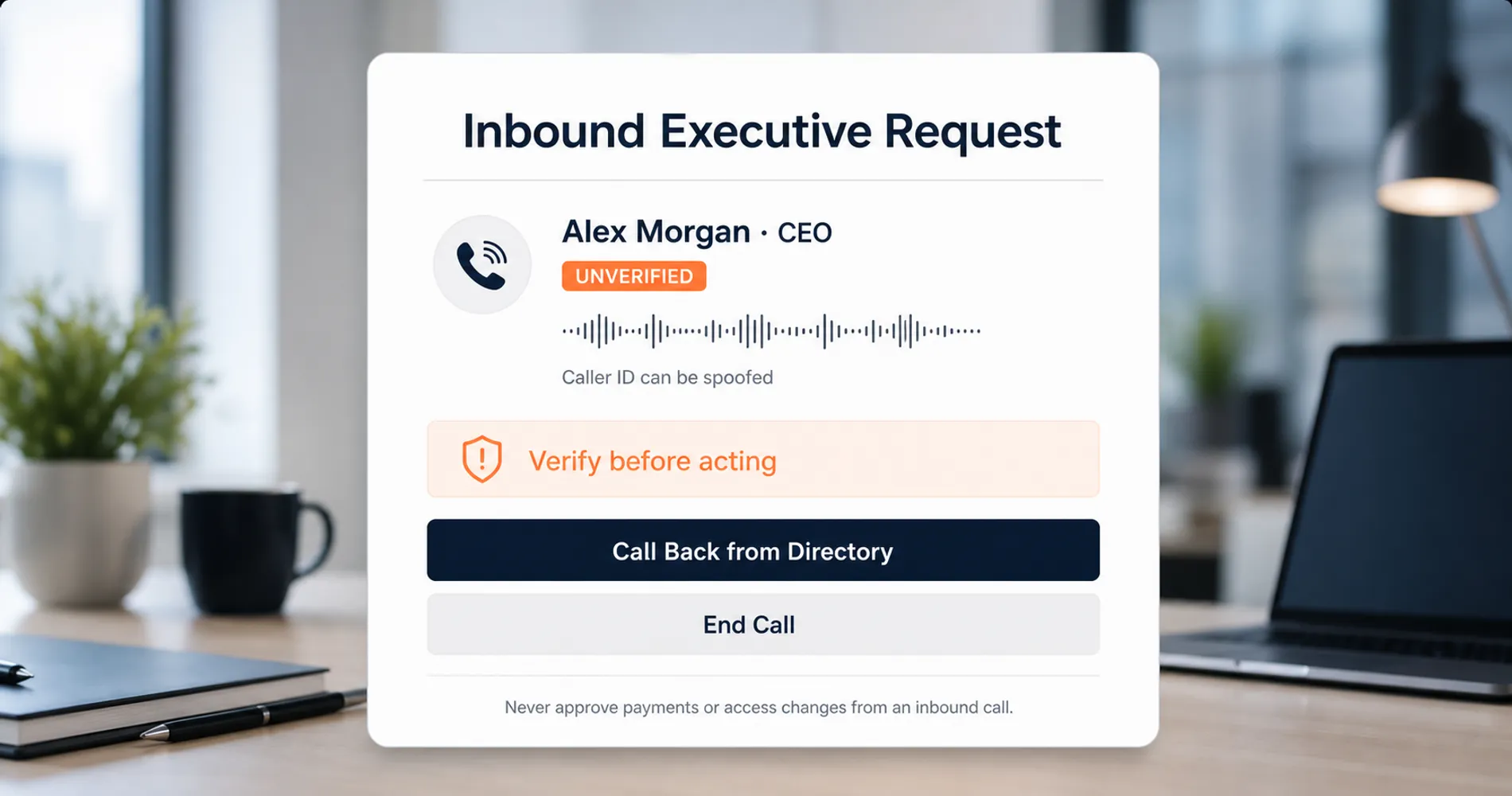
The 3-Second Threshold Changes Who Is Exposed
If anyone in your leadership has a public voicemail greeting, a podcast appearance, a YouTube video, a webinar recording, or a conference talk online, the source material for a voice clone already exists. This is not a risk you can remove by being careful going forward — the audio is already public. The defense has to assume the clone is possible.
Notice what's missing from this attack: malware, a phishing link, a suspicious attachment, a compromised account. None of the technical safeguards most businesses rely on apply to it. The finance manager who approves that wire transfer made a reasonable decision based on the information available to them — the failure is systemic, not individual. Which raises the obvious question: why didn't training catch this?
Why Traditional Phishing Training Fails Against AI Vishing
Standard phishing training relies on spotting visual email anomalies, while AI vishing exploits live phone urgency to bypass every verification habit that training built. Check the sender address, hover over the link, watch for bad grammar — each of those instincts is anchored to a screen, and none of them fire during a phone call.
| Traditional phishing | AI vishing | |
|---|---|---|
| Channel | Email — visual, asynchronous | Phone — auditory, real time |
| Trained reflex | Inspect sender, hover links, report | None — no equivalent reflex exists for voice |
| Time to decide | Minutes or hours; the email waits | Seconds, under live social pressure |
| Detection signal | Odd grammar, mismatched domains, suspicious links | None reliable — the voice is familiar and the caller ID matches |
| What defeats it | Email filtering + user skepticism | Out-of-band verification only |
This is the first gap: the verification muscle memory is channel-specific. An employee who would never click a link in a suspicious email has no equivalent reflex for a live voice. The same employee who reports phishing emails weekly can approve a fraudulent wire transfer the same afternoon without experiencing any sense of contradiction — because nothing in their training connected the two.
The second gap: authority plus urgency is engineered to suppress the "check with someone" instinct. These calls almost always combine a senior voice, a tight deadline, and a reason for secrecy or unavailability ("I'm in meetings all day, just get it done"). That combination isn't incidental — it's the payload. The attack is specifically constructed so that the one action that would defeat it (hanging up and verifying) feels insubordinate in the moment.
Neither gap is a training failure in the sense of employees not paying attention. It's a design problem: the training was built for a threat model that no longer matches the threat. If your team is also seeing fake browser prompts asking them to run commands, that's the same authority-plus-urgency structure delivered in the browser — our ClickFix attack guide covers that vector specifically.
The Email Side Has the Same Problem
AI-generated phishing emails carry the same implication for email training: grammar mistakes and awkward tone are no longer reliable signals, because the attacker's writing is now machine-perfect. If an employee does click one, the response steps in our phishing link response guide still apply — but detection can no longer lean on "it read like a scam."
The fix is not more awareness content. It's a procedure that works regardless of how convincing the voice is.
Three Protocols to Stop AI Vishing Attacks
Call-back verification, verbal security codes, and two-person authorization block AI voice cloning fraud without any security software or budget. They work not by detecting the fake but by removing the phone call as a sufficient basis for action, and a 15-person business can implement all three in under an hour.
We've taken these calls from South Florida businesses after the money was already gone. A representative case: a logistics company where a bookkeeper approved a mid-five-figure vendor payment after a call that sounded exactly like the owner, timed to a week the owner was traveling. The company had a verification policy on paper — the point of failure was that nobody had told the bookkeeper it applied when the request came from the boss himself. The attack exploited trust built over years, not a technical vulnerability, and that is exactly the failure mode these three controls are designed to absorb.
1. Call-back verification. No financial transaction, credential reset, or access change gets executed based on an inbound call — ever, regardless of who is calling. The employee says, "Got it, let me call you right back," hangs up, and dials the person's number from the internal directory, not the number that just called. This works because the attacker controls the inbound channel (the cloned voice, the spoofed caller ID) but cannot control the outbound one. The real owner answers her real phone, and the attack ends there.
2. A verbal verification code. Establish a short word or number code known to your team and leadership. Any caller claiming to be internal leadership and requesting money, credentials, or access can be asked for it by any employee. A caller who can't produce it hasn't passed — no matter how much they sound like the CEO. This works because the code never appears in any audio recording, social media post, or email an attacker could harvest. Setting it up takes ten minutes at one team meeting. Rotate it if anyone leaves.
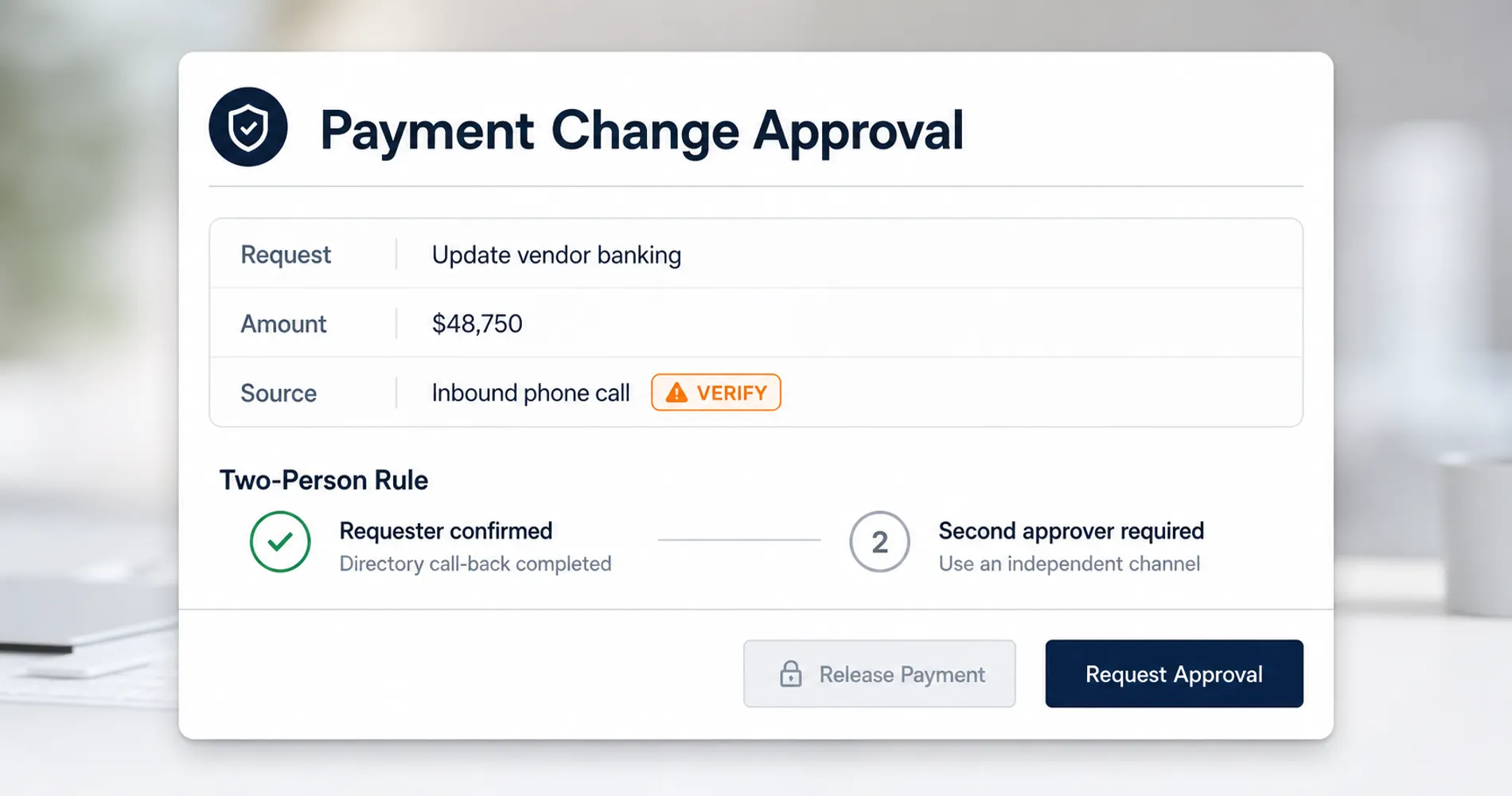
3. The two-person rule for money movement. No wire transfer, payroll banking change, or vendor payment-detail change is executed by a single person acting on a phone request alone. A second person must independently confirm — and "independently" means through their own channel, not by being conferenced into the same call. This works because the attacker's entire investment is in compromising one moment of one person's judgment. Requiring a second, separate judgment multiplies the cost of the attack beyond what most attackers will spend on a small business.
| Control | How to implement | Time to deploy | What it stops |
|---|---|---|---|
| Call-back verification | Policy: all financial/access requests by phone get a call-back to a directory number. Put it in writing; tell the team. | 30 minutes | Cloned voices and spoofed caller ID — the attacker can't receive your outbound call |
| Verbal code | Pick a code at one team meeting. Leadership commits to providing it when asked. Rotate on staff changes. | 10 minutes | Impersonation of executives, even with a perfect voice match |
| Two-person rule | No single-person authorization for wires, payroll changes, or vendor banking updates. Second approver confirms via their own channel. | 30 minutes | The single-point-of-judgment failure every BEC attack depends on |
These controls also apply unchanged to video. The widely reported $25.6 million Arup fraud in early 2024 was not a phone call — it was a deepfake video conference, with an entire meeting of synthetic colleagues directing a finance employee through fifteen transfers. A live deepfake on a video call is still an inbound request, and it still fails call-back verification and the two-person rule.
Why "Just Ask Them Something Personal" No Longer Works
Challenge questions are not a reliable defense in 2026, because real-time voice AI now responds faster than conversational suspicion can register. Voice conversion latency has dropped below 200 milliseconds on consumer hardware, and commercial conversational stacks routinely respond in under 300 — there is no telltale lag, no robotic pause, no stumble when you ask an unexpected question. And the content of a personal challenge ("where did we have lunch last month?") is exactly the kind of detail a prepared attacker harvests from social media, or simply deflects: "I'm walking into a meeting, just handle it." The verbal code from the table above survives where challenge questions fail because it is pre-arranged, never spoken in public audio, and binary — the caller either has it or hasn't passed. Conversational friction is no longer a reliable signal; out-of-band verification is.
One more scope note: not every vishing call asks for money. Some ask the employee to "verify" a password or approve an MFA prompt, turning a cloned voice into stolen credentials. The same protocols apply — but this is also where FIDO2 hardware security keys earn their place, because a physical key makes a phished password useless on its own. Our passkeys and hardware key guide covers when a YubiKey is worth it for a small team.
One implementation note from the field: the protocol only works if leadership submits to it. If the owner gets annoyed when an employee asks for the verification code, the protocol will stop being used within a month. The most important moment in the rollout is the first time an employee challenges a real executive — and gets thanked for it.
How to Train Employees Against AI Vishing
Small businesses can train teams effectively with a live voice-cloning demonstration, a one-page reference card, and a drill-friendly culture — no platform subscription required. The whole program takes about an hour to set up.
Run the 15-minute demo. Take a low-cost voice cloning tool, feed it 30 seconds of the owner's voice from any existing recording, and play the result for your team — with the owner in the room. Hearing a machine speak in a voice everyone recognizes accomplishes what no written policy can: it makes the threat concrete in under a minute. The question that usually follows — "how do we know any call is real?" — is the training objective, and the protocol from the previous section is the answer.
Issue a one-page reference card. The three controls — call back on a directory number, ask for the code, get a second approver — on a single page at every desk that touches money or credentials. Under pressure, people don't recall training sessions; they look at what's in front of them.
Build a "was this a test?" culture. Announce that vishing drills may happen at any time, and that following the protocol is always the right answer — even when the call turns out to be the real CEO with a real urgent request. The employee who makes a genuine executive wait ten minutes for a call-back should be recognized publicly, not corrected. Once one employee gets pushback for verifying, the rest of the team quietly stops verifying.
When to graduate to a simulation platform. One correction to common advice: most free security tools don't actually cover the phone channel. KnowBe4's free Phishing Security Test is genuinely useful for an email baseline — it covers up to 100 users with no sales call — but it's email-only; simulated vishing calls require their paid Gold tier and up, and Proofpoint offers vishing awareness content but no outbound call simulation at all. If your team grows past the point where the DIY demo scales, two platforms actually fit a small business buying without a security department. Jericho Security runs AI-generated adaptive vishing calls — conversations that respond to what your employee says, not scripted recordings — and is one of the few platforms with genuine self-serve onboarding: a 7-day trial, no sales meetings, built explicitly for SMB deployment. Brightside AI bundles vishing simulation with deepfake scenarios and OSINT scanning of your team's public exposure at $3.90 per seat per month on its top tier — under $60/month for a 15-person company. For the email side of the same training effort, our visual phishing identification guide works as the companion resource.
What Should a Business Do Immediately After a Vishing Attack?
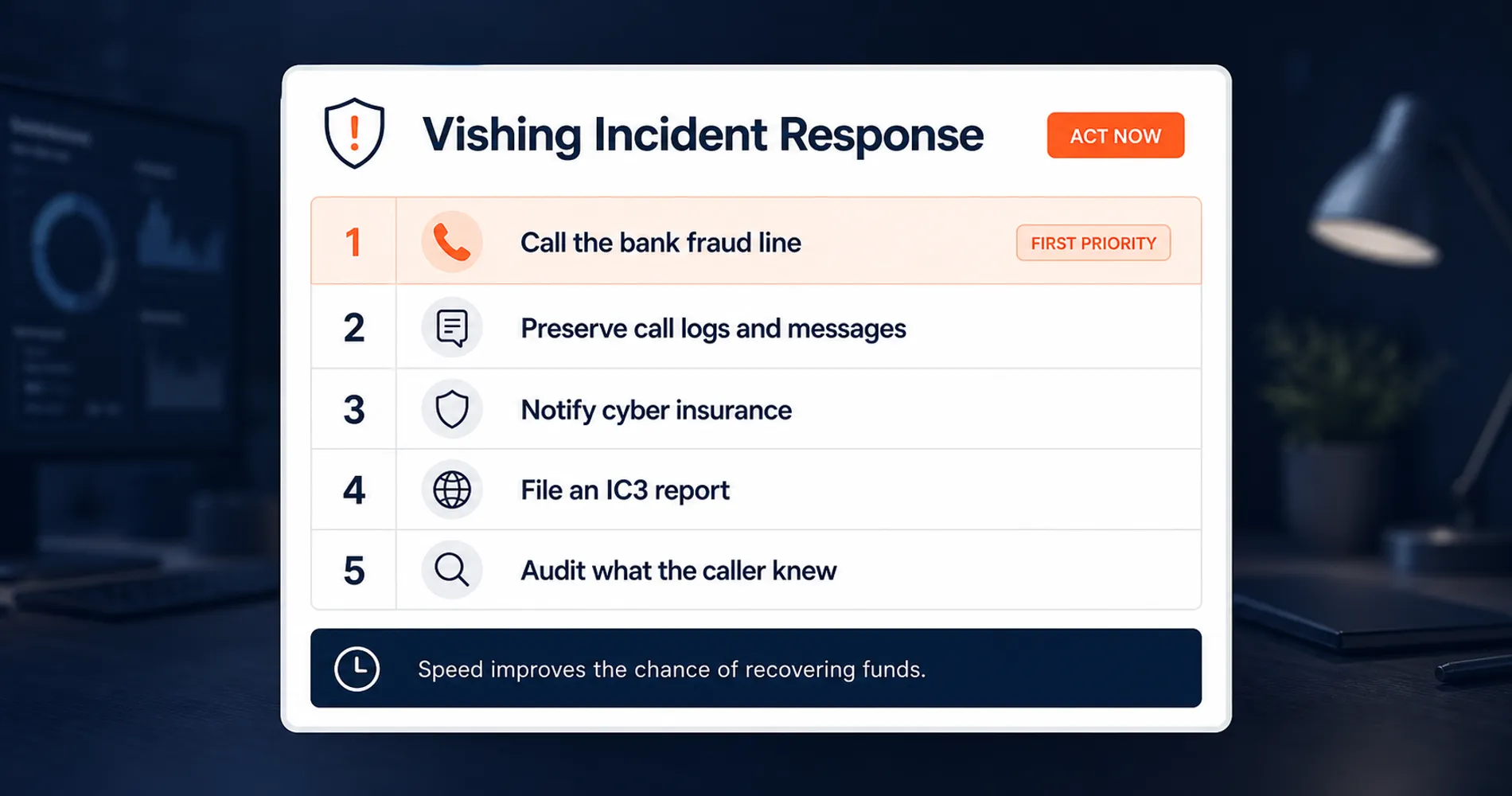
Stop the transaction through your bank's fraud line, document all call records, notify your cyber insurance carrier within its reporting window, and file an IC3 report to trigger the FBI's fund-freezing process. Work the list in order — speed determines whether the money is recoverable.
-
Stop the transaction. Call your bank's fraud line immediately — the number on the back of your card or from your banker's verified contact, never a number from the wire confirmation or any recent caller. Ask for a recall of the funds and the bank's indemnification paperwork. Nearly all BEC losses move by wire or ACH, which means the money moves fast — but freezes are genuinely possible: the FBI's Recovery Asset Team froze $679 million in fraudulent transfers last year, and recall requests filed within hours have a meaningfully better chance than ones filed after the funds make their second hop to another account.
-
Document everything before anyone cleans up. The call log, voicemails, the caller ID that displayed, the internal approval chain, timestamps, any follow-up emails or texts. Don't delete anything, including messages that feel embarrassing in hindsight — they are evidence for the bank, the insurer, and the FBI.
-
Notify your cyber insurance carrier inside the reporting window. Most policies require incident notification within 24–72 hours of discovery. Missing the window can void coverage on its own, independent of what the policy covers.
-
File a report at ic3.gov. BEC is specifically tracked, and the IC3 complaint is what initiates the Recovery Asset Team's Financial Fraud Kill Chain process with the receiving bank — the mechanism behind the $679 million in frozen transfers mentioned above.
-
Audit what the caller knew. They knew your executive's name, your employee's name, who handles payments, and possibly the executive's travel schedule. That intelligence came from somewhere — usually your website, LinkedIn, and social media, but sometimes a compromised mailbox that's still compromised. If the caller referenced details from internal email threads, treat it as an active email compromise and respond accordingly.
The Insurance Clause That Surprises People After the Incident
Many cyber insurance policies exclude or sharply limit social engineering losses if the policyholder cannot demonstrate documented verification procedures that were in place before the incident. A written protocol — even the one-page version from this article, dated and distributed — is the difference between a covered claim and a denied one. Implement it before you need it; it cannot be backdated.
The Bigger Picture: Why AI Changes the SMB Threat Model
AI removed the cost barrier that once kept sophisticated impersonation attacks pointed exclusively at large enterprises. For years, small businesses had an unspoken security assumption: sophisticated attacks weren't worth running against small targets. Cloning a voice, researching an org chart, and timing a call used to require effort that only made sense against a company with millions to steal. That is no longer true. The same class of attack that once targeted multinationals with dedicated fraud teams now scales down profitably to a $40,000 wire from a 15-person company — because the marginal cost of the attack is a $20 tool and a few hours of prep.
What hasn't changed is the defense. Notice that nothing in this article asked you to buy detection software that spots fake voices — that's an arms race, and current detection tools lose accuracy precisely in the messy real-world conditions where attacks happen. Call-back verification, a verbal code, and two-person authorization are procedural controls, and that's exactly why they hold: they don't need to detect the fake, because they make a convincing voice insufficient to move money. For businesses that want to see where these controls fit in a complete security posture, our NIST cybersecurity framework guide for small businesses provides the broader structure.
If you're looking at your current security training and realizing it covers email but not the phone on every desk, that's worth acting on before the call comes rather than after. We provide IT security assessments for South Florida businesses that include exactly this kind of gap analysis — where your verification procedures, training, and infrastructure stand against the current threat model, and what to fix first.
Related Resources
- Your Employee Just Clicked a Phishing Link. What Do You Do in the Next Hour? — The email-channel companion: containment steps for the first 60 minutes after a phishing click.
- ClickFix Attacks: The Copy-Paste Threat Targeting Small Businesses — The same authority-and-urgency playbook, delivered through fake browser prompts instead of phone calls.
- How to Spot a Phishing Email: A Visual Guide — The visual training resource for the email side of your awareness program.
- NIST Cybersecurity Framework for Small Business — The broader framework these verification controls fit into.
- Cybersecurity Services — Security assessments and training programs for South Florida businesses.
Frequently Asked Questions
Related Articles
More from Cybersecurity
Are Free VPN Extensions Safe for Small Businesses? A July 2026 Check
Recent VPN incidents showed how extensions can expose passwords, AI conversations, and browser traffic. Learn how to audit extensions, build an allowlist, and protect your company.
11 min read
Best VPN for Small Business Privacy in 2026: What Actually Keeps Your Data Safe
A practical guide for small business owners and IT managers on choosing a VPN that genuinely protects business data. Covers no-log audits, jurisdiction, 5/9/14 Eyes, and real business privacy requirements.
20 min read
What Is Credential Harvesting? The Attack That Bypasses Your Password Manager
Credential harvesting steals the background keys that run your business systems — not passwords. Here's what it is, who's at risk, and what to ask your IT team.
11 min read