

UniFi Gateway Comparison Guide 2026: All 11 Models Ranked
Complete UniFi gateway comparison covering all 11 current models — from Cloud Gateway Ultra ($129) to Dream Machine Beast ($1,499) and Enterprise Fortress Gateway ($1,999). Exact device counts, throughput thresholds, and storage economics.

Quick Decision: Which Gateway Do You Need?
Under $200: Cloud Gateway Ultra ($129) for wired-only, Express 7 ($199) for WiFi 7
$200-$300: Cloud Gateway Max for Protect cameras, Dream Router 7 for all-in-one WiFi 7, Cloud Gateway Fiber for 10G backbone
$379–$499: Dream Machine Pro ($379) for rackmount with HDD storage, Dream Router 5G Max ($499) for 5G cellular deployments
$500-$999: Dream Machine Pro Max for RAID and dual-drive redundancy, Dream Wall ($999) for IT-closet wall-mount with full PoE switching
$1,499+: Dream Machine Beast for campus-scale routing (7,500+ clients, 8× 10GbE ports), Enterprise Fortress Gateway ($1,999) for dual hot-swappable power supplies and multi-building HA
FCC Foreign Router Ban (March 2026)
All UniFi gateways listed in this guide are previously FCC-authorized models and remain fully legal to purchase, sell, and deploy. The March 2026 FCC Covered List update restricts the importation and authorization of new foreign-made router models — it does not prohibit the sale of existing authorized stock currently in distribution channels. Securing currently authorized models ensures your deployment timeline won't be impacted by potential regulatory delays on future hardware authorizations. See the full FCC ban impact analysis.
Affiliate Disclosure: This article contains affiliate links. If you make a purchase through these links, we may earn a small commission at no extra cost to you. As an Amazon Associate, iFeelTech earns from qualifying purchases.
When to Upgrade Your UniFi Gateway
If you're not sure whether your current router needs replacing at all, our router replacement checklist covers the security and performance signals that tell you it's time — before you compare specific models.
The Cloud Gateway Ultra is a capable entry-level gateway at $129, but growing businesses hit its hardware limits faster than expected. After deploying over 50 UniFi networks, we've identified the exact device counts and throughput thresholds where you need to upgrade.
The UniFi Gateway Lineup: 11 Options for 2026
UniFi's current gateway lineup covers everything from budget home offices to large enterprise campuses. Here is the complete hierarchy:
Looking for complete system recommendations? See our UniFi Buyer's Guide for gateway, switch, and access point combinations by office size with setup examples under $1,500 and $5,000.
Entry Level: Cloud Gateway Ultra ($129)
Compact desktop gateway managing 30 devices and 300 clients with 1 Gbps IDS/IPS throughput. Runs UniFi Network only. Ideal for wired-focused offices with 5–15 employees.
Budget WiFi 7: Express 7 ($199)
Ultra-compact WiFi 7 gateway with 10G WAN and 2.3 Gbps IDS/IPS. No storage — UniFi Network only. Best for home offices or mesh extension nodes.
Surveillance-Ready: Cloud Gateway Max ($199–$479)
Enhanced throughput (2.3 Gbps IDS/IPS) with optional NVMe storage (up to 2TB) for UniFi Protect. Supports all UniFi applications. See the CGU vs. CGMax comparison.
All-in-One WiFi 7: Dream Router 7 ($279)
WiFi 7 with 10G SFP+ WAN, 4-port 2.5G switch with PoE, and 64GB microSD. Runs all UniFi applications. Best for home offices and small businesses.
5G Cellular: Dream Router 5G Max ($499)
New for 2026. Full-performance 5G (up to 3.4 Gbps), WiFi 7, 10G SFP+, and microSD storage. Best for remote deployments without wired internet. Certified with AT&T, T-Mobile, and Verizon. For existing gateways that just need cellular failover, the UniFi 5G Backup ($99) adds RedCap 5G backup to any gateway via a PoE switch port. See the 5G failover setup guide for full configuration steps.
High-Performance Desktop: Cloud Gateway Fiber ($279)
Dual 10G SFP+ ports, one 10 GbE RJ45 WAN port, 5 Gbps IDS/IPS throughput, and NVMe storage. Best for 10G backbone environments without rack infrastructure.
Ruggedized Industrial: Cloud Gateway Industrial ($579)
New for 2026. Fanless, wall-mountable gateway with WiFi 7, 270W PoE budget, and 5 Gbps IDS/IPS. Rated −30 to 50°C. Pre-installed 128GB microSD. See the full UCG Industrial review.
Entry Rackmount: Dream Machine Pro ($379)
1U rackmount supporting 100 devices and 1,000 clients with 3.5 Gbps IDS/IPS. Includes 10G SFP+ and a 3.5-inch HDD bay for high-capacity surveillance storage.
Advanced Rackmount: Dream Machine Pro Max ($599)
Doubles to 200 devices and 2,000 clients with 5 Gbps IDS/IPS. Dual 3.5-inch HDD bays with RAID1, Shadow Mode HA, and enhanced processing power.
High-Density Rackmount: Dream Machine Beast ($1,499)
New for 2026. 750+ devices, 7,500+ clients, 25 Gbps IDS/IPS, 8× 10GbE ports, dual 3.5-inch HDD bays, and Shadow Mode HA. Outperforms the EFG on capacity and port density.
Enterprise Scale: Enterprise Fortress Gateway ($1,999)
500+ devices, 5,000+ clients, 12.5 Gbps IDS/IPS, dual 25G SFP28 ports, and dual hot-swappable power supplies. The only UniFi gateway with field-replaceable PSUs without downtime.
UniFi Cloud Gateway Ultra ($129): Best for Small Wired Networks
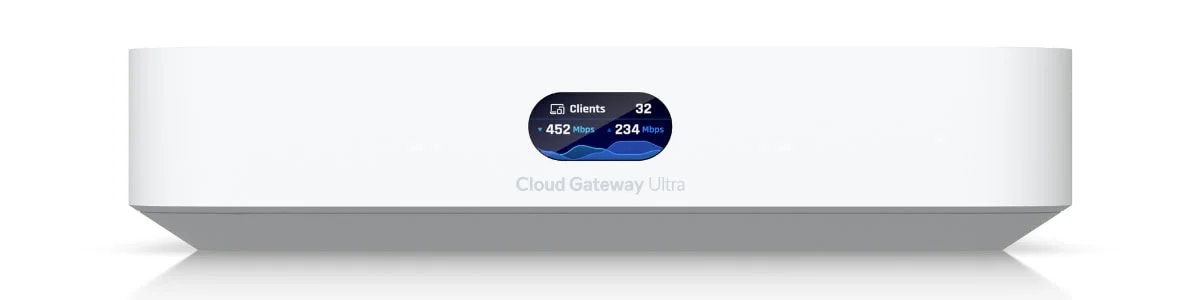
The Cloud Gateway Ultra manages up to 30 devices and 300 clients with 1 Gbps IDS/IPS throughput. It runs UniFi Network exclusively and lacks camera storage.
Best For: Offices requiring basic wired networking without surveillance. Avoid If: Your internet exceeds 800 Mbps, you manage more than 25 switches/APs, or you need UniFi Protect.
While Ubiquiti rates the Ultra for 30+ managed devices, practical experience suggests performance degradation begins around 25 devices when running full threat management. This includes switches, access points, and any other UniFi hardware—not client devices.
The 300+ client capacity proves adequate for offices with 15-20 employees, accounting for multiple devices per person (laptop, phone, tablet). Beyond this point, you'll notice increased latency during high-usage periods.
Internet Speed Limitations
The 1 Gbps IDS/IPS throughput represents real-world performance with all security features enabled. The Ultra will create a bottleneck if your internet connection exceeds 800 Mbps and you require full threat detection. Similarly, the 1 GbE LAN ports limit local file transfer speeds even if your WAN connection supports higher bandwidth.
Application Restrictions
The Ultra runs UniFi Network exclusively. If you need UniFi Protect for surveillance, Talk for VoIP, or Access for door control, you'll require the Cloud Gateway Max as your minimum gateway.
Performance Reality Check
The Ultra's 2.5 GbE WAN port can't be fully utilized due to 1 GbE LAN port limitations. Even with multi-gigabit internet, individual clients max out at gigabit speeds. This matters for businesses regularly transferring large files or running bandwidth-intensive applications.
UniFi Cloud Gateway Max: Best for Surveillance Integration
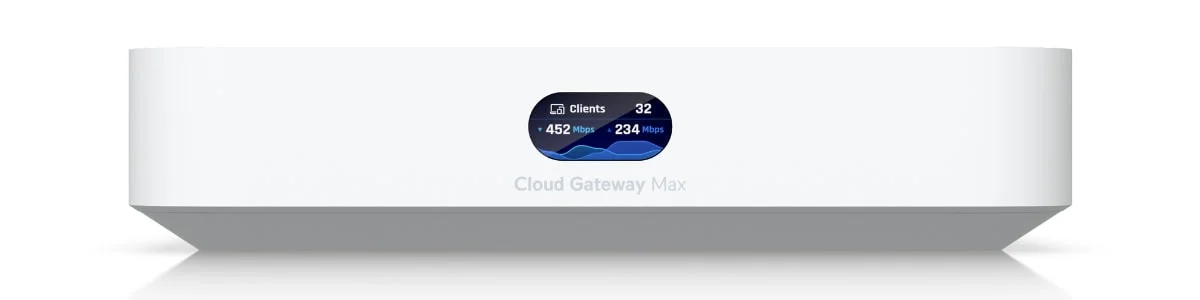
The Cloud Gateway Max delivers 2.3 Gbps IDS/IPS throughput, NVMe storage for up to 15 cameras, and the full UniFi application suite. It is the minimum gateway for any UniFi Protect deployment.
Best For: Growing offices adding surveillance, VoIP, or access control on a multi-gigabit connection. Avoid If: You need more than 50 managed devices or are planning 10+ cameras with 60-day retention.
The Cloud Gateway Max addresses three key limitations of the Ultra: throughput constraints, storage requirements, and application support. At $199 for the base model (without storage), it is a strategic upgrade for businesses deploying UniFi Protect.
Throughput Enhancement
The 2.3 Gbps IDS/IPS throughput accommodates multi-gigabit internet connections while maintaining full security features. The 2.5 GbE LAN ports enable actual utilization of faster WAN speeds across your network. For offices with fiber connections exceeding 1 Gbps, this upgrade is essential.
Noise Consideration
Unlike the fanless Ultra, the Cloud Gateway Max features active cooling and may produce low-level fan noise under load. Consider placement in server closets rather than open desks if noise sensitivity is a concern.
Storage Integration
The optional NVMe storage slot distinguishes the Max from the Ultra. Storage options include 512GB ($279), 1TB ($359), and 2TB ($479) configurations. This enables UniFi Protect surveillance without requiring a separate NVR, consolidating network management and video storage in one device.
The 1TB configuration provides adequate capacity for businesses adding 4-8 security cameras with 30-day retention. Larger deployments or longer retention periods require the 2TB option or consideration of the Dream Machine Pro with traditional HDD storage.
Complete Application Suite
The Max supports all UniFi applications: Network, Protect, Talk, Access, and Connect. This matters when your technology requirements extend beyond basic networking into surveillance, VoIP, or access control systems. Rather than running separate controllers, the Max consolidates management into one interface.
Upgrade Trigger Points for Max:
- Internet connection exceeds 1 Gbps with full security requirements
- Need for 4-8 UniFi Protect cameras with 30-day retention
- VoIP deployment requiring UniFi Talk integration
- Access control system using UniFi Access readers
- Local network transfers regularly exceeding gigabit speeds
Express 7: Budget WiFi 7 Entry Point
The UniFi Express 7 ($199) launched in February 2025 as Ubiquiti's most affordable WiFi 7 gateway. Its ultra-compact form factor and mesh capabilities make it ideal for home offices or as expansion nodes in larger UniFi networks.
What Makes It Different
The Express 7 packs a 10G RJ45 WAN port and six-stream WiFi 7 into a device smaller than a coffee mug. At 2.3 Gbps IDS/IPS throughput, it handles multi-gigabit internet with full security features enabled. The fanless design means silent operation—ideal for home offices.
However, the Express 7 runs UniFi Network only—no Protect, Talk, or Access support. It also lacks any storage, so camera surveillance requires a separate NVR or a different gateway.
Best Use Cases
- Budget-conscious WiFi 7 deployment for home offices
- Mesh extension node for larger UniFi networks
- Remote office gateway where simplicity matters
- Travelers needing portable 10G-capable gateway
Express 7 vs. Cloud Gateway Ultra
Both cost-effective options, but the Express 7 adds WiFi 7 and 10G WAN while the Ultra offers 2.5G WAN and four LAN ports. Choose Express 7 for WiFi; choose Ultra for more wired connections.
Dream Router 7: All-in-One WiFi 7 Solution
The Dream Router 7 ($279) represents Ubiquiti's answer to the question: "What if one device handled everything?" Launched February 2025, it combines WiFi 7, 10G connectivity, PoE, and full UniFi OS in a desktop form factor.
Integrated Capabilities
Unlike the Express 7, the Dream Router 7 runs all UniFi applications: Network, Protect, Talk, Access, and Connect. The integrated 64GB microSD provides storage for small camera deployments (2-4 cameras with 7-day retention).
Key specifications:
- WAN: 10G SFP+
- LAN: 4× 2.5G RJ45 (one PoE port providing 25W)
- WiFi: 6-stream WiFi 7 (2.4/5/6 GHz)
- IDS/IPS: 2.3 Gbps
- Storage: 64GB microSD (included)
When to Choose the Dream Router 7
The UDR7 excels for home offices and small businesses wanting a single device for everything. The built-in PoE port can power one access point or camera without a separate switch.
Consider the Dream Router 7 if:
- You want WiFi 7 without managing separate access points
- A small camera deployment (2-4 cameras) meets your needs
- Single PoE device (AP or camera) is acceptable
- Desktop placement works for your environment
For real-world performance data and six months of deployment notes, see our Dream Router 7 review.
Upgrade to Cloud Gateway Fiber if:
- You need more than 64GB storage
- Multiple 10G connections are required
- Higher IDS/IPS throughput (5 Gbps vs 2.3 Gbps) matters
Dream Router 5G Max ($499): Best for 5G Cellular Deployments
New for 2026. The Dream Router 5G Max delivers full-performance 5G up to 3.4 Gbps downlink, WiFi 7, 10G SFP+, and microSD storage in a desktop form factor. It is the definitive gateway for locations without wired internet access.
Best For: Food trucks, pop-up events, construction trailers, remote retail, and any rapid-deployment scenario requiring reliable cellular connectivity with full UniFi management. Avoid If: You have a stable wired internet connection — the UDR-5G-Max's 30-device and 300-client limits are identical to the Cloud Gateway Ultra, making it overkill for fixed locations.
The Dream Router 5G Max (UDR-5G-Max) is certified with AT&T and T-Mobile for direct SIM activation. Its dual nano-SIM slots allow carrier redundancy — primary cellular plus automatic failover to a backup SIM. The pre-installed 64GB microSD supports UniFi Protect for small surveillance deployments, and the expansion slot accepts additional microSD capacity.
Key Specifications
- Cellular: 5G NR Sub-6 with 3.4 Gbps downlink (NSA) / 1.8 Gbps (SA)
- WiFi: WiFi 7 tri-band (2.4 / 5 / 6 GHz)
- WAN: 10G SFP+ and 2.5 GbE RJ45 (for wired failover)
- LAN: 4× 2.5G RJ45 (1× PoE)
- IDS/IPS: 2.3 Gbps
- Storage: Pre-installed 64GB microSD + expansion slot
- SIM: Dual nano-SIM (or eSIM option)
5G Max vs. Dream Router 7
Both are desktop WiFi 7 gateways with near-identical IDS/IPS throughput, LAN ports, and storage. The sole differentiator is the UDR-5G-Max's 5G cellular modem. If your location has reliable wired broadband, the Dream Router 7 ($279) costs $220 less and covers the same use cases.
UniFi Cloud Gateway Fiber ($279): Best Desktop 10G Gateway
The Cloud Gateway Fiber delivers 5 Gbps IDS/IPS throughput, dual 10G SFP+ ports, one 10 GbE RJ45 WAN port, and NVMe storage support for surveillance.
The Cloud Gateway Fiber bridges the gap between desktop convenience and rackmount performance. Unlike the fanless Ultra, the UCG-Fiber uses active cooling to sustain 10G workloads. It accommodates up to 50 managed devices and handles multi-gigabit internet without bottlenecking security features. For the full breakdown including head-to-head comparisons with the UDR7, UCG Ultra, and UCG Max, see our dedicated UCG Fiber review.
| Specification | Cloud Gateway Fiber | Cloud Gateway Max |
|---|---|---|
| IDS/IPS Throughput | 5 Gbps | 2.3 Gbps |
| 10G SFP+ Ports | 2× (WAN/LAN) | None |
| 10 GbE RJ45 | 1× (WAN, copper) | None |
| 2.5G Ports | 4× RJ45 | 5× RJ45 |
| PoE Output | 1× PoE+ (30W) | None |
| Storage | NVMe slot (up to 2TB) | NVMe (up to 2TB) |
| Price | $279 | $199-$479 |
Best Use Cases
The Cloud Gateway Fiber shines in wired-focused deployments requiring 10G backbone connectivity without rack infrastructure:
- High-speed fiber connections: Dual 10G ports handle symmetric 10G internet
- NAS and server connectivity: 10G LAN for local storage infrastructure
- Performance-sensitive surveillance: 5 Gbps IDS/IPS ensures cameras don't bottleneck security
- Small office with existing WiFi: When separate access points provide WiFi coverage
Best For: Environments requiring a 10G backbone or high-speed fiber without rack infrastructure. Ideal for NAS connectivity, symmetric 10G internet, or offices with existing WiFi access points. Avoid If: You require built-in WiFi (consider the Dream Router 7 instead) or need more than 50 managed devices.
Deciding specifically between these three compact, non-rackmount options — Express 7, Dream Router 7, and Cloud Gateway Fiber? See our dedicated compact gateway comparison for a closer look at how they stack up against each other.
UCG-Fiber vs. Dream Machine Pro
Both offer similar IDS/IPS throughput (~5 Gbps), but the UCG-Fiber uses compact NVMe storage while the UDM Pro uses cost-effective 3.5" HDDs. Choose UCG-Fiber for desktop deployment; choose UDM Pro for rack infrastructure with high-capacity storage needs.
UniFi Dream Machine Pro ($379): Best Entry-Level Rackmount Gateway
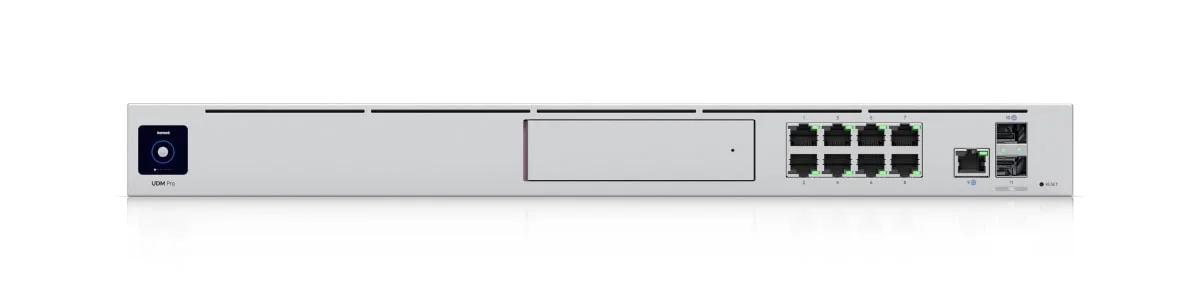
The Dream Machine Pro manages up to 100 UniFi devices and 1,000 clients with 3.5 Gbps IDS/IPS throughput and a 3.5-inch HDD bay for cost-effective surveillance storage.
Best For: Businesses with 30–75 employees requiring central rack infrastructure and high-capacity camera storage.
The UniFi Dream Machine Pro is the transition point to professional rackmount infrastructure. The 3.5 Gbps IDS/IPS throughput handles multi-gigabit internet while maintaining comprehensive threat detection. The 10 Gbps SFP+ WAN and LAN ports eliminate bandwidth constraints for businesses investing in fiber connectivity.
Storage Architecture
Unlike the Max's NVMe slot, the Pro features a 3.5" HDD bay supporting traditional hard drives. This matters for surveillance deployments requiring cost-effective high-capacity storage. An 8TB drive costs approximately $200, providing substantially more capacity than NVMe options at lower per-gigabyte costs.
For businesses planning 12-20 camera deployments with 30-60 day retention, the Pro's HDD support delivers better economics than the Max's NVMe storage.
10 Gbps Infrastructure
The Pro's 10 Gbps SFP+ ports enable high-speed backbone connectivity. This matters when connecting to network storage, establishing point-to-point links between buildings, or supporting bandwidth-intensive workflows like video editing or CAD rendering.
The eight 1 GbE RJ45 ports plus 10 Gbps SFP+ LAN uplink provide flexibility for mixed-speed networks, allowing strategic placement of 10 Gbps connectivity where needed while maintaining standard gigabit for most devices.
UDM Pro vs. UDM Pro SE
The UDM Pro SE ($499) adds integrated PoE switching—eight ports with 180W total power budget. For deployments with 6-8 PoE devices (access points, cameras, VoIP phones), the SE eliminates the need for a separate PoE switch, potentially reducing total system cost while simplifying installation. For larger deployments that outgrow the SE's eight ports, see our UniFi switch comparison guide to choose the right standalone switch.
UDM Pro Upgrade Triggers:
- Managing 25+ UniFi devices across the office and remote locations
- Supporting 30-75 employees with multiple devices each
- Surveillance requirements exceeding eight cameras or 30 days of retention
- 10 Gbps backbone connectivity for server infrastructure
- Multi-WAN failover with load balancing requirements
- Professional rackmount installation with UPS integration
For the full failover-vs-load-balancing-vs-bonding decision, see our dual WAN business network guide.
Dream Machine Pro Max: Enhanced Reliability and Performance
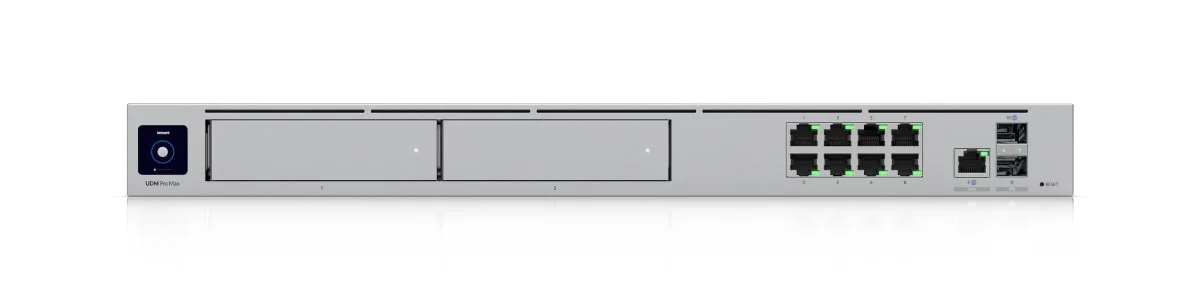
The Dream Machine Pro Max ($599) addresses specific limitations in the standard Pro: single-point storage failure, insufficient processing power for large deployments, and bandwidth constraints under heavy security load.
Doubled Capacity
The Pro Max supports 200+ UniFi devices and 2,000+ concurrent clients—exactly double the standard Pro. This corresponds to businesses with 75-150 employees or organizations managing multiple locations through a central gateway.
The enhanced processing capability (2.0 GHz vs. 1.7 GHz, 8GB vs. 4GB RAM) ensures smooth operation even under maximum load. This headroom prevents performance degradation for networks approaching the Pro's 100-device limit.
RAID Storage Protection
The dual 3.5" HDD bays enable RAID1 mirroring, which is true redundancy for surveillance footage. For businesses where video evidence has legal or liability implications, this protection justifies the upgrade cost.
RAID1 also enables zero-downtime drive replacement. When a drive fails, operations continue on the remaining drive while you schedule replacement, avoiding the system downtime required with single-drive configurations.
Increased Security Throughput
The 5 Gbps IDS/IPS throughput represents a 43% increase over the standard Pro. This matters for organizations with multi-gigabit internet connections requiring complete threat management without creating bottlenecks.
The additional 2.5 GbE WAN port provides multi-WAN flexibility, enabling load balancing across connections or a failover configuration without consuming the 10 Gbps SFP+ port.
Pro Max vs. Pro: The $220 Decision
The Pro Max costs $220 more than the standard Pro. This price difference buys doubled capacity, RAID storage, 43% higher security throughput, and enhanced processing power. These capabilities justify the investment for businesses planning significant growth or requiring surveillance reliability. Organizations satisfied with single-drive storage and capacity under 100 devices should save the $220 and invest in better switching or access points instead.
Pro Max Upgrade Triggers:
- Managing 50-200 UniFi devices across multiple locations
- Supporting 75-150 employees with comprehensive device coverage
- Surveillance footage requiring legal compliance or liability protection
- Internet connections exceeding 3 Gbps with complete security enabled
- Multi-site hub-and-spoke deployments with the Pro Max as the central hub gateway serving remote spoke sites over VPN
- Zero-downtime requirements for business-critical operations
Need more capacity than the Pro Max? The Dream Machine Beast ($1,499) is the next tier — 25 Gbps IDS/IPS, 750+ managed devices, 7,500+ clients, and a built-in 8× 10GbE LAN switch.
Dream Machine Beast ($1,499): Best for Campus-Scale Routing and Port Density
New for 2026. The Dream Machine Beast manages 750+ devices and 7,500+ clients with 25 Gbps IDS/IPS throughput, eight 10GbE RJ45 ports, and two 3.5-inch HDD bays — all in a 1U rack chassis. See our hands-on Dream Machine Beast review for deployment notes and the full spec table.
Best For: Large organizations requiring high-density client capacity, dense 10G port connectivity, or centralized NVR storage at campus scale without the dual-PSU premium of the EFG. Avoid If: Your primary requirement is dual hot-swappable power supply redundancy — purchase the Enterprise Fortress Gateway instead.
The Dream Machine Beast (UDM-Beast) outperforms the Enterprise Fortress Gateway on raw compute and port density: 7,500+ clients vs. the EFG's 5,000+, and 750 managed devices vs. the EFG's 500. It also includes Shadow Mode (VRRP) high-availability failover — the same HA technology as the EFG.
When to Choose Beast vs. EFG
The architectural choice is specific:
- Buy the Dream Machine Beast ($1,499) for campus-scale routing, a built-in 8× 10GbE LAN switch, and superior client/device capacity.
- Spend the extra $500 on the EFG ($1,999) exclusively if your deployment requires dual hot-swappable AC power supplies — the EFG's only unique capability over the Beast. This is the decisive factor for healthcare, financial, and manufacturing environments with zero-tolerance for power supply failure.
Key Specifications
- IDS/IPS: 25 Gbps
- Managed Devices: 750+
- Concurrent Clients: 7,500+
- Ports: 8× 10GbE RJ45, 2× 10G SFP+, 2× 25G SFP28, 1× 10GbE RJ45 WAN
- Storage: 2× 3.5-inch HDD bays + built-in 128GB SSD
- HA: Shadow Mode (VRRP)
- Power: Single AC supply (+ DC RPS backup input)
- Form Factor: 1U rack mount
Enterprise Fortress Gateway ($1,999): Best for Dual-PSU High Availability
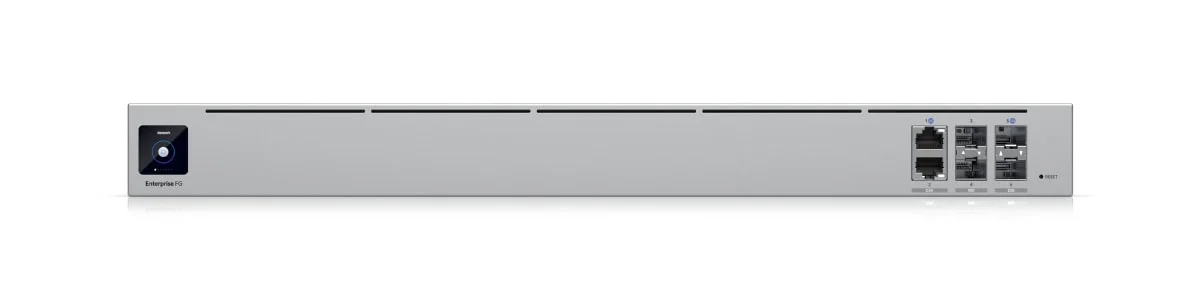
The Enterprise Fortress Gateway manages 500+ devices and 5,000+ clients with 12.5 Gbps IDS/IPS throughput and dual hot-swappable power supplies for mission-critical deployments.
Best For: Healthcare, financial services, and manufacturing environments where power supply failure cannot interrupt operations and downtime costs exceed thousands per hour. Avoid If: Your primary need is raw capacity or port density — the Dream Machine Beast handles more clients (7,500+), more devices (750+), and costs $500 less.
The Enterprise Fortress Gateway ($1,999) is purpose-built for environments where the power supply itself is a failure point. Its dual hot-swappable AC power supplies — each independently replaceable without downtime — are the defining differentiator over the Dream Machine Beast. When paired with a second EFG, this creates four-way power redundancy (two units × two supplies).
Capacity and Throughput
The EFG manages 500+ UniFi devices and 5,000+ concurrent clients with 12.5 Gbps IDS/IPS throughput — sufficient for large campuses and multi-building facilities with 300+ employees. Note that the Dream Machine Beast ($1,499) exceeds these numbers in raw capacity; organizations prioritizing client and device scale should evaluate the Beast first.
High Availability Architecture
The EFG supports Shadow Mode high availability (VRRP) — as does the Dream Machine Beast. Pairing two EFGs ($3,998 total) delivers automatic failover within seconds if one unit fails. The defining advantage here is the dual hot-swappable power supplies: each EFG ships with two independently replaceable AC power modules, meaning power supply replacement never requires downtime.
25 Gbps Connectivity
The dual 25 Gbps SFP28 ports enable infrastructure previously limited to enterprise equipment costing tens of thousands of dollars. This supports high-bandwidth applications like video production, research computing, or large-scale virtualization.
Combined with two 10 Gbps SFP+ ports and two 2.5 GbE RJ45 ports (all remappable between WAN and LAN), the EFG provides unprecedented flexibility for complex network architectures.
Power Redundancy
The dual hot-swappable power supplies ensure operation continues even during power supply failure. When deployed in high-availability pairs, this creates four-way power redundancy—both gateways with dual supplies—providing maximum protection against hardware failure.
Enterprise Program Requirement
The EFG requires registration in Ubiquiti's Enterprise Partner Program. This includes professional support, deal registration, and pre-sales assistance, but may involve verification delays and dealer relationships. Organizations considering the EFG should plan for this procurement process.
EFG Upgrade Triggers:
- Requiring dual hot-swappable AC power supply redundancy — the EFG's sole differentiator over the Dream Machine Beast
- Managing 200–400 UniFi devices across a large campus or hub-and-spoke multi-building topology
- Internet connections exceeding 10 Gbps with full security throughput requirements
- Healthcare, financial, or industrial environments where power supply failure cannot interrupt operations
- Organizations requiring 25G SFP28 backbone uplinks for core switching
How Does the March 2026 FCC Foreign Router Ban Affect UniFi?
The March 2026 FCC order restricts U.S. government agencies from authorizing new wireless routers manufactured in China, Russia, Cuba, Iran, North Korea, and Venezuela. This is not a product ban — it halts new equipment authorizations from covered countries, not the sale of already-authorized models.
All currently authorized UniFi gateways remain fully legal to purchase, sell, and deploy in the United States. Ubiquiti manufactures in multiple locations including the United States; the Ubiquiti Store continues normal operations.
What could change over time: Ubiquiti and other network vendors may face delays in getting FCC authorization for new hardware models if any manufacturing or component sourcing triggers the order's scope. There is no impact on the 11 gateway models covered in this guide.
Bottom line: If you are deploying a UniFi gateway today, the FCC order does not affect your purchase. Monitor Ubiquiti's official communications for any future product authorization updates.
Gateway Selection Decision Framework
Choosing the appropriate gateway requires analyzing three primary factors: current requirements, planned growth, and budget constraints. This framework helps match business needs to gateway capabilities.
Device Count Analysis
Count your current UniFi devices (switches, access points, cameras, access readers) and project one-year growth. Add a 25% buffer for unexpected expansion. If this total approaches a gateway's device limit, select the next tier.
| Current + Projected Devices | Recommended Gateway | Best For |
|---|---|---|
| 5-15 devices | Cloud Gateway Ultra ($129) | Basic wired networks, UniFi Network only |
| 5-20 devices | Express 7 ($199) | Home office with WiFi 7, no Protect needed |
| 10-25 devices | Cloud Gateway Max ($199-$479) | Growing office, Protect cameras, full app suite |
| 10-25 devices | Dream Router 7 ($279) | All-in-one WiFi 7, 2-4 cameras, single PoE device |
| 10-25 devices | Dream Router 5G Max ($499) | 5G cellular, remote/mobile deployment, WiFi 7 |
| 15-30 devices | Cloud Gateway Fiber ($279) | 10G backbone, high IDS/IPS, no WiFi needed |
| 25-75 devices | Dream Machine Pro ($379) | Rackmount, HDD storage, professional capacity |
| 75-150 devices | Dream Machine Pro Max ($599) | RAID storage, Shadow Mode HA, multi-site |
| 150-600 devices | Dream Machine Beast ($1,499) | High-density capacity, 8× 10GbE ports |
| 200-400 devices | Enterprise Fortress Gateway ($1,999) | Dual hot-swap PSUs, campus 25G backbone |
Internet Speed Requirements
Match your internet connection speed to the gateway IDS/IPS throughput. Maintain 20% overhead for peak usage without creating bottlenecks.
| Internet Speed | Minimum Gateway | Full Security Throughput |
|---|---|---|
| Up to 800 Mbps | Cloud Gateway Ultra | 1 Gbps IDS/IPS |
| 1-1.8 Gbps | Express 7 / Cloud Gateway Max / Dream Router 7 / Dream Router 5G Max | 2.3 Gbps IDS/IPS |
| 2-2.8 Gbps | Dream Machine Pro | 3.5 Gbps IDS/IPS |
| 3-4 Gbps | Cloud Gateway Fiber / Dream Machine Pro Max | 5 Gbps IDS/IPS |
| 5-10 Gbps | Dream Machine Beast / Enterprise Fortress Gateway | 12.5–25 Gbps IDS/IPS |
Application Requirements
Identify which UniFi applications your business needs now and within the following year. The Cloud Gateway Ultra and Express 7 run UniFi Network only—other applications require the Max, Dream Router 7, or higher.
UniFi Protect (Surveillance) Minimum: Cloud Gateway Max, Dream Router 7, or Cloud Gateway Fiber with appropriate storage. Consider Dream Machine Pro for deployments exceeding 8 cameras or requiring retention beyond 30 days.
UniFi Talk (VoIP) Minimum: Cloud Gateway Max, Dream Router 7, or Cloud Gateway Fiber. Consider Dream Machine Pro or higher for deployments exceeding 10 phones or requiring call recording features.
UniFi Access (Door Control) Minimum: Cloud Gateway Max, Dream Router 7, or Cloud Gateway Fiber for installations with 1-3 access readers. Dream Machine Pro or higher is recommended for comprehensive access control deployments with multiple buildings or high reader counts.
UniFi Identity (Employee VPN) Upgrading to a full UniFi OS console (Max, Dream Router 7, or higher) enables UniFi Identity Endpoint, providing one-click employee VPN access—a major improvement over the Ultra's standard VPN configuration.
Total Cost of Ownership Analysis
Gateway selection involves more than purchase price. Consider supporting infrastructure, power consumption, and maintenance requirements over three years.
Infrastructure Requirements
Compact gateways (Ultra, Max, CGFiber, Dream Router 7, UDR-5G-Max) require desktop or shelf space. Rackmount units (DM Pro, DM Pro Max, Beast, EFG) need appropriate rack infrastructure. Two models offer dedicated wall-mount form factors without requiring a rack.
Form Factor and Mounting Reference
| Form Factor | Products | Environment | Temp Range | Max PoE |
|---|---|---|---|---|
| Desktop/shelf | Ultra, Max, CGFiber, Express 7, DR7, UDR-5G-Max | Standard office | 0–40°C | None–30W |
| 1U rack mount | DM Pro, DM Pro Max, Beast, EFG | Server room / rack | 0–40°C | None |
| Rugged wall-mount | Cloud Gateway Industrial | Warehouse, outdoor, −30°C environments | −30–50°C | 270W |
| IT-closet wall-mount | Dream Wall | Wiring closet, no rack required | −10–40°C | 420W |
Budget approximately $400–$800 for a 12U wall-mount rack with proper cooling and surge protection for rackmount deployments. This includes the rack itself ($200–$300), a rackmount PDU ($100–$150), and a suitable UPS ($100–$350 depending on runtime requirements).
Storage Costs
NVMe (Cloud Gateway Max): Premium pricing at $280 for 512GB, $360 for 1TB, and $480 for 2TB. Compact and fast, but expensive per gigabyte.
HDD (Dream Machine Pro / Pro Max / Beast): 3.5-inch drives cost approximately $120 for 4TB or $200 for 8TB — far better economics for long-retention surveillance. For Pro Max and Beast with RAID1, double the drive count but gain redundancy. Two 4TB drives ($240) provide the same usable capacity as a single 4TB with failure protection.
microSD (Edge Gateways): Several models include built-in microSD storage. The Dream Router 7 and Dream Router 5G Max ship with pre-installed 64GB microSD; the Cloud Gateway Industrial with 128GB; the Dream Wall with 512GB. Ubiquiti's high-endurance microSD cards range from $69–$120. While more expensive per gigabyte than HDDs, microSD storage eliminates physical drive footprint and operates in harsh environments (the Cloud Gateway Industrial is rated to −30°C).
Power and Cooling
All UniFi gateways consume minimal power: 15-30W for compact models, 30-60W for rackmount units. Annual electricity costs at $0.12/kWh approximate $15-65 depending on model.
Rackmount deployments in enclosed spaces require ventilation planning. Budget for rack fans ($50-150) if deploying in closets or equipment rooms without existing cooling infrastructure.
No Recurring Licensing Fees
UniFi's pricing model is one of its most significant competitive advantages. Unlike Cisco Meraki, which charges annual licensing fees that can reach $300–$600 per device per year just to keep hardware functioning, or Fortinet FortiGate, which requires active subscriptions for UTM features, IDS/IPS, and firmware updates — UniFi gateways include all security features, firmware updates, and centralized management at no recurring cost.
The Licensing Cost Advantage
A Cisco Meraki MX67 ($800 hardware) requires an approximately $400/year Advanced Security License to maintain full functionality — over three years, that's $2,000 in licensing alone on top of the hardware. The Dream Machine Pro ($379 hardware) includes all security features, updates, and UniFi Network Application management for zero additional annual cost. The only optional recurring cost is the CyberSecure add-on ($99–$149/year), which is genuinely optional rather than required for basic operation. For a full cost breakdown of the gateway + CyberSecure + Identity VPN stack, see our network security deployment guide.
3-Year TCO Comparison
| Gateway | Purchase Price | Infrastructure | 3-Year Total |
|---|---|---|---|
| Cloud Gateway Ultra | $129 | $50 (shelf, basic UPS) | ~$225 |
| Cloud Gateway Max (1TB) | $359 | $50 (shelf, basic UPS) | ~$455 |
| Dream Machine Pro | $379 | $850 (rack, UPS, HDD) | ~$1,350 |
| Dream Machine Pro Max | $599 | $1,090 (rack, UPS, dual HDDs) | ~$1,810 |
| Dream Machine Beast | $1,499 | $1,090 (rack, UPS, dual HDDs) | ~$2,710 |
| Enterprise Fortress Gateway | $1,999 | $800 (rack, UPS) | ~$2,920 |
All figures exclude the optional CyberSecure subscription ($99–$149/year). No mandatory licensing fees apply to any tier.
Migration Strategies and Configuration Transfer
UniFi's architecture simplifies gateway upgrades through configuration backup and restoration. However, understanding migration nuances prevents deployment issues.
Configuration Backup Process
Before any gateway replacement, download a full site configuration backup from Settings → System → Backup. This preserves network settings, security policies, port configurations, and wireless profiles.
Store this backup externally—not only on the gateway itself. If hardware failure forces replacement, external backup availability enables rapid restoration.
Application Considerations
Migrating from Ultra to Max or higher requires careful planning around UniFi applications. UniFi Protect recordings don't transfer between gateways, so plan surveillance deployment timelines accordingly.
UniFi Talk settings and recordings are transferred through configuration backup, but all VoIP devices are verified to reconnect properly after gateway replacement. Test critical phones immediately after migration.
Zero-Downtime Migrations
Businesses requiring continuous operation can deploy the new gateway alongside the existing one. Configure the replacement completely offline, then switch network connections during a scheduled maintenance window.
This approach requires a secondary internet connection or offline configuration via a directly connected laptop. The additional planning time reduces the outage duration from hours to minutes.
Professional Migration Services
For organizations concerned about migration complexity or downtime risks, professional installation services minimize disruption while ensuring proper configuration transfer. Our team provides gateway replacement services throughout South Florida with guaranteed minimal downtime and comprehensive testing before considering the migration complete.
Future-Proofing Considerations
Gateway selection should account for three-year technology evolution and business growth patterns.
Internet Speed Evolution
Multi-gigabit fiber continues expanding availability while prices decline. Areas currently limited to 1 Gbps connections frequently see 2-5 Gbps options within 18-24 months. To accommodate future upgrades without requiring gateway replacement, select gateways with throughput capacity exceeding current internet speeds by at least 50%.
WiFi 7 Migration
The transition to WiFi 7 access points increases bandwidth demands on gateway infrastructure. A single U7 Pro Max access point can theoretically deliver 8.6 Gbps aggregate throughput across three bands. Even with typical client distributions and real-world performance, multiple WiFi 7 access points can saturate gigabit gateways during high-usage periods.
Organizations planning WiFi 7 deployments should select gateways with 2.5 Gbps minimum throughput and multi-gigabit switching infrastructure to avoid creating bottlenecks at the gateway level.
Security Evolution
Threat detection and deep packet inspection become increasingly important as attack sophistication grows. Budget for CyberSecure subscriptions ($99-149/year, depending on gateway), providing real-time threat intelligence updates powered by Proofpoint.
This subscription-based service operates independently of gateway selection but influences the total cost of ownership. Organizations requiring compliance with specific security frameworks should budget for these ongoing costs alongside gateway investment.
Explore All UniFi GatewaysFrequently Asked Questions
Can I run multiple UniFi gateways in one network?
UniFi's architecture supports only one gateway per network. However, you can establish VPN connections between separate networks with their own gateway for inter-site connectivity. The Enterprise Fortress Gateway supports high availability pairing where two EFGs operate as redundant units, but this requires specific configuration, and both units must be EFGs.
Do I need to replace my switches when upgrading gateways?
Gateway upgrades don't require switch replacement unless you add 10 Gbps or 25 Gbps connectivity requiring compatible switching infrastructure. Existing gigabit switches continue functioning normally with any gateway upgrade. However, upgrading to Dream Machine Pro or higher enables 10 Gbps uplinks beneficial for backbone connectivity or network storage.
How does gateway selection affect UniFi Protect camera count?
Gateway processing power determines practical camera limits per Ubiquiti's official capacity table. Cloud Gateway Max (UCG-MAX) supports up to 15 HD, 8 2K, or 5 4K cameras. Dream Machine Pro handles up to 24 HD or 8 4K cameras; Dream Machine Pro Max scales to 50 HD or 15 4K. Consider camera resolution alongside camera count — 4K deployments reach capacity faster and 5 4K cameras on a UCG-MAX is the ceiling.
Can the Enterprise Fortress Gateway operate without a paired unit?
The EFG functions independently without pairing. High availability requires two units configured as primary and shadow, but single-unit deployment delivers full performance and capacity. Organizations initially purchasing one EFG can add the second unit later when budget permits or business requirements justify a high availability investment.
What's the relationship between gateway capacity and actual office size?
Office square footage correlates loosely with gateway requirements through the number of access points needed for coverage. As a general guideline, Cloud Gateway Ultra handles small offices under 3,000 square feet with 2-4 access points. Cloud Gateway Max serves offices from 3,000-8,000 square feet requiring 4-8 access points. Dream Machine Pro accommodates 8,000-20,000 square feet facilities with a comprehensive UniFi deployment. These are rough estimates—actual requirements depend on construction materials, desired coverage density, and total device count, including switches, cameras, and access control.
Making Your Gateway Selection
Key Insight
UniFi gateway selection starts with an honest assessment of current requirements and a realistic projection of one-year growth. Rather than purchasing the highest-tier gateway "just in case," match current requirements to gateway capabilities while allowing a reasonable growth buffer. Money saved on unnecessary gateway capacity invests better in additional access points, managed switching, or enhanced security subscriptions that improve daily network performance.
The Cloud Gateway Ultra effectively serves small offices, but specific indicators—device count approaching 25, internet speeds exceeding 800 Mbps, and need for UniFi Protect surveillance—signal when upgrades deliver measurable value.
The Cloud Gateway Max addresses bandwidth limitations and storage requirements for growing businesses. Dream Machine Pro provides the capacity and connectivity supporting professional deployments with comprehensive UniFi ecosystems. Dream Machine Pro Max delivers enhanced reliability through RAID storage and doubled capacity for organizations requiring data protection or supporting larger teams. The Enterprise Fortress Gateway enables true high availability for operations where network downtime creates a significant financial or operational impact.
If you're also evaluating non-UniFi options — Firewalla, Omada, Aruba, or subscription firewalls like Meraki and SonicWall — our best firewall for small business guide covers the full market with 3-year TCO comparisons. For readers specifically interested in pairing a third-party gateway with UniFi switches and APs, our UniFi gateway alternatives and hybrid stack guide covers setup, controller requirements, and product comparisons.
Related Articles
More from UniFi Networks
UDM Pro Max vs UDM Pro vs UDM SE (2026): Full Comparison & Verdict
UDM Pro Max ($599) vs UDM Pro ($379) vs UDM SE ($499): 5 Gbps vs 3.5 Gbps IDS/IPS, RAID storage, PoE, and real deployment scenarios — which UniFi gateway is worth it in 2026.
16 min read
UniFi Network Solutions: 2026 Tech Overview
A comprehensive technical analysis of Ubiquiti's UniFi ecosystem for business networking and security. Covers gateways, WiFi 7 access points, CyberSecure, and real-world deployment experience.
13 min read
UniFi Cloud Gateway Ultra Review: Best Value for Gigabit UniFi Networks (2026)
The UCG-Ultra delivers a full UniFi controller, 1 Gbps IDS/IPS, and multi-WAN failover in a $129 fanless device. No separate Cloud Key needed. Here's who it's right for.
20 min read