
UniFi Gateway Alternatives 2026: When to Stay UniFi, Use Firewalla, pfSense, or Meraki
Compare gateway alternatives that integrate with UniFi switches and APs. UXG Series, Cloud Gateway Fiber, Firewalla Gold Pro, Netgate pfSense, and Meraki MX for hybrid network setups.

Key Takeaway
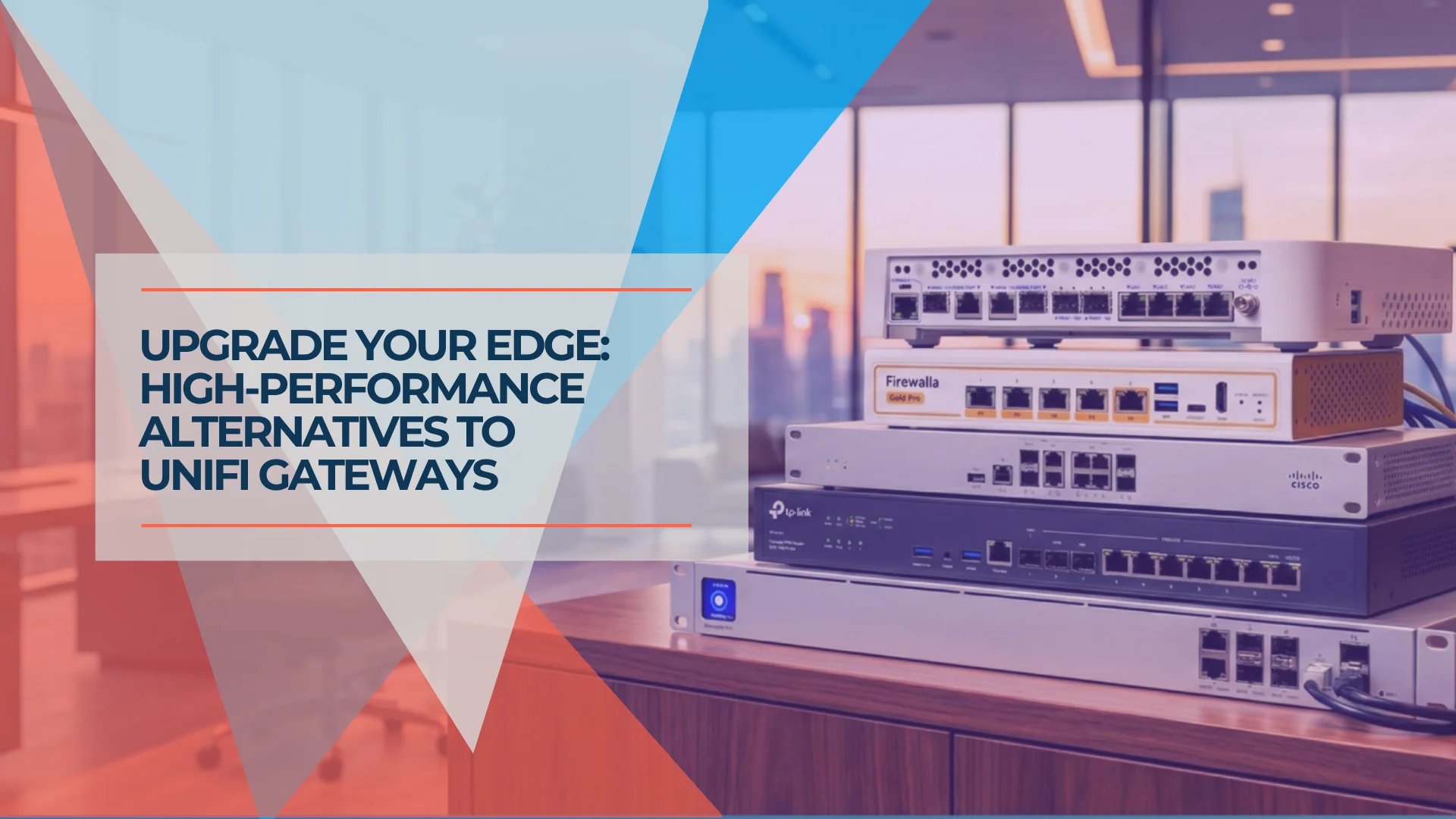
For most UniFi networks, the best gateway alternative is still another UniFi gateway. A third-party firewall only makes sense when you need deeper firewall control, compliance reporting, enterprise support, or a security workflow UniFi does not currently handle well enough. This guide helps you decide whether to stay within the ecosystem or pair UniFi switches and APs with a specialized gateway.
Affiliate Disclosure: This article contains affiliate links. If you make a purchase through these links, we may earn a small commission at no extra cost to you. As an Amazon Associate, iFeelTech earns from qualifying purchases.
The UniFi Dream Machine series has become a favorite for small business networking. The unified dashboard is intuitive, setup is straightforward, and the ecosystem integration with UniFi Protect cameras, Access control, and Talk VoIP creates a cohesive management experience few competitors match at this price point.
That said, every network has unique requirements. Some businesses need routing workflows, compliance evidence, firewall policy control, or support models that are easier to manage on a dedicated firewall platform.
Networking equipment works well together across vendors. You can keep your U7 Pro access points and Pro Max switches while pairing them with a gateway that better fits your specific needs.
This guide explores your options, from staying within the UniFi ecosystem with newer gateway models to pairing UniFi with third-party firewalls like Firewalla, Netgate, or Meraki. If your requirement is a ruggedized, fanless gateway for a warehouse, manufacturing floor, or satellite location without rack space, the Cloud Gateway Industrial ($579) is a purpose-built UniFi option worth considering before looking outside the ecosystem.
When Might You Consider Alternatives?
Use an alternative when routing complexity, compliance logging, support requirements, or firewall policy needs outweigh UniFi's single-dashboard convenience.
Most small business networks work well with UniFi's all-in-one Dream Machine series. However, certain use cases benefit from specialized gateway solutions:
Compliance and Detailed Logging
UniFi's Traffic Flows and system logs have improved significantly—you can now view completed sessions, blocked/allowed traffic, risk levels, and applied policies, and export logs via SIEM integration (CEF format). However, some audits still require exportable, long-retention, or highly granular firewall evidence that may be easier to produce from pfSense, Meraki, or another dedicated firewall platform with mature compliance reporting workflows.
Advanced Routing and Firewall Configurability
UniFi gateways now support OSPF, and selected models support BGP—including EFG, UDM Pro Max, UDM SE, UDM Pro, UDW, and UXG-Enterprise, depending on firmware version. SSL/TLS inspection is available on UXG-Enterprise, EFG, and EF Core. However, third-party gateways still offer deeper configurability: more granular firewall rule management, richer package ecosystems, mature multi-vendor VPN interop, and traditional CLI-driven workflows that experienced network engineers expect. If your team needs that level of control, a dedicated routing platform like pfSense remains a strong fit. For a deeper dive, see our pfSense vs UDM Pro guide.
Enterprise Support Requirements
Ubiquiti's support has expanded beyond community forums: optional UI Care provides extended 5-year replacement protection with priority support and advance device shipping on selected models. However, businesses requiring vendor-backed support with dedicated account managers, cloud management, and optional upgraded RMA services may still prefer vendors like Cisco Meraki that include these in their licensing.
Before Exploring Alternatives
For most small business networks, the UDM Pro Max ($599) or Cloud Gateway Max ($199) provides excellent value with no required license for core gateway operation. Consider alternatives only if you have specific requirements these devices don't address.
Should You Even Leave UniFi?
Many readers searching for "UniFi gateway alternatives" actually need a newer native UniFi gateway rather than a third-party replacement. Before exploring outside options, use this table to identify the right path for your situation.
| Your situation | Best path |
|---|---|
| Wants single-dashboard management for networking, cameras, Access, Talk | UDM Pro Max / Cloud Gateway Fiber / Cloud Gateway Max |
| Wants UniFi switching/APs but needs controller flexibility | UXG-Max / UXG-Pro / UXG-Enterprise |
| Wants readable, mobile-first security visibility | Firewalla Gold Plus / Gold Pro |
| Wants deep routing/firewall configurability and package ecosystem | Netgate pfSense |
| Wants vendor-backed enterprise support and multi-site cloud management | Meraki MX |
| Migrating to or building a full Omada environment | Omada ER8411 (see note below) |
If you fall into the first two rows, read the UniFi sections below. If your needs match the bottom four, continue to the third-party gateway options.
First, Check Whether a Newer UniFi Gateway Solves the Problem
UniFi's own gateway lineup now ranges from $199 to $1,999, covering 2.3–12.5 Gbps IDS/IPS throughput with full dashboard integration.
Before looking outside the ecosystem, check whether a newer UniFi gateway addresses your requirements. Ubiquiti's lineup now covers a wide range of throughput and price points, and many readers discover that a Cloud Gateway Fiber or UXG-Pro solves the problem they assumed required a third-party device.
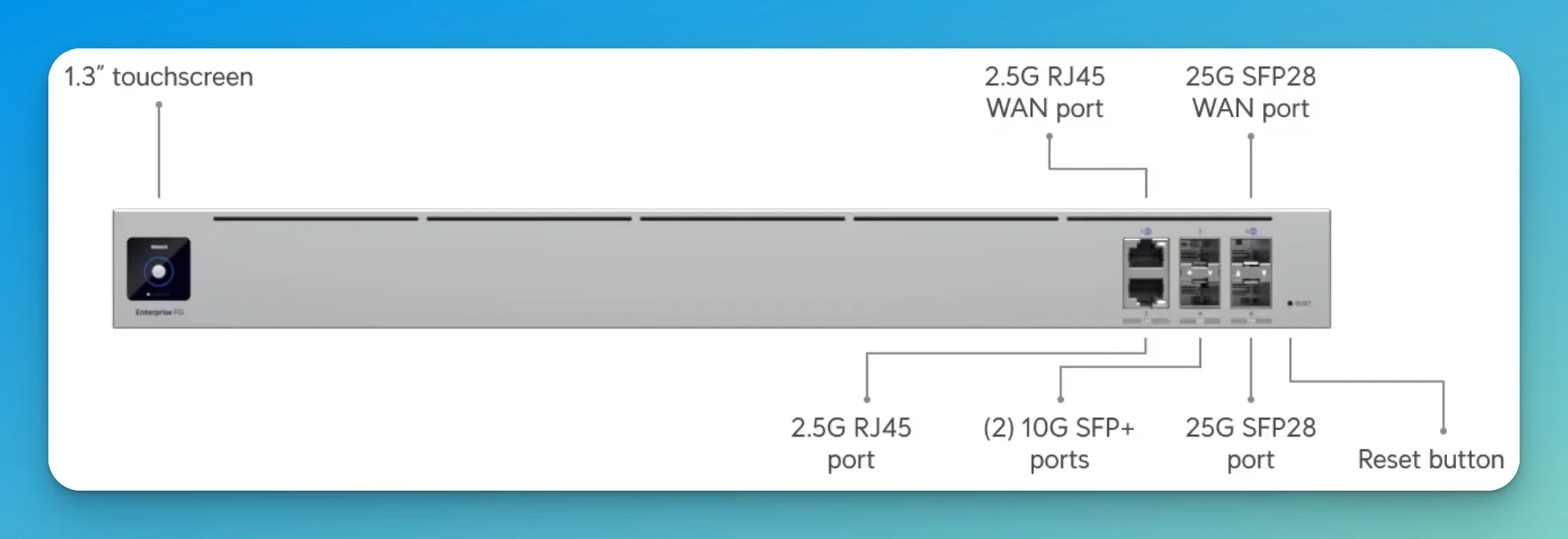
The UXG series lets you host the controller on a cloud server, VM, or dedicated Cloud Key while the gateway handles routing. With an independent UniFi Gateway, you retain UniFi Network management for routing, switches, and access points. Protect, Access, and Talk require compatible UniFi application hosting, such as a CloudKey+, UniFi console, UNVR, or appropriate UniFi OS host.
UXG and Cloud Gateway Options at a Glance
UniFi now has two related gateway paths: Cloud Gateways (Cloud Gateway Max, Cloud Gateway Fiber) host UniFi applications directly and function as all-in-one consoles. Independent Gateways (Gateway Max, Gateway Fiber, UXG-Pro, UXG-Enterprise) handle routing only and require a CloudKey, Official UniFi Hosting, or a UniFi Network Server for controller duties. Choose a Cloud Gateway when you want a self-contained UniFi console. Choose an independent Gateway/UXG when you want routing separated from controller hosting.
| Model | Type | Price | IDS/IPS Throughput | Best For |
|---|---|---|---|---|
| Cloud Gateway Max | Console | $199 | 2.3 Gbps | Compact deployments, built-in controller |
| Cloud Gateway Fiber | Console | $279 | 5 Gbps | Multi-gig fiber, 10G, built-in controller |
| Gateway Max / UXG-Max | Independent | $199 | 2.3 Gbps | Small UniFi sites using external controller hosting |
| Gateway Fiber / UXG-Fiber | Independent | $279 | 5 Gbps | 10G independent gateway with external controller hosting |
| UXG-Pro | Independent | $499 | 3.5 Gbps | High-throughput, requires external controller |
| UXG-Enterprise | Independent | $1,999 | 12.5 Gbps | HA, SSL/TLS inspection, requires external controller |
The Cloud Gateway Fiber ($279) is the newest addition to the lineup and fills a gap for readers with multi-gig fiber who want 10G connectivity without paying UXG-Enterprise prices. It features three 10G ports, an integrated 4-port 2.5 GbE switch, selectable NVR storage, and 5 Gbps IDS/IPS routing in a compact desktop form factor. For many readers exploring alternatives, this may be the native UniFi answer they actually need.
Why Consider UXG
The Dream Machine series integrates the controller into the gateway hardware—straightforward to deploy, but the controller's resources are tied to that device. The UXG series separates these functions, allowing you to:
- Host the controller on dedicated hardware or a cloud VM
- Scale controller resources independently
- Implement controller redundancy for high availability
- Maintain the full UniFi dashboard experience
UXG vs UDM: Architecture Difference
Dream Machine (UDM): All-in-one with integrated controller. Streamlined setup, excellent for most deployments.
UniFi Gateway (UXG): Gateway only—requires external controller. More architectural flexibility for specialized needs.
Routing features overlap heavily, but exact capabilities vary by model, UniFi OS version, and whether the device is a Cloud Gateway or independent Gateway/UXG. The primary difference is deployment architecture.
Option 1: Firewalla Gold Pro — Intuitive Security Visibility
Best For: Owner-operated offices, studios, and small agencies that want clear security visibility without pfSense-level complexity.
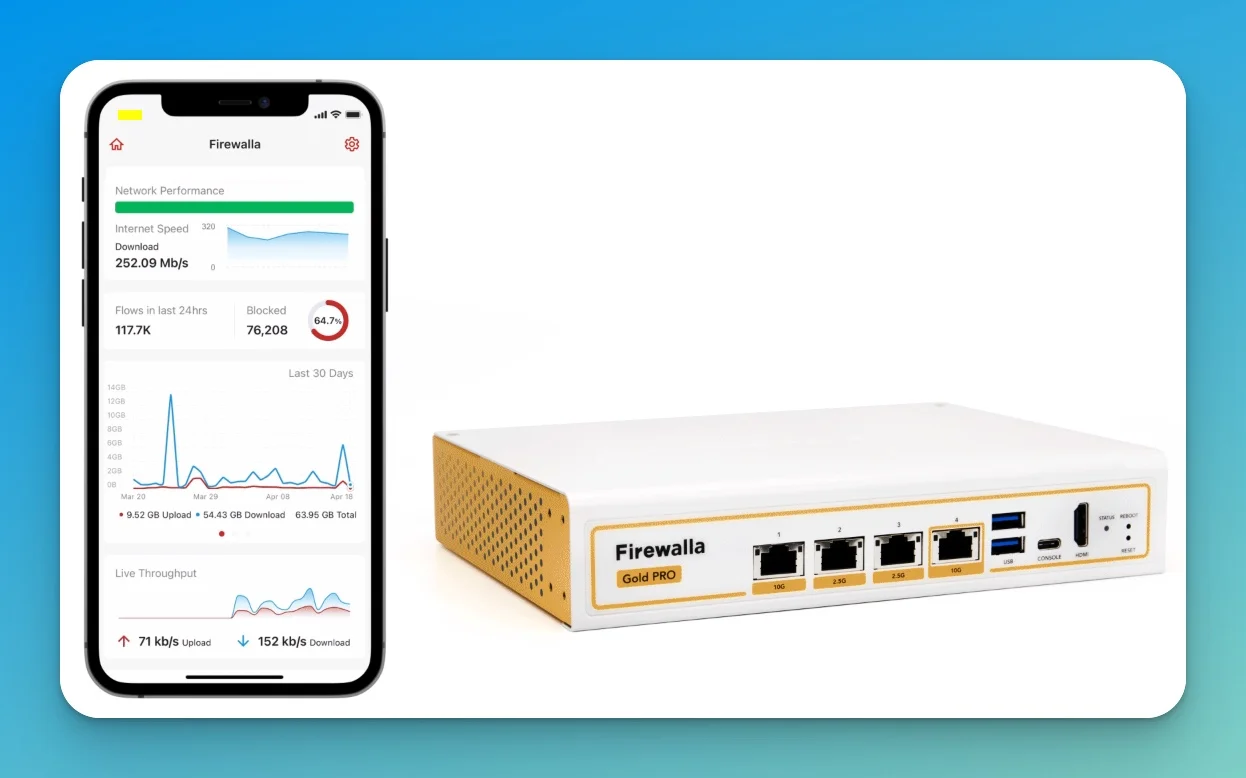
The Firewalla Gold Pro takes a different approach to network security. Rather than requiring networking expertise to interpret logs, Firewalla presents security events with clear context—showing exactly which device, destination, and rule triggered each action, all manageable from a mobile app.
Hardware Specifications
| Specification | Firewalla Gold Pro |
|---|---|
| CPU | Quad-core Intel (12th Gen) |
| RAM | 8GB |
| Ports | 2× 10GbE + 2× 2.5GbE |
| Throughput | 10 Gbps (Routing/Firewall) |
| Price | $929 |
Gold Plus vs Gold Pro
Firewalla offers two models: the Gold Plus ($609) with 2.5G ports, and the Gold Pro ($929) with 10G ports. Choose Gold Plus if 2.5G throughput meets your needs; the Gold Pro is designed for networks requiring 10G line-rate performance.
What Makes Firewalla Different
Firewalla excels at making security data understandable. When traffic is blocked, you see:
- Which specific device initiated the connection
- The destination domain (not just an IP address)
- The exact rule or threat signature that triggered the block
- Historical context showing whether this is new behavior
- One-tap options to allow, block, or investigate
This clarity is valuable for troubleshooting and for environments where non-technical stakeholders need to understand security events.
Hybrid Setup: Firewalla + UniFi
Network Topology
ISP Modem → Firewalla Gold Pro → UniFi Switch → UniFi Access Points
The UniFi switch also connects to cameras, door access, and other UniFi devices.
Controller Requirement:
Without a Dream Machine, you'll need a separate UniFi controller:
- Cloud Key Gen2+ ($199) — Hardware controller with NVR capability (currently sold out on the official store; check availability)
- Self-hosted UniFi Network Application — Free software on Linux, Docker, or Windows
- Official UniFi Hosting — Ubiquiti's cloud-hosted option (from $29/month for up to 1,000 devices)
Option 2: Netgate pfSense — Maximum Routing Flexibility
Best For: Network engineers and compliance-focused businesses needing BGP/OSPF, granular logging, or package extensibility.
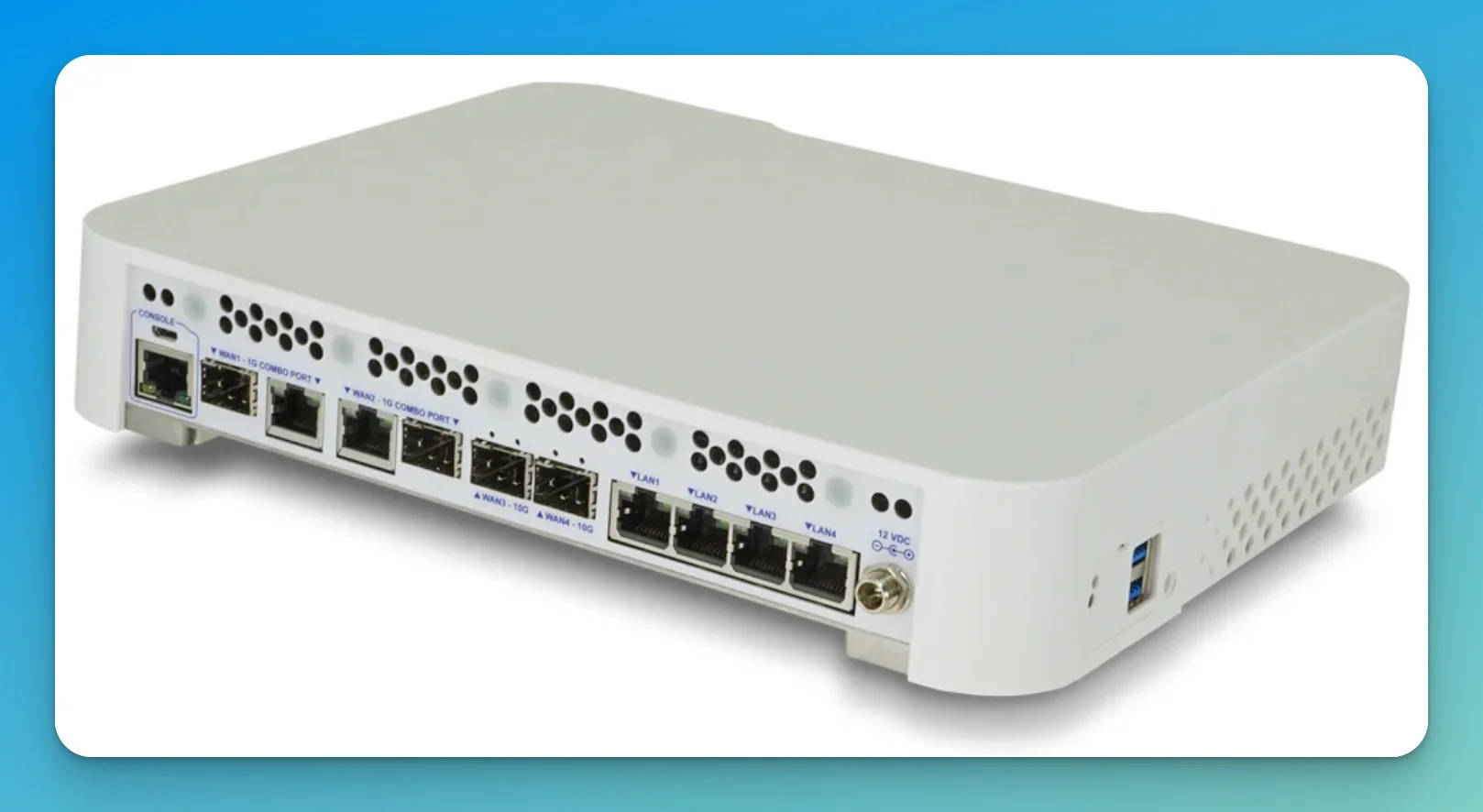
The Netgate 4200 and 6100 run pfSense Plus, providing comprehensive control over network traffic. These appliances support advanced routing protocols and a rich package ecosystem that extends functionality far beyond typical gateway features.
We've covered this comparison in detail in our pfSense vs UDM Pro guide.
Hardware Options
| Model | Price | Form Factor | L3 Forwarding (IMIX) | Firewall (IMIX) | Best For |
|---|---|---|---|---|---|
| Netgate 4200 | $599 | Desktop | 9.28 Gbps | 3.21 Gbps | Small/medium offices |
| Netgate 6100 | $899 | Desktop | 6.08 Gbps | 2.73 Gbps | Multi-site, 10G deployments |
Netgate also publishes iPerf3 figures (18.5 Gbps L3 for the 6100) which represent best-case synthetic throughput. IMIX numbers above reflect real-world mixed packet sizes. IDS/IPS throughput with Suricata or Snort depends heavily on ruleset complexity, enabled inspection features, and traffic mix. Netgate does not publish a single official IDS/IPS throughput figure for these models, so test before sizing for inspection-heavy deployments.
Why pfSense Fits Compliance Needs
Granular Logging: Generate timestamped evidence of traffic segmentation for PCI-DSS audits. Document exactly which rules block inter-VLAN communication with detailed audit trails.
Package Ecosystem: Install additional capabilities directly on the gateway:
- pfBlockerNG — DNS-based threat blocking with detailed logging
- Suricata/Snort — IDS/IPS with custom rulesets
- HAProxy — Load balancing and reverse proxy
- OpenVPN/WireGuard — Full VPN configuration control
Update Control: pfSense updates when you choose, providing predictability for 24/7 operations.
The Learning Curve
pfSense's interface exposes extensive configuration options, which provides flexibility but requires networking knowledge. Setup typically takes 2-4 hours compared to 15-30 minutes for a UniFi gateway. For teams with networking expertise, this trade-off is often worthwhile.
Hybrid Setup: pfSense + UniFi
Network Topology
ISP Modem → Netgate 4200/6100 → UniFi Switch → UniFi Access Points
The UniFi switch also connects to cameras, door access, and other UniFi devices.
Configure your UniFi networks in "Third-Party Gateway" mode (covered in the configuration section below).
Option 3: Cisco Meraki MX — Enterprise Support and Multi-Site Management
Best For: Multi-location businesses prioritizing vendor-backed support, centralized cloud management, and optional upgraded RMA services.
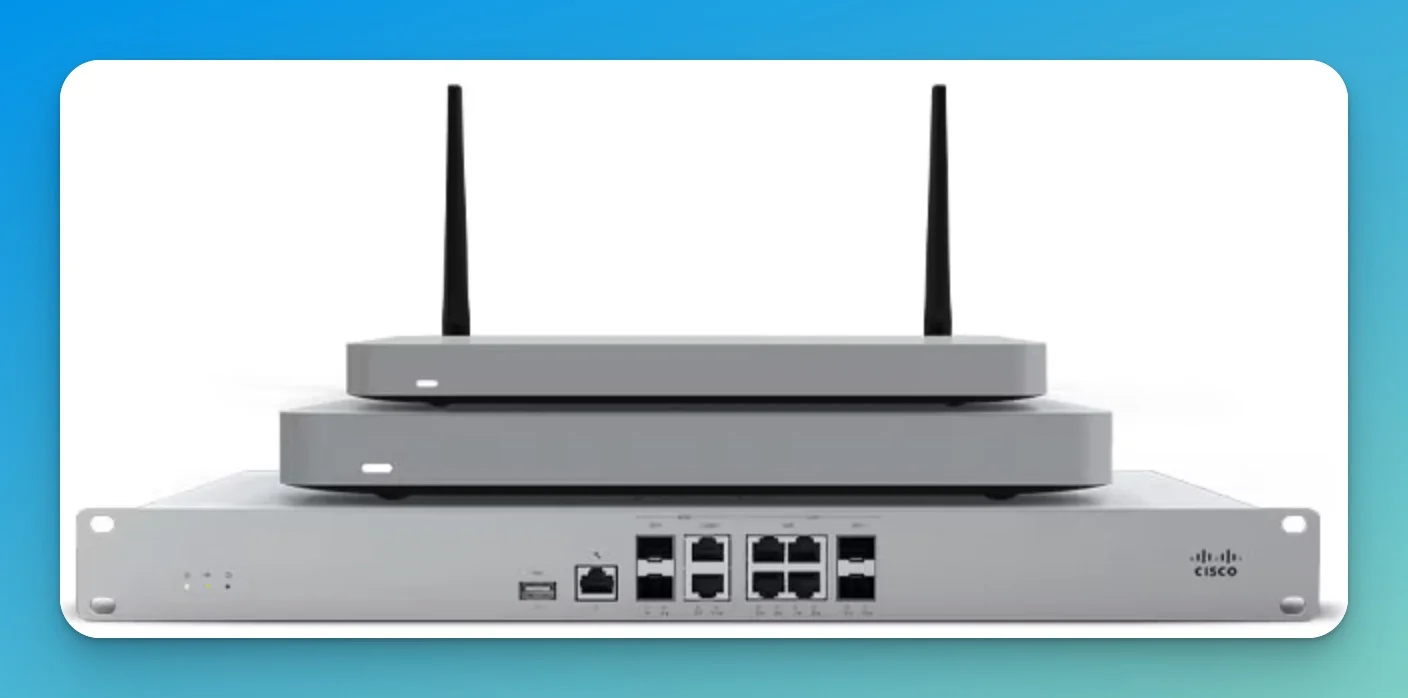
Cisco Meraki offers a different value proposition: you're investing in support infrastructure as much as hardware. The licensing includes 24/7 phone support, next-business-day advance hardware replacement, and a dashboard designed for managing hundreds of sites.
We've analyzed Meraki extensively in our UniFi vs Meraki WiFi 7 cost comparison.
Hardware: The MX85
| Specification | Meraki MX85 |
|---|---|
| Firewall Throughput | 1 Gbps |
| VPN Throughput | 500 Mbps |
| Max Users (Cisco spec) | Up to 250 |
| Recommended (field sizing) | 50–100 active SMB users |
| Hardware Price | $1,900+ |
| Annual License | ~$809–$824 (Enterprise, reseller pricing) |
The Support Value Proposition
Auto-VPN: Configure site-to-site VPNs between dozens of locations with minimal manual setup. The dashboard handles key exchange and routing automatically.
Hardware Replacement: If a device fails, Cisco ships a replacement next business day on a best-effort basis (upgraded RMA services available with Cisco RMA Upgrade). The new device pulls its configuration from the cloud—no manual reconfiguration needed.
Vendor Support: Licensing includes 24/7 phone support with escalation paths, eliminating reliance on community forums during critical issues.
Cost Considerations
5-Year Total Cost (MX85):
| Component | Cost |
|---|---|
| Hardware | $1,900 |
| Enterprise License (5 years, ~$810/yr) | ~$4,050 |
| Total | ~$5,950 |
This compares to $599 for a UDM Pro Max with no licensing fees. The Meraki investment makes sense for organizations where network downtime carries significant business impact and the support infrastructure provides measurable risk reduction. License pricing varies by reseller and discount tier.
Meraki Licensing
Meraki devices require active licensing to function. Budget for ongoing licensing as an operational expense, similar to internet service costs.
Hybrid Setup: Meraki + UniFi
While less common (most Meraki customers want the full Meraki experience), you can pair a Meraki gateway with existing UniFi switching and wireless infrastructure if you need Meraki's support model while preserving your UniFi LAN investment.
A Note on TP-Link Omada ER8411
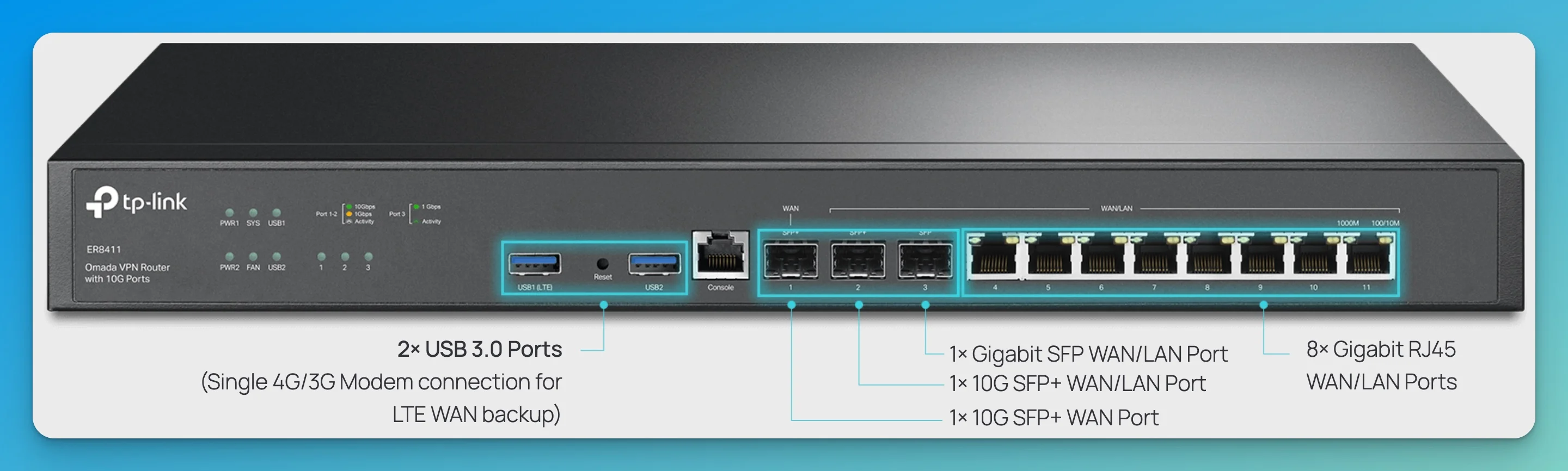
| Specification | Omada ER8411 |
|---|---|
| 10G Ports | 2× 10G SFP+ (1 WAN, 1 WAN/LAN) |
| 1G Ports | 1× SFP WAN/LAN + 8× RJ45 WAN/LAN |
| IPsec VPN | ~2.88–3.10 Gbps |
| WireGuard VPN | 1.41 Gbps |
| OpenVPN | 1.04 Gbps |
| Price | ~$399 |
The ER8411 is a capable budget 10G router, but it is designed as part of the Omada SDN platform. For existing UniFi deployments, the Cloud Gateway Fiber ($279) offers 10G connectivity with native dashboard integration at a comparable price. The ER8411 makes more sense when you are migrating toward or building a full Omada environment rather than supplementing an existing UniFi network.
We've covered the platform in detail in our UniFi vs Omada WiFi 7 comparison.
Configuration Guide: Setting Up a Hybrid Stack
Yes, UniFi switches and APs work behind third-party gateways. You disable DHCP in the UniFi controller, match VLAN IDs to your gateway, and manage routing separately.
If you decide to pair UniFi switches and APs with a third-party gateway, here's the practical setup process.
What Changes Without a UniFi Gateway
Dashboard Differences
With a third-party gateway, your UniFi dashboard won't display:
- Traffic Identification — Application usage visualization moves to your gateway's interface
- Threat Management — IDS/IPS monitoring happens on your new gateway
- DPI Statistics — Deep packet inspection data comes from your gateway
- Integrated VPN — Configure VPN on your gateway, not in UniFi
Your UniFi switches, access points, and cameras continue working normally—you're just managing routing separately.
Step 1: Set Up Your UniFi Controller
Without a Dream Machine, your switches and APs need a controller:
Cloud Key Gen2+ ($199) — Plug-and-play hardware controller with optional NVR capability for UniFi Protect. (Currently sold out on the official store; check availability.)
Self-Hosted Controller — Install the free UniFi Network Application on Ubuntu/Debian, Docker, or Windows.
Official UniFi Hosting — Ubiquiti's cloud-hosted option (from $29/month). Note: UniFi Site Manager at unifi.ui.com is a management portal for viewing sites, not a controller host.
Step 2: Configure Your Gateway
Your gateway handles routing, DHCP, DNS, NAT, firewall rules, VLANs, and VPN. Configure your VLANs on the gateway first, noting the VLAN IDs for use in the UniFi controller.
Step 3: Configure UniFi Networks
In the UniFi controller, navigate to Settings → Networks.
For each network/VLAN:
- Create or edit the network
- Set Gateway IP/Subnet to match your gateway's interface for that VLAN
- Set DHCP Mode to None (your gateway handles DHCP)
- Ensure the VLAN ID matches your gateway configuration
Example Configuration:
| Network Name | VLAN ID | Gateway IP | UniFi DHCP |
|---|---|---|---|
| Corporate | 10 | 192.168.10.1 | None |
| Guest | 20 | 192.168.20.1 | None |
| IoT | 30 | 192.168.30.1 | None |
Step 4: Configure Switch Ports
Trunk Ports (to gateway and between switches): Set to carry all VLANs tagged.
Access Ports (to end devices): Assign the appropriate network/VLAN.
AP Ports: Set as trunk ports carrying all VLANs for multi-SSID deployments.
Common Setup Considerations
Configuration Tips
Double NAT: If your ISP modem is also routing, you may have double NAT. Put the modem in bridge mode or place your gateway in the modem's DMZ.
DHCP: Ensure only your gateway runs DHCP to avoid address conflicts.
VLAN IDs: Double-check that VLAN IDs match between your gateway and UniFi controller.
Management Access: Ensure your management VLAN allows access to both the UniFi controller and your gateway's admin interface.
Quick Comparison: Finding Your Best Fit
| Option | Price | Best For | UniFi Dashboard | Support |
|---|---|---|---|---|
| UDM Pro Max | $599 | Most businesses—all-in-one simplicity | Full integration | Community; optional UI Care |
| Cloud Gateway Fiber | $279 | Multi-gig fiber, 10G, 5 Gbps IPS | Full integration | Community; optional UI Care |
| Cloud Gateway Max | $199 | Compact all-in-one UniFi console | Full integration | Community; optional UI Care |
| Gateway Max / UXG-Max | $199 | Independent gateway with external controller hosting | Full integration | Community; optional UI Care |
| Firewalla Gold Pro | $929 | Intuitive security visibility | Gateway only | |
| Netgate 4200 | $599 | Deep routing/firewall control | Gateway only | TAC Lite included; Pro/Enterprise optional |
| Meraki MX85 | $1,900+ | Multi-site, enterprise support | Gateway only | 24/7 phone + vendor-backed |
| Omada ER8411 | ~$399 | Full Omada ecosystem builds | Gateway only | Community |
Recommendation Summary
Stay with UniFi If
- You want unified management for networking, cameras, and access control
- Your network topology is straightforward
- Community support meets your needs
- Single-dashboard convenience outweighs specialized firewall control
Best options: UDM Pro Max ($599), Cloud Gateway Fiber ($279), or Cloud Gateway Max ($199)
Consider UXG Series If
- You want UniFi's dashboard but need controller flexibility
- High availability or controller redundancy matters
- You're scaling to larger deployments
Best options: Gateway Max / UXG-Max ($199) or UXG-Pro ($499)
Consider Firewalla If
- Intuitive security visibility is important
- Non-technical stakeholders need to understand security events
- Mobile app management appeals to you
Best options: Firewalla Gold Pro ($929) or Gold Plus ($609)
Consider Netgate/pfSense If
- You need deeper firewall configurability or package extensibility
- Compliance requires detailed, timestamped firewall logging
- Your team has networking expertise
Best options: Netgate 4200 ($599) or 6100 ($899)
Consider Meraki If
- Uptime and vendor accountability matter for your organization
- You manage multiple locations
- Vendor-backed support and cloud management are required
Best option: Meraki MX85 ($1,900+ with licensing)
Consider Omada If
- You are building or migrating toward a full Omada SDN environment
- You need an affordable 10G gateway outside the UniFi ecosystem
- You do not need UniFi dashboard integration
Best option: Omada ER8411 (~$399)
Not Covered in Depth
This guide focuses on the gateway platforms most commonly paired with UniFi infrastructure based on community adoption and integration simplicity. Several other capable platforms exist:
-
Fortinet FortiGate (60F/80F) — Enterprise-grade UTM starting around $400–$700 for hardware plus FortiGuard subscription ($200–400/yr). Strong fit for regulated industries (healthcare, finance) needing unified threat management with formal security subscriptions. Common in MSP-managed environments where Fortinet's Security Fabric provides centralized policy management across sites. The licensing model adds ongoing cost but includes regularly updated threat intelligence.
-
SonicWall TZ (270/370) — SMB-focused firewalls with solid VPN throughput and deep packet inspection at hardware price points similar to Netgate ($300–$700 plus annual TotalSecure subscription). A common choice for MSPs managing dozens of client sites through SonicWall's centralized management console. The subscription model unlocks content filtering, gateway anti-virus, and anti-spyware—features that overlap with what Firewalla provides through its own subscription-free approach.
-
MikroTik — Extremely cost-effective routing hardware with RouterOS; steep learning curve and CLI-heavy management. Capable of very high throughput at low price points, but requires significant networking expertise to configure and maintain.
-
OPNsense / Protectli — Open-source pfSense alternative on fanless hardware; growing community and plugin ecosystem. A good option for users who want pfSense-style flexibility without Netgate's hardware vendor lock-in.
-
WatchGuard Firebox — Unified threat management with strong reporting and subscription-based feature tiers. Popular in education and small enterprise environments where WatchGuard's compliance reporting simplifies audits.
Each has merits for specific use cases, but the options above represent the most common and well-documented pairings with UniFi infrastructure.
Conclusion
Most UniFi networks are best served by UniFi gateways. The lineup now covers everything from compact $199 desktops to 12.5 Gbps enterprise gateways with SSL/TLS inspection, and the unified dashboard, no required license for core gateway operation, and broad integration with Protect, Access, and Talk make staying in-ecosystem the simpler path.
A third-party firewall makes sense when you need specific capabilities UniFi does not provide: deeper firewall configurability and package ecosystems (pfSense), intuitive owner-facing security visibility (Firewalla), or vendor-backed enterprise support with cloud management and optional upgraded RMA services (Meraki). If none of those apply, staying within the UniFi ecosystem is the lower-maintenance choice.
When you do pair a third-party gateway with UniFi switches and WiFi 7 access points, the setup works well—you just manage routing separately from the UniFi dashboard.
Frequently Asked Questions
Can I use UniFi Protect cameras with a third-party gateway?
Yes. UniFi Protect cameras can work behind a third-party gateway, but they must be managed by the UniFi Protect application on a compatible UniFi console, CloudKey+, UNVR, or supported UniFi host. The gateway routes traffic; it does not manage cameras.
Do I lose WiFi 7 capabilities without a UniFi gateway?
No. Your U7 Pro or U7 Pro Max access points function identically regardless of which gateway routes your traffic. WiFi performance depends on the access points and switches, not the gateway.
Can I migrate back to a UniFi gateway later?
Yes. If you later purchase a Dream Machine, you can adopt your existing switches and APs to the new gateway. Controller configuration migrates via backup/restore.
Is the Cloud Key Gen2+ worth buying just for controller hosting?
For most hybrid deployments, yes. At $199, it provides reliable, low-maintenance controller hosting. Self-hosted options are free but require ongoing server management.
Does UniFi Identity VPN work with third-party gateways?
UniFi Identity (Teleport VPN) requires a UniFi gateway. For mixed-vendor setups, configure VPN on your third-party gateway instead.
Can I use UniFi Access with a third-party gateway?
Yes. UniFi Access can work behind a third-party gateway, but it still requires the UniFi Access application and compatible UniFi hosting. The gateway routes traffic; it does not manage door access.
How do firmware updates work in a mixed-vendor setup?
Update each system independently. Your gateway has its own update mechanism; UniFi devices update through the UniFi controller. Coordinate updates during maintenance windows.
Related Resources
UniFi Guides
- Best Firewall for Small Business 2026 — No-subscription firewall guide with TCO comparisons
- UniFi Gateway Comparison Guide — Complete 2026 gateway lineup
- Dual WAN Business Network Guide — Failover, load balancing, and bonding compared across UniFi, Firewalla, Meraki, and Peplink
- Cloud Gateway Fiber Review — UCG-Fiber deep dive with 10G benchmarks
- pfSense vs UDM Pro — Detailed Netgate comparison
- UniFi vs Meraki WiFi 7 — Full ecosystem cost analysis
- UniFi vs Omada WiFi 7 — Budget alternative comparison
- UDM Pro Max Review — Detailed product analysis
- Cloud Gateway Max Review — UCG-Max deep dive
- Cloud Gateway Ultra vs Max Comparison — Side-by-side specs, cost analysis, and deployment decision guide
Our Services
- UniFi Network Services — Professional installation and configuration
- Managed IT Services — Ongoing network management
- Contact Us — Free network assessment
Related Articles
More from UniFi Networks
UniFi Site Magic: How to Connect Two Business Locations (2026)
Step-by-step guide to setting up UniFi Site Magic for site-to-site VPN between business locations. Covers IP planning, topology, and non-UniFi alternatives.
8 min read
UniFi U7 Pro Max Field Review (2026): PoE+, Range & XGS Comparison
Field review of 12 UniFi U7 Pro Max APs across four SMB sites. PoE+, range, spectral scanning, heat, and U7 Pro XGS comparison.
18 min read
Meraki to UniFi Migration Guide: Cost Comparison and Step-by-Step Replacement Path
A practical migration guide for IT managers moving from Cisco Meraki to UniFi. Includes hardware mapping, 5-year cost comparison, pre-migration checklist, and weekend cutover plan.
16 min read