

UniFi Dream Router 7 Review: Long-Term Results from Real Business Deployments
More than seven months across multiple branch office deployments: WiFi 7 holds, the UniFi OS 5.x line is stable, early launch issues are resolved. Real performance data, verified specs, and honest trade-offs for business buyers.

After more than seven months of production deployments across three branch office locations, the UniFi Dream Router 7 has earned its place in our standard toolkit for small office deployments. This $279 gateway — 10G SFP+ WAN, 2.3 Gbps IDS/IPS, WiFi 7 tri-band, full UniFi OS 5.x — provides routing and security performance that previously pushed many small offices toward rack-mounted UniFi gateways. Below is the original installation case study plus long-term monitoring data across multiple sites.
Dream Router 7 at a Glance: Key Numbers
- Price: $279 direct from Ubiquiti Store (verified July 2026); third-party listings typically run $273–$340
- IDS/IPS throughput: 2.3 Gbps (with full security enabled)
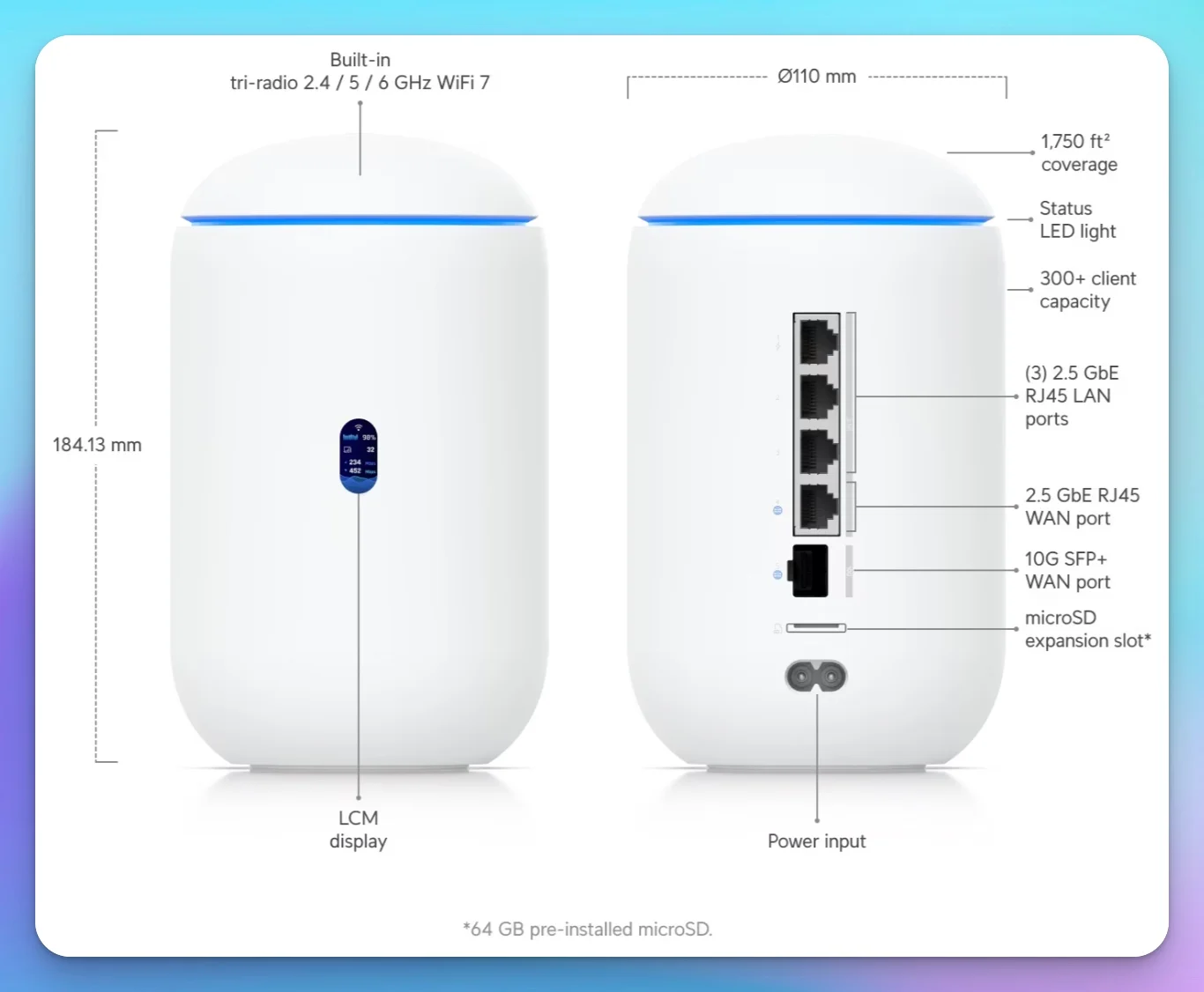
- WAN: 10G SFP+ + 2.5G RJ45 (dual-WAN — failover AND load balancing both supported)
- LAN: 3x 2.5G RJ45 (one with PoE, 15.4W 802.3af)
- WiFi: WiFi 7 tri-band — 6 GHz: 5.7 Gbps, 5 GHz: 4.3 Gbps, 2.4 GHz: 688 Mbps; 2x2 MU-MIMO (down from 4x4 on the original Dream Router)
- Protect camera capacity: 5 HD / 2 2K / 1 4K; recording uses the pre-installed 64GB microSD
- Coverage: Up to 1,750 sq ft
- UniFi apps: Full stack — Network, Protect, Talk, Access, Connect
- FCC status: Previously authorized model — can continue to be sold and used under the March 2026 router rules
- Best for: Small offices and branch locations, 5–20 people, up to 1,750 sq ft
- Not for: Rack installs, spaces above 1,750 sq ft, WAN connections above 2 Gbps with IDS/IPS
FCC Availability Note
The Dream Router 7 remains a previously authorized model and can continue to be sold and used under the FCC's March 2026 router rules. The rule mainly affects new foreign-produced consumer router models that need new FCC equipment authorization. Firmware and security updates for already-authorized covered routers are permitted through at least January 1, 2029, per the FCC's May 2026 waiver extension (DA 26-454).
Affiliate Disclosure: This article contains affiliate links. If you make a purchase through these links, we may earn a small commission at no extra cost to you. As an Amazon Associate, iFeelTech earns from qualifying purchases.
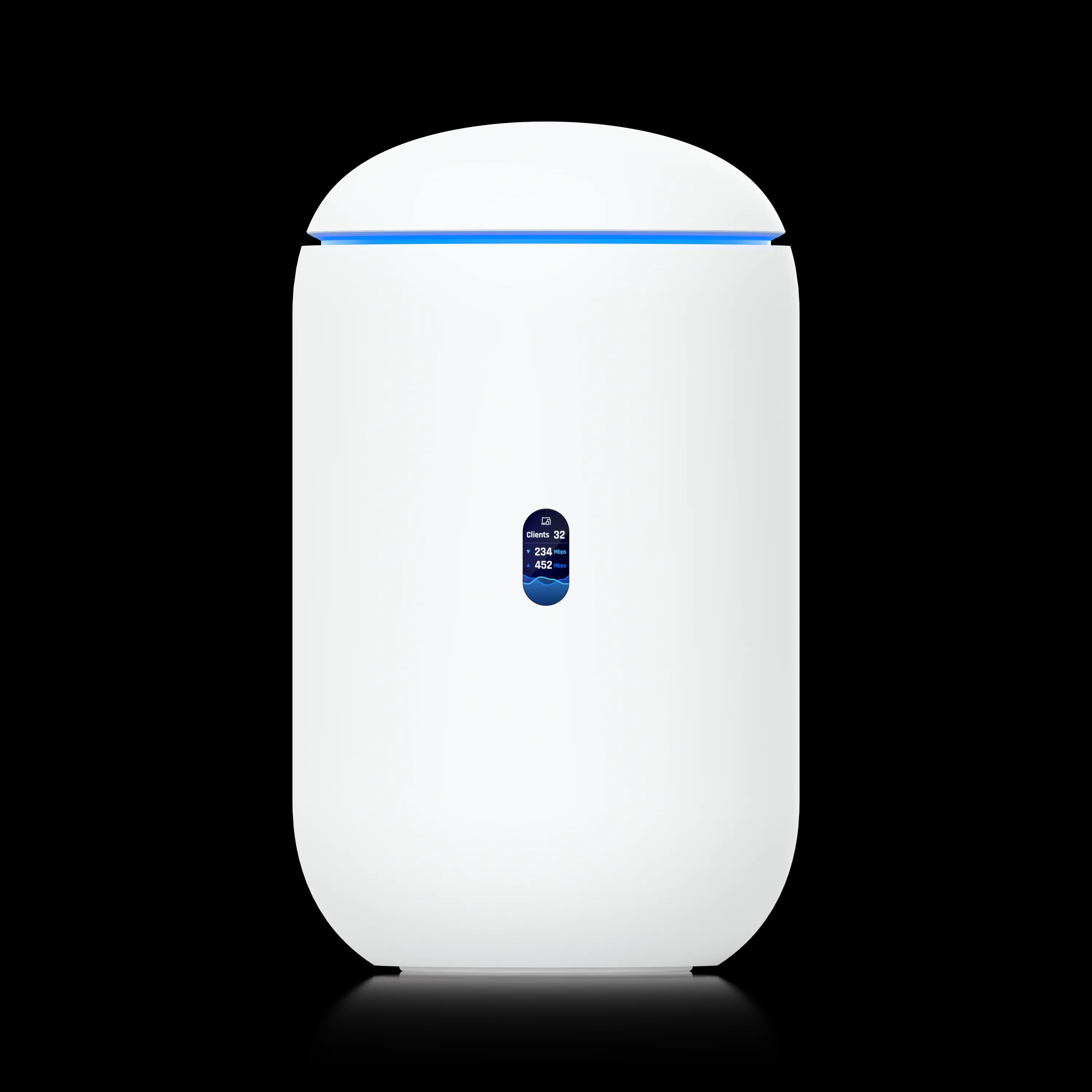
UniFi Dream Router 7
Compact all-in-one gateway with 10G SFP+ WAN, WiFi 7 tri-band, and 2.3 Gbps IDS/IPS throughput. Ideal for small offices and branch locations.
- 10G SFP+ WAN Port
- 3x 2.5 GbE LAN (1 PoE)
- WiFi 7 Tri-Band (up to 5.7 Gbps)
- 2.3 Gbps IDS/IPS Throughput
*Price at time of publishing
What Is the UniFi Dream Router 7?
The Dream Router 7 is one of Ubiquiti's compact all-in-one UniFi Cloud Gateways, released in early 2025. It combines 10G routing, multi-gig switching, and WiFi 7 wireless in a desktop form factor — consolidating gateway, switch, and access point into a single desktop cylinder that requires no rack infrastructure.
UniFi Dream Router 7 Introduction
What sets the Dream Router 7 apart from both the original Dream Router and consumer WiFi 7 routers is the combination of 10G SFP+ connectivity and substantial IDS/IPS throughput. Unlike its predecessor, this device offers capable gateway performance in a desktop form factor.
Real-World Installation: Small Branch Office
A consulting firm client needed networking for a new 1,200 sq ft satellite office in Coral Gables—five desks, a conference area, and a reception desk. Requirements: reliable WiFi, wired connections for three workstations, integration with their existing UniFi setup at headquarters, and connectivity ready for potential fiber upgrades.
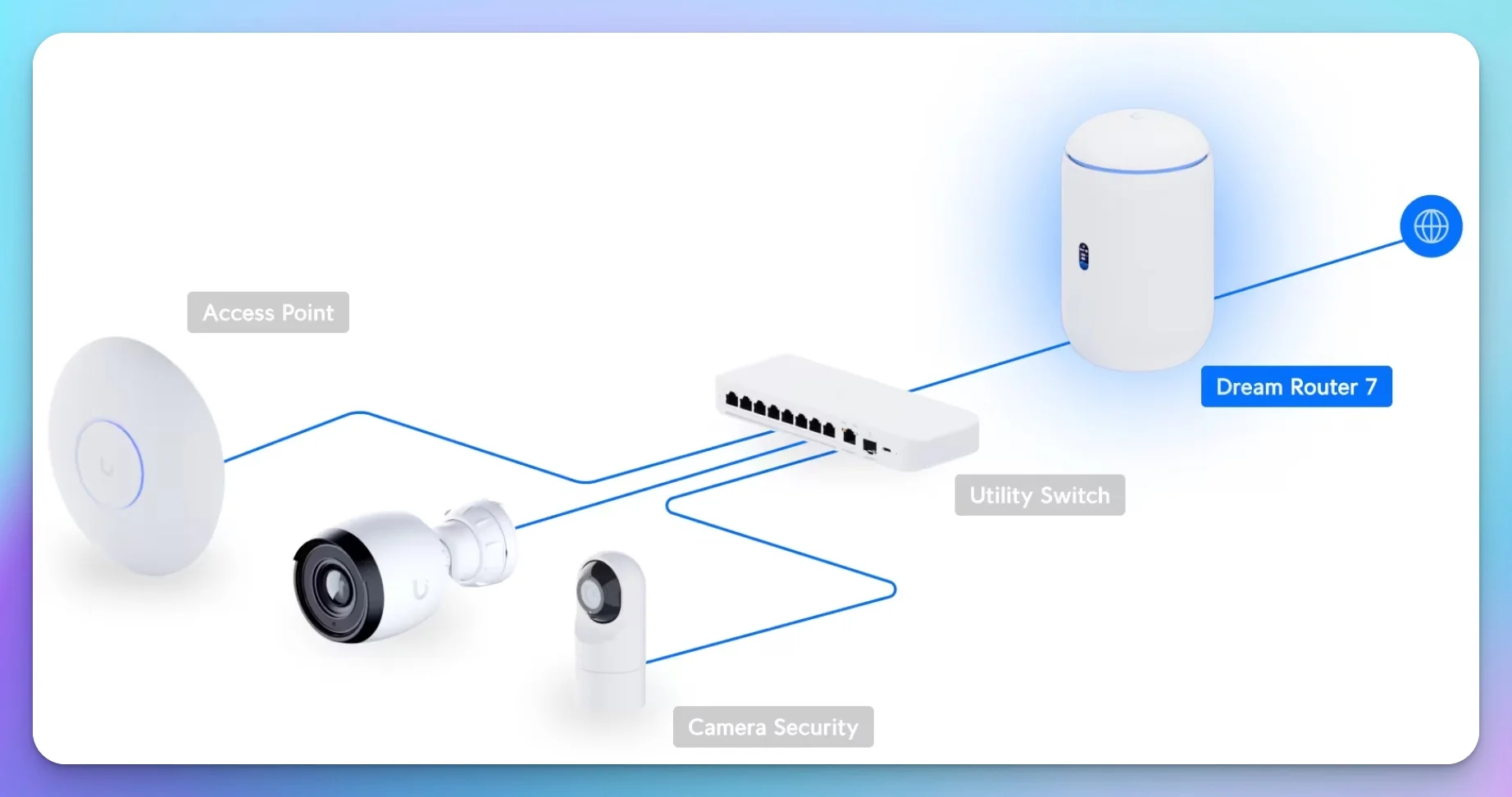
We installed the Dream Router 7 on their 500 Mbps AT&T Business Fiber line via the 2.5 GbE WAN port, configured VLANs for staff and guest traffic, and added a small UniFi switch for IP phones and printers. Total installation time: about two hours including testing.
How Far Does the UniFi Dream Router 7 WiFi Coverage Reach?
The UniFi Dream Router 7 provides reliable WiFi 7 coverage for up to 1,750 square feet. It easily covered our client's entire 1,200 square foot space. Signal strength remained strong in all work areas, including the conference room at the far end of the office.
To test local network performance (separate from the 500 Mbps internet connection), we ran iperf3 tests between WiFi clients and a wired server:
- WiFi 7 (6 GHz) at close range: 850-950 Mbps
- WiFi 7 (5 GHz) at mid-range: 550-650 Mbps
- Far corner of office (50+ feet): 300-400 Mbps
- 2.4 GHz (legacy devices): 150-200 Mbps
- Stable video calls throughout: No dropped connections or quality issues
These numbers represent measured local throughput between the WiFi client and a wired server—useful for local file transfers and internal applications. For internet access, the 500 Mbps connection remained the bottleneck, which the Dream Router 7 delivered without issue.
Testing Methodology
- Firmware tested: UniFi OS 5.1.19
- WiFi 7 test client: Intel BE200 WiFi 7 adapter (Windows 11)
- Test tool: iperf3 (TCP, 10-second runs, 3-run average)
- Distances: 10 ft (close), 25 ft (mid-range), 50+ ft (far corner)
- Channel width: 160 MHz on 6 GHz and 5 GHz bands
- Active clients during testing: 12–15 (typical office load)
- Security features enabled: IDS/IPS, VLANs, guest network isolation
- UniFi Protect: Active with one 2K camera recording
Routing Performance With IDS/IPS Security Enabled
The Dream Router 7 delivers a maximum IDS/IPS routing throughput of 2.3 Gbps. This allows full threat detection on up to 2 Gbps internet plans.
The client's internet connection is a 500 Mbps fiber line. We enabled IDS/IPS from the start—something we typically can't do on lower-end gateways without significant performance penalties. The Dream Router 7 handled this configuration without issue:
- Routing performance with IDS/IPS enabled: Full 500 Mbps symmetrical
- IDS/IPS overhead: Negligible (device rated for 2.3 Gbps)
- Latency: Consistent 8-12ms to local servers
- No performance degradation during business operations
With 2.3 Gbps of IDS/IPS throughput available, the Dream Router 7 can handle connections up to 2 Gbps while still providing threat detection and prevention. For most small business and branch office scenarios, you can enable full security features without compromising network performance.
Ideal Deployments for the UniFi Dream Router 7
The Dream Router 7 is best for small branch offices and advanced home networks requiring multi-gig routing without network rack infrastructure.
After several months of monitoring this installation, we identified specific scenarios where this gateway excels:
Small to Medium Office with Multi-Gig Needs
If you need 2.5 GbE connectivity for workstations, NAS devices, or future multi-gig internet without rack infrastructure, the Dream Router 7 delivers. The three 2.5 GbE LAN ports provide substantial wired bandwidth, and the 10G SFP+ port means you can connect to fiber internet or a 10G switch for expanded capacity.
Branch Offices with Security Requirements
Organizations that need full IDS/IPS inspection—not just firewall basics—will appreciate the Dream Router 7's maximum security throughput. Unlike budget gateways that can't handle threat detection without performance penalties, the Dream Router 7 lets you enable comprehensive security for any connection under 2 Gbps.
Better Prepared for Fiber Upgrades
If you're on a 500 Mbps or 1 Gbps connection now but anticipate upgrading to multi-gig fiber in the next few years, the 10G SFP+ WAN port means you won't need to replace your gateway. Add a Ubiquiti SFP+ to RJ45 adapter (~$65) or use fiber modules directly.
Home Office or Power User Setup
For professionals working from home who want advanced networking capability without enterprise complexity, the Dream Router 7 provides WiFi 7, multi-gig Ethernet, camera support, and UniFi ecosystem integration in a desk-friendly package.
Multi-Site Deployment Consistency
Organizations with multiple small locations can deploy Dream Router 7 units for uniform management across sites. The UniFi Network application allows centralized administration, simplified firmware updates, and consistent security policies.
Dual-WAN Failover and Load Balancing
The Dream Router 7 supports both dual-WAN failover and multi-WAN load balancing using the 10G SFP+ and 2.5 GbE WAN ports simultaneously. Failover automatically switches to the secondary ISP when the primary drops. Load balancing distributes traffic across both connections for increased aggregate throughput. This makes it a strong choice for branch offices that need ISP redundancy without stepping up to rack-mounted gear.
When Budget Meets Performance
At $279, the Dream Router 7 bundles WiFi 7, multi-gig Ethernet, and 10G SFP+ connectivity into a single desktop device. A comparable separated setup (Cloud Gateway Max + U7 Pro access point) costs $390-$470, making the all-in-one approach competitive for deployments where the form factor fits. For a full cost breakdown across three budget tiers, see our budget 2.5 Gbps UniFi network guide.
When to Choose a Different UniFi Gateway
Choose a different gateway for spaces over 1,750 sq ft, rack installs, or connections above 2 Gbps with IDS/IPS.
The Dream Router 7 is more capable than many compact gateways, but it still has specific limitations:
Large Spaces or Multi-Floor Deployments
The integrated WiFi 7 radio covers a typical small office comfortably, but larger spaces or multi-floor offices require additional access points. At that point, consider whether a dedicated gateway with separate WiFi 7 access points provides better value and flexibility.
Rack-Mounted or Closet Installations
If you're building or maintaining a network rack, the Dream Router 7's desktop form factor doesn't integrate well. More importantly, installing it inside a metal rack or network closet wastes the integrated WiFi—the signal won't reach your workspace. The Cloud Gateway Max is a better choice for closet installs since it has no built-in WiFi and pairs with separately positioned access points. For full rack deployments, the Dream Machine Pro Max offers extensive connectivity.
Extensive Wired Device Requirements
Three LAN ports can fill up quickly in environments with many wired devices. While you can add switches, organizations that need 8+ direct gateway connections from the start should choose hardware with more built-in ports.
Bandwidth Requirements Above 2 Gbps
The 2.3 Gbps IDS/IPS throughput is excellent for connections up to 2 Gbps, but if you're deploying 5 Gbps or 10 Gbps internet, you'll need a more powerful gateway. The Dream Machine Pro Max handles up to 5 Gbps with IDS/IPS enabled; for 10+ Gbps with full threat inspection, the Enterprise Fortress Gateway (EFG) delivers 12.5 Gbps IDS/IPS throughput.
Extensive PoE Device Deployment
With only one PoE port at 15.4W, you can't power multiple PoE devices directly from the gateway. If you're deploying numerous cameras, access points, or IP phones, you'll need external PoE switches anyway—at which point a non-PoE gateway may make more sense.
If You Need to Power High-Performance APs
The single PoE port is 802.3af only (15.4W). It cannot power PoE+ (802.3at) devices like the U7 Pro (22W) or U7 Pro Max. It's limited to lower-power devices such as G5 Bullet/Dome cameras, older access points, or the U7 Lite. If you plan to add a WiFi 7 access point to extend coverage, you'll need a separate PoE+ injector or PoE switch.
High-Availability Requirements
The Dream Router 7 supports dual-WAN failover and load balancing at the ISP level, protecting against internet outages. However, it provides no hardware-level device redundancy — if the unit itself fails, the network goes offline until the device is replaced or swapped. Organizations that require automated hardware failover between two physical units should choose enterprise gateways with dedicated HA port pairing.
Setup and Configuration
Initial setup follows the standard UniFi process. We connected the Dream Router 7 to the client's fiber internet, downloaded the UniFi Network mobile app, and followed the setup wizard. The entire process took about 15 minutes.
Configuration steps:
- Connect WAN port to internet source
- Power on device and wait for LED indicators
- Launch UniFi Network app (mobile or desktop)
- Follow setup wizard to configure:
- Network name and password
- Admin credentials
- Basic security settings
- Guest network (optional)
- Add device to existing UniFi network (if applicable)
For our client, we integrated this branch office into their existing UniFi setup. This allowed them to manage both locations from a single controller interface—a significant operational benefit compared to running separate network management systems.
Integration with Existing UniFi Networks
One of the Dream Router 7's strengths is seamless integration with larger UniFi deployments. Our client's main office runs a Dream Machine Pro with multiple access points and switches. We added the Dream Router 7 as a remote site, which provides:
- Centralized management across both locations
- Consistent network policies and configuration
- Remote troubleshooting capabilities
- Unified monitoring and alerts
This setup works well for organizations with distributed operations. IT staff can manage all locations from a single interface rather than logging into separate systems for each site.
How Does the Dream Router 7 Compare to Other UniFi Gateways?
The Dream Router 7 sits between the budget Express 7 and the rack-mount Dream Machine Pro Max. Here's how it stacks up against other UniFi gateway options:
| Specs | |||
|---|---|---|---|
| WiFi | WiFi 7 (integrated) | WiFi 7 (integrated) | None (requires APs) |
| WAN Ports | 1x 10G SFP+ + 1x 2.5GbE | 1x 10G RJ45 | 1x 2.5GbE RJ45 |
| LAN Ports | 3x 2.5GbE | 1x 2.5GbE | 4x 2.5GbE |
| PoE Output | 1 port (15.4W) | None | None |
| IDS/IPS | 2.3 Gbps | 2.3 Gbps | 2.3 Gbps |
| Coverage | 1,750 sq ft | 1,750 sq ft | N/A |
| Best For | Small/medium office | Home office, very small setups | Growing businesses |
For detailed comparisons between the newer WiFi 7 gateway models, see our UDR7 vs UX7 vs UCG Fiber comparison. If you're deciding between the UDR7 and the wired-only UCG Fiber, our dedicated UCG Fiber review covers that head-to-head in depth.
Key Differences:
The UniFi Express 7 costs $80 less and shares the same maximum security throughput and identical WiFi 7 coverage area. However, it has only one 2.5 GbE LAN port (vs three on the Dream Router 7), a single 10G RJ45 WAN port instead of the Dream Router 7's 10G SFP+ (no fiber flexibility or dual-WAN), no PoE output, and runs only the UniFi Network application—no Protect, Access, or Talk. The Dream Router 7 is worth the $80 premium for businesses that need wired connections for multiple devices, camera recording, or dual-WAN failover.
The Cloud Gateway Max matches the Dream Router 7's full security throughput and actually offers more LAN ports (four 2.5 GbE vs three), but lacks any 10G connectivity and has no built-in WiFi. It requires separate access points, so total cost for a comparable setup (UCG Max + U7 Pro) runs about $390-$470—significantly more than the Dream Router 7. However, the separate AP approach provides better coverage flexibility for larger or complex spaces, and the UCG-Max supports far more cameras (15 HD vs 5 HD).
The Dream Machine Pro Max operates in a different class entirely. With 5 Gbps IDS/IPS throughput, extensive 2.5GbE and 10GbE connectivity, and rack-mountable design, it serves mid-sized businesses and enterprise deployments. It costs $320 more than the Dream Router 7 but provides capabilities not available in a compact desktop gateway. For organizations needing 10+ Gbps with full threat inspection, the Enterprise Fortress Gateway (EFG) reaches 12.5 Gbps IDS/IPS.
UniFi Dream Router 7 vs Express 7: Which Should You Buy?
The Dream Router 7 vs Express 7 decision is the most common question we hear from small business buyers evaluating UniFi WiFi 7 gateways. At $279 vs $199, the $80 gap is narrow enough that the right choice depends on your specific requirements rather than budget alone.
Both gateways have very similar published WiFi 7 specifications: tri-band radios, the same listed data rates (6 GHz at 5.7 Gbps, 5 GHz at 4.3 Gbps, 2.4 GHz at 688 Mbps), 2x2 MU-MIMO, 1,750 sq ft coverage, and 2.3 Gbps IDS/IPS throughput. If WiFi speed or threat detection capacity is your primary concern, neither has a meaningful advantage over the other.
The differences are in connectivity and software capabilities. The Dream Router 7 has three 2.5 GbE LAN ports compared to just one on the Express 7—a significant gap if you have workstations, printers, or switches that need wired connections. The Dream Router 7's 10G SFP+ WAN port accepts fiber modules directly and supports dual-WAN failover with the secondary 2.5 GbE RJ45 WAN port. The Express 7's single 10G RJ45 WAN port handles copper connections only and offers no failover option.
The Dream Router 7 also includes a PoE port (15.4W, 802.3af) that can power a small camera or access point without an injector. The Express 7 has no PoE output.
On the software side, the Dream Router 7 runs the full UniFi application suite—Network, Protect, Access, Talk, and Connect—with a pre-installed 64GB microSD for camera recording. The Express 7 runs UniFi Network only, with no support for cameras, door access, or VoIP through the gateway.
Choose the Express 7 if you need a WiFi 7 gateway for a home office or very small space (1-3 people) with primarily wireless devices, a single wired connection is sufficient, you don't need cameras, and you want the most compact and portable form factor (422g with USB-C power).
Choose the Dream Router 7 if you need multiple wired connections, camera recording capability, dual-WAN failover, PoE for a device, or you're deploying in a small business with 5+ people. The extra $80 buys meaningful hardware and software capabilities that matter in business environments.
For a deeper side-by-side breakdown, see our full Express 7 vs Dream Router 7 comparison.
Dream Router 7 vs Consumer Mesh Systems (Eero, TP-Link Deco)
The Dream Router 7's $279 price tag often draws comparisons to consumer WiFi 7 mesh systems like the Eero Max 7 (about $600 per unit; three-packs list at $1,700 but have sold closer to $1,250 through mid-2026) and the TP-Link Deco BE85 (roughly $1,000–$1,500 for a 3-pack depending on discounts). On paper, consumer mesh systems cover more square footage per dollar—a Deco BE85 3-pack blankets up to 7,200 sq ft. But the comparison misses what the Dream Router 7 includes beyond WiFi.
The Dream Router 7 is a full security gateway with business-grade threat detection, VLAN segmentation, zone-based firewall, DPI traffic identification, and content filtering. Consumer mesh systems offer basic firewall features at best—typically no comparable IDS/IPS, business-grade VLAN segmentation, or granular firewall policy control. For any business handling client data or meeting compliance requirements, this distinction matters.
Our UniFi vs eero comparison breaks the cost side down over five years, including the subscription tiers each platform charges for.
Multi-site management is another gap. Organizations with two or more locations can manage every Dream Router 7 from a single UniFi Network interface with consistent policies, centralized monitoring, and Site Magic VPN between sites. Consumer mesh systems manage one network at a time with no cross-site coordination.
The Dream Router 7 also runs UniFi Protect for camera recording, UniFi Access for door locks, and UniFi Talk for VoIP—none of which exist in consumer mesh ecosystems. Where consumer mesh wins is in simplicity: app-guided setup, automatic channel optimization, and wider coverage without adding access points. For a home with no business networking requirements, consumer mesh is the easier path. For any environment where security policies, network segmentation, or multi-site management matter, the Dream Router 7 offers capabilities that consumer mesh systems do not provide—at a lower total cost.
Pricing and Value Analysis
The Dream Router 7 retails for $279 direct from Ubiquiti's store (verified July 2026) — the best widely available price. Third-party listings typically run $273–$340 depending on retailer and stock, so the UI Store remains the sensible default unless a reputable listing genuinely undercuts it.
What You Get for $279:
- 10G SFP+ WAN port
- Three 2.5 GbE LAN ports (one with PoE)
- WiFi 7 tri-band radios (up to 5.7 Gbps)
- 2.3 Gbps IDS/IPS throughput
- Full UniFi Network controller
- UniFi Protect NVR functionality
- 64GB microSD card included — yields approximately 1.5–2 days of continuous 2K footage per camera (or 4–6 days with motion-only recording enabled). For any deployment requiring 7+ day retention, plan for a dedicated UNVR. See our UniFi Protect storage planning guide for full sizing math.
Comparable Equipment Costs:
To achieve similar capabilities with separate components, you'd need:
Separated Gateway + AP Configuration:
- Cloud Gateway Max: $199-$279
- U7 Pro access point: $189
- Total: $388-$468 (40-68% more than Dream Router 7)
Consumer WiFi 7 Router Alternative:
- Typical WiFi 7 routers: $400-600
- Limited or no IDS/IPS capability
- No UniFi ecosystem integration
- Consumer-grade management interface
At $279, the Dream Router 7 undercuts separated gateway-plus-AP configurations by $100–$190 while consolidating into a single desktop unit. The main trade-offs — fewer physical ports and desktop-only installation — are acceptable constraints for small offices where the form factor fits.
Long-Term Deployment Update — July 2026
The branch office installation described in this review has been running for more than seven months. The detailed monitoring notes below were compiled at the six-month mark (May 2026), with firmware and pricing re-verified in July 2026. Notes from that deployment and two additional UDR7 installations since then:
Firmware — UniFi OS 5.1.19 is current (July 2026): Units still on earlier 5.x releases should be updated after reviewing the release notes and scheduling a maintenance window. Version 5.1.19 addresses CVE-2026-54403, a high-severity UniFi OS path traversal issue that could allow authentication bypass on supported device families running earlier firmware — update promptly. The progression from launch firmware through the 5.x line has been steady: each release addressed stability concerns raised in community forums, and our deployed units have not required manual intervention since the first 90 days.
Key improvements since launch:
- OS 4.4.6 (October 2025): Added Hardware Acceleration for LAN-to-LAN traffic specifically on the UDR7, improving internal network throughput. Also added the Content Filtering Block Page, IPv6 Direct Connect support, and fixed a dual-WAN PPPoE DDNS issue that affected some deployments.
- OS 4.4.11 (January 2026): Continued stability improvements.
- OS 5.0.16 (March 2026): Major version milestone — no breaking changes reported across our deployments.
- OS 5.1.19 (June 2026): Current release; patches CVE-2026-54403 (authentication bypass) and resolves an IPv6 DNS issue affecting Content Filtering configurations.
Memory leak and AP connectivity issues: The firmware problems documented at launch — memory leaks and intermittent AP connectivity drops — have not resurfaced on any of our three installations. Buyers reading negative early reviews should know these were firmware-era issues, not hardware defects.
WiFi 7 performance after 6 months: No measurable degradation on the 6 GHz band. Connected WiFi 7 clients maintain consistent speeds. The 2x2 MU-MIMO configuration (a step down from the 4x4 on the original Dream Router) is a real trade-off in very dense client environments, but for typical branch office deployments with 5–20 clients, it has not been a limiting factor.
ONVIF camera support: ONVIF camera compatibility in UniFi Protect is useful, but it is not identical to native UniFi camera support. Third-party cameras can be added for live view, playback, motion detections, PTZ, and audio where supported by the camera. Other advanced Protect features are not supported unless added through compatible UniFi AI hardware. Native UniFi cameras still provide the most complete Protect experience.
Site Magic VPN reliability: WireGuard-based Site Magic has been consistent across all three deployments for remote site connectivity. For VPN-dependent workflows, Site Magic is the recommended path.
RAM constraints under real load: The 3 GB RAM shared across all UniFi applications remains comfortable in our 15–20 device deployments. If you plan to run IDS/IPS at capacity, record from multiple Protect cameras simultaneously, and manage close to the 300-client rated limit, monitor memory utilization through the UniFi dashboard. In that scenario, the Dream Machine Pro Max provides significantly more headroom.
Acoustics under extended load: Fan activity under sustained load is audible but unobtrusive in a normal office environment. In one installation near a reception desk, the client has not mentioned the fan. Ensure adequate bottom intake ventilation — the cylinder design accumulates dust similarly to the original Dream Router.
Boot time: 4–5 minutes — no change from launch. A UPS is strongly recommended for business deployments. With a UPS in place, micro power interruptions don't cause full reboots, which is the primary concern in an office setting.
Power draw: Maximum 26W (excluding PoE output) per Ubiquiti specifications. Typical operating load is lower. Add your PoE device's draw if you're using the PoE port.
Thermal performance: Ubiquiti rates the Dream Router 7 at 89 BTU/hr maximum heat dissipation (excluding PoE output) — comparable to a small LED desk lamp. In six months of deployment, the external chassis runs warm to the touch under sustained load but has never required intervention. The rated ambient operating temperature is −10 to 40°C (14 to 104°F). Keep the bottom intake clear of obstructions; avoid enclosed cabinets without ventilation.
Practical Recommendations
Based on our installation and ongoing monitoring, here are specific configuration recommendations:
Network Design
- Use for single-room or small suite deployments (up to 1,500 sq ft)
- Plan for external switch if you need more than three LAN connections
- Position centrally for optimal WiFi coverage
- Ensure adequate ventilation (wall mount preferred over desk placement)
Configuration Settings
- Enable IDS/IPS for any internet connection under 2 Gbps (device has 2.3 Gbps capacity)
- Enable advanced threat detection for comprehensive security
- Configure guest network with device isolation for visitor WiFi
- Set up automated firmware updates during low-usage periods
- Enable WPA3 encryption on wireless networks
- Configure static DHCP reservations for servers and network equipment
Security Considerations
- Change default admin credentials immediately
- Enable WPA3 encryption on wireless networks
- Configure firewall rules for guest network isolation
- Regularly review connected devices and network access logs
Integration with Larger UniFi Deployments
- Add as remote site if you have existing UniFi infrastructure
- Maintain consistent network naming and security policies across locations
- Configure VPN for secure inter-site communication if needed
- Monitor both sites from centralized UniFi Network application
Who Should Buy the Dream Router 7
Based on six months of deployment experience across three sites, here are the buyers this device fits well:
Excellent choice for:
- Small to medium businesses needing multi-gig connectivity without rack infrastructure
- Branch offices with 5-15 people requiring full security features
- Organizations planning for 2 Gbps+ fiber internet upgrades
- Advanced home networks wanting 10G uplinks and WiFi 7
- Multi-site deployments requiring consistent UniFi management
- Businesses transitioning from consumer routers to business-grade networking
- Spaces up to 1,750 sq ft with straightforward layout
Good alternative to consider:
- Growing businesses anticipating team expansion beyond 15-20 people
- Multi-floor offices requiring extensive WiFi coverage
- Organizations needing rack-mounted hardware for standardization
- Deployments requiring more than three direct LAN connections
- Business-critical setups needing device-level hardware redundancy
- Bandwidth requirements exceeding 2 Gbps with IDS/IPS enabled
The key differentiator: If you need 2.5 GbE connectivity, WiFi 7, and robust threat detection in a compact desktop gateway, the Dream Router 7 consolidates what would otherwise require a separate gateway and access point. If you need rack mounting, extensive ports, or 10+ Gbps with security features, upgrade to the Dream Machine Pro series.
Alternatives Worth Considering
If the Dream Router 7 doesn't quite fit your requirements, consider these alternatives:
For Smaller Setups
The UniFi Express 7 costs $80 less and provides WiFi 7 in an even more compact package. It works well for very small offices (2-5 people) or home offices with minimal networking needs.
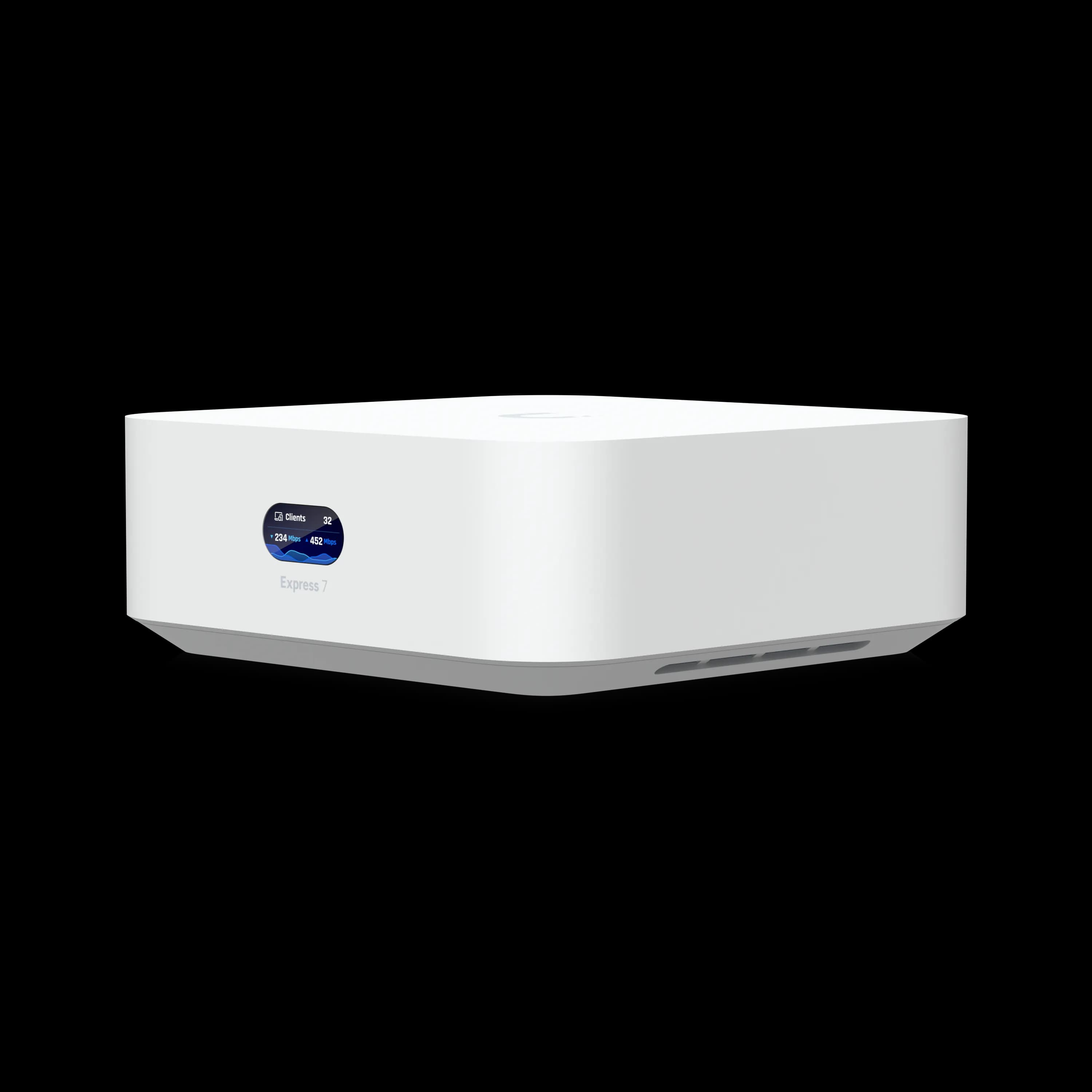
UniFi Express 7
$199Compact WiFi 7 gateway for home offices and very small setups. Saves $80 vs the Dream Router 7.
For Better Expandability
The Cloud Gateway Max offers more wired flexibility, selectable NVMe storage, and much higher Protect camera capacity, but it requires separate access points. Pair it with dedicated access points for optimal coverage flexibility.
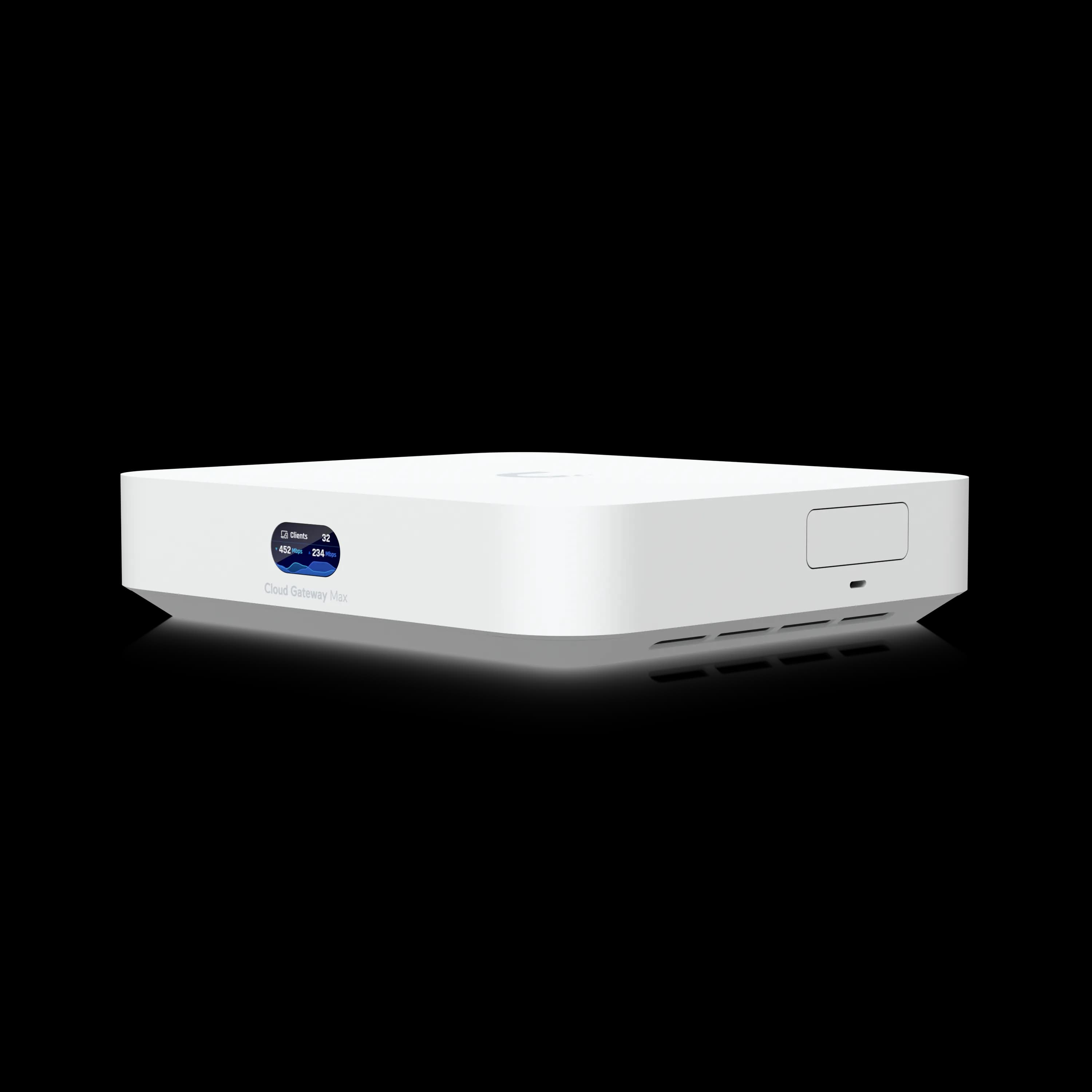
Cloud Gateway Max
$199–$279Gateway-only option with 2.3 Gbps IDS/IPS and four 2.5 GbE LAN ports. Pair with separate APs for maximum flexibility.
For Growth Headroom
The Dream Machine Pro Max provides significant overhead for growth, extensive connectivity options, and support for advanced network services. It costs more upfront but eliminates the need for hardware replacement as requirements expand.
For Network Design Flexibility
A complete UniFi network setup with separate gateway, switches, and access points provides maximum flexibility. While more expensive initially, this approach allows you to upgrade individual components as needed rather than replacing the entire system.
Final Verdict
The Dream Router 7 is a good fit for small offices, branch locations, and home offices that need reliable networking with UniFi integration but don't require rack-mount hardware or extensive port counts.
For the branch office installation described in this review, the combination of compact size, integrated WiFi 7, and centralized management through UniFi Network addressed the client's requirements without adding unnecessary hardware or cost.
However, this is not a one-size-fits-all solution. If you anticipate growth, require advanced security features, or need extensive wired connectivity, invest in more capable hardware from the start. The Dream Router 7 works best when you have clear, limited requirements that align with its capabilities.
Our Recommendation
Choose the Dream Router 7 if: You need WiFi 7, multi-gig Ethernet (2.5 GbE), 10G SFP+ WAN capability, and full IDS/IPS threat detection in a compact desktop form factor. At $279, it delivers advanced small-office security and connectivity for small to medium offices, branch locations, or advanced home networks—all without requiring rack infrastructure or separate access points.
Look elsewhere if: You need rack-mounted hardware, require more than three LAN ports, operate spaces larger than 1,750 sq ft that need multiple access points, or require bandwidth above 2 Gbps with IDS/IPS enabled. The Cloud Gateway Max or Dream Machine Pro series provide greater expandability for growing deployments, though at significantly higher cost.
Need help designing a network for your office or planning a UniFi deployment? Our team provides professional network installation and configuration services for businesses throughout South Florida. Contact us for a customized assessment.
Related Resources
- UniFi Gateway Comparison Guide - Compare all UniFi gateway options
- Express 7 vs Dream Router 7 - Head-to-head comparison of the $199 and $279 gateways
- UDR7 vs UX7 vs UCG Fiber - Detailed comparison of new WiFi 7 gateways
- UCG Fiber Review - The wired-only alternative when you already have dedicated WiFi APs
- UniFi Office Network Blueprint - Plan a complete UniFi deployment
- Small Business Network Setup Guide - Network design fundamentals
- UniFi Business Network Guide - Complete UniFi ecosystem overview
- Network Cabling Services - Professional installation for South Florida businesses
- How to Find Your Router IP Address - Access the admin panel on any device before or after switching gateways
Pricing and specifications accurate as of July 2026. Product availability varies by region.
Frequently Asked Questions
Related Articles
More from UniFi Networks
UniFi Cloud Gateway Ultra Review: Best Value for Gigabit UniFi Networks (2026)
The UCG-Ultra delivers a full UniFi controller, 1 Gbps IDS/IPS, and multi-WAN failover in a $129 fanless device. No separate Cloud Key needed. Here's who it's right for.
20 min read
We Ran 538 Ubiquiti Devices for 4 Years. Here's What Actually Failed.
Real fleet data: 538 UniFi devices tracked over 4 years. 0.74% replacement rate, 99.99% core uptime, and five incident post-mortems from commercial sites.
15 min read
UniFi 5G Backup Review: $99 Cellular Failover for Small Business, Tested
The UniFi 5G Backup ($99) adds automatic cellular failover to any UniFi gateway via a single PoE connection. Full review, setup guide, and real TCO for small business.
14 min read