
UDM Pro Max vs UDM Pro vs UDM SE (2026): Full Comparison & Verdict
UDM Pro Max ($599) vs UDM Pro ($379) vs UDM SE ($499): 5 Gbps vs 3.5 Gbps IDS/IPS, RAID storage, PoE, and real deployment scenarios — which UniFi gateway is worth it in 2026.

Affiliate Disclosure: This article contains affiliate links. If you make a purchase through these links, we may earn a small commission at no extra cost to you. As an Amazon Associate, iFeelTech earns from qualifying purchases.
The UDM Pro ($379), UDM SE ($499), and UDM Pro Max ($599) are Ubiquiti's mainstream 1U rackmount cloud gateways for small and midsize business networks. All three are all-in-one controllers running the full UniFi application suite. The Pro is the value option, the SE adds built-in PoE and a 2.5GbE RJ45 WAN port, and the Pro Max adds greater capacity, 5 Gbps IPS routing, and dual-drive storage protection. This comparison is based on direct production experience across client rack installations.
Quick Verdict
Buy the UDM Pro for a stable gigabit network that already has external PoE switching. Buy the UDM SE when its built-in PoE can replace a small separate switch. Buy the Pro Max for multi-gig security throughput, greater device capacity, or redundant Protect storage.
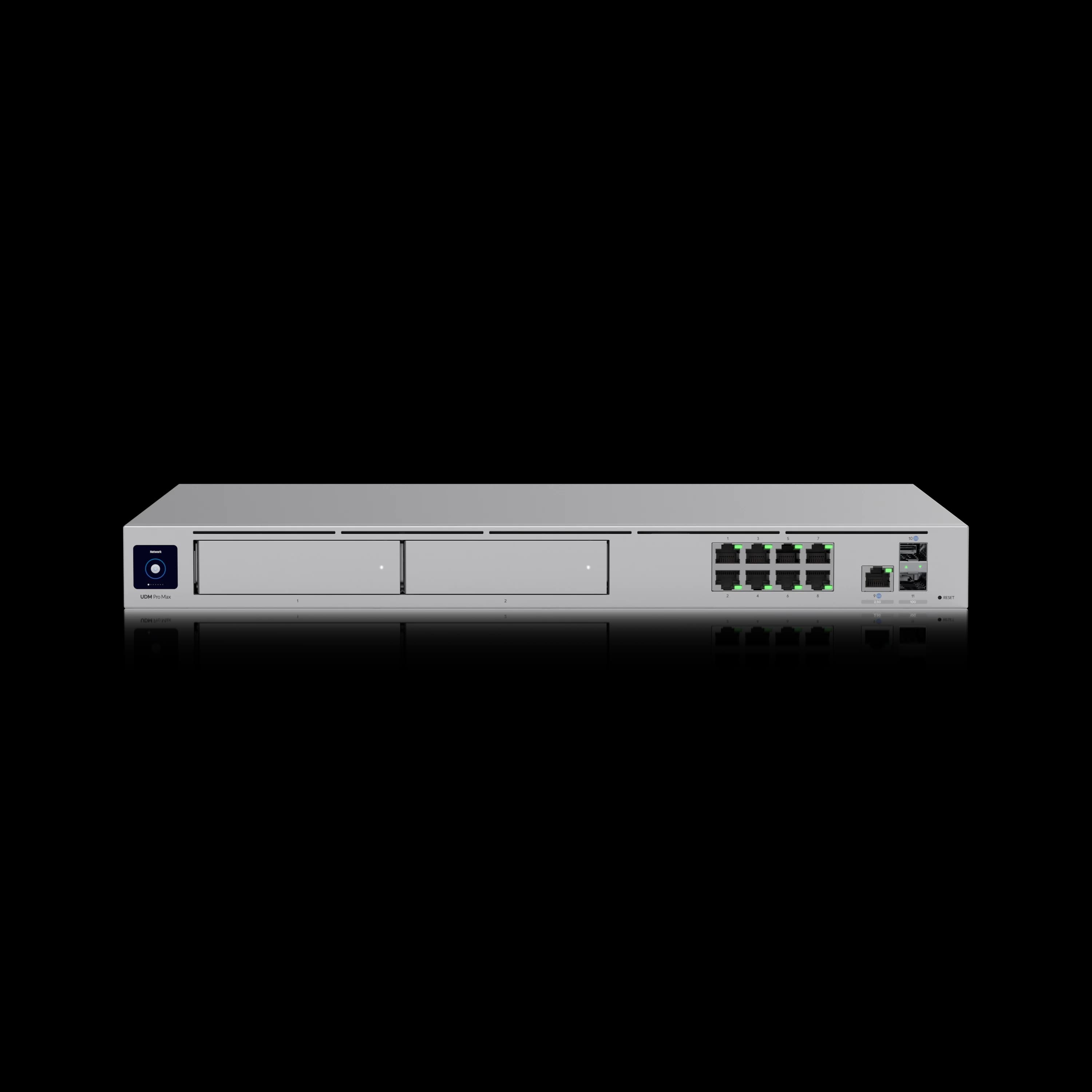
Dream Machine Pro Max
Double the capacity, 5 Gbps IDS/IPS, RAID-protected storage, and 2.5G WAN — the Pro Max is built for growing businesses.
- 200+ Device Capacity
- 5 Gbps IDS/IPS
- Dual HDD RAID 1
- 2.5G WAN Port
*Price at time of publishing
Why Choose the Dream Machine Pro Max Over the Standard Pro?
While the standard Dream Machine Pro ($379) remains the baseline for gigabit networks, it caps IDS/IPS throughput at 3.5 Gbps. The Pro Max ($599) raises IDS/IPS throughput to 5 Gbps, doubles device capacity to 200+, and adds RAID-protected dual drive bays for surveillance redundancy. All three devices support Shadow Mode (VRRP) failover and are all-in-one 1U rackmount solutions combining gateway, controller, switch, and NVR functionality. All three run the same core UniFi application stack. Their practical differences come from processing capacity, ports, PoE, and storage hardware — those are what determine which model is the right fit. For a broader context on cloud-managed network systems, see our vendor comparison.
Managing fewer than 30 managed UniFi devices without rack infrastructure? The Cloud Gateway Max ($199) handles 2.3 Gbps IPS routing in a compact desktop format. For offices needing 5 Gbps IDS/IPS and 10G WAN without rack hardware, the Cloud Gateway Fiber ($279) is also worth considering.
Technical Specifications Comparison
| Specs | |||
|---|---|---|---|
| Processor | ARM Cortex-A57 Quad-Core @ 1.7 GHz | ARM Cortex-A57 Quad-Core @ 1.7 GHz | ARM Cortex-A57 Quad-Core @ 2.0 GHz |
| RAM | 4GB DDR4 | 4GB DDR4 | 8GB DDR4 |
| Storage | 16GB eMMC | 16GB eMMC | 32GB eMMC |
| Managed Devices | 100+ | 100+ | 200+ |
| Connected Clients | 1,000+ | 1,000+ | 2,000+ |
| IDS/IPS Throughput | 3.5 Gbps | 3.5 Gbps | 5 Gbps |
| RJ45 WAN | 1GbE | 2.5GbE | 2.5GbE |
| SFP+ WAN | 10G | 10G | 10G |
| LAN Ports | (1) 10G SFP+, (8) 1G RJ45 | (1) 10G SFP+, (8) 1G RJ45 (PoE) | (1) 10G SFP+, (8) 1G RJ45 |
| HDD Bays | (1) 3.5" bay | (1) 3.5" bay | (2) 3.5" bays with RAID |
| Built-in SSD | None | 128GB | 128GB |
| Built-in PoE | None | 6 PoE + 2 PoE+ (180W) | None |
| Max Power | 33W | 50W (excl. PoE) | 60W |
| Form Factor | 1U rackmount | 1U rackmount | 1U rackmount |
Prices checked July 13, 2026. Specifications from Ubiquiti Tech Specs.
Changelog: July 2026 and May 2026 updates
July 2026: This comparison now includes a full three-way breakdown against the Dream Machine Special Edition (UDM SE) — where it fits, where it doesn't, and why it isn't our default recommendation for a new purchase in 2026.
May 2026: Software feature parity is complete — all three gateways run identical software under UniFi Network 10.x (Digital Twin, Time Machine, Zone-Based Firewall, Device Supervisor). Shadow Mode (VRRP) gateway failover has been stable across our production deployments for well over 12 months since OS 4.0.6. Multi-gig fiber (2–5 Gbps business plans) is increasingly available, making the Pro's 3.5 Gbps IDS/IPS ceiling a practical consideration for offices evaluating service upgrades. The Dream Machine Beast ($1,499) launched April 29, 2026 — it is an enterprise-tier gateway (25 Gbps IDS/IPS, 750+ managed UniFi devices, up to 100 HD / 60 2K / 40 4K cameras) that sits one tier above the Pro Max. See our Dream Machine Beast vs Pro Max comparison.
Does the Dream Machine Pro Max Improve Internet Speed?
Both gateways perform identically on gigabit networks. The throughput difference matters only when your ISP plan exceeds the Pro's 3.5 Gbps IDS/IPS ceiling.
The Pro Max doubles the RAM (8GB vs 4GB) and increases the clock speed to 2.0 GHz. The official 5 Gbps versus 3.5 Gbps IPS rating is more relevant to buyers than the processor clock difference alone.
Throughput Under Security Processing
Ubiquiti rates the UDM Pro and UDM SE for 3.5 Gbps IDS/IPS routing, compared with 5 Gbps on the Pro Max. Actual throughput varies with packet size, WAN protocol, enabled security policies, firmware version, and traffic mix. Both gateways have ample rated security-processing headroom for gigabit internet plans.
Device and Client Capacity
The doubled capacity specification (200+ managed UniFi devices vs 100+) represents the most significant differentiator between models. "Managed devices" refers specifically to adopted UniFi infrastructure — access points, switches, cameras, and other UniFi hardware — not endpoint clients like laptops, phones, or tablets. Ubiquiti separately rates connected client capacity at 2,000+ for the Pro Max and 1,000+ for the Pro and SE. For guidance on planning your complete UniFi network infrastructure, see our comprehensive deployment guide.
A business with 15 access points, 8 switches, and 20 cameras totals 43 managed UniFi devices — well within the standard Pro's 100+ ceiling. The 40 employee laptops and phones connected through those APs are clients, not managed devices. Ubiquiti officially rates the Pro for 100+ managed devices; we use approximately 75 as a conservative planning threshold when continued growth is expected, leaving headroom for expansion without operating near the rated ceiling. Growth plans requiring additional cameras, access points for expanded coverage, or multi-site adoption push managed-device requirements toward Pro Max territory.
IDS/IPS Throughput
The 5 Gbps IDS/IPS throughput on the Pro Max versus 3.5 Gbps on the standard Pro becomes relevant with multi-gig internet connections. For businesses with gigabit or slower internet, the standard Pro provides adequate security processing capacity. See our guide on building enterprise network security with UniFi for comprehensive security implementation strategies.
In our deployments on 2.5 Gbps connections, the Pro Max sustains near-rated throughput with the security configuration used in our client networks. The standard Pro's 3.5 Gbps IDS/IPS ceiling means less headroom on multi-gig links, particularly with comprehensive security policies, DPI, and threat management running simultaneously.
Note: PPPoE performance can vary by ISP configuration, firmware, and enabled services. Ubiquiti does not publish a separate multi-gig PPPoE throughput rating for these models, so businesses using PPPoE should test against their provider before relying on the headline IPS figures.
Multi-Gig Consideration
With 2-5 Gbps fiber plans becoming more common, the UDM Pro's 3.5 Gbps IDS/IPS ceiling may limit headroom on faster connections. If your ISP plan exceeds 3 Gbps and you want full IDS/IPS enabled, the Pro Max is the more practical choice.
Does the Dream Machine Pro Max Offer Better Surveillance Storage?
The Pro Max provides RAID 1 dual drive bays and a dedicated 128GB detection SSD. The standard Pro has a single unprotected bay with no built-in detection storage.
RAID Protection vs Single Drive
The Pro Max's dual 3.5" drive bays support RAID 1 mirroring, providing redundancy for UniFi Protect surveillance recordings. If one drive fails, recordings remain accessible on the second drive without data loss.
Surveillance Storage Planning
With two 8TB drives in RAID 1, the Pro Max provides approximately 8TB of usable recording capacity with full single-drive redundancy (RAID 1 mirrors data, so two identical drives yield one drive's worth of usable space). The standard Pro requires a separate NVR or accepts the risk of a single-drive failure. RAID protects against a single-drive hardware failure but is not a backup — it does not protect against corruption, accidental deletion, or multiple-drive failure.
Built-in Detection Recording
The Pro Max and SE include an integrated 128GB SSD that supports detection recordings without requiring an HDD. Install an HDD for continuous recording and longer retention. The standard Pro requires an HDD to store UniFi Protect recordings.
For more details on surveillance capacity planning with these gateways, see our UDM Pro Max capacity planning guide, UniFi Protect storage framework, and our in-depth Pro Max review.
Is the Dream Machine Pro Max Worth the Upgrade?
The cost justification comes down to three hardware differentials: IDS/IPS headroom above 3.5 Gbps, RAID-protected storage redundancy, and the 200+ vs 100+ device capacity ceiling.
Immediate Cost Comparison
| Cost Factor | Dream Machine Pro | Dream Machine Pro Max |
|---|---|---|
| Base Unit | $379 | $599 |
| UI Care (5-year)* | $75 | $119 |
| Official 8TB storage | $299 (one drive) | $598 (two drives) |
| Total with UI Care and listed storage | $753 | $1,316 |
| Storage protection | None | RAID 1 single-drive redundancy |
*UI Care is an optional extended warranty add-on, not required for operation. Official 8TB drive ($299) currently listed as sold out; Ubiquiti notes drive pricing may change. Third-party compatible drives may cost less.
Power Consumption
The Pro's 33W maximum draw makes it straightforward to slot into a standard rack PDU without power budget concerns. The Pro Max draws up to 60W — nearly double — primarily due to its faster processor and dual HDD bays. For rack deployments with UPS protection, the higher draw should be factored into battery runtime calculations, particularly when running dual HDDs at full write speed during surveillance recording.
Long-Term Value Considerations
The Pro Max's additional $220 base cost includes:
- Double RAM (8GB vs 4GB)
- Faster processor (2.0 GHz vs 1.7 GHz)
- Second HDD bay with RAID 1 support
- 128GB detection SSD for smart recordings
- 2.5G RJ45 WAN port vs 1G on the Pro
- Double managed-device capacity (200+ vs 100+)
- 5 Gbps IDS/IPS vs 3.5 Gbps
- License-free security and SD-WAN — core UniFi IDS/IPS, firewall, and Site Magic SD-WAN features do not require an annual gateway license. CyberSecure remains an optional $99/year subscription
For businesses planning to utilize surveillance features with redundancy, the Pro Max's integrated RAID support eliminates the need for a separate $299+ UNVR unit in many deployments.
The Pro + UNVR Alternative
| Configuration | Total Cost | Storage Capacity | Use Case |
|---|---|---|---|
| UDM Pro Max | $599 | 2 bays (RAID 1) | Medium surveillance, simpler management |
| UDM Pro + UNVR | $678 ($379 + $299) | 4 bays | Larger camera counts, longer retention, or separate recording hardware |
For extended 4K retention or separate failure domains for gateway vs. recordings, the Pro + UNVR combo is the stronger option. The Pro Max handles medium surveillance setups well, but retention depends on your specific camera count, resolution, recording mode, and RAID configuration.
How Does Each Gateway Handle Large Networks?
The Pro Max's 8GB RAM and faster processor deliver noticeably better controller performance and higher camera counts than the 4GB standard Pro.
Network Controller Performance
Both devices run the UniFi Network Application identically, but the Pro Max's additional RAM and processing power provide faster UI load times and more responsive search in the device list when managing complex deployments. Businesses running multiple VLANs, Zone-Based Firewall rules, and threat management features experience improved responsiveness with the Pro Max. Zone-Based Firewall — available on both models under Network 10.x — simplifies rule management significantly compared to legacy firewall rules, and complex zone configurations benefit from the Pro Max's additional RAM headroom.
Deployments using Enterprise PoE switches or other high-capacity switches benefit from the Pro Max's enhanced controller performance when managing complex VLAN configurations and port profiles across multiple switches.
For comprehensive guidance on network architecture, see our professional UniFi network design guide and network architecture decision framework.
Protect Camera Integration
The Pro Max's dual drive bays and 128GB detection SSD provide superior surveillance capabilities compared to the Pro's single bay. Ubiquiti's official processing specifications support (24) HD, (14) 2K, and (8) 4K cameras on the UDM Pro, and (50) HD, (25) 2K, and (15) 4K on the UDM Pro Max.
Storage retention depends heavily on resolution, frame rate, codec, average bitrate, continuous vs detection-only recording, and RAID configuration. Two drives in RAID 1 provide approximately 50% usable capacity (mirrored redundancy, not additive storage) — so two 4TB drives yield roughly 4TB usable, not 8TB. Actual retention varies significantly; use Ubiquiti's storage calculator or our storage planning framework for site-specific estimates.
Larger camera deployments benefit from dedicated UNVR Pro hardware regardless of gateway selection. See our complete UniFi Protect setup guide for detailed capacity calculations and camera configuration.
Can I Set Up High Availability with These Gateways?
Yes. Both the UDM Pro and Pro Max support Shadow Mode (VRRP) failover with identical configuration and behavior.
High Availability with Shadow Mode
Both devices support UniFi's Shadow Mode, a VRRP-based active-passive high-availability system that pairs two gateways of the same model as a redundant set. Shadow Mode requires UniFi OS v4.0.6 or newer and is fully production-ready as of Network Application v10.x. Failover is designed to complete in a matter of seconds, with firewall and connection state tables synchronized between the primary and shadow unit.
The practical difference is throughput headroom: the Pro Max maintains 5 Gbps IDS/IPS capacity during normal operation, giving it more overhead for HA environments with multi-gig internet. The standard Pro's 3.5 Gbps ceiling is adequate for gigabit HA deployments.
A Pro Max HA pair costs $1,198 versus $758 for dual Pros — a $440 premium for enhanced capacity and reliable multi-gig failover. For additional redundancy options, see our guide on 5G failover setup as a complementary backup strategy.
Shadow Mode is strictly active-passive failover, not active-active load balancing. Network routing state and firewall connection tables are synchronized between units, but UniFi Protect recordings are not mirrored. Ubiquiti recommends installing an HDD only in the primary gateway and physically moving it to the shadow unit during a failover event. For a detailed walkthrough, see our Pro Max review.
Backup and Recovery
UniFi's automatic backup functionality works identically across all three models. Automated system backups are generated weekly and before major firmware updates, saved to the owner's UI account. Manual backups can also be created and downloaded locally at any time.
RAID Failure Handling
The Pro Max's RAID 1 configuration provides specific operational benefits for surveillance-heavy deployments. When a drive failure occurs:
- The system continues recording to the remaining functional drive
- Dashboard notification alerts the administrator to a drive failure
- Hot-swap capability allows drive replacement without system shutdown
- Automatic rebuild restores RAID protection after replacement
Both gateways support hot-swapping drives without powering off the console. The operational difference is redundancy: the Pro can continue operating as a gateway during a hot-swapped drive replacement, but its single-drive design provides no recording redundancy — footage from the failure point onward is lost until a new drive is installed and formatted. The Pro Max can maintain recording availability through a single-drive failure when its two drives are configured in RAID 1.
Which Gateway Is Best for WiFi 7?
Neither the Pro nor Pro Max can directly power an access point — external PoE (via a switch or injector) is required. Multi-gig switching is needed only when the goal is to exceed 1 Gbps of wired AP backhaul.
Both gateways use 8x 1GbE RJ45 LAN ports plus a 10G SFP+ LAN port. To drive WiFi 7 APs beyond 1 Gbps backhaul:
- Use the 10G SFP+ LAN port to connect to a multi-gig switch (Pro Max 24 PoE, Enterprise 8 PoE, etc.)
- Run the APs from that switch, not directly from the gateway's built-in 1GbE ports
A PoE injector is sufficient if you only need to power one or two APs without multi-gig backhaul. For larger deployments, budget for a multi-gig PoE switch. For help choosing the right access points, see our UniFi WiFi 7 AP guide and WiFi 7 AP buyer's guide.
Common Misconception
A Pro Max does not increase WiFi radio performance by itself. WiFi 7 APs still need external PoE, and multi-gig switching is required to use more than 1 Gbps of wired backhaul.
Where Does the Dream Machine Special Edition Fit?
The UDM SE ($499) sits between the Pro and Pro Max on price. It shares the standard Pro's 1.7 GHz processor, 4GB RAM, 3.5 Gbps IDS/IPS, and single 3.5" HDD bay. Compared with the Pro, the SE adds built-in PoE (six PoE + two PoE+ ports, 180W total budget), a 2.5GbE RJ45 WAN port instead of the Pro's 1GbE, and an integrated 128GB SSD for smart detection recordings — meaningful upgrades, though none of the Pro Max's throughput, RAM, or storage advantages.
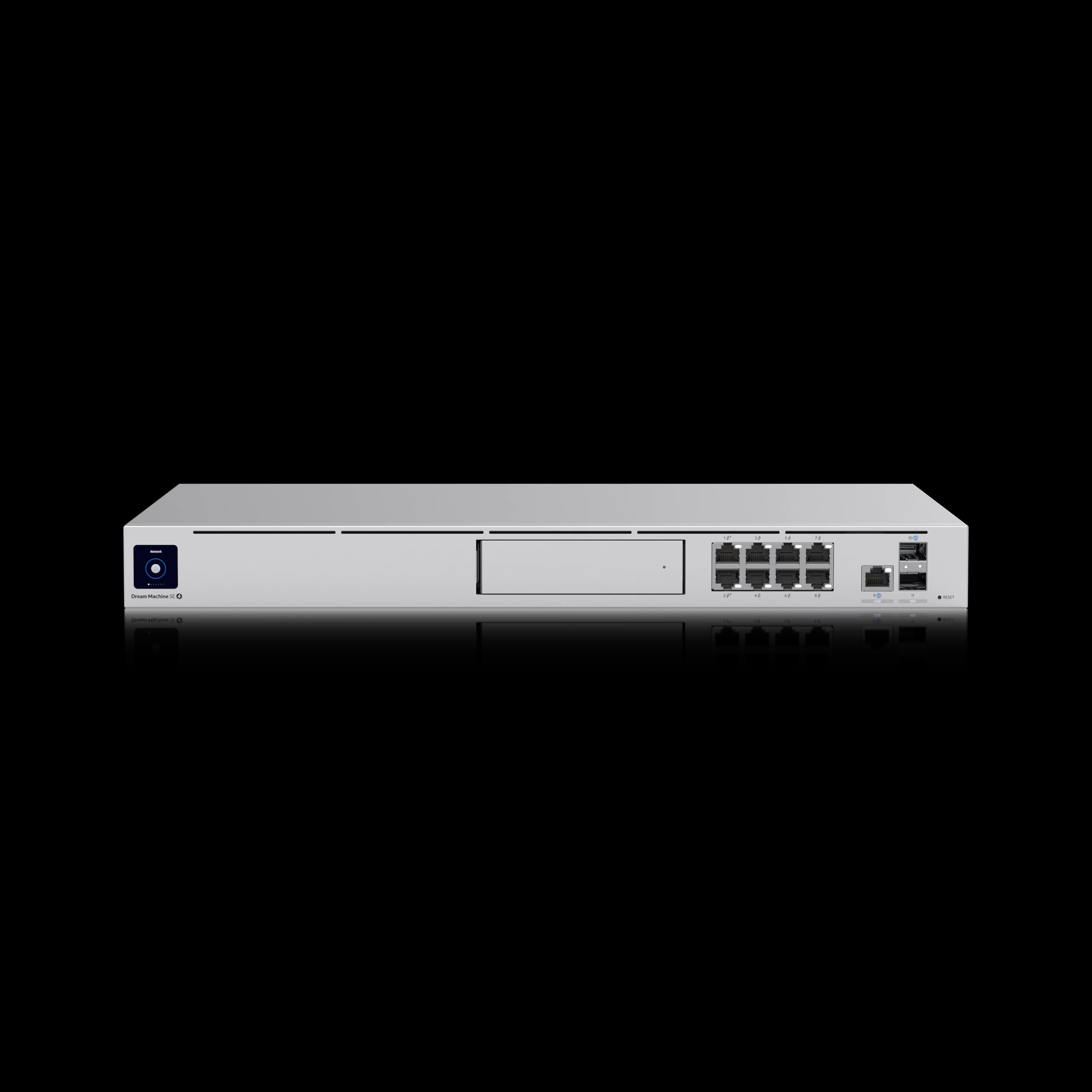
Dream Machine Special Edition
$499Same controller hardware as the standard Pro, plus 8 built-in PoE ports, 2.5GbE WAN, and 128GB SSD — best suited when the PoE budget replaces a switch you'd otherwise buy.
| Aspect | Dream Machine Pro | UDM SE | Dream Machine Pro Max |
|---|---|---|---|
| Price | $379 | $499 | $599 |
| PoE Ports | None | 6 PoE + 2 PoE+ (180W) | None |
| RJ45 WAN | 1GbE | 2.5GbE | 2.5GbE |
| Built-in SSD | None | 128GB | 128GB |
| Processor | 1.7 GHz | 1.7 GHz | 2.0 GHz |
| RAM | 4GB | 4GB | 8GB |
| IDS/IPS Throughput | 3.5 Gbps | 3.5 Gbps | 5 Gbps |
| Managed Devices | 100+ | 100+ | 200+ |
| HDD Bays | 1x 3.5" | 1x 3.5" | 2x 3.5" (RAID) |
Two honest ways to read this table. First, the SE is $120 more than the standard Pro for the same processor, RAM, and IDS/IPS ceiling — the premium buys you built-in PoE (six PoE + two PoE+ ports, 180W total budget), a 2.5GbE RJ45 WAN port (vs the Pro's 1GbE), and an integrated 128GB SSD for smart detection recordings. If you were going to buy a small PoE switch anyway and value the WAN upgrade, that's a reasonable trade. If you don't need PoE and already have an SFP+ WAN connection, you're paying more for modest improvements over the cheaper Pro.
Second, and more often the real decision: the SE is $100 cheaper than the Pro Max, but the Pro Max adds meaningfully more — double the RAM, 5 Gbps IDS/IPS instead of 3.5 Gbps, 200+ device capacity instead of 100+, and RAID-protected dual-drive storage instead of a single unprotected bay. For a new purchase with no PoE requirement, that's a better $100 spent than the SE's built-in switching. We don't recommend the SE as a default pick in 2026; it makes sense in two narrower cases — the built-in PoE genuinely offsets a switch purchase, or you're adding a matching unit to a network that already runs UDM SEs and want configuration parity. Outside those, buy the Pro at $379 for a stable network, or the Pro Max at $599 if you need the extra headroom.
For a full breakdown of all current UniFi gateways, see our gateway comparison guide.
How to Migrate from the UDM Pro to the UDM Pro Max
The UniFi backup and restore process transfers all network configurations, VLANs, and firewall rules to the new Pro Max automatically.
To migrate your network:
- Generate and download a local backup from your current UDM Pro via Settings > System > Backup.
- Disconnect the UDM Pro and connect the UDM Pro Max to the same network cables.
- Upload the backup file during the initial Pro Max setup wizard.
- Allow 2-4 hours as a conservative planning window for all devices to fully adopt and reconnect (simpler networks may complete faster).
The migration maintains your VLAN structure, wireless networks, firewall rules, and security policies.
Making Your Decision
Our Recommendation
The short version: Buy the UDM Pro if your managed UniFi infrastructure (APs, switches, cameras) is stable under 75 devices and your internet is gigabit or below. Buy the Pro Max if you're scaling past 75 managed devices, have or are getting multi-gig internet, or need RAID-protected camera storage without a separate UNVR.
The $220 Pro Max premium is justified in three specific cases:
- Your internet plan exceeds 3 Gbps and you want full IDS/IPS enabled without throughput constraints
- You need RAID 1 redundancy for surveillance recordings
- Your managed UniFi device count will exceed 100 within 24 months
If none of those apply, the Dream Machine Pro at $379 covers the job cleanly.
For a hands-on example of the Pro Max in a small professional office with cameras and door access, see our UniFi small office case study.
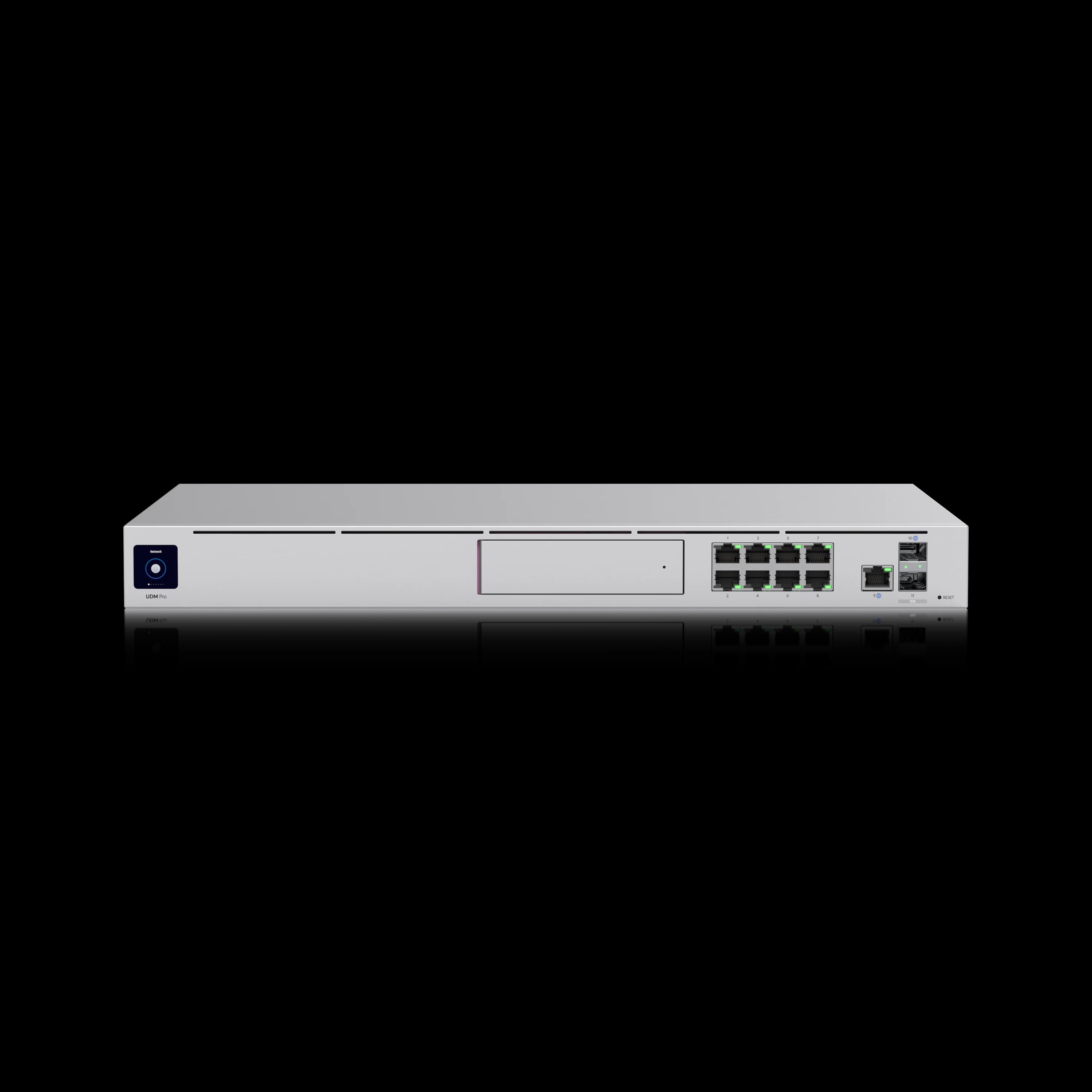
Dream Machine Pro
$379The proven SMB gateway for stable networks under 75 managed UniFi devices with gigabit internet.
For smaller setups under 30 managed devices without rack requirements, the Cloud Gateway Max at $199 or the Cloud Gateway Fiber at $279 may be all you need.
Note: Neither the Pro nor the Pro Max includes PoE ports. Budget for a separate PoE switch or injectors to power access points and cameras.
Need More Than the Pro Max?
If your network exceeds 10G throughput requirements, you're managing 500+ devices, or you need redundant 25G uplinks, see our Dream Machine Beast vs Pro Max comparison. The Beast's premium is justified in specific scenarios; for most businesses reading this comparison, the Pro Max is the ceiling they'll need.
Need help determining which UniFi gateway fits your business requirements? Our team provides comprehensive network assessments and professional installation services throughout South Florida. Contact us for a personalized evaluation of your infrastructure needs.
For additional UniFi gateway guidance, see our complete gateway selection guide, scalable network blueprint, 2025 UniFi updates overview, our in-depth UDM Pro Max review, and — if your requirements exceed the Pro Max's device ceiling or you're building a 10G network — our Dream Machine Beast vs Pro Max comparison.
Frequently Asked Questions
Related Articles
More from UniFi Networks
UniFi Dream Machine Beast vs UDM Pro Max: Which Gateway Is Right for Your Business?
UniFi Dream Machine Beast vs UDM Pro Max: specs comparison, real deployment scenarios, TCO analysis, and the four network profiles where the $1,499 Beast outperforms the $599 Pro Max.
14 min read
UniFi Gateway Comparison Guide 2026: All 11 Models Ranked
Complete UniFi gateway comparison covering all 11 current models — from Cloud Gateway Ultra ($129) to Dream Machine Beast ($1,499) and Enterprise Fortress Gateway ($1,999). Exact device counts, throughput thresholds, and storage economics.
26 min read
UniFi Dream Machine Pro Max Review 2026: The Rack Gateway for Growing Business Networks
5 Gbps IDS/IPS confirmed in lab. 18+ months deployed across client racks. Shadow Mode, RAID storage, Network 10.5 — here's what the UDM Pro Max actually delivers at $599, and when to choose the $379 UDM Pro instead.
23 min read