

Cloud Gateway Ultra vs Cloud Gateway Max (2026): Which Should You Buy?
Compare the UCG-Ultra ($129) and Cloud Gateway Max (from $199): pricing, Protect support, 1 vs 2.3 Gbps IDS/IPS, 1 GbE vs 2.5 GbE LAN, and which gateway fits your network.

The UCG-Ultra and Cloud Gateway Max sit $70 apart on Ubiquiti's product page and look nearly identical in the box. Same chassis. Same processor. Same management interface. So why does the choice matter so much?
The base gateways are $70 apart, but the decision involves three differences: Protect support, multi-gigabit routing, and 2.5 GbE LAN ports. For most buyers, Protect is the deciding factor. Ubiquiti currently supports only the Network application on the Ultra — no Protect, no NVR storage. If cameras become a requirement after purchase, the retrofit path adds over $200 in hardware and a second device to manage alongside the gateway.
This comparison works through each differentiating specification — Protect support, IDS/IPS throughput, LAN port speed, and total cost — to identify which gateway fits the deployment.
Affiliate Disclosure: This article contains affiliate links. If you make a purchase through these links, we may earn a small commission at no extra cost to you. As an Amazon Associate, iFeelTech earns from qualifying purchases.
Quick Answer
Quick Recommendation
UCG Ultra ($129): Gigabit ISP plan, no current cameras, no camera plans within the hardware's lifecycle. Handles all standard office networking — routing, VLANs, VPN, firewall.
Cloud Gateway Max ($199+): Cameras are planned or possible within two years, fiber plan is 2 Gbps or faster, or the deployment will expand into Protect, Access, or Talk.
Neither gateway includes Wi-Fi or PoE
Note: Both the UCG-Ultra and Cloud Gateway Max are wired-only gateways. Neither includes a wireless radio or PoE output. A separate UniFi Access Point — such as the U7 Pro — is required for wireless coverage, and a PoE switch or individual injectors are required to power cameras and access points. See our best UniFi WiFi 7 access points guide for deployment recommendations.
Specs at a Glance
| Spec | UCG Ultra | Cloud Gateway Max |
|---|---|---|
| Price | $129 | $199 (no storage) / $279 (512GB) |
| IDS/IPS Throughput ⚑ | 1 Gbps | 2.3 Gbps |
| WAN Port | 1× 2.5 GbE RJ45 | 1× 2.5 GbE RJ45 |
| LAN Ports ⚑ | 4× 1 GbE RJ45 | 4× 2.5 GbE RJ45 |
| UniFi Protect ⚑ | Not supported | Supported |
| UniFi Access / Talk / Connect | Not supported | Supported |
| NVMe Storage | None | Selectable up to 2 TB |
| Managed Cameras (max) | — | 5× 4K / 8× 2K / 15× HD |
| Managed Devices | 30+ | 30+ |
| Concurrent Clients | 300+ | 300+ |
| Max Power | 6.2W | 16.1W |
| Power | USB-C 5V/3A | USB-C 5V/5A |
| PoE Output | None | None |
| Dimensions | 141.8 × 127.6 × 30 mm | 141.8 × 127.6 × 30 mm |
⚑ These three specs are the primary differentiators. Each is covered in detail in the sections below.
The WAN port on both devices is 2.5 GbE — meaning both can accept a 2.5 Gbps fiber handoff at the physical layer. The constraint on the UCG-Ultra isn't the WAN port; it's the IDS/IPS inspection engine behind it.
Multi-WAN / failover note: Both gateways support a secondary WAN connection for ISP failover, but enabling it requires reassigning one of the four LAN ports as a second WAN. This leaves three LAN ports available for downstream switches and devices.
Cloud Gateway Max vs Cloud Gateway Ultra: Spec Comparison
Can the UCG-Ultra Run UniFi Protect?
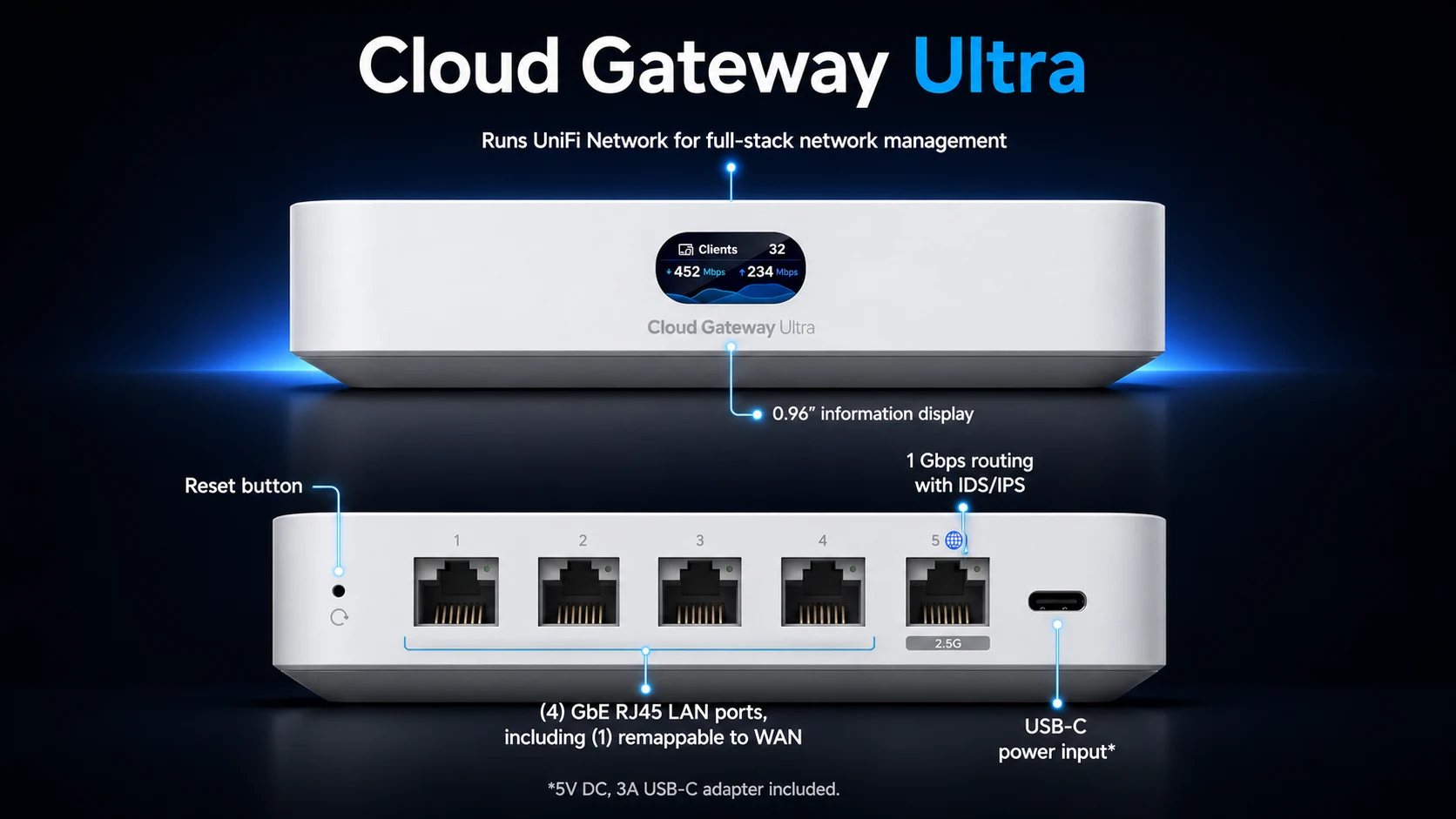
The UniFi Cloud Gateway Ultra cannot run UniFi Protect and does not support UniFi security cameras or NVR storage natively.
Ubiquiti currently supports only the Network application on the UCG-Ultra. It cannot host Protect or provide NVR storage. If your deployment requires physical security cameras now or at any point during the hardware's lifecycle, choose the UCG-Max or add a separate Protect console.
For sites running the UCG-Ultra, adding even a single UniFi camera requires a separate Protect console — typically a UNVR Instant ($199) or CloudKey+ — along with a dedicated hard drive, adding both cost and the overhead of managing the gateway and a separate Protect console.
- When the Ultra is appropriate: Pure networking deployments — routing, VLANs, VPNs, firewall — for professional services firms (accounting, law, financial advisory) with no physical surveillance requirements currently planned.
- When the Max is appropriate: Retail, medical, or mixed-use offices where security cameras are actively deployed or likely to be added within the hardware's lifecycle. The UCG-Max (no storage, $199) supports Protect immediately upon installing an NVMe SSD. For compatible camera models, see our UniFi Protect camera guide. For broader network design, see the UniFi Network Design Guide.
Retrofit Cost Adds Up
In our small-business deployments, a significant share of network-only sites add cameras within two years of initial setup. The retrofit path — Ultra ($129) + UNVR Instant ($199) + HDD — exceeds $328 before storage. The Max at $199 plus an NVMe drive addresses that upfront and keeps everything on a single device, though storage capacities differ between the two approaches.
When Does the 1 Gbps IDS/IPS Limit Matter?
The UCG-Ultra caps at 1 Gbps with IDS/IPS enabled. Choose the Max over the Ultra for internet service above 1 Gbps. For sustained 2.5 Gbps or faster inspected traffic, consider the 5 Gbps-rated UCG Fiber.
IDS/IPS requires substantial processing overhead. On the UCG-Ultra, all traffic passes through a 1 Gbps inspection engine when threat detection is active. On a 2.5 Gbps fiber connection, this caps effective secure throughput at 40% of the plan speed. The UCG-Max's inspection engine delivers 2.3 Gbps with IDS/IPS fully active, handling multi-gigabit business tiers up to that ceiling. For sustained inspected throughput above 2.3 Gbps, the UCG Fiber (5 Gbps IDS/IPS) is the next step.
Disabling IDS/IPS leaves the stateful firewall and configured traffic rules active, but removes signature-based inspection and blocking. In our small-business deployments, we would not use that as the default approach to obtain higher throughput in a security-conscious environment.
The UCG-Ultra's 1 Gbps ceiling is not a concern if:
- Your ISP plan is 1 Gbps or below (the majority of small office plans today)
- Your office has 10–30 concurrent users on standard business workloads
PPPoE Throughput Considerations
If your fiber provider uses PPPoE authentication, expect some additional throughput overhead beyond the IDS/IPS ceiling. Ubiquiti does not publish model-specific PPPoE throughput figures for these gateways. Sites using PPPoE should confirm performance with their ISP and current UniFi OS version before selecting a gateway for a near-gigabit or multi-gigabit connection.
VPN protocols: Both gateways support WireGuard, OpenVPN, IPsec, L2TP, and Teleport. Ubiquiti does not publish model-specific VPN throughput figures, so VPN performance should not be inferred from the IDS/IPS rating alone.
For offices requiring 5 Gbps IDS/IPS or multi-10G connectivity, the UCG Fiber ($279) is the next step with dual 10G SFP+ ports.
Port Speed Requirements: 1 GbE vs. 2.5 GbE LAN
The UCG-Max features four 2.5 GbE LAN ports, preventing network bottlenecks for downstream devices that exceed standard gigabit speeds.
For standard office devices — VoIP phones, printers, and general-purpose workstations — the UCG-Ultra's 1 GbE LAN ports provide sufficient bandwidth. Most offices will not notice the difference. The gap becomes operationally relevant for specific hardware:
- Network Attached Storage (NAS): Synology and QNAP units equipped with 2.5 GbE NICs are now common in small office environments. A direct connection to the UCG-Ultra caps NAS-to-gateway throughput at 1 Gbps regardless of the NAS's capability.
- High-bandwidth workstations: Video production, architecture, and engineering environments moving large files between local workstations and a file server benefit from the UCG-Max's higher LAN port speed.
- Multi-gigabit switching: Deployments using UniFi Enterprise or Pro Max switches as a high-capacity downstream layer benefit from a 2.5 GbE gateway uplink to avoid a port-speed bottleneck at the gateway itself.
Important nuance: A workstation and NAS connected to the same external 2.5 GbE switch and VLAN exchange traffic through that switch, not through the gateway. The UCG-Ultra's 1 GbE ports become the bottleneck only when:
- The NAS or workstation is directly attached to one of the gateway's 1 GbE ports.
- The external switch has only a 1 GbE uplink to the gateway.
- Traffic must be routed between VLANs through the gateway.
- Internet-bound traffic exceeds the gateway's inspected throughput.
For a standard 20-person office with an external switch handling local traffic, 1 GbE gateway ports are sufficient. The Max's 2.5 GbE ports matter most when the gateway itself is the switching point for high-bandwidth local devices or when inter-VLAN routing is required at multi-gigabit speeds.
Cost Analysis: Upgrading vs. Retrofitting Later
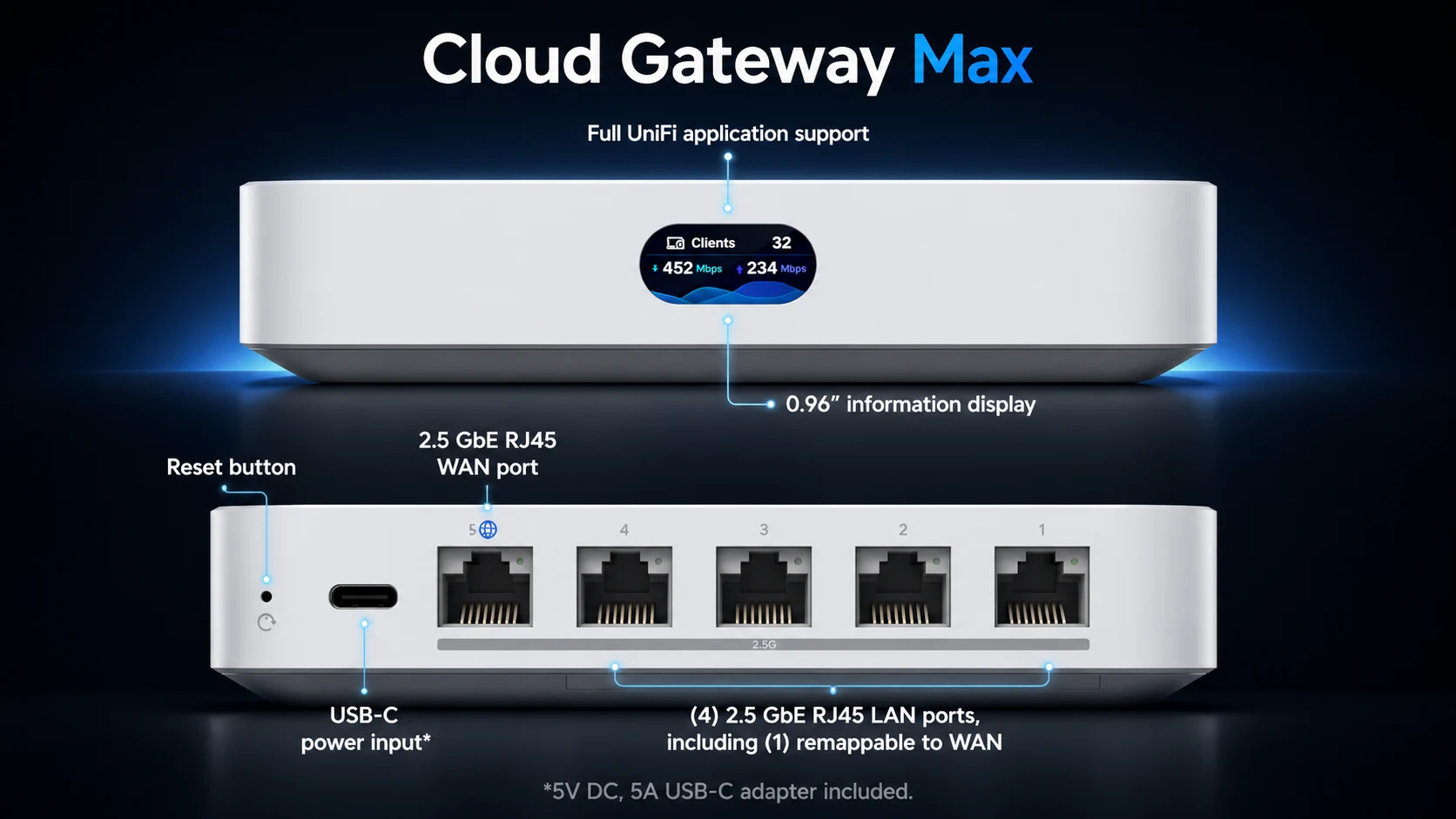
Adding cameras to a UCG-Ultra network requires purchasing external NVR hardware, making the UCG-Max significantly more cost-effective when cameras are part of the deployment horizon.
The UCG-Max without storage ($199) is the most flexible entry point. It delivers upgraded routing and port capabilities immediately, and UniFi Protect can be activated by installing an M.2 NVMe drive — see our Protect storage planning guide for compatible drive options and sizing. Ubiquiti's M.2 SSD Tray is approximately $19 (availability can vary); a compatible 128–256GB NVMe drive adds another $20–30. Total to activate Protect from the base unit: roughly $50 above the $199 gateway price.
| Configuration | Required Hardware | Current Cost |
|---|---|---|
| Network only (no cameras) | UCG-Ultra | $129 |
| Max, no recording storage | UCG-Max (No Storage) | $199 |
| Max with tray, before NVMe | UCG-Max + M.2 SSD Tray | ~$218 |
| Max with 512GB preinstalled | UCG-Max 512GB | $279 |
| Ultra + separate Protect console | UCG-Ultra + UNVR Instant (before HDD) | $328 |
Placement note: The UCG-Max has a maximum power draw of 16.1W, compared with 6.2W for the Ultra. Give the enclosure reasonable clearance, avoid stacking warm equipment directly on it, and keep it within Ubiquiti's published operating-temperature range. Use an NVMe drive that fits the official M.2 SSD Tray.
UI Care extended warranty: For business deployments where downtime is costly, Ubiquiti's UI Care 5-Year Coverage is worth adding at purchase. UI Care costs $25 for the UCG-Ultra. For the UCG-Max, current five-year coverage costs $39 for the no-storage model and $59 for the 512GB configuration. Coverage includes priority pre-shipment replacement before inspection — a practical advantage over standard return-and-wait warranty processes on critical network hardware.
Which Should You Buy?
The following four deployment profiles each map to a clear product recommendation.
Profile 1: Sub-10 employee office, gigabit internet, no cameras — The UCG Ultra is the appropriate choice. It handles routing, VLANs, firewall, and VPN at $129 with no unnecessary overhead. The 1 Gbps IDS/IPS ceiling aligns with standard gigabit ISP plans.
Profile 2: Any office considering cameras within 24 months — The UCG Max (no storage, $199) is the more cost-effective option. Camera compatibility accounts for most of the price difference in practice. An approximately $19 M.2 SSD Tray plus an NVMe drive can be added when Protect is needed, keeping everything on a single device rather than adding a separate UNVR console.
Profile 3: Office with 2 Gbps fiber or planning an upgrade — The UCG Max is the appropriate choice. The UCG-Ultra's 1 Gbps IDS/IPS ceiling reduces effective throughput to 40% of a 2.5 Gbps fiber plan with threat detection active. The Max at 2.3 Gbps handles 2 Gbps plans with full inspection enabled. Multi-gigabit business service is available at some South Florida addresses; confirm serviceability with your provider before selecting hardware.
Profile 4: Deployment with a wired NAS, 2.5G workstations, or UniFi multi-gigabit switching — The UCG Max's 2.5 GbE LAN ports prevent a bottleneck at the gateway for high-throughput wired devices. For standard office hardware, this would not be the primary reason to choose the Max, but it is a relevant factor when the hardware is already part of the deployment.
When neither gateway is the right choice:
- Sustained throughput above approximately 2.3 Gbps: Choose the UCG Fiber ($279) for 5 Gbps IDS/IPS, dual 10G SFP+ ports, and a stronger compact gateway.
- Rack-mounted deployment or larger Protect storage: Choose a Dream Machine Pro or Pro Max when you need rack installation, built-in HDD bays, or greater device capacity.
- Wi-Fi-integrated gateway: Only appropriate when gateway placement is also suitable for wireless coverage — typically single-room or very small offices.
For a full picture of where these two gateways fit in Ubiquiti's broader lineup — including the UCG Fiber and Dream Machine Pro — see the UniFi Gateway Comparison Guide.
Related Resources
- UniFi Cloud Gateway Ultra Review — Full review of the UCG Ultra: performance benchmarks, setup walkthrough, and who it's built for.
- UniFi Cloud Gateway Max Review — Full review of the UCG Max including Protect setup, storage configuration, and real-world performance at SMB sites.
- UCG Fiber Review — The next step up: 5 Gbps IDS/IPS, dual 10G SFP+ ports, and full application suite at $279. Relevant if your needs outgrow both gateways in this comparison.
- UniFi Gateway Comparison Guide — The full lineup from UCG Ultra to Dream Machine Pro Max, with positioning guidance for each deployment scenario.
- UniFi Network Design Guide — How to plan a UniFi deployment including camera integration, VLAN design, and gateway selection for multi-site environments.
Source Verification
Specifications and U.S. pricing checked against Ubiquiti Tech Specs and the Ubiquiti Store on July 13, 2026. Prices and availability may change.
Frequently Asked Questions
Related Articles
More from UniFi Networks
We Ran 538 Ubiquiti Devices for 4 Years. Here's What Actually Failed.
Real fleet data: 538 UniFi devices tracked over 4 years. 0.74% replacement rate, 99.99% core uptime, and five incident post-mortems from commercial sites.
15 min read

UniFi Buyer's Guide 2026: What to Buy for a Business Network
A plain-English guide to choosing UniFi gateways, PoE switches, WiFi 7 access points and cameras for a small or growing office, with two worked builds and prices rechecked October 16, 2026.
48 min read
UniFi Cloud Gateway Ultra Review: Best Value for Gigabit UniFi Networks (2026)
The UCG-Ultra delivers a full UniFi controller, 1 Gbps IDS/IPS, and multi-WAN failover in a $129 fanless device. No separate Cloud Key needed. Here's who it's right for.
20 min read