

Building a Budget-Friendly 2.5 Gbps UniFi Network
Step-by-step guide to building an affordable 2.5 Gbps UniFi network in 2026. Covers three budget tiers, the full current hardware lineup, PoE options, and the Dream Router 7 alternative.

A complete 2.5 Gbps UniFi network costs between $328 and $490, depending on the tier you choose. This guide covers three budget builds using currently-available hardware — the Cloud Gateway Max, Dream Router 7, Flex Mini 2.5G, and Wi-Fi 7 access points — along with the PoE decisions that trip up most first-time builders.
What You Need to Know Before Buying
- Cat6 cabling (or better) is required for reliable 2.5 Gbps links. Cat5e may work over short runs but is not recommended.
- ISP modem/ONT with a 2.5G or 10G RJ45 handoff port — confirm with your provider before ordering equipment.
- Even if your ISP plan is 1 Gbps today, a 2.5G local network noticeably speeds up device-to-device file transfers (NAS backups, media streaming, large project files).
What Are the New UniFi 2.5 Gbps Devices in 2026?
As of May 2026, Ubiquiti's 2.5 Gbps lineup includes the Dream Router 7, Express 7, Cloud Gateway Ultra, and U7 Lite access point. These additions mean there are now multiple build paths where a single recommendation used to suffice:
- Dream Router 7 ($279) — released February 2025. Combines a 2.3 Gbps IDS/IPS gateway, Wi-Fi 7 tri-band radio, PoE output port, and microSD for Protect cameras in one desktop device. For many builders, this eliminates the need to buy a separate access point.
- Cloud Gateway Ultra ($129) — Ubiquiti's lowest-cost controller-included gateway. Caps at 1 Gbps throughput; useful if your internet is gigabit or below and you want to save $70 over the Max.
- Express 7 ($199) — compact two-port gateway with built-in Wi-Fi 7. Designed for apartments and small spaces; only one LAN port, so a switch is still required for multiple wired devices.
- U7 Lite ($99) — dual-band Wi-Fi 7 access point (2.4 + 5 GHz only). A solid budget AP for spaces where the high throughput of the 6 GHz band is not required.
- UniFi OS 5.x — the current firmware generation across all modern gateways as of May 2026, with improved IDS/IPS throughput and PPPoE handling.
Key Takeaways
| Topic | Summary |
|---|---|
| 2.5G vs. 1G | Faster local transfers, less congestion under simultaneous high-bandwidth use, and a sensible upgrade path as multi-gig ISP plans expand |
| Three build tiers | Budget ($328–$362), Recommended ($452), and PoE-simplified ($490+) |
| Gateway options | Cloud Gateway Max for dedicated 2.5G routing; Dream Router 7 if you want Wi-Fi 7 + gateway in one box |
| AP options | U7 Lite ($99) for budget/smaller spaces; U7 Pro ($189) for tri-band 6 GHz performance |
| PoE reality | Neither the Cloud Gateway Max nor the Flex Mini 2.5G outputs PoE — plan accordingly |
| Future-proofing | This setup scales to 10 Gbps WAN as ISP plans and hardware evolve |
Which Budget Tier Fits Your 2.5 Gbps Build?
Three tiers cover the range from all-in-one simplicity to full modular flexibility.
Tier 1 — Budget (~$328–$362)
Two paths here depending on whether you prioritize simplicity or flexibility.
Path A — Dream Router 7 + Flex Mini ($328): The Dream Router 7 includes Wi-Fi 7 tri-band and a PoE output port (802.3af, 15.4W) that can power a U7 Lite or a camera. If you pair it with a Flex Mini 2.5G switch for additional wired ports, you get a complete 2.5G network for $328 — no separate AP or PoE injector needed. The trade-off: the gateway's built-in radio sits wherever your ISP line terminates, which may not be the ideal central location for Wi-Fi coverage. Note: the PoE port cannot power a U7 Pro (requires 22W PoE+) — use a separate injector if adding one.
Path B — Cloud Gateway Max + Flex Mini + U7 Lite ($362): The modular approach with the entry-level Wi-Fi 7 AP. The U7 Lite covers the 2.4 and 5 GHz bands with Wi-Fi 7 but skips the 6 GHz radio. Good for apartments, single-floor homes, or offices under 1,500 sq ft where the high throughput of the 6 GHz band is not required.
Tier 2 — Recommended (~$452)
Cloud Gateway Max + Flex Mini 2.5G + U7 Pro + PoE injector. This is the configuration from the original guide, and it still holds up. The U7 Pro's 6 GHz band makes a practical difference in crowded RF environments — dense apartment buildings, co-working spaces, small offices with many concurrent client devices. Ceiling placement of a dedicated AP also consistently outperforms a gateway's built-in radio in terms of coverage uniformity.
Tier 3 — PoE-Simplified (~$490+)
Cloud Gateway Max + Flex 2.5G PoE 8-port + U7 Pro. The Flex 2.5G PoE ($199) is Ubiquiti's newer 8-port 2.5G switch with PoE output and a 196W total power budget — enough to run 8–9 U7 Pro access points simultaneously. No separate injector needed. Costs more than the Flex Mini approach but cleans up the installation: one switch handles both data and power. Better suited for structured wiring closets or any setup where minimizing the power strip footprint matters.
What Components Do You Need for a 2.5 Gbps Network?
Gateway/Controller
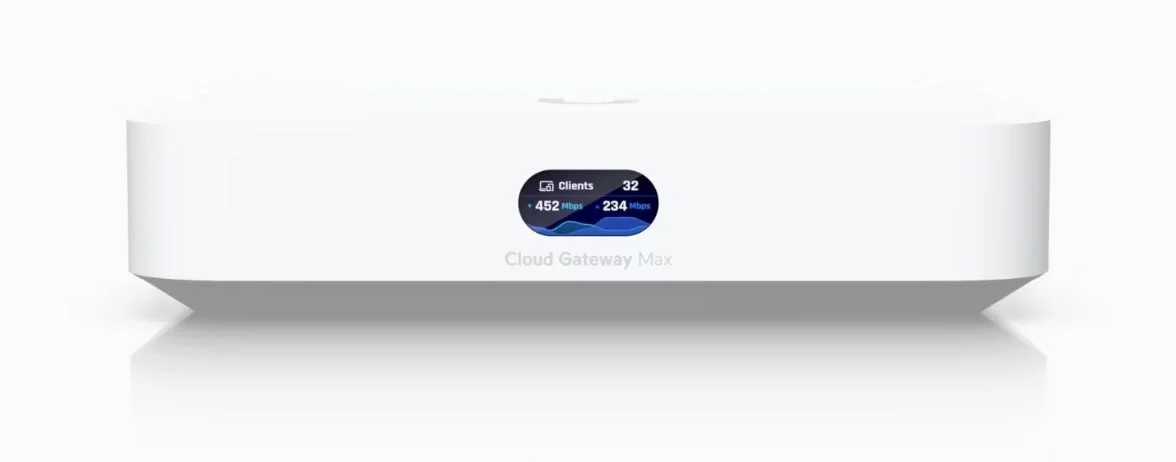
The Cloud Gateway Max ($199) is the primary 2.5 Gbps gateway for budget builds; the Dream Router 7 ($279) bundles Wi-Fi 7 and PoE output into one device. Both deliver 2.3 Gbps IDS/IPS throughput and run the full UniFi controller.
The UniFi Cloud Gateway Max provides four 2.5 GbE LAN ports, a 2.5 GbE WAN port, and optional NVMe storage for UniFi Protect cameras. At $199 without storage (or $279 with a 512GB NVMe drive for Protect recording), it's the most capable compact gateway Ubiquiti makes for sub-$200. See our full UCG-Max review for detailed performance testing.
Cloud Gateway Max: What You Get for $199
Four 2.5 GbE ports, 2.3 Gbps IDS/IPS, Protect support with an optional NVMe drive (skip the bundled SSD version to save ~$80), and a full built-in UniFi controller. It handles 30+ managed devices and 300+ wireless clients — more than enough for home or small office deployments.
The all-in-one alternative: Dream Router 7 ($279)
If you want Wi-Fi 7, 2.3 Gbps routing, and Protect support in a single device, the Dream Router 7 consolidates all three. It includes:
- Wi-Fi 7 tri-band (2.4 / 5 / 6 GHz)
- Dual WAN: 10G SFP+ primary + 2.5GbE RJ45 secondary, three 2.5 GbE LAN ports
- One PoE output port (802.3af, 15.4W — powers a U7 Lite or camera, but not a U7 Pro which requires PoE+ at 22W)
- microSD slot for UniFi Protect (camera recording)
- 2.3 Gbps IDS/IPS
The $279 price covers what would otherwise cost $199 (Cloud Gateway Max) + $189 (U7 Pro) = $388. The trade-off is placement: the Dream Router 7 sits near your ISP termination point, which is often a closet, corner, or wall — not ideal for Wi-Fi coverage. For multi-room homes or offices, a modular setup with a ceiling-mounted AP will outperform the Dream Router 7's built-in radio. For open-plan spaces or small apartments, the all-in-one approach performs well.
For a full side-by-side, see our Express 7 vs Dream Router 7 comparison, Dream Router 7 review, and UniFi gateway comparison guide.
What About the Cloud Gateway Ultra ($129)?
If your internet plan is 1 Gbps or below and you don't plan to add cameras, the Cloud Gateway Ultra saves you $70 over the Max. It has a hard 1 Gbps IDS/IPS ceiling — fine for gigabit fiber, but it will bottleneck a 2 Gbps or 2.5 Gbps plan. The Ultra also has 1 GbE LAN ports rather than 2.5 GbE, so local file transfer speeds between wired devices are limited to 1 Gbps even if your switch handles more.
What About Rack-Mount Gateways?
If you have a server rack or require higher IDS/IPS throughput than the desktop models provide, the Dream Machine line offers 10G SFP+ WAN/LAN ports and enterprise-tier scalability:
- Dream Machine Pro ($379): 3.5 Gbps IDS/IPS, 10G SFP+ WAN and LAN, 3.5" HDD bay for Protect storage. Handles up to 100 managed devices.
- Dream Machine Pro SE ($499): Same routing capacity as the Pro, plus integrated 8-port PoE switching (180W budget) — eliminates the need for a separate PoE switch in smaller rack deployments.
- Dream Machine Pro Max ($599): 5 Gbps IDS/IPS, dual 3.5" HDD bays with RAID1 redundancy, Shadow Mode high-availability failover. Supports 200+ managed devices and 2,000+ clients.
These are beyond the scope of a budget 2.5G build, but worth considering if you already have rack infrastructure or plan to exceed 2.5 Gbps WAN in the near term. Note: their 10G WAN ports use SFP+ slots, so if your ISP hands off a standard RJ45 cable, you'll need an SFP+ to RJ45 transceiver module (~$39). See our UniFi gateway comparison guide and fiber cable & SFP selection guide for the full lineup.
Network Switch
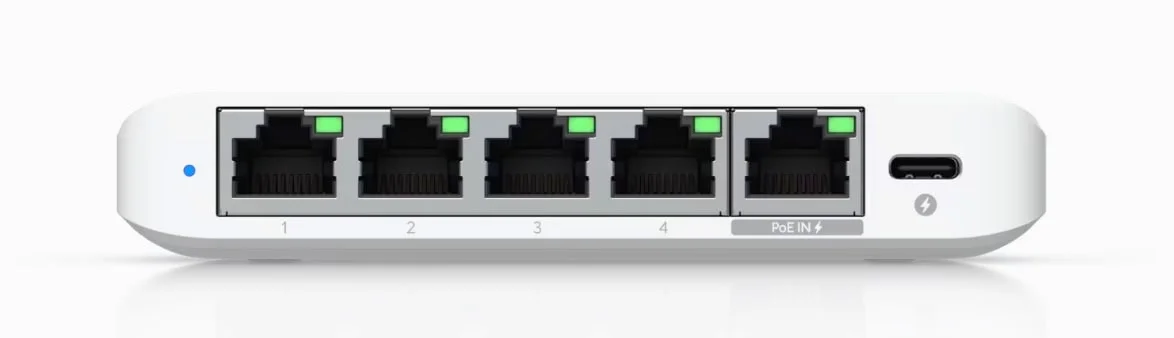
The UniFi Flex Mini 2.5G ($49) remains the most cost-effective way to add 2.5 Gbps ports to a UniFi build. Five ports total — one upstream input, four for devices — all at 2.5 Gbps. It's powered by PoE or USB-C, is fanless, and fits anywhere.
PoE Limitation: The Flex Mini Does Not Output PoE
The Flex Mini 2.5G accepts PoE to power itself, but it does not provide PoE output to connected devices. You cannot use it to power a U7 Pro directly. See the PoE planning section below.
If you want PoE output from your switch, the newer UniFi Flex 2.5G PoE (8-port) provides 2.5G speeds with PoE output on every port — it can power access points and cameras directly, eliminating the need for separate injectors. The higher price is offset by a cleaner installation with fewer cables and power bricks.
For reference, the USW-Lite-8-PoE ($109) is a proven and widely-used option if you need PoE across eight ports at gigabit speeds. It won't deliver 2.5G to your wired devices, but it powers APs and cameras cleanly and costs less than the Flex 2.5G PoE. For a full breakdown of every UniFi switch line with PoE sizing guidance, see our best UniFi switches guide.
Which UniFi Wi-Fi 7 Access Point Should You Choose?
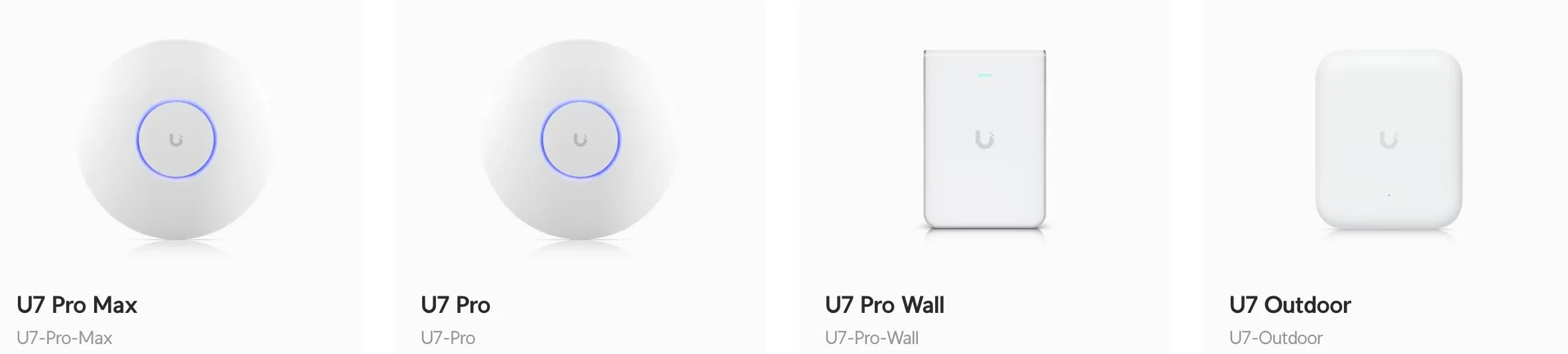
Choose the U7 Lite for budget dual-band coverage in small spaces, or the U7 Pro for high-density tri-band performance with 6 GHz.
U7 Lite ($99) — Budget option
Dual-band Wi-Fi 7 (2.4 + 5 GHz). No 6 GHz radio. Still delivers Wi-Fi 7's efficiency improvements — multi-link operation, improved channel utilization, lower latency — on the two most universally-supported bands. The 2.5G uplink port is included.
Good fit for: apartments, single-floor homes under ~1,500 sq ft, smaller offices, any deployment where the 6 GHz band's shorter range would be a disadvantage anyway.
U7 Pro ($189) — Recommended
Tri-band Wi-Fi 7 (2.4 + 5 + 6 GHz), six spatial streams, 2.5G uplink. The 6 GHz band carries the bulk of the bandwidth advantage in crowded RF environments — it's less congested and supports wider channel widths. A widely deployed option for small offices and higher-density home networks.
U7 Pro Wall ($199) — Compact option
Same tri-band Wi-Fi 7 as the U7 Pro in a wall-plate form factor. A practical choice for rooms where ceiling mounting isn't possible or where the AP needs to blend into the wall. Not to be confused with the U7 In-Wall ($149), which is dual-band but includes a built-in 3-port switch.
U7 Pro Max ($279) — High-density environments
For conference rooms, retail floors, or offices with 50+ concurrent wireless clients. Beyond the scope of this guide, but worth knowing it exists if your space grows. See our UniFi Wi-Fi 7 access points business guide for the full lineup.
U7 Lite vs U7 Pro: Quick Comparison
| Spec | U7 Lite | U7 Pro |
|---|---|---|
| Price | $99 | $189 |
| Bands | 2.4 + 5 GHz (dual-band) | 2.4 + 5 + 6 GHz (tri-band) |
| Spatial Streams | 4 | 6 |
| Max Throughput | ~4.3 Gbps aggregate | ~6.3 Gbps aggregate |
| Uplink | 2.5 GbE | 2.5 GbE |
| Ideal Use Case | Single-floor homes, small offices < 1,500 sq ft | Dense apartments, offices with 20+ clients |
Placement Still Matters More Than Model
A U7 Lite in the right location — center of the floor plan, ceiling-mounted, away from interference sources — will outperform a U7 Pro tucked in a corner. Get the placement right before upgrading the hardware.
How Do You Power UniFi 2.5 Gbps Access Points?
Power UniFi access points using a standalone PoE+ injector (~$15) or a dedicated 2.5G switch with built-in PoE output.
Critical: Plan Your PoE Before You Order
Neither the Cloud Gateway Max nor the Flex Mini 2.5G provides PoE output to connected devices. If you're using a U7 Pro or U7 Lite as a ceiling-mounted AP, you need a way to deliver power over the Ethernet cable.
Option 1 — PoE+ Injector (U-POE-at, ~$15 each)
The budget approach. A PoE injector sits between your switch and the access point, injecting 802.3at PoE+ power. One injector per access point. Adds one extra power outlet requirement per AP but keeps your switch cost low.
Option 2 — PoE Switch
A switch with PoE output handles power and data in one cable run. The Flex 2.5G PoE (8-port, 2.5G + PoE) is the clean multi-gig option. The USW-Lite-8-PoE ($109) is the cost-effective choice if 1G is sufficient on the switch ports feeding your wired devices.
Power outlet count for the injector approach:
- Cloud Gateway Max — one outlet
- Flex Mini 2.5G — one outlet (USB-C or PoE from the gateway)
- PoE+ Injector — one outlet per access point
Budget for a quality power strip or UPS near your network equipment. An uninterruptible power supply is worth considering even for home networks — a brief power flicker that knocks out the gateway disrupts everything.
Cabling
Use Cat6 or better throughout. Cat5e can technically run at 2.5 Gbps over short distances, but Cat6 is more reliable at higher frequencies and is widely available at minimal cost premium. For runs over 100 meters or for future-proofing to 10 Gbps, Cat6A is the appropriate choice.
Pre-terminated patch cables from a reputable supplier (or terminated-in-place Cat6 pulled through walls) are both fine. Avoid cheap unshielded patch cables in environments with high electrical interference.
Complete Build Summaries
Network Topology: How the Components Connect
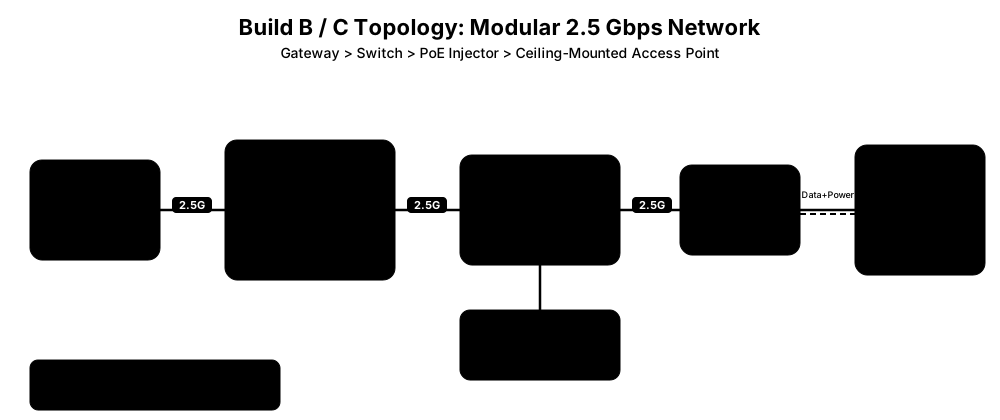
The diagram above shows the wiring path for Build B and Build C (the modular approach). The key detail: since neither the Cloud Gateway Max nor the Flex Mini 2.5G outputs PoE, a separate PoE+ injector sits between the switch and the access point to deliver both data and power over a single Ethernet cable. Build A (Dream Router 7) simplifies this by eliminating the injector — the DR7 has a PoE output port built in.
Build A — Budget All-in-One (~$328)
| Component | Product | Est. Price |
|---|---|---|
| Gateway + Wi-Fi | UniFi Dream Router 7 | $279 |
| Switch | UniFi Flex Mini 2.5G | $49 |
| Cabling | Cat6 Ethernet | Varies |
| Total | ~$328 |
No separate access point or PoE injector needed. The Dream Router 7's built-in Wi-Fi 7 covers the wireless side, and its PoE output port (802.3af, 15.4W) can optionally power a U7 Lite or camera — not a U7 Pro. Best for open-plan spaces where the gateway can be placed centrally.
Build B — Budget Modular (~$362)
| Component | Product | Est. Price |
|---|---|---|
| Gateway | UniFi Cloud Gateway Max (No SSD) | $199 |
| Switch | UniFi Flex Mini 2.5G | $49 |
| Access Point | UniFi U7 Lite | $99 |
| Power | PoE+ Injector (U-POE-at) | ~$15 |
| Cabling | Cat6 Ethernet | Varies |
| Total | ~$362 |
Modular approach with a ceiling-mounted Wi-Fi 7 AP. Better coverage flexibility than the Dream Router 7 in multi-room layouts. No 6 GHz band on the U7 Lite, which is a reasonable trade-off at this price.
Build C — Recommended (~$452)
| Component | Product | Est. Price |
|---|---|---|
| Gateway | UniFi Cloud Gateway Max (No SSD) | $199 |
| Switch | UniFi Flex Mini 2.5G | $49 |
| Access Point | UniFi U7 Pro | $189 |
| Power | PoE+ Injector (U-POE-at) | ~$15 |
| Cabling | Cat6 Ethernet | Varies |
| Total | ~$452 |
The most field-tested configuration. The U7 Pro's 6 GHz band makes a real difference in environments with many Wi-Fi devices. Recommended for most homes and small offices.
Total Cost & Power Draw Comparison
| Metric | Build A (DR7 + Flex Mini) | Build B (Max + Lite) | Build C (Max + Pro) |
|---|---|---|---|
| Total hardware cost | ~$328 | ~$362 | ~$452 |
| Idle power draw | ~12 W | ~18 W | ~20 W |
| Max power draw | ~22 W | ~30 W | ~33 W |
| Annual electricity | ~$15–$20 | ~$20–$26 | ~$22–$29 |
| Separate PoE needed | No | Yes (1 injector) | Yes (1 injector) |
Power estimates based on manufacturer specs at typical U.S. residential electricity rates (~$0.15/kWh). Actual draw varies with traffic load and connected clients.
Optimizing Performance
UniFi handles channel selection, band steering, and transmit power adjustments automatically out of the box (Radio AI on U7 Pro and above), so you rarely need to touch RF settings manually. Focus your optimization effort on placement and wired backhaul instead.
UniFi 7 Innovations: U7 Pro Max | U7 Pro Wall | U7 Outdoor
Access Point Placement
Ceiling-center is the default best practice for a reason — it distributes signal equally in all directions. For the 6 GHz band specifically, place the AP in the room where high-bandwidth devices (desktops, NAS, streaming devices) are located. The 6 GHz band offers less wall penetration than 5 GHz, so it's less effective as a whole-home broadcast radio and more effective as a short-range high-throughput band for devices in the same room.
Coverage Mapping
Use the WiFiman app to map signal strength through your space before committing to permanent AP placement. It visualizes signal coverage and shows where roaming handoffs occur between access points — useful for multi-AP deployments.
Prioritize Wired Connections for High-Bandwidth Devices
Wi-Fi 7 improves on Wi-Fi 6 in throughput and latency, but a wired 2.5G connection is still more predictable for sustained transfers. For devices that don't move — a desktop workstation, NAS, smart TV, or gaming console — run an Ethernet cable to the Flex Mini 2.5G switch. You get 2.5 Gbps, sub-1ms latency, and zero interference from neighboring networks.
QoS for Critical Applications
UniFi's Traffic Management (available under Network Settings) lets you prioritize specific applications or device types. If video conferencing, VoIP, or gaming latency matters to you, set those traffic types to high priority. The gateway handles this at wire speed without CPU impact at normal household traffic volumes.
Advanced Optimization
WiFiman for Coverage and Roaming
WiFiman offers wireless speed and latency testing, device discovery, and a Signal Mapper that generates a heat map of your Wi-Fi coverage. Use it to verify that roaming between access points (in a multi-AP setup) is happening at the expected thresholds — UniFi defaults to a -70 dBm handoff level, which works well in most environments.
Optimization Checklist
- Update firmware first. UniFi OS 5.x (current as of May 2026) includes important IDS/IPS throughput improvements and better PPPoE handling. Always start with a current firmware baseline.
- Monitor via the Network app. The traffic statistics and client view in the UniFi Network app show which devices are consuming bandwidth and flag any anomalous activity.
- Adjust transmit power if needed. In small spaces with multiple APs, lowering transmit power slightly reduces co-channel interference and improves roaming behavior.
- Enable IDS/IPS. The Cloud Gateway Max handles 2.3 Gbps with threat detection active — there's no reason to leave it off on a 2.5 Gbps plan.
- VLANs for IoT devices. Isolate smart home devices from your main network using UniFi's built-in VLAN configuration. This limits the blast radius if a low-cost IoT device is compromised. Our guest Wi-Fi and VLAN setup guide walks through the full configuration.
- Plan for a UPS. Even a basic 600VA UPS under your network equipment prevents brief power flicker from triggering restarts and DHCP disruptions. See our best UPS for UniFi rack guide for sizing recommendations.
ISP Landscape for Multi-Gig (May 2026)
Multi-gig availability has expanded since this guide was first published. Providers currently offering 2+ Gbps residential plans in parts of the U.S. include AT&T Fiber (2 and 5 Gbps tiers), Verizon Fios (2.3 Gbps symmetrical), Frontier Fiber, Google Fiber (up to 8 Gbps in select markets), Ziply Fiber, Optimum, and Comcast Xfinity.
Pricing for a 2 Gbps plan typically lands between $80–$150/month depending on provider and location. Check ISP availability at your address before planning equipment, since fiber footprint varies significantly by city and neighborhood.
One note on modems: most ISPs providing 2.5 Gbps or higher send a modem/ONT that already has a 2.5G or 10G Ethernet port. Confirm with your ISP that the handoff port matches your gateway's WAN port before the installation day.
Frequently Asked Questions
Do I need 2.5 Gbps internet to justify this setup?
No. Even on a standard 1 Gbps internet plan, a 2.5G local network significantly speeds up transfers between your own devices — NAS backups, file sharing between computers, 4K media streaming from a local server. The local speed improvement is independent of your ISP plan.
Can I use the Cloud Gateway Max with a standard gigabit switch?
Yes. The Cloud Gateway Max's 2.5G LAN ports will negotiate down to 1G or 100M with slower devices. You don't have to replace your entire switch infrastructure at once — start with the gateway and upgrade the switch and APs over time.
Why not just use a consumer router like Eero or Orbi?
Consumer mesh systems prioritize ease of setup over configurability. They typically don't support VLANs, IDS/IPS at wire speed, granular QoS, or integration with cameras and access control. For a straightforward home network, they're fine. For any environment with IoT isolation, camera integration, VPN needs, or multiple wired clients that benefit from 2.5G, UniFi provides meaningfully more control at a comparable price point.
Is the Dream Router 7 worth $279 for a home user?
It's a practical choice if you want Wi-Fi 7 and don't want to manage separate components. The $279 covers both the gateway and the access point functionality. The limitation is placement — you get one Wi-Fi radio where your ISP line terminates. If that location is central and open, it works well. If your ISP terminates in a closet or corner, add a separate ceiling-mounted AP and the all-in-one value diminishes.
What's the difference between U7 Lite and U7 Pro?
The U7 Lite ($99) is dual-band (2.4 + 5 GHz) with Wi-Fi 7. The U7 Pro ($189) adds the 6 GHz band and more spatial streams. The 6 GHz band provides more throughput headroom and less interference in dense wireless environments. For a single-family home or small office with a manageable number of client devices, the U7 Lite is a reasonable choice. For offices, apartments in dense urban buildings, or any space with 20+ concurrent wireless clients, the U7 Pro's 6 GHz radio makes a measurable difference. See our U7 Lite vs U7 Pro comparison for a full breakdown.
Can this setup be expanded to 10 Gbps later?
Yes. The Cloud Gateway Max supports up to 2.5 Gbps WAN today. When 10 Gbps ISP plans become available in your area and your switch infrastructure supports it, the gateway itself becomes the upgrade path — the Cloud Gateway Fiber ($279) delivers 5 Gbps IDS/IPS with dual 10G SFP+ ports. The cabling (Cat6) and access points carry forward.
Bottom Line
What to Buy in May 2026
For most people upgrading to 2.5 Gbps: Build C (Cloud Gateway Max + Flex Mini 2.5G + U7 Pro, ~$452) is the configuration with the most consistent performance across a variety of environments. It keeps the gateway, switch, and access point separate, allows optimal ceiling placement of the AP, and delivers full 2.5 Gbps routing with Wi-Fi 7 tri-band.
If you want to spend less and don't need the 6 GHz band, Build B with the U7 Lite brings the total to $362. If you'd rather have everything in one device and can place it centrally, the Dream Router 7 + Flex Mini at $328 is the most cost-effective complete package.
All three builds scale to 10 Gbps WAN when ISP plans and your switch infrastructure support it. The Cat6 cabling and access points carry forward — the gateway is the only component that changes.
Affiliate Disclosure: This article contains affiliate links. If you make a purchase through these links, we may earn a small commission at no extra cost to you. As an Amazon Associate, iFeelTech earns from qualifying purchases.
Related Articles
More from Network Infrastructure
Business Wi-Fi Range Guide (2026): Real-World Coverage & Optimization
Professional guide to Wi-Fi range for businesses. Covers real-world range expectations, consumer vs professional solutions, UniFi access point recommendations, and optimization strategies for commercial environments.
23 min read
What Network Gear IT Contractors Actually Buy for Small Business Jobs (2026)
The actual kit list an IT contractor uses for small business network installs in 2026 — Cat6, patch panel, UniFi gateway decision, PoE switching, XG/XGS APs, and UPS. With the real reasoning behind each choice.
18 min read

WiFi Dead Zones Elimination Guide: Room-by-Room Solutions for Business Spaces
Professional guide to identifying and eliminating WiFi dead zones in business environments. Covers conference rooms, open offices, warehouse spaces, and outdoor areas with UniFi solutions.
11 min read