

UniFi 5G Backup Review: $99 Cellular Failover for Small Business, Tested
The UniFi 5G Backup ($99) adds automatic cellular failover to any UniFi gateway via a single PoE connection. Full review, setup guide, and real TCO for small business.

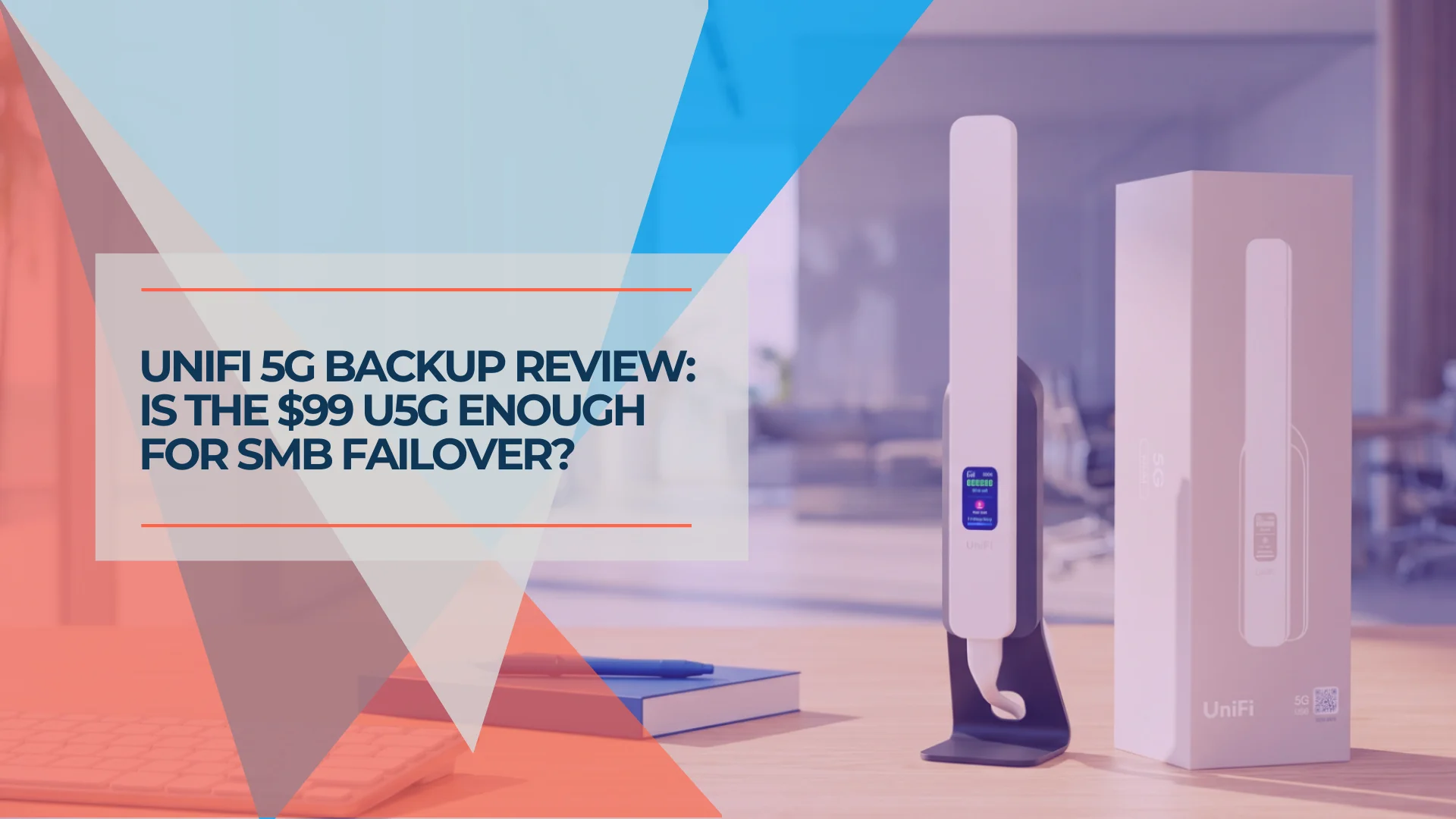
Ubiquiti launched the UniFi 5G Backup on May 21, 2026, and it has one job: give any UniFi network a cellular fallback for $99.
For context, the previous cheapest cellular option in the UniFi ecosystem was the LTE Backup Pro at $279. The 5G Max sits at $399. The U5G reaches $99 by using 5G RedCap, a reduced-capability cellular standard designed for devices that need reliable connectivity rather than maximum speed.
If you need a cellular modem that can handle 1 Gbps+ while serving as your primary WAN, the 5G Max is the right choice. If you need a plug-in backup that activates within seconds when your fiber goes down and keeps email, VoIP, and card readers running during the outage, the U5G covers that use case at a third of the price.
This guide covers what you get, what you don't, how to set it up on a UniFi gateway, and the ongoing data plan cost that factors into total ownership.
Affiliate Disclosure: This article contains affiliate links. If you make a purchase through these links, we may earn a small commission at no extra cost to you. As an Amazon Associate, iFeelTech earns from qualifying purchases.
What Is the UniFi 5G Backup?
The UniFi 5G Backup is a $99 PoE-powered RedCap 5G modem that provides automatic cellular internet failover for any UniFi network.
The device (model U5G) measures 7.9 × 1.5 × 0.8 inches and weighs just 122g (4.3 oz) — compact enough to mount on a wall, stick to a window, or set on a desk cradle near your patch panel. It connects to any PoE switch port on your local network, not a gateway's WAN port, and establishes a GRE tunnel to handle traffic routing when the primary fiber or cable connection drops.
The underlying technology is 5G RedCap — a reduced-capability 5G standard that trades peak throughput for lower cost and simpler hardware. A 15-person office that needs to keep Teams calls alive and credit cards processing during an ISP outage does not need 400 Mbps of cellular throughput. It needs a connection that works, at a cost that fits a small IT budget.
What is 5G RedCap?
RedCap (Reduced Capability) is a 5G standard introduced in 3GPP Release 17, designed for devices that need reliable 5G connectivity without the complexity and cost of full 5G NR. It supports a maximum bandwidth of 20 MHz in sub-7 GHz frequencies, which translates to a ceiling of 220 Mbps down and 120 Mbps up. In exchange, devices are smaller, draw less power, and cost significantly less — built for sensors, backup modems, and wearables rather than replacing a fiber connection.
Introducing UniFi 5G Backup — Official Ubiquiti Overview
In real-world testing, the U5G delivers 30–85 Mbps downstream and 1–3 Mbps upstream, depending on carrier, location, and signal conditions. That range is not sufficient for bandwidth-heavy workloads like 4K streaming, but it covers the applications that matter during an outage: email, VPN tunnels, VoIP calls, and POS transactions. For a device designed exclusively for failover, those numbers meet the requirement.
Network Topology
How the U5G Reroutes Traffic During an Outage
Toggle between modes to see how failover works in practice.
Primary fiber or cable WAN is active. Packets flow directly from the ISP through the gateway to your clients at full speed. The U5G modem is powered via PoE and monitoring the network, but no cellular data is consumed.
The device runs cool and silent, which matters when it's sitting on a shelf near your patch panel for months between outages. A front-facing 1.14-inch status screen shows real-time signal strength and carrier status at a glance — useful for quick placement optimization during install. The U5G requires UniFi Network 10.4.57 or later for adoption and management — this version shipped the same week as the hardware.
If you're new to 5G failover for business networks, our setup guide covers the fundamentals.
UniFi 5G Backup Specifications and What's in the Box
The U5G ships with everything needed for installation: the device itself, a magnetic desktop cradle, wall mount, and window adhesive kit.
No power adapter is included because none is needed — the device draws power exclusively via PoE (802.3af) through its single Gigabit RJ45 port.
| Spec | UniFi 5G Backup (U5G) |
|---|---|
| Dimensions | 7.9 × 1.5 × 0.8 in (200 × 38 × 20.2 mm) |
| Weight | 122 g (4.3 oz) device; 138 g (4.9 oz) stand |
| Port | 1× GbE RJ45 (PoE-in, 802.3af) |
| SIM | 1× Nano SIM slot + eSIM (one active at a time) |
| Antennas | Two embedded omnidirectional cellular |
| Max power draw | 14.5 W |
| Display | 1.14" front-facing status screen |
| Management | UniFi Network 10.4.57 or later |
| Certifications | FCC, IC, PTCRB, GCF, AT&T, T-Mobile |
The U5G supports one SIM at a time — either a physical Nano SIM or an eSIM, not both simultaneously. In the US, Ubiquiti ships the device with a T-Mobile eSIM pre-loaded, which activates automatically after adoption when you purchase a Data Pack. If you'd rather use your own carrier, insert a physical Nano SIM and the eSIM is disabled.
Carrier compatibility — verify before ordering
The U5G is fully unlocked, but "fully unlocked" with a RedCap modem doesn't mean what it does with a phone. RedCap is a newer 5G standard, and carrier support varies:
- T-Mobile: Best current support. RedCap has been live nationwide on T-Mobile's 5G SA network since October 2024. This is the path of least resistance.
- AT&T: Achieved nationwide RedCap coverage in mid-2025 with 200M+ points of presence. Physical SIM should work, but verify your specific market.
- Verizon: Has stated commercial RedCap intent and has 5G SA available, but at the time of this review, Verizon SIMs are not yet automatically recognized by the U5G. Ubiquiti has confirmed future firmware updates will add Verizon auto-provisioning.
If T-Mobile coverage is strong in your area, the pre-loaded eSIM is the simplest option. If you need AT&T or another carrier, confirm RedCap availability in your specific market before purchasing.
5G bands supported: n2, n5, n7, n12, n13, n14, n25, n26, n30, n38, n41, n48, n66, n71, n77, n78
LTE fallback bands: B2, B4, B5, B7, B12, B13, B14, B25, B26, B30, B38, B41, B42, B43, B48, B66, B71
The LTE fallback is worth noting — in areas where 5G RedCap isn't available on your carrier's towers, the U5G drops to LTE automatically. You're still getting backup connectivity, just at LTE speeds (up to 195 Mbps theoretical, lower in practice).
How Much Does the UniFi 5G Backup Cost to Run?
The device costs $159 in year one when bundling hardware with a data pack, and $60–$79 annually thereafter.
Year-one total cost of ownership:
| Cost component | Amount |
|---|---|
| Hardware (one-time) | $99 |
| Ubiquiti Data Pack — bundled at purchase | $60/year (10 GB) |
| Ubiquiti Data Pack — standalone | $79/year (10 GB) |
| Year-one TCO (bundled) | $159 |
| Year-one TCO (standalone) | $178 |
Year-two and beyond: $60–$79/year for the Data Pack renewal. No hardware cost.
The Data Pack pricing deserves a closer look. If you buy the Data Pack at the same time as the hardware in the Ubiquiti Store, you save $19/year — paying $60 instead of $79. The pack includes 10 GB of data valid for 12 months, available on the T-Mobile network in the US. Data activates automatically after device adoption via the eSIM. If you exhaust the 10 GB during an extended outage, additional data can be purchased through Site Manager or the UniFi mobile app. Ubiquiti does not currently publish per-GB top-up pricing on the store page — plan for this variable if your business continuity scenarios involve prolonged outages where 10 GB may not be sufficient.
In the US, Data Packs can be purchased and managed through Site Manager (Ubiquiti's web-based management portal) or the UniFi mobile app after device adoption. Site Manager is the more practical option for IT admins managing multiple client sites — it provides a centralized view of data plan status across deployments without requiring a phone.
BYO SIM alternative: If you'd rather use your own carrier, insert a physical Nano SIM with whatever data plan you negotiate. Business data-only plans from T-Mobile or AT&T often run $10–$30/month, which changes the TCO math significantly for businesses that expect frequent or extended failover use. For most SMBs that treat this as pure emergency backup, the $60–$79/year Ubiquiti plan is the simpler and cheaper path.
36-month TCO: U5G vs. traditional cellular failover
Over a standard 3-year hardware refresh cycle, the U5G's total cost is $219–$257 (hardware + three years of data). Compare that to a dedicated cellular failover line from a traditional ISP, which typically runs $50–$75/month — totaling $1,800–$2,700 over the same period.
| UniFi 5G Backup (3 years) | Traditional cellular line (3 years) | |
|---|---|---|
| Hardware | $99 | $0 (carrier-provided) |
| Annual service | $60–$79/year | $600–$900/year |
| 3-year total | $219–$336 | $1,800–$2,700 |
Over three years, the U5G costs roughly 85–90% less than a dedicated cellular line. The trade-off is that the Ubiquiti Data Pack is metered (10 GB/year) while carrier lines are typically unlimited. For emergency-only failover that activates a few times per year, 10 GB is sufficient for most SMBs. Businesses expecting extended or frequent outages should budget for supplemental data packs or use a BYO SIM with an unlimited plan.
How this compares to the alternatives
| UniFi 5G Backup | LTE Backup Pro | UniFi 5G Max | |
|---|---|---|---|
| Hardware price | $99 | $279 | $399 |
| Peak download | 220 Mbps (RedCap) | 300 Mbps (LTE Cat 12) | 3.4 Gbps (5G NR) |
| Can serve as primary WAN | No | No | Yes |
| SIM support | 1× Nano + eSIM (one at a time) | 1× Nano | 2× Nano + eSIM |
| Network port | 1× GbE | 1× GbE | 1× 2.5GbE |
| WAN mode | LAN backup only | LAN backup only | LAN backup + WAN |
| Best for | SMB failover on a budget | Legacy deployments | Primary cellular WAN or high-speed failover |
The U5G wins on entry cost. The 5G Max wins on speed ceiling and versatility — it can serve as a primary WAN and supports load balancing. The LTE Backup Pro is nearly 3× the price of the U5G while offering similar failover-only functionality, which makes it harder to recommend for new deployments. For most small businesses adding cellular backup to an existing fiber or cable connection, the U5G is the practical starting point.
Product Comparison
UniFi Cellular Backup Options: U5G vs LTE Backup Pro vs 5G Max
Select a device to see full specs and a recommendation.
UniFi 5G Backup
Best for most SMBsThe right starting point for most small businesses. 220 Mbps is more than enough to keep email, VoIP, POS, and VPN running during an outage. At $99 hardware and $60/year thereafter, the three-year total cost is under $250.
View on Ubiquiti Store →If your primary ISP is AT&T Business Fiber, check whether their built-in 5G failover already covers your needs before adding hardware.
Which UniFi Gateways Work with the 5G Backup?
The U5G works with any UniFi gateway running UniFi Network 10.4.57 or later.
It connects to a PoE switch port on your network — not directly to the gateway's WAN port — and uses a GRE tunnel over LAN to provide backup connectivity. This means you don't need a spare WAN port, and you can place the U5G wherever cellular signal is strongest rather than wherever your gateway sits.
Confirmed compatible gateways:
- Cloud Gateway Ultra ($129) — the most common SMB gateway. Full review here.
- Cloud Gateway Max ($199–$479) — adds Protect, Talk, and more storage. Full review here.
- Cloud Gateway Fiber ($279) — 10G backbone for high-speed ISP connections.
- Dream Router 7 ($279) — all-in-one with built-in WiFi 7.
- Dream Machine Pro ($379) — rackmount with HDD storage.
- Dream Machine Pro Max ($599) — RAID storage, Shadow Mode HA.
- Enterprise Fortress Gateway ($1,999) — campus-scale, 25G backbone.
If you're still deciding on a gateway, our full UniFi gateway comparison covers all current models and helps match device count and ISP speed to the right hardware.
VPN and remote site continuity: Because the U5G establishes a GRE tunnel back to your Cloud Gateway, site-to-site VPN tunnels (IPsec, WireGuard, Site Magic) remain routable during failover. For multi-site or hub-and-spoke deployments, this means branch offices maintain connectivity to HQ resources — including file shares, internal apps, and hosted PBX — even when the local fiber drops. The failover is transparent to VPN peers.
One important distinction: the U5G operates exclusively in LAN-connected backup mode. It does not support WAN mode (plugging into a gateway's WAN port for direct failover or load balancing) — that capability is exclusive to the 5G Max lineup. For most SMBs, LAN backup mode is the better option anyway — it's simpler to set up, gives you placement flexibility for signal optimization, and provides the same automatic failover behavior.
How to Set Up the UniFi 5G Backup
Configuration requires connecting the device to a PoE switch port, adopting it in UniFi Network 10.4, and activating the SIM. The entire process takes 15–30 minutes.
1. Physical installation
Connect the U5G to any PoE-enabled port on your UniFi switch (or use a PoE adapter if your switch doesn't support PoE). The device draws all power from PoE — no separate power cable needed.
For placement: the U5G snaps magnetically into its included desktop cradle, or mounts to a wall or window using the included adhesive kit. Place it where cellular signal is strongest — near an exterior wall or window is ideal. Since it connects over LAN rather than requiring a direct cable run to your gateway, you have full flexibility on placement.
2. Adopt in UniFi Network
Open the UniFi Network application (web GUI or mobile app). The U5G will appear automatically as a new device ready for adoption — the same way any UniFi access point or switch does. Click Adopt. The device will likely pull a firmware update immediately after adoption; keep it connected during this process.
3. SIM activation
If using the pre-loaded T-Mobile eSIM: Purchase a Data Pack through the UniFi mobile app (iOS 10.35.0+ or Android 10.38.2+ required). The eSIM activates automatically after adoption.
If using a physical SIM: Insert your Nano SIM into the slot on the underside of the device (next to the PoE port). Most carrier SIMs are recognized and configured automatically. If your SIM isn't auto-provisioned, go to the device settings in UniFi Network and enter the APN manually.
4. Verify failover configuration
After adoption, cellular backup is available to all VLANs on your network by default. To customize which networks use cellular backup:
Go to Settings → Networks → [select a network] → UniFi Cellular Internet Backup and toggle it on or off per VLAN.
5. Test failover
Disconnect your primary WAN cable (or disable the WAN interface in the controller). Monitor traffic — the U5G should activate within seconds. In practice, expect a brief interruption of 1–5 seconds during the WAN switchover, with most active TCP connections recovering automatically. Running a continuous ping to an external host (e.g., ping 1.1.1.1) during the test gives a clear view of the switchover window. Reconnect the primary WAN and verify the network fails back automatically.
Setup complexity
Most SMB installs take under 30 minutes from unboxing to verified failover. The LAN-connected backup mode requires no WAN port reconfiguration and no complex failover policies. If you've adopted any UniFi device before, this is the same process with one additional step (SIM activation).
Pro tip: After setup, disable "Automatic Speed Test" in your console's Internet settings. The periodic speed tests consume cellular data from your Data Pack — data you'd rather save for actual outages.
Data conservation with traffic rules: A 10 GB data pack will deplete quickly if Windows Update, cloud backups, or streaming services run unrestricted during failover. Navigate to Settings → Traffic Management → Traffic Rules and create rules that block or rate-limit high-bandwidth application categories (OS Updates, Streaming, Cloud Backup) when traffic is routed through the cellular backup interface. This ensures your limited data is reserved for business-critical traffic like email, VoIP, POS, and VPN.
UniFi 5G Backup vs. 5G Max: Which One Should You Buy?
The U5G is the right choice for the majority of small businesses adding cellular failover to an existing wired internet connection. The 5G Max is for businesses that need cellular as a primary WAN or require sustained high-throughput failover.
Buy the UniFi 5G Backup ($99) if:
- Your primary need is emergency failover — keeping email, VoIP, POS, and VPN alive during ISP outages
- Your office has 25 or fewer users who don't need high-bandwidth applications during failover
- You have an existing UniFi gateway and want the lowest-cost path to cellular backup
- T-Mobile or AT&T coverage is strong in your area
Step up to the UniFi 5G Max ($399) if:
- You need cellular as a primary WAN option, not just backup
- You want load balancing between cellular and wired WAN
- You need sustained throughput above 100 Mbps on cellular
- You need dual-SIM for carrier redundancy
- You want WAN mode with policy-based routing
For a typical SMB with fiber or cable as the primary ISP and 5–25 employees, the U5G at $99 + $60–$79/year is the right entry point. In a failover scenario, the relevant comparison is cellular backup versus no internet at all — not cellular backup versus fiber speeds. The $300 premium for the 5G Max is justified when you need WAN mode, load balancing, or primary cellular capability. For emergency-only failover, it is not.
If cellular coverage in your area is unreliable, Starlink is a strong alternative failover option — with different trade-offs on cost, latency, and setup complexity.
Business Continuity: The Hurricane Season Use Case
Cellular failover is particularly relevant for businesses in hurricane-prone or disaster-prone regions where multi-day ISP outages are a recurring risk.
We deploy UniFi networks for businesses across Miami-Dade and Broward County. Hurricane season runs June through November, and a single day of internet downtime costs a 10-person office an estimated $2,000–$5,000 in lost productivity, missed sales, and disrupted operations. The U5G's first-year cost of $159–$178 is recovered after a single multi-day ISP outage.
Cellular towers in South Florida are increasingly hardened with battery and generator backups, which means cellular connectivity often survives when wired ISP infrastructure doesn't. A $99 backup modem on the wall near your patch panel, drawing no data until it's needed, is a straightforward insurance policy.
Cellular backup requires power backup
The U5G draws power exclusively via PoE from your switch. If the grid goes down and your switch loses power, the cellular backup goes down with it. Any business continuity plan that includes the U5G should also include a UPS (uninterruptible power supply) sized to keep your gateway, switch, and U5G running through a power outage. A 1500VA rack-mount UPS from APC, CyberPower, or Eaton typically provides 30–90 minutes of runtime for a small network stack — enough to bridge short outages or provide time for a generator to start.
For businesses throughout South Florida — and any coastal or hurricane-belt market — cellular failover paired with battery backup is a practical baseline for any business continuity plan.
Related Resources
- 5G Failover Setup Guide: How to Add Cellular Backup to Your Business Network — The foundational guide to 5G failover concepts, covering setup, carrier selection, and best practices.
- UniFi Gateway Comparison 2026: Ultra vs Max vs Pro vs Pro Max vs EFG — Full comparison of all 11 current UniFi gateways to help match your network needs to the right hardware.
- UniFi Cloud Gateway Ultra Review — Deep dive on the most popular SMB gateway — and one of the most common U5G pairing options.
- Ubiquiti UCG Max Review — Full review of the mid-tier gateway with Protect, Talk, and expanded storage.
- AT&T Fiber Built-In 5G Failover: What You Get and What's Missing — Check if your ISP already includes failover before adding hardware.
- Starlink for Business Failover — Alternative failover path for areas with weak cellular coverage.
- Dual WAN Business Network Guide — The full architecture decision: failover vs. load balancing vs. bonding, and which gateway fits a rack network or a small branch.
Frequently Asked Questions
Related Articles
More from UniFi Networks
UniFi Cloud Gateway Ultra Review: Best Value for Gigabit UniFi Networks (2026)
The UCG-Ultra delivers a full UniFi controller, 1 Gbps IDS/IPS, and multi-WAN failover in a $129 fanless device. No separate Cloud Key needed. Here's who it's right for.
20 min read
UDM Pro Max vs UDM Pro vs UDM SE (2026): Full Comparison & Verdict
UDM Pro Max ($599) vs UDM Pro ($379) vs UDM SE ($499): 5 Gbps vs 3.5 Gbps IDS/IPS, RAID storage, PoE, and real deployment scenarios — which UniFi gateway is worth it in 2026.
16 min read
UniFi Gateway Comparison Guide 2026: All 11 Models Ranked
Complete UniFi gateway comparison covering all 11 current models — from Cloud Gateway Ultra ($129) to Dream Machine Beast ($1,499) and Enterprise Fortress Gateway ($1,999). Exact device counts, throughput thresholds, and storage economics.
26 min read