

Homelab Network Cables: Cat6A, Cat8, DAC, or Fiber for Each Link
Which cable links your switch, NAS and APs? DAC, fiber, Cat6A and RJ45 SFP+ modules mapped to UniFi, Omada, Synology and UGREEN ports, with cost and power.

A common 10-gigabit mismatch we see in small racks is the NAS and the switch disagreeing about what 10G looks like. A UniFi Pro Max or Omada SG switch offers 10G as SFP+ cages. A UGREEN DXP4800 Plus, or a Synology DS1525+ with its 10G module, offers it as an RJ45 jack. Both are 10G, and they do not connect without the right part in between.
That part changes the bill more than most people expect. Linking two SFP+ ports with a direct attach cable costs $13 to $16 and draws about 0.1 W. Bridging SFP+ to RJ45 takes a copper module at $45 to $86 per end that draws about 2 to 2.5 W at its specified maximum and runs warm. Across a rack, those choices add up, and a wrong one usually shows up as a return label or a switch with no free uplink.
Here is how we cable each link, whether your rack runs UniFi, Omada, Synology, UGREEN, or a mix.
Affiliate Disclosure: This article contains affiliate links. If you make a purchase through these links, we may earn a small commission at no extra cost to you. As an Amazon Associate, iFeelTech earns from qualifying purchases.
The short answer
- 1G, 2.5G and 5G links: Cat6. That covers a Synology DS925+, every 2.5G access port, and 10G access points plugged into 2.5G ports.
- SFP+ to SFP+ in the same rack: a passive DAC.
- SFP+ switch to an RJ45 NAS: one SFP+-to-RJ45 module plus a Cat6A patch, or a switch with native 10GbE ports.
- SFP+ switch to a 10GbE access point: the module carries data only, so plan the PoE source too.
- 10G leaving the rack: SR modules with multimode fiber, or an active optical cable for a fixed 5 to 30 m run.
- Cat8: fits 25G/40G copper links that none of this gear has.
Pick the Cable in 30 Seconds
Find the row that matches the link, then read the section for that row.
| Link | Distance | Power needed | Use | Section |
|---|---|---|---|---|
| RJ45 to RJ45, 1G to 5G | Up to 100 m | PoE for APs and cameras | Cat6 (existing Cat5e is fine to 5G) | 2.5G links |
| RJ45 to RJ45, 10G | Up to 100 m | PoE for APs | Cat6A | Cat6 vs Cat6A |
| SFP+ to SFP+ | 0.5 to 3 m (generic DAC to about 7 m) | None | Passive DAC | DAC |
| SFP+ to SFP+ | 5 to 30 m, fixed | None | Active optical cable | DAC vs AOC |
| SFP+ to SFP+ | Room to building | None | SR modules with multimode fiber | Fiber |
| SFP+ switch to 10G RJ45 NAS | Short patch; reach depends on the module (30 m for the listed TP-Link and FS options, 100 m for Ubiquiti) | None | One RJ45 module in the switch plus Cat6A | Module question |
| SFP+ switch to 10GbE access point | Up to 30 m on the listed TP-Link and FS modules, 100 m on Ubiquiti's | A 10G-rated injector meeting the AP's PoE requirement, or supported DC power | RJ45 module plus Cat6A plus injector, or a native 10G PoE port | AP power chain |
| Any 25G/40G copper link | Up to 30 m | None | Cat8 | Cat8 |
Start With the Ports, Not the Cable
Most wrong cable purchases start in the cable aisle. Someone decides the rack deserves "the good stuff", buys a bag of Cat8 patch cords, and then finds that the NAS has SFP+ cages or the switch uplinks do. The category printed on a cable jacket is the last decision in the chain.
Write down every link in the rack and answer four questions for each:
- What port is on each end? RJ45 at 1G, 2.5G, 5G or 10G, or an SFP-family cage (SFP at 1G, SFP+ at 10G, SFP28 at 25G).
- How far apart are the ends? Same rack, next rack, or another room.
- Does the link carry PoE? Access points and cameras do. Uplinks and NAS links do not.
- What speed do both ends actually run? A 10GbE port facing a 2.5G port gives you a 2.5G link, whatever the cable.
An SFP+ cage is a narrow, rectangular metal slot, usually grouped at one end of a switch and labelled "SFP+" or "10G". It does nothing on its own: it holds a DAC, an optical module or a copper module, and that choice is what this article is about.
What 10G Looks Like on UniFi, Omada, Synology and UGREEN
The pattern that causes most of the confusion: switches and gateways tend to expose 10G as SFP+ cages, while NAS units and Wi-Fi 7 access points increasingly expose it as RJ45. The UNAS line is the exception on the NAS side, and the UniFi Pro XG family is the exception on the switch side.
| Device | 10G-class ports | Other ports worth knowing | Review |
|---|---|---|---|
| UniFi Dream Machine Pro Max | 2× 10G SFP+ (WAN or LAN) | UDM Pro Max | |
| UniFi Pro Max 16 / 24 PoE | 2× 10G SFP+ uplinks | 2.5G and 1G PoE access ports | UniFi switches |
| UniFi Pro XG 8 PoE | 8× 10GbE RJ45 PoE + 2× 10G SFP+ | UniFi switches | |
| UniFi Pro XG 24 / 48 PoE | 16 / 32× 10GbE RJ45 + 25G SFP28 uplinks | 2.5G ports | UniFi switches |
| UniFi UNAS Pro 4 | 2× 10G SFP+ (10G only) | 1× GbE RJ45 | UNAS Pro 4 |
| UniFi UNAS Pro 8 | 2× 10G SFP+ (10G only) + 1× 10GbE RJ45 | RJ45 runs 10G/5G/2.5G/1G | UNAS comparison |
| UniFi U7 Pro XG | 1× 10GbE RJ45 uplink | PoE-powered | U7 Pro XG |
| Omada ER8411 | 2× 10G SFP+ | 1G RJ45 ports | Omada Wi-Fi 7 |
| Omada ER707-M2 | None; SFP port is 1G only | 2.5G RJ45 | Omada Wi-Fi 7 |
| Omada SG2210XMP-M2 | 2× 10G SFP+ uplinks | 8× 2.5G PoE+ | Omada Wi-Fi 7 |
| Omada SG3428XPP-M2 V2 | 4× 10G SFP+ uplinks | 24× 2.5G PoE++ | Omada Wi-Fi 7 |
| Omada EAP773 / EAP787 | 1× 10GbE RJ45 uplink | PoE or DC powered | Omada Wi-Fi 7 |
| Synology DS925+ / DS725+ | None, and no 10G upgrade path | 2.5GbE | DS925+ |
| Synology DS1525+ | 10GbE RJ45 via E10G22-T1-Mini (about $110–115) | 2× 2.5GbE | DS1525+ |
| Synology DS1825+ | PCIe slot: dual SFP+ (E10G30-F2) or RJ45 cards | 2× 2.5GbE | Synology guide |
| UGREEN DXP4800 Plus | 1× 10GbE RJ45 | 1× 2.5GbE | UGREEN vs Synology |
| UGREEN DXP8800 Plus | 2× 10GbE RJ45 | Thunderbolt 4 | 8-bay NAS |
Port details from each vendor's specifications as covered in the linked reviews; UNAS Pro 8 ports and Synology card compatibility re-checked September 2026.
Two rows deserve a second look. "10G only" on the UNAS SFP+ ports means exactly that: those cages will not fall back to 1G or 2.5G, so they need a 10G SFP+ port on the switch. And the Synology DS925+ and DS725+ have no path to 10G, so their owners can skip straight to the 2.5G section and spend nothing on SFP+ gear.
One 10G Link, Four Ways: Cost and Power
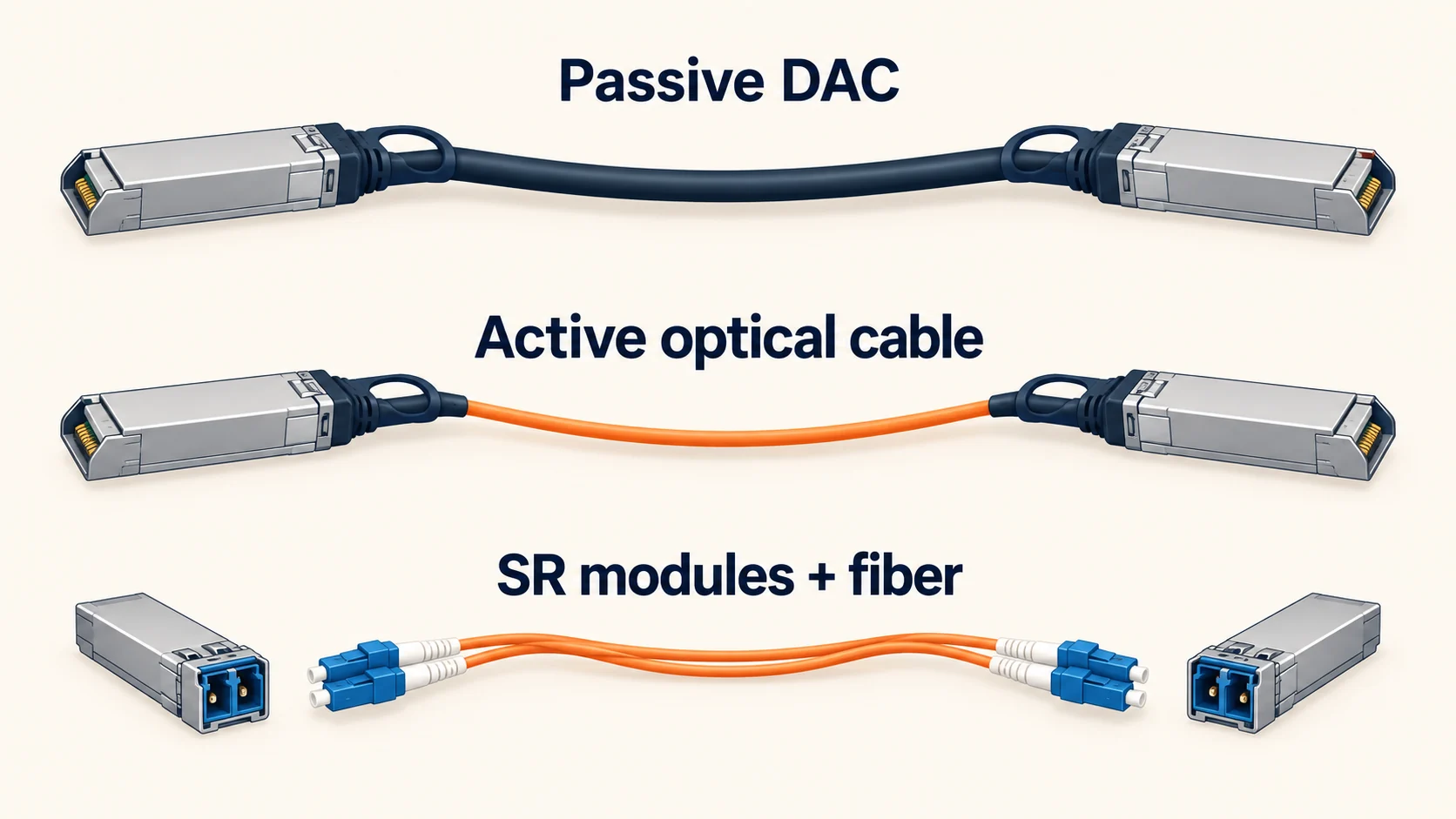
Once both ends of a link are SFP+, there are four ways to join them. All carry 10 Gbps. They differ in price, power, heat and reach.
| Two SFP+ ports joined by | UniFi | Omada | FS.com | Power for the link (specified maximum) | Reach |
|---|---|---|---|---|---|
| Passive DAC | $13 (0.5 m) | $15.99 (1 m) | $14 (1 m) | About 0.1 W | UniFi 0.5 to 3 m; generic to about 7 m |
| Active optical cable, 5 m | $39 | Not verified | $36 | Up to 0.8 W | 5 to 30 m |
| 2× SR modules + OM4 LC-LC patch | $40 + patch | $36 + patch | $50 + patch | 1.6 W (UniFi) to 2 W (FS) | See the fiber section; varies by module |
| 2× RJ45 modules + Cat6A patch | $130 | $89.98 | $172 | About 3.8 W (UniFi), 5 W (FS), about 5 W (TP-Link, derived) | 30 m at 10G for most; UniFi's is rated 100 m |
Base list prices, US, checked September 28–29, 2026 on store.ui.com, the Omada Store and fs.com. Ubiquiti's store can show an added surcharge at checkout on some products; these figures exclude it. An FS OM4 LC-LC 2 m patch is $9.40. Power figures are vendor-specified maximums for the modules or cable only, not measured draw, and exclude the switch and device. TP-Link's figure is derived from its datasheet's 750 mA at 3.3 V. ServeTheHome measured 2.7 to 3.0 W per FS RJ45 module at the outlet.
The pattern is plain. A DAC costs roughly a tenth to a fifth of the all-copper route and draws a small fraction of the power. Each step down the table buys reach or flexibility, at the cost of money and heat.
The bottom row is rarely the right answer between two SFP+ ports. It matters because it is what you need when one end only speaks RJ45, which is where most UGREEN and Synology owners land. In that case you buy one module, not two: the NAS keeps its native RJ45 port and the module goes in the switch.
The 2.5G Links: Cat6 Is Enough
Many homelab and small-office racks never need an SFP+ cage. If your NAS is a Synology DS925+ or DS725+, your switch has 2.5G access ports, and your access points plug into them, every link is copper Ethernet and Cat6 handles all of it.
2.5GBASE-T and 5GBASE-T were designed to run over Cat5e at up to 100 metres, so Cat6 gives you margin. Put the money into the switch, not a higher cable category.
This is also where 10GbE Wi-Fi 7 access points land more often than their buyers expect. The Omada EAP773 and EAP787 and the UniFi U7 Pro XG have 10GbE uplinks, but on a 2.5G switch port they negotiate at 2.5G. A Cat6 patch cord is the right cable there, and Cat6A or Cat8 will not change the negotiated speed. Getting them to 10G is a switch and power decision, covered below. Our Omada Wi-Fi 7 setup guide walks through the Omada side.
Conductor gauge matters where PoE flows. Treat this table as a rule of thumb and check the patch cord's own stated PoE rating:
| Patch cable gauge | Data | PoE | Where it fits |
|---|---|---|---|
| 23 to 24 AWG (standard) | Yes | Up to PoE++ | Access points, cameras, anything PoE-powered |
| 28 AWG (slim) | Yes | Recognized by TIA for power delivery; check the cord's rating | Dense patching; keep bundles small |
| 30 AWG (ultra-slim) | Yes | Treat as data-only | Short data links where bulk is the problem |
Slim patch cords make a small rack far tidier. AWG alone does not decide PoE suitability: construction, length and bundling matter too. Belden's guidance for 28 AWG patch cords supports power up to 60 W but recommends bundles of 12 or fewer above 30 W. When in doubt on a PoE++ device, use a standard-gauge cord. For bulk in-wall cable and jacket ratings, see our ethernet cable guide, and if you are still deciding whether to leave 1G, start with the 2.5 Gigabit upgrade guide.
Existing Wall Runs or a New Pull?
The cable already in your walls changes the answer, so it gets its own branch.
- Existing Cat5e or Cat6, links at 1G to 5G: keep it. Cat5e runs 2.5G and 5G to 100 m.
- Existing Cat6, links at 10G: it may work, but it is not guaranteed. TIA guidance expects 10GBASE-T to run on Cat6 channels up to 37 m, and between 37 and 55 m depending on alien crosstalk. Long or bundled runs need testing. Short, sound Cat6 patch cords are fine.
- A new pull that may ever carry 10G: Cat6A. It is the specification for 10G at the full 100 m, and the price gap over Cat6 is small next to the cost of opening the walls twice.
- A new run to another building or a long backbone: fiber, covered below.
SFP+ to SFP+: Use a DAC Inside the Rack
When both ends are SFP+ cages within a few metres, a passive direct attach cable is the default. A DAC is a short run of copper twinax with an SFP+ connector permanently attached at each end. In most cases nothing needs configuring: once both ends are seated, the link comes up at 10G.
The pairings where this is the answer:
- UniFi Dream Machine Pro Max to a Pro Max 16/24 PoE switch: gateway SFP+ to switch SFP+ uplink.
- UniFi UNAS Pro 4 or UNAS Pro 8 to a Pro Max or Pro XG switch: a DAC to a 10G switch cage satisfies the "10G only" ports.
- Omada ER8411 to an SG3428XPP-M2 V2 or SG2210XMP-M2: the SM5220-1M or any compatible DAC.
- Synology DS1825+ with an E10G30-F2 dual-SFP+ card to a switch: the card accepts DACs as well as SR and LR optics.
Lengths: UniFi sells its 10G DAC in 0.5, 1 and 3 m. TP-Link's Omada Store lists 1 m ($15.99) and 3 m ($24.99). FS sells generic passive DACs from 0.5 to 7 m. In one rack, 0.5 or 1 m covers most links.
Compatibility: UniFi and Omada switches generally accept third-party DACs and optics. Some NICs and switches enforce vendor coding, and Synology validates its add-in cards against its own compatibility list, so check it before buying a generic cable for a DS1825+.
DAC vs AOC
A DAC gets thick and stiff as it lengthens, and passive copper tops out at a few metres. For a fixed link of about 5 to 30 m, an active optical cable is the next step: optical transceivers bonded to each end with thin fiber between them. UniFi's 10G AOC runs 5, 10, 20 and 30 m from $39 for 5 m, and FS lists a generic 5 m at $36.
The trade-off is flexibility. An AOC is one sealed assembly, so it cannot be re-terminated or pulled through small conduit with the ends attached. For a run that may change or goes through walls, use separate modules and fiber. On the UniFi Pro XG 24 and 48, whose uplinks are 25G SFP28, the same logic applies with SFP28 cables; our UniFi fiber and SFP guide covers 25G and 100G.
SFP+ Switch to RJ45 NAS or Access Point: The Module Question
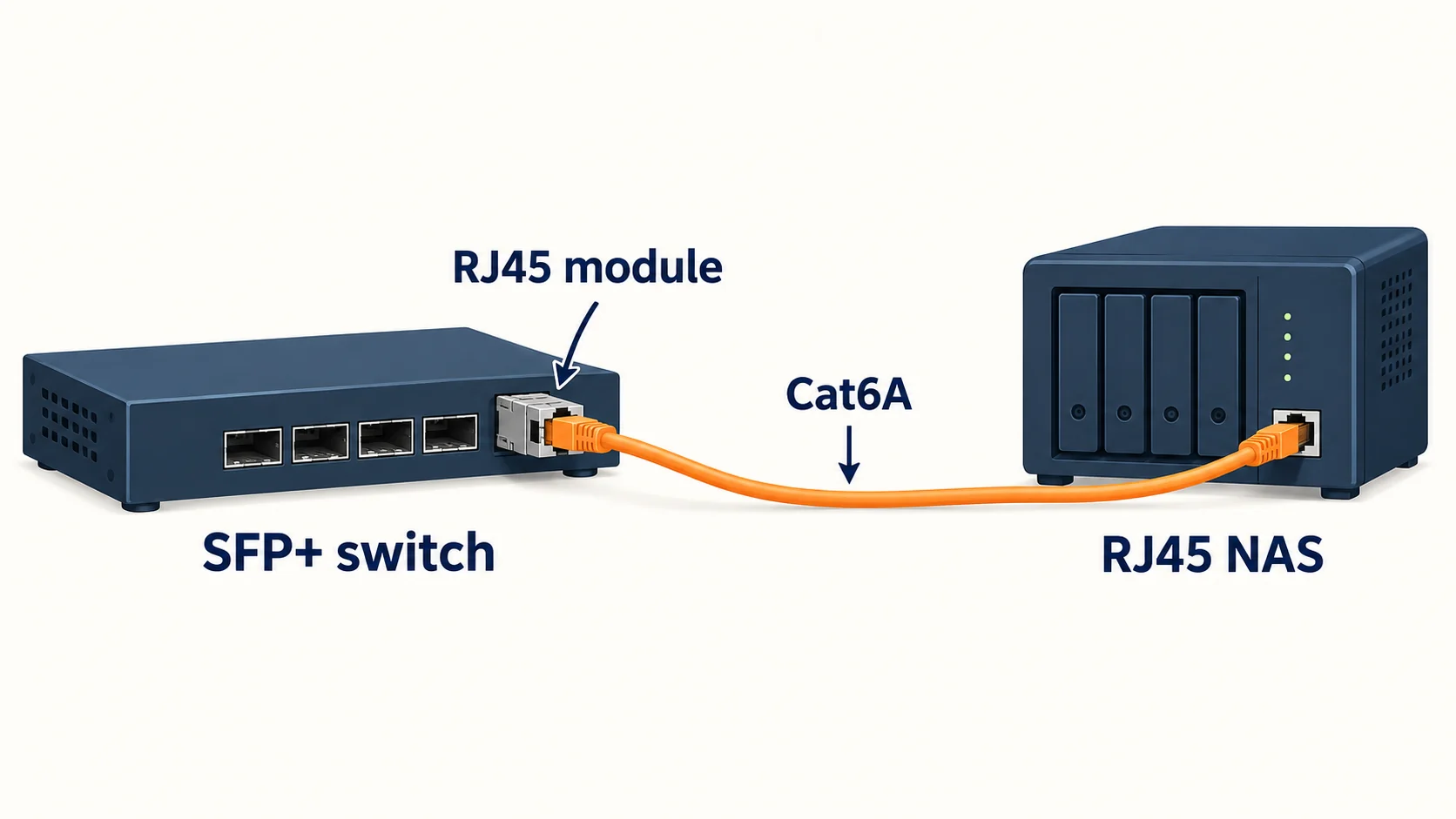
This is the mismatch from the top of the article. The pairings:
- UGREEN DXP4800 Plus or DXP8800 Plus (10GbE RJ45) to a UniFi Pro Max or Omada SG switch (SFP+ uplinks).
- Synology DS1525+ with the E10G22-T1-Mini (10GbE RJ45) to the same switches.
- Omada EAP773/EAP787 or UniFi U7 Pro XG (10GbE RJ45) when you want the access point at 10G rather than 2.5G.
There are two ways to join them.
Path 1: A Switch With Native 10GbE RJ45 Ports
A Cat6A patch runs straight from the NAS or AP to the switch. On the UniFi side, the Pro XG 8 PoE has eight 10GbE PoE ports, two SFP+ cages and a 155 W PoE budget. It lists at $499 in Ubiquiti's US store, with a higher total shown once the store's surcharge is included. That is far more than two modules cost, so native ports are not automatically cheaper. They earn their place when you need several 10G copper ports, 10G PoE for access points, or cages for other jobs. Our UniFi switch guide covers where they fit.
Path 2: An SFP+-to-RJ45 Module in the Switch
A copper module turns one SFP+ cage into a 10GbE RJ45 port:
| Module | Price | Speeds | 10G reach | Power |
|---|---|---|---|---|
| UniFi UACC-CM-RJ45-MG | $65 | 10G / 5G / 2.5G / 1G | 100 m on Cat6A | 1.9 W max |
| TP-Link Omada SM5310-T | $44.99 | 10G / 5G / 2.5G / 1G | 30 m on Cat6A | About 2.5 W (derived from datasheet) |
| FS.com generic 10GBASE-T | $86 | 10G (check the listing for 2.5G/5G) | 30 m on Cat6A/Cat7 | 2.5 W max |
Sources: Ubiquiti tech specs, TP-Link SM5310-T datasheet, FS listings. Prices checked September 28–29, 2026.
Multi-speed support matters. A module that negotiates 2.5G and 5G can serve a NAS that runs at 2.5G today and moves to 10G later. TP-Link notes that when the SM5310-T sits in a 10G slot facing a 2.5G or 5G peer, flow control may need enabling on the switch port.
Count cages, and check the vendor's module limit
The UniFi Pro Max 16 PoE and 24 PoE and the Omada SG2210XMP-M2 each have two SFP+ cages. If one carries the gateway uplink and the other takes a copper module, no cage is left for a second 10G device.
Four cages do not mean four copper modules either. TP-Link's SG3428XPP-M2 V2 page recommends using only one SM5310-T in that switch, so plan a second copper 10G device another way.
Copper modules run warm. Each dissipates a couple of watts inside a small metal cage, and two side by side heat each other. Where the layout allows, leave an empty cage or a DAC between them, and keep the switch where air can move. For the cable itself, use a Cat6A patch for 10G.
The Access Point Power Chain
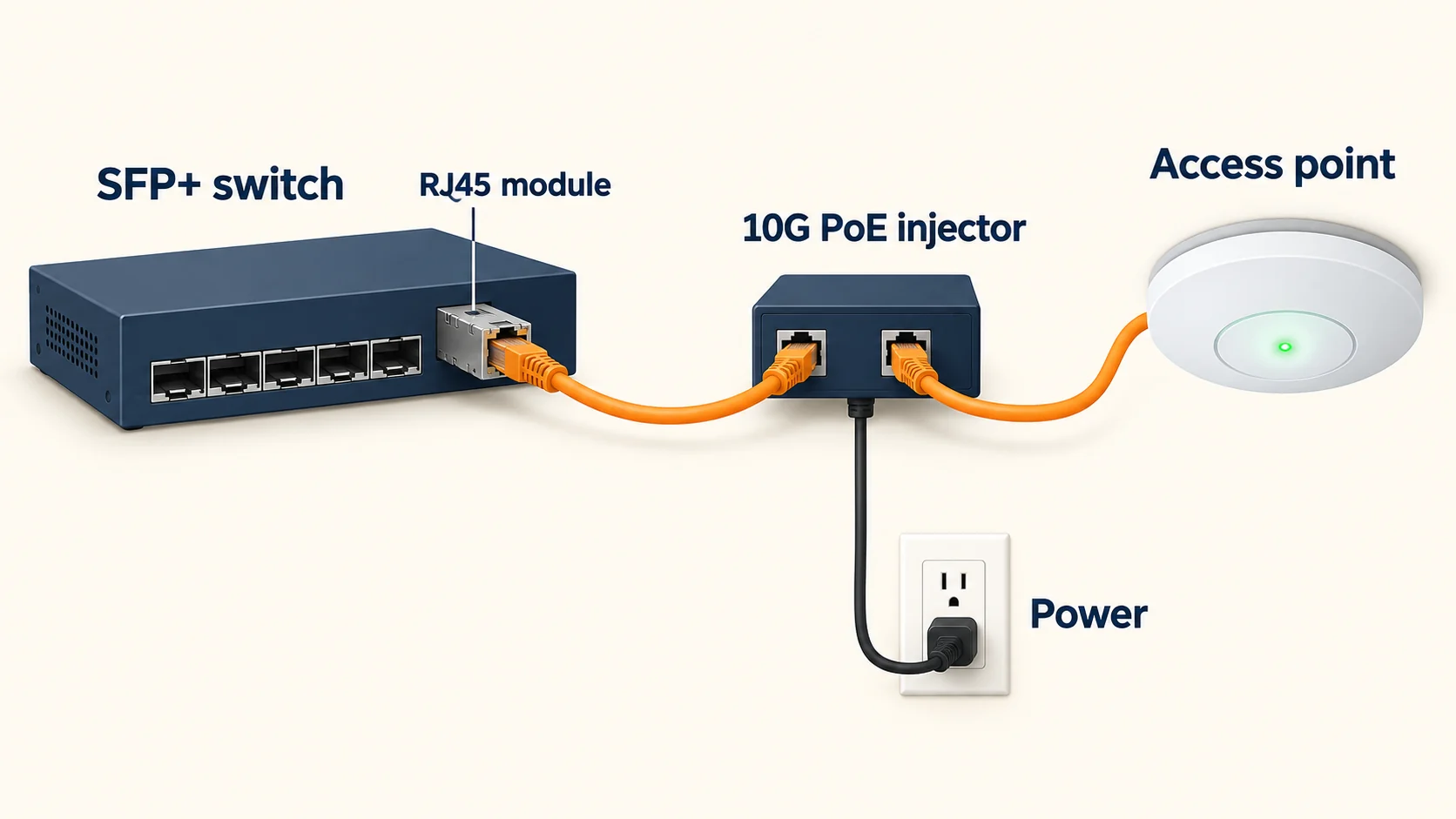
A module and a Cat6A cable carry data, not PoE. A 10GbE access point on that link still needs a power source, and each AP is different:
| Access point | Power it accepts | What to know |
|---|---|---|
| Omada EAP773 | 802.3at PoE or 12 V/2.5 A DC (adapter not included) | 25.4 W max on PoE |
| Omada EAP787 | 802.3bt PoE or 12 V/2.5 A DC | On 802.3at it draws 25.5 W but its Ethernet port drops to 2.5G, so PoE+ defeats the purpose of 10G |
| UniFi U7 Pro XG | PoE+ (802.3at), up to 22 W, per our U7 Pro XG guide and retailer listings | A 10G PoE++ adapter also works and leaves headroom |
Sources: Omada Store product pages and EAP787 datasheet; StorageReview and our own guide for the U7 Pro XG.
The three ways to power a 10G access point:
- A native 10G PoE port on the switch, such as the Pro XG 8 PoE. One cable, no extras.
- A module plus an inline 10G PoE injector. The UniFi 10G PoE++ Adapter (60 W) is $39. The Omada POE380S (up to 90 W, 10G ports) is $69.99, marked down from $89.99. Use a 10G-rated injector; a gigabit one caps the link at 1G.
- A DC adapter where the AP supports one. It works, but it needs an outlet beside a ceiling-mounted AP, which is rarely practical.
If a 10G AP is not essential, connect it to a 2.5G PoE port with a Cat6 patch and skip all three.
A Worked Bill: Adding 10G to an Existing Rack
Say the rack already has a UniFi Pro Max 24 PoE with the gateway on one SFP+ cage and one cage free. Base list prices, September 28–29, 2026, patch cords not priced:
| Goal | Route | Parts | Cost |
|---|---|---|---|
| UGREEN NAS at 10G | Module in the free cage | UniFi RJ45 module ($65) | $65 |
| One U7 Pro XG at 10G | Module in the free cage plus injector | Module ($65) + UniFi 10G PoE++ adapter ($39) | $104 |
| NAS and AP both at 10G | Add a Pro XG 8 PoE, DAC uplink from the Pro Max | Pro XG 8 PoE ($499) + DAC ($13) | $512, before the store's displayed surcharge |
The module route is cheaper for one device. The third row is where it stops working: there is one free cage, so a second copper device needs a different design, and the $512 buys six more 10G copper ports and PoE++ on all of them. On Omada the arithmetic differs. An SM5310-T is $44.99, and the SG3428XPP-M2 V2 recommends only one, so a NAS takes that module and the access points stay on 2.5G PoE++ ports.
The NAS-side reading for these pairings lives in our UNAS Pro 4 vs DXP4800 Plus comparison, the UGREEN vs Synology guide and the Synology DS1525+ review, which covers the E10G22-T1-Mini.
Leaving the Rack: Fiber and LC-LC Patches
When an SFP+ backbone link has to leave the rack (to an office, a second rack, a garage), fiber often fits better than copper modules. It is thin, runs cool, ignores electrical interference, and reaches far beyond any house.
The default homelab link is two 10GBASE-SR modules joined by a duplex LC-to-LC multimode patch:
- Modules: UniFi's 10G multimode module is $20 and draws 0.8 W max. TP-Link's SM5110-SR is $17.99 on the Omada Store. FS's generic SR module is $25 at 1 W max.
- Fiber: an OM4 LC-LC duplex patch. FS lists a 2 m cord at $9.40.
That is roughly $45 to $60 for a short rack-to-rack link, which covers parts only. The 2 m patch cord is priced for the shelf; longer runs are priced by the cable length, so budget for the cable you need. Copper RJ45 modules run $45 to $86 each and reach 30 m on the TP-Link and FS options. Reach depends on the module: Ubiquiti and FS list 300 m on OM3 and 400 m on OM4, while the SM5110-SR lists up to 300 m on 50/125 µm fiber. Check the listing for your module, though any of them far exceeds a home run.
A rack patch cord is not built for a run between buildings. For a garage or outbuilding, use cable rated for the pathway (outdoor or indoor/outdoor jacketed, usually with conduit), terminated or spliced to the LC connectors, and check local code. Keep the cheap LC-LC patch cords for inside the rack and equipment room.
Two fiber mistakes that look like broken hardware
Match the module to the fiber. SR modules are for multimode fiber (OM3/OM4, usually aqua jackets). LR modules are for single-mode (OS2, usually yellow). Both ends of a link must use the same type; a mismatched pair fails to link or links unreliably.
Keep the ends clean. Leave the dust caps on until the moment you plug in, and never look into a live module. A dirty LC end-face can cause link failures, errors or intermittent operation.
OM4 costs little more than OM3, so it is a sensible default for new patch cords; if you already have OM3 in the wall, keep using it. Single-mode with LR or BiDi modules suits runs between buildings and is covered in our UniFi fiber and SFP guide. If you are deciding between fiber and Cat6A through the walls, read our fiber vs Cat6A guide.
Cat6A vs Cat8 in a Homelab
Cat8 patch cords are heavily marketed with "40 Gbps" on the packaging, so the question comes up often.
The facts are short. Cat8 is specified for 25GBASE-T and 40GBASE-T over copper up to 30 metres, a data-centre standard for switch-to-server links. Not one switch, NAS or access point in the port table has such a port. The fastest RJ45 port in that gear is 10GbE, and Cat6A carries 10G to the full 100 metres.
At the speeds a homelab runs, Cat8 performs the same as Cat6A. What it adds is a thicker, stiffer, shielded cable that is harder to dress in a small rack and, in the low-cost market, a category claim that is often undocumented.
Cat6A or Cat8
Cat6A fits every RJ45 link in a UniFi, Omada, Synology or UGREEN rack, including 10GbE. Cat8 fits a short 25G/40G copper link between data-centre switches and servers. If your gear negotiates 10G on Cat6A, a Cat8 cord will not make it faster.
For the in-wall version of this decision, see our Cat6 vs Cat8 office guide.
Four Racks, Cabled
Four common setups, as starting points rather than fixed kits.
1. The 2.5G shelf
Gear: a Synology DS925+ or a UGREEN NAS at 2.5G, a 2.5G switch, one or two Wi-Fi 7 APs.
| Link | Cable |
|---|---|
| Gateway to switch, switch to NAS | Cat6 patch |
| Switch to access points | Cat6 or Cat6A in-wall, standard-gauge patch at the switch |
| Everything else | 28 AWG slim Cat6 patches for data |
No SFP+ parts at all. This suits most homes and small offices and leaves the switch's SFP+ cages free.
2. UniFi rack with a UNAS Pro 4
Gear: UDM Pro Max, Pro Max 24 PoE, UNAS Pro 4.
| Link | Cable | Cost |
|---|---|---|
| UDM Pro Max SFP+ to switch SFP+ | UniFi 10G DAC, 0.5 m | $13 |
| Switch SFP+ to UNAS Pro 4 SFP+ | UniFi 10G DAC, 0.5 m | $13 |
| Switch to access points | Cat6A in-wall, standard patch |
Both SFP+ cages on the Pro Max 24 PoE are now in use, which matters if a 10G workstation is coming.
3. Omada rack with a Synology DS1525+
Gear: Omada ER8411, SG3428XPP-M2 V2, Synology DS1525+ with the E10G22-T1-Mini, EAP773 access points.
| Link | Cable | Cost |
|---|---|---|
| ER8411 SFP+ to switch SFP+ | SM5220-1M DAC | $15.99 |
| Switch SFP+ to DS1525+ 10GbE RJ45 | SM5310-T + Cat6A patch | $44.99 |
| Switch 2.5G PoE++ ports to EAP773s | Cat6A in-wall (APs negotiate 2.5G) |
Two SFP+ cages remain. A DAC or fiber device fits there. A second SM5310-T does not, given TP-Link's one-module recommendation for this switch.
4. Mixed rack: UniFi or Omada switch with a UGREEN DXP4800 Plus
Gear: a Pro Max 24 PoE or SG2210XMP-M2, a UGREEN DXP4800 Plus, and a gateway with an SFP+ uplink.
| Link | Cable | Cost |
|---|---|---|
| Gateway to switch | DAC | $13 to $16 |
| Switch SFP+ to DXP4800 Plus 10GbE | UniFi RJ45 adapter ($65) or TP-Link SM5310-T ($44.99) + Cat6A patch | $45 to $65 |
| DXP4800 Plus 2.5GbE port | Optional second link, Cat6 |
Both cages are now used. The worked bill above shows when a Pro XG 8 PoE becomes the better answer. For layout, labelling and airflow, see our rack cable management guide, and for outages, the UPS guide for UniFi racks.
Common Mistakes
- Buying Cat8 for 2.5G links. The link runs at what the ports negotiate, and Cat6 already carries it.
- Using every SFP+ cage on modules. Count cages, and check the vendor's module limit.
- Forgetting PoE on a module link. A 10GbE access point still needs an injector, a PoE++ port or a DC supply.
- Pairing an SR module with single-mode fiber. SR goes with multimode, LR with single-mode.
- Putting 30 AWG slim patches on PoE++ devices. Keep the thinnest cords for data.
- Planning a 10G upgrade for a Synology DS925+. It has no 10G path; the DS1525+ and DS1825+ do.
Related Resources
- UNAS Pro 4 vs UGREEN DXP4800 Plus: the SFP+ vs RJ45 NAS decision from the storage side.
- UGREEN vs Synology NAS: which platform fits, including the 10GbE cost of each.
- Omada Wi-Fi 7 Business Setup: full Omada builds with the SFP+ uplinks this article cables.
- Best UniFi Switches: Pro Max vs Pro XG and where native 10GbE ports make sense.
- UniFi Fiber and SFP Guide: single-mode, BiDi, 25G and 100G module selection.
- Is 10GbE Worth It?: how to tell whether your workload needs 10G before you buy.
- Best Ethernet Cables: bulk Cat6 and Cat6A for in-wall runs, jacket ratings and conductor quality.
Frequently Asked Questions
Related Articles
More from Network Infrastructure

How to Set Up Guest Wi-Fi the Right Way (And Why Most Businesses Get It Wrong)
Step-by-step guide to setting up a secure guest Wi-Fi network for your small business on UniFi or TP-Link Omada — without exposing your printers, payment terminals, or internal files.
18 min read
Best Ethernet Cables 2026: Cat6, Cat6A, and When You Need Shielded
We've pulled Cat6A, shielded, outdoor, and direct-burial cables across 50+ business installs. What we recommend — by use case and environment.
30 min read

Is 10GbE Worth It in 2026? Small-Business Upgrade Guide
Decide whether 10 Gigabit Ethernet is right for your business. Compare 2.5, 5, and 10GbE, see verified parts and pricing, learn how to measure your actual bottleneck, and avoid common 10G pitfalls.
14 min read