

Is 10GbE Worth It in 2026? Small-Business Upgrade Guide
Decide whether 10 Gigabit Ethernet is right for your business. Compare 2.5, 5, and 10GbE, see verified parts and pricing, learn how to measure your actual bottleneck, and avoid common 10G pitfalls.


Key Takeaway
Most offices do not need 10GbE at every desk. Measure network and storage performance first. Use 2.5 or 5GbE where existing Cat5e and endpoint hardware support it, and deploy 10GbE for shared storage, video production, virtualization, or backup paths that demonstrably exceed multi-gigabit capacity. A hybrid design—10GbE at the core and 1/2.5/5GbE at ordinary endpoints—is usually the most economical approach.
Affiliate Disclosure: This article contains affiliate links. If you make a purchase through these links, we may earn a small commission at no extra cost to you. As an Amazon Associate, iFeelTech earns from qualifying purchases.
10 Gigabit Ethernet delivers 10× the bandwidth of standard Gigabit networking—but the real question is whether your workflows actually benefit from that capacity and whether the cost makes sense for your environment.
This guide helps you measure your actual bottleneck, compare 2.5, 5, and 10GbE options, and build a right-sized upgrade plan. If you're already leaning toward multi-gigabit without going all the way to 10G, see our dedicated 2.5 Gigabit vs 10 Gigabit comparison for a deeper look at when 2.5GbE is the better fit.
Quick Decision: Do You Need 10GbE?
Before diving into details, here's a practical decision framework. The right speed depends on your measured workload, not employee count:
| Your Situation | Recommendation | Why |
|---|---|---|
| General office (documents, web apps, email) | 1GbE or 2.5GbE | These workloads rarely saturate even Gigabit |
| NAS backup with light concurrent access | 2.5GbE or 5GbE | Meaningful upgrade at a fraction of 10G cost |
| Wi-Fi 7 access point uplinks | Check the AP spec | Current business APs ship with 2.5, 5, or 10GbE uplinks—verify your model |
| Video editing team (4K/8K ProRes, RAW) | 10GbE | Large project files need sustained throughput |
| Virtualization/hypervisor hosts | 10GbE | VM migrations and concurrent storage I/O benefit from bandwidth and lower latency |
| NAS with heavy concurrent large-file access | 10GbE | Measured aggregate throughput—not user count—determines when multi-gigabit capacity is insufficient |
Understanding the Numbers
Gb/s vs MB/s
Network speeds are measured in gigabits per second (Gb/s), but file transfers typically display in megabytes per second (MB/s). To convert: divide Gb/s by 8. A 10 Gb/s link yields a theoretical maximum of 1,250 MB/s, though real-world file transfers will be lower due to protocol overhead.
| Link Speed | Theoretical Max (MB/s) | Typical File Transfer (MB/s) |
|---|---|---|
| 1 Gbps | 125 | 100–115 |
| 2.5 Gbps | 312 | 250–290 |
| 5 Gbps | 625 | 500–580 |
| 10 Gbps | 1,250 | 900–1,150 |
Theoretical Best-Case Transfer Times
These are ideal line-rate calculations. Actual transfers will be slower due to Ethernet framing, TCP/IP overhead, SMB/NFS protocol costs, and—most critically—storage device speed:
| Task | 1 Gbps | 2.5 Gbps | 5 Gbps | 10 Gbps |
|---|---|---|---|---|
| 100 GB file transfer | 13.3 min | 5.3 min | 2.7 min | 1.3 min |
| 1 TB backup to NAS | 2.2 hours | 53 min | 27 min | 13 min |
| 4K video project (200 GB) | 26.7 min | 10.7 min | 5.3 min | 2.7 min |
Your Storage Is Often the Real Bottleneck
A 10GbE link does not guarantee 10GbE file transfers. Sustaining 10GbE-class speeds typically requires multiple drives in a suitably configured array or an all-flash volume. SSD cache can improve random I/O and some virtualization workloads, but it does not necessarily accelerate large sequential file transfers (Synology SSD cache guidance). RAID level, concurrent workloads, CPU-based encryption, and protocol choice (SMB vs NFS vs iSCSI) all affect throughput. Benchmark your storage independently before investing in a faster network link.
Internet vs LAN Speed
Upgrading to 10GbE improves transfers within your local network only. It will not make your internet connection faster. If your ISP delivers 1 Gbps, internal 10GbE helps for NAS access, backups, and file sharing—but downloads and cloud services remain limited by your WAN link.
For most office work (documents, web apps, email), even 1 Gbps LAN is rarely saturated. The benefits of faster networking show up in internal file transfers, backups, and media workflows.
When 10GbE Makes Sense
Video Production & Media
If your team regularly edits 4K or 8K footage, 10GbE is worth considering. At 60p, Apple lists ProRes 422 HQ at approximately 1.77 Gb/s for 3840 × 2160 and 1.89 Gb/s for 4096 × 2160. ProRes RAW varies with image content; Apple says RAW generally falls between ProRes 422 and 422 HQ, while RAW HQ generally falls between 422 HQ and ProRes 4444 (Apple ProRes white paper, ProRes RAW white paper). Two editors working with 4K60 ProRes 422 HQ can therefore exceed a 2.5GbE uplink.
Virtualization Workloads
Hypervisor hosts (ESXi, Proxmox, Hyper-V) benefit from 10GbE connectivity to shared storage. VM migrations, backups, and concurrent disk I/O all improve with higher bandwidth and lower latency. If you're setting up a server room to support virtualization, see our server room setup guide for infrastructure planning.
High-Density NAS Access
A Synology NAS or similar device serving multiple users simultaneously with large files (CAD drawings, scientific datasets, video assets) can become a bottleneck at 2.5GbE speeds—especially when aggregate throughput from concurrent workloads exceeds 250–290 MB/s. The deciding factor is measured bandwidth demand, not user count: two editors pulling 4K footage can saturate a 2.5G link, while a dozen users opening office documents may not. Not all NAS models support 10GbE—see our best NAS for small business comparison for models with built-in or upgradeable 10G connectivity.
When 10GbE Is Not Enough
For workflows involving multi-stream uncompressed or RAW video, high-end virtualization clusters, or large-scale data ingest, even 10GbE may become the bottleneck. In those environments, 25GbE (SFP28) is the more practical next step. Plan cabling and switch infrastructure accordingly if you anticipate growth beyond 10G. Segmenting high-bandwidth traffic with VLANs can also help isolate storage and production traffic from general office use.
Measure Before You Upgrade
Before spending on 10GbE hardware, identify whether the network is actually your bottleneck. Run these tests on your existing setup:
- Network capacity — Use
iperf3to establish the maximum capacity of the network path between your workstation and NAS/server. Getting 900+ Mb/s on Gigabit confirms the path works properly—it does not prove that production work needs more bandwidth. - Storage throughput — Benchmark your NAS or server's disk performance independently. On Synology, check Storage Manager or run a local
ddtest. If your storage is the limiting factor, a faster network link will not help. - Switch port utilization — Check your switch's per-port statistics for peak utilization during representative workloads. In UniFi, this is visible under Devices → Switch → Ports.
- Real workflow comparison — Compare real file transfers and switch utilization under representative production load against the
iperf3ceiling. The network is likely the bottleneck when real work approaches theiperf3ceiling while local storage benchmarks show additional headroom.
Planning Heuristic
As a practical planning guide—not an Ethernet standard—investigate an upgrade when production traffic repeatedly sustains around 80% or more of the current link and storage and client tests show additional capacity. If storage benchmarks are the limiting factor, invest there first.
10GbE Parts List
Switches
Here's a recommended UniFi 10GbE switch shortlist with verified pricing. UniFi offers additional models beyond this list—see our best UniFi switches guide for the full lineup:
| Model | 10GbE Ports | Uplinks | PoE | Price | Best For |
|---|---|---|---|---|---|
| USW-Pro-XG-8-PoE | 8× RJ45 | 2× 10G SFP+ | 155W | $499 | Small deployments, NAS + workstations |
| USW-Pro-XG-10-PoE | 10× RJ45 | 2× 10G SFP+ | 400W | $699 | Growing offices |
| USW-Pro-XG-24-PoE | 16× RJ45 + 8× 2.5G | 2× 25G SFP28 | 720W | $1,799 | Full 10G backbone |
| USW-Aggregation | — | 8× 10G SFP+ | — | $269 | SFP+ only (fiber/DAC) |
| USW-Flex-XG | 4× RJ45 | 1× 1G (PoE input) | — | $299 | Desktop/edge deployments |
Budget Pick
The USW-Aggregation at $269 is the most affordable way to add 10G connectivity if you're willing to use SFP+ transceivers or DAC cables instead of RJ45. Note that its datasheet limits 10GBASE-T RJ45 copper modules to four of its eight ports, and the total cost includes transceivers, DACs, or optics per connected device. For help choosing the right DAC, AOC, or fiber optic for each SFP+ port, see our UniFi fiber and SFP guide.
Prices checked August 6, 2026; US pricing before tax. Availability and promotions may change.
Network Interface Cards (NICs)
For connecting computers to your 10GbE network:
| Type | Options | Notes |
|---|---|---|
| PCIe Cards | Intel X550-T2 (2-port), ASUS XG-C100C | The X550-T2 launched in 2016 as a server adapter; Intel lists NBASE-T (2.5/5G) support in Linux only. The ASUS XG-C100C supports 100M/1G/2.5G/5G/10G and works over Cat5e to 30 m at 10G per ASUS testing |
| Thunderbolt Adapters | OWC Thunderbolt 10G, CalDigit Connect 10G | $150–200 list; check current stock as availability varies |
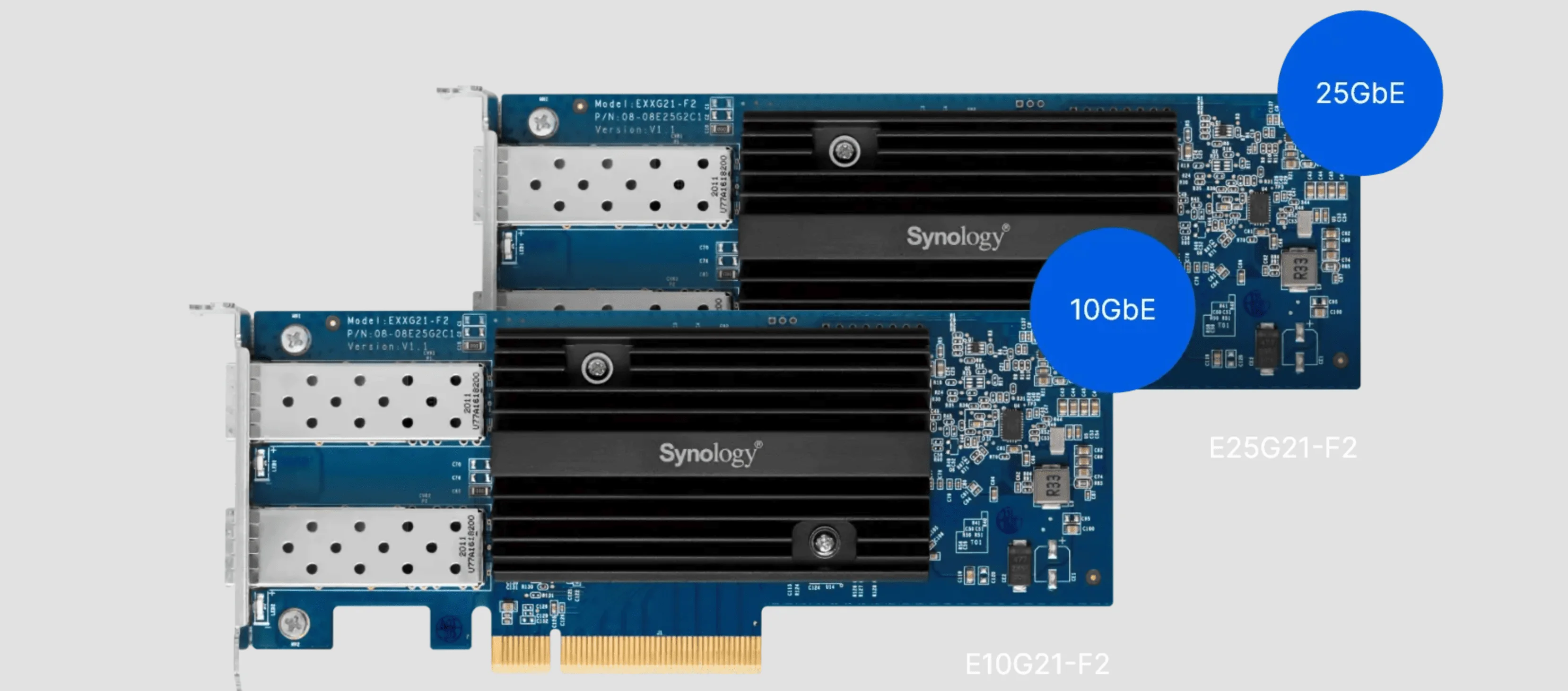
| NAS Add-in Cards | Synology E10G22-T1-Mini, E10G21-F2 | Check Synology's compatibility list by NAS model before purchasing |
Cabling
10GbE is more demanding on cable quality than Gigabit. Here's what each cable type reliably supports:
| Cable Type | 2.5GbE | 5GbE | 10GbE Distance | Notes |
|---|---|---|---|---|
| Cat5e | ✅ 100 m | ✅ 100 m | ⚠️ Not standards-rated | IEEE 802.3bz supports 2.5G and 5G over Cat5e to 100 m. Some equipment (e.g., ASUS XG-C100C) can achieve 10G over short, favorable Cat5e runs (≤30 m), but do not design a business installation around that |
| Cat6 | ✅ 100 m | ✅ 100 m | ⚠️ 37–55 m | 10GBASE-T should work to 37 m on installed Cat6; 37–55 m depends on alien-crosstalk conditions and may require field testing (Fluke Networks) |
| Cat6a | ✅ 100 m | ✅ 100 m | ✅ 100 m | Full-distance support, recommended for 10GbE |
Cat7 cable is sometimes marketed for 10GbE, but it is an ISO category (ISO/IEC 11801), not a TIA standard. Standards-compliant Cat7 uses non-RJ45 connectors (GG45/TERA), so most consumer "Cat7" patch cables with RJ45 ends are tested to Cat6A specifications at best. For a US small-business deployment, Cat6A is the clear recommendation.
Cabling Reality Check
Many buildings are wired with Cat5e. That cabling supports up to 5GbE (IEEE 802.3bz), not just 2.5GbE—so 5GbE switches and NICs are a strong intermediate upgrade before committing to rewiring. For reliable 10GbE at full distance, budget for Cat6a. For bulk Cat6A recommendations and what to verify before you buy, see our best ethernet cable guide. If you're weighing copper against fiber for longer runs, our Cat6A vs fiber guide covers the trade-offs.
SFP+ Modules & DAC Cables
For switch-to-switch connections or devices with SFP+ ports:
| Type | Use Case | Max Distance |
|---|---|---|
| DAC (Direct Attach Copper) | Switch-to-switch in same rack | 1-7 meters |
| 10G-SR (Short Range) | Multimode fiber (OM3/OM4) | 300 m (OM3) / 400 m (OM4) |
| 10G-LR (Long Range) | Single-mode fiber | Up to 10 km |
Optical distance specifications per Cisco transceiver compatibility matrix.
DAC cables are the most cost-effective option for short runs—they're essentially SFP+ connectors with a short copper cable between them, no transceivers needed. In Cisco's SFP+ specifications, passive DAC is rated at approximately 0.1 W per end, common optical modules at about 1 W, and Cisco's 10GBASE-T copper module at 2.5 W. Total consumption varies by switch, NIC, PHY, module, distance, and traffic load.
SFP+ Compatibility Note
Not every SFP+ port supports intermediate speeds (2.5/5GbE). Many SFP+ ports negotiate only 1G or 10G. Copper 10GBASE-T SFP+ modules also run hotter and may have shorter reach than native RJ45 ports. Verify module compatibility with your specific switch model before purchasing.
Common 10GbE Pitfalls
1. Forgetting About Heat
10GbE RJ45 ports consume more power than SFP+ ports and generate noticeable heat. This affects:
- Adapter longevity (Thunderbolt 10G adapters and 10GBASE-T copper SFP+ modules run hot under sustained load—plan for adequate airflow)
- Switch rack density and cooling requirements
- Power consumption at scale (see the Cisco power figures in the SFP+ section above for representative numbers)
Note: 10GBASE-T (RJ45) also has higher PHY latency than SFP+ (fiber/DAC) due to signal encoding overhead. For highly latency-sensitive workloads, SFP+ is preferred.
2. Ignoring the Rest of the Chain
Your network is only as fast as its slowest link. A 10GbE switch doesn't help if:
- Your NAS has a Gigabit port
- Your computer lacks a 10G NIC
- Your storage can't sustain 10G throughput (see the storage bottleneck section above)
3. Underestimating Cable Runs
That "short run" to the server room might be longer than you think. Measure before committing to Cat6, which only reliably supports 10G to 37 m (or up to 55 m in favorable conditions).
4. Assuming LACP Doubles Single-Transfer Speed
Link aggregation (LACP/802.3ad) bonds multiple links for resilience and aggregate capacity, but a single ordinary file transfer typically uses one link. LACP helps when many clients or streams share the bonded path simultaneously—it does not make one large copy twice as fast.
5. Jumbo Frames Are Not Required
Jumbo frames (MTU 9000) can reduce CPU overhead on high-throughput links, but they must be supported end-to-end on every device in the path. Misconfigured jumbo frames cause packet drops and degraded performance. Standard 1500-byte MTU works well for most 10GbE deployments.
Upgrading Your NAS to 10GbE
One of the most practical 10GbE upgrades is connecting your NAS to the network at higher speed.
When NAS + 10GbE Makes Sense
The decision should be based on measured workload, not user count:
- Aggregate throughput exceeds your current link — Run
iperf3and check if peak concurrent demand approaches or exceeds your NAS uplink capacity - Video editing workflows pulling large footage files directly from NAS (codec and resolution determine per-stream demand)
- VM storage served over iSCSI where latency and bandwidth both matter
- Frequent large backups where backup windows are too tight on the current link
- Storage can sustain the speed — Verify with a local disk benchmark that your NAS can actually deliver 10G-class throughput (typically requires multiple drives in a suitably configured array or an all-flash volume)
Direct Connection Option
For a single workstation, you can connect directly to a 10GbE-capable NAS without a switch. This provides a dedicated 10G link at minimal cost—just two NICs and a Cat6a cable.
Setup note: Assign both interfaces addresses on a dedicated, non-conflicting /30 subnet (e.g., 192.168.100.1 and 192.168.100.2), leave the default gateway blank on the direct interface, and connect to the NAS using its dedicated IP address. Most operating systems add the local route automatically; add a manual route only if your configuration requires one.
Synology 10GbE Upgrade Cards
Many Synology NAS models support 10GbE add-in cards:
- E10G22-T1-Mini — 10GBase-T in a compact card (check Synology's compatibility list for supported models)
- E10G21-F2 — Dual 10G SFP+ ports
Verify After Deployment
After installing 10GbE hardware, confirm that you're actually achieving the expected throughput:
- Run
iperf3between upgraded endpoints to verify network link speed. - Test a real file transfer (SMB/NFS copy) and compare against the theoretical table. If the result is much lower than the
iperf3result, storage or protocol overhead is the constraint. - Check switch port counters for errors, CRC failures, or packet drops—these indicate cabling issues.
- Monitor under production load for a full business day to confirm stability.
Sample Deployment Costs
To help with budgeting, here are three common deployment scenarios with approximate component costs:
Scenario 1: Direct NAS Connection (~$150–250)
A single workstation connected directly to a 10GbE NAS—no switch required.
| Component | Approximate Cost |
|---|---|
| PCIe NIC (ASUS XG-C100C or similar) | $80–100 |
| NAS add-in card (Synology E10G22-T1-Mini) | $50–70 |
| Cat6a patch cable (2–5 m) | $10–15 |
| Total | ~$150–185 |
Scenario 2: Hybrid SFP+ Core (~$550–750)
10GbE SFP+ between NAS and switch, 2.5GbE to client workstations. Good for offices where the NAS uplink is the primary bottleneck.
| Component | Approximate Cost |
|---|---|
| USW-Aggregation (8× SFP+) | $269 |
| NAS SFP+ card (Synology E10G21-F2) | $100–120 |
| DAC cable (NAS to switch, 1–3 m) | $15–25 |
| 2.5GbE switch for client ports (existing or ~$80–150) | $0–150 |
| Total | ~$400–565 |
Scenario 3: Four-Workstation RJ45 (~$900–1,200)
10GbE RJ45 to a NAS and three to four workstations—typical for a small video editing or engineering team.
| Component | Approximate Cost |
|---|---|
| USW-Flex-XG (4× RJ45) or USW-Pro-XG-8-PoE (8× RJ45) | $299–499 |
| PCIe NICs × 3–4 (ASUS XG-C100C) | $240–400 |
| NAS add-in card | $50–120 |
| Cat6a cabling (4–5 runs, installed) | $200–400 |
| Total | ~$800–1,420 |
Component prices are approximate US retail as of August 2026. Professional cabling installation adds labor cost depending on run length and building conditions. See our network cabling cost calculator for a more detailed estimate.
Conclusion
Bottom Line
Measure first, then upgrade selectively. Use 2.5 or 5GbE where existing Cat5e cabling and endpoint hardware support it. Deploy 10GbE for shared storage, video production, virtualization, or backup paths where measured throughput exceeds multi-gigabit capacity. A hybrid design—10GbE at the core and 1/2.5/5GbE at ordinary endpoints—is usually the most economical approach.
From Our Deployments
In our small-business deployments, our standard design approach is to place the NAS and virtualization hosts on 10GbE, retain 1/2.5GbE at ordinary desks, and verify both network and storage throughput with iperf3 and real file transfers before recommending workstation upgrades. In one recent Miami office project, switching a video production team's NAS uplink from 1GbE to 10GbE (USW-Aggregation + DAC) reduced their daily project sync from 45 minutes to under 5—while the rest of the office stayed on 2.5GbE without issue.
Frequently Asked Questions
Is 10GbE worth it for a small business?
It depends on your workload, not your headcount. Measure your current network and storage throughput first. For most offices, 2.5 or 5GbE delivers a meaningful upgrade at lower cost. Reserve 10GbE for paths where you've confirmed the network is the bottleneck—typically shared storage, video production, or virtualization.
What cable do I need for 10 Gigabit Ethernet?
Cat6a is recommended for 10GbE runs up to 100 meters. Cat6 can support 10G to 37 m reliably (up to 55 m in favorable conditions). Cat5e is not rated for 10GbE by IEEE standards, though some hardware can achieve it over very short runs.
Can I use SFP+ without fiber?
Yes. DAC (Direct Attach Copper) cables connect SFP+ ports without fiber optics. They're ideal for switch-to-switch connections within the same rack (1–7 meters typical) and consume very little power.
What's the difference between 10G RJ45 and SFP+ switches?
RJ45 switches use standard Ethernet cables but generate more heat and consume more power per port. SFP+ switches are more flexible (fiber or DAC) and run cooler, but require transceivers or special cables. SFP+ also offers lower PHY latency.
Do I need to upgrade my whole network to 10GbE?
No. Upgrade selectively at bottleneck points. A common setup: 10GbE between your NAS and switch, 2.5/5GbE to workstations. Devices auto-negotiate speeds, but both endpoints and any transceivers in the path must support the same rate. Many SFP+ ports support only 1G and 10G—not 2.5 or 5GbE.
How far can 10GbE run on copper?
With Cat6a: 100 meters. With Cat6: 37–55 meters depending on installation conditions. Single-mode fiber (10G-LR) can reach 10 km for long-distance links.
Will my existing Cat5e cabling work for 10GbE?
Not reliably. Cat5e supports up to 5GbE per IEEE 802.3bz (both 2.5G and 5G to 100 m). For 10GbE, you need Cat6 (short runs) or Cat6a (full 100 m distance). However, 5GbE over existing Cat5e is a strong intermediate upgrade before rewiring.
What's the cheapest way to get 10GbE?
The USW-Aggregation at $269 provides 8 × 10G SFP+ ports if you're comfortable using DAC cables or fiber (add the cost of modules/DACs per device). For RJ45, the USW-Flex-XG at $299 provides four 10GbE RJ45 ports. For eight 10GbE RJ45 PoE ports, the USW-Pro-XG-8-PoE at $499 is the starting point.
Related Articles
More from Network Infrastructure
2.5 Gigabit vs. 10 Gigabit: Why 2.5 GbE Might Be the Best Choice for Your Network
Comprehensive comparison of 2.5 Gigabit vs 10 Gigabit Ethernet. Learn why 2.5 GbE offers the best value for most home and small business networks.
9 min read

Homelab Network Cables: Cat6A, Cat8, DAC, or Fiber for Each Link
Which cable links your switch, NAS and APs? DAC, fiber, Cat6A and RJ45 SFP+ modules mapped to UniFi, Omada, Synology and UGREEN ports, with cost and power.
20 min read

WiFi 7 Multi-Link Operation (MLO) Explained: What It Does, What It Doesn't, and Whether Your Office Can Use It
MLO is WiFi 7's most important — and most misunderstood — feature. This guide explains how it actually works, the difference between eMLSR and STR, which devices support it, and how to deploy it in UniFi.
17 min read