

Omada Wi-Fi 7 Business Setup: Three Scalable Builds
Three Omada Wi-Fi 7 builds with matched APs, PoE switches, gateways, and controllers — sized for 5 to 75 users with verified pricing.

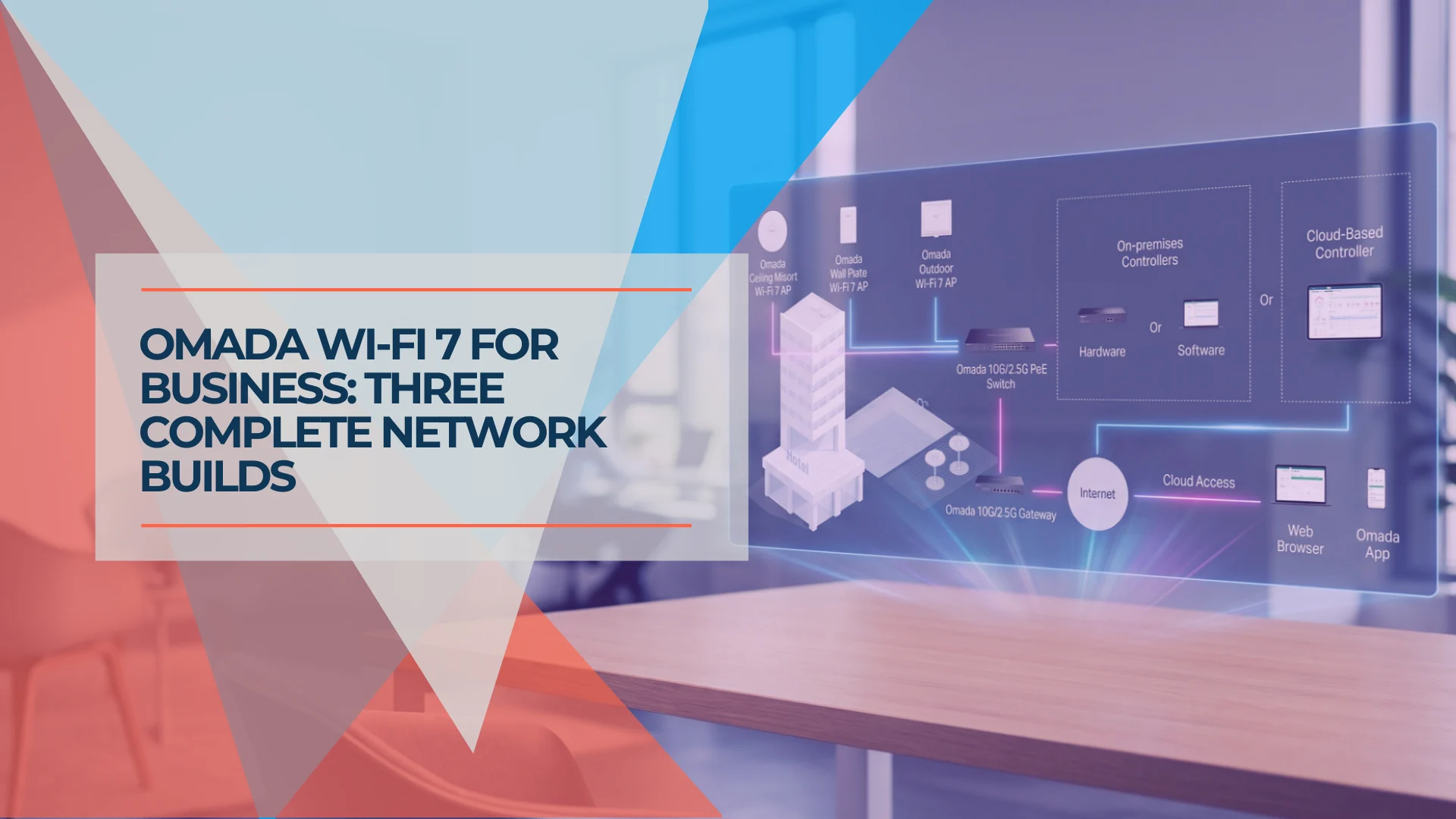
Buying a Wi-Fi 7 access point is straightforward. The part that takes more care is what goes around it — matching the switch port speed, confirming the PoE budget over the actual cable run, and making sure three access points don't collectively exceed the switch's power capacity. These are the mismatches we check for when auditing small-business networks across South Florida.
The four Omada Wi-Fi 7 access points covered in this guide range from approximately $100 to $280. (The full lineup includes higher-end models like the BE22000 EAP783, wall-plate units, and outdoor APs — this guide focuses on the four ceiling-mount models that cover most small-business deployments.) The most expensive model is not necessarily the best fit. What matters is whether the gateway, switch, PoE budget, and cabling behind the AP can actually deliver what the access point promises. This guide packages those four models into three scalable core-equipment builds — a lean office, a growing multi-gig office, and a high-density multi-zone site — and makes every dependency visible before you order.
Affiliate Disclosure: This article contains affiliate links. If you make a purchase through these links, we may earn a small commission at no extra cost to you. As an Amazon Associate, iFeelTech earns from qualifying purchases.
Which Build Fits Your Business?
| Build A: Lean Office | Build B: Growing Multi-Gig | Build C: High-Density | |
|---|---|---|---|
| Team / site | 5–15 users, 1–2 APs | 15–40 users, 2–4 APs | 40–75 users, 4–6 APs |
| AP class | EAP723 (dual-band) | EAP772 (tri-band) | EAP787 + EAP772 (mixed) |
| Network need | Cloud apps, video calls | Multi-gig clients, NAS | Dense conferencing, creator traffic |
| Equipment budget | ~$550 | ~$860 | ~$2,580 |
Budget ranges reflect same-day Omada Store pricing checked September 21, 2026. These are core equipment costs. Not included: controller hardware or subscription (if needed), SFP+ modules or DAC cables for 10G links, PoE injectors for 10G AP connections, rack/UPS/patch panels, cabling and certification, and installation labor or site survey.
Five Inputs Before Choosing an AP
Answering these five questions before shopping helps avoid mismatched hardware and unnecessary returns.
1. Active users and simultaneous devices. Count the humans, then multiply. A 20-person office with laptops, phones, and a shared display in the conference room is 50–60 concurrent devices. Vendor-stated maximums like "250+ clients" are association limits, not usable-capacity benchmarks — real performance depends on airtime demand, application mix, and RF conditions.
2. Floor plan, materials, and AP placement. Drywall and drop ceilings are forgiving. Glass-walled conference rooms, concrete, elevator shafts, and metal ductwork are not. TP-Link rates most of these APs at 1,500 ft² under laboratory conditions — a useful upper bound, but not a deployment guarantee. In a real office, an open floor might be served by one AP per 1,200–1,500 ft², while a space with concrete walls or glass partitions might need two APs for the same area.
3. Internet versus local traffic. If everyone is hitting cloud apps over a 500 Mbps ISP connection, even a 1GbE uplink to the AP is not the bottleneck. If the office runs a local NAS, video editing workflows, or multi-gig file transfers, the AP-to-switch uplink speed matters more.
4. Client support for 6 GHz and Wi-Fi 7. Tri-band APs (EAP772, EAP773, EAP787) add a 6 GHz radio, but only devices with Wi-Fi 6E or Wi-Fi 7 radios can use it. If most of your fleet is Wi-Fi 5 laptops, the 6 GHz radio will go largely unused until those devices are replaced. The EAP723's dual-band design still delivers Wi-Fi 7 improvements on 2.4 GHz and 5 GHz at half the cost.
5. Cabling, switch ports, PoE, and controller already owned. Existing Cat5e supports 2.5GbE. Cat6 is recommended for new runs and supports 10GBASE-T at up to ~55 meters under favorable conditions. Cat6A handles the full 100-meter 10G distance and is the right choice for new 10G infrastructure. If the office already has an Omada controller and a managed PoE switch, the only purchase might be the APs themselves.
AP Ladder: What Actually Separates These Four Ceiling-Mount Models
Omada's full Wi-Fi 7 lineup includes additional models — the BE22000 EAP783 with dual 10GbE ports, the 5-stream EAP727, wall-plate units (EAP775-Wall, EAP725-Wall), and outdoor APs. This guide focuses on the four ceiling-mount models that fit the widest range of small-business deployments.
Every Omada Wi-Fi 7 AP shares the same management platform, the same VLAN support, and the same seamless roaming capabilities. SSID limits differ by model (16 on the EAP723, 24 on the tri-band models). The real differences are the ones that change your switch, cabling, and budget requirements.
| EAP723 | EAP772 | EAP773 | EAP787 | |
|---|---|---|---|---|
| Marketing class | BE5000 | BE11000 | BE11000 | BE15000 |
| Bands | 2.4 GHz + 5 GHz | 2.4 + 5 + 6 GHz | 2.4 + 5 + 6 GHz | 2.4 + 5 + 6 GHz |
| Ethernet port | 1× 2.5GbE | 1× 2.5GbE | 1× 10/5/2.5/1GbE | 1× 10/2.5GbE |
| PoE standard | 802.3at (PoE+) | 802.3at (PoE+) | 802.3at (PoE+) | 802.3bt/at (PoE++/PoE+) |
| Max power draw | 17.83W | 25.4W | 25.4W | 29W |
| Max clients | 250+ | 380+ | 380+ | 510+ |
| Coverage (lab) | 1,500 ft² | 1,500 ft² | 1,500 ft² | 2,050 ft² |
| RF scanning | No | No | No | Dedicated radio |
| AFC support | No | No | No | Yes (firmware update) |
| SSIDs | 16 | 24 | 24 | 24 |
| Store price | $99.99 | $169.99 | $189.99 | $279.99 |
The BE numbers (BE5000, BE11000, BE15000) are aggregate theoretical PHY rates across all bands and spatial streams. No individual client will reach 11 Gbps or 15 Gbps. A typical 2×2 Wi-Fi 7 laptop connecting at 5 GHz on a 160 MHz channel negotiates roughly 2.4 Gbps with 1024-QAM, or up to ~2.9 Gbps with 4096-QAM — and real-world throughput will be a fraction of either number. Coverage and client-count figures are laboratory ratings; real capacity depends on construction materials, interference, and application mix.
The $20 question: EAP772 vs EAP773. These two APs have nearly identical radios and the same BE11000 class. The EAP773 adds a 10GbE port and costs $20 more. That port only helps if your switch has a 10G port to connect it to — and even then, an SFP+ slot provides data only, not PoE, so you would also need a 10G PoE injector (Omada POE380S, ~$70) or DC power. On a standard Omada 2.5G PoE switch, both APs run at 2.5G. Save the $20 per AP unless you have a specific 10G switching plan and are prepared for the injector cost.
The dedicated scanner: EAP787. The EAP787's fourth radio continuously scans all three bands without interrupting client traffic, enabling real-time interference detection and rogue AP identification. Two dependencies: this feature requires an Omada controller V6.0 or above (it does not work in standalone mode), and the EAP787's AFC (Automated Frequency Coordination) support — which unlocks higher 6 GHz transmit power — varies by region. Check Omada's AFC page for availability.
Build A: Lean Office
Scenario: 5–15 users, normal cloud apps and video calls, 1–2 APs, basic guest Wi-Fi, no high-speed local server workload.
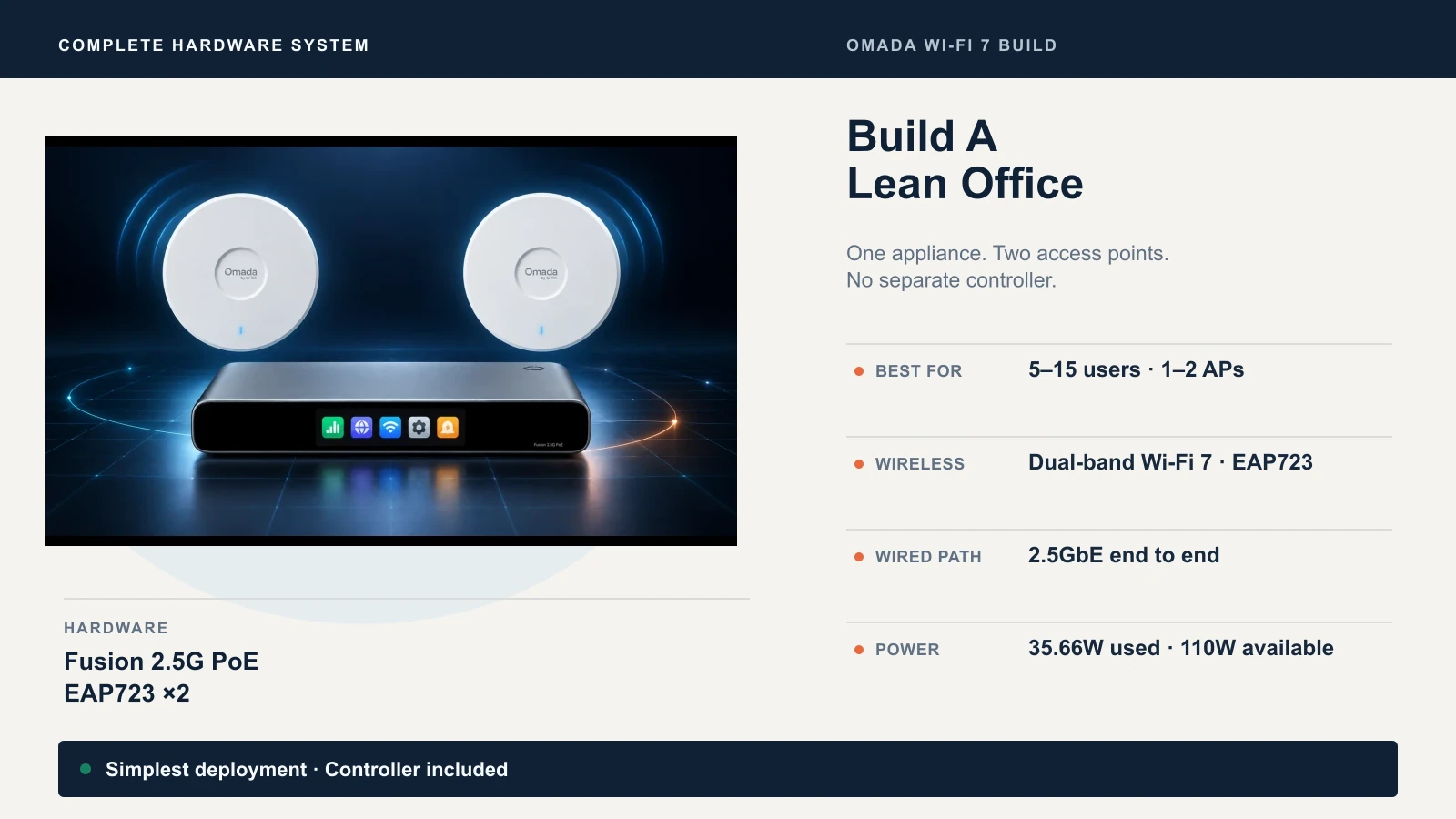
The simplest Omada Wi-Fi 7 deployment uses the Fusion 2.5G PoE — a single box that combines the gateway, controller, and an 8-port 2.5G PoE+ switch. No separate controller purchase, no controller software to host.
Bill of Materials
| Device | Qty | Role | PoE Draw | Port Speed | Unit Price | Subtotal |
|---|---|---|---|---|---|---|
| Fusion 2.5G PoE | 1 | Gateway + controller + switch | Provides 110W | 9× 2.5GbE | $349.99 | $349.99 |
| EAP723 | 2 | Ceiling-mount APs | 17.83W each | 2.5GbE | $99.99 | $199.98 |
| Total | 35.66W used / 110W budget | $549.97 |
Prices: Omada Store, September 21, 2026. Cabling and installation separate.
Topology
Internet → Fusion 2.5G PoE [2.5G WAN] → [2.5G PoE+ LAN ports] → EAP723 ×2 → wireless clients
The Fusion's built-in controller manages up to 30 Omada devices — far more than this build needs. Bluetooth-based setup via the Omada app gets the network running in minutes without a laptop.
When Separate Devices Make More Sense
If you expect to outgrow 8 PoE ports within a year or need a 10G SFP+ uplink to a local NAS, buy the components separately: an ER707-M2 gateway (~$99.99), an SG2210XMP-M2 switch ($249.99 for 8× 2.5G PoE+ ports, 2× 10G SFP+ uplinks, 160W, fanless), and the same two EAP723s. Total is comparable (~$550) but gives you a 10G backbone path and a clearer upgrade to a larger switch later. You will need to add a controller — Omada Cloud Essentials is free with unlimited device and site management.
Upgrade Trigger
Move to Build B when you add a third AP, deploy PoE cameras or IP phones that push past 8 ports, or bring in a local NAS that benefits from multi-gig switching.
Build B: Growing Multi-Gig Office
Scenario: 15–40 users, 2–4 APs, heavier video conferencing, modern 6 GHz–capable clients starting to appear, local NAS or faster internet plan.
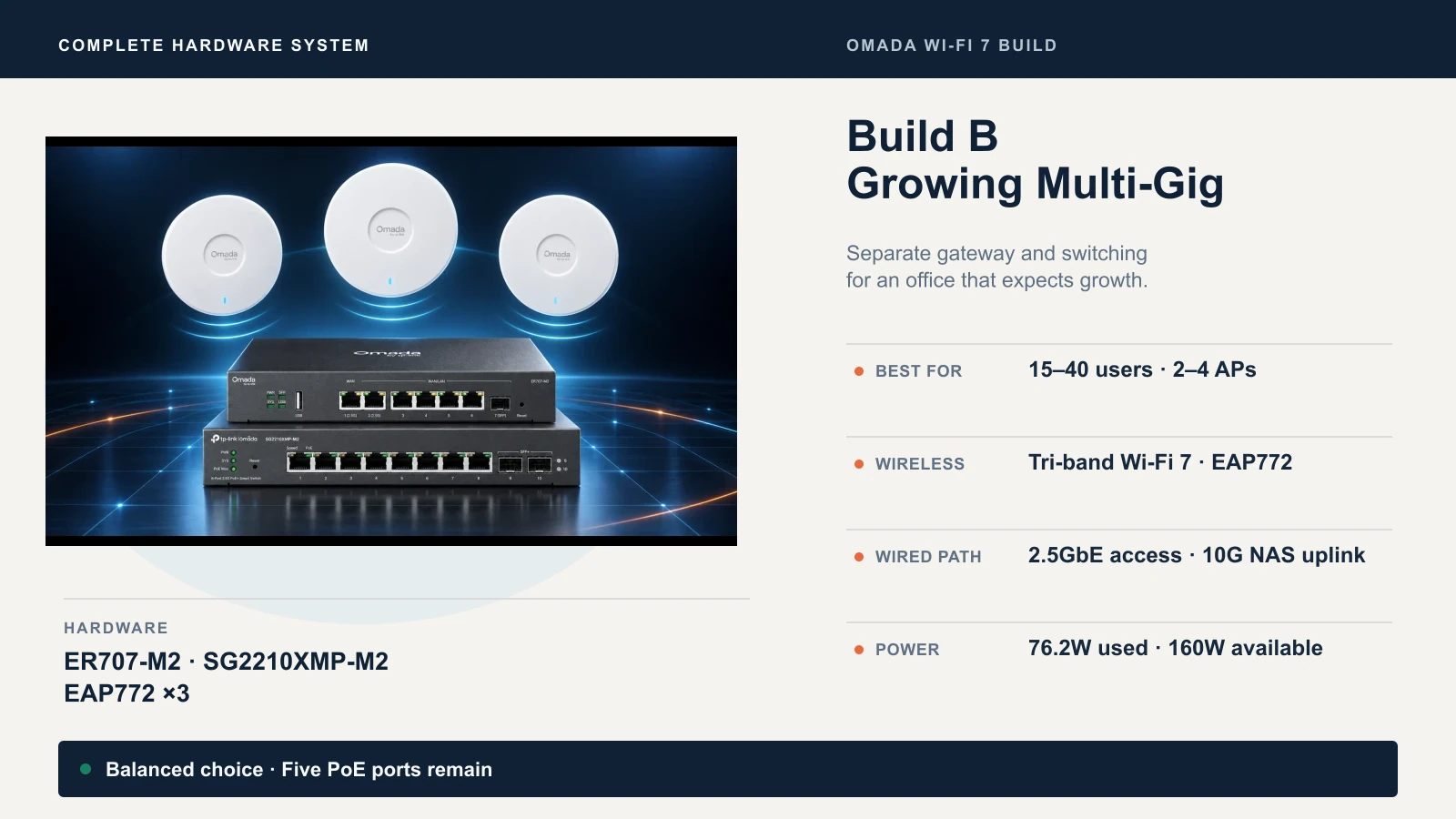
This build separates the gateway, switch, and APs — the standard architecture for a business that expects growth.
Bill of Materials
| Device | Qty | Role | PoE Draw | Port Speed | Unit Price | Subtotal |
|---|---|---|---|---|---|---|
| ER707-M2 | 1 | VPN gateway | — | 2× 2.5G WAN/LAN, 5× 1G | $99.99 | $99.99 |
| SG2210XMP-M2 | 1 | PoE+ switch | Provides 160W | 8× 2.5G, 2× 10G SFP+ | $249.99 | $249.99 |
| EAP772 | 3 | Tri-band APs | 25.4W each | 2.5GbE | $169.99 | $509.97 |
| Total | 76.2W used / 160W budget | $859.95 |
Prices: Omada Store, September 21, 2026. Controller and cabling separate.
Topology
Internet → ER707-M2 [2.5G RJ45 WAN] → [2.5G RJ45 LAN] → SG2210XMP-M2 [2.5G PoE+ ports] → EAP772 ×3 → wireless clients
SG2210XMP-M2 [10G SFP+] → NAS / server (optional, bypasses gateway for local traffic)
The ER707-M2 connects to the switch via a 2.5G RJ45 port — its SFP port is 1G only. The switch-to-gateway link is 2.5 Gbps, which is adequate for most ISP connections. The switch's 10G SFP+ slots are best used for a local NAS or a future gateway upgrade with 10G capability.
Why EAP772 Over EAP773 Here
The EAP773 costs $20 more per AP and adds a 10G Ethernet port. On the SG2210XMP-M2, that 10G port auto-negotiates down to 2.5G because the switch's access ports are 2.5G. To get 10G to the AP, you would need an SFP+ slot with a 10GBASE-T adapter module (Omada SM5310-T, ~$45, limited to 30m at 10G with Cat6A) plus a 10G PoE injector (POE380S, ~$70) since the SFP+ slot does not supply power. That consumes uplink capacity and adds ~$115 per AP. For this topology, the EAP772 at 2.5G delivers the same wireless experience at lower total cost.
Controller and Port Notes
Omada Cloud Essentials (free, unlimited devices and sites) handles this build. If you need IPS/IDS, DPI, PPSK, advanced portal authentication, or MSP multi-customer management, upgrade to Omada Cloud Standard. A hardware controller (OC200 V3 at ~$80 or OC300 at ~$160) is an alternative if you prefer local management. See our full Omada controller comparison for the detailed breakdown.
The SG2210XMP-M2 has 8 PoE access ports plus 2× 10G SFP+ uplinks. Three APs consume three PoE ports. The remaining five handle PoE devices like IP phones or cameras. Wired workstations should connect through a separate non-PoE switch or directly to the ER707-M2's LAN ports for small teams.
Upgrade Trigger
Move to Build C when you observe high airtime utilization, rising latency, or degraded application performance per AP — symptoms that show up in controller dashboards and site surveys. Also consider upgrading when you need dedicated RF scanning for interference management or total PoE demand outgrows 160W.
Build C: High-Density / Performance Site
Scenario: 40–75 active users across multiple zones — dense meeting rooms, training areas, open floors — with PoE cameras, IP phones, creator traffic, or multi-gig local services. 4–6 APs, not because user count alone demands it, but because the floor plan, zone density, and infrastructure load justify the switching and power capacity.
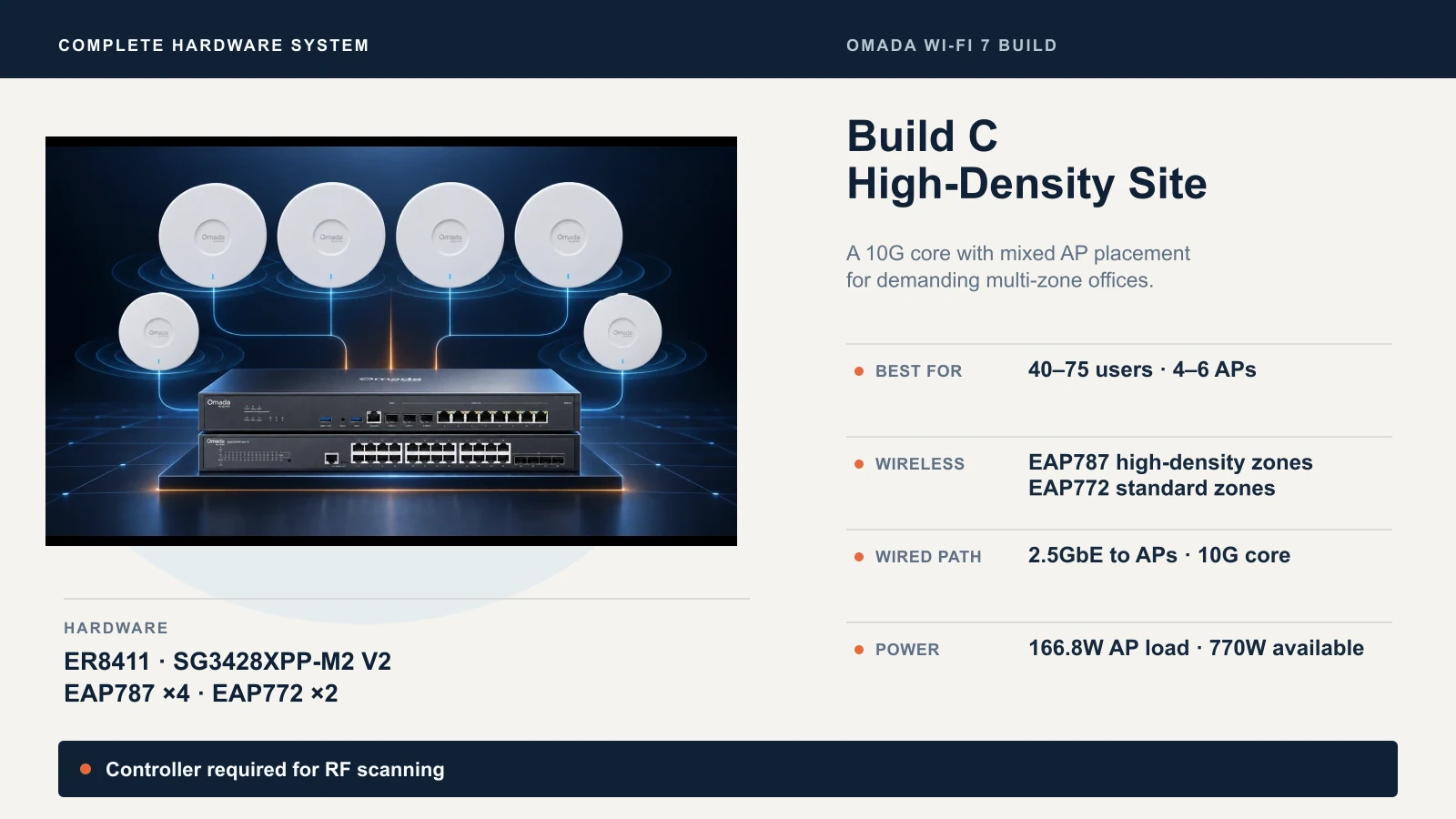
This build uses the EAP787 in high-demand zones and the EAP772 in lower-density areas — a practical mix that avoids overspending on flagship hardware where it will not be utilized.
Bill of Materials
| Device | Qty | Role | PoE Draw | Port Speed | Unit Price | Subtotal |
|---|---|---|---|---|---|---|
| ER8411 | 1 | 10G VPN gateway | — | 2× 10G SFP+, 9× 1G | $399.99 | $399.99 |
| SG3428XPP-M2 V2 | 1 | PoE++ switch | Provides 770W | 24× 2.5G, 4× 10G SFP+ | $719.99 | $719.99 |
| EAP787 | 4 | Flagship APs (high-density) | 29W each | 10/2.5GbE | $279.99 | $1,119.96 |
| EAP772 | 2 | Tri-band APs (standard zones) | 25.4W each | 2.5GbE | $169.99 | $339.98 |
| Total | 166.8W used / 770W budget | $2,579.92 |
Prices: Omada Store, September 21, 2026. Controller, cabling, SFP+ modules, and installation separate.
PoE Budget Worksheet
| Device | Count | PoE Standard | Max Draw/Unit | Subtotal |
|---|---|---|---|---|
| EAP787 | 4 | 802.3bt (PoE++) | 29W | 116W |
| EAP772 | 2 | 802.3at (PoE+) | 25.4W | 50.8W |
| IP phones (example) | 10 | 802.3af | 6.5W | 65W |
| IP cameras (example) | 4 | 802.3at | 15W | 60W |
| Planned total | 291.8W | |||
| Switch budget | 770W | |||
| Reserve | 478.2W (62%) |
Planning wattage uses each device's maximum draw from the datasheet. Actual draw is typically lower. The 770W budget provides substantial headroom for future devices.
Topology
Internet → ER8411 [10G SFP+] → SG3428XPP-M2 V2 [10G SFP+ uplink] → [2.5G PoE++ ports] → EAP787 ×4 + EAP772 ×2 → wireless clients
Using the EAP787's 10G Port
The EAP787 has a 10GbE port, but the SG3428XPP-M2 V2's access ports are 2.5G. The AP auto-negotiates to 2.5G on this switch. To run 10G to the AP, you would need one of the switch's SFP+ uplink slots with a 10GBASE-T adapter module (Omada SM5310-T, ~$45, limited to 30m at 10G with Cat6A) plus a 10G PoE injector (POE380S, ~$70) since SFP+ slots do not supply power. That adds ~$115 per AP and consumes uplink slots.
For most deployments, 2.5G per AP is not the bottleneck — aggregate real-world throughput per AP depends on client density, airtime demand, and RF conditions, not the wired uplink speed. The EAP787's 10G port is most useful when paired with a native 10G PoE++ access switch, such as Omada's SX3206HPP or SX3832MPP. For most small-business deployments, however, 2.5GbE remains the more economical choice.
Controller Required for RF Scanning
The EAP787's dedicated RF scanning radio requires an Omada controller V6.0 or above — it does not work in standalone mode. If you buy this AP for its scanning capability, budget for an OC300 (~$160) or Omada Cloud Standard. AFC availability for higher 6 GHz power varies by region.
The Bottleneck Audit
Every Wi-Fi connection passes through a chain of components. The slowest link determines the effective speed:
Client radio → RF environment → AP radio → AP Ethernet port → switch access port → switch uplink → gateway → internet or local server
Build A Example
A 2×2 Wi-Fi 7 laptop on 5 GHz, 160 MHz channel, negotiates a ~2.4–2.9 Gbps PHY rate depending on QAM level. Real throughput in a furnished office: ~600–900 Mbps. The EAP723's 2.5GbE port handles this. The Fusion's 2.5G WAN port handles a typical 500 Mbps ISP connection. The wired path has headroom here — the RF environment and ISP plan are the practical limits.
Build B Example
Three EAP772s each pushing 600 Mbps of aggregate client traffic. Total: ~1.8 Gbps hitting the switch. The switch-to-gateway link is 2.5G RJ45 (the ER707-M2's fastest RJ45 ports are 2.5G; its SFP port is 1G only). For internet-bound traffic, the 2.5G gateway uplink is the ceiling — adequate for most ISP plans under 2 Gbps. For local NAS traffic, connect the NAS directly to the switch's 10G SFP+ port. That traffic never touches the gateway, so the 2.5G gateway link is not the limit.
Build C Example
Four EAP787s at high load: ~4–6 Gbps aggregate hitting the switch's 2.5G access ports. Each AP is limited to 2.5 Gbps by the switch port. The switch's 10G SFP+ uplink to the ER8411 handles the aggregate easily. The ER8411's NAT throughput reaches ~9.4 Gbps, but enabling security features reduces that significantly: with current firmware (5.15.20+), IPS throughput is approximately 4.9 Gbps TCP / 4.5 Gbps UDP, and DPI throughput is approximately 5.5 Gbps TCP / 3.5 Gbps UDP. Plan WAN capacity against the throughput with your intended security stack enabled. In practice, the limiting factor in this build tends to be the RF environment — dense conference rooms with glass, occupants, and competing radios — rather than the wired infrastructure.
Controller Choice
You do not need to buy a controller before any of these builds work. Every Omada AP, switch, and gateway operates in standalone mode with local web management.
A controller adds centralized configuration, seamless roaming (802.11k/v/r), mesh, guest portal, and monitoring across all devices. Your options:
- Built-in (Fusion gateways): Included. Manages up to 30 devices. No separate hardware or subscription.
- Omada Cloud Essentials: Free. Cloud-hosted. Unlimited devices and sites. Covers VLANs, topology, WireGuard VPN, basic portal, and firmware management.
- OC200 V3 / OC300: Hardware controllers at ~$80 / ~$160. Run locally, no subscription, full feature set.
- Omada Cloud Standard: Paid per-device license. Adds MSP mode, IPS/IDS, DPI, PPSK, advanced portal authentication, WLAN optimization, and API access — not just multi-site management. For a broader look at how cloud-managed networking compares across platforms, see our cloud-managed networks guide.
For the full breakdown — including what works during controller downtime and which features require which tier — see our Omada controller comparison guide.
Configuration and Commissioning Checklist
Once the hardware is mounted and cabled:
- Update firmware on every device before configuring. Record the versions.
- Adopt all devices into the controller. Back up the controller configuration immediately.
- Create network segments — management VLAN, staff network, guest network, and IoT/device VLAN as requirements justify. Do not create VLANs you will not manage.
- Confirm DHCP, DNS, and firewall behavior per VLAN. Guest traffic should be isolated from internal resources — see our guest Wi-Fi setup guide for the detailed configuration.
- Set channel width and power intentionally. Leaving everything on auto/max without reviewing the results can lead to co-channel interference in multi-AP setups. Start at 40 MHz on 5 GHz, 80 or 160 MHz on 6 GHz, and 20 MHz on 2.4 GHz. Controller-managed automatic channel and power optimization can work well — but validate the outcome rather than assuming the defaults are correct.
- Test roaming between APs with a phone or laptop. Walk the floor. Verify handoffs.
- Test guest isolation — a guest device should not reach internal file shares or printers.
- Validate PoE draw in the controller dashboard. Monitor actual consumption and retain at least 10–15% headroom above the measured total for device additions and power spikes.
- Document admin credentials and recovery — controller login, AP passwords, and the physical reset procedure. Store this outside the network.
Do not assume VLANs or SSIDs create regulatory compliance (PCI, HIPAA). They are network segmentation tools, not compliance certifications. For the full migration and setup process, see our guide on migrating from consumer mesh to Omada business networking.
When Placement Matters More Than the AP Model
A higher-end AP does not compensate for poor placement. An EAP723 mounted in the right ceiling tile typically provides better coverage than an EAP787 in the wrong one.
Upgrade the design before the hardware when:
- Dead zones persist despite adequate AP count — the problem is placement, not AP capability
- Users report intermittent drops — likely interference or co-channel contention, not throughput
- The building has mixed construction (concrete, glass, metal studs) that creates unpredictable RF behavior
- Cable runs were not planned during build-out and require creative routing
Hire a professional site survey when:
- The space exceeds 3,000 square feet with internal walls
- Multiple floors need coverage without ethernet between floors
- The business depends on voice, video, or latency-sensitive applications
- You want confidence in the design before purchasing hardware
We regularly deploy Omada networks for businesses throughout South Florida. One recent example: a 30-person law office in a 2,800 ft² space with glass-walled conference rooms and a concrete core. The client initially ordered two EAP772s based on the 1,500 ft² lab coverage rating. A walkthrough revealed that the conference rooms and the core created three distinct RF zones. We placed three EAP723s instead — less expensive per unit, better positioned — and measured -65 dBm or better RSSI across all workstations. The total PoE draw was 48W on a 160W budget. The difference between a working network and a great one was the placement plan, not the AP model.
Final Recommendation
Build A (~$550): The Fusion 2.5G PoE plus two EAP723s is the most practical small-office setup in Omada's lineup. One box handles gateway, controller, and switching. If you do not have 6 GHz clients and your ISP plan is under 2 Gbps, this is the right build. Reconsider if your PoE device count exceeds 8 or you need 10G uplinks.
Build B (~$860): The ER707-M2, SG2210XMP-M2, and three EAP772s give a 15–40 person office tri-band Wi-Fi 7 with 6 GHz support, a 2.5G backbone, and 10G SFP+ uplinks ready for a NAS or future gateway upgrade. Reconsider if controller dashboards or site surveys show high airtime utilization, rising latency, or total PoE demand outgrows 160W.
Build C (~$2,580+ with controller and modules): The ER8411, SG3428XPP-M2 V2, four EAP787s, and two EAP772s serve multi-zone sites with 40–75 users, dedicated RF scanning, 770W of PoE headroom, and a 10G core. Add a controller (OC300 at ~$160 or Cloud Standard subscription) and SFP+ modules for the gateway-to-switch link. Reconsider if the site has fewer than 40 active users and no significant PoE infrastructure — the switching and power capacity will sit unused.
Every build in this guide is a core equipment system with verified port, power, and speed compatibility. The access point is the visible piece; the gateway, switch, PoE budget, cabling, and controller behind it determine whether the network actually performs. Start with users, traffic, and floor plan. Let the hardware follow.
Related Resources
- Omada Controller Guide: Software vs Hardware vs Cloud — Detailed comparison of every Omada controller option and which features require which tier.
- UniFi vs Omada Wi-Fi 7 for Business — Still deciding between platforms? Start here.
- Best Wi-Fi 7 Access Points for Small Business — Cross-brand AP comparison including UniFi, Omada, and Aruba.
- Consumer Mesh to Omada Business Migration — Step-by-step implementation guide for replacing consumer mesh.
- Mesh Wi-Fi vs Access Points — Deciding whether to keep mesh, wire it, or move to managed APs.
- 10 Gigabit Ethernet Guide — Planning multi-gig and 10GbE infrastructure for your office.
Frequently Asked Questions
Related Articles
More from Network Infrastructure
Mesh Wi-Fi vs Access Points: Keep, Wire, or Upgrade?
Already have eero or Deco? Compare keeping it, adding Ethernet, using bridge/AP mode, or moving to UniFi or Omada—with practical small-business scenarios.
18 min read
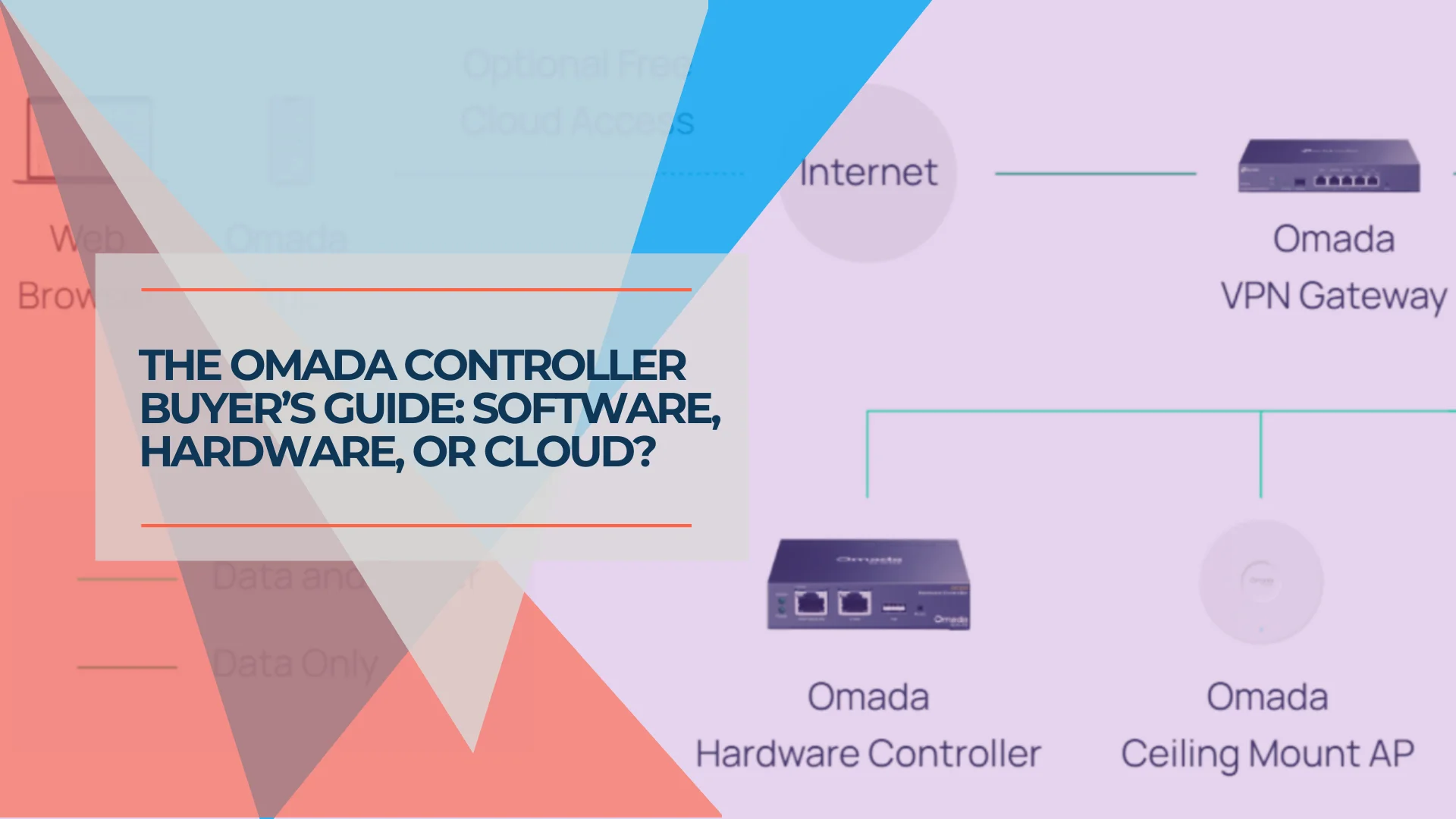
TP-Link Omada Controller Guide: Software vs. Hardware vs. Cloud (2026)
The four ways to run an Omada Controller explained with verified 2026 pricing. Software, hardware (OC200/OC220/OC300/OC400), Cloud Essentials, and Cloud Standard compared.
12 min read
Why Consumer Mesh Limits Business Growth (And How to Migrate to Omada)
Replace Eero or Google Nest with TP-Link Omada for VLAN isolation and business stability. Complete migration guide with verified February 2026 pricing and guest network setup.
23 min read