

Best 8-Bay NAS for Small Business in 2026: UGREEN vs Synology vs UniFi
Compare UGREEN DXP8800 Plus, Synology DS1825+ and UniFi UNAS Pro 8 by usable capacity, 10GbE, backup software, expansion and complete cost.

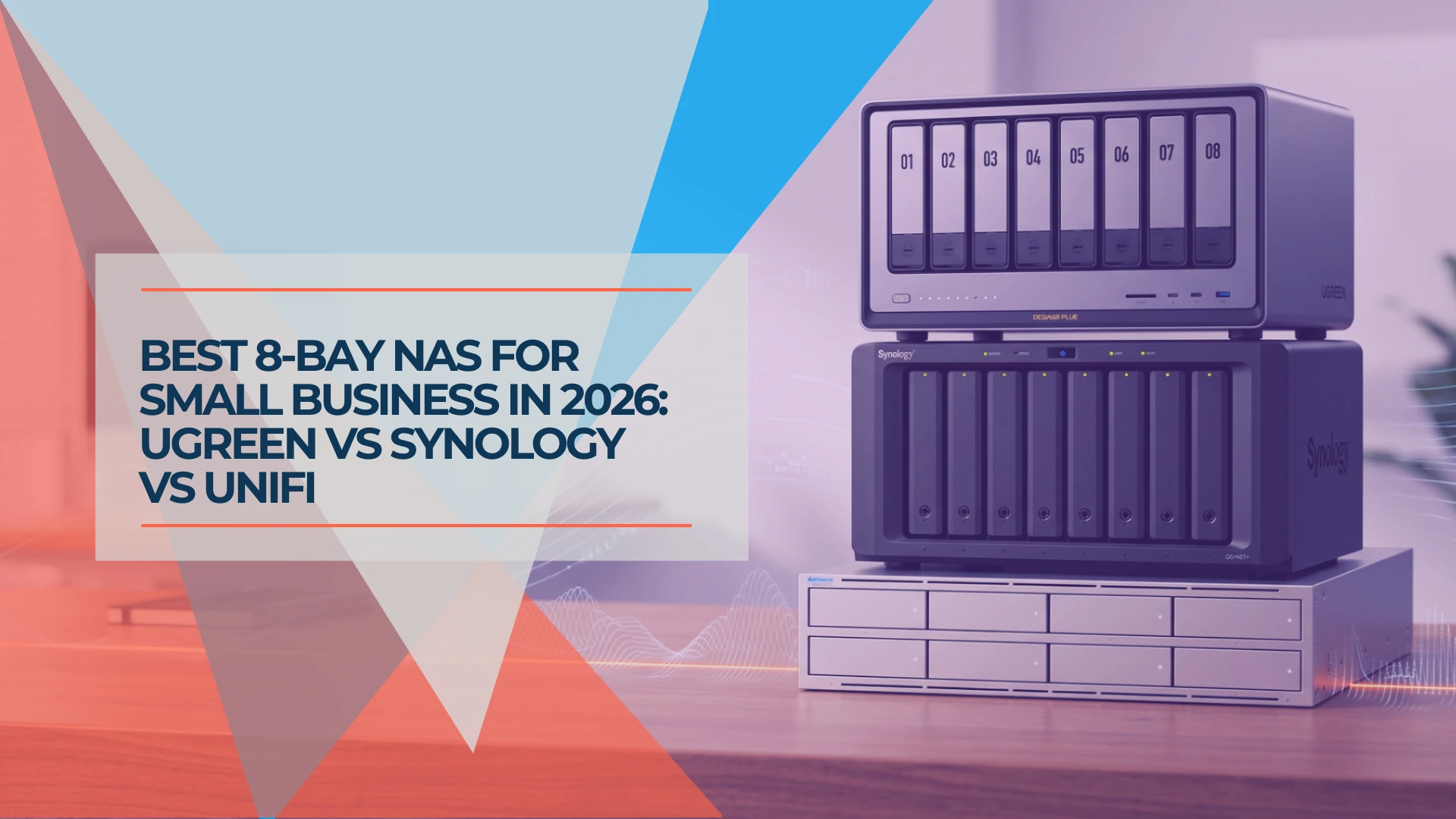
Eight drive bays do more than fill out a spec sheet. They let a business maintain two-drive fault tolerance without surrendering most of its capacity to parity, delay the next storage migration by years, and sustain larger backup or media workflows without running out of headroom. They also raise the stakes of a platform decision. Eight NAS drives, a network upgrade and an independent backup target often add up to more than the enclosure itself.
We compare three systems using the same drive set and the same protection assumptions: UGREEN's DXP8800 Plus for hardware density and performance, Synology's DS1825+ for software depth and recovery tooling, and UniFi's UNAS Pro 8 for simple high-capacity storage inside an existing UniFi environment. The right answer is not the box with the fastest CPU — it is the one that can store, protect and restore the workload your team actually runs.
Affiliate Disclosure: This article contains affiliate links. If you make a purchase through these links, we may earn a small commission at no extra cost to you. As an Amazon Associate, iFeelTech earns from qualifying purchases.
Methodology and Scope
This is an editorial comparison based on verified vendor documentation, current US retail pricing and our deployment experience — we did not benchmark all three systems side by side in a lab for this article. Specifications, software capabilities and prices were verified against manufacturer product pages and authorized retailers on September 21, 2026. Firmware versions were not controlled.
Why these three and not QNAP, Asustor or TerraMaster? These are the three 8-bay platforms we see most often in small-business projects across our client base: UGREEN for hardware value, Synology for business software maturity and UniFi for teams already standardized on Ubiquiti infrastructure. QNAP, Asustor and TerraMaster make competitive 8-bay products; they are not covered here because each would require its own platform evaluation. If your shortlist includes them, our best NAS for small business roundup provides broader category coverage.
Fast Verdict: Which 8-Bay NAS — and Do You Need One?
Three Systems, One Drive Set
UGREEN DXP8800 Plus ($1,370) — Best included hardware for technical teams that need dual 10GbE, Thunderbolt 4 and compute headroom without add-on cards. Least mature backup and administration suite of the three.
Synology DS1825+ (~$1,250) — Best software for business data protection, automated backup across endpoints, and low-touch administration. Requires a ~$258 add-in card for 10GbE. Expandable to 18 drives.
UniFi UNAS Pro 8 ($799) — Lowest enclosure cost with included 10GbE and redundant power, managed from the same console as your switches and access points. No Docker, no VMs, no app ecosystem — file storage and backup only.
Stay with 4 or 5 bays if your total data fits comfortably in a single-parity array today, you have no plan for independent backup, no need for 10GbE and no one to administer the system. A larger enclosure does not solve a missing backup strategy.
| UGREEN DXP8800 Plus | Synology DS1825+ | UniFi UNAS Pro 8 | |
|---|---|---|---|
| Street price (diskless) | $1,370 | ~$1,250 | $799 |
| CPU | Intel i5-1235U (10C/12T) | AMD Ryzen V1500B (4C/8T) | ARM Cortex-A57 (4C) |
| RAM (max) | 8GB DDR5 (64GB) | 8GB DDR4 ECC (32GB) | 16GB (fixed) |
| 10GbE | 2× included | Optional PCIe card | 2× SFP+ + 1× RJ45 |
| RAID 6 / 2-disk parity | ✓ | ✓ (RAID 6 + SHR-2) | ✓ |
| Docker / VMs | ✓ | ✓ | ✗ |
| Backup suite | Basic (UGOS Pro) | Comprehensive (Active Backup, Hyper Backup, Snapshot Replication) | File-level (UNAS-to-UNAS, cloud targets, snapshots) |
| Form factor | Desktop | Desktop | 2U rackmount |
| Expansion | None | Up to 18 drives (2× DX525) | None |
Capacity Before Brand: What Eight Bays Actually Give You
Before comparing platforms, understand what eight bays can and cannot do.
Raw capacity is the sum of drive sizes — eight 20TB drives provide 160TB of raw decimal storage. That number appears on the box but is not the usable figure — you need to subtract what protection costs.
One-disk parity (RAID 5) dedicates one drive's worth of capacity to parity data, leaving seven drives usable. You survive a single drive failure. With 20TB drives, that is roughly 127 TiB (~140TB) of usable space.
Two-disk parity (RAID 6 or SHR-2) dedicates two drives to parity, leaving six usable. You survive two simultaneous drive failures. With 20TB drives: roughly 109 TiB (~120TB) usable. This is the practical advantage of eight bays — you can afford two-disk fault tolerance and still have meaningful storage. Our RAID level comparison covers how each level handles drive failures and rebuilds.
A hot spare reserves one additional drive that automatically replaces a failed member. In an eight-drive RAID 6 with a hot spare, five drives hold data, two hold parity and one waits. That costs another 20TB of capacity but starts rebuilding immediately.
RAID Is Not Backup
Two-disk parity protects against drive failure. It does not protect against accidental deletion, ransomware encryption, theft, fire, firmware corruption or administrator error. Every 8-bay NAS in this comparison needs an independent backup target — a second NAS, an external drive, or a cloud destination — before it is protecting business data. Our 3-2-1 backup rule guide covers how to plan this properly. Budget for it.
TB vs TiB: Drive manufacturers use decimal terabytes (1TB = 1,000,000,000,000 bytes). Operating systems report binary tebibytes (1 TiB = 1,099,511,627,776 bytes). A "20TB" drive shows as approximately 18.19 TiB in your NAS dashboard. This is not missing space — it is a unit difference. The worksheet below uses both.
Filesystem overhead: Every NAS filesystem reserves space for metadata, internal structures, snapshot tracking and other system functions. The exact amount depends on filesystem type (Btrfs, ext4), RAID implementation, firmware version, enabled features (snapshots, quotas, deduplication) and vendor-specific allocations. Expect the displayed usable capacity after volume creation to be noticeably lower than the raw RAID math — verify it on your chosen platform and firmware before committing to a capacity plan.
Same Drives, Same Protection, Honest Math
This worksheet uses eight Seagate IronWolf Pro 20TB (ST20000NT001) drives — the current-generation CMR NAS drive rated for 550TB/year workload with a five-year warranty and three years of Rescue Data Recovery Services. We use $600 per drive as a planning assumption in the cost tables below. Current new-retail offers vary substantially by retailer, seller, condition and warranty eligibility — established sellers were listing $670–$730 at the time of writing, while marketplace sellers started lower. At $670 per drive, the eight-drive set costs $5,360 instead of $4,800 — a $560 difference that shifts every system total upward equally. Verify the exact SKU, seller and warranty before purchasing. Do not confuse this model with the older ST20000NE000 (300TB/year workload rating), which is still sold alongside it.
Drive compatibility varies by platform:
- Synology: DSM 7.3 permits non-validated third-party HDDs in 2025 DS Plus models for new storage pools and migration. Drives not on Synology's compatibility list may appear as unverified, and drive-related technical support may be limited. Synology's own HAT-series drives receive the deepest validation and full support guarantee. Verify the complete drive model number on the DS1825+ compatibility list before purchasing.
- UGREEN: Supports third-party drives from Seagate, WD and Toshiba, but advises buyers to verify the complete part number on its compatibility list before purchasing.
- UniFi: Requires 1TB-or-larger, 7200 RPM CMR drives for multi-bay RAID — a broader requirement than model-specific validation.
Eight-Drive Capacity Worksheet (RAID 6 / SHR-2 — Two-Disk Parity)
| Line item | UGREEN DXP8800 Plus | Synology DS1825+ | UniFi UNAS Pro 8 |
|---|---|---|---|
| Drives | 8× Seagate IronWolf Pro 20TB | 8× Seagate IronWolf Pro 20TB | 8× Seagate IronWolf Pro 20TB |
| Raw capacity (decimal) | 160TB | 160TB | 160TB |
| Raw capacity (binary) | ~145.5 TiB | ~145.5 TiB | ~145.5 TiB |
| RAID type | RAID 6 | SHR-2 | RAID 6 |
| Drives for parity | 2 | 2 | 2 |
| Drives for data | 6 | 6 | 6 |
| Usable before filesystem overhead | ~109.1 TiB (~120TB) | ~109.1 TiB (~120TB) | ~109.1 TiB (~120TB) |
| Filesystem/metadata overhead | Varies by config | Varies by config | Varies by config |
| Fault tolerance | 2 drives | 2 drives | 2 drives |
| Hot spare option | ✓ (reduces data to 5 drives) | ✓ (reduces data to 5 drives) | ✓ (reduces data to 5 drives) |
With identical drives and equivalent two-disk parity, all three systems provide approximately 109 TiB before filesystem and metadata overhead — about 120TB in marketing terms. The displayed capacity after volume creation will be somewhat lower; verify it on the chosen platform and firmware. The difference between these products is not capacity. It is what happens to the data after it lands on the drives.
RAID 5 Alternative
If you accept single-disk fault tolerance, RAID 5 yields roughly 127 TiB (~140TB) before overhead — about 20% more usable space. That comes with higher rebuild risk: if a second drive fails during the rebuild of a first failure, you lose the array. With 20TB drives, rebuilds are a prolonged process — the exact duration depends on drive condition, array load, RAID implementation, background tasks and rebuild priority settings. For business data, we recommend RAID 6 or SHR-2 in an 8-bay configuration.
UGREEN DXP8800 Plus: Maximum Included Hardware for Technical Teams
The DXP8800 Plus has the strongest CPU and the most included connectivity of these three systems. The Intel Core i5-1235U is a 10-core/12-thread laptop-class processor better suited to mixed compute and storage workloads than either the Synology's embedded AMD or the UniFi's ARM chip. Dual 10GbE ports are built in — no adapter card, no extra cost — and support link aggregation for higher aggregate multi-client throughput when your switch supports it. (Link aggregation improves total bandwidth across multiple connections and provides failover; a single file transfer from one client does not automatically double in speed.) Two Thunderbolt 4 ports (40Gbps interface each) allow direct-connect workflows for video teams, though actual throughput depends on the RAID array speed, SMB stack and client configuration — not only the interface rating.
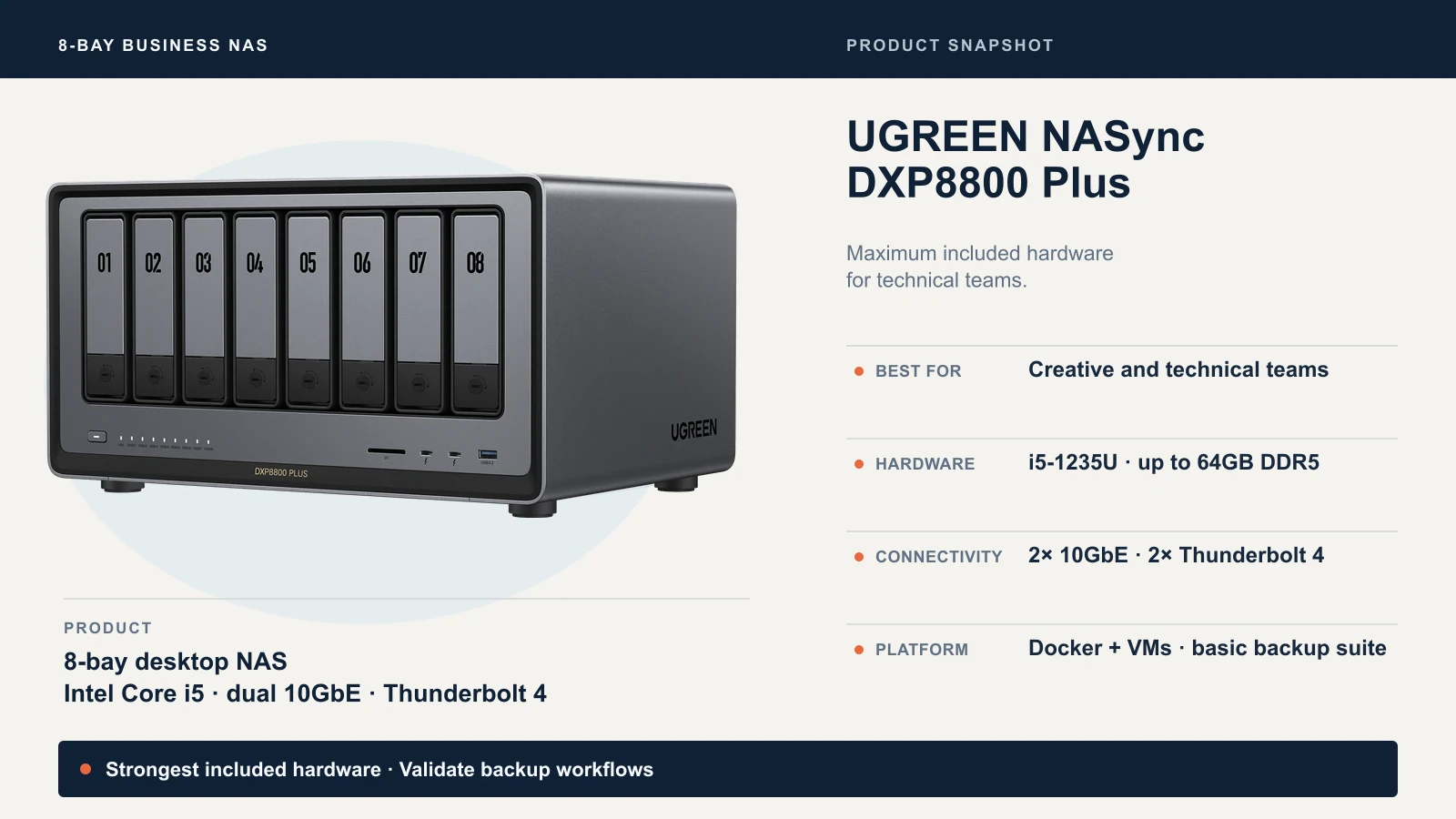
Where this hardware matters: A video production team editing 4K or 6K footage directly from the NAS over Thunderbolt 4 or 10GbE. A small architecture or design firm running large Revit models from shared storage. A technical team using Docker containers and VMs alongside file storage. The DXP8800 Plus has the compute, memory headroom (expandable to 64GB DDR5) and I/O ports to support these workloads — though concurrent performance under mixed loads depends on memory, disk IOPS and application demands, not only the CPU.
Where UGOS Pro falls short: UGREEN's operating system handles file sharing, Docker, virtual machines and AI-powered photo management. What it does not match is Synology's application depth for business operations. Synology's Active Backup suite — Active Backup for Business for computers, physical servers and VMware/Hyper-V VMs, plus the separate Active Backup for Microsoft 365 package for Exchange Online, OneDrive, SharePoint and Teams — has no UGOS equivalent. Hyper Backup's versioned, encrypted, deduplicated backup to dozens of cloud and local targets is more mature than what UGOS Pro currently offers. Snapshot Replication with immutable snapshots is more mature in DSM. If your business requires turnkey endpoint backup or compliance-oriented data protection, UGOS Pro requires more testing, more workarounds, or different third-party tools.
UGREEN also sells the newer DXP8800 Ultra ($1,780), which upgrades the processor to an Intel Core 7 150U and supports up to 96GB DDR5 RAM. For most file-serving and backup workloads, the Plus at $1,370 delivers the same capacity and connectivity. The Ultra makes sense for teams running compute-heavy containers, local AI workloads, or multiple simultaneous 10GbE video streams where the workload is demonstrably CPU-bound. Do not upgrade to the Ultra solely for file storage — the Plus already exceeds what the drives can deliver.
UGREEN DXP8800 Plus Verdict
Best fit: Creative teams, technical users and businesses with validated workflows that need 10GbE, Thunderbolt 4 and compute headroom included in the box price.
Disqualifier: The business expects turnkey backup, compliance tools or a polished administration experience without testing and validation. UGOS Pro is capable but not as mature as DSM for business administration.
Synology DS1825+: The Recovery and Administration Choice
The DS1825+ takes a different approach — less hardware per dollar, substantially more software per dollar. The AMD Ryzen V1500B is a 2018-era quad-core embedded processor that does not match the UGREEN's i5-1235U in raw compute. But DSM is the most mature NAS operating system on the market, and for business data protection, that maturity is often worth the trade-off.
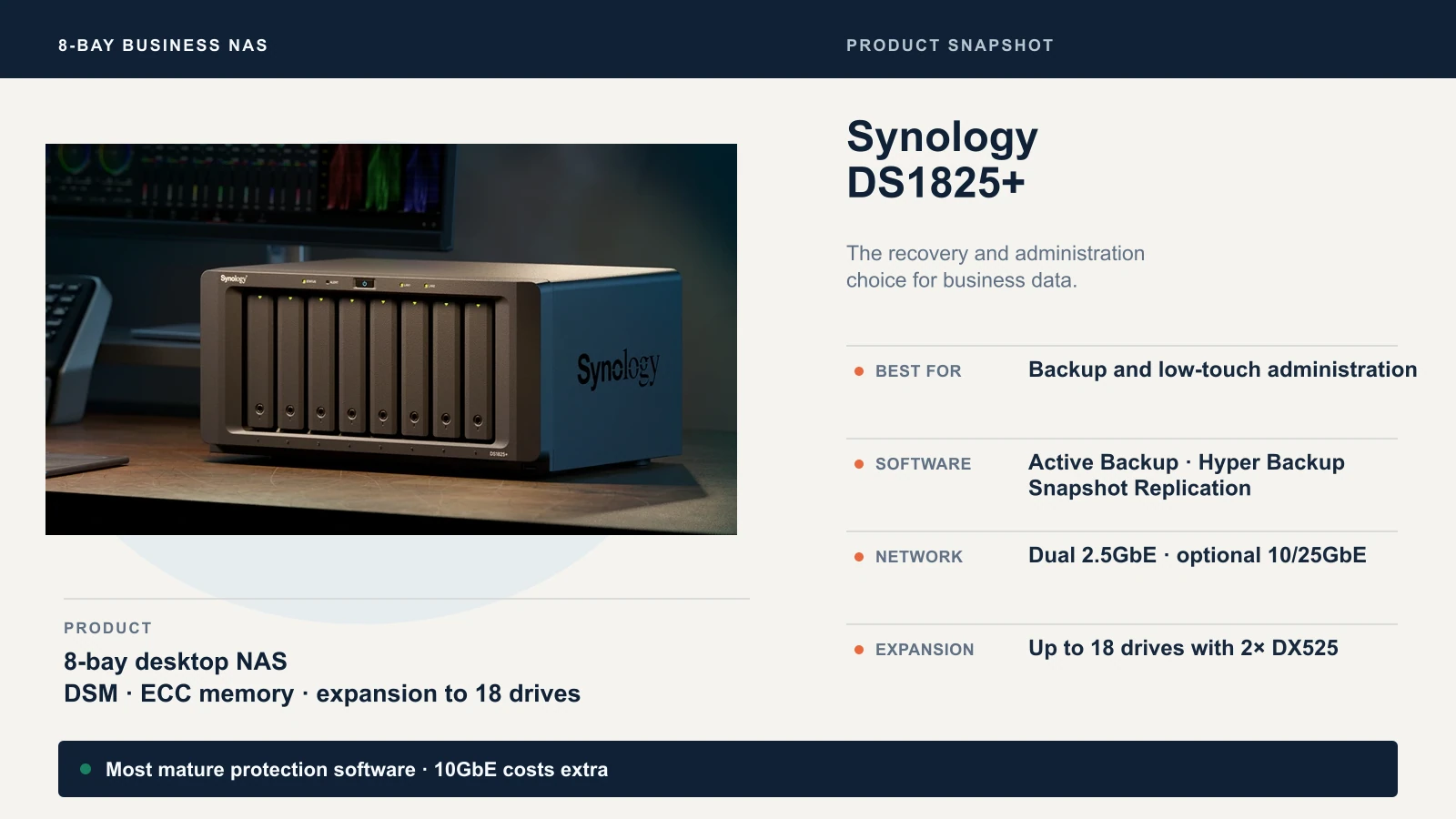
Active Backup for Business provides centralized, license-free backup for Windows PCs, Linux servers, and VMware/Hyper-V virtual machines. The separate Active Backup for Microsoft 365 package handles Exchange Online, OneDrive, SharePoint and Teams — also license-free. Together, they consolidate endpoint, VM and SaaS backups on one Synology appliance, with separate management interfaces for the two packages and granular file-level or bare-metal restore. For a business protecting 25–75 endpoints plus Microsoft 365 accounts, this software suite alone can justify the Synology premium over competing hardware.
Hyper Backup handles NAS-to-NAS and NAS-to-cloud backup with versioning, client-side encryption, deduplication and integrity checks. It supports Synology C2, Backblaze B2, Amazon S3, Azure, Google Cloud and more. Snapshot Replication provides immutable, scheduled snapshots with offsite replication — a defense against ransomware that does not depend on a separate backup application.
The networking cost: The DS1825+ includes dual 2.5GbE ports. For a small team doing office file access, that is adequate. For video editing, large database workloads, or multi-user concurrent access to large files, you need the Synology E10G30-T2 dual-port 10GbE adapter at approximately $258 (Newegg, September 2026). That card uses the DS1825+'s PCIe Gen3 x8 slot (running at x4 link speed). It works, it is reliable, and it is an additional cost that the UGREEN and UniFi units do not require. For a deeper comparison of UGREEN and Synology across multiple bay counts, see our UGREEN vs Synology NAS platform comparison.
Expansion: The DS1825+ supports two DX525 expansion units, scaling to 18 total drives (360TB raw with 20TB drives). No other unit in this comparison offers expansion beyond eight bays. If you expect to outgrow eight bays within three years, Synology is the only platform here that can grow without replacing the enclosure.
Synology DS1825+ Verdict
Best fit: Businesses that need protected, administrated data — automated endpoint backup, immutable snapshots, granular permissions and monitoring — with low ongoing administration overhead.
Disqualifier: 10GbE is essential and the add-in card cost breaks the budget, or the business prioritizes raw compute and direct-connect I/O over software depth.
UniFi UNAS Pro 8: Simple Rack Storage for a UniFi Environment
The UNAS Pro 8 costs $799 — nearly half the UGREEN and roughly $450 less than the Synology before any networking add-ons. It is a 2U rackmount appliance with dual redundant hot-swap power supplies, an ARM Cortex-A57 processor, 16GB of fixed RAM, and three 10G ports (two SFP+, one RJ45). It appears in your UniFi console alongside your switches, access points and cameras.
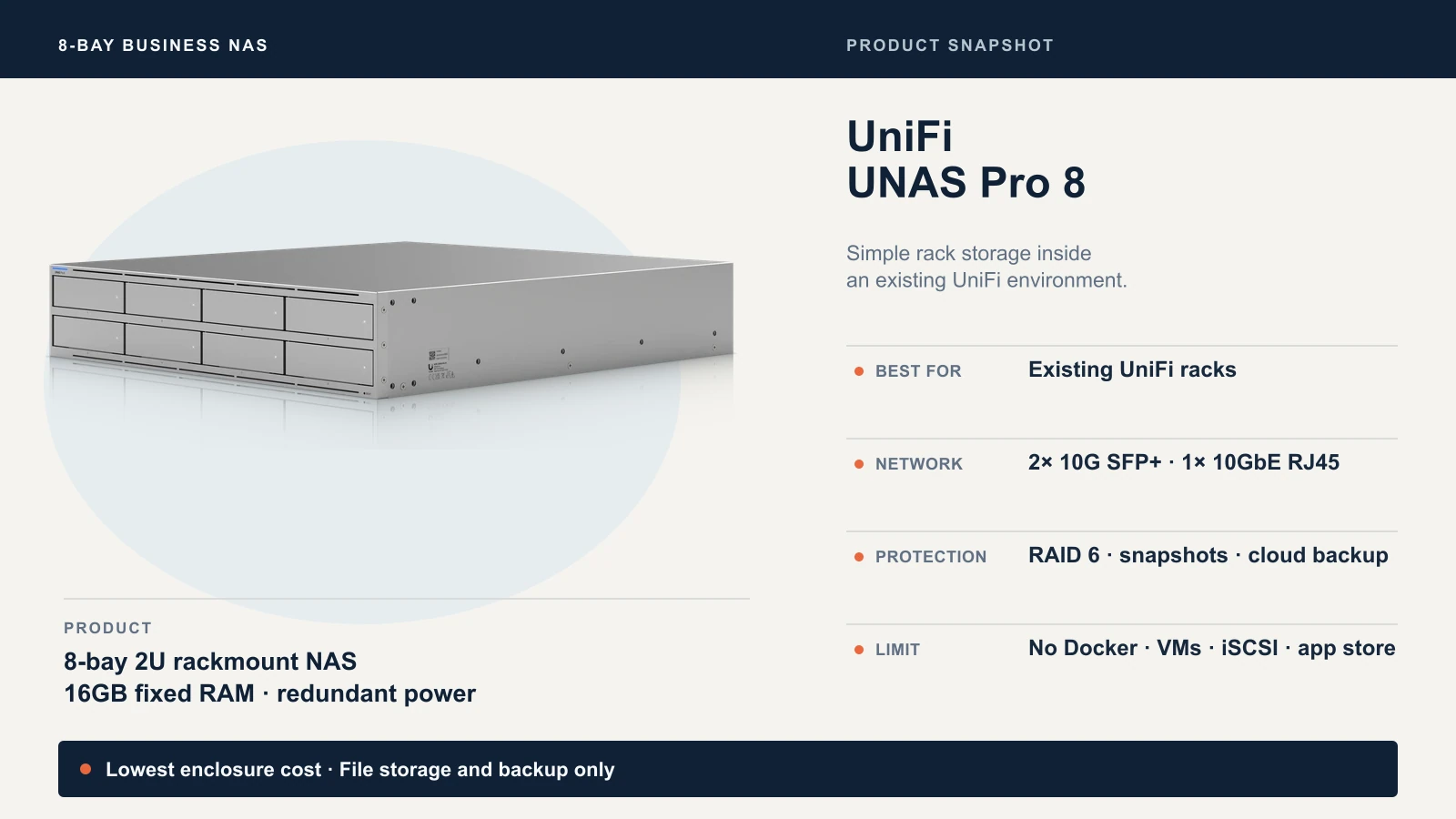
That console integration is the primary value proposition. An IT administrator managing a UniFi network does not need to learn a second platform, bookmark a second management URL or maintain separate credentials for storage. The UNAS Pro 8 shows up in Site Manager with drive health, RAID status and storage utilization visible from the same dashboard that monitors your network.
What UniFi Drive does: SMB file sharing, user and group permissions, RAID 5/6/10, scheduled snapshots, storage-pool encryption, Time Machine backup targets, backup to a remote UNAS, backup to CIFS/SMB servers, and backup to cloud services including Google Drive, OneDrive, Dropbox, Amazon S3, Backblaze B2 and Wasabi. That covers straightforward file storage and backup workflows.
What UniFi Drive does not do (as of September 2026): No Docker containers. No virtual machines. No iSCSI. No application hosting. No package manager or app store. No centralized endpoint backup comparable to Synology's Active Backup suite. No sophisticated versioned backup with deduplication. UniFi Drive is actively evolving — verify current capabilities before purchasing. For a detailed analysis of what UniFi Drive can and cannot replace, see our UniFi NAS vs Synology feature comparison and UniFi NAS complete business guide.
The rack requirement: This is a 2U rackmount unit. It is designed for an equipment rack rather than a quiet office. If you do not have a rack or dedicated equipment closet, the UNAS Pro 8 is not the right form factor. For a quieter 4-bay desktop option in the UniFi ecosystem, see the UNAS 4.
UniFi UNAS Pro 8 Verdict
Best fit: A team already running UniFi infrastructure that needs straightforward high-capacity file storage and backup, managed from one console, with included 10GbE and redundant power at the lowest enclosure cost.
Disqualifier: The business needs Docker, VMs, centralized endpoint backup, application hosting, or any workflow that UniFi Drive does not support as of September 2026.
Complete-System Cost: Enclosure Is the Cheapest Part
The enclosure is typically the smallest line item. The table below uses identical drives and two-disk parity for all three systems. Prices are US street prices checked September 21, 2026.
| Line item | UGREEN DXP8800 Plus | Synology DS1825+ | UniFi UNAS Pro 8 |
|---|---|---|---|
| Enclosure (diskless) | $1,370 | ~$1,250 | $799 |
| 8× Seagate IronWolf Pro 20TB (@ $600) | $4,800 | $4,800 | $4,800 |
| 10GbE adapter | Included | ~$258 (E10G30-T2) | Included |
| Memory upgrade | — | — | — |
| Rack / rails | — | — | Included with unit |
| UPS (entry-level) | ~$200 | ~$200 | ~$200 |
| Independent backup target | Not included — see note below | Not included — see note below | Not included — see note below |
| Subtotal (enclosure + drives + 10GbE) | $6,170 | $6,308 | $5,599 |
| Subtotal (with UPS, excl. backup) | $6,370 | $6,508 | $5,799 |
Backup target costs are intentionally excluded because they depend entirely on how much data you protect and how long you retain it. A $400 external drive might protect a limited critical-data subset, but it will not provide a complete backup of a 120TB array. A full-capacity second NAS can add several thousand dollars to the build. Cloud backup introduces recurring storage and API charges — and possible egress fees on restore. Size your backup target according to your protected data volume and retention policy, not as a line item that fits neatly into a table.
What this table does not include: A 10GbE switch ($200–$600+ depending on port count), 10GbE client NICs ($50–$100 each), SFP+ transceivers or DAC cables for the UNAS Pro 8's SFP+ ports ($15–$30 each), rack or cabinet costs if you do not already have one, and the time cost of setup, migration and validation. All three systems need the same switch and client infrastructure to deliver 10GbE to workstations — the difference is whether the NAS side requires an additional adapter card.
Cost per usable TiB (RAID 6, ~109 TiB before filesystem overhead):
| UGREEN | Synology | UniFi | |
|---|---|---|---|
| System cost (enclosure + drives + 10GbE) | $6,170 | $6,308 | $5,599 |
| Est. usable TiB (before filesystem overhead) | ~109 | ~109 | ~109 |
| Cost per usable TiB | ~$56.61 | ~$57.87 | ~$51.37 |
The UniFi UNAS Pro 8 delivers the lowest cost per usable terabyte. The drives dominate every build — at $600 each, the eight-drive set alone costs $4,800, making the enclosure choice a 10–16% difference in total system cost, not double.
Prices Checked September 21, 2026
UGREEN price from ai.ugreen.com (sale price). Synology price from B&H Photo and Best Buy (diskless, authorized retailers). UniFi price from store.ui.com. The $600-per-drive figure is a planning assumption rather than a quoted authorized-retailer price. Established sellers were listing the Seagate IronWolf Pro 20TB (ST20000NT001) around $670–$730 in September 2026, while some marketplace offers were lower. Verify the exact SKU, condition, seller and warranty eligibility before purchasing. The E10G30-T2 adapter price is from Newegg ($258).
Workload Verdicts
Every recommendation below states the dependency that could reverse it.
1. General Office Files and PC/Server Backup
Synology DS1825+. Active Backup for Business provides centralized, license-free backup for Windows PCs and file servers from one console. DSM handles SMB permissions, quota management, Active Directory integration and scheduled snapshots. Reversal: if no endpoints require centralized backup and the team already manages UniFi infrastructure, the UNAS Pro 8 handles basic file storage at lower cost.
2. Microsoft 365 Protection
Synology DS1825+. Active Backup for Microsoft 365 backs up Exchange Online, OneDrive, SharePoint and Teams data to local storage — no per-seat licensing fee. Reversal: if the Microsoft 365 backup requirement is limited to OneDrive for Business, UniFi Drive now supports OneDrive backup natively. For Exchange, SharePoint and Teams, Synology remains the only self-hosted option in this comparison.
3. Video Editing Over 10GbE
UGREEN DXP8800 Plus. Dual 10GbE and dual Thunderbolt 4 are included — no adapter cards required. The Intel i5-1235U is better suited to concurrent thumbnail generation and background indexing than the other CPUs in this comparison. Reversal: if the editing workflow relies on software only available on DSM (specific Synology packages or tested integrations), add a 10GbE card to the DS1825+ instead.
4. Surveillance Archive / Backup Target
UniFi UNAS Pro 8 if you are already running UniFi Protect — the UNAS can serve as an archive target within the same console. Synology DS1825+ if you need Surveillance Station's support for up to 40 cameras and integration with 8,700+ third-party IP camera models. Note: the DS1825+ includes only two camera licenses; additional cameras require purchased licenses. Advanced AI analytics (people counting, intrusion detection) may require compatible cameras or Synology's dedicated DVA hardware rather than the DS1825+ alone. Reversal: see our UniFi Protect vs Synology Surveillance Station comparison for a detailed breakdown.
5. Virtual Machines and Containers
Synology DS1825+ for tested, documented VM and Docker workflows through Virtual Machine Manager and Container Manager. UGREEN DXP8800 Plus for raw compute advantage — the i5-1235U and 64GB RAM ceiling handle heavier container workloads. The UNAS Pro 8 does not support VMs or containers. Reversal: if the container workload demands more CPU than the Synology's V1500B can deliver, UGREEN offers stronger hardware despite less mature orchestration tooling.
6. Existing UniFi Rack
UniFi UNAS Pro 8. It occupies 2U in the rack you already own, connects to the SFP+ ports on your existing UniFi switches, and is managed from the console your team already uses. Reversal: if the workload requires applications, endpoint backup or VM hosting that UniFi Drive does not support, the UNAS Pro 8 as a file tier plus a separate Synology or UGREEN unit for applications may be the right combination.
7. Business With No Dedicated IT
Synology DS1825+. DSM's guided setup, automated backup scheduling, health monitoring with email alerts, and extensive documentation make it the most approachable platform for a business without full-time IT staff. Synology's support ecosystem (knowledge base, community forums, professional services through partners) is deeper than UGREEN's or Ubiquiti's for NAS-specific issues. Reversal: if the business already has a managed IT provider fluent in UniFi, the UNAS Pro 8's console integration may reduce support overhead.
Migration and Exit Costs
Switching NAS platforms is not a firmware update. Budget for these:
Data migration time. Copying 100TB over a single 10GbE link at a sustained rate of 400–600 MB/s takes roughly 48–72 hours of raw transfer time — before accounting for interruptions, verification passes and small-file overhead that will extend it further. During migration, you need both the old and new systems running simultaneously with enough capacity to hold the complete dataset. Plan for temporary double storage.
Permissions and shares. SMB share structures, user accounts, group memberships and ACLs do not transfer automatically between Synology DSM, UGOS Pro and UniFi Drive. Rebuild them manually or script the migration. Active Directory integration helps if both old and new systems join the same domain.
Application state. Docker containers, VMs, backup job configurations, scheduled tasks and surveillance recordings are platform-specific. Plan to recreate rather than migrate these. Export configurations where possible and test the new setup before decommissioning the old.
Drive portability. Do not assume you can move a RAID array from one vendor's enclosure to another. RAID metadata formats differ between platforms. The safe migration path is always: copy all data to the new system, verify the copy, validate access and permissions, then decommission the old system. Moving a live disk set between vendors risks data loss unless the vendor explicitly documents support for that exact migration.
User retraining. If your team accesses files through vendor-specific client apps (Synology Drive, UGREEN's mobile app, UniFi's drive client), switching platforms means new software on every workstation and phone. Factor in the support tickets.
Final Buying Decision
Come back to three questions:
1. Which restore job matters most? If restoring a failed PC, a corrupted VM or a deleted SharePoint site needs to work on the first attempt, Synology's Active Backup ecosystem is the answer. If the restore requirement is "get the shared files back," any of these three handle that.
2. Who administers it? If a non-technical office manager monitors storage, Synology's DSM is the most approachable. If a UniFi-certified IT provider manages the network, the UNAS Pro 8 reduces their tool count. If an in-house technical team validates their own workflows, UGREEN's hardware advantage lets them build exactly what they need.
3. What network throughput do you genuinely need? A five-person accounting firm accessing office documents, PDFs and archived records does not need 10GbE. A video team pulling 4K ProRes from shared storage is likely to benefit from it. Match the investment to the real workflow — not the theoretical maximum.
Buy the system that answers all three honestly.
Related Resources
- Best NAS for Small Business 2026 — Broader NAS comparison including 4-bay options for teams that may not need eight bays.
- UGREEN vs Synology NAS Comparison — Deeper platform comparison across the full UGREEN and Synology lineups.
- UniFi NAS vs Synology: Features, Pricing, Backup Compared — Detailed software and feature comparison between UniFi Drive and DSM.
- UniFi NAS Complete Business Guide — Full guide to choosing between UNAS models within the UniFi ecosystem.
- UNAS Pro 4 vs UGREEN DXP4800 Plus — 4-bay head-to-head for businesses considering a smaller build.
- 10 Gigabit Ethernet Guide — What you need to know before upgrading your office network to 10GbE.
- Synology NAS Business Guide — In-depth Synology deployment guide for business environments.
- Synology Active Backup for Business Guide — Detailed setup and planning guide for Synology's endpoint and VM backup suite.
- 3-2-1 Backup Rule Guide — How to plan independent backup for any NAS deployment.
Frequently Asked Questions
Related Articles
More from Business Hardware
UGREEN vs Synology NAS: Hardware Value or Better Business Software?
UGREEN gives you faster hardware for the money; Synology gives you the deeper business software stack. Compare backup, permissions, 10GbE, apps and total cost.
15 min read
RAID 0 vs 1 vs 5 vs 6 vs 10: Which Fits Your Business NAS?
What each RAID level does, how many drives can fail, how much space you keep, and why RAID is not a backup. Covers SHR, rebuilds and drive failures.
10 min read
Best NAS for Small Business 2026: Synology, UGREEN & UniFi Compared
Compare the top NAS systems for small business in 2026. Synology DS925+, UGREEN NASync DXP4800 Plus, and UniFi UNAS Pro reviewed with specs, pricing, and practical trade-offs.
21 min read