

Restaurant Network Blueprint: POS, KDS, Guest Wi-Fi and Cameras Without the Chaos
Design a reliable restaurant network for POS, KDS, guest Wi-Fi, cameras and backup internet—with clear ownership, labeling and handoff.

"We open in 30 minutes, so we can't touch anything." That sentence explains more bad restaurant networks than any wiring diagram. The ISP installed a router, the POS company added its own equipment, the camera installer hid a switch, and somebody ran an unlabeled cable to the kitchen printer. Everything works—until one device disappears and nobody can identify which vendor, port, network, or internet connection owns the failure.
A restaurant network is not office Wi-Fi with more tablets. It is the payment path, the kitchen communication path, the camera system, the guest amenity, and often the only route to cloud ordering. A reliable blueprint begins by deciding who owns the POS network, then separates the other trust zones, plans coverage for the real building, adds tested backup connectivity, and documents every cable and device before opening day.
Affiliate Disclosure: This article contains affiliate links. If you make a purchase through these links, we may earn a small commission at no extra cost to you. As an Amazon Associate, iFeelTech earns from qualifying purchases.
The Operating Constraint: The Restaurant Must Keep Trading
Every network design starts with a question about what matters most. In an office, that answer is usually productivity and data protection. In a restaurant, the answer is more direct: the network is the payment path.
When a terminal cannot reach the authorization server, card processing degrades—some POS platforms can accept cards in offline mode, but the merchant takes on decline and dispute risk, and cloud-dependent functions stop entirely. When a KDS loses its local network connection, the kitchen stops receiving tickets. (An internet outage is different: with a hardwired local hub device, Toast can continue passing on-premise tickets to KDS stations even without internet—but local network failure breaks that path too.) When online ordering drops, revenue loss is immediate. When staff handhelds disconnect, servers revert to paper and service slows.
The 30-Minute Heuristic
In our experience, planned network changes should happen outside service hours—before the doors open or after the last guest leaves. Emergency diagnosis may still occur during service, but a design that requires unplugging mystery cables or guessing which switch feeds the bar POS puts the operation at unnecessary risk when that moment arrives.
This is not about raw internet speed. A 500 Mbps fiber connection means nothing if the POS terminal sits on a flat network shared with guest devices, the backup path has never been tested, and the technician facing the outage has no documentation. The blueprint that follows is built around one principle: design for recovery, not just connectivity.
Greenfield or Takeover? They Are Different Projects
Most published restaurant-network guides assume you are starting from a blank floor plan. Most real restaurant network projects are not that. They are takeovers—spaces with inherited equipment, unlabeled cabling, consumer-grade gear in a closet, and a POS system that was installed by a different vendor three years ago.
The approach for each is fundamentally different.
| Factor | Greenfield (New Build) | Takeover (Existing Space) |
|---|---|---|
| Design timing | During construction, before drywall closes | After discovery, around operating hours |
| Cable access | Open walls, ceilings, and conduit paths | Existing runs—some labeled, most not |
| Equipment | Selected and ordered to specification | Discovered, audited, then replaced or retained |
| Rollback plan | Not applicable—there is no previous system | Required before changing anything |
| Testing window | Before opening, with full access | Between services, often overnight |
| Change risk | Low—no production system to disrupt | High—live POS, cameras, and internet in use |
| Documentation | Built as the system is installed | Must be created from what exists before changes begin |
Greenfield advantage: When you coordinate network, security cameras, and AV before the walls close, every cable run terminates at the rack, every device gets a labeled home run, and the testing window is measured in days rather than hours. The critical gate is getting low-voltage work completed before drywall, ceiling tiles, or decorative finishes seal off the cable paths.
Takeover reality: You inherit someone else's decisions—and their shortcuts. The first job is not installation; it is discovery. Map every device, trace every cable you can, identify who owns the POS network versus the business network, and document the current state before proposing changes. Then plan a staged cutover that keeps the existing system running in parallel until the replacement is validated. We have walked into spaces where the only path to the kitchen printer ran through an unlabeled consumer switch behind a refrigerator. You cannot safely replace that cable during dinner service.
For detailed guidance on cable installation, labeling standards, and the pre-drywall coordination timeline, see our business network wiring installation guide.
Inventory the Restaurant Before Selecting Equipment
Before choosing a single access point or switch, build a device census. A restaurant network supports more device categories than a typical office, and each one has different requirements for connectivity, power, physical placement, and ownership.
POS and kitchen operations:
- POS terminals (countertop and handheld)
- Kitchen display systems (KDS)
- Receipt and kitchen printers
- Kiosks and guest-facing displays
- Contactless payment readers
Back-of-house and staff:
- Back-office workstation
- Manager tablet or laptop
- Staff scheduling/communication devices
- Delivery-platform tablets (DoorDash, Uber Eats, etc.)
Guest-facing:
- Guest Wi-Fi clients (phones, laptops)
- Digital signage or menu boards
Security and building systems:
- Surveillance cameras (interior and exterior)
- NVR or cloud-managed recording
- Access control (if applicable)
- Music/AV system
Network infrastructure:
- ISP modem/ONT
- Router/gateway (Toast-managed, self-managed, or both)
- Switches (managed, with PoE where needed)
- Wireless access points (indoor and outdoor/patio)
- UPS for network and POS equipment
Group every device by function and ownership. A Toast-managed POS terminal belongs to a different support path than a security camera, even though both plug into Ethernet. That ownership distinction drives every decision that follows—from VLAN design to who you call at 9 PM on a Saturday when something stops working.
For general AP count, port sizing, and PoE math, see the UniFi network sizing guide. The numbers below focus on the restaurant-specific variables that generic sizing calculators miss.
Choose the POS Network Ownership Model
This is the most consequential decision in a restaurant network design, and it must be made before selecting any infrastructure equipment. The question is not "which router should I buy?" It is: who owns and supports the POS network?
Modern cloud POS platforms like Toast support two distinct network deployment models. They are not interchangeable, and they carry different support boundaries.
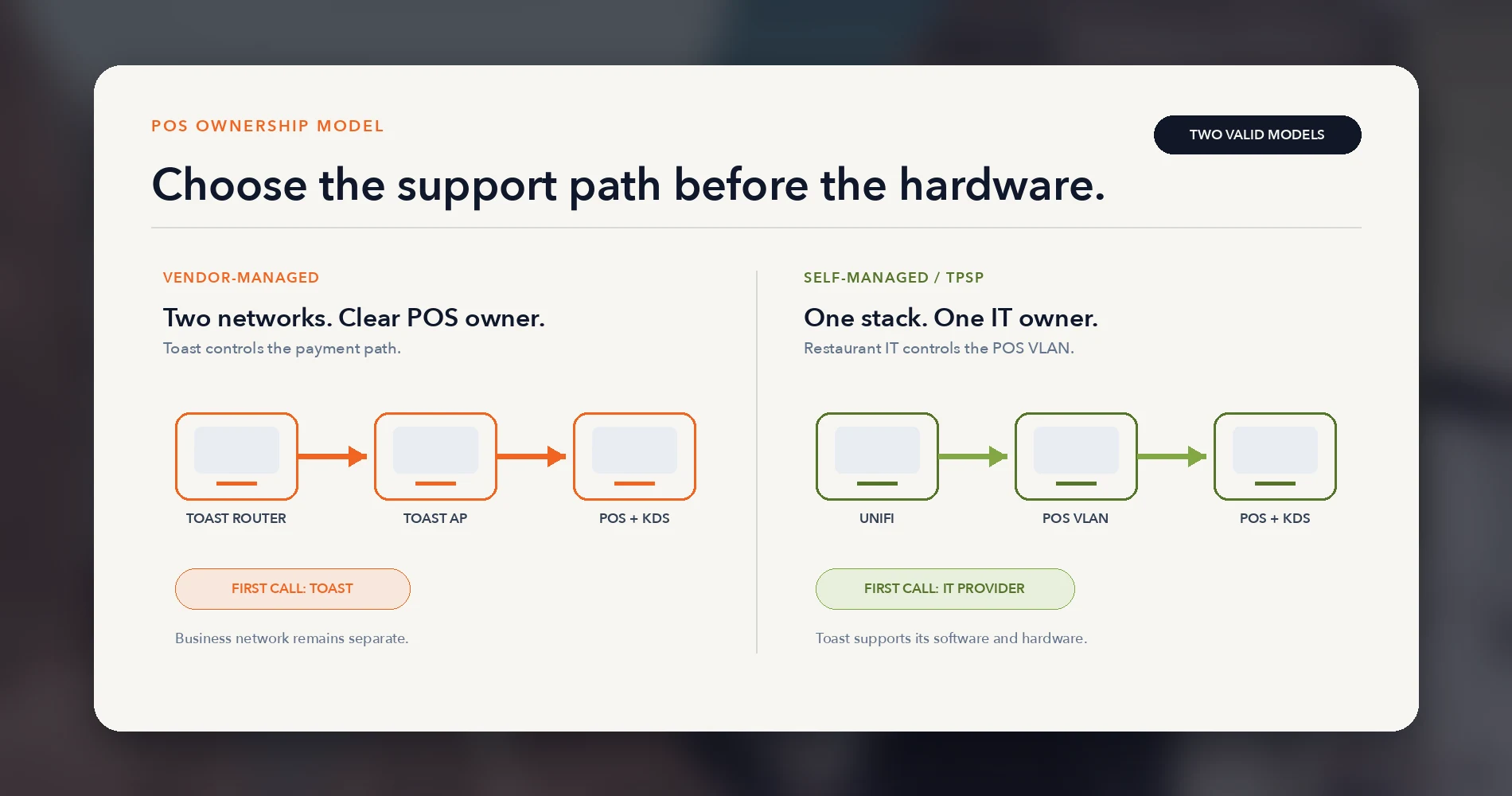
Branch A: Vendor-Managed POS Network
In this model, the POS vendor supplies and manages dedicated networking equipment—a router, optional switch, and access points—that exist solely for POS devices. The restaurant's other technology (guest Wi-Fi, cameras, office PCs, music) runs on a separate network entirely.
ISP modem / ONT
├── Toast-managed router (192.168.192.0/24)
│   ├── Toast switch
│   │   ├── POS terminals (wired)
│   │   ├── KDS units (wired)
│   │   ├── Printers (wired)
│   │   └── Toast access points → handhelds
│   └── Only Toast-approved devices
│
└── Restaurant business network (separate router/gateway)
    ├── Back-office / staff
    ├── Guest Wi-Fi
    ├── Cameras / NVR
    └── Music, signage, delivery tablets
This is not an installation mistake or an unnecessary duplication of equipment. It is a normal, documented deployment model. We have encountered Toast-managed Cisco Meraki routers and dedicated access points at client locations—a completely separate POS network running alongside the restaurant's general infrastructure. Toast's current documentation also references Toast Router (Pronto) equipment and mixed configurations depending on the location.
The operational advantage is a single escalation path. When a terminal cannot connect, the restaurant calls Toast. Toast can manage and troubleshoot its own equipment without depending on a third-party IT provider or the restaurant owner to reset an unfamiliar router.
Branch B: Self-Managed / TPSP Network
In this model, the restaurant or its IT provider supplies and manages all networking equipment—including the infrastructure that carries POS traffic. Toast publishes specific requirements for this configuration, and the restaurant signs a self-managed network waiver acknowledging the different support boundary.
ISP modem / ONT
└── Customer / TPSP gateway (e.g., UniFi gateway)
    ├── Dedicated Toast POS VLAN + 5 GHz SSID
    │   ├── POS terminals
    │   ├── KDS units
    │   ├── Printers
    │   └── Handhelds (no client isolation)
    ├── Staff / back-office network
    ├── Guest network (internet-only, isolated)
    └── Camera / IoT network
Toast's preference for self-managed environments is physical separation. A dedicated VLAN is an accepted alternative when physical separation is not practical—but it is the alternative, not the default architecture.
The operational advantage is unified infrastructure control. One gateway, one monitoring dashboard, one documentation set, one professional support relationship covering the entire site. But the tradeoff is real: Toast will support its software and hardware as far as possible, but it will not swap ports, reset third-party routers, or provide network troubleshooting for equipment it does not manage. Network incidents belong to the restaurant's IT provider.
Neither Model Is Universally Better
A Toast-managed network trades infrastructure flexibility for a simpler support path. A self-managed network trades that single escalation path for design control and consolidated management. The correct choice depends on the restaurant owner's IT support coverage, tolerance for coordinating two vendors during a connectivity incident, and preference for infrastructure control versus operational simplicity. Confirm the current deployment model with Toast's Onboarding Consultant before purchasing equipment.
For the full technical requirements, including bandwidth tiers, wireless specifications, firewall allowlists, and offline-mode constraints, see our Toast POS network requirements guide.
Build the Physical Foundation: Home Runs, Rack, Power, and Labels
Regardless of POS ownership model, the restaurant's own network infrastructure should follow one principle: every permanent cable run terminates in a documented rack or telecom space.
For most restaurants under 4,000 sq ft, that means a single rack. Larger or multi-floor spaces may need an intermediate distribution frame (IDF) or secondary closet—but the principle holds: every run terminates at a documented, accessible location with matching labels on both ends.
No daisy-chained consumer switches behind the bar. No mystery cables running through the ceiling to an unlabeled wall plate. No undocumented PoE injectors hidden in inaccessible locations. (Injectors themselves are not the problem—undocumented, unprotected injectors that nobody can find during an outage are.)
The rack
A standard restaurant network rack contains:
- Patch panel — every cable run terminates here with a matching label
- Managed PoE switch(es) — sized to the device census plus 20–30% port reserve
- Gateway/router — the restaurant's business network gateway (not the Toast-managed router, which lives on its own)
- UPS — protects the gateway, switch, and any other rack-mounted equipment from power events
- Cable management — horizontal organizers between patch panel and switch
- Shelf — for an NVR, small UPS, or other non-rack-mountable equipment
The labeling standard
This is the part most installers skip and most restaurants regret. Label both ends of every cable run with a matching ID. Label every wall plate, patch-panel port, and switch port. Use plain-language device names:
BAR-POS-01— bar point-of-sale terminal, drop 1KITCHEN-KDS-02— kitchen display system, station 2EXPO-PRINTER-01— expediter printerPATIO-AP-01— patio wireless access pointCAM-DINING-03— dining room camera, position 3
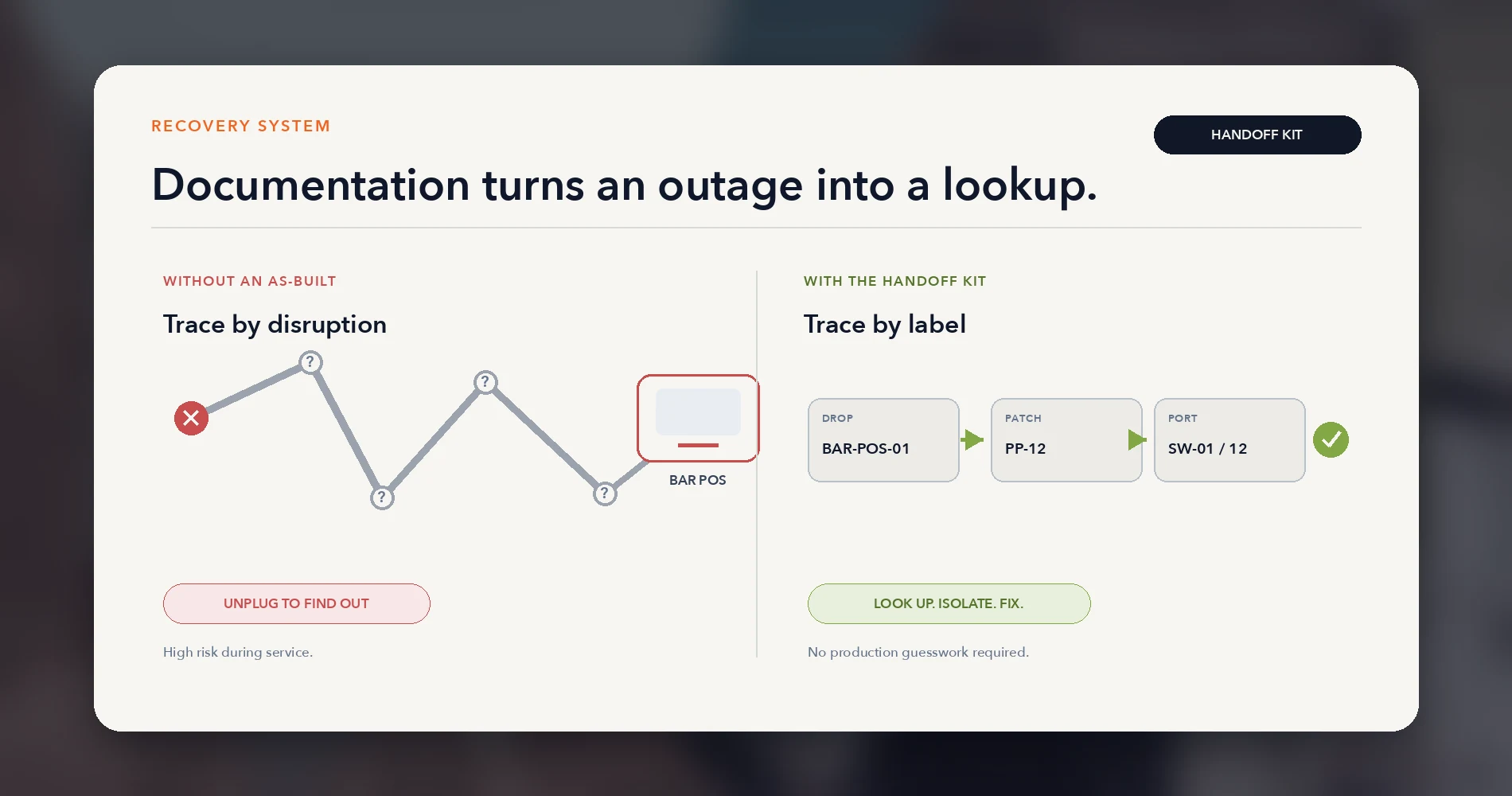
When Toast-managed equipment exists at the same location, label which drops and ports belong to the Toast network and which belong to the restaurant's business network. During an outage, a technician should be able to trace any device from the wall plate to the patch panel and switch port without unplugging anything else.
The Documentation Is Part of the Recovery System
We regularly encounter restaurant sites where nobody can identify which cable feeds a payment terminal without physically tracing it. During business hours, that investigation means unplugging production equipment to test—often an unacceptable risk. Good documentation converts a forensic project into targeted troubleshooting. The label scheme and as-built drawings are not administrative extras; they are uptime controls.
For cable selection standards, testing procedures, and the full labeling toolkit, see the network cabling checklist and RJ45 wiring diagram guide.
Separate the Trust Zones Without Breaking Local Communication
A restaurant network serves devices with fundamentally different trust levels. Payment terminals handle card data. Cameras record continuously. Guest phones are untrusted by definition. These should not share a flat network—but the segmentation must respect each zone's communication requirements.
Five functional zones
| Zone | Purpose | Isolation rule |
|---|---|---|
| POS / Payment | Terminals, KDS, printers, handhelds | Dedicated path—vendor-managed or dedicated VLAN. Client isolation off so devices can discover each other. Multicast/Bonjour enabled. |
| Staff / Back office | Manager workstation, scheduling, inventory, delivery tablets | Standard business network. Internet access and limited internal services. |
| Guest Wi-Fi | Customer internet access | Internet-only. Client isolation on. No access to any internal network. |
| Cameras / IoT | Surveillance, NVR, access control, sensors | Management access for monitoring. Controlled outbound access for remote viewing, updates, and time sync. Isolated from POS and guest. |
| Management | Network infrastructure management interfaces | Restricted to IT administrator access. Not exposed to any user-facing network. |
The critical detail that trips up even experienced network administrators: client isolation, which is correct for the guest network, must not be applied to the POS zone. Toast's requirements explicitly state that client isolation must be disabled and multicast/mDNS traffic must be permitted so that terminals, KDS units, and printers can discover each other. Other POS platforms with local-device communication may have similar requirements—verify with the vendor.
In the vendor-managed model (Branch A), Toast handles POS segmentation with its own physical network. The restaurant only needs to segment the remaining zones—staff, guest, cameras, and management—on the business network.
In the self-managed model (Branch B), the POS zone is a dedicated VLAN on the restaurant's infrastructure. The IT provider owns the segmentation, firewall rules, and cross-zone exceptions.
Example UniFi VLAN layout (self-managed model)
The following is a starting-point example for a self-managed UniFi deployment. Adjust VLAN IDs, subnets, and firewall rules to match the site's requirements and Toast's current specifications.
| VLAN ID | Name | Subnet (example) | SSID | Key settings |
|---|---|---|---|---|
| 10 | POS / Toast | 10.10.10.0/24 | RESTAURANT-POS (dedicated 5 GHz SSID) | Client isolation off, multicast/mDNS enabled, WPA2/AES Personal. No guest, camera, or office devices. |
| 20 | Staff / Back Office | 10.10.20.0/24 | RESTAURANT-STAFF | Standard business network. Internet + limited internal services. |
| 30 | Guest | 10.10.30.0/24 | RESTAURANT-GUEST | Client isolation on, bandwidth-limited, internet-only. No access to VLANs 10, 20, 40, or 99. |
| 40 | Cameras / IoT | 10.10.40.0/24 | — (wired only) | Controlled outbound access for remote viewing, updates, and time sync. No access to POS or guest. |
| 99 | Management | 10.10.99.0/24 | — | UniFi gateway, switches, APs. Restricted to IT admin access. |
POS VLAN Requirements Override Generic Defaults
Toast's self-managed network requirements include specific wireless, multicast, and isolation settings that differ from typical office VLANs. Always verify the current Toast Network Requirements before configuring the POS VLAN—the requirements above are a summary, not a substitute for Toast's living documentation.
For VLAN fundamentals and configuration concepts, see our VLANs explained guide. For the specific UniFi guest VLAN walkthrough, see the guest Wi-Fi VLAN setup guide—but apply its client-isolation settings only to the guest zone, not the POS zone.
Design Wi-Fi for the Dining Room, Kitchen, Bar, and Patio
Restaurant Wi-Fi is more demanding than office Wi-Fi. The environments are more challenging for RF, the coverage requirements are more varied, and the consequences of a dead spot are more immediate—a handheld that loses connection at a table means a server walking back to a terminal.
Environment-specific challenges
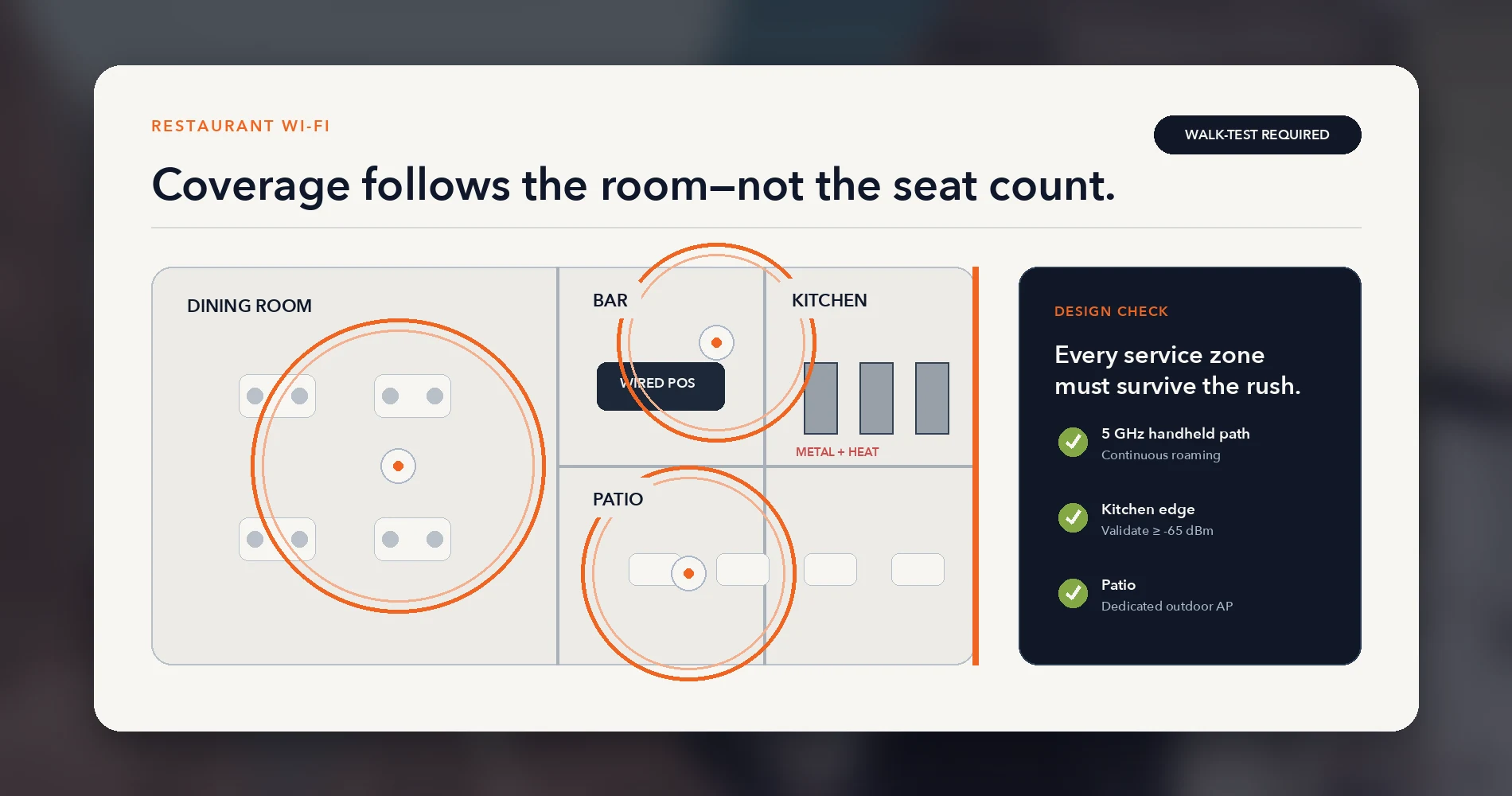
Kitchen: Metal shelving, commercial refrigerators, microwaves (2.4 GHz interference), tile and concrete walls, grease-coated surfaces, and extreme temperature swings. Where possible, mount access points outside the kitchen—above the pass or expo window with line-of-sight into the kitchen area. If an AP must go inside the kitchen, an IP-rated weatherproof model handles moisture better, but the IP rating alone does not account for grease, cleaning chemicals, heat, or food-service placement rules. Validate the exact model's environmental specifications and confirm mounting location with the kitchen operator. Toast requires 5 GHz for handheld devices, and the signal in service areas should never fall below -65 dBm.
Dining room: The primary handheld roaming zone. Coverage must be continuous across the entire floor so servers do not lose orders mid-table. People density during peak service absorbs signal; plan for the busy Saturday, not the quiet Tuesday lunch.
Bar: Often a combination of POS terminals (wired), staff handhelds, and heavy guest device concentration. Guest traffic competes with POS traffic on the RF layer even when they are on separate VLANs.
Patio / outdoor seating: Requires a weatherproof outdoor AP or strong indoor coverage through exterior walls (rarely sufficient). The outdoor AP needs its own home-run cable back to the rack—do not extend with a consumer repeater.
Placement principles
- Mount APs on ceilings where possible, oriented to radiate downward into the service area
- Keep APs away from metal ductwork, walk-in refrigerators, and microwave ovens
- Plan for handheld roaming: overlapping coverage between APs so a server moving through the space does not drop connection
- Separate the Toast 5 GHz SSID from the guest SSID; channel planning must account for both
- A walk-test with a real device is worth more than any heat-map calculator—RF behaves differently in a room full of stainless steel, tile, and bodies than it does on a floor plan
Do not guess AP count from seat count alone. A 40-seat restaurant in a brick building with a patio needs a different design than a 40-seat restaurant in a strip-mall buildout with drop ceilings. For general sizing methodology, see the UniFi network sizing guide.
Size Switches and PoE From the Device Census
Go back to the device census. Count two numbers separately: total wired endpoints and total PoE-powered devices. They are not the same list.
Wired endpoint count (determines port needs)
Count every device that needs an Ethernet connection: POS terminals, KDS units, printers, back-office PCs, cameras, NVR, access points, and any wired signage or kiosk. Add the uplink ports connecting switches to the gateway and any inter-switch links.
Build in a 20–30% port reserve. Restaurants add devices—a second KDS station, a new camera angle, a delivery-tablet charging station with Ethernet—and pulling a new switch out of a box during service is not an option.
PoE device count (determines power budget)
Not every wired device draws PoE power. POS terminals and printers typically use their own AC adapters. Access points, cameras, and some KDS units are PoE-powered. Check each device's actual power draw—a UniFi U6 Pro AP draws up to 13W max, while camera power varies widely by model (the UniFi G5 PTZ draws up to 14W; non-UniFi PTZ cameras can draw 25W or more).
Add up the actual watts from the device datasheets, not just the device count. A 24-port switch with a 95W PoE budget may be adequate for a small deployment, but the math gets tight quickly—verify the total against your specific device list and leave headroom. Choose switches where the PoE budget covers the current load plus a reserve for future devices.
POS Equipment on a Vendor-Managed Network
If the restaurant uses a Toast-managed network (Branch A), the Toast switch powers Toast APs and possibly Toast-specific peripherals. Those PoE loads do not appear on the restaurant's switch budget. Size the restaurant's switch for business-network devices only: cameras, non-Toast APs, signage, and other infrastructure.
For current switch model recommendations, PoE budget comparisons, and sizing tables, see best UniFi switches and the Power over Ethernet guide. Do not duplicate those model-specific tables here—they are maintained in those articles and updated when Ubiquiti changes the lineup.
Primary Internet, Backup Path, and Outage Testing
A restaurant that depends on cloud POS, online ordering, and card authorization should have backup internet. Not because every restaurant has a contractual requirement for a second ISP—but because an internet failure during a busy service creates an immediate operational and revenue problem.
Why independence matters more than bandwidth
The backup path should be as independent as practical from the primary. A second connection from the same ISP may share the same conduit, last-mile infrastructure, or upstream aggregation point—meaning it could fail in the same outage that takes down the primary. Verify the actual physical path and carrier dependency before assuming independence. The most reliable backup is typically a different technology on a different physical path: fiber primary with cellular backup, or cable primary with a fixed-wireless secondary.
Backup options by POS model
Toast-managed with Toast Router (PC-61): Toast offers an optional cellular subscription. With an active subscription and cellular reception, the Toast Router automatically switches from wired to cellular within approximately 10 seconds when the primary connection fails. This is a Toast Router capability—older Meraki-based managed deployments or deployments without the cellular subscription may not have automatic failover.
Self-managed / TPSP network: The restaurant's IT provider owns the backup design. Options include dual-WAN configuration on the gateway (two wired ISPs on different paths), a 5G/LTE cellular failover device, or a combination. The failover path, automatic switching behavior, and restoration sequence must be documented and tested.
The testing requirement
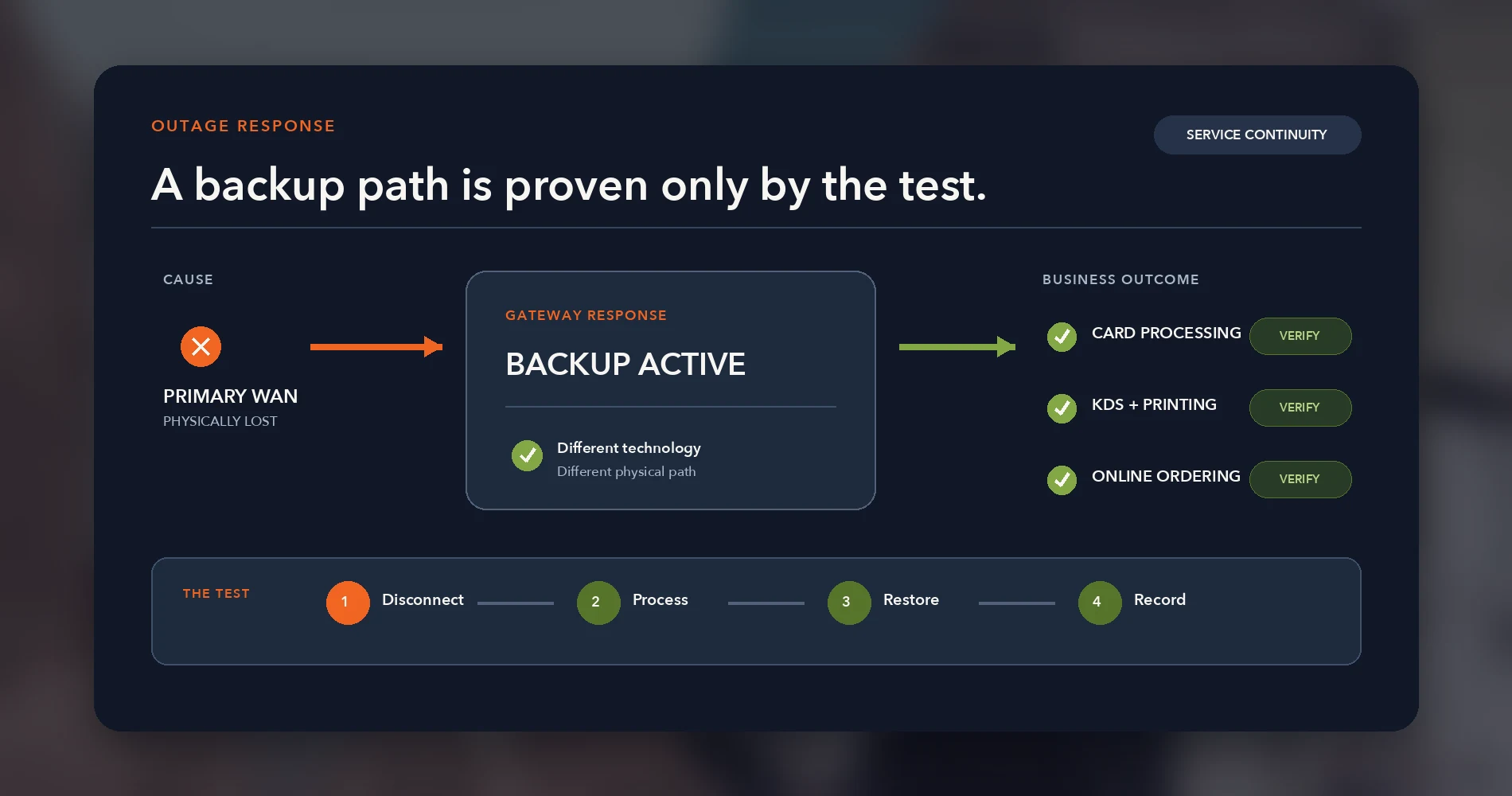
A backup path that has never been tested is not a proven backup. Failover testing should verify:
- The primary connection is physically disconnected (not just the test interface)
- POS terminals continue processing cards through the backup path
- KDS and printing still function
- The system restores cleanly to the primary connection when it returns
- The test is repeated on a schedule—SIM cards expire, cellular plans get suspended, and backup hardware fails silently
For dual-WAN architecture and configuration details, see the dual-WAN business network guide. For self-managed 5G/LTE failover implementation, see our 5G failover setup guide. For ISP uptime terms and what your contract actually guarantees, see the business internet SLA guide.
Guest Wi-Fi and Cameras Must Not Expand the Payment Trust Boundary
Guest Wi-Fi and security cameras are expected features in any modern restaurant. Both have legitimate business value. Neither belongs on the POS network.
Guest Wi-Fi
Guest Wi-Fi is an internet-only amenity. The design rule is straightforward:
- Separate SSID on a dedicated VLAN (or separate physical network)
- Client isolation enabled—guests should not see each other's devices
- No routing to any internal network—POS, staff, cameras, or management
- Bandwidth limiting to prevent one guest streaming video from degrading POS connectivity
- Captive portal or simple password, depending on the restaurant's preference
For the full guest network setup, see how to set up guest Wi-Fi for small business and the UniFi guest Wi-Fi VLAN setup. Remember the client-isolation warning from the trust zones section: the guest zone requires isolation on, but the POS zone requires it off.
Security cameras
Cameras belong on their own managed zone—separate from POS, guest, and staff networks. The camera network carries continuous video streams that consume sustained bandwidth; mixing that traffic with payment authorization is unnecessary risk.
Key decisions for the restaurant:
- Recording: local recording through an NVR or appliance such as UniFi Protect, fully cloud-recorded video, or a hybrid system
- Storage and retention: how many days of footage, and who owns the storage
- Network capacity: continuous streams from multiple cameras require dedicated switch capacity and PoE budget
- Internet access: local recording does not require internet for the core function, but remote viewing, push alerts, firmware updates, time synchronization, and vendor cloud services may. Provide controlled outbound access rather than blocking internet entirely.
- Access: who can view live and recorded footage, and from where
Segmentation Is Not Compliance
Placing POS and camera traffic on separate VLANs helps reduce exposure, but VLANs alone do not make a network "PCI compliant." PCI DSS scope depends on the complete cardholder-data environment, and segmentation must be effective, documented, and validated—not assumed from VLAN configuration alone. Consult the current PCI SSC scoping and segmentation guidance and your payment processor's requirements before making compliance claims.
Keep camera model selection, NVR sizing, and storage calculations in their dedicated guides. For camera selection, see the UniFi Protect camera buying guide. For retention planning, see the Protect storage planning guide.
Three Reference Profiles
The following profiles illustrate how the blueprint scales across different restaurant sizes. Each is a plausible example, not a case study from a specific engagement. The assumptions are explicit so you can adjust them to your actual space.
Profile 1: Café / Counter-Service (800–1,200 sq ft)
| Parameter | Example value |
|---|---|
| Service zones | Counter, small dining area |
| POS terminals | 1–2 countertop (wired) |
| Handhelds | 0–1 |
| KDS | 1 |
| Printers | 1 receipt, 1 kitchen |
| Cameras | 2–3 (entrance, register, dining) |
| Guest Wi-Fi | Optional—may not justify a separate SSID at this scale |
| ISP / Failover | Single broadband + cellular backup recommended |
| APs | 1 indoor (may cover entire space) |
| Switch ports needed | 8–12 usable ports (including cameras and AP) |
| POS network model | Toast-managed is worth considering at this scale—one router, minimal cabling, single support path |
Profile 2: Full-Service Restaurant (~40 seats, 2,000–3,500 sq ft)
| Parameter | Example value |
|---|---|
| Service zones | Dining room, bar, kitchen, possibly patio |
| POS terminals | 2–3 countertop/bar (wired) |
| Handhelds | 3–6 |
| KDS | 2 (kitchen line, expo) |
| Printers | 2–3 (bar, kitchen, expo) |
| Cameras | 5–8 (entrance, register, dining, kitchen, back door, patio) |
| Guest Wi-Fi | Yes—separate SSID, bandwidth-limited |
| ISP / Failover | Business broadband + independent cellular or secondary wired ISP |
| APs | 2–3 indoor + 1 outdoor if patio exists |
| Switch ports needed | 24-port managed PoE switch (business network) |
| POS network model | Either model—Toast-managed alongside a business UniFi network, or self-managed with a dedicated Toast VLAN |
Profile 3: Large / Multi-Station Restaurant (80+ seats, 4,000+ sq ft)
| Parameter | Example value |
|---|---|
| Service zones | Multiple dining areas, bar, kitchen, prep area, patio, private dining |
| POS terminals | 4–8 (wired, distributed across stations) |
| Handhelds | 8–15 |
| KDS | 3–4 (multiple kitchen stations, expo) |
| Printers | 4–6 (per station, per bar) |
| Cameras | 10–16+ |
| Guest Wi-Fi | Yes—possibly with captive portal and analytics |
| ISP / Failover | Dedicated business fiber + independent backup on a different physical path |
| APs | 4–6+ indoor, 1–2 outdoor |
| Switch ports needed | 48-port or stacked 24-port managed PoE switches |
| POS network model | Either model, but self-managed/TPSP is worth evaluating at this scale—infrastructure complexity and the need for unified management often favor consolidated control |
These profiles determine the rack contents, switch sizing, PoE budget, AP count, and cabling scope. Adjust every number to the actual space—square footage, building materials, service zones, and the device census you built in the inventory step.
The Restaurant Network Handoff Kit
In our experience, the documentation package is more valuable to the restaurant's long-term operations than any individual piece of hardware. It is what lets someone diagnose a failure six months from now without calling the original installer.
What the handoff kit contains
Physical topology diagram — shows ISP handoff, router(s), switches, patch panel, APs, and every connected device. If both a Toast-managed and business network exist, show both with clear ownership boundaries.
Logical network map — subnets, VLANs, SSIDs, DHCP scopes, and the purpose and owner of each network segment.
Patch panel and switch-port map — ties every cable drop ID to its patch-panel port and switch port. A technician should be able to look up "BAR-POS-01" and know exactly which patch-panel position and switch port it lands on.
Device inventory — every network-connected device with model, serial number (where appropriate), physical location, IP or DHCP reservation, MAC address (where useful for sticky assignments), and the support owner (Toast, ISP, IT provider, or restaurant).
ISP and failover details — provider name, circuit ID, account number, support phone number, public/static IP information, primary and backup connection paths, and which device owns the failover decision.
UPS and restart sequence — which devices are on UPS power, expected runtime during an outage, and the documented restart order. A common sequence is gateway first, then switches, then APs, then endpoints—but the validated order depends on the deployed equipment. Document and test the actual sequence so a power event does not leave the POS offline while devices time out and retry in the wrong order.
Escalation and support contacts — Toast support, ISP support, IT provider, cabling contractor, and the after-hours process for each. During a Saturday night outage, the manager should not have to search for a phone number.
Secure credential handoff — Wi-Fi passwords, management console access, ISP portal login—stored in a secure location separate from the general network documentation. Not on a sticky note inside the rack.
Validation record — the test results from the pre-opening acceptance (covered in the next section), signed and dated. This proves the system was working when it was handed over and establishes a baseline for future troubleshooting.
As-built photos — rack front and rear, cable routing paths, AP locations, camera positions, and any non-obvious equipment placement. Redacted where client-specific details require it.
Why the Handoff Kit Matters
If the installer does not provide this documentation, the next person to touch the network—whether that is a different IT provider, the restaurant manager, or the ISP technician—starts with limited visibility. The handoff kit is what separates a professional installation from a "the guy who set it up is no longer here" situation. In our experience, incomplete documentation is the single most common reason restaurant network troubleshooting takes longer than it should.
The network cabling checklist provides the general documentation framework. The restaurant addendum above adds POS ownership boundaries and service-continuity details that generic checklists omit.
Pre-Opening Acceptance and Safe Takeover Sequence
A restaurant network should not go live on faith. Before opening day (greenfield) or before cutting over from the old system (takeover), run a structured acceptance test.
Greenfield acceptance checklist
- Every wired link tested and confirmed—for new permanent cabling, documented test results from a cable qualifier or certifier; for existing runs, at minimum a link-light and speed verification
- Handheld coverage walk-test across all service zones—dining, bar, kitchen, patio—with signal levels recorded
- POS terminal → printer test from every terminal to every printer it should reach
- POS terminal → KDS test from every terminal to every KDS station
- Guest Wi-Fi isolation verified—guest device cannot reach POS, staff, camera, or management networks
- Camera recording verified—every camera shows live feed and recording is writing to storage
- Primary WAN loss test—physically disconnect the primary ISP and verify backup activates
- Backup restoration test—reconnect primary and verify clean failback without manual intervention
- Controlled power-recovery test—perform a graceful shutdown following vendor procedures (protect NVR recordings and stateful devices), then power on and time how long until all POS terminals, KDS, and printers are operational
- Monitoring confirmed—gateway, switch, and AP status visible in the management console
- Documentation complete—handoff kit delivered and reviewed with the manager or owner
Takeover cutover sequence
Takeovers carry more risk because a production system is running. The sequence matters:
- Discovery and documentation — map the existing network completely before proposing changes
- Parallel installation — install new equipment alongside the existing system, do not remove anything yet
- Controlled migration — move devices to the new network one zone at a time, starting with the lowest-dependency zone identified during discovery (often back-office or signage, not POS). Note that camera migration can create recording gaps—plan accordingly.
- POS migration last — the payment path moves only after everything else is validated on the new infrastructure
- Validation — run the full acceptance checklist above
- Rollback window — keep the old equipment connected but inactive for a defined period. We typically recommend 48–72 hours based on service-schedule coverage, but base the actual window on risk assessment and contractual acceptance. If the new system fails during the first service, you can revert without rebuilding.
- Decommission — remove old equipment only after the rollback window closes with no issues. Label and document what was removed.
The "we open in 30 minutes" constraint governs the entire takeover timeline. Schedule the cutover for the longest available window—typically after closing on a slow night—and have a tested rollback plan before touching the first cable.
Which Blueprint Fits This Restaurant?
The framing question was: how do you design a restaurant network that keeps payments and operations running without creating a system nobody can safely troubleshoot once the restaurant opens?
The answer is not a specific product lineup. It is a design method.
| Scenario | Recommended approach |
|---|---|
| Small restaurant, no IT staff, wants simplicity | Toast-managed POS network + separate business network for cameras/guest Wi-Fi. One call to Toast for POS issues, one call to ISP or IT provider for everything else. |
| Mid-size restaurant with responsive IT provider | Self-managed/TPSP UniFi network with dedicated Toast VLAN. Unified management, professional documentation, consolidated monitoring—but the IT provider must be available outside business hours. |
| Multi-location operator standardizing infrastructure | Self-managed/TPSP at scale, with consistent VLAN architecture, centralized cloud management, and standardized handoff documentation per location. |
| Takeover with unknown existing infrastructure | Discovery first. Do not commit to a deployment model until you know what exists, who owns it, and what the cutover constraints are. |
What Makes a Restaurant Network Work
A reliable restaurant network is not defined by its VLAN count or hardware generation. It is defined by labeled cables, documented ownership, a tested backup path, and a manager who knows exactly who to call—and in what order—when something stops working during service.
Choosing the POS Layer
If you are evaluating POS systems alongside your network design, the deployment model and support boundaries should be part of that evaluation. A platform with clearly defined network ownership reduces the coordination friction between vendors during connectivity incidents.
Affiliate Disclosure: This article contains affiliate links. If you make a purchase through these links, we may earn a small commission at no extra cost to you. As an Amazon Associate, iFeelTech earns from qualifying purchases.
Related Resources
- UniFi Network Blueprint: Business Guide — the general business network architecture this restaurant blueprint extends.
- Business Network Wiring Installation Guide — cable installation, cost drivers, and the pre-drywall coordination timeline.
- Network Cabling Checklist — cable selection, labeling, testing, and documentation tools.
- VLANs Explained for Small Business — plain-language segmentation fundamentals for owners and managers.
- Dental Office Network Requirements — the same vertical blueprint approach applied to a dental practice, with clinical software and imaging constraints.
- How to Set Up Guest Wi-Fi — guest network policy, isolation, and equipment decisions.
- Dual-WAN Business Network Guide — route diversity and WAN failover architecture.
- 5G Failover Setup — self-managed cellular backup implementation and testing.
- UniFi Gateway Comparison Guide — current gateway selection for the business network.
- Best UniFi Switches — current switch and PoE model recommendations.
- What to Do When Business Internet Goes Down — outage response procedures and preparation.
Frequently Asked Questions
Related Articles
More from Network Infrastructure
Toast POS Networks Explained: Toast-Managed vs Self-Managed UniFi
Understand Toast-managed and self-managed POS networks, where UniFi fits, who owns support, and which current Toast requirements matter.
23 min read
Homelab Network Cables: Cat6A, Cat8, DAC, or Fiber for Each Link
Which cable links your switch, NAS and APs? DAC, fiber, Cat6A and RJ45 SFP+ modules mapped to UniFi, Omada, Synology and UGREEN ports, with cost and power.
20 min read
Mesh Wi-Fi vs Access Points: Keep, Wire, or Upgrade?
Already have eero or Deco? Compare keeping it, adding Ethernet, using bridge/AP mode, or moving to UniFi or Omada—with practical small-business scenarios.
18 min read