

Toast POS Networks Explained: Toast-Managed vs Self-Managed UniFi
Understand Toast-managed and self-managed POS networks, where UniFi fits, who owns support, and which current Toast requirements matter.

If Toast installed a Cisco Meraki router and its own access points beside your existing network, that equipment may be there for a good reason. Toast supports both a Toast-managed network and a self-managed or third-party-managed model, and the difference is bigger than the logo on the router. It determines who controls the configuration, which equipment Toast will troubleshoot, and who the restaurant calls when a handheld stops sending orders during service.
The right question is not simply whether Toast "works with UniFi." It is whether the restaurant wants one vendor to administer the POS connectivity path or wants its IT provider to own the network and coordinate with Toast. Identify that model first. Only then is it safe to discuss VLANs, access points, failover, and the UniFi settings that affect a self-managed deployment.
Affiliate Disclosure: This article contains affiliate links. If you make a purchase through these links, we may earn a small commission at no extra cost to you. As an Amazon Associate, iFeelTech earns from qualifying purchases.
The 60-Second Answer: Identify the Network Owner Before Touching Anything
Before reconfiguring a switch port, moving an access point, or placing any equipment ahead of a Toast router, answer one question: who owns this network?
Toast deploys two distinct models, and the answer determines everything that follows.
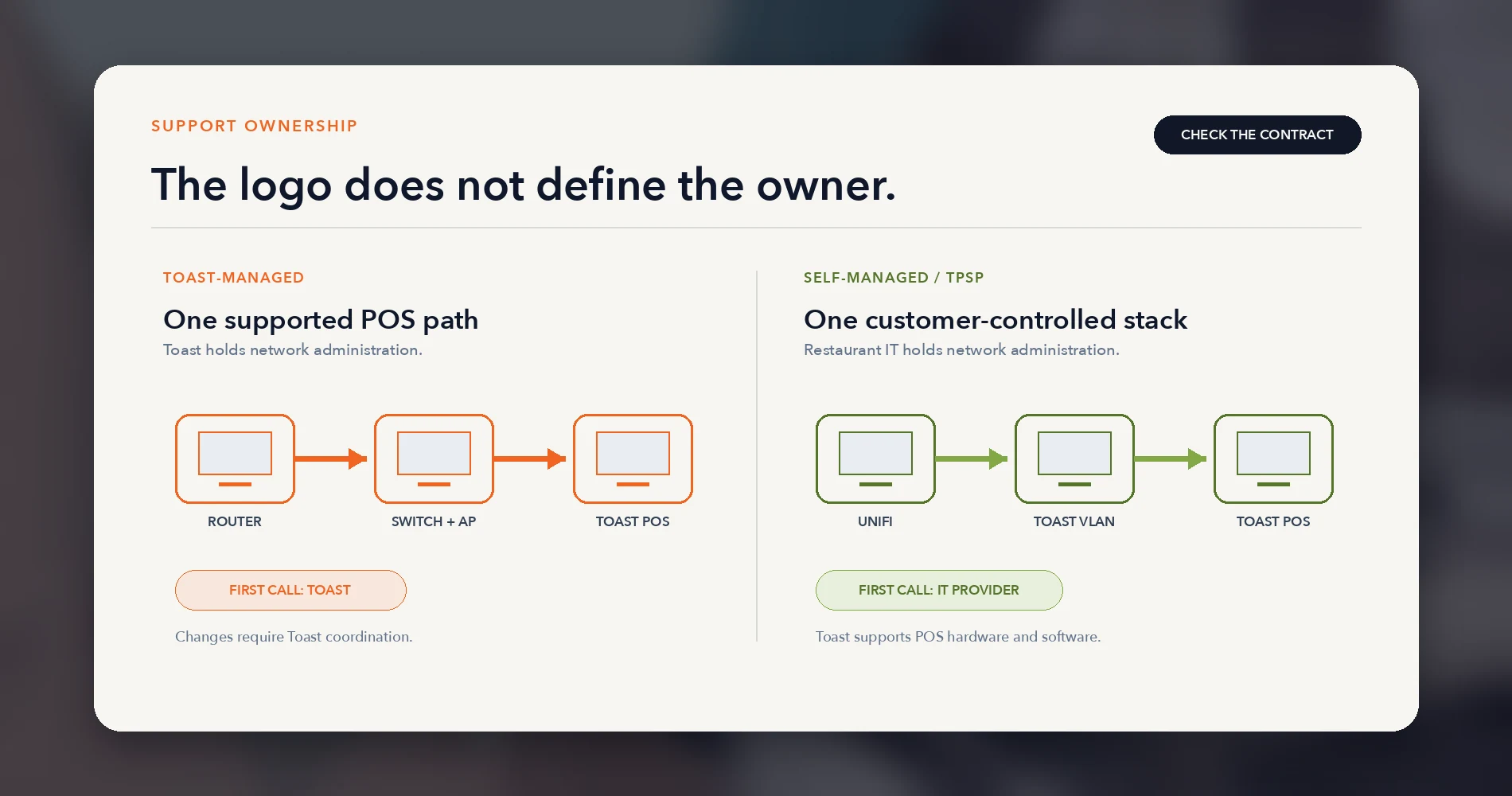
Toast-managed network. The restaurant purchased networking equipment from Toast, and Toast administers the configuration. Toast holds administrative control over the router, switches, and access points. If a terminal loses connectivity, the first call goes to Toast — and Toast can troubleshoot the full path from the router to the device.
Self-managed or TPSP network. The restaurant or a third-party service provider supplied the networking equipment. The restaurant's IT team or contractor holds administrative control. Toast supports the POS hardware and software, but the network layer belongs to whoever built it.
Three checks identify the model at any location:
- Who supplied the router and access points? If the restaurant purchased the networking equipment from Toast and Toast configured it, it is likely a managed deployment.
- Who has administrative access? If the restaurant or its IT provider cannot log into the router or AP controller, Toast probably administers it.
- Whose support agreement covers the network? The contract language — not the hardware brand — defines the support boundary.
Do Not Reconfigure a Toast-Managed Network Without Toast Approval
If the router, switch, or access points are part of a Toast-managed deployment, do not move, reconfigure, or place equipment ahead of them without coordinating with Toast first. Changes to a managed network can limit Toast's ability to troubleshoot connectivity problems until the supported configuration is restored, and may disrupt POS operations during service.
Once you know the model, the rest of this article applies differently. If you have a Toast-managed network, focus on the managed-vs-self-managed comparison, the fault tree, and the backup internet sections for operational context. If you manage Toast on your own network, every section applies — VLANs, RF coverage, cabling, and validation all sit on your side of the ownership line.
Why Toast May Install a Completely Separate Network
Walk into a restaurant with Toast and you may find two complete networks: the restaurant's business infrastructure and a separate Toast stack with its own router, switch, and access points. This is not duplication caused by a communication failure. It is how Toast's managed network model works.
Toast provides all necessary network infrastructure during a standard deployment. The managed stack creates a dedicated connectivity path for Toast terminals, handhelds, printers, and kitchen display systems. The exact hardware varies — a location may contain Cisco Meraki equipment, a Toast Router (Pronto), Toast-provided UniFi components, or mixed generations from different installation periods.
The operational logic is straightforward. When Toast administers the router, the switch, the APs, and the configuration, Toast can troubleshoot the entire path from the device to the internet without depending on a third party. The restaurant gets a single escalation point for POS connectivity, and Toast gets the administrative access it needs to diagnose problems remotely.
This model makes particular sense for restaurants that do not have a dedicated IT provider or whose IT support is not available during service hours. Restaurants need a support path that remains available when connectivity problems occur — not a voicemail box that returns calls on the next business day.
The trade-off is clear: the restaurant gains a simplified support path but loses direct control over POS network configuration, and it carries a second set of networking equipment alongside whatever infrastructure already serves the rest of the business.
Managed vs Self-Managed Is Really a Support Decision
The choice between a Toast-managed network and a self-managed design is not primarily a hardware debate. It is a support-ownership decision that determines who the restaurant calls first, who diagnoses the problem, and who carries responsibility when the answer is not immediately obvious.
| Factor | Toast-Managed | Self-Managed / TPSP |
|---|---|---|
| Administrative control | Toast holds credentials and configuration access | Restaurant or IT provider holds full control |
| First support call for connectivity | Toast for the Toast-administered network; ISP issues remain a separate fault domain | IT provider for network, Toast for POS software/hardware |
| Network troubleshooting responsibility | Toast owns router-to-device path | Restaurant/IT provider owns all network layers |
| Change flexibility | Changes require Toast coordination | Full control, but changes must stay within Toast's published requirements |
| Documentation burden | Toast maintains its managed stack | Restaurant/IT provider must document topology, VLANs, cabling, and device inventory |
| After-hours IT dependency | Toast support available per agreement | Depends on IT provider's coverage hours and response time |
| Failure handoff risk | Lower — Toast administers both the network and the POS, though ISP and upstream issues remain outside Toast's scope | Higher — fault may sit across vendor boundaries, requiring coordinated diagnosis |
Neither Model Is Universally Better
Choose Toast-managed when the restaurant values a single first call for POS connectivity problems and does not have responsive, after-hours IT coverage. The simplified support path is worth the reduced infrastructure control.
Consider self-managed when the restaurant has competent IT ownership, wants unified network visibility across all business systems, and accepts the coordination boundary with Toast during incidents. This model works only if the IT provider understands — and maintains — Toast's published network requirements.
The key risk is choosing self-managed without the IT support to back it. If the restaurant's IT provider cannot respond promptly when a terminal loses connectivity during service, the self-managed model leaves a gap that neither Toast nor the IT provider can close alone.
The Terminal-Offline Fault Tree
"The terminal is offline" is a symptom, not a diagnosis. The fault could sit in any of six domains, and the support owner is different at each branch. Understanding where to look first — and who to call — prevents the restaurant from bouncing between Toast and the IT provider during an active incident.
Branch 1: Power and physical connection. Is the device powered on? Is the Ethernet cable seated at both ends, or is the Wi-Fi radio active? Check the cable from the device to the wall jack and from the patch panel to the switch port. A loose RJ45 connector or a cable accidentally unplugged during cleaning is one of the most frequently overlooked causes.
- Support owner: On-site staff or IT provider.
Branch 2: Switch and Wi-Fi path. Is the switch port active? Is the correct VLAN assigned? For wireless devices, is the AP broadcasting the Toast SSID, and does the device show a connection? Check signal strength — Toast requires a minimum of -65 dBm in service areas.
- Support owner: IT provider (self-managed) or Toast (managed).
Branch 3: Addressing, DNS, and firewall. Does the device have a valid IP address? Can it reach the gateway? Are DNS servers responding? Has a firewall rule or content filter blocked Toast's required URLs and ports? ICMP echo replies must not be restricted.
- Support owner: IT provider (self-managed) or Toast (managed).
Branch 4: ISP and cloud connectivity. Is the internet connection active? Can the router reach external hosts? If the primary circuit is down, has failover engaged? Is there a Toast service disruption — check the status page before rebooting equipment.
- Support owner: ISP for the circuit, Toast for cloud services.
Branch 5: Terminal hardware and software. Is the Toast application responsive? Has the device been rebooted recently? Is the software version current? Hardware failures — cracked screens, battery drain, failed radios — present as connectivity problems but are device issues.
- Support owner: Toast.
Branch 6: Peripheral path. Printers and KDS devices that stop receiving tickets may have their own network path problem. A printer on a different VLAN than the terminals, or with client isolation enabled, will silently fail to receive print jobs. Bonjour, multicast, and UPnP must be enabled for local device communication. For KDS to function during Offline Mode, at least one hardwired non-Elo V1 Toast device must act as the local hub, and UPnP multicast must be enabled.
- Support owner: IT provider for network configuration, Toast for device pairing and software.
The practical lesson: start at the physical layer and work up. A cable, a port, or a power cycle resolves the problem more often than a firewall change or a cloud issue. And before spending time on hold, check the Toast status page to confirm the problem is local rather than a Toast service disruption.
What Toast Actually Requires on a Self-Managed Network
If the restaurant operates a self-managed or TPSP network, Toast publishes a list of requirements and preferences that the deployment should follow. Meeting them eases troubleshooting and keeps the deployment within Toast's supported configuration. These come directly from Toast's Network Requirements Overview, last updated July 2026. Toast describes these as a mixture of requirements and preferences — not every item is a contractual prerequisite, but deviating from any of them can complicate support. Where iFeelTech's operational preference differs from the published guidance, it is noted separately.
Last verified against Toast documentation: August 13, 2026.
| Requirement | Toast's Published Specification | Purpose |
|---|---|---|
| Bandwidth | Minimum 15 Mbps down / 5 Mbps up dedicated to Toast (lower minimums for smaller installations — see table below) | Ensures order flow, payment processing, and cloud sync are not starved by other traffic |
| Network separation | Physical segmentation preferred; dedicated VLAN permitted when physical separation is not practical | Prevents non-Toast traffic from interfering with POS operations |
| VLAN configuration | Dedicated VLAN for Toast, at least one physical Ethernet port mapped per IP device, ports labeled "FOR TOAST USE ONLY," no non-Toast devices on this VLAN | Isolates Toast traffic and simplifies troubleshooting |
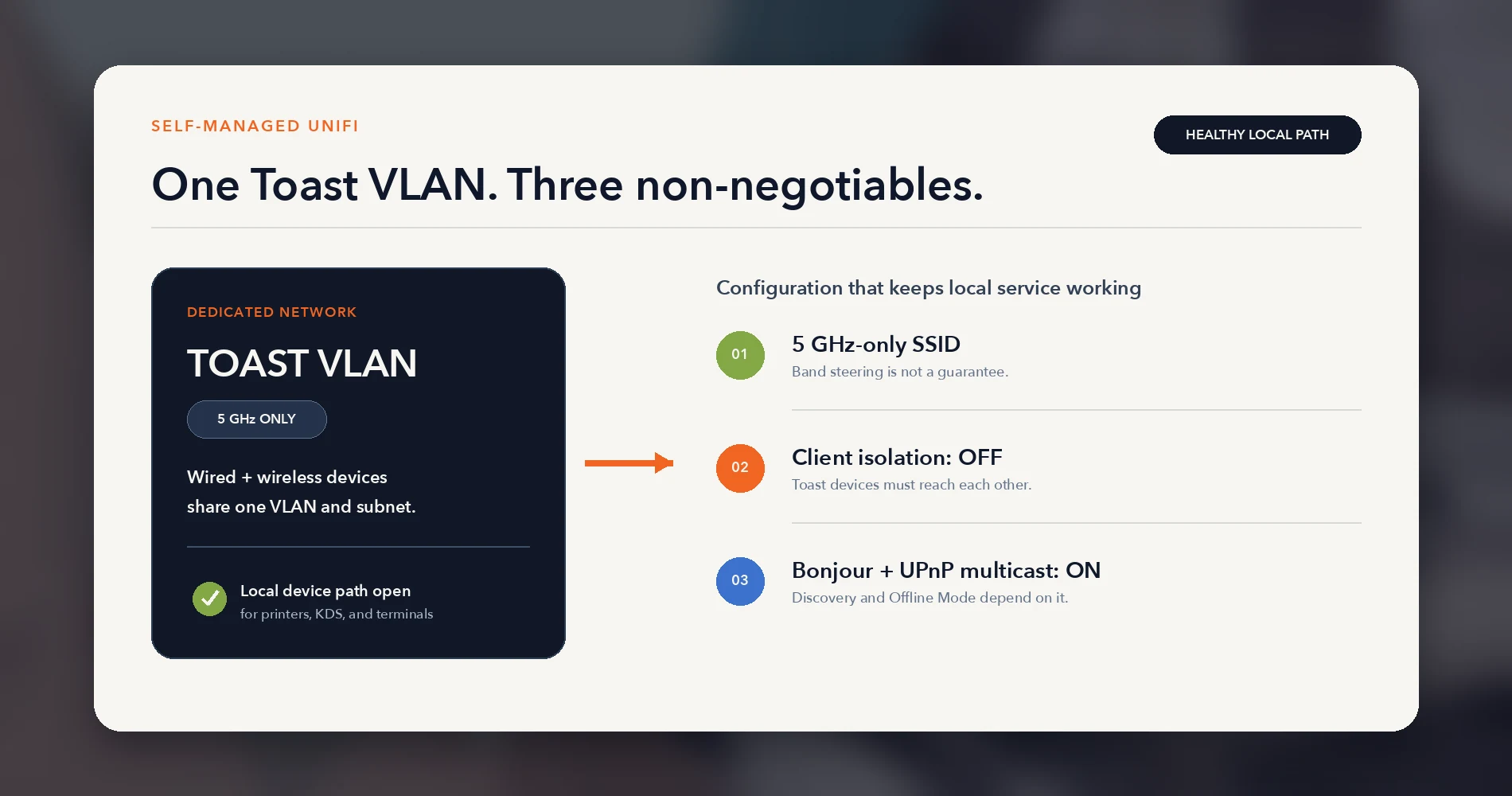
| Wireless band | 5 GHz only, least utilized channel, dedicated SSID for Toast on the same VLAN as wired Toast devices | Avoids 2.4 GHz interference from microwaves, Bluetooth, and consumer devices common in restaurants |
| Signal strength | Never below -65 dBm in service areas where handhelds access the network | Prevents order-sending delays, timing errors, and handheld sync failures |
| Encryption | WPA2/AES personal | Baseline wireless security |
| Client isolation | Must be disabled on the Toast SSID | Toast devices need to communicate with each other on the local network for printing, KDS, and local hub functions |
| Multicast / Bonjour / UPnP | Must be enabled (unicast, anycast, or multicast plus Bonjour); UPnP multicast required for Offline Mode KDS operation | Required for printer discovery, KDS routing, local device communication, and offline local sync |
| ICMP | Echo replies must not be restricted | Used for network health monitoring and Toast diagnostics |
| Cabling | Cat5e or higher, terminated to EIA/TIA 568B standard | Ensures reliable wired connections; improper termination causes intermittent failures that are difficult to diagnose |
| QoS | Router/firewall should prioritize Toast traffic | Prevents bandwidth contention during peak hours |
| Firewall | Unrestricted outbound traffic on the Toast VLAN preferred; otherwise, implement Toast's full Firewall Allowlist — it includes TCP 8080, 8443, 36868, 5671, UDP 3478, 5140, 5142, ICMP and many more destinations beyond ports 80/443 | Blocked outbound traffic causes payment failures and cloud sync errors; partial allowlists are a common cause of intermittent problems |
| IP scheme | Toast-managed networks use 192.168.192.0/24 with a gateway of 192.168.192.1; self-managed may use their own scheme | Printers ship with DHCP by default; a different scheme requires manual printer IP configuration |
Toast's bandwidth minimums by installation size:
| Installation Scale | Download | Upload |
|---|---|---|
| ~2 tablets, 1 KDS, ~250 orders/day | 3 Mbps | 1 Mbps |
| ~10 tablets, 2 KDS, ~1,000 orders/day | 7 Mbps | 1 Mbps |
| ~30 tablets, 4 KDS, ~2,000 orders/day | 15 Mbps | 5 Mbps |
iFeelTech's operational preference: Even for smaller installations, we recommend dedicating at least 15/5 Mbps to Toast. A restaurant that grows from two tablets to ten — which happens faster than most owners expect — should not need a network redesign to support the upgrade. Building in headroom from day one is cheaper than retrofitting under time pressure.
Where UniFi Fits — and Where It Does Not
UniFi hardware can appear in a Toast deployment in three very different configurations. Conflating them causes confusion about who controls what, so identify the pattern before making any changes.
Pattern A: Toast-Managed Stack Beside a Customer UniFi Network
The restaurant runs its business network on UniFi — gateway, switches, APs — and Toast installed a separate managed stack (Meraki, Pronto, or Toast-provided equipment) for POS devices. The two networks coexist physically but operate independently. The restaurant's IT provider manages the UniFi side. Toast manages the POS side.
This is a common pattern at locations where Toast deployed before the restaurant's IT provider built or upgraded the general network. It works. The trade-off is two parallel sets of equipment, two sets of documentation, and two support paths.
Pattern B: Approved Self-Managed Toast VLAN on Customer UniFi
The restaurant or its IT provider owns the entire network — UniFi gateway, switches, and APs — and has configured a dedicated Toast VLAN, SSID, and firewall rules that meet Toast's self-managed network requirements. Toast devices connect through the customer-controlled infrastructure. The IT provider owns the network; Toast supports the POS.
This pattern delivers unified visibility and a single equipment set, but moves full network responsibility to the restaurant's IT team. Every requirement in the table above must be met, maintained, and documented. If something breaks in the network layer during service, the IT provider — not Toast — is the first call.
Pattern C: Toast-Provided UniFi Components in a Managed Deployment
Toast has used UniFi access points and other Ubiquiti equipment in some managed deployments. The UniFi logo on the hardware does not mean the restaurant controls the configuration. If the equipment was purchased from Toast and Toast configured it, it remains part of the managed network regardless of the brand.
Check who holds administrative access to the UniFi controller — not who manufactured the hardware — to determine the actual deployment model.
A Toast-Managed Meraki Network Is Not a Migration Candidate
If the restaurant's Toast deployment uses Cisco Meraki equipment as part of a Toast-managed network, do not treat this as an opportunity to migrate to UniFi. That equipment is part of Toast's managed support path. Replacing it without Toast's involvement would remove Toast's ability to support the POS network. See the Meraki to UniFi Migration Guide for customer-owned Meraki networks — not Toast-managed ones.
For a deeper look at how UniFi fits into a complete business network architecture, see the UniFi Network Blueprint for Business. For restaurant-specific design covering non-Toast zones, security cameras, guest Wi-Fi, and full-site topology, see the Restaurant Network Blueprint.
The Three Self-Managed Settings Most Likely to Cause Trouble
In our restaurant-network work, three UniFi configuration choices are recurring causes of self-managed Toast connectivity problems. All three look harmless in the UI, and all three can silently break POS operations.
1. Band Steering Instead of a Dedicated 5 GHz SSID
Toast requires wireless Toast devices to operate on the 5 GHz band. The temptation is to create a single dual-band SSID and enable band steering to push devices toward 5 GHz. This is not what Toast requires.
Band steering is a suggestion, not a guarantee. A handheld that roams to the edge of 5 GHz coverage may fall back to 2.4 GHz — and on that band, it competes with microwaves, Bluetooth speakers, baby monitors from neighboring spaces, and every consumer device within range. The result is intermittent order delays that appear random because the frequency hop is invisible to the server carrying the handheld.
The fix: Create a dedicated 5 GHz-only SSID for Toast devices. In the UniFi Network application, set the WiFi Band to 5 GHz when creating or editing the wireless network. Assign this SSID to the Toast VLAN. Do not use band steering as a substitute.
2. Client Isolation Enabled on the Toast SSID
Client isolation prevents devices on the same SSID from communicating with each other. It is a standard security measure for guest Wi-Fi — and it will break Toast's local device communication.
Toast terminals, handhelds, printers, and KDS devices need to talk to each other on the local network. A handheld sends a print job to a kitchen printer over the LAN. A terminal acting as the local hub coordinates offline operations with other devices. Client isolation blocks all of this without an error message: the device appears connected, Wi-Fi signal is strong, and internet works — but print jobs do not reach the configured kitchen destination.
The fix: Disable client isolation on the Toast SSID and VLAN. In UniFi, this is the "Client Device Isolation" toggle under the wireless network's advanced settings. Guest isolation belongs on the guest network, not on the POS network.
For background on how VLANs separate traffic without client isolation, see VLANs Without the Jargon.
3. Multicast, Bonjour, and UPnP Not Properly Configured
Toast relies on several local network communication mechanisms, and each serves a different purpose:
- Bonjour (mDNS) enables device discovery — printers, KDS units, and terminals find each other on the local network through mDNS announcements.
- UPnP multicast is specifically required for Offline Mode with local sync. Toast's documentation states that Universal Plug-and-Play multicast traffic must be enabled on the network router for KDS devices to continue receiving tickets during an outage. This refers to LAN-side multicast communication between Toast devices — it does not mean enabling automatic WAN-facing UPnP port mapping, which is a separate router feature with its own security considerations.
- Same-subnet reachability is the foundation. All Toast devices — wired and wireless — must be on the same VLAN and subnet. At least one hardwired non-Elo V1 Toast device must be on the network to act as the local hub for offline communication.
If any of these are misconfigured, the symptoms vary. Blocked Bonjour may prevent printers from being discovered. Disabled UPnP multicast may allow normal online operation but cause KDS failures during an outage — a problem that only surfaces when the internet drops. And if the Toast SSID is on a different VLAN than wired Toast printers, print routing fails regardless of multicast settings — Toast's own documentation warns that the wireless SSID must belong to the same VLAN as the wired POS network.
The fix: Enable Bonjour (mDNS) and UPnP multicast on the Toast VLAN. In UniFi, verify that multicast DNS is allowed and that no firewall rules block multicast traffic within the VLAN. Note that UniFi's mDNS proxy is designed for forwarding discovery between VLANs — since Toast devices should all be on the same VLAN, the primary concern is ensuring mDNS and multicast work within that VLAN, not across VLANs. Disable client isolation on the Toast network (see above), and confirm that all Toast devices share the same VLAN and subnet.
RF Coverage: Design for the Handheld, Not the Empty Dining Room
Toast requires that wireless signal strength never drops below -65 dBm in any area where handhelds will access the network. Below that threshold, expect order-sending delays, handheld sync failures, and intermittent disconnections that are difficult to reproduce because they depend on the server's exact position.
The problem with designing for a minimum is that restaurants are not static environments. A dining room that measures -60 dBm at 10 AM with empty tables can drop below -65 dBm at 7 PM when:
- Human bodies absorb RF. A full dining room at capacity attenuates signal far more than an empty one. The walk test must account for peak occupancy, not just the installer's convenience.
- Stainless steel and commercial equipment reflect and block signal. The kitchen line, walk-in coolers, hood systems, and metal shelving create dead zones that do not appear on a coverage map drawn from the dining room.
- The host stand and expo window are transition zones. Handhelds roam between APs as servers move through the space. If coverage is marginal at the handoff point, the device drops and reconnects — causing a delay that the server may not notice until the order fails to send.
- Patios and outdoor seating extend the coverage requirement beyond the building envelope, where interior APs may not reach.
Access points must be installed in centrally located ceiling positions away from EMI sources — microwaves, speakers, refrigerator motors, and commercial kitchen equipment all generate interference that degrades 5 GHz signal.
iFeelTech's operational preference: Design for -55 dBm or better across all Toast service zones, not the -65 dBm floor. The 10 dB margin absorbs peak-hour attenuation, minor AP degradation, and the inevitable table that ends up directly behind a steel column that was not in the original floor plan. A real heatmap or walk-test measurement from each zone — not a predictive model — should validate coverage before going live.
Cabling and Documentation Are Recovery Controls
Every cable, outlet, patch-panel port, switch port, and connected device in a restaurant network should be labeled, documented, and traceable from end to end. This is not administrative overhead — it is the difference between a targeted 5-minute fix and a 45-minute diagnostic exercise while the restaurant is open.
This is a pattern we encounter regularly: a terminal or printer stops working, and the first question is "which cable feeds that device?" At documented sites, the technician checks the port map, finds the switch port, and either sees a link-down indicator or tests the cable. At undocumented sites, the technician traces cables through walls, under counters, and behind equipment — sometimes requiring production devices to be unplugged for identification. During service hours, that investigation may not be practical.
Minimum Labeling Standard
- Both ends of every cable run get a matching unique ID.
- Wall outlet and patch-panel port match the cable ID.
- Switch port recorded against the cable/drop ID.
- Device labels use plain-language names:
BAR-POS-01,KITCHEN-KDS-02,EXPO-PRINTER-01,PATIO-AP-01. - Ownership boundary clearly marked: Toast-managed versus restaurant/IT-managed equipment.
- ISP circuit, modem, UPS feeds, and uplinks identified and labeled.
Redacted Port-Map Example
| Cable ID | Outlet Location | Patch Panel Port | Switch / Port | VLAN | Device | Owner |
|---|---|---|---|---|---|---|
| DR-01 | Dining room, host stand | PP1-01 | SW1 / Port 1 | Toast POS | Host terminal | Toast-managed |
| DR-02 | Dining room, server station | PP1-02 | SW1 / Port 2 | Toast POS | POS terminal | Toast-managed |
| KIT-01 | Kitchen, expo window | PP1-03 | SW1 / Port 3 | Toast POS | KDS display | Toast-managed |
| KIT-02 | Kitchen, line | PP1-04 | SW1 / Port 4 | Toast POS | Kitchen printer | Toast-managed |
| BAR-01 | Bar, POS station | PP1-05 | SW1 / Port 5 | Toast POS | Bar terminal | Toast-managed |
| AP-01 | Dining room ceiling | PP1-09 | SW1 / Port 9 | Mgmt | UniFi AP | IT-managed |
| AP-02 | Kitchen/bar ceiling | PP1-10 | SW1 / Port 10 | Mgmt | UniFi AP | IT-managed |
| CAM-01 | Front entrance | PP1-11 | SW1 / Port 11 | Security | Camera | IT-managed |
| WAN-01 | IDF / rack | — | Router WAN | — | ISP modem uplink | ISP |
This kind of map — printed, laminated, and stored in the rack — saves more time in an outage than any single piece of networking equipment. For full guidance on structured cabling standards, see the Network Cabling Checklist and Business Network Wiring Installation Guide. For RJ45 termination and the T568B standard that Toast requires, see the RJ45 Wiring Diagram Guide.
Primary and Backup Internet Without Mixing Deployment Models
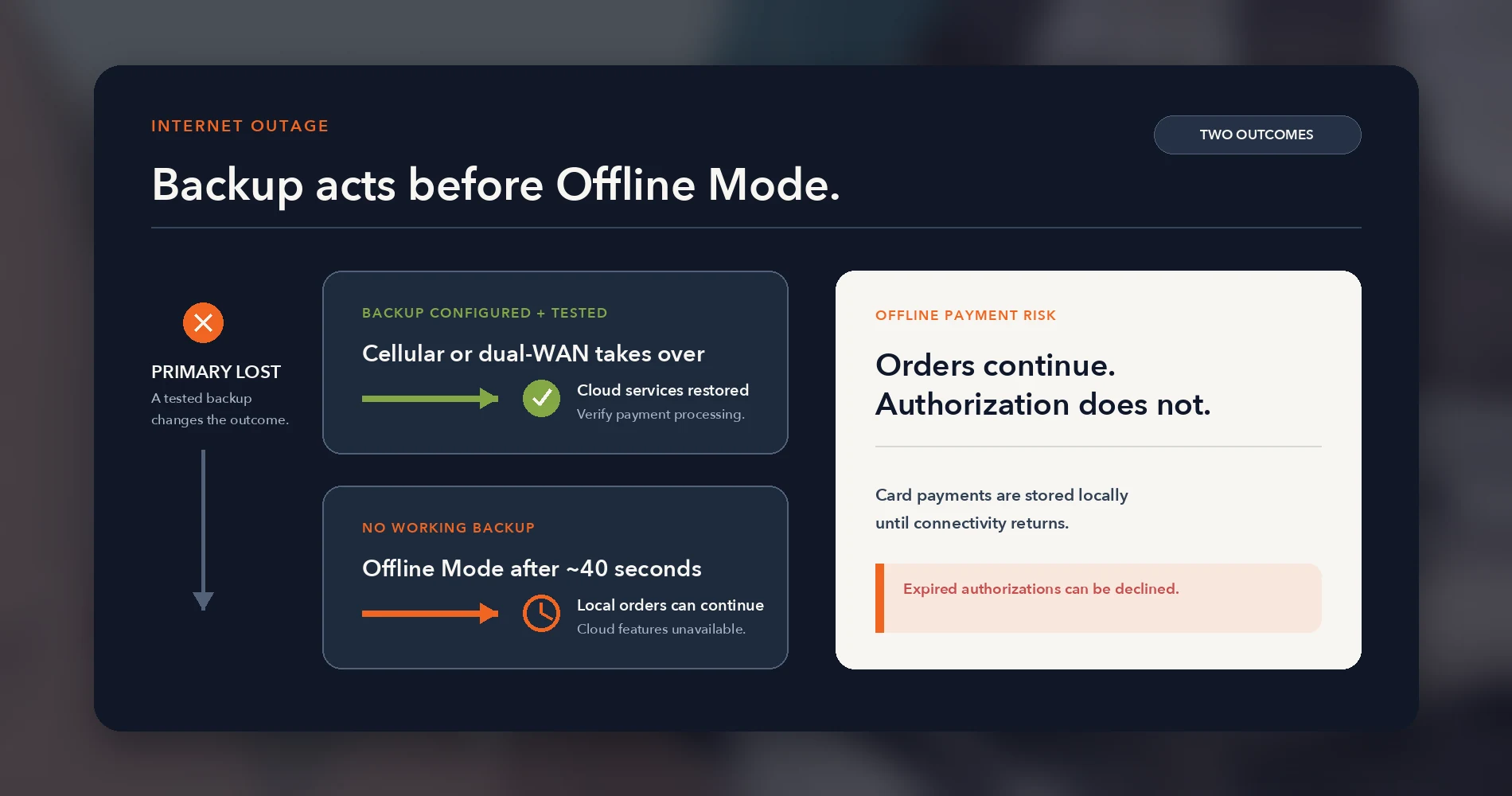
A restaurant that loses internet during service loses the ability to authorize card payments in real time, sync orders to the cloud, receive online orders, and operate cloud-dependent features. Toast devices enter Offline Mode automatically after approximately 40 seconds without a connection. The POS continues taking orders and processing card payments locally, and KDS devices can continue receiving tickets if UPnP multicast is enabled and a supported hardwired device is acting as the local hub. But Offline Mode does not eliminate the risk.
Card payments taken while offline cannot be authorized until connectivity returns. Toast warns that authorizations may expire — in some cases as early as 24 hours — and the payment can be declined after the fact. Toast's own documentation recommends considering a cellular backup connection specifically to help prevent declined payments from expired authorizations. External online orders and other cloud-dependent features are also unavailable during an outage.
How Backup Connectivity Works Across Deployment Models
Toast-managed with Toast Router (Pronto). The current Toast Router includes a SIM card slot and supports an optional cellular subscription purchased through the Toast Shop. When the wired internet connection drops, the router automatically switches to cellular within approximately 10 seconds. A blue indicator light confirms active cellular use. This is the simplest backup path for managed deployments because it stays within Toast's support boundary.
Toast-managed with older equipment. Locations with Meraki-era or earlier Toast-managed stacks may not have the same cellular backup capability. Do not assume that a managed deployment includes automatic failover — verify with Toast what backup options apply to the specific hardware generation at each location.
Self-managed network. The restaurant's IT provider designs and owns the backup path. Options include dual-WAN with a second ISP, a 5G cellular failover module, or a dual-WAN gateway configuration. The key design constraint: the backup connection must serve the Toast VLAN, and failover must be tested — not assumed — before relying on it during a real outage.
Regardless of the model, test failover regularly. A SIM that expired three months ago or a backup circuit that was never properly configured provides no protection during an actual outage.
For a deeper look at what business internet uptime commitments actually mean and how repair-time guarantees work, see the Business Internet SLA Guide.
Pre-Opening and Post-Change Validation
Every new Toast installation and every significant network change should end with a structured validation sequence before the restaurant opens for service. Running these checks during a quiet period avoids discovering problems under operational load.
Validation Sequence
-
Topology and ownership confirmation. Verify that the as-built documentation matches the physical installation. Confirm which equipment belongs to the Toast-managed stack (if applicable) and which belongs to the restaurant's network. Update the port map if anything changed during installation.
-
Wired link test. Confirm every wired Toast device — terminals, printers, KDS — has an active link on the correct switch port and VLAN. Check for link-speed mismatches and verify that each device receives a valid IP address via DHCP.
-
Handheld walk test. Carry a Toast handheld through every service zone: host stand, dining room (including corners and booths), bar, expo/pass, kitchen edge, patio, and back office. Verify that signal strength stays above -65 dBm (preferably -55 dBm) and that the device does not drop or roam excessively between APs.
-
Printer and KDS path test. Send a test order from each terminal and handheld to every configured printer and KDS. Confirm that kitchen tickets, bar tickets, and receipt printers all receive the correct output. This tests the Bonjour/multicast path, VLAN configuration, and print routing in one pass.
-
Reboot recovery. Power-cycle the router, switch, and one AP to confirm the network recovers from a power interruption without manual intervention. Important safeguards: perform this test only during a planned maintenance window, never during active service. Confirm that no payments are pending or in offline-authorization state before cycling power. If the deployment is Toast-managed, coordinate with Toast before power-cycling managed equipment. And never reboot equipment during an active Toast service disruption — Toast warns that restarting during an outage can cause printing failures and stranded payments.
-
Failover test (where supported). If the deployment includes a cellular backup or dual-WAN, disconnect the primary circuit and verify that failover engages, Toast remains operational, and payments process. Reconnect primary and confirm restoration.
-
Documented rollback. If any step fails, have a documented path back to the previous working state. For new installations, this may mean reverting to the Toast-managed stack if a self-managed design is not yet validated.
Record the results. The test record becomes part of the site's operational documentation and establishes a known-good baseline for future troubleshooting.
Which Network Model Fits This Restaurant?
This is a support decision disguised as a technology question. The right model depends on the restaurant's IT capabilities, risk tolerance, and operational priorities — not on a preference for one hardware brand over another.
The Decision Framework
Choose Toast-managed when the restaurant owner values a single first call for POS connectivity issues and does not have dependable, after-hours IT support. The managed model places network responsibility with the company that also owns the POS platform. The trade-off — less infrastructure control and a second physical network — is acceptable when the priority is operational simplicity and a clear support path.
Consider self-managed or TPSP when the restaurant has qualified IT ownership (in-house or contracted) that can respond during service hours, the owner wants unified visibility across all network systems, and the team accepts the coordination boundary with Toast during incidents. This model works only if the IT provider knows Toast's current requirements, maintains them, and documents the entire deployment.
In both cases: Final eligibility, equipment specifications, and design approval must be confirmed with Toast. This article explains the decision framework and the technical requirements — it does not replace Toast's own deployment guidance or support team.
The decision is also not permanent. A restaurant that starts with a managed network can transition to self-managed later as its IT capabilities mature, and a restaurant that struggles with self-managed support gaps can ask Toast about managed options. The ownership model should match the restaurant's current operational reality, not an aspirational infrastructure vision.
If You Have Not Chosen a POS Yet
If you are evaluating POS platforms for a new restaurant or a replacement, the network ownership model should be part of that evaluation — not an afterthought discovered during installation. Toast supports both managed and self-managed networks, offers integrated hardware and software, and processes payments on its own platform. That vertical integration simplifies the support path in ways that matter when connectivity fails during service.
Affiliate Disclosure: This article contains affiliate links. If you make a purchase through these links, we may earn a small commission at no extra cost to you. As an Amazon Associate, iFeelTech earns from qualifying purchases.
Related Resources
- Restaurant Network Blueprint — Full-site restaurant network design covering POS, KDS, guest Wi-Fi, cameras, and cabling in a single architecture.
- UniFi Network Blueprint for Business — The general architecture guide for designing a UniFi business network, including gateway selection and topology planning.
- VLANs Without the Jargon — Understand VLAN segmentation fundamentals before configuring a dedicated Toast POS VLAN.
- Network Visibility: The Definitive Guide to Managed Infrastructure — Why managed switch ports, device inventories, and ownership records speed fault isolation in multi-vendor environments.
- 5G Failover Setup Guide — Implement cellular backup on a self-managed UniFi network for POS continuity.
- Dual-WAN Business Network Guide — Design an independent backup internet path for restaurants that need more than cellular failover.
- RJ45 Wiring Diagram Guide — T568B termination standards, testing, and the cabling quality that Toast requires.
- Network Cabling Checklist — Labeling, testing, and handoff documentation for structured cabling projects.
- Business Network Wiring Installation Guide — Commercial installation, code compliance, and project timing for new construction and retrofit.
- Business Internet SLA Guide — Understand uptime commitments and repair-time guarantees for the circuits that keep your POS online.
- Meraki to UniFi Migration Guide — For customer-owned Meraki networks considering a transition to UniFi — not for Toast-managed Meraki deployments.
Frequently Asked Questions
Related Articles
More from Network Infrastructure

Restaurant Network Blueprint: POS, KDS, Guest Wi-Fi and Cameras Without the Chaos
Design a reliable restaurant network for POS, KDS, guest Wi-Fi, cameras and backup internet—with clear ownership, labeling and handoff.
25 min read
Homelab Network Cables: Cat6A, Cat8, DAC, or Fiber for Each Link
Which cable links your switch, NAS and APs? DAC, fiber, Cat6A and RJ45 SFP+ modules mapped to UniFi, Omada, Synology and UGREEN ports, with cost and power.
20 min read
Mesh Wi-Fi vs Access Points: Keep, Wire, or Upgrade?
Already have eero or Deco? Compare keeping it, adding Ethernet, using bridge/AP mode, or moving to UniFi or Omada—with practical small-business scenarios.
18 min read