

UniFi Network Blueprint for Business: 3 Scalable Solutions for 2026
Three UniFi network blueprints for 5-15, 15-40, and 40-75+ employees. WiFi 7 access points, 10GbE switching, and enterprise security without mandatory licensing fees.


Affiliate Disclosure: This article contains affiliate links. If you make a purchase through these links, we may earn a small commission at no extra cost to you. As an Amazon Associate, iFeelTech earns from qualifying purchases.
Key Takeaway
Three UniFi network blueprints for businesses at different stages: 5-15, 15-40, and 40-75+ employees. Each blueprint uses WiFi 7 technology, multi-gigabit switching, and enterprise security without mandatory licensing fees.
The UniFi ecosystem provides enterprise-grade network performance without the complexity or mandatory licensing fees of traditional business solutions. These three blueprints establish reliable, secure networks that scale with your company.
Quick Reference: Three Blueprints by Business Size
| Blueprint Tier | Best For | Gateway | Core Switch | WiFi Solution | Est. Cost |
|---|---|---|---|---|---|
| Small Office | 5-15 Employees Dental offices, law firms, retail | UCG-Ultra | Lite 8 PoE | U7 Pro / U7 Lite | $600-750 |
| Mid-Sized Business | 15-40 Employees Creative agencies, tech offices | UCG-Fiber | Pro XG 8 PoE | U7 Pro XG | $1,400-2,000 |
| Enterprise | 40-75+ Employees FinServ, healthcare, manufacturing | UDM Pro Max | Pro XG 24 PoE | U7 Pro XGS + E7 | $4,000-6,500 |
Understanding Modern Business Network Architecture
Professional business networks have three fundamental components, each serving a distinct purpose in creating a reliable and scalable infrastructure.
Core Network Components
Gateway (Security Appliance): The gateway serves as your network's control center, managing all traffic between your local network and the internet. Modern business-grade gateways integrate advanced firewall capabilities, intrusion detection systems, and threat management features. Processing power determines the gateway's capacity to handle traffic volume and security analysis without creating bottlenecks.
Managed Switches: Switches distribute network connectivity throughout your office, connecting computers, printers, servers, and network devices. Power over Ethernet (PoE) switches simplify installations by delivering data and electrical power through a single cable. This capability supports WiFi access points, VoIP phones, security cameras, and other powered devices without requiring separate electrical connections.
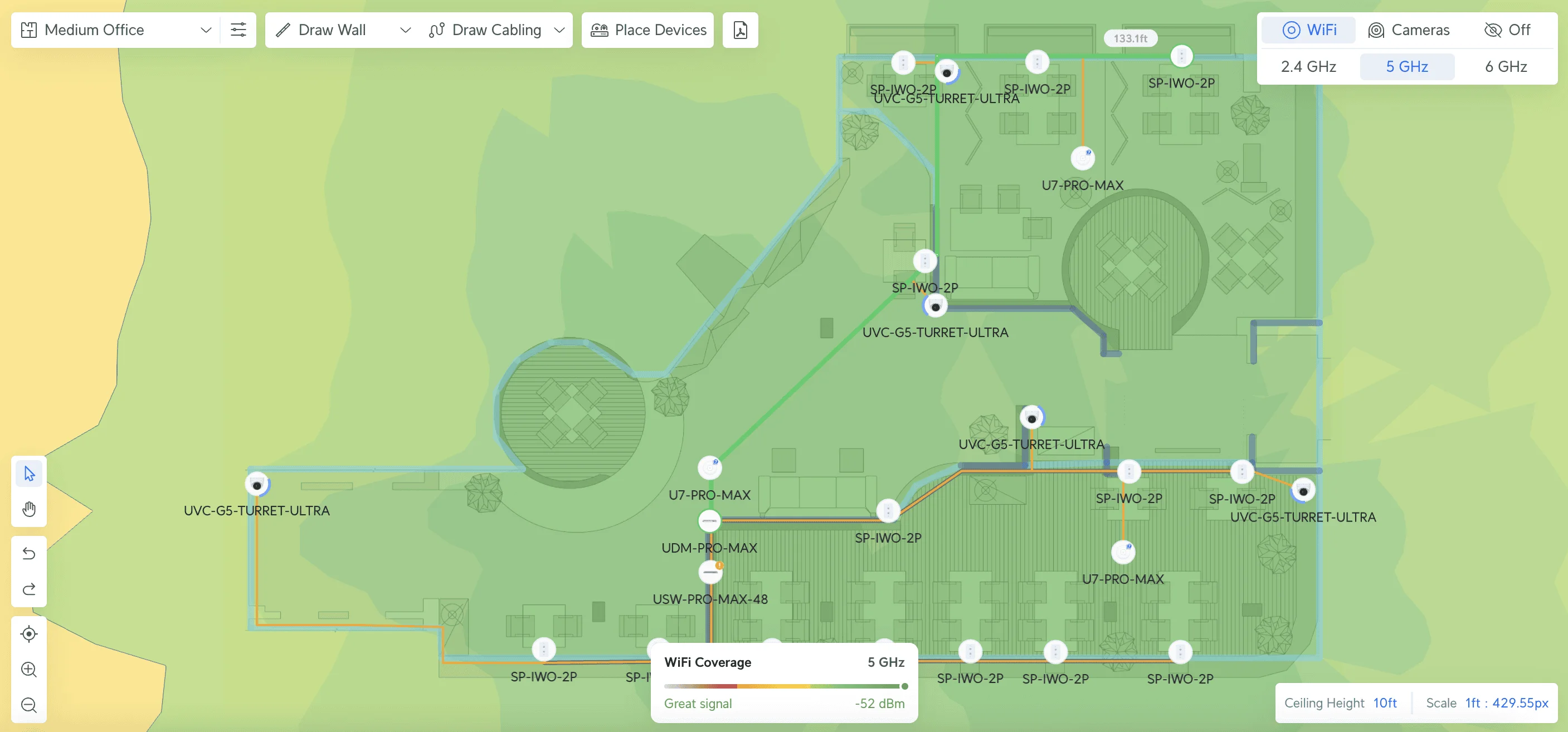
Access Points: Professional WiFi deployment uses multiple access points strategically positioned throughout your space to create seamless wireless coverage. This distributed approach eliminates dead zones and provides consistent performance across your entire office, something impossible to achieve with a single consumer router.
Why Modern Businesses Need Scalable Infrastructure
Modern business operations place significant demands on network infrastructure:
- Cloud-First Applications: Business software operates primarily through cloud platforms, requiring reliable, high-speed internet connectivity
- Device Proliferation: Each employee typically uses multiple connected devices. Conference rooms require smart displays, and offices integrate IoT devices
- Symmetrical Bandwidth: Video conferencing, cloud backups, and collaborative tools require substantial upload capacity
- Security Requirements: Cyber threats necessitate network security features that inspect and filter traffic without impacting performance
What is the best UniFi setup for a small office (5-15 users)?
For offices with under 15 employees, combine the UniFi Cloud Gateway Ultra with U7 Pro access points for a cost-effective network that supports 1 Gbps speeds without requiring a rack. Unlike older setups, these gateways eliminate the need for a separate Cloud Key or self-hosted server. Learn more about WiFi 7 access point options for your deployment.
Gateway: UniFi Cloud Gateway Ultra
UniFi Cloud Gateway Ultra ($129). Handles up to 1 Gbps IPS routing and manages 30+ UniFi devices. Its compact form factor eliminates the need for a dedicated server room.
Switch: UniFi Switch Lite 8 PoE
Switch Lite 8 PoE ($109). Provides 52W of total PoE budget, sufficient to power two access points and a few VoIP phones.
WiFi: 2x UniFi U7 Pro
2x U7 Pro ($189/ea). Deploys WiFi 7 with 6 spatial streams. Note: Ideally requires a 2.5GbE switch for full throughput, but works reliably on Gigabit for general office tasks.
Total Hardware Cost: ~$600–$700
Budget Alternative: U7 Lite
For tighter budgets, the UniFi U7 Lite ($99) provides WiFi 7 capabilities at a lower price point.
Small Office Blueprint Summary
- Total Investment: $600-750 (with U7 Lite: $500-650)
- Best for: Dental offices, law firms, retail stores, professional services
- Key Benefit: Professional networking with WiFi 7 without rack mounting
- Growth Path: Add switches and access points as team expands
- Important Note: The Cloud Gateway Ultra does not support UniFi Protect (cameras). For future surveillance needs, you'll need a Cloud Key, NVR, or upgrade to a gateway with Protect support.
High-Performance 10GbE Network for Creative & Tech Offices (15-40 Users)
Mid-sized businesses requiring high-bandwidth internal transfers should utilize the UniFi Cloud Gateway Fiber paired with Pro XG switching to achieve end-to-end 10 Gbps performance. For detailed guidance on 10GbE networking, see our 10 Gigabit Ethernet guide.
Gateway: UniFi Cloud Gateway Fiber
Cloud Gateway Fiber ($279). Delivers 10 Gbps routing and 5 Gbps threat management (IDS/IPS). Includes 2x SFP+ ports for fiber uplinks, essential for video editing or large file transfers. Pair with 10G SFP+ modules for fiber connectivity. See our fiber cable and SFP selection guide for detailed specifications.
Core Switch: UniFi Switch Pro XG 8 PoE
Pro XG 8 PoE ($499). A fanless, 10GbE switch with a 155W PoE budget. Ventilation Note: This unit runs warm; ensure at least 2 inches of clearance on all sides. PoE Load: Monitor total PoE draw if deploying 5+ access points on this switch—you'll be near the 155W limit.
WiFi: 3-5x UniFi U7 Pro XG
3-5x U7 Pro XG ($199/ea). The fanless design and 10GbE uplink ensure wireless users can access local servers at near-wired speeds.
High-Density Option: U7 Pro XGS
For offices with 30+ concurrent WiFi users, the U7 Pro XGS ($299) adds dedicated spectral scanning for real-time interference management.
Mid-Sized Business Blueprint Summary
- Total Investment: $1,400-2,000
- Best for: Creative agencies, tech companies, video production, architecture firms
- Key Benefit: 10GbE performance for high-bandwidth internal transfers
- Growth Path: Add Pro XG switches and access points as needed
Power Budgeting for WiFi 7
The U7 Pro XG and U7 Pro XGS are power-hungry devices. Calculate your total PoE++ draw before deployment to avoid overloading the switch. The Pro XG 8 PoE provides 155W total budget—each U7 Pro XGS can draw up to 25W under full load. Plan accordingly to prevent power-related failures. Learn more about Power over Ethernet planning.
UPS Protection: Protect your network investment with a quality UPS. For small offices, the APC UPS 1500VA provides adequate runtime. Enterprise deployments should consider the APC Smart-UPS 2200VA for rack-mounted equipment.
Enterprise Architecture for High-Density Environments (40+ Users)
For organizations with over 40 employees or strict uptime requirements, deploy the Dream Machine Pro Max with U7 Pro XGS access points to enable dual-WAN failover and real-time spectrum analysis. Read our UDM Pro Max review for detailed performance analysis.
Gateway: UniFi Dream Machine Pro Max
UDM Pro Max ($599). Rack-mountable gateway with dual-WAN load balancing (protects against internet outages) and NVR capacity for 50+ cameras. For additional storage needs, consider the UniFi NAS Pro or a Synology DS925+ for file sharing and backups.
Core Switch: Pro XG 24 PoE or Pro Max 48 PoE
For maximum performance, the Pro XG 24 PoE ($1,799) provides 24 ports of 10GbE connectivity with PoE+++ (up to 90W per port). For larger deployments, the Pro Max 48 PoE offers 48 ports with 16 x 2.5GbE ports and a 720W PoE budget.
WiFi Strategy: Mixed High-Performance Deployment
Deploy U7 Pro XGS ($299/ea) in conference rooms. The dedicated spectral scanning radio actively avoids interference in crowded wireless environments. Cabling Requirement: The U7 Pro XGS requires Cat6A cabling to utilize its full 10GbE uplink potential.
Security Add-On: CyberSecure for Compliance
CyberSecure ($99/yr). Adds real-time threat signature updates (55,000+ signatures). For FinServ/Healthcare clients, this is a compliance necessity, not just an optional add-on.
Enterprise Blueprint Summary
- Total Investment: $4,000-6,500
- Best for: Financial services, healthcare, software development, manufacturing
- Key Benefit: Dual-WAN failover and enterprise-grade resilience
- Growth Path: Unlimited expansion with comprehensive UniFi ecosystem
Advanced Features and Network Management
UniFi Network Software Features
The UniFi Network software provides centralized management:
- Object Networking: Apply network rules to users, devices, or groups rather than complex IP-based configurations
- Zone-Based Firewall: Intuitive firewall configuration with enterprise-grade capabilities
- Traffic Analytics: Real-time visibility into network performance and application usage
- WiFi 7 Optimization: Improved handling of legacy devices and IoT performance
CyberSecure: Threat Protection
Security Enhancement
CyberSecure provides advanced threat detection with 55,000+ signatures updated in real-time. Pricing: $99 annually. Required for compliance-heavy industries (FinServ, Healthcare).
Total Cost of Ownership Analysis
UniFi's cost advantage becomes more pronounced over time due to its lack of mandatory licensing fees for core functionality.
3-Year TCO Comparison (Mid-Sized Business Blueprint – 2026)
| Solution | Initial Hardware | Annual Licensing | 3-Year Total |
|---|---|---|---|
| UniFi Pro XG Solution | $1,700 | $99 (CyberSecure only) | $1,997 |
| Traditional Enterprise 10GbE | $3,000 | $1,800 | $8,400 |
The UniFi Pro XG lineup delivers enterprise-grade 10GbE performance at a fraction of traditional enterprise costs while eliminating ongoing licensing requirements.
Get a Custom Network QuoteInfrastructure Planning: Cabling and Future-Proofing
Physical infrastructure represents the most disruptive aspect of network upgrades. Proper planning ensures your cabling supports current needs and future technology adoptions.
Recommended Cabling Standards
- New Installations: Category 6A (Cat6A) cabling is mandatory to achieve the advertised 10GbE speeds over full 100-meter distances
- Retrofit Projects: Category 6 acceptable for most current applications, with upgrade path planning
- Critical Warning: Users upgrading old offices with Cat5e cabling will bottleneck expensive 10GbE gear. Budget for cabling upgrades when deploying Pro XG equipment.
- PoE Considerations: Plan cable runs for all potential access point locations, cameras, and powered devices
- Redundancy: Install spare conduit runs for future expansion without wall disruption
- Tools: Professional installation requires proper crimping tools and cable testers for certification
Professional cabling installation ensures optimal performance and provides warranty protection for your infrastructure investment. Our network cabling services include comprehensive planning, installation, and certification.
Request Cabling AssessmentAdvanced Integration Opportunities
UniFi's ecosystem approach enables seamless integration of additional business applications:
UniFi Protect: Professional Surveillance
Integrate security cameras directly into your network infrastructure without separate NVR hardware or cloud subscriptions. The UniFi Protect cameras with AI-enabled capabilities provide advanced analytics and smart detection. See our UniFi Protect CCTV guide for complete deployment planning.
UniFi Access: Door and Gate Control
Implement professional access control systems using the same network infrastructure and management interface. Perfect for businesses requiring secure entry management and visitor tracking. See our full UniFi Access review for hardware costs, setup guidance, and a direct comparison with ButterflyMX and ADT. For comprehensive security planning, review our security by design guide.
Network Segmentation and VLANs
Create separate network segments for different purposes:
- Employee Network: Secure access to business systems and the internet
- Guest Network: Isolated internet access for visitors
- IoT Network: Separate segment for smart devices and sensors
- Management Network: Dedicated access for IT infrastructure
Our VLANs explained guide covers which segments most small businesses need and what belongs in each one. Restaurants and hospitality environments need additional segmentation for POS, kitchen displays, and vendor-managed equipment — our restaurant network blueprint covers that vertical-specific design. For businesses requiring additional switching capacity, explore the complete UniFi switch lineup including options for every deployment size.
Get Professional Network AssessmentFrequently Asked Questions
Is UniFi appropriate for businesses without dedicated IT staff?
Yes, the UniFi Network application provides an intuitive dashboard for managing all devices from a single interface. While initial configuration requires technical knowledge, daily operations are straightforward. Many businesses work with managed IT service providers for setup and ongoing maintenance, ensuring professional configuration while retaining simplified management.
Should I invest in WiFi 7 access points in 2026?
WiFi 7 deployment is recommended for any new installation. Benefits include improved network efficiency, reduced latency, and better handling of high-device-density environments. The U7 Pro XG and XGS models offer 10GbE uplinks and fanless operation for businesses planning for the next 3-5 years of growth. Compare WiFi 7 business implementations to understand deployment strategies.
Should I upgrade from existing U7 Pro or U7 Pro Max access points?
If you already have U7 Pro or U7 Pro Max access points, upgrading to the Pro XG models is not immediately necessary unless you're experiencing performance bottlenecks or need 10GbE infrastructure. The primary benefits of upgrading are fanless operation (quieter), 10GbE uplink capability, and enhanced thermal management. If you're pursuing maximum performance, focus first on upgrading your switching infrastructure to 10GbE. Review our UniFi installation challenges guide for upgrade planning.
How do I choose between U7 Pro, U7 Pro XG, and U7 Pro XGS models?
The choice depends on your infrastructure and performance requirements: U7 Pro ($189) works with standard Gigabit PoE+ switches and delivers WiFi 7 performance for most businesses. U7 Pro XG ($199) requires 10GbE infrastructure but provides fanless operation and higher performance. U7 Pro XGS ($299) adds dedicated spectral scanning for environments with significant wireless interference or high device density (50+ concurrent users). Read our detailed U7 Lite vs U7 Pro comparison for more guidance.
What ongoing maintenance does a UniFi network require?
Maintenance primarily involves applying periodic firmware updates to gateways, switches, and access points. The UniFi Network Controller manages these updates centrally, often automating the process. Updates provide new features, security patches, and performance improvements. Most businesses schedule updates quarterly during maintenance windows. For a look at what actually goes wrong (and how rarely), see our incident post-mortems from our fleet covering 538 devices over 48 months.
Can I manage multiple office locations with UniFi?
UniFi Site Manager enables centralized management of multiple locations from a single cloud-hosted dashboard. Without additional licensing costs, you can monitor all sites, apply consistent policies, and troubleshoot issues remotely. This capability is particularly valuable for businesses with multiple offices or remote locations. Learn more about cloud-managed networks for multi-site deployments.
How does UniFi pricing compare to enterprise solutions?
UniFi typically costs 40-60% less than comparable enterprise solutions over a 3-year period, primarily due to the absence of mandatory licensing fees for core functionality. UniFi provides professional capabilities suitable for most small to medium business requirements without the associated complexity and costs.
Implementation Strategy and Next Steps
Investing in scalable network infrastructure represents one of the most practical decisions for growing businesses. Proper planning ensures your network supports current operations while providing clear upgrade paths for future expansion.
Professional vs. DIY Implementation
While technically inclined individuals can implement the small office blueprint independently, professional installation ensures optimal configuration. Benefits include:
- Site assessment and optimal equipment placement
- Professional cable management and documentation
- Security configuration and network optimization
- Staff training on network management
- Ongoing support and maintenance planning
Professional implementation is recommended for businesses requiring the mid-sized or enterprise blueprints due to the complexity of 10GbE networking.
Phased Implementation Approach
Large deployments can be implemented in phases to manage budget and minimize disruption:
- Phase 1: Core infrastructure (gateway and primary switch)
- Phase 2: WiFi access point deployment
- Phase 3: Advanced features (cameras, access control)
- Phase 4: Additional sites or expansion
Ready to Build Your Network?
Our team specializes in UniFi technology, including U7 Pro XG/XGS access points and Pro XG switch lineup. We provide assessments, professional installation of WiFi 7 infrastructure, and ongoing support.
Services include network planning with 10GbE considerations, equipment procurement, professional installation, staff training, and managed IT support.
Contact our team for professional UniFi implementation tailored to your specific needs.
Related Resources
- UniFi 2025 Updates: WiFi 7 & Object Networking – Latest features
- UniFi Dream Machine Pro Max Review – Gateway deep dive
- UniFi Gateway Comparison Guide – Compare all gateways
- Best WiFi 7 Access Points for Small Business – AP selection guide
- UniFi Network Design Guide – Architecture planning
- Cat6 vs Fiber for Business – Cabling decisions
- Network Cabling Services – Professional installation
- UniFi Networks Services – Expert deployment
Related Articles
More from UniFi Networks
UniFi Office Network Design Guide (2026): WiFi 7 & Cabling
Step-by-step UniFi network design for a 2,500 sq ft office: WiFi 7 AP placement, Cat6A cabling, equipment selection, VLAN security, and design outputs from a Brickell case study.
17 min read
UniFi 2025 Review and 2026 Midyear Update: Wi-Fi 7, Object Networking, and Multi-Gig Planning for Small Businesses
What mattered in UniFi's 2025 overhaul and what changed in the first half of 2026. Covers Network 9.4 Object Networking, Network 10.5, Wi-Fi 7 hardware, corrected Pro XG switch pricing, and upgrade guidance for small businesses.
19 min read
UniFi Network Solutions: 2026 Tech Overview
A comprehensive technical analysis of Ubiquiti's UniFi ecosystem for business networking and security. Covers gateways, WiFi 7 access points, CyberSecure, and real-world deployment experience.
13 min read