

Complete UniFi Protect AI Security System for About $2000: Professional-Grade Surveillance for Small Business
Build a professional AI-powered security system with UniFi Protect for about $2,000. Complete guide to the UDM Pro SE, G6 Bullet cameras, and 8TB storage configuration, with current Ubiquiti prices.

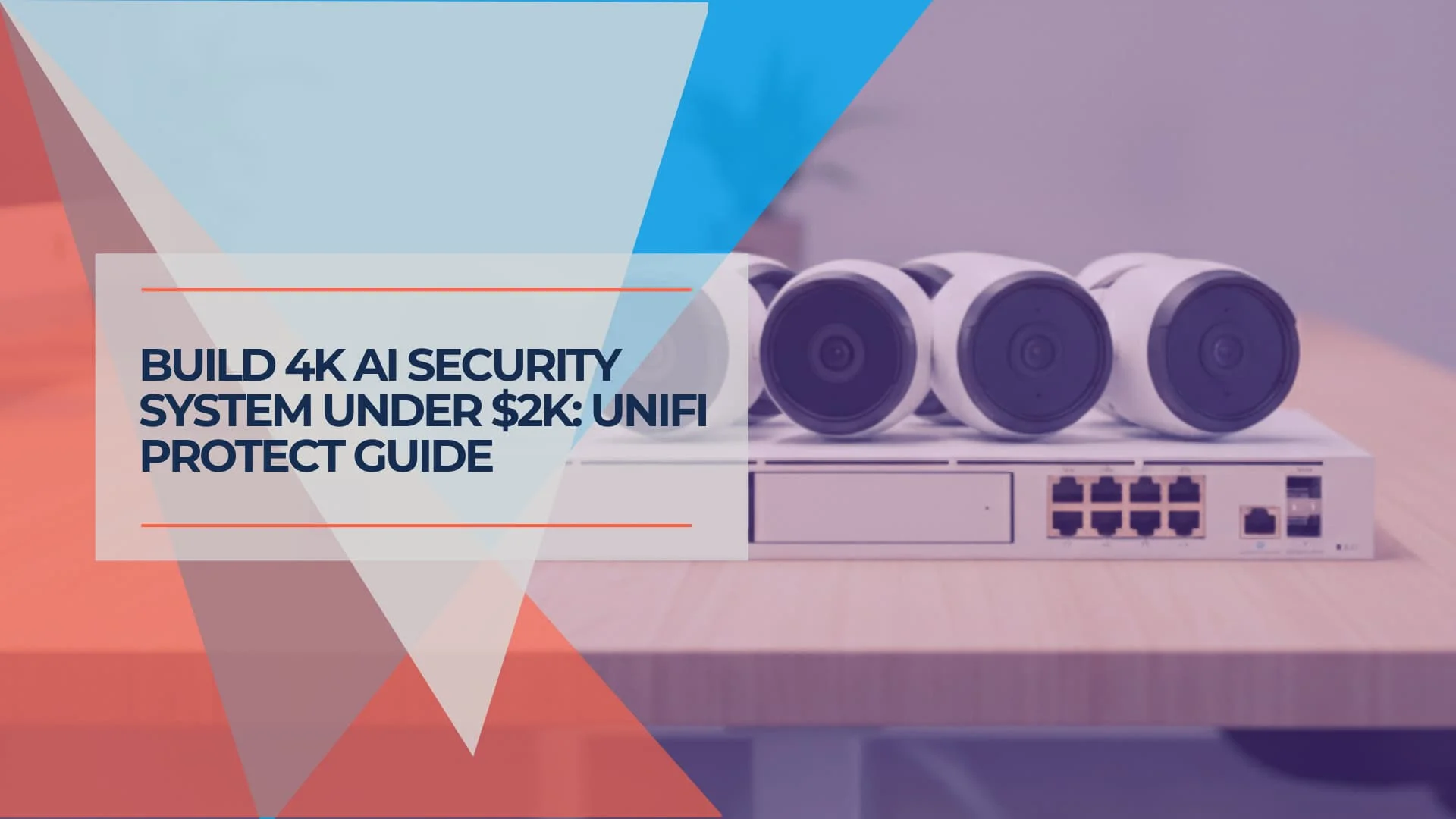
What Does a UniFi Protect System Cost for About $2,000?
A practical UniFi Protect configuration for small businesses with a budget of about $2,000 combines the UDM Pro SE gateway with six G6 Bullet cameras and 8TB of storage.
At Ubiquiti's US store list prices on November 13, 2026, this configuration totals $2,072 ($2,326 with the surcharges the store adds to the gateway and cameras). It was $1,942 when the 8TB drive cost $249; the drive is now $379, which moves the six-camera build just over $2,000. With five cameras the same build totals $1,873 at list prices ($2,093 with surcharges). The configuration provides 4K surveillance without Protect licensing fees. The UDM Pro SE's integrated 8-port PoE switch powers the AI-enabled G6 Bullet cameras, creating a security and networking foundation that can scale as your business grows.
- Gateway: UniFi Dream Machine Pro SE ($499; $549 with surcharge)
- Cameras: 6× UniFi G6 Bullet Camera ($1,194; $1,398 with surcharges)
- Storage: Enterprise 8TB HDD ($379; listed with "No restock date yet" on November 13, 2026)
- Total: $2,072 at list prices
Affiliate Disclosure: This article contains affiliate links. If you make a purchase through these links, we may earn a small commission at no extra cost to you. As an Amazon Associate, iFeelTech earns from qualifying purchases.
Complete System Overview
Total Equipment Cost: $2,072 at Ubiquiti US list prices (November 13, 2026)
- Gateway: UDM Pro SE with 8 PoE ports (PoE 15.4 W / PoE+ 30 W per port, 180 W budget) – $499
- Storage: Enterprise 8TB HDD – $379
- Cameras: 6× UniFi G6 Bullet with AI detection – $1,194
- AI Features: On-camera detection of people, vehicles and animals, smart notifications
- Recording: Roughly 11-14 days continuous for six cameras on 8TB (estimate, see below)
- Scalability: Ready for network and WiFi expansion
Quick Reference: System Components & Costs
| Component | Quantity | Unit Price | Total |
|---|---|---|---|
| UniFi Dream Machine Pro SE | 1 | $499 | $499 |
| Enterprise 8TB HDD | 1 | $379 | $379 |
| UniFi G6 Bullet Camera | 6 | $199 | $1,194 |
| Total Equipment Cost (list prices) | $2,072 |
Ubiquiti US store, November 13, 2026. With the store's surcharges the gateway is $549 and each camera $233, for a total of $2,326. HDD pricing "may change frequently" according to Ubiquiti.
Key Implementation Advantages
- All cameras powered directly from UDM Pro SE (no additional switches needed)
- Single management interface for the entire security system
- Built-in network infrastructure ready for business expansion
- No ongoing licensing or subscription fees
- Local AI processing for privacy and reliability
Important: Cable Cost Not Included
This equipment cost does not include network cabling. As a planning estimate, a 6-camera installation may need roughly 600-1000 feet of Cat6 cable, plus connectors and installation labor. Cabling materials and professional installation costs vary by site, so get a quote for your building.
Why Choose UniFi Protect Over Traditional Systems?
UniFi Protect consolidates multiple components into an integrated solution. Traditional enterprise security systems require separate NVRs, PoE switches, and often subscription-based AI analytics.
This configuration uses two device types:
- UDM Pro SE: Combines router, PoE switch, and NVR functionality
- G6 Bullet cameras: Include an onboard AI engine (no cloud subscription required)
The integrated approach provides local AI processing for privacy and reliability, plus a unified management interface that simplifies troubleshooting and maintenance.
For businesses evaluating different security camera platforms, our UniFi Protect vs Synology Surveillance Station comparison provides detailed analysis of two leading local-storage solutions.
Why Use the UDM Pro SE for Camera Management?
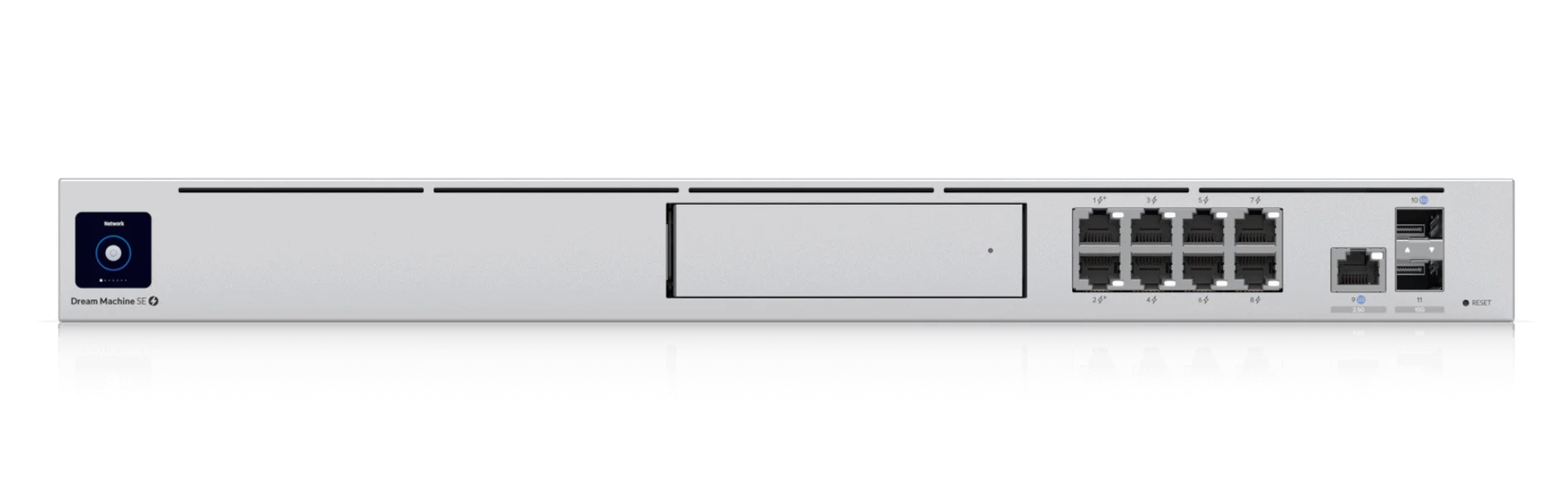
The UDM Pro SE is a practical gateway for this setup because it consolidates an NVR, 8-port PoE switch, and security router into a single $499 device ($549 with the store's surcharge).
By integrating the Network Video Recorder (NVR) and Power over Ethernet (PoE) switch, the UDM Pro SE avoids buying those components separately. Its 128GB integrated SSD supports the OS and applications, while the 3.5" drive bay handles video storage. With 180W of total PoE budget, it can power six G6 Bullets (9.9 W maximum each, about 59 W total), leaving room for future access points or cameras.
Technical Specifications
- PoE Budget: 180W total across 8 ports (up to 15.4W per port on PoE, 30W on PoE+)
- Camera Capacity: Ubiquiti lists managed cameras as 24 HD, 14 2K, or 8 4K (the 4K G6 Bullet counts toward the 8)
- Storage: One 3.5" SATA drive bay (Ubiquiti sells 8TB, 16TB and 24TB Enterprise drives)
- Processor: Quad-core ARM Cortex-A57 at 1.7 GHz with 4GB RAM
- Network: 8x 1GbE RJ45 ports (PoE), 1x 2.5GbE RJ45 and 2x 10G SFP+ ports; default WAN ports are one 10G SFP+ and one 2.5GbE
Key Benefits
The UDM Pro SE's integration eliminates the need for separate devices:
- No separate NVR: UniFi Protect runs directly on the device (for setups that need a dedicated NVR, see our UNVR vs UNVR Pro comparison)
- No separate PoE switch: Built-in 8-port PoE switch powers all cameras
- No separate router: Enterprise-grade routing and firewall included
- Unified management: Single interface for network and security
This consolidation simplifies troubleshooting, reduces potential failure points, and provides a foundation for expanding your network with additional UniFi access points, switches, or cameras as your business grows. For comprehensive guidance on UniFi network design, see our UniFi network design guide.
UniFi G6 Bullet Cameras: AI-Powered Surveillance
The UniFi G6 Bullet camera delivers 4K resolution at 30fps with AI analytics processing performed locally on the device.
AI Detection Capabilities
The G6 Bullet includes an onboard Multi-TOPS AI engine that performs analysis on the camera without cloud connectivity or subscription services. Ubiquiti lists smart detections for people, vehicles and animals, and the product page also lists face recognition and license plate recognition. AI capabilities in Protect include:
- Person, vehicle and animal detection to filter out routine motion
- Smart motion zones that ignore irrelevant movement
- Customizable detection sensitivity for different environments
Local AI processing provides:
- Privacy through local processing
- No ongoing subscription costs for detection
- Detection and recording that do not depend on internet connectivity
UniFi Protect Generation 6 Cameras - G6 Bullet, G6 Turret, G6 Instant
Image Quality and Performance
The camera uses a 1/1.8" 8MP sensor that captures 4K (3840 × 2160) footage. The fixed focal length lens provides a 109.9° horizontal field of view (134.1° diagonal), making it well-suited for wide coverage of parking lots, entryways, and building perimeters. The integrated IR illuminators provide night vision up to 30 m (98 feet).
Weather resistance meets IP66 standards for outdoor operation, protecting against heavy rain and water jets, and the camera is rated IK04 for tamper resistance. Ubiquiti lists an operating temperature range of -20 to 50°C (-4 to 122°F).
Note: For applications requiring an adjustable field of view or longer range, consider the G6 Pro Bullet (2.36x optical zoom, 40 m IR), which costs $479 ($561 with surcharge). Ubiquiti sells a separate AI LPR camera for license plate recognition.
Network and Power Efficiency
Each G6 Bullet draws a maximum of 9.9W over PoE, well within the UDM Pro SE's power budget. The G6 Bullet's network port is 10/100 Mbps Ethernet.
The cameras support multiple streaming profiles simultaneously, allowing high-resolution recording while providing lower-bandwidth streams for remote viewing and mobile applications. This flexibility maintains performance across different access scenarios.
G6 vs G5 Camera Comparison
The G6 Bullet is the entry 4K bullet camera in UniFi's current lineup (Ubiquiti US store list prices, November 13, 2026):
| Model | Resolution | Price | AI Features | Lens Type | Value Assessment |
|---|---|---|---|---|---|
| G5 Bullet | 2K HD | From $129 | AI detections | Fixed | Good budget option |
| G6 Bullet | 4K (3840×2160) | $199 | People/vehicle/animal detections | Fixed focal length | Entry 4K bullet |
| G6 Pro Bullet | 4K | $479 | Enhanced AI | 2.36x optical zoom | Premium features |
| G5 Pro | 4K | $379 list (Black Friday offer $199 through Nov 30) | AI detections | 3x optical zoom | Previous-generation premium |
The G6 Bullet provides 4K resolution at about half the $379 list price of the G5 Pro, making it a practical choice for this budget-conscious configuration. The $70 premium over the G5 Bullet's $129 starting price delivers 4K instead of 2K resolution.
For a detailed comparison of G6 models, see our G6 Bullet vs Pro Bullet comparison.
How Many Days of Footage Can 8TB Store?
At an assumed 8-10 Mbps per 4K camera, an 8TB drive retains roughly 11 to 14 days of continuous footage for six cameras. Smart Detection recording extends retention, but by an amount that depends on how much activity the cameras see.
For most businesses, a "Mixed Recording" strategy can extend retention:
- Business Hours: Continuous recording (captures all workflow)
- After Hours: Smart Detection only (records only when people or vehicles are detected)
This hybrid approach extends the 8TB drive's capacity. While the UDM Pro SE supports only one HDD, you can use a larger drive (Ubiquiti sells 16TB and 24TB Enterprise models) if long continuous retention is a compliance requirement.
Storage Estimate for 6 Cameras
8TB drive capacity (approximately 7.2TB usable, an assumption):
- Continuous 4K recording: about 11-14 days (6 cameras × 8-10 Mbps = 48-60 Mbps, or roughly 0.52-0.65TB per day)
- Smart Detection or mixed recording: longer, depending on activity; no fixed figure
These are arithmetic estimates from assumed bitrates, not Ubiquiti figures. Actual bitrates vary with scene, motion and settings. The Capacity Calculator on Ubiquiti's UDM Pro SE product page gives camera-specific estimates.
Recording Profile Optimization
UniFi Protect offers flexible recording profiles that can be customized for each camera based on its purpose and location:
- Continuous recording: Captures everything, ideal for high-security areas during business hours
- Motion detection: Records when any motion is detected, extends retention moderately
- Smart Detection: Records only when AI detects the object types you select (for the G6 Bullet: people, vehicles, animals), maximizes retention
The G6 cameras' AI capabilities enable intelligent recording decisions. Rather than recording every motion event, the system can be configured to record only when specific objects are detected. This approach extends recording retention while capturing all relevant security events.
Storage Expansion Options
The UDM Pro SE's single drive bay limits onboard storage, but expansion options exist:
- Larger drives: Upgrade to a 16TB Enterprise drive ($729 on the Ubiquiti store, November 13, 2026) or a 24TB drive for extended retention
- NAS backup: Configure backup to a Synology or similar NAS for redundancy
- Offsite copies: Recordings live on the local drive, so keep any offsite or cloud copy in a separate backup
For critical applications requiring both long retention and redundancy, we recommend a 16TB primary drive with automatic backup to a secondary NAS device. Our business NAS guide provides detailed information on implementing backup solutions.
For comprehensive storage planning guidance, see our UniFi Protect storage planning guide.
System Installation and Configuration
As a planning estimate, professional installation may take 6-8 hours, depending on cable routing complexity and camera placement requirements.
Installation Process
- Site Survey: Evaluate camera placement, cable routing, and mounting locations
- Cable Installation: Run Cat6 cable from UDM Pro SE to each camera location (600-1000ft total)
- Camera Mounting: Install and aim cameras at appropriate height and angle (fixed lens provides about 110° horizontal coverage)
- Network Configuration: Adopt cameras, configure recording profiles, set up user accounts
- AI Optimization: Configure detection zones, adjust sensitivity, set up notifications
- Testing: Verify PoE delivery, recording quality, remote access, and alert functionality
Mounting Considerations: Since the G6 Bullet uses a fixed lens, careful placement during installation is essential. Position cameras to make use of the roughly 110° horizontal field of view for wide area coverage. For applications requiring optical zoom, consider upgrading specific cameras to the G6 Pro Bullet model.
For businesses new to UniFi systems, our UniFi installation challenges and solutions guide addresses common setup issues.
Key Configuration Steps
Once hardware is installed, the system requires configuration:
- Camera adoption: Adopt all cameras in the UniFi Protect application
- Recording profiles: Set continuous, motion, or smart detection per camera
- Detection zones: Define areas to monitor and areas to ignore
- User accounts: Create accounts with appropriate access levels
- Remote access: Enable secure access via mobile app and web interface
- Notifications: Configure alerts for person/vehicle/animal detection
AI Analytics Configuration and Optimization
The G6 cameras' AI capabilities require thoughtful configuration to maximize effectiveness while minimizing false alerts.
Smart Detection Setup
- Person Detection: Eliminates false alarms from weather or vegetation
- Vehicle Detection: Monitors parking areas and delivery zones
- Animal Detection: Filters out wildlife to reduce false alerts
- Smart Motion Zones: Focuses detection on critical areas while ignoring irrelevant activity
Detection Zone Best Practices
Smart motion zones allow precise control over where AI detection occurs:
- Identify critical areas: Define zones for entrances, exits, and high-value areas
- Exclude irrelevant motion: Ignore trees, traffic, or employee work areas
- Adjust sensitivity: Fine-tune detection thresholds per zone
- Test and refine: Review detection events and adjust zones as needed
Notification Strategy
Balance security awareness with alert fatigue:
- Person detection in sensitive areas → Immediate push notifications
- Vehicle detection during specific hours → Standard alerts
- Animal detection in perimeter areas → Optional alerts
- General motion → Logged events without immediate alerts
Remote Access and Mobile Management
UniFi Protect provides remote access through mobile apps (iOS/Android) and web browsers.
Mobile App Features
- Live viewing: Monitor all cameras in real-time
- Playback: Review recorded footage with timeline navigation
- AI event filtering: Browse detections by type (for the G6 Bullet: people, vehicles, animals)
- Push notifications: Receive alerts for configured events
- Adaptive streaming: Automatically adjusts quality based on bandwidth
Web Interface
The web-based interface offers advanced management:
- Detailed analytics and reporting
- Bulk camera configuration
- User account management
- System health monitoring
- Video export for incident documentation
Integration with Business Operations
The UDM Pro SE provides a foundation for expanding your business technology infrastructure beyond security.
Network Expansion
The UDM Pro SE manages additional UniFi devices through a single interface:
- WiFi access points: Add UniFi APs for comprehensive wireless coverage
- Network switches: Expand PoE capacity for additional cameras with UniFi switches
- Guest networks: Isolate customer WiFi from business network (guest WiFi setup guide)
- VLANs: Segment IoT devices, cameras, and workstations for security
UniFi Access Control
UniFi's door access control system integrates with Protect:
- Automated recording when doors are accessed
- Visual verification of access card usage
- Centralized management of surveillance and access control
- Comprehensive audit trails for compliance
For a detailed breakdown of hardware options, pricing, and how Access compares to ButterflyMX and ADT, see our UniFi Access review.
Business Intelligence
AI detection events can also show patterns beyond security:
- Person detections: See when people are on site by time of day
- Vehicle detections: Review delivery and customer vehicle activity
- Time-based review: Identify busy hours from the event timeline
For businesses implementing comprehensive security strategies, our small business security assessment guide provides a framework for evaluating all security aspects beyond cameras. Additionally, consider reviewing our network security audit guide to ensure your network infrastructure is properly secured.
Cost Analysis and ROI Considerations
Many camera platforms charge licensing, video management software, or cloud analytics fees that vary by vendor and plan. UniFi Protect itself has no license or subscription fee, and the G6 Bullet's AI detection runs on the camera.
3-Year Cost for the UniFi Protect System
| Cost Category | UniFi Protect System |
|---|---|
| Equipment (list prices, Nov 2026) | $2,072 |
| Protect licensing | $0 |
| AI detection subscription | $0 |
| 3-Year Total (equipment only) | $2,072 |
Optional paid add-ons are not included: Ubiquiti sells CyberSecure at $99 per year per gateway, and UI Care coverage at $99 for the UDM Pro SE and $39 per G6 Bullet. Compare any other system by requesting a quote that lists its hardware, licensing, and analytics fees for three years.
Installation Costs
Professional installation adds to the total project cost; get a quote for your site. A typical scope includes:
- Site survey and camera placement
- Cat6 cable installation (600-1000ft)
- Camera mounting and aiming
- System configuration and testing
- User training
Long-Term Value
Beyond immediate cost savings:
- No vendor lock-in: Local AI processing eliminates dependencies on external services
- Scalable infrastructure: UDM Pro SE supports business growth with additional UniFi devices
- Unified management: Single interface reduces ongoing maintenance complexity
No Protect Subscription Fees
UniFi Protect has no license or subscription fee, so the main ongoing costs are optional services and drive replacement. Compare quotes for equipment, licensing, and analytics over three years before deciding.
Troubleshooting and Maintenance
UniFi Protect requires minimal ongoing maintenance when properly installed.
Automated System Health Monitoring
UniFi Protect continuously monitors system health:
- Camera connectivity status
- Storage space warnings
- Network performance alerts
- Firmware update notifications
The system maintains detailed logs for troubleshooting. Remote diagnostic capabilities allow technical support to resolve many issues without on-site visits.
Firmware Updates
UniFi devices receive regular firmware updates that improve functionality and address security vulnerabilities. The unified management platform allows coordinated updates across all components.
Annual Maintenance
Recommended annual maintenance tasks:
- Clean camera lenses and housings
- Inspect cable connections for damage
- Review storage utilization and retention policies
- Update user accounts and permissions
- Test backup and recovery procedures
Frequently Asked Questions
Can this system work with existing network infrastructure?
Yes, the UDM Pro SE can replace an existing router while maintaining compatibility with current network devices. The built-in PoE switch eliminates the need for additional network hardware in most installations. If you plan to keep an existing router, review Ubiquiti's documentation for the configuration you intend to use.
How does the AI detection compare to cloud-based systems?
Local AI processing provides no subscription costs for detection, local privacy, and detection that does not depend on internet connectivity. Cloud-based systems differ widely by vendor, so compare detection types, accuracy, and fees for the products you are considering.
What happens if internet connectivity is lost?
The system continues operating during internet outages. All AI processing, recording, and local network access remain functional. Remote access and mobile notifications require internet connectivity, but core security functions operate independently.
Can additional cameras be added later?
Ubiquiti lists the UDM Pro SE as managing 24 HD, 14 2K, or 8 4K cameras. With six 4K G6 Bullets, there is room for two more 4K cameras. The two unused PoE ports can power additional cameras or access points. For more than 8 4K cameras, consider a dedicated NVR such as the UNVR, which Ubiquiti lists for up to 18 4K cameras.
How long does installation typically take?
As a planning estimate, professional installation may take 6-8 hours, depending on cable routing complexity and mounting challenges. This includes system configuration, user training, and cable management.
What warranty and support options are available?
Under Ubiquiti's warranty terms, products bought directly from Ubiquiti's webstores carry a two-year warranty, while products bought from an authorized distributor or reseller carry one year from shipment to that distributor or reseller. Ubiquiti also sells optional UI Care coverage (5 years; $99 for the UDM Pro SE and $39 for the G6 Bullet on the store). Local installation partners can provide ongoing support and maintenance services.
Next Steps and Implementation
This UniFi Protect system provides AI-powered security for about $2,000 in equipment costs ($2,072 at list prices with six cameras), with no Protect subscription fees.
Implementation begins with a site survey to confirm camera placement and cable routing requirements. Professional installation helps ensure optimal performance and includes training on system operation and management.
The UDM Pro SE's expansion capabilities mean this security investment can also serve as a foundation for WiFi expansion, access control integration, and network infrastructure development.
For businesses planning complete network infrastructure, see our UniFi business network guide for comprehensive planning guidance.
For visitor management at the front door, the G4 Doorbell Pro PoE Kit ($379; shown as sold out with no restock date on November 13, 2026) integrates directly with the same Protect console used in this build, adding a video intercom, package detection camera, and optional NFC access control without additional hardware beyond the doorbell itself.
Ready to Upgrade Your Business Security?
Contact our team for a comprehensive site assessment and customized implementation proposal. We'll evaluate your specific requirements and design a solution that maximizes security coverage while supporting your long-term business technology needs.
For businesses in Miami and South Florida, we provide complete installation services including professional cable management, system optimization, and comprehensive user training.
Related Articles
More from UniFi Networks
UniFi Protect vs. Reolink vs. TP-Link: Which Camera System Is Best for Your Business?
UniFi Protect, Reolink, and TP-Link (Tapo vs. VIGI) compared for small business use — current 2026 lineups, real 8-camera pricing, and iFeelTech's multi-year UniFi fleet reliability data.
20 min read
UniFi Protect vs. Synology Surveillance Station: A Complete 2026 Comparison
A detailed comparison of UniFi Protect and Synology Surveillance Station for small business and home security. We examine hardware, software, pricing, and real-world use cases to help you choose the right system.
13 min read
UniFi G6 Instant Review (2026): 4K WiFi vs. PoE for Business Security
Real-world UniFi G6 Instant review comparing WiFi vs PoE camera installation. See how 12 cameras deployed in under 4 hours with about 44% cost savings over traditional wired systems.
11 min read