

UniFi vs. Ring for Business: Which Doorbell Camera Wins in 2026?
UniFi G4 Doorbell Pro vs Ring Battery Doorbell Pro 2nd Gen for business use. Pricing, subscription costs, infrastructure requirements, and a clear recommendation for each scenario.

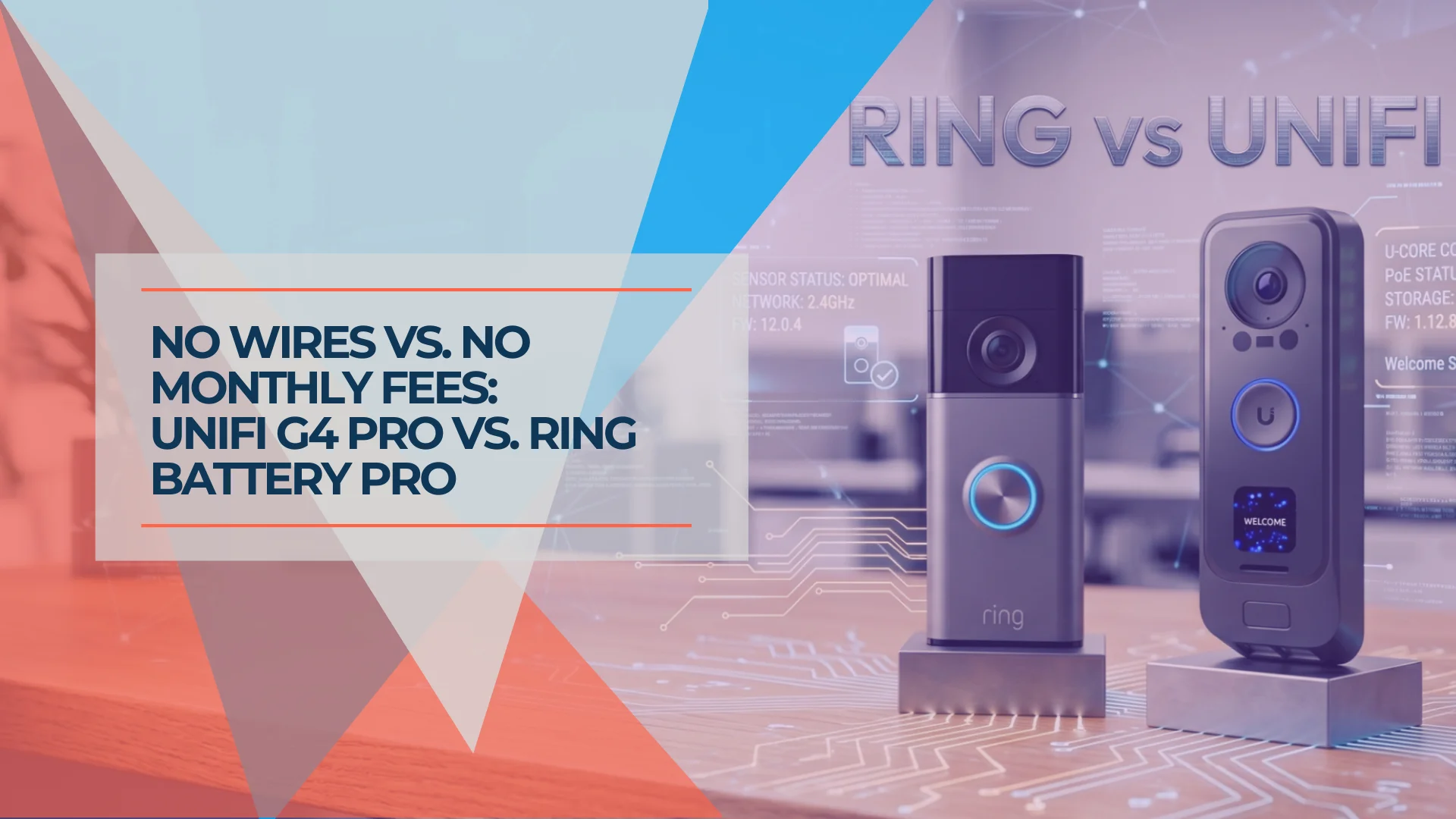
You don't need a CCTV installation or a $5,000 security quote just to see who is at the front door of your shop or office. Three doorbell cameras cover this ground in 2026: Ring's Battery Doorbell Pro (2nd Gen) for wire-free simplicity, the UniFi G4 Doorbell Pro Wi-Fi ($299, currently backordered) for subscription-free wireless operation, and the UniFi G4 Doorbell Pro PoE Kit ($379) for a fully hardwired commercial installation. One is live in ten minutes. The other two are subscription-free and locally recorded — one over Wi-Fi, one over a dedicated PoE cable.
We install both for clients across South Florida. Both work well. The right choice comes down to how fast you need it running and whether paying a monthly cloud fee is something you want to do indefinitely.
Affiliate Disclosure: This article contains affiliate links. If you make a purchase through these links, we may earn a small commission at no extra cost to you. As an Amazon Associate, iFeelTech earns from qualifying purchases.
Bottom Line: Three Options
Wire-free, no IT setup → Ring Battery Doorbell Pro 2nd Gen ($249.99) — Mount it, connect to Wi-Fi, done. Requires a ~$10/month subscription for video history.
Wi-Fi, zero monthly fees → UniFi G4 Doorbell Pro Wi-Fi ($299) — Same dual-camera hardware as the PoE Kit, connects over Wi-Fi. No subscription. Currently backordered at Ubiquiti's store. Requires a UniFi Protect console.
Hardwired, commercial grade → UniFi G4 Doorbell Pro PoE Kit ($379) — Single CAT6 cable, no Wi-Fi variables, PoE chime included. Requires a UniFi Protect console.
From zero infrastructure: Ring costs least over 3 years (~$610). UniFi Wi-Fi + UCG-Max = ~$578 (cheaper than Ring). UniFi PoE Kit + UCG-Max = ~$658. With existing UniFi: the Wi-Fi G4 at $299 and the PoE Kit at $379 carry no recurring fees — the savings compound with each additional Protect device added to the same console.
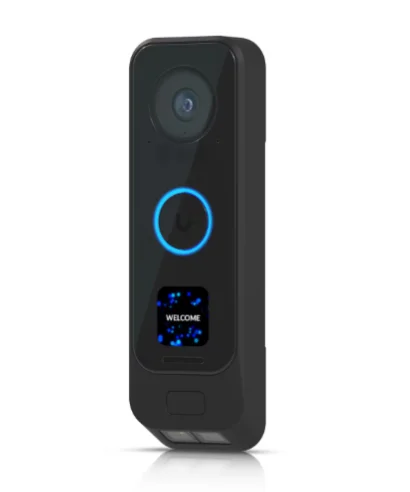
UniFi G4 Doorbell Pro PoE Kit
$379One CAT6 cable delivers power and network. Local AI on your Protect console. No subscription — ever.
- Dual camera: 5MP doorbell + 8MP package sensor
- PoE — single cable, zero Wi-Fi variables
- Person, vehicle & package detection on-device
- PoE chime included in the kit
UniFi G4 Doorbell Pro (Wi-Fi)
$299Identical dual-camera hardware to the PoE Kit, Wi-Fi connected. Powers from existing 16–24V AC doorbell wiring. No subscription.
- Same 5MP + 8MP dual-camera array as PoE Kit
- Wi-Fi — no Ethernet run needed to the door
- Powers from existing doorbell transformer
- Local AI storage — no cloud fees
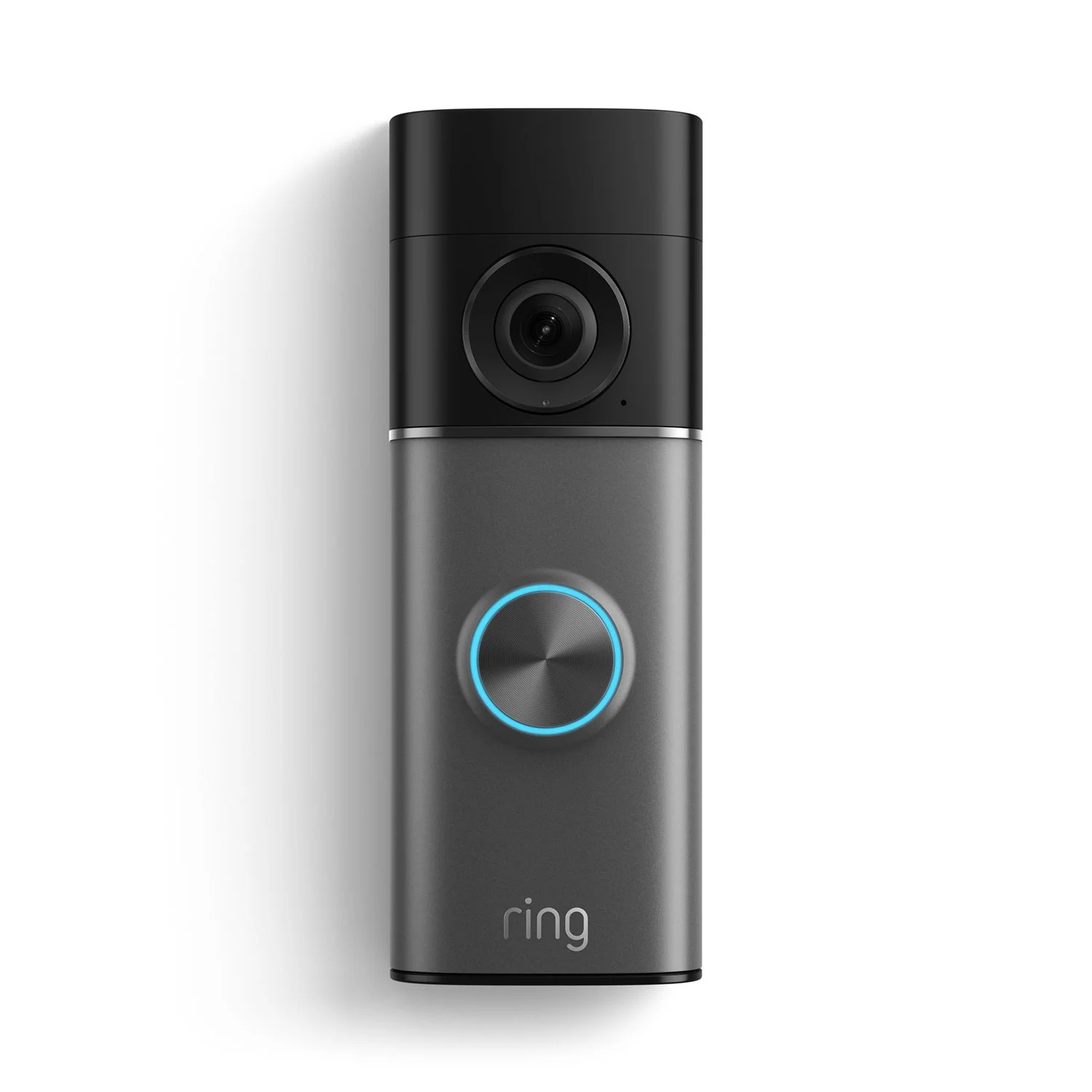
Ring Battery Doorbell Pro (2nd Gen)
$249.99Mount it, connect to Wi-Fi, done. 4K with radar-powered 3D Motion Detection. Requires Ring Multi ($10/mo) for video history.
- 4K with 10× Enhanced Zoom
- Radar 3D Motion Detection — fewer false alerts
- True-color Night Vision
- Battery powered — no wiring whatsoever
Three Cameras That Replace a CCTV Quote
Ring and the UniFi G4 Wi-Fi are the direct wireless comparison — both connect over Wi-Fi, neither requires a cable run to the door. Ring is simpler and cheaper upfront but requires a subscription; the UniFi Wi-Fi version is $50 more and records locally with no recurring fees (currently backordered). For a permanent hardwired installation, the G4 Doorbell Pro PoE Kit ($379) runs over a single CAT6 cable with no Wi-Fi dependency.
| UniFi G4 Doorbell Pro PoE Kit | UniFi G4 Doorbell Pro (Wi-Fi) | Ring Battery Doorbell Pro (2nd Gen) | |
|---|---|---|---|
| Price | $379 | $299 (backordered) | $249.99 |
| Resolution | FHD (1600×1200) — dual cameras | FHD (1600×1200) — dual cameras | Retinal 4K with 10x Enhanced Zoom |
| Power | PoE (single CAT6 cable) | 16–24V AC doorbell wiring | Removable rechargeable battery |
| Subscription required | No | No | Yes (Ring Multi $10/mo minimum) |
| Ecosystem | UniFi Protect (local NVR) | UniFi Protect (local NVR) | Ring / Amazon cloud |
Network Infrastructure Requirements for UniFi and Ring
Ring operates independently via Wi-Fi and stores footage in Amazon's cloud. Both UniFi G4 variants require a local Protect console on your network to function — but they handle the last few feet to the door very differently.
Three architectural paths: Ring is cloud-first and requires nothing beyond a Wi-Fi connection and an Amazon account. Footage routes through Amazon's servers, and a subscription is required for any video history. UniFi G4 Wi-Fi connects over your existing Wi-Fi network but records locally to a Protect console — a UCG-Max ($279), UNVR, or any Dream Machine with Protect support. No subscription. No cloud footage. If internet drops, local recording continues. UniFi G4 PoE Kit takes the same local-recording approach but delivers both power and network connectivity over a single CAT6 cable, removing Wi-Fi from the equation at the door entirely.
3-year cost comparison, single front-door installation:
- UniFi G4 Wi-Fi + UCG-Max (starting from zero): $299 + $279 = $578, no recurring fees after (cheaper than Ring from year one)
- UniFi G4 Wi-Fi (existing UniFi infrastructure): $299 total, no recurring fees ever
- UniFi G4 PoE Kit + UCG-Max (starting from zero): $379 + $279 = $658, no recurring fees after
- UniFi G4 PoE Kit (existing UniFi infrastructure): $379 total, no recurring fees ever
- Ring Battery Doorbell Pro + Ring Multi (3 years): $249.99 + ($10 × 36) = $609.99 total
Starting from zero infrastructure, the UniFi Wi-Fi G4 + UCG-Max ($578) undercuts Ring over three years. The PoE Kit from zero ($658) costs slightly more — the premium is in the cable run and long-term Wi-Fi independence. With existing UniFi infrastructure, both G4 options win permanently.
If you're evaluating this as part of a broader business security upgrade, a single doorbell doesn't justify a console purchase on its own. Add two outdoor cameras and a parking lot unit, and the UCG-Max becomes the cheapest line item in a full system. We've built complete UniFi Protect deployments for under $2,000 that cover entire small businesses — relevant context if the doorbell is an entry point into a larger Protect rollout.
UniFi G4 Doorbell Pro: The Zero-Subscription Route
The UniFi G4 Doorbell Pro is the subscription-free, locally recorded option — available in a Wi-Fi version ($299, backordered) and the PoE Kit ($379, in stock). Both share the same dual-camera hardware, the same AI detection, and the same Protect integration. The difference is how power and connectivity reach the door.
The biggest advantage is zero monthly fees. For businesses like dental practices, law firms, or distribution warehouses, keeping footage, AI detections, and access logs on-premises also removes any third-party cloud dependency for the lifespan of the hardware.
For regulated industries, this distinction has direct compliance implications. Healthcare practices operating under HIPAA, law firms handling privileged client communications, and financial services firms subject to data retention audits inherit a cloud data residency problem when footage routes through Amazon's servers. A Protect console keeps recordings on your hardware — no third-party data processing agreement required, no cloud residency risk, and full control over retention schedules. Ring's cloud architecture does not change at any subscription tier.
The dual-camera array is uniquely suited for commercial environments. The primary 5MP sensor handles standard eye-level interactions, while a dedicated downward-facing 8MP sensor monitors the threshold delivery zone. This physical camera separation is more reliable than the software-based digital zoom used by Ring; there is a physical lens aimed at the ground-level delivery area, not an algorithmic crop.
Additional capabilities with direct business applications:
- Programmable welcome display — scrolling text and custom messages for medical practices, shared buildings, and multi-tenant spaces
- NFC and fingerprint reader — integrates with UniFi Access for keycard or biometric door unlock at the same unit (see Access Control Integration below)
- Deep Protect integration — the doorbell appears on the same timeline as every other Protect camera, enabling cross-camera event correlation
- On-premises storage — footage stays on your hardware unless you explicitly configure cloud sync
UniFi G4 Doorbell Pro — Official Overview
The full G6 camera lineup integrates with the same console, so expanding to indoor areas, parking lots, or loading docks later requires no additional infrastructure.
Constraints to plan for: Both versions require a UniFi Protect console to function. The IPX4 weather rating requires a covered installation. The Wi-Fi version requires existing 16–24V AC doorbell wiring (or a separate PoE injector). Initial setup requires someone with basic networking knowledge. The Wi-Fi version is currently backordered at Ubiquiti's store. For high-availability requirements, the UCG-Max supports an external drive for expanded local storage; organizations that need on-site failover should evaluate a UNVR with dual-drive RAID-1 as the recording backbone.
G4 Doorbell Pro: Best For
IT-managed businesses already running UniFi infrastructure, any location where footage must stay on-premises, offices where dedicated physical package detection matters, and businesses treating the doorbell as the entry point into a full Protect deployment. Choose the Wi-Fi version if you can't run a new cable; choose the PoE Kit if you want to eliminate Wi-Fi from the equation entirely.
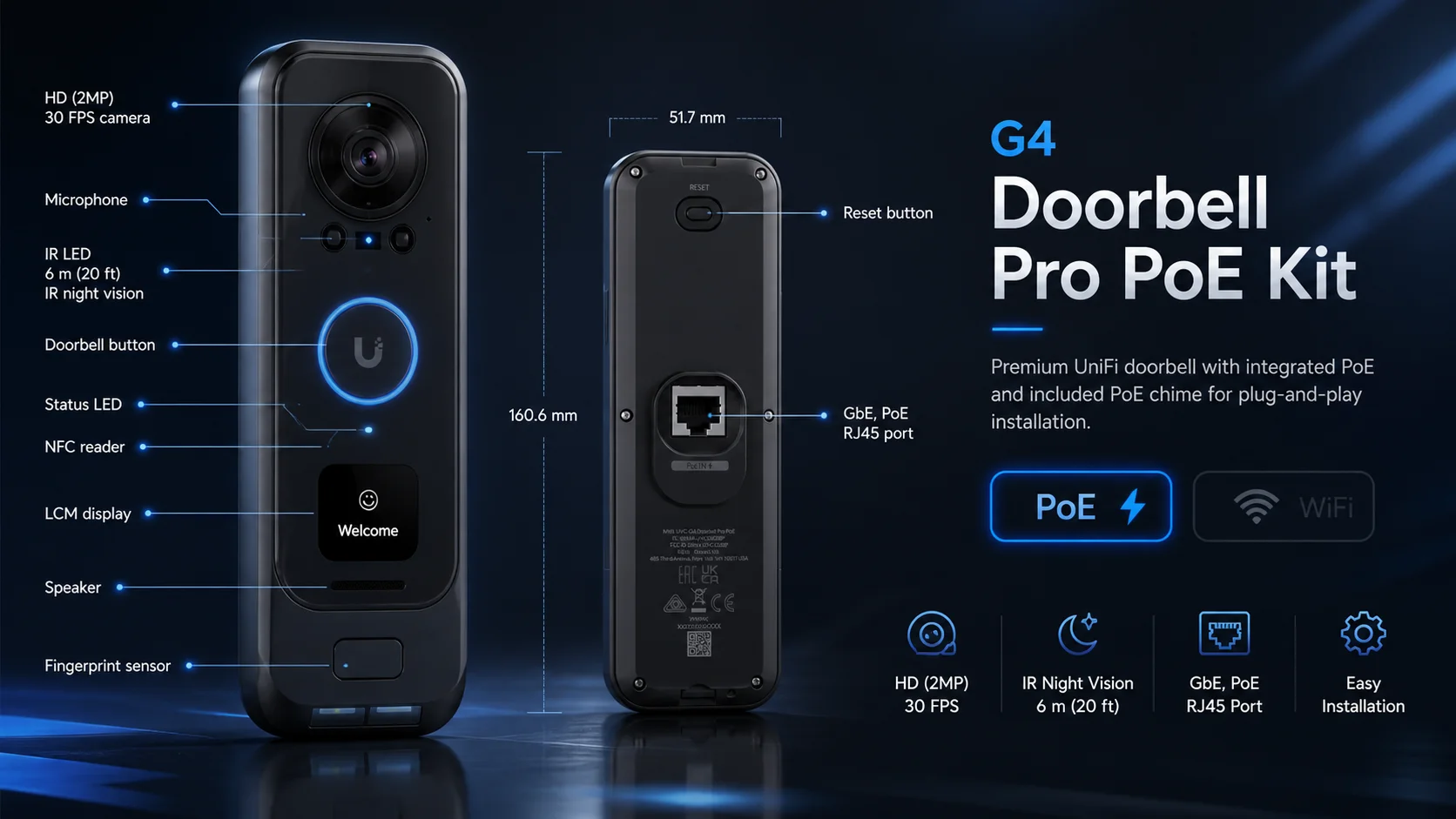
Ring Battery Doorbell Pro (2nd Gen) Features and Limitations
The Ring Battery Doorbell Pro is the fastest path to a working front-door camera — no wiring, no IT setup, and up and running in under ten minutes via the Ring app. You pay monthly for video history, but there is nothing else to configure.
Ring's Battery Doorbell Pro (2nd Gen) delivers Retinal 4K with a 140° × 140° head-to-toe field of view and up to 10x Enhanced Zoom. The radar-powered 3D Motion Detection maps physical zones in 3D space, significantly reducing false alerts from sidewalk traffic — an essential feature for businesses facing busy commercial corridors.
Because it requires zero network drops or PoE switches, this unit can be mounted and operational in under ten minutes via the Ring mobile app. This makes it the correct path for leased office suites, historic buildings where wall penetration is not permitted, or temporary locations.
Ring Battery Doorbell Pro (2nd Gen) — Official Overview
Ring's full AI feature set — Video Descriptions, natural language Video Search, Familiar Faces, and Active Warnings — requires the Ring AI Pro plan at $20/month. The base Ring Multi plan ($10/month) covers video history and smart alerts without the AI layer. Without an active subscription, you only get live view.
Constraints to plan for: Battery maintenance is the primary operational variable. A high-traffic retail or medical entrance with 30–50 interactions daily will deplete the battery in two to four weeks. Someone on staff must own that schedule. All footage routes through Amazon's cloud — acceptable for most small businesses, but requires an explicit decision for healthcare, legal, or financial services environments with data governance requirements.
Ring Battery Doorbell Pro 2nd Gen: Best For
Businesses without existing network infrastructure, tenants in leased commercial spaces, locations where IT support is unavailable, and any property already integrated into the Amazon Alexa ecosystem.
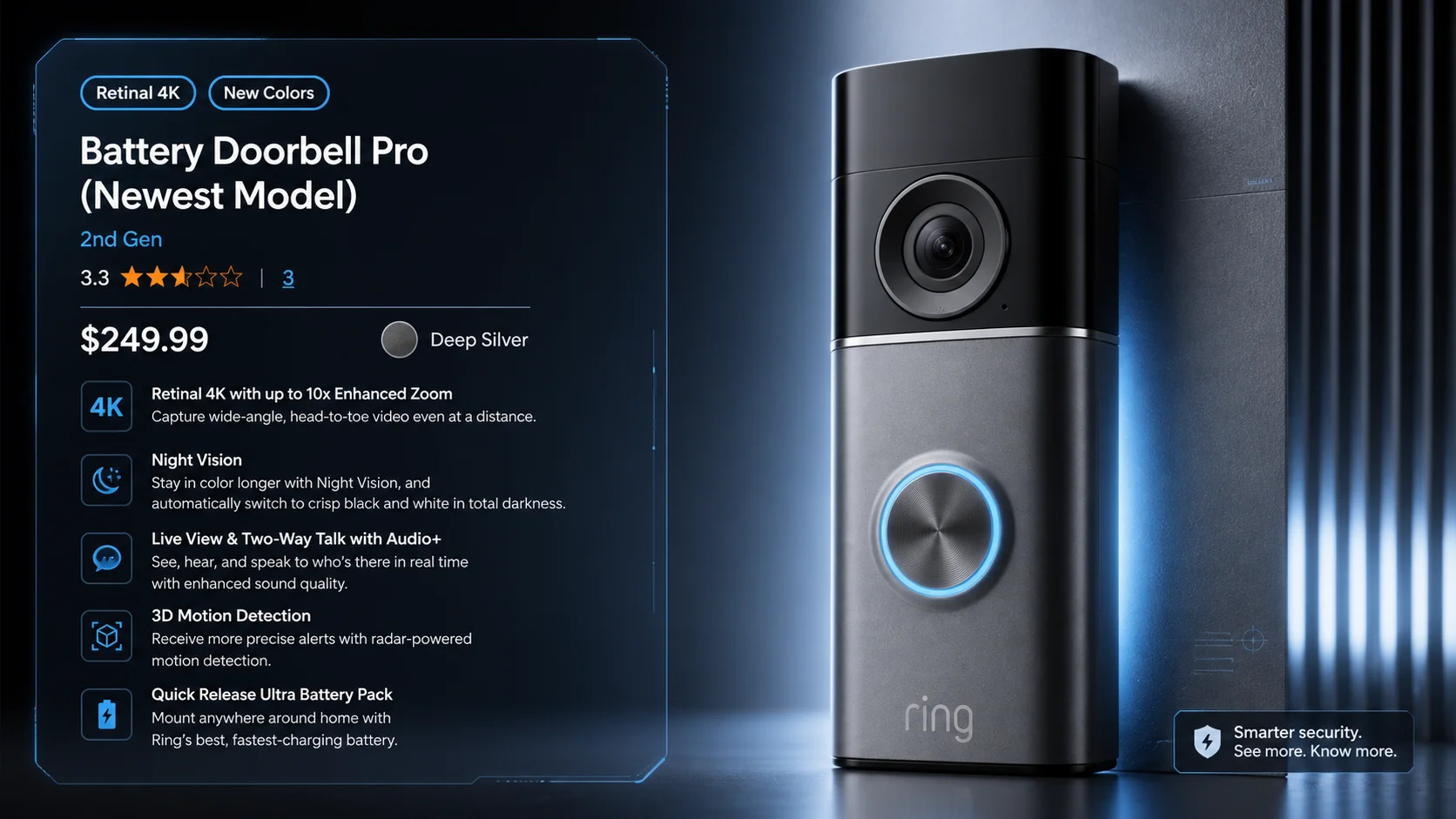
UniFi G4 Doorbell Pro vs Ring: Three-Way Specifications
The two UniFi G4 variants share the same camera hardware. The PoE Kit adds hardwired power delivery and includes a chime; the Wi-Fi version uses your existing doorbell wiring and connects over wireless.
| Specification | UniFi G4 Doorbell Pro PoE Kit | UniFi G4 Doorbell Pro (Wi-Fi) | Ring Battery Doorbell Pro (2nd Gen) |
|---|---|---|---|
| Price | $379 | $299 (backordered) | $249.99 |
| Video Resolution | FHD (1600×1200), dual-sensor | FHD (1600×1200), dual-sensor | Retinal 4K with 10x Enhanced Zoom |
| Field of View | Main: 138°H × 114°V / Package: 97.5°H × 79.4°V | Same as PoE Kit | 140° × 140° head-to-toe |
| Night Vision | IR LED, 6m (20 ft) range | IR LED, 6m (20 ft) range | Color low-light; B&W in darkness |
| Motion Detection | AI-based local processing | AI-based local processing | Radar-powered 3D + Cloud AI |
| Two-Way Audio | Yes | Yes | Two-Way Talk with Audio+ |
| Package Detection | Dedicated 8MP downward camera | Dedicated 8MP downward camera | Software detection via main lens |
| AI Alerts | Included in Protect — no subscription | Included in Protect — no subscription | Ring Multi ($10/mo); full AI on Ring AI Pro ($20/mo) |
| Local Recording | Yes, on Protect console | Yes, on Protect console | Ring Alarm Pro only; otherwise cloud-only |
| Data Storage | On-premises network | On-premises network | Amazon cloud |
| Ecosystem | UniFi Protect + Access | UniFi Protect + Access | Amazon Alexa, Echo, Fire TV |
| Power Source | PoE (single CAT6 cable) | 16–24V AC doorbell wiring | Removable rechargeable battery |
| Connectivity | Wired Ethernet (PoE) | Wi-Fi (802.11ac) | Wi-Fi |
| Weather Rating | IPX4 (covered install required) | IPX4 (covered install required) | IP55 (weather-resistant) |
| Required Infrastructure | UniFi Protect console | UniFi Protect console + Wi-Fi | Amazon account + Wi-Fi |
| Availability | In Stock | Backordered | In Stock |
PoE vs. Wi-Fi vs. Wi-Fi: Connectivity Reliability at Commercial Entrances
A PoE-connected camera delivers consistent video throughput regardless of wireless conditions. Both Wi-Fi options — Ring and the UniFi G4 Wi-Fi — compete for bandwidth with every other device on the network. But they're not equivalent behind that shared vulnerability.
This matters more in commercial spaces. A concrete-and-masonry lobby, a multi-tenant office suite, or a retail storefront in a strip mall all create conditions where Wi-Fi performance degrades: thick exterior walls attenuate signal, neighboring tenants saturate the 2.4 GHz and 5 GHz bands, and peak-hour traffic from staff devices creates RF congestion at exactly the times when clear video matters most.
The UniFi G4 Wi-Fi handles this better than Ring in one critical way: even if the internet drops or the Wi-Fi link stutters, the camera's local recording continues to the Protect console — you don't lose footage. Ring's battery model stores nothing locally; a Wi-Fi dropout means a gap in the record. Both Wi-Fi options share the risk of degraded live-view performance in RF-congested environments.
The PoE Kit removes these variables. The CAT6 cable delivers power and network on a dedicated channel. In any permanent commercial installation with structured cabling access, PoE is the more reliable path. The Ring Battery Doorbell Pro and the UniFi G4 Wi-Fi are practical choices when running a new cable is physically impossible — wired connectivity performs more consistently, but a working installation is better than one that never gets deployed.
Managing the Doorbell Off-Site: Ring App vs. UniFi Protect App
The Ring app is ready to hand to any staff member the day it arrives. The UniFi Protect app requires a one-time IT configuration but offers significantly more control.
Ring app: Live view, two-way audio, and motion alerts work immediately after setup. Sharing doorbell access with a second phone — an office manager, a front desk employee — takes under two minutes via the Ring app's Shared Users feature. No account complexity, no IT involvement. Push notifications are fast and consistent. The interface assumes zero technical background and works identically on iOS and Android.
UniFi Protect app: Remote live view and event history are available through Ubiquiti's cloud relay without any port forwarding configuration. Adding a staff member requires creating a free Ubiquiti account and accepting a console invite — a few extra steps compared to Ring's simple share flow. Once set up, the Protect app offers role-based access (viewer, operator, admin), per-camera recording schedules, adjustable AI detection zones, and a cross-camera event timeline. For a single user, it's straightforward; for a business where multiple employees need varying levels of doorbell access, those permission tiers become operationally useful.
The practical difference: A non-technical office manager can take ownership of Ring the day it ships. UniFi Protect takes one IT configuration session to set up correctly, but provides more useful tooling day-to-day once it's running.
UniFi Access Control Integration
The UniFi G4 Doorbell Pro integrates with UniFi Access to enable NFC keycard and fingerprint-based door unlock. Ring has no equivalent access control ecosystem.
This distinguishes the G4 Doorbell Pro from standard consumer doorbells. When paired with a UniFi Access Hub, the G4 Doorbell Pro functions as a combined video intercom and access control terminal. Employees badge in with an NFC card or enrolled fingerprint, the Access system authenticates against your access policy, and the door unlocks — all logged to the same Protect timeline that captures the visual record.
For businesses thinking about what happens when an employee leaves, this integration is the right architecture. A departing employee's NFC credential is revoked in UniFi Access. The video record and access log are on-premises. Revoking access and auditing entry history requires no vendor support call. The Access Hub connects to the same PoE infrastructure already running to the G4 Doorbell Pro, making it the lowest-cost upgrade to a full visitor management and access control setup for any business already in the UniFi ecosystem.
Three-Year Cost of Ownership Comparison
The UniFi Wi-Fi G4 + UCG-Max from zero ($578) undercuts Ring over three years. The PoE Kit from zero ($658) costs slightly more — the premium is in the cable run and zero Wi-Fi dependency. With existing UniFi infrastructure, both G4 options carry no recurring costs at any time horizon.
| UniFi G4 PoE Kit | UniFi G4 Wi-Fi | Ring Battery Pro (2nd Gen) | |
|---|---|---|---|
| Hardware | $379 | $299 | $249.99 |
| Required infrastructure | UCG-Max ($279) if not owned | UCG-Max ($279) if not owned | None |
| Subscription (Year 1) | $0 | $0 | $120 (Ring Multi) |
| Subscription (Year 3 cumulative) | $0 | $0 | $360 (Ring Multi) |
| 3-Year Total (no existing UniFi infra) | $658 | $578 | $609.99 |
| 3-Year Total (UniFi already deployed) | $379 | $299 | $609.99 |
If a business already utilizes UniFi switches or gateways, the G4 Doorbell Pro is the most cost-effective solution. Starting from scratch, Ring is cheaper initially — but UniFi's recurring cost is zero, making it the lower-cost option the moment the console investment is amortized across additional Protect devices. Read the UCG-Max review for a full breakdown on what the console adds beyond a single doorbell.
Ring Multi ($10/mo) covers video history and smart alerts but not Ring's AI feature set. Video Descriptions, Video Search, Familiar Faces, and Active Warnings require the Ring AI Pro plan at $20/month. If you want the full intelligent features the Battery Doorbell Pro (2nd Gen) was built to use, the 3-year subscription cost rises to $720, bringing your total to $969.99 — compared to $609.99 for Ring Multi, or $578–$658 for either UniFi option starting from zero infrastructure.
South Florida Heat: Battery Drain and Thermal Considerations
In ambient temperatures above 95°F, lithium-ion battery capacity degrades measurably. Both G4 Doorbell Pro variants are hardwired devices with no battery — heat affects video quality settings but not power continuity.
This is a concrete operational difference for South Florida deployments. Florida's Gulf and Atlantic coasts regularly see ambient temperatures between 90°F and 100°F (32°C–38°C) during summer months. At 40°C (104°F), lithium-ion batteries discharge at roughly 40% below their rated capacity, according to Battery University's standardized discharge testing. A Ring Battery Doorbell Pro that lasts three to four weeks between charges in a mild climate may require weekly recharging at a high-traffic entrance during a South Florida summer — and sustained heat above 95°F accelerates long-term cell degradation over the product's lifespan.
Both G4 Doorbell Pro models (PoE Kit and Wi-Fi) are rated to 40°C (104°F) operating temperature and draw power continuously from wired infrastructure — PoE or AC doorbell wiring. There is no battery to degrade. Thermal management is passive — mount either version under an overhang or covered entrance, away from direct afternoon sun, and the unit operates without temperature-related performance concerns. For Ring installations in South Florida, hardwiring the unit to an existing 16–24V AC doorbell transformer eliminates the battery variable entirely while retaining all 4K and 3D Motion Detection capabilities.
Hardware Warranty and Replacement Policy
UniFi provides a 1–2 year limited warranty with RMA replacement, no subscription required. Ring's standard 1-year warranty extends for as long as a Ring Protect subscription stays active.
UniFi G4 Doorbell Pro: 1-year limited warranty for reseller purchases; 2 years when purchased directly from store.ui.com. Submit warranty claims at rma.ui.com — replacements may be new or refurbished units. Labor and reinstallation are not included under warranty, so factor in on-site support costs if the doorbell is at a location without in-house IT.
Ring Battery Doorbell Pro: 1-year manufacturer warranty standard. With an active Ring Protect subscription (Ring Multi or Ring AI Pro), coverage extends through an Allstate/SquareTrade service contract — hardware replacement for electrical or mechanical failure during normal use, for as long as the subscription remains active without any lapse. Cancel Ring Protect and the extended coverage ends immediately.
The business continuity implication: UniFi's warranty is subscription-independent. Ring's extended coverage is a real benefit, but it ties hardware protection to an ongoing monthly payment — something to weigh if you're evaluating total long-term cost.
Should You Choose UniFi G4 Doorbell Pro or Ring for Business?
Three options, two architectures. Choose by installation constraints first, then cost.
The UniFi G4 Doorbell Pro PoE Kit ($379) is the right fit for businesses already on a UniFi network, any location with structured cabling access, organizations with data governance requirements that mandate local storage, and high-traffic entrances where battery maintenance is impractical. It's also the right foundation if you plan to add outdoor cameras or access control later — everything runs on the same infrastructure.
The UniFi G4 Doorbell Pro Wi-Fi ($299, backordered) is the right call if you want all the Protect ecosystem benefits — local recording, no subscription, NFC integration — but can't run a new cable to the door. It uses existing 16–24V AC doorbell wiring and connects over Wi-Fi. If it were in stock today, it would be the most cost-effective path for businesses already running UniFi infrastructure.
The Ring Battery Doorbell Pro 2nd Gen ($249.99) is the right choice for businesses in leased spaces, offices without dedicated IT support, or locations where running new Ethernet or doorbell wiring is structurally or contractually impossible. It's also the fastest path to a working front-door camera — live in under ten minutes, no networking knowledge required.
Consider Ring as a bridge if you're planning a future UniFi Protect deployment but need a doorbell solution now. Ring is easy to uninstall and resell — it leaves no permanent infrastructure behind.
Commercial Installation Guidelines
Use a hardwired PoE connection for permanent commercial entrances. Battery-powered units require recharging every two to four weeks under high-traffic conditions.
UniFi G4 Doorbell Pro PoE Kit: Run a single CAT6 cable from a PoE-capable switch to the door location. If your space doesn't already have Ethernet at the door, budget for a low-voltage contractor to pull the cable — typically $150–$350 for a single interior run in standard commercial construction, and more for concrete block or historic buildings. This eliminates every Wi-Fi reliability variable — signal attenuation, RF congestion, and neighboring network interference. The included PoE chime means no separate accessory is needed. For South Florida deployments, the unit's IPX4 rating requires a covered mounting location; install under an overhang or canopy rather than in direct weather exposure.
Both devices support standard US doorbell wiring (16–24V AC, 40–50VA transformer). If your commercial space already has wired doorbell infrastructure, both the G4 Doorbell Pro and the Ring Battery Pro can draw power from it — eliminating battery concerns for Ring and providing an alternative power path for UniFi where a PoE switch port is not immediately adjacent.
Ring Battery Doorbell Pro (2nd Gen): Assign someone on staff to monitor battery status in the Ring app. At a high-traffic entrance, plan for a recharge cycle every two to four weeks — more frequently in summer heat. The Quick Release Ultra Battery Pack charges via USB-C; keeping a spare charged unit on hand eliminates any coverage gap during the swap. If existing doorbell wiring is accessible, hardwiring the Ring Pro to the transformer solves the battery maintenance issue permanently while retaining all 4K and radar capabilities.
Related Resources
- Complete UniFi Protect System for Under $2,000 — Full system guide covering cameras, consoles, and deployment for small businesses ready to go beyond a single doorbell.
- UniFi G6 Camera Buying Guide — The full G6 camera lineup that integrates with the same Protect console as the G4 Doorbell Pro.
- UCG-Max Review — Deep dive on the entry-level Protect console behind the cost comparison in this article.
- Managing Physical Access When Employees Leave — Why the camera at the front door is part of a larger access control conversation.
- Small Business Security Upgrade Guide (Miami) — Physical and cyber security framework for South Florida businesses.
Frequently Asked Questions
Related Articles
More from UniFi Networks
UniFi Protect vs. Reolink vs. TP-Link: Which Camera System Is Best for Your Business?
UniFi Protect, Reolink, and TP-Link (Tapo vs. VIGI) compared for small business use — current 2026 lineups, real 8-camera pricing, and iFeelTech's multi-year UniFi fleet reliability data.
19 min read
Best UniFi Protect Cameras 2026: Complete G6 Lineup Buying Guide
Compare every UniFi G6 camera from the $179 Instant to the $499 Pro Dome. Real-world testing, pricing, specs, and recommendations for home and business security.
21 min read
UNVR vs UNVR Pro vs UNVR G2: Which UniFi NVR Should You Buy in 2026?
Complete comparison of UniFi UNVR vs UNVR Pro network video recorders, plus the new 2026 UNVR G2 and G2 Pro. Compare specs, storage, RAID options, stacking, and total cost to choose the right NVR for your surveillance system.
20 min read