
UniFi Protect vs. Reolink vs. TP-Link: Which Camera System Is Best for Your Business?
UniFi Protect, Reolink, and TP-Link (Tapo vs. VIGI) compared for small business use — current 2026 lineups, real 8-camera pricing, and iFeelTech's multi-year UniFi fleet reliability data.

A client asked us a fair question recently: why pay $199 for a UniFi camera when a Reolink camera that "does basically the same thing" costs $100 on Amazon? The short answer is that it depends — and in a meaningful number of cases, the $100 camera is the right call.
We've installed UniFi Protect across hundreds of commercial cameras in South Florida offices, and we've spent real time with the current Reolink and TP-Link lineups too. None of these systems is objectively better in isolation. They're built for different starting points: how much networking infrastructure a business already has, how many cameras it plans to run, and whether the system needs to talk to anything else.
This guide compares the current 2026 lineups from all three brands — including the cases where UniFi Protect isn't the right answer. All prices were checked on August 4, 2026 and may change; we note the source for each. UniFi product capabilities (standalone Edge cameras, the Instant WiFi camera and the Instant recorder) were re-verified against Ubiquiti's own pages on October 2, 2026.
Affiliate Disclosure: This article contains affiliate links. If you make a purchase through these links, we may earn a small commission at no extra cost to you. As an Amazon Associate, iFeelTech earns from qualifying purchases.
Quick Verdict: Match the System to Your Situation
Already running UniFi networking, or scaling past 10–15 cameras across one or more sites: UniFi Protect. Unified management for networking, cameras, and access control. No current per-camera licensing fees. Most UniFi cameras are managed by a UniFi recorder or gateway; the newer G6 Edge cameras can also run standalone on microSD.
Want PoE/NVR architecture and ONVIF flexibility at a lower price, no existing ecosystem to integrate with: Reolink. PoE cameras, local NVR, no subscription, and ONVIF flexibility for roughly half the total system cost.
Need 1–4 cameras, no PoE wiring, and a same-day setup: TP-Link Tapo. WiFi and battery options, no NVR required, free local recording via microSD. Battery models record event-triggered clips (not continuous). Best for a retail counter, home office, or small satellite location.
Already on TP-Link Omada networking and want single-vendor PoE surveillance: TP-Link VIGI. PoE cameras with local recording, no subscription, 5-year metal-chassis warranty, and unified management via Omada Central.
Prefer to watch? This seven-minute video explains how the three camera systems differ and which situations each one suits. The written comparison, with the details, follows below.
UniFi Protect vs Reolink vs TP-Link Cameras: Which Fits?
What "TP-Link" Actually Means Here — Tapo vs. VIGI
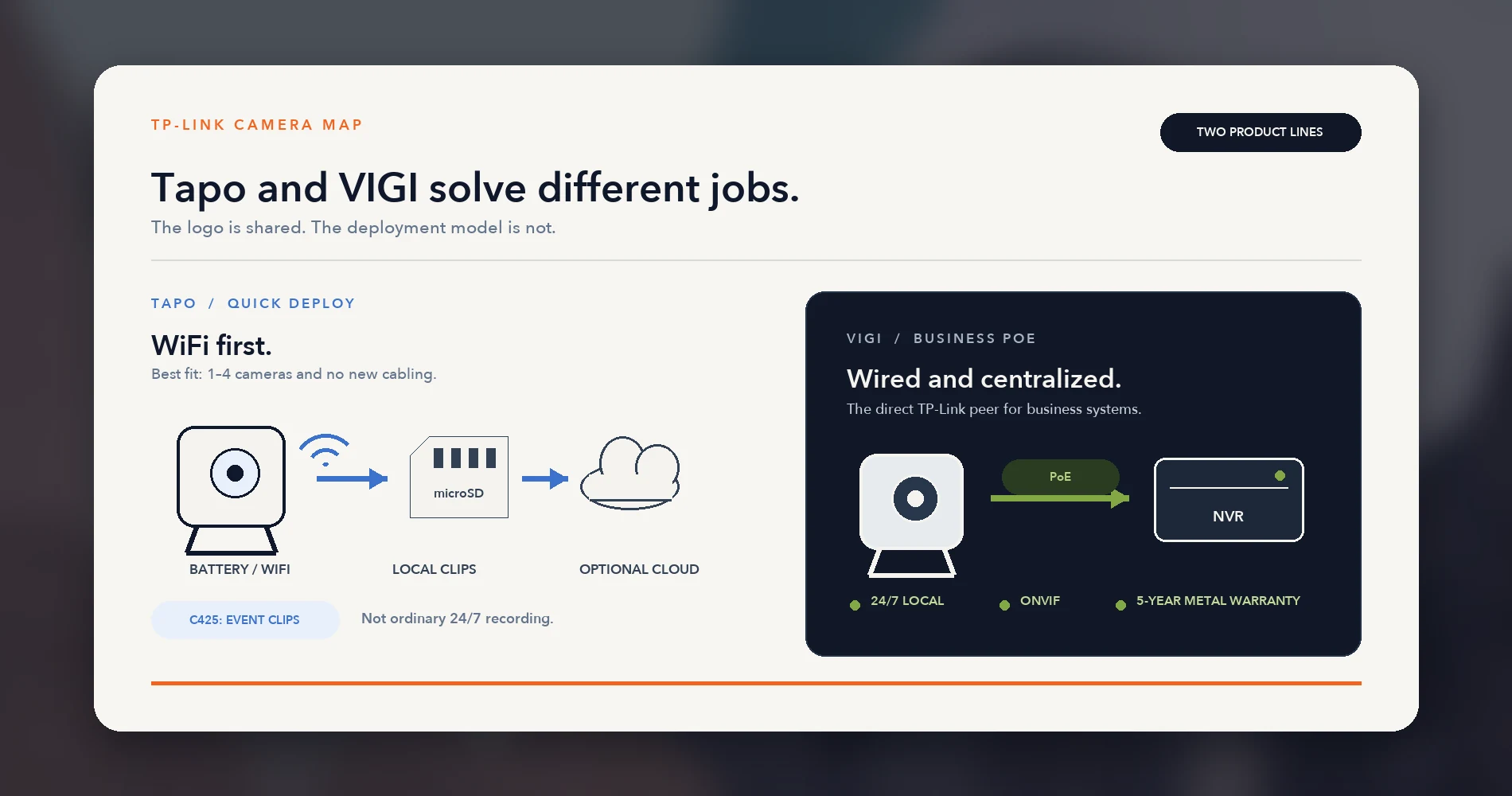
TP-Link sells two distinct camera product lines that serve different markets, and most "UniFi vs TP-Link" comparisons conflate them.
Tapo is TP-Link's consumer smart-home brand. Most Tapo cameras are WiFi or battery-powered, though the lineup has expanded: newer wired models like the C575D support PoE (802.3af/at), and several wired Tapo cameras now support ONVIF Profile S for third-party NVR integration. Battery-powered models like the C425 do not support ONVIF. Tapo cameras record to microSD locally for free, with optional Tapo Care cloud storage. Tapo Care offers three tiers: Cloud (30-day storage, up to 2 cameras, from $3.49/month), Cloud Advanced (180-day storage, unlimited cameras), and Cloud Advanced AI (180-day storage with AI features including facial recognition). Only one plan is active per TP-Link account; pricing varies by region and checkout method. AI detection for person, vehicle, and pet works locally without a subscription; cloud video history and richer notifications require a Tapo Care plan. For 1–4 cameras where installation speed matters more than centralized management, Tapo is a practical answer.
VIGI is TP-Link's business-grade surveillance line (recently rebranded with the "InSight" prefix on newer models). VIGI cameras are PoE-based and support ONVIF. A VIGI NVR is recommended for centralized continuous recording, but VIGI cameras can also record to microSD (up to 512GB), VIGI software, or third-party ONVIF-compatible recorders. AI detection is included with the hardware — no subscription. VIGI integrates with TP-Link's Omada Central platform for unified network and surveillance management. Metal-chassis VIGI cameras carry a 5-year US warranty; VIGI NVRs also carry 5 years (excluding HDDs).
The Comparison That Matters
For wired PoE business deployments, VIGI — not Tapo — is TP-Link's architectural competitor to UniFi and Reolink. The cost and architecture sections below use VIGI for the TP-Link PoE comparison, with Tapo broken out separately for quick-deploy WiFi scenarios.
The Current 2026 Lineups
These are the models currently offered in the US as of August 2026.
UniFi Protect: G6 Series
Ubiquiti's G6 series spans multiple sensor sizes and resolutions. The standard G6 models — G6 Bullet, G6 Turret (both $199), G6 Instant ($179, a WiFi camera), G6 Dome ($279), and G6 Mini Dome — share a 4K 1/1.8" 8MP sensor with the Multi-TOPS AI inference chip for on-device person, vehicle, face, and license plate detection. The G6 Pro variants ($479+) step up to a larger 1/1.2" sensor for improved low-light performance. The G6 180 is a 16MP dual-sensor panoramic camera ($299), and the G6 PTZ ($399) adds motorized pan/tilt/zoom. The newer G6 Edge models (Bullet, Turret, Dome) are 4K PoE+ cameras with a larger 1/1.2" sensor that support standalone operation with local microSD storage and an optional NVR; they are listed on Ubiquiti's store, so check current pricing and stock. For a model-by-model breakdown, see our G6 buying guide.
NVR options range from the UNVR Instant at $199 (supports 6 4K cameras with a built-in 6-port PoE switch — no separate PoE switch needed) to the UNVR at $299 (supports 18 4K cameras across 4 HDD bays, but requires a separate PoE switch to power cameras). The UNVR Instant still needs a gateway or Layer 3 switch on the network. There are no current per-camera licensing fees regardless of camera count.
Two ways to run UniFi cameras. Most UniFi cameras, including the G6 Instant WiFi camera, are adopted by UniFi Protect running on a UniFi NVR or a UniFi gateway with Protect, so they need one of those. The G6 Edge cameras are the exception: set up once with the UniFi or Protect mobile app, they can operate standalone with local microSD storage, connect to Site Manager for remote management, and join an NVR later for centralized, redundant recording.
Reolink: RLC-8xx Series and PoE Kits
Reolink's current 4K PoE lineup centers on the RLC-820A at $99.99 — a fixed-lens 4K turret camera with person, vehicle, and animal detection built in. The RLC-823S2 (~$310–$360 depending on retailer; price checked August 2026) adds PTZ with 16X optical zoom and auto-tracking. Reolink also offers dual-lens models like the Duo 3 PoE for ultra-wide coverage, and 12MP systems for buyers who want higher resolution than 4K.
On the NVR side, the RLN8-410 at $299.99 (MSRP $349.99) is the workhorse: 8 PoE ports, a pre-installed 2TB HDD, and support for up to 12 cameras (8 PoE + 4 WiFi on the latest hardware revision). Complete kits are also available — the RLK8-800B4 bundles 4 cameras with an NVR and 2TB HDD for $699.99. For a matched-price breakdown of a kit against separate cameras and an NVR, see our Reolink kit vs. separate cameras guide. If your shortlist is Reolink against Lorex, see our Reolink vs. Lorex comparison for a small office.
No subscription required. Most Reolink PoE cameras support ONVIF and RTSP, meaning they can feed into third-party NVRs like Synology Surveillance Station or Blue Iris — though Reolink notes that third-party compatibility is model-dependent and not guaranteed for every camera/recorder combination.
TP-Link Tapo: Consumer WiFi Cameras
The Tapo lineup is broader than many comparison articles suggest. It spans battery cameras like the C425 MagCam (2K, magnetic mount, up to 300-day battery life, ~$65–$130 depending on current promotions), plug-in WiFi cameras with ONVIF support, 4K models, cameras with facial recognition, and — as of 2026 — wired PoE models like the C575D (4K dual-lens, 802.3af/at PoE). The lineup no longer fits a simple "WiFi and battery only" description.
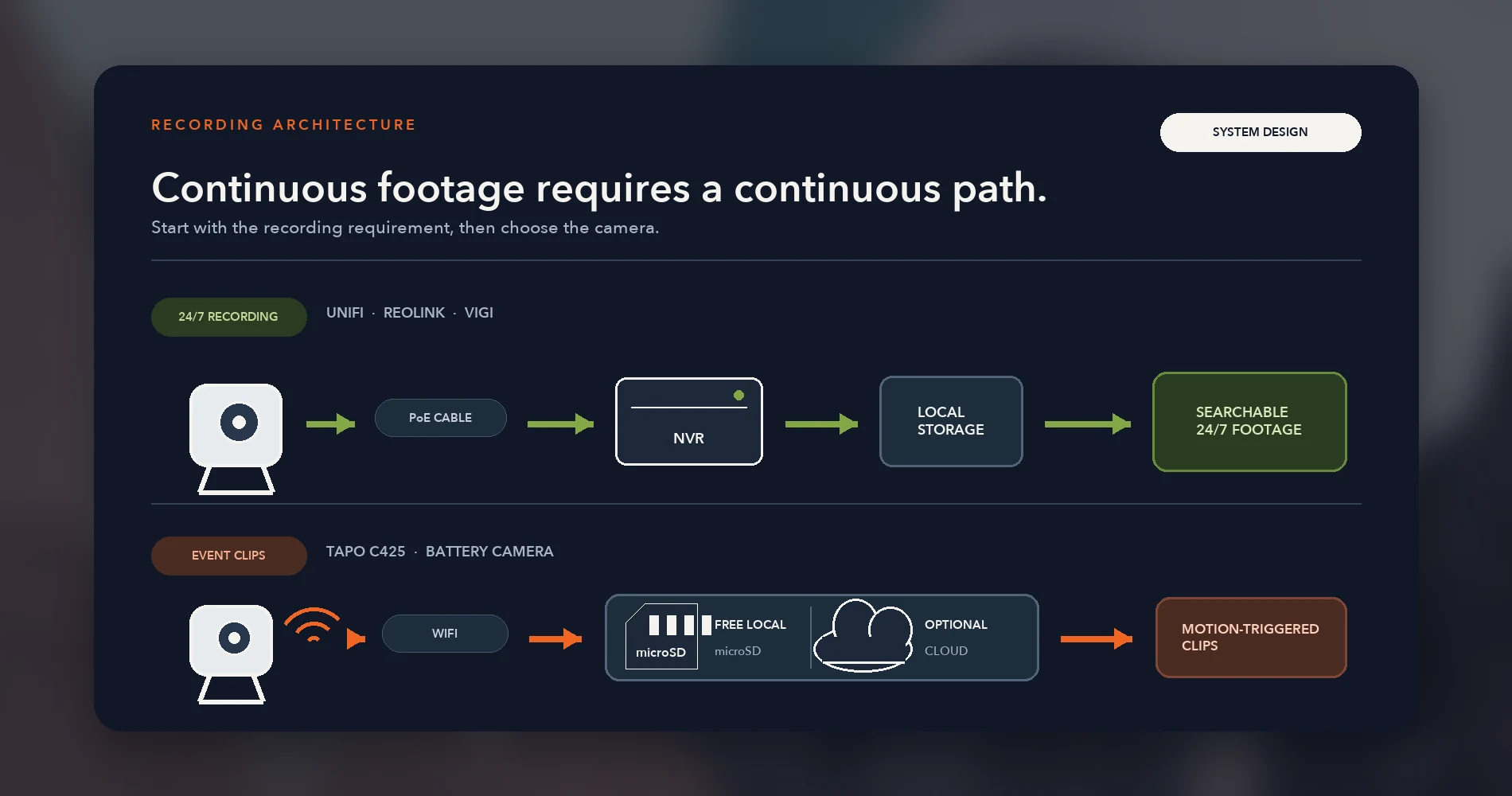
That said, the battery and WiFi models remain Tapo's core market. Battery cameras like the C425 record event-triggered clips, not continuous 24/7 footage — an important distinction from PoE systems. Local recording is free via microSD card (up to 512GB). Tapo Care adds cloud video history and richer AI notifications; the entry Cloud tier starts at $3.49/month for up to 2 cameras, with Advanced tiers covering unlimited cameras at higher prices.
TP-Link VIGI: Business PoE Cameras
VIGI's current generation — now sold under the "InSight" branding — includes the InSight S345 (formerly C345) at 4MP and the InSight S385 at 8MP for the bullet form factor, plus turret, dome, and panoramic variants. All are PoE, IP67-rated, and include person/vehicle analytics and classification without any subscription. Each camera supports microSD storage (up to 512GB) for standalone recording without an NVR. For centralized continuous recording, the VIGI NVR1008H-8MP handles 8 PoE channels with up to 10TB of storage on the V1.0 hardware revision (the newer V1.20 revision supports up to 16TB — check your specific unit).
| UniFi G6 Bullet | Reolink RLC-820A | VIGI InSight S345 | Tapo C425 | |
|---|---|---|---|---|
| Resolution | 4K (8MP) | 4K (8MP) | 4MP | 2K (4MP) |
| Sensor | 1/1.8" CMOS | 1/2.7" CMOS | 1/2.7" CMOS | 1/3" CMOS |
| AI Detection | Person, vehicle, face, LPR (on-device) | Person, vehicle, animal | Person, vehicle analytics/classification | Person, vehicle, pet |
| Recording Mode | Continuous, scheduled, event | Continuous, scheduled, event | Continuous, scheduled, event | Event-triggered clips (not continuous) |
| Connection | PoE (802.3af) | PoE (802.3af) | PoE (802.3af/at) | WiFi / Battery |
| ONVIF | Yes (basic; AI Port adds deeper features) | Yes (model-dependent) | Yes | No (battery); model-dependent (wired Tapo) |
| Weatherproof | IP66 | IP67 | IP67 | IP66 |
| Price | $199 | $99.99 | ~$100–$250 (varies by US retailer) | $65–$130 (frequently discounted) |
| Warranty | Standard hardware | 2 years | 5 years (metal chassis) | 1 year (wire-free) |
Prices checked August 4, 2026. Prices are snapshots and may change.
Architecture: What You're Actually Buying
Camera specs are easy to compare. What actually determines whether a system works for your business is the architecture underneath.
Does it need PoE infrastructure? The wired UniFi cameras (G6 Bullet, Turret, Dome, Edge and others), Reolink PoE kits, and VIGI all use PoE — meaning a PoE switch or NVR with built-in PoE ports, plus Ethernet cable runs to each camera location. This is more reliable than WiFi (no signal drops, no battery replacements) but requires upfront wiring. UniFi also sells the G6 Instant, a WiFi camera that skips the data cable (it is powered over USB-C) but still needs a UniFi Protect console. Most Tapo cameras run on WiFi or battery — no cable runs needed, though newer models like the C575D support wired Ethernet and PoE. WiFi cameras consume bandwidth and battery models need occasional recharging unless paired with a solar panel.
Is a dedicated NVR required? For most UniFi cameras, yes: Protect runs on a UNVR (including the compact UNVR Instant) or a UniFi gateway with Protect capability, and that includes the G6 Instant WiFi camera. The exception is the G6 Edge series, which supports standalone operation with local microSD storage and an optional NVR (mobile app setup required). Reolink's PoE kits include an NVR; standalone cameras can also record to microSD (cloud support is available on some models but not all — the RLC-820A, for example, does not currently support Reolink Cloud). VIGI cameras can record to microSD (up to 512GB) independently, but a VIGI NVR is recommended for centralized continuous multi-camera recording. Tapo cameras record directly to microSD cards, with optional cloud backup via Tapo Care.
Is local storage subscription-free? UniFi Protect: yes — all recording and AI detection runs locally with no recurring fees. Reolink with an NVR: yes, fully local, no subscription. VIGI: yes, same model (whether using NVR or camera-local microSD). Tapo: microSD recording is free, but cloud storage and richer AI notification features require Tapo Care. Note that battery-powered Tapo cameras like the C425 record event-triggered clips, not continuous 24/7 footage.
Can it talk to other systems? Reolink and VIGI offer the broadest ONVIF options in this comparison, though support is model-dependent — verify the specific camera, hardware revision, and recorder before assuming compatibility. UniFi Protect accepts third-party ONVIF cameras for basic recording and motion detection; Ubiquiti's optional AI Port accessory ($199) can add person, vehicle, face, and license plate detection to supported third-party streams (each AI Port handles one 4K camera, up to two 2K cameras, or up to three HD cameras). Most wired Tapo cameras now support ONVIF Profile S and RTSP, though battery-powered models generally do not.
If interoperability with third-party NVRs or NAS-based recording is a priority, Reolink and VIGI provide the most straightforward path. UniFi's strength is ecosystem depth within its own platform, not cross-vendor flexibility.
Real Cost for a Typical Small Office
Single camera prices are misleading. A $100 camera that needs a $350 NVR and a PoE switch isn't automatically cheaper than a $199 camera once you build out a real system. The comparisons below use equal assumptions: same camera count, same recording mode (continuous for PoE builds), and comparable storage. All prices are from manufacturer stores or major US retailers, checked August 4, 2026.
8-Camera Continuous-Recording PoE Comparison
All three builds use: 8 cameras, PoE power, local continuous recording, and normalized 2TB storage. The UniFi build uses the larger UNVR, which has no built-in PoE ports, so it requires a separate PoE switch. The compact UNVR Instant does include a built-in 6-port PoE switch, but it supports six 4K cameras, so it suits smaller builds rather than this eight-camera one. Eight G6 Bullets draw up to 9.9W each (79.2W total), which exceeds the USW-Lite-8-PoE's 52W budget and its 4 PoE ports. The minimum viable switch is the USW-Pro-8-PoE: 8 PoE+/PoE++ ports with a 120W budget ($349). Reolink's and VIGI's NVRs include integrated 8-port PoE.
| Component | UniFi Protect | Reolink | TP-Link VIGI |
|---|---|---|---|
| Cameras | 8× G6 Bullet @ $199 | 8× RLC-820A @ $100 | 8× InSight S345 @ ~$100–$250 |
| Camera resolution | 8MP (4K) | 8MP (4K) | 4MP |
| NVR | UNVR @ $299 | RLN8-410 @ $300 (2TB HDD included) | NVR1008H-8MP @ ~$250 |
| PoE switch | USW-Pro-8-PoE @ $349 | Integrated in NVR | Integrated in NVR |
| Storage (HDD) | 2TB @ ~$65 | Included (2TB) | 2TB @ ~$65 |
| AI detection | Included (face, LPR, on-device) | Included (person, vehicle, animal) | Included (person/vehicle classification) |
| Subscription | $0 | $0 | $0 |
| Total hardware | ~$2,305 | ~$1,100 | ~$1,115–$2,315 |
Prices checked August 4, 2026 from manufacturer stores. Reolink RLN8-410 MSRP is $349.99; current listed price is $299.99. VIGI S345 US pricing varies by retailer ($93–$254). For 8MP VIGI cameras (InSight S385), costs would be higher but US retail pricing is limited. Hardware totals exclude tax, installation, Ethernet cabling, and any required uplink cable or transceiver.
Tapo: 4-Camera Event-Recording WiFi Deployment
The Tapo scenario is not directly comparable to the PoE builds above: it uses battery-powered cameras that record event-triggered clips (not continuous 24/7 footage), and it covers 4 cameras rather than 8. Tapo Care is optional — local microSD recording works without it.
| Component | TP-Link Tapo |
|---|---|
| Cameras | 4× C425 @ ~$65 (current sale) |
| NVR | None (microSD recording) |
| Storage | 4× 256GB microSD @ ~$25 each |
| Subscription | $0 (local recording only) |
| Total hardware | ~$360 |
Optional cloud cost: Tapo Care pricing varies by plan, region, and checkout method. Each TP-Link account supports only one active Tapo Care subscription, and the entry Cloud tier covers only 1–2 cameras. Four-camera coverage requires a Cloud Advanced plan (unlimited cameras, 180-day storage) at a higher price point. Cloud fees are excluded from this comparison because of this variability. Check the Tapo app for current pricing.
Reolink lands roughly half the cost of UniFi for the same camera count and resolution. The UniFi premium buys a unified management environment for networking, cameras, and access control, on-device AI with face and license plate recognition, and no current per-camera licensing fees — features the other platforms don't match at this price point.
Tapo Is Not a Direct PoE Substitute
The Tapo C425 records event-triggered clips when motion is detected — it does not provide ordinary continuous recording like PoE systems with an NVR. If your use case requires uninterrupted 24/7 footage (common for business liability and compliance), a PoE system is the baseline, not an optional upgrade. Tapo's wired PoE models like the C575D support continuous recording, but they're newer and priced differently than the battery lineup.
VIGI's InSight S345 cameras are 4MP, not 8MP — for a true resolution match against UniFi and Reolink, you'd need the VIGI InSight S385 (8MP), which is pricier and has limited US retail availability. VIGI pricing in the US varies widely enough that we recommend getting a quote from a specific distributor rather than relying on any single listed price.
For readers who decide UniFi is the right fit and want help sizing storage, our UniFi Protect storage planning guide walks through the exact math by camera count, resolution, and retention period.
Reliability: iFeelTech's Fleet Data and Its Limits
We operate a tracked fleet of 538 Ubiquiti devices across approximately 12 commercial sites in South Florida. Of those 538, 383 are cameras — making up 71% of the fleet. These devices run continuously in 84–97°F ambient temperatures with 73–78% average humidity (per on-site monitoring), including outdoor installations with direct sun exposure and salt-air conditions.
Over a 48-month reporting period, we replaced 4 devices across the entire fleet — a 0.74% cumulative replacement rate (4 ÷ 538). Of those four replacements, three were cameras and one was an access point:
- 3 environmental losses (cameras): one WiFi camera damaged by a power spike on an unconditioned outdoor circuit, and two PoE cameras shorted by condensation in a poorly insulated cooler environment.
- 1 RMA (access point) with ambiguous root cause (possibly firmware, not hardware).
We logged five total incidents during this period — the four replacements above plus one non-hardware incident (EMI-induced cable faults that were resolved by re-routing cabling, not replacing devices). Core infrastructure — gateways and switches — maintained 99.99% measured uptime (calculated from controller-reported availability, excluding scheduled maintenance windows). The full data and incident post-mortems are in our 4-year fleet reliability report.
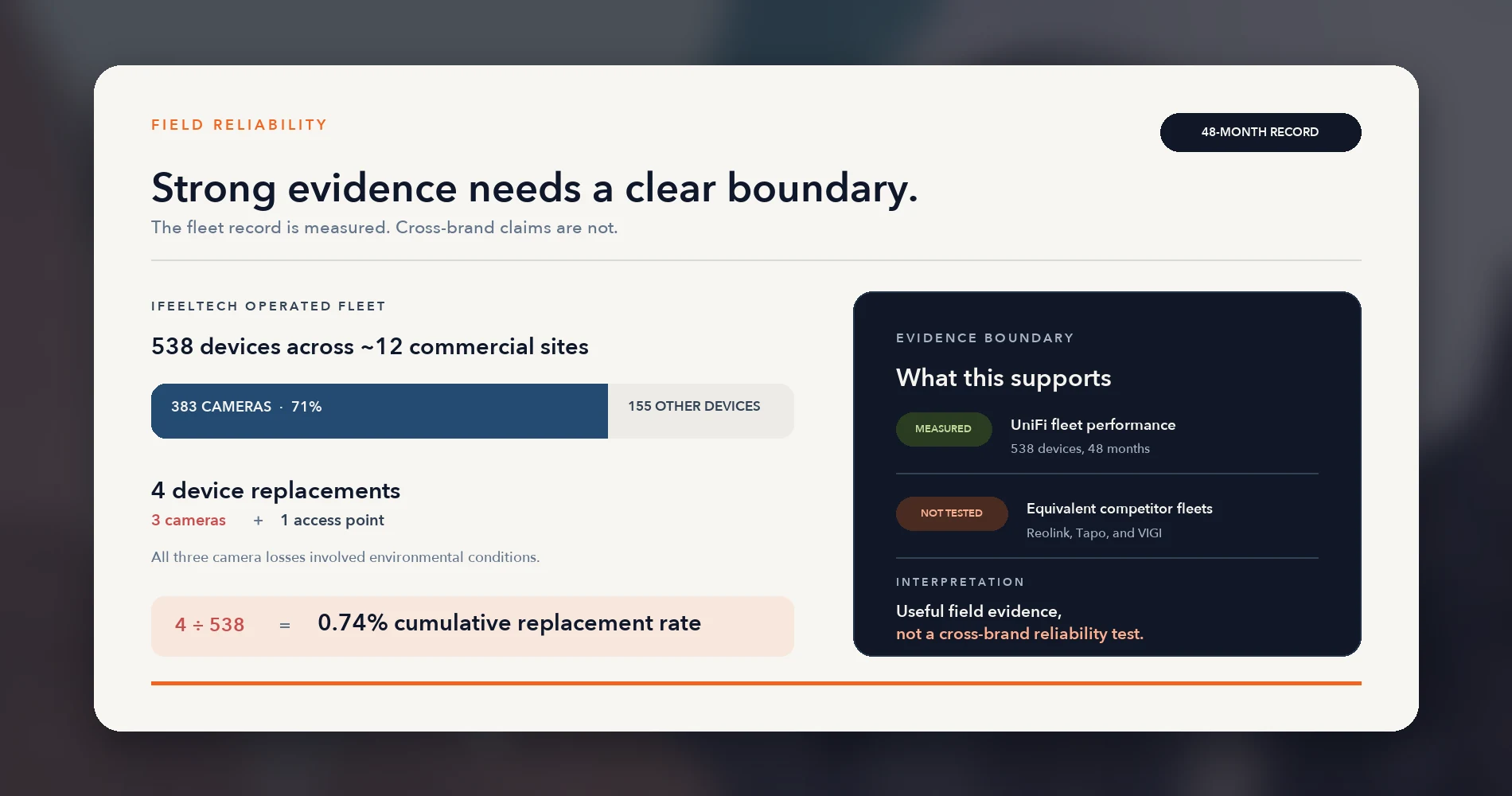
The important caveat: we don't operate Reolink, Tapo, or VIGI fleets at comparable scale, so we can't make equivalent reliability claims for those brands. What we can compare are manufacturer warranty terms:
- Reolink: 2-year limited warranty.
- TP-Link Tapo: 1 year for wire-free cameras; varies by model for wired products.
- TP-Link VIGI: 5-year warranty for metal-chassis cameras (excluding pan/tilt models) and VIGI NVRs (excluding hard drives). This is the longest hardware warranty in this comparison.
- UniFi: Standard hardware warranty; optional UI Care ($39/unit) extends coverage to 5 years with priority RMA.
The warranty comparison is worth noting: VIGI's 5-year metal-chassis warranty is a meaningful business consideration that most UniFi-vs-alternatives comparisons overlook.
AI Detection, App Experience, and Ecosystem Integration
Day-to-day, the camera hardware matters less than the software you interact with. Here's where each system lands on the features you'll actually use.
UniFi Protect
UniFi's main differentiator isn't any single camera spec — it's the unified management environment. UniFi Network (switches, APs, gateways), UniFi Protect (cameras), and UniFi Access (door readers) share one account, one console, and one Site Manager dashboard. The web UI presents them as integrated views; mobile workflows use separate apps (UniFi Network and UniFi Protect), but the management identity and site structure are shared.
AI detection runs on each camera's own inference chip, which means the AI processing load scales with camera count rather than concentrating on the NVR. This is a meaningful advantage for detection specifically — though NVR storage I/O, network bandwidth, and simultaneous viewing still have practical limits at scale. Face recognition and license plate detection are included with G-series cameras at no additional fee. For third-party ONVIF cameras, the optional AI Port ($199) adds these same detection capabilities to supported streams (one 4K, two 2K, or three HD cameras per AI Port).
The tradeoff: UniFi's ecosystem is deep but opinionated. Third-party ONVIF cameras work for basic recording and, with an AI Port, for deeper detection — but the experience is more seamless with Ubiquiti hardware. There's no Alexa or Google Assistant integration.
Reolink
Reolink's app has improved considerably over the last two years. Live view, playback, and smart detection alerts work reliably on both iOS and Android. The desktop client (Reolink Client) handles multi-camera viewing well, and the NVR's local HDMI output lets you connect a monitor directly for a traditional security desk setup.
The key differentiator: ONVIF and RTSP support on most models. Reolink cameras can feed into Synology Surveillance Station, Blue Iris, Home Assistant, or other ONVIF-compatible platforms — though Reolink's own support documentation notes that compatibility varies by camera model, hardware revision, and the specific recorder. Verify your exact combination before assuming seamless integration. That said, starting with Reolink's own NVR and having an exit path to a NAS later is a real advantage for businesses that aren't sure what their surveillance needs will look like in 3–5 years.
AI detection (person, vehicle, animal) runs on-device and is included with the hardware. Face recognition and LPR are not available in the same way as UniFi — Reolink's smart detection is effective for alerting but less granular for searchable analytics.
TP-Link Tapo
Tapo's app is designed for simplicity — it's the easiest onboarding experience of the four. Connect to WiFi, mount the camera, and you're recording in minutes. Alexa and Google Assistant integration lets you pull up live views on smart displays. Most wired Tapo cameras also support ONVIF Profile S and RTSP, giving a path to third-party NVR integration — though battery-powered models like the C425 generally do not.
The tradeoff: useful features are increasingly behind Tapo Care. Basic motion detection and AI alerts (person, vehicle, pet) work without a subscription, but cloud video history, richer notification snapshots, and advanced AI features like facial recognition require a paid plan. The entry Cloud tier covers up to 2 cameras; more than that requires a Cloud Advanced plan. Check the Tapo app for current pricing.
TP-Link VIGI
VIGI's management experience sits between Tapo's simplicity and UniFi's depth. The VIGI app and VIGI VMS software handle live view, playback, and detection alerts. For businesses already running TP-Link Omada networking gear, VIGI cameras and NVRs integrate with Omada Central — TP-Link's unified cloud management platform for both networking and surveillance. This provides a single-console experience for switches, access points, and cameras, similar in concept to UniFi's approach but with a younger feature set.
AI detection (person/vehicle classification, line crossing, intrusion detection) is included with the hardware — no subscription. ONVIF support means VIGI cameras work with third-party NVRs if you outgrow the VIGI ecosystem. The limitation worth noting: VIGI's community and independent support resources are thinner than UniFi's or Reolink's. Troubleshooting will draw from a smaller pool of forum threads and documentation.
Which System Fits Your Business?
Choose UniFi for integration, Reolink for 4K value, Tapo for small wireless setups, and VIGI for Omada sites. Here's the reasoning by scenario.
UniFi Protect
Choose UniFi Protect if you're already invested in UniFi networking, or you're scaling past 10–15 cameras (a planning heuristic from our deployments, not a universal threshold), or you want cameras and door access control in one management environment. The ecosystem integration, on-device AI with face and license plate recognition, and no current per-camera licensing fees make UniFi a strong fit for businesses planning to grow. The premium over Reolink is real (~$1,200 more for an 8-camera deployment), but it buys a platform, not just cameras. For a very small site, the G6 Edge cameras can run standalone without an NVR, though you give up centralized recording unless you add one later.
For model-specific guidance, our G6 buying guide covers which G6 camera fits which use case, and our G6 Instant WiFi vs. PoE review helps decide when the WiFi model makes sense versus running cable.
Reolink
Choose Reolink if you have no existing network ecosystem to integrate with, you want PoE reliability at the lowest verified total cost for a wired 4K system, and you're comfortable without deep single-vendor integration. Reolink delivers 4K resolution, on-device AI detection, and fully local recording with no subscription — roughly half of UniFi's total system cost for the same camera count. ONVIF support on most models gives an exit path to a NAS-based system later if your needs evolve.
The tradeoff: no face recognition or LPR at this price point, less polished multi-site management, a 2-year warranty versus VIGI's 5-year, and a smaller professional installer ecosystem than Ubiquiti's.
TP-Link Tapo
Choose Tapo if you need 1–4 cameras, you have no PoE wiring and don't want to install any, and you want the system recording the same day you buy it. WiFi setup, magnetic mounts, and microSD recording that works without a subscription. The C425's battery life (up to 300 days) keeps maintenance low.
Important: battery-powered Tapo cameras record event-triggered clips, not continuous 24/7 footage. If your business requires uninterrupted recording for liability or compliance, a PoE system is the right baseline. Tapo's newer wired PoE models (like the C575D) support continuous recording, but the battery lineup does not. Past 4 cameras, WiFi bandwidth becomes a constraint and a PoE system wins on both capability and total cost of ownership.
TP-Link VIGI
Choose VIGI if you're already running TP-Link Omada gear and want one vendor for network and cameras, or you value the 5-year metal-chassis warranty and are comfortable with a smaller community. VIGI's PoE architecture, included AI detection, ONVIF support, no subscription cost, and the longest stated warranty in this comparison make it a credible alternative to both Reolink and UniFi.
Worth noting: VIGI's most affordable US-available cameras are 4MP — for 8MP/4K resolution, you'd need the InSight S385 models, which are pricier and harder to source in the US. VIGI's US retail availability is thinner than Reolink's or UniFi's, meaning getting consistent pricing and support may take more effort.
For an 8-camera single-site deployment with no growth plans and no existing network ecosystem, the choice between Reolink and VIGI comes down to sourcing, warranty preference (Reolink's 2-year vs. VIGI's 5-year for metal chassis), and ecosystem alignment. If neither applies, Reolink's larger community and broader US availability give it a slight edge for support and troubleshooting.
For anything involving multiple sites, scaling past 15 cameras, or integrating cameras with door access control, UniFi Protect's ecosystem depth becomes worth the premium — especially if the networking infrastructure is already there.
Planning a Wired Camera System in South Florida?
We can help scope camera placement, PoE capacity, storage, and retention before you buy — regardless of which platform you choose. Contact iFeelTech for a free consultation.
Related Resources
Camera-specific guides:
- Best UniFi Protect Cameras: G6 Lineup Guide — Model-by-model breakdown of the full G6 series, from the $179 Instant to the $499 Pro 360.
- UniFi G6 Instant Review: WiFi vs. PoE Cameras — When the WiFi model makes sense and when to run cable instead.
- UniFi Protect vs. Synology Surveillance Station — NAS-based recording compared to purpose-built camera platforms.
- Reolink vs. Lorex for a Small Office — Two PoE systems compared on workflow, storage and installed cost.
- UNVR Instant Review — Detailed review of the compact NVR with built-in PoE switch referenced in the cost comparison above.
Infrastructure and planning:
- Power over Ethernet Guide — PoE standards, wattage budgets, and how to size a PoE switch for cameras and access points.
- UniFi Protect Storage Planning Guide — How to size storage by camera count, resolution, and retention period.
- UniFi vs. Omada: WiFi 7 Business Comparison — For readers weighing the broader Ubiquiti vs. TP-Link ecosystem decision.
First-party data:
- 4-Year UniFi Fleet Reliability Report — The full fleet data behind the reliability claims in this article: 538 devices, 48 months, five incident post-mortems.
Frequently Asked Questions
Related Articles
More from UniFi Networks
UniFi vs. Ring for Business: Which Doorbell Camera Wins in 2026?
UniFi G4 Doorbell Pro vs Ring Battery Doorbell Pro 2nd Gen for business use. Pricing, subscription costs, infrastructure requirements, and a clear recommendation for each scenario.
18 min read
Best UniFi Protect Cameras 2026: Complete G6 Lineup Buying Guide
Compare every UniFi G6 camera from the $179 Instant to the $499 Pro Dome. Real-world testing, pricing, specs, and recommendations for home and business security.
21 min read
UniFi Protect vs. Synology Surveillance Station: A Complete 2026 Comparison
A detailed comparison of UniFi Protect and Synology Surveillance Station for small business and home security. We examine hardware, software, pricing, and real-world use cases to help you choose the right system.
11 min read