

Leaving GoDaddy and Microsoft 365 for Proton: A Privacy-Driven Switch
What leaving GoDaddy-hosted Microsoft 365 for Proton involves: a five-person studio's case, privacy limits, SPF and cancellation checks, and who should stay.


A small design studio wanted to leave GoDaddy and Microsoft 365 for Proton, for privacy reasons. The scope was six mailboxes, a few group addresses such as info@ and sales@, and work files spread across a local NAS and cloud services, with very little in OneDrive.
The GoDaddy DNS and MX cutover was quick. Moving three years of email took more work: we had started without the newly released Microsoft 365 Easy Switch workflow and lost time on the migration. The experience reinforced a useful distinction: a simple DNS change does not make the mailbox import simple.
This is how that kind of switch goes, what it needs, and where Teams and SharePoint dependencies change the decision.
Affiliate Disclosure: This article contains affiliate links. If you make a purchase through these links, we may earn a small commission at no extra cost to you. As an Amazon Associate, iFeelTech earns from qualifying purchases.
The short version
If Microsoft 365 is mostly email for you, a move to Proton can be manageable. Check administrator access, mailbox size and app compatibility first. Import and verify your data, change mail routing, then monitor delivery before ending the old plan. You can keep the same custom-domain address without transferring the domain away from GoDaddy.
If your office lives inside Teams, SharePoint, Power Automate or Excel macros, staying on Microsoft is usually the better decision. See who should not switch to Proton Workspace.
The case: a design studio leaving GoDaddy and Microsoft 365 for privacy
The studio bought Microsoft 365 through GoDaddy, which handled billing and its email dashboard. The client wanted to leave both services. Ending the email subscription and transferring the domain registration are separate decisions. This is the same studio described in our Microsoft 365 to Proton migration walkthrough, which covers the cutover steps in more detail.
Proton's privacy benefit needs a precise definition. Message bodies and attachments stored in its mailbox use zero-access encryption. Messages between Proton users are end-to-end encrypted. Ordinary mail exchanged with Gmail or Outlook uses TLS when supported, rather than end-to-end encryption; the other provider can retain a readable copy. Password-protected messages or PGP can extend end-to-end encryption to external correspondents. Subject lines and sender/recipient addresses are not end-to-end encrypted. Proton explains these boundaries in its encryption documentation.
For this client, the benefit is reducing the email host's access to stored message content. Moving the mailbox does not erase copies at Microsoft, in backups or in correspondents' accounts.
What moves when you leave Microsoft 365 for Proton
The studio's work files were split between a local NAS and more than one cloud service, and very little was in OneDrive, so each file source was a small, separate copy job. Most of the migration work was in the six mailboxes and their last three years of messages. We did not use Proton's newly released Microsoft 365 Easy Switch workflow for the initial import, so the table below describes today's options, not the method used in this case.
The group addresses needed attention too. An alias delivers to one mailbox; a group distributes messages to members; a shared mailbox is a collaborative inbox. Those are different requirements. Record who should receive and reply from each address before choosing the replacement.
For readers planning a similar move now, the current migration options are:
| What | Current route | What to check |
|---|---|---|
| Mail, contacts and calendars | Easy Switch for Business supports Microsoft 365 organizations | Admin authorization, import results and enough destination storage |
| OneDrive files | Download, verify and upload to Proton Drive | Open the copies and recreate any sharing you still need |
| Custom-domain email address | Keep the address and change mail DNS records | Create every receiving address and alias before cutover |
| Teams, SharePoint and other workflows | Assess separately | A mailbox import does not move these systems |
Proton announced its Microsoft expansion on 29 September 2026 as a gradual rollout. Its business migration guide requires a Proton admin, Microsoft 365 admin authorization and cloud-hosted mailboxes; shared mailboxes are currently excluded. Check that the Microsoft option is available in your account before scheduling the move. See Proton's rollout announcement for the release context.
For files, Proton's OneDrive transfer instructions describe downloading and uploading through a computer. Easy Switch is not a OneDrive migration tool.
Is leaving Microsoft 365 for Proton a good fit for your office?
The studio's quick cutover and slower historical import are why we look at both workflow complexity and data volume. An email-first move is a reasonable candidate when these conditions hold:
- Microsoft 365 is mostly an email account, with a calendar and contacts.
- Any group addresses have a tested receiving and reply workflow; shared mailboxes need a separate migration plan because Proton's business import excludes them.
- Your files fit the destination and can be copied and checked without losing required workflows.
- Nothing else signs in with your Microsoft account.
- You do not rely on Outlook add-ins.
- You do not need to co-edit Word or Excel live with people who stay on Microsoft.
If you are still deciding whether a platform change is the right fix, our guide to fixing the setup before switching covers the assessment to run first. Any failed item needs its own plan. A single dependency, such as Microsoft sign-in for an essential application, can determine the decision.
When staying put is the better call
We would assess a wider Microsoft dependency before recommending an exit. If your team lives in Teams chats and meetings, runs approvals in SharePoint or Power Automate, shares Excel models that depend on macros, or manages laptops with Microsoft's device tools, leaving Microsoft is a larger project than an email migration, and staying is usually the better choice. Our Proton Workspace vs Microsoft 365 comparison lays out the trade-offs, and who should not switch gives a short test.
A middle path exists. Move only email to Proton, keep Microsoft for the files and apps you depend on, and reassess later. It does not end the Microsoft relationship, and Microsoft will still hold any data you leave there. It can be a practical compromise when you want Proton for mail but need Microsoft's other tools.
Using Proton after Outlook: what changes day to day
Test a normal working day before committing: find an older message, open an attachment, send an invitation and use the phone app. Proton offers its own web, desktop and mobile apps. Moving the stored data and reproducing an Exchange workflow are different tests.
Proton Mail Bridge connects mail to compatible desktop clients on a paid plan; it is not available on mobile. New Outlook for Windows does not support Bridge, and Proton does not recommend new Outlook for Mac. Classic Outlook, Thunderbird or Apple Mail may suit you. Check the exact version; if cancelling Microsoft also ends your desktop Outlook license, you need a separate valid license or another client. See Proton's Outlook compatibility guidance.
Do not assume Bridge recreates Outlook calendar/contact synchronization or add-ins. Test those workflows in Proton's own apps. Rebuild signatures, rules and other settings the import does not transfer, and reconnect sending devices or applications separately.
Your custom-domain address can remain the same. That avoids asking contacts to update their address books, but it does not guarantee identical deliverability or a move without interruption.
Which Proton plan fits an email-first move
For this kind of move, start with mailbox and file storage needs. These are Proton's three main business mail/workspace tiers:
| Plan | USD per user/month, paid annually | What it adds |
|---|---|---|
| Mail Essentials | $6.99 | 15 GB per user, mail/calendar, Drive sharing, Docs/Sheets; 3 custom domains per organization |
| Workspace Standard | $12.99 | 1 TB per user, expanded VPN and Pass with team vaults, Meet for 100; 15 custom domains |
| Workspace Premium | $19.99 | 3 TB per user, Lumo, email retention policies, Meet for 250; 20 custom domains |
The studio went on Workspace Standard, which is also the first tier that lists email groups. For a small office that needs business email, fits within 15 GB per user and does not require native email groups, Mail Essentials is the starting point. Check the actual mailbox size before choosing it. Domain allowances apply to the organization, not separately to each user. For an office with group addresses like the studio's info@ and sales@, check the group workflow first: Proton lists email groups on Workspace Standard and Premium, not Mail Essentials. An alias is not a substitute for distribution to several people.
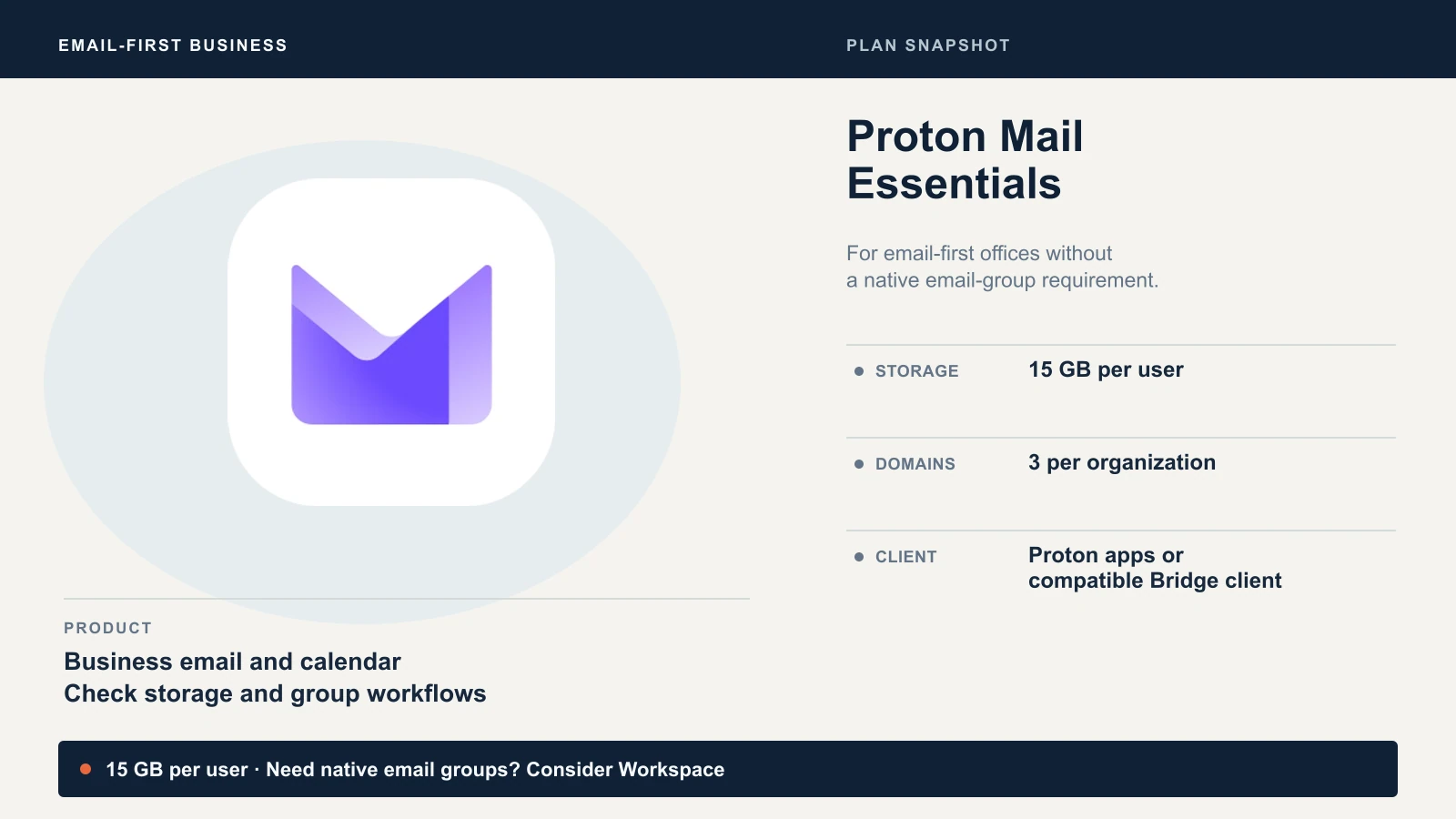
Mail Essentials also includes basic Pass, limited VPN access and Meet for up to 50 people for one hour. Standard adds capacity and team features; it is not the first tier with any access to those products. Its extra $6 per user/month is worthwhile only if you need the upgrades. Our Mail for Business review and Standard vs Premium comparison cover those choices.
Proton's live pricing page showed annual charges of $83.88, $155.88 and $239.88 per user, respectively, on 23 October 2026, before applicable taxes. It advertises a 14-day trial and a 30-day money-back guarantee. Use the trial to test your workflow; a large import may take longer. At list price, five Mail Essentials seats come to $419.40 a year and five Workspace Standard seats to $779.40, before tax. These are current list prices, not the client's bill or a promise of savings. Budget for an overlap with the existing subscription and any migration help.
The migration order we recommend
Prepare and verify the destination while Microsoft remains available. This is the sequence we recommend for an email-first move; the linked runbook covers the detailed screens and rollback procedure.
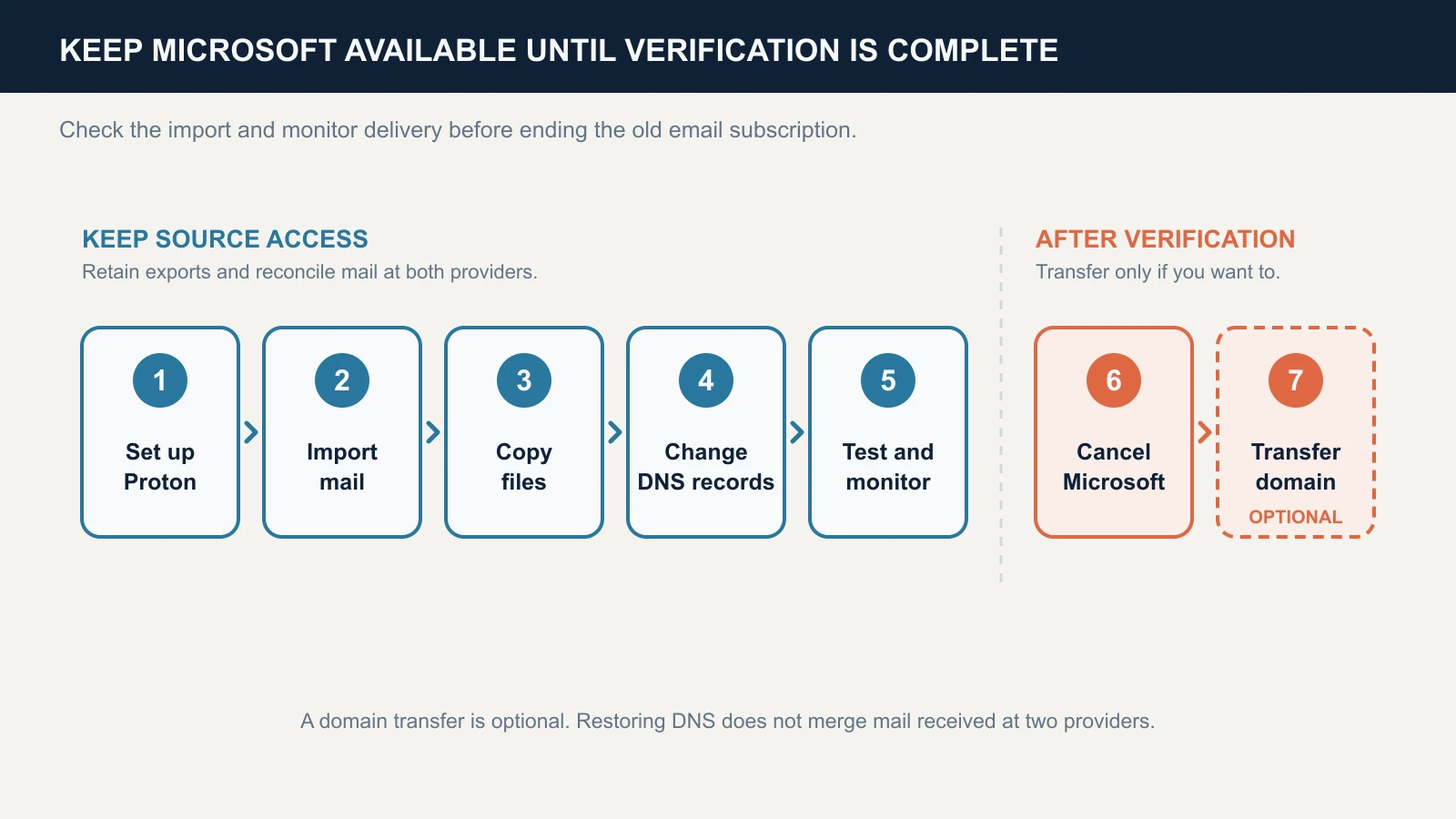
- Inventory and set up Proton. List mailboxes, groups, aliases, forwarding, calendars, local Outlook archives and any website, scanner or accounting tool sending through Microsoft. Check storage, administrator authorization and the intended apps. Verify domain ownership in Proton, prepare all receiving addresses and configure two-factor authentication plus a data recovery method.
- Import and inspect the data. Use the Microsoft option in Easy Switch for Business where available. Review its completion status and failures. Compare important folders, older mail, attachments, contacts and calendar events with the source. Keep an independent export of data you cannot afford to lose. The Microsoft 365 migration walkthrough covers the wizard.
- Copy and verify the files. Download the required OneDrive files, open representative copies and upload them to Proton Drive. Check shared links and access separately. Keep the local copies through verification.
- Cut over mail routing. Follow Proton's domain settings for MX priorities and the exact SPF, DKIM and DMARC values; our DMARC guide for small businesses covers the policy choice. At the final MX cutover, use
mail.protonmail.chandmailsec.protonmail.chand remove other MX records for that domain. Preserve unrelated website records. Keep the old mailbox accessible while DNS caches update. - Test and monitor. Send to and from external providers, reply, test every alias and sending tool, inspect authentication results and check the old inbox for late deliveries. Proton says routing confirmation can take up to 24 hours. The historical import can be the slowest part: allow for mailbox size, item count and failures rather than promising a fixed completion time. Our recommendation is to allow several days of overlap and resolve missed items before cancellation; one test message is not enough.
- End the old email subscription. Only after the import, files, apps and delivery checks pass. Confirm which product is being cancelled and what else it includes, then record the new admin credentials, recovery codes and DNS host access using our IT handover checklist.
- Consider a domain transfer separately. Optional, after mail is stable. Save the DNS zone and check the new provider's DNS arrangements first.
If the cutover fails, pause cancellation, use the saved DNS configuration and follow the runbook's rollback procedure. Mail received at each provider during the overlap still needs reconciliation; restoring MX records does not merge the two mailboxes.
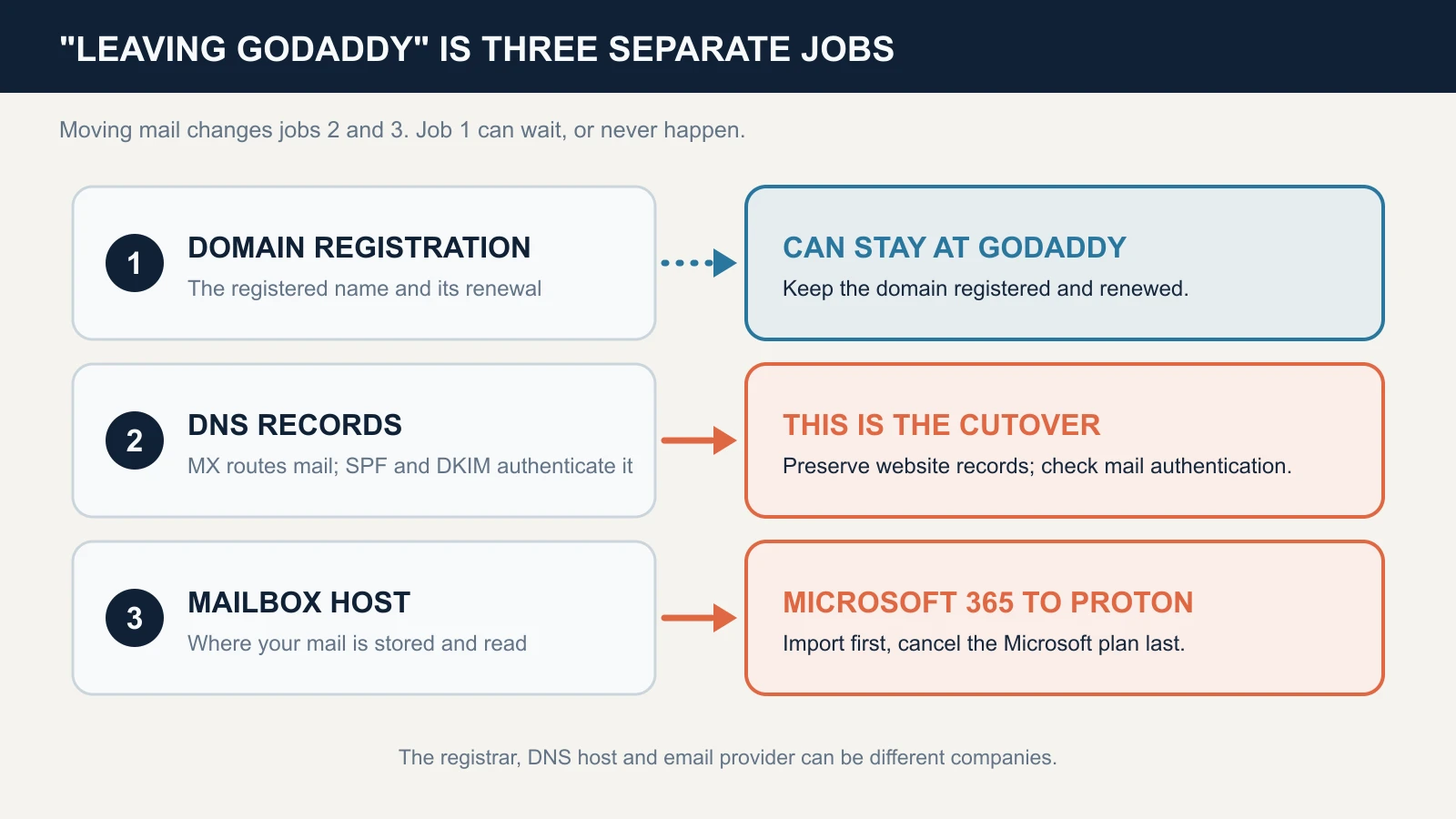
Leaving GoDaddy: three separate jobs
GoDaddy can be the registrar, DNS host and email reseller at the same time. Changing one role does not automatically change the others.
Confirm administrator access first
Proton's import needs a Microsoft 365 administrator sign-in. GoDaddy's Advanced Admin Centers guide starts at Email & Office Dashboard → Admin → Advanced; available centers depend on your plan. Access to that dashboard alone does not prove that Proton's Microsoft authorization will succeed. Confirm that you can complete the administrator sign-in the import asks for before you start. If you cannot, that is a conversation with GoDaddy, not a DNS problem.
Update the SPF record
GoDaddy's SPF instructions list the standard Microsoft 365 value as v=spf1 include:secureserver.net -all, and say it is added automatically when the domain, DNS and email share one account. Advanced Email Security can require a different value: inspect the actual record. A domain can have only one SPF record, and our SPF, DKIM and DMARC guide explains why a second one breaks authentication. Proton's record has to replace that one or be merged into it, rather than sit beside it. The -all at the end tells receiving servers that any sender not listed fails, so a leftover record that lists only GoDaddy would fail mail sent from Proton.
During the migration, keep both senders covered. Proton's wizard supports parallel sending, but its proposed SPF value must also cover your actual GoDaddy configuration and any other authorized senders. Once Microsoft is gone, remove the GoDaddy include unless something else still sends through it.
Verify your data before ending the plan
Export and verify before cancellation
GoDaddy's Microsoft 365 terms say that once you cancel, you will no longer have access to your content, that it may be permanently removed, and that it is your responsibility to export or copy what you want before canceling. Verify your mail in Proton first. If you are not ready to delete, turn off auto-renew: GoDaddy says you can keep using the product until the end date shown on the billing page.
Turning off auto-renew keeps access until the subscription end date. Deleting the product is a separate action with email confirmation. Do not use a deletion or recovery window as your backup plan. Our Microsoft 365 backup guide covers export options.
Check bundles before cancelling. GoDaddy's email-pack documentation says cancelling a pack cancels all associated accounts. An account upgraded into a standalone plan is an exception. The same document describes a 30-day restoration route for deleted addresses, including addresses in a cancelled pack, subject to an available qualifying account. That is different from a guarantee that every deleted subscription can be recovered.
Moving the domain is a different project
Leaving Microsoft 365 does not require leaving GoDaddy as the registrar, because mail delivery depends on DNS records. If you want the domain out too, GoDaddy's transfer checklist lists the requirements: unlock the domain, turn off Domain Privacy, downgrade Domain Protection to none, and get the authorization code. GoDaddy applies a 60-day lock after a registration, transfer or contact change when the registrant chose that option, a 120-day restriction for bundled new domains, and says transfers usually take 5 to 7 days. Eligibility varies by domain extension.
A registrar transfer does not copy DNS records. Save the zone first, confirm whether DNS hosting stays where it is, and if it moves, recreate the website and mail records before changing nameservers. Then test both services. Keep renewal active wherever the domain is registered.
GoDaddy and Proton help pages checked on 23 October 2026.
Next steps
The studio's move had two halves: the DNS change was quick, and the three-year mail import took longer than expected. For the next move, we would confirm the migration route and group-address behavior before scheduling the cutover.
The migration walkthrough has the printable runbook and the DNS record table, and our custom domain setup guide covers the records and tests for your own domain. If you want a hand with the cutover itself, our cloud services team does this work for small offices across South Florida.
Related Resources
- Microsoft 365 to Proton Workspace Migration — The full step-by-step cutover, DNS record table and rollback plan.
- Who Should Not Switch to Proton Workspace — The test for offices that are better off staying.
- Proton Workspace vs Microsoft 365 — Feature, price and migration comparison.
- Proton Mail for Business Review — What Mail Essentials includes and where it stops.
- Proton Mail Custom Domain Setup — Records and tests for your own domain on Proton.
- SPF, DKIM and DMARC Explained — What the three records do and how to check them.
- Fix the Setup or Switch? — The assessment to run before committing to a platform change.
- Microsoft 365 Backup Guide — Export and backup options to use before cancelling a Microsoft plan.
Frequently Asked Questions
Related Articles
More from Cybersecurity

Who Should Not Switch to Proton Workspace (and What to Do Instead)
Considering Proton Workspace? Check shared inboxes, Office files, Teams, sign-in and compliance before leaving Microsoft 365 or Google Workspace.
10 min read

Are Free VPN Extensions Safe for Small Businesses? A July 2026 Check
Recent VPN incidents showed how extensions can expose passwords, AI conversations, and browser traffic. Learn how to audit extensions, build an allowlist, and protect your company.
11 min read

Mullvad vs NordVPN vs Proton VPN: Which Protects Your Privacy Best in 2026?
A three-way comparison of Mullvad, NordVPN, and Proton VPN from someone mid-migration. Secure Core speed data, independent audit breakdowns, and a clear decision framework.
17 min read