

Proton Mail for Business Review: Pricing, Migration, and Practical Tradeoffs
Proton Mail reviewed from client migrations: pricing, cost drivers, compatibility limits, and the identity audit to run before switching.

In the Proton Mail migrations we have completed for clients, email has been the most predictable part. Mail delivered. Custom domains worked. The apps did what the documentation said.
The harder work has been everything tied to the Google or Microsoft identity being retired — project management tools, accounting platforms, e-signature services, analytics dashboards. Those dependencies are not email problems, and they do not appear on a pricing page. In our experience, they are what can stretch a clean cutover into a longer cleanup when they have not been mapped in advance.
We have four medium-size Proton migrations in the pipeline as of August 2026. This review covers what Proton Mail for Business costs, what it does well, where it will require adjustment, and the identity audit we run before recommending a cutover. Including why we have not finished moving our own company email.
Affiliate Disclosure: This article contains affiliate links. If you make a purchase through these links, we may earn a small commission at no extra cost to you. As an Amazon Associate, iFeelTech earns from qualifying purchases.
What Does Proton Mail for Business Include?
Mail Essentials is Proton's email-and-calendar plan; Workspace Standard and Premium are full productivity suites. The distinction matters because someone searching "proton mail business plan" may not realize the plans exist separately.
Mail Essentials includes Proton Mail, Proton Calendar, 15 GB of storage per user, 10 email addresses per user, and support for 3 custom email domains. It includes Proton Bridge for IMAP/SMTP access (classic Outlook, Thunderbird, Apple Mail), SMTP submission for CRMs and devices, appointment scheduling, basic document and spreadsheet editing through Proton Docs and Sheets, and file sharing through Proton Drive — though storage is limited to that 15 GB. You also get basic VPN access on one device per user.
Workspace Standard and Premium add 1 TB storage per user (3 TB on Premium), up to 15–20 custom domains, Proton VPN with full business features, Proton Pass password manager with team vaults, Proton Meet video conferencing, Email Groups, Proton Sentinel advanced threat protection, and more. For the full suite, see the Proton Workspace review.
This review focuses on Mail Essentials — the plan for teams that want encrypted email and calendar without paying for a full suite. If you already have a VPN, a password manager, and cloud storage you are satisfied with, Mail Essentials is a reasonable starting point. If you want everything under one provider, start with Proton Workspace instead.
How Much Does Proton Mail for Business Cost?
Mail Essentials costs $6.99 per user per month on annual billing, or $7.99 per user per month on monthly billing. There is no minimum seat requirement — a single-person firm can use it. All plans include a 14-day free trial and a 30-day money-back guarantee.
Pricing verified against proton.me/business/mail/pricing on August 6, 2026. Taxes may apply; currency and final price depend on billing country.
| Plan | Annual billing | Monthly billing | Storage | Custom domains |
|---|---|---|---|---|
| Mail Essentials | $6.99/user/mo | $7.99/user/mo | 15 GB/user | 3 |
| Workspace Standard | $12.99/user/mo | $14.99/user/mo | 1 TB/user | 15 |
| Workspace Premium | $19.99/user/mo | $24.99/user/mo | 3 TB/user | 20 |
For comparison, Google Workspace Business Starter is also $7/user/month on annual billing but includes 30 GB of pooled storage and a broader collaboration suite. The meaningful comparison between the two is not price per seat — it is encryption model, storage, collaboration depth, administration, and whether you would need to replace other subscriptions.
Per-Seat Price Is Not the Full Cost
Per-seat cost is the number most comparisons focus on. It is not the most useful number. Migration work — mapping identity dependencies, importing mail history, reconfiguring DNS, and supporting users through the transition — scales with mailbox size, integration complexity, and migration style, not seat count. The next section covers what actually determines the project cost.
What Determines the Cost of a Proton Mail Migration?
Cost depends on mailbox volume, history requirements, integration complexity, identity work, and user support. We see two client archetypes in every email migration, and they produce different project scopes.
The clean-start team archives their existing mail (export to PST or Google Takeout), sets up Proton fresh, and moves forward. Old mail remains accessible in the archive if they need to search it. This is typically the faster and less expensive path.
The full-history team wants folder structure, labels, and messages migrated into Proton. This requires more work because of mailbox size, folder complexity, and import limitations. Note that Proton Mail supports up to three folder hierarchy levels — Easy Switch reorganizes deeper Gmail nesting during import, skips duplicates, spam, and trash, and converts nested labels into a flat format (e.g., "Work / Invoices" becomes "Work – Invoices").
| Cost driver | Why it matters |
|---|---|
| Number of users | Each mailbox is a separate migration unit |
| Mailbox size per user | Larger mailboxes take longer to import, and the 15 GB Mail Essentials limit may require cleanup before import |
| Migration style | A clean start with an accessible archive requires less work than a full-history import with validation |
| Identity dependencies | Third-party services tied to Google/Microsoft login each need individual attention (see the next section) |
| DNS and mail authentication | Publish Proton's DKIM records, add Proton to the domain's single SPF record, and review DMARC alignment before switching MX. See our DMARC setup guide |
| Custom integrations | SMTP relays, CRM email connectors, scanner-to-email — anything that sends through your current provider needs reconfiguring. Proton's SMTP submission is send-only for business applications; receiving through desktop clients requires Bridge |
Proton's Easy Switch handles email, calendar, and contact imports from Gmail, Outlook, Yahoo, and other IMAP providers. It runs with both platforms in parallel, which reduces downtime. Easy Switch does not migrate Google Drive files — Proton documents a separate Google Takeout and upload workflow for that.
We are not publishing universal migration-time estimates because the spread between a clean-start three-person firm and a full-history fifteen-person firm is wide enough that any average would mislead. What we can document is which variables to size before you commit — and the one most organizations underestimate is covered in the next section.
What Can Break When a Company Leaves Google or Microsoft?
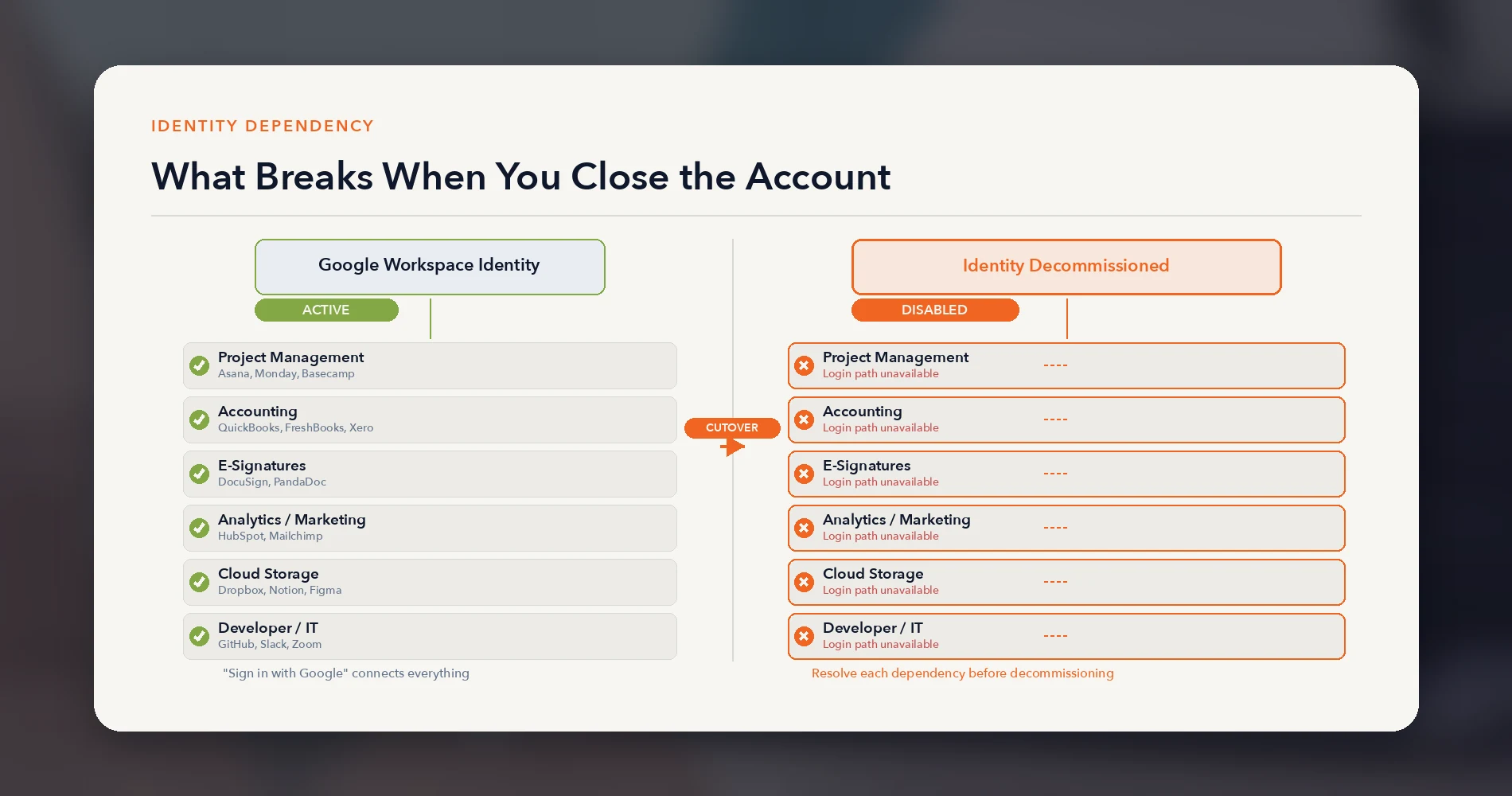
Mail cutover and identity retirement are separate events. Changing MX records to Proton does not by itself disable Google or Microsoft accounts. Third-party SSO fails when the old identity becomes unavailable — typically when the organization disables user accounts, closes the tenant, or removes an OAuth or SAML relationship.
In our client migrations, Proton Mail itself has worked as documented: mail delivery, custom domains, calendars, and Bridge have not been the source of problems. The disruption has come from third-party services that were authenticated through "Sign in with Google" or a Microsoft work account. For the DNS side of adding your domain, see our Proton custom domain setup guide.
How the dependency forms
Over years of using Google Workspace or Microsoft 365, teams accumulate third-party services — project management, accounting, e-signatures, CRM, analytics, design tools, file sharing. Many of these were set up by clicking "Sign in with Google" instead of creating a username and password. Some team members may not remember which services they access this way.
If the organization later disables or deletes those identities, affected services may lose their only login path. Add another authentication method or transfer ownership before that point.
How to find these dependencies
Google Admin does provide visibility here. Under Security → Access and data control → API controls, administrators can review configured and accessed OAuth apps with user counts and requested scopes, and export the list as CSV. This is the best starting point for an organizational inventory.
However, the admin-level view does not capture every dependency. Individual users should also review their Google Account → Security → "Third-party apps with account access" to identify personal sign-ins and services that do not appear in the organizational report.
What the breakage looks like in practice
In the migrations we have completed, the categories that required remediation included:
- Project management tools — Asana, Monday, Basecamp accounts created through Google SSO
- Accounting and invoicing platforms — QuickBooks Online, FreshBooks, Xero accessed via Google login
- E-signature services — DocuSign, PandaDoc authenticated through Google
- Analytics and marketing tools — HubSpot, Mailchimp, and SEO tools tied to Google accounts
- Cloud storage and collaboration — Dropbox, Notion, Figma, Canva with Google-only authentication
- Developer and IT tools — GitHub, Slack, Zoom using Google or Microsoft SSO
Each of these is individually solvable — you create a standalone password, update the login method, or migrate the account. But when a ten-person team has thirty such services spread across its members, the aggregate cleanup is measured in days rather than hours.
A note on identity retention
Some organizations can preserve Google identities after moving email by downgrading to Google Cloud Identity Free or retaining Microsoft Entra accounts without a Microsoft 365 application license. This can keep some SSO functions active during a transition, though licensing terms, account claims, and application behavior should be tested for each environment. Not every organization will find this practical, but it is worth evaluating before committing to a hard cutover.
Why we frame this as an identity project
In our experience, email transfer has been the most predictable part of these migrations. The identity and integration work is where unplanned effort concentrates. We encourage clients to treat the migration as an identity project with email as one component, rather than an email project with a few loose ends to clean up afterward.
The Pre-Migration Audit: Run This Before You Commit
This is the checklist we walk through with every client before setting a cutover date. Complete it before committing to a timeline.
1. Export the organizational app inventory
In Google Admin, go to Security → Access and data control → API controls. Review both the Configured apps and Accessed apps lists. Export the CSV — it includes app names, user counts, and requested scopes. This is your organizational dependency map.
For Microsoft environments, review Enterprise applications, user assignments, consent grants, and sign-in logs in Entra.
2. Have users review their personal third-party connections
The admin-level export does not capture every dependency. Have each team member open Google Account → Security → "Third-party apps with account access" (or the equivalent Microsoft page) to identify personal sign-ins and services the organizational report may miss.
3. Classify each service
For every service on the combined list:
- Can it create a standalone login? Most SaaS products support email-and-password authentication alongside SSO. Create the standalone credential before cutover.
- Is the Google account the only authentication path? Some services only support Google SSO. These need migration plans or replacement.
- Is data tied to the Google identity? Some services store data under the Google account. Switching login methods may or may not preserve data — test before cutover.
4. Evaluate identity retention options
Determine whether you can preserve Google or Microsoft identities temporarily after moving email. Google Cloud Identity Free and unlicensed Microsoft Entra accounts may allow some SSO functions to continue, but licensing terms and application behavior must be tested per environment.
5. Check shared and service accounts
Many teams have shared Google accounts for info@company.com or billing@company.com that authenticate third-party services no individual employee owns. Identify who controls them and what depends on them.
6. Audit individual vs company-owned accounts
Some employees signed up for work tools using their personal Google account; others used the company account. The migration only affects the latter, but the confusion between the two generates support tickets.
7. Plan SPF, DKIM, and DMARC before the MX cutover
Changing your mail provider without updating DNS mail authentication records is how your email lands in spam. Publish Proton's DKIM records, add Proton to the domain's single SPF record (Proton warns against multiple SPF records), and review DMARC alignment and policy before changing MX records. Use low-TTL values during the transition and have a rollback plan.
8. Decide your migration style up front
Clean start or full-history import — make this decision before you engage anyone to do the work, because it determines scope, cost, and timeline. Do not let it default to a full-history import without understanding the cost difference.
9. Run a pilot with one or two users first
Migrate one or two users before the full team. They will surface identity dependencies, workflow gaps, and Bridge configuration issues that documentation does not cover. A two-week pilot can prevent a longer post-cutover cleanup.
For offices leaving Microsoft 365, our Microsoft 365 to Proton Workspace migration guide covers the cutover itself: Easy Switch for Business, OneDrive files, DNS records and closing the Microsoft tenant.
Where Proton Mail Is Stronger
Proton is strongest when limiting provider access to stored message content is a primary requirement. The clients doing this today are choosing Proton for its privacy architecture, not for cost savings.
Automatic end-to-end encryption between Proton users. Message bodies and attachments sent between Proton accounts are automatically end-to-end encrypted. Proton holds no keys to decrypt this content in storage. This is architecturally different from standard Gmail, where Google manages the encryption keys. Messages from external (non-Proton) senders are protected with zero-access encryption after arrival — Proton's servers store them in a form designed to limit Proton's access where documented. Subject lines and addressing metadata are not end-to-end encrypted.
Encryption boundaries to understand:
| Scenario | Encryption level |
|---|---|
| Proton-to-Proton email | Automatic end-to-end encryption (bodies and attachments) |
| Email from external sender to Proton | TLS in transit; zero-access encryption in storage |
| Proton to external recipient | TLS in transit; optional password-protected or PGP encryption per message |
| Subject lines and metadata | Not end-to-end encrypted |
For teams where most communication is with external parties, the automatic E2EE applies only to internal messages unless you use password protection or PGP per message.
Swiss jurisdiction. Proton is based in Switzerland and subject to Swiss data protection law. Foreign requests for data are not directly binding — they must be processed through Swiss legal channels. Proton can be compelled to comply with valid Swiss orders, as documented in Proton's transparency report. This is a meaningful procedural difference from providers subject to US jurisdiction, without implying that any legal framework provides absolute protection.
Provider data access and business model. Google Workspace does not scan business email content for advertising — Google states this explicitly. However, Google does process Workspace data for spam protection, security features, and user-facing tools, and Google manages the encryption keys for standard Workspace accounts. Proton's zero-access and E2EE model reduces the provider's access to stored content by design. For organizations whose clients or regulators ask about provider-side data access, this is a concrete architectural difference. Google offers client-side encryption (CSE) on Enterprise Plus and Education editions for customer-controlled key management, but it is not available on standard Business tiers.
Certifications and compliance. Proton holds ISO 27001 certification and SOC 2 Type II attestation. A Business Associate Agreement is available on request for healthcare organizations. Proton's terms include a 99.95% uptime SLA with service credits on all paid plans.
The admin console handles user provisioning, storage allocation, domain management, 2FA enforcement, and session revocation. Organizations should understand the private vs. non-private user distinction: administrators can access non-private user mailboxes directly. They cannot access private user mailboxes, and Proton states that the private setting cannot be reversed.
For the teams we work with, the driver is privacy positioning. They want to tell their clients that communications are handled under Swiss law with limited provider access. This is a values purchase, not a cost optimization — and framing it as a cost play sets up disappointment when the migration bill arrives. For a broader look at building a privacy-first stack beyond email, see our privacy-first productivity apps guide.
If the privacy architecture matches your requirements, Proton offers a 14-day trial with a 30-day money-back guarantee — enough time to test encryption, Bridge, and admin workflows before committing. Read the limitations below first.
Proton Mail's Practical Limitations
The main limits involve shared inboxes, client compatibility, search, storage, integrations, and administration depth.
No native collaborative shared inbox. Proton supports up to 10 additional email addresses per user on Mail Essentials, and Email Groups for distribution lists on Workspace plans — but Email Groups are not included in Mail Essentials. There is no equivalent to Google Groups collaborative inboxes where multiple people reply from one address and see each other's responses. Teams needing assignment, collision detection, shared reply history, or service-level reporting will need a dedicated shared-inbox workflow alongside Proton, with the inbound forwarding and outbound SMTP integration tested for your specific setup.
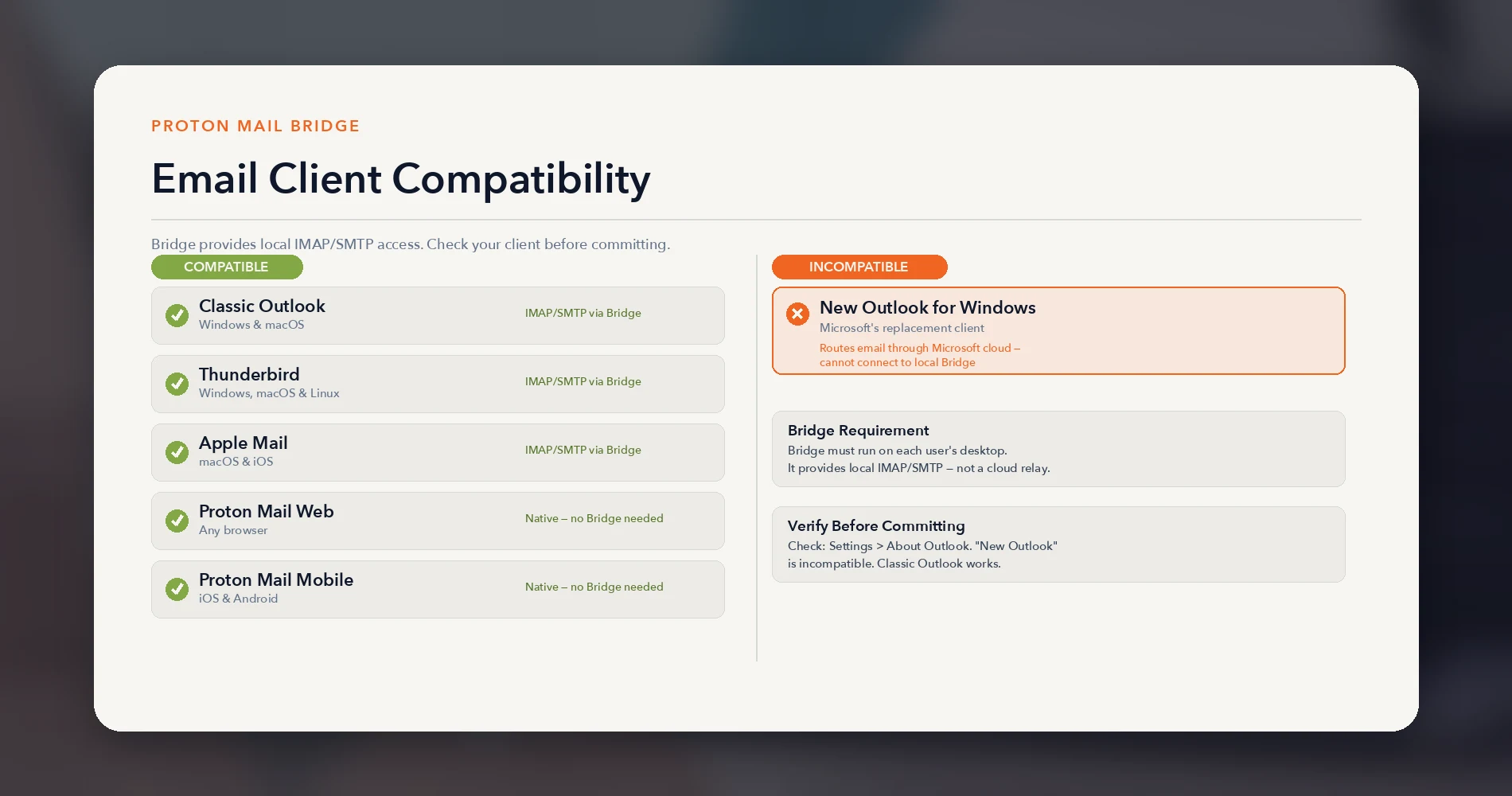
Bridge support depends on the Outlook version. Proton Mail Bridge provides local IMAP/SMTP access for desktop email clients. Bridge supports classic Outlook on Windows and macOS, Thunderbird, and Apple Mail. New Outlook for Windows routes email through Microsoft's cloud, which makes it incompatible with Bridge. Proton documents New Outlook for Mac setup but warns of synchronization issues and recommends another client when reliability is critical. Outlook-dependent teams should verify the exact client version they use before committing. Bridge must run on each user's machine, which is an additional deployment and support step.
The integration ecosystem is thinner. Google Workspace has a marketplace with thousands of add-ons. Proton has SMTP submission for sending from CRMs, CMS platforms, and devices, and Bridge for desktop email clients. There is no app marketplace. Proton's hosted SMTP is send-only — it does not provide inbound IMAP for external applications that need to read mailboxes.
Search uses a local encrypted index. Proton cannot index message content server-side because of encryption. Instead, content search builds a local index in your browser's web storage, which is created per browser or device. This can be resource-intensive for large mailboxes and may not cover the entire history. The experience differs from Gmail's server-side full-text search.
15 GB storage on Mail Essentials requires planning. Gmail's free tier also provides 15 GB, and Google Workspace Starter provides 30 GB pooled. Teams with large existing mailboxes should model imported history and attachment growth before assuming Mail Essentials' 15 GB is sufficient. Upgrading to Workspace Standard ($12.99/user/month for 1 TB) is the published self-service path; teams with specific requirements can also discuss Enterprise options with Proton's sales team.
Administration has boundaries. Proton's admin console covers user provisioning, domains, storage, 2FA enforcement, and access to non-private user mailboxes. It does not currently offer granular delegated roles, endpoint management, DLP, legal hold, or mature eDiscovery workflows. Organizations with those requirements should validate them against the current feature matrix before choosing a plan. Workspace Premium adds email retention policies, which serve a different purpose than DLP or legal hold.
Our Own Migration Remains Incomplete
Our migration remains incomplete because several workflows still depend on Google identity and services. We recommend Proton Mail to clients with compatible workflows. We have completed migrations for clients. We have four more in the pipeline. Our own company email remains on Google Workspace.
The reason is not dissatisfaction with Proton Mail. Our own ecosystem integration — CRM, ticketing system, analytics stack, monitoring tools, development workflows — depends on Google identity deeply enough that the migration would be a substantial project. The identity dependency map described above is the same map we have not fully unwound for ourselves.
We are not positioning this as a future plan. The honest position is that the migration we recommend to clients with simpler ecosystems is one we have not completed for our own, more complex one. That is useful context for anyone evaluating the same decision with a similarly deep integration footprint.
Who Should Choose Proton Mail for Business?
Proton fits privacy-led teams with manageable integration dependencies and a tested migration and recovery plan.
Proton Mail is a good fit if you are:
- A privacy-driven firm — law, healthcare, financial services, consulting — that wants to limit provider access to client communications
- A team that needs documented provider certifications for security reviews (ISO 27001, SOC 2 Type II)
- An organization with a manageable SSO footprint that you have already audited
- A team that prioritizes privacy architecture and is prepared to accept a smaller integration ecosystem
- A team that does not rely heavily on collaborative shared inboxes or deep Google integrations
Wait or evaluate further if you are:
- A team with deep identity dependencies that has not run the audit above
- An organization dependent on collaborative shared-inbox workflows (Google Groups, shared reply visibility, ticket assignment from a shared address)
- A team using new Outlook for Windows, which is incompatible with Bridge
- An organization without a designated owner for the migration — someone to run the audit, manage the pilot, handle DNS cutover, and support users through the transition
- A team with retention, legal-hold, eDiscovery, or supervisory review requirements that exceed Proton's current administration capabilities
- An organization whose incumbent is Microsoft 365 — the identity dependency problem is similar, but the migration path and tooling differ
If your incumbent is Google, see our Google Workspace vs Proton Workspace comparison for the full-suite view.
The product works well for its intended use case. The determining factor is whether your organization has mapped its identity dependencies and can manage the transition — including rollback criteria if needed. If you have not run the audit, start there. If you have, start a 14-day trial and pilot with one or two users before committing the full team.
Mail Essentials or Workspace: Which Plan Should You Choose?
Choose Essentials for email and calendar; choose Workspace when its bundled tools replace subscriptions you are currently paying for separately.
Choose Mail Essentials ($6.99/user/month annual) if:
- You want encrypted email and calendar and already have satisfactory solutions for VPN, cloud storage, and password management
- Your storage needs are modest (15 GB per user, accounting for imported history)
- You need 3 or fewer custom email domains
- You want the lowest entry cost to privacy-first business email
Choose Workspace Standard ($12.99/user/month annual) if:
- You want to consolidate email, storage, VPN, password management, and video meetings under one provider
- You need more than 15 GB of storage per user (Workspace provides 1 TB)
- You want Email Groups for distribution lists (not available on Mail Essentials)
- You want Proton Sentinel advanced threat protection (not available on Mail Essentials)
- You need more than 3 custom domains (Workspace supports 15)
The price difference is $6/user/month. For a 10-person team, that is $720/year. Whether Workspace Standard saves money depends on which existing subscriptions it would actually replace — calculate the annual difference using your current VPN, password manager, and storage costs rather than assuming the bundle is automatically a better value.
If you have decided on Workspace, see Proton Workspace Standard vs Premium for the feature differences, retention rules, and cost at 5/10/25 users. For the full product review, see our Proton Workspace review. If your evaluation includes Microsoft as an incumbent, see Proton Workspace vs Microsoft 365. If credential management is part of your migration, see our Proton Pass review. If encrypted cloud storage is part of the decision, see Tresorit vs Proton Drive for Business.
Frequently Asked Questions
These answers cover pricing, identity, Outlook, shared inboxes, encryption, and HIPAA support.
How much is Proton Mail for business?
Proton Mail Essentials costs $6.99 per user per month on annual billing, or $7.99 per user per month on monthly billing. There is no minimum seat requirement. Taxes may apply; currency and final price depend on billing country. Pricing verified against proton.me/business/mail/pricing on August 6, 2026.
What is the difference between Proton Mail Essentials and Proton Workspace?
Mail Essentials is email and calendar with 15 GB storage, 10 email addresses per user, and 3 custom domains. Workspace Standard ($12.99/user/month annual) adds 1 TB storage, Proton VPN, Proton Pass, Proton Meet, Email Groups, Proton Sentinel, and support for 15 custom domains. Mail Essentials suits teams that already have separate VPN and password management. Workspace suits teams consolidating multiple subscriptions into one encrypted platform.
What can break when you migrate from Google Workspace to Proton Mail?
Changing MX records to Proton does not by itself disable Google accounts. Problems arise when the old identity is disabled, deleted, or the tenant is closed — third-party services that were authenticated through "Sign in with Google" lose their login path. Start in Google Admin → Security → API controls to export the list of accessed OAuth apps, then have users review their personal third-party connections. See our pre-migration audit checklist above.
Can I use Proton Mail with Outlook?
Through Proton Mail Bridge, which provides local IMAP/SMTP access. Bridge works with classic Outlook on Windows and macOS, Thunderbird, and Apple Mail. Microsoft's new Outlook for Windows is incompatible with Bridge because it routes email through Microsoft's cloud. Proton documents New Outlook for Mac setup but warns of synchronization issues and recommends another client when reliability is critical. Verify your client version before committing.
Does Proton Mail support shared inboxes?
Not in the collaborative sense. Proton supports up to 10 additional email addresses per user on Mail Essentials, Email Groups for distribution on Workspace plans, and a catch-all address. There is no native equivalent to Google Groups collaborative inboxes where several people reply from one address and see each other's responses. Teams needing assignment, reply visibility, or ticket workflows will need a dedicated shared-inbox workflow alongside Proton.
Are external emails automatically end-to-end encrypted?
No. Proton-to-Proton message bodies and attachments are automatically end-to-end encrypted. Messages to non-Proton addresses use TLS in transit but are not end-to-end encrypted by default. Users can send password-protected messages or use PGP when end-to-end protection to external recipients is required.
Is Proton Mail HIPAA compliant?
Proton supports HIPAA compliance when properly configured and covered by the required agreements, including a signed Business Associate Agreement. To request a BAA, contact privacy@support.proton.me with the subject "HIPAA BAA." No email platform makes a business HIPAA compliant on its own — configuration, access controls, retention policies, staff training, and organizational policy determine compliance.
Related Resources
These guides cover full-suite comparisons, deliverability, migration, and adjacent Proton tools.
- Proton Workspace Review 2026: Pricing, Tests & Limitations — The full suite review, including Docs, Sheets, Meet, Drive, VPN, and Pass. Start here if you want everything under one roof.
- Who Should Not Switch to Proton Workspace — Eight dependency checks (shared inboxes, Office files, Teams, sign-in, compliance) to run before you commit.
- Leaving GoDaddy and Microsoft 365 for Proton — A five-person studio's privacy-driven switch, with the SPF and cancellation checks.
- Proton Unlimited vs Proton Business — If you're not yet sure a business plan is necessary, this covers when a personal Proton plan is genuinely enough.
- DMARC for Small Business: Setup Guide — Configure SPF, DKIM, and DMARC before any email migration. This is how you prevent deliverability problems during cutover.
- Business Email Going to Spam: How to Fix It — Deliverability troubleshooting during and after domain migration.
- Proton Workspace vs Microsoft 365 — If your incumbent is Microsoft rather than Google.
- Google Workspace vs Proton Workspace — Side-by-side comparison for teams evaluating the full suite switch.
- Proton Pass for Business Review — Credential management review. Relevant if the SSO cleanup pushes your team toward a password manager.
- Privacy-First Productivity Apps — Broader context on building a privacy-first business stack.
- Tresorit vs Proton Drive for Business — If encrypted cloud storage is part of your evaluation.
Related Articles
More from Business Software
Microsoft 365 to Proton Workspace Migration: A Small-Office Walkthrough (2026)
How to move a small office from Microsoft 365 to Proton Workspace: Easy Switch for Business, OneDrive files, DNS cutover and Microsoft 365 cleanup.
18 min read
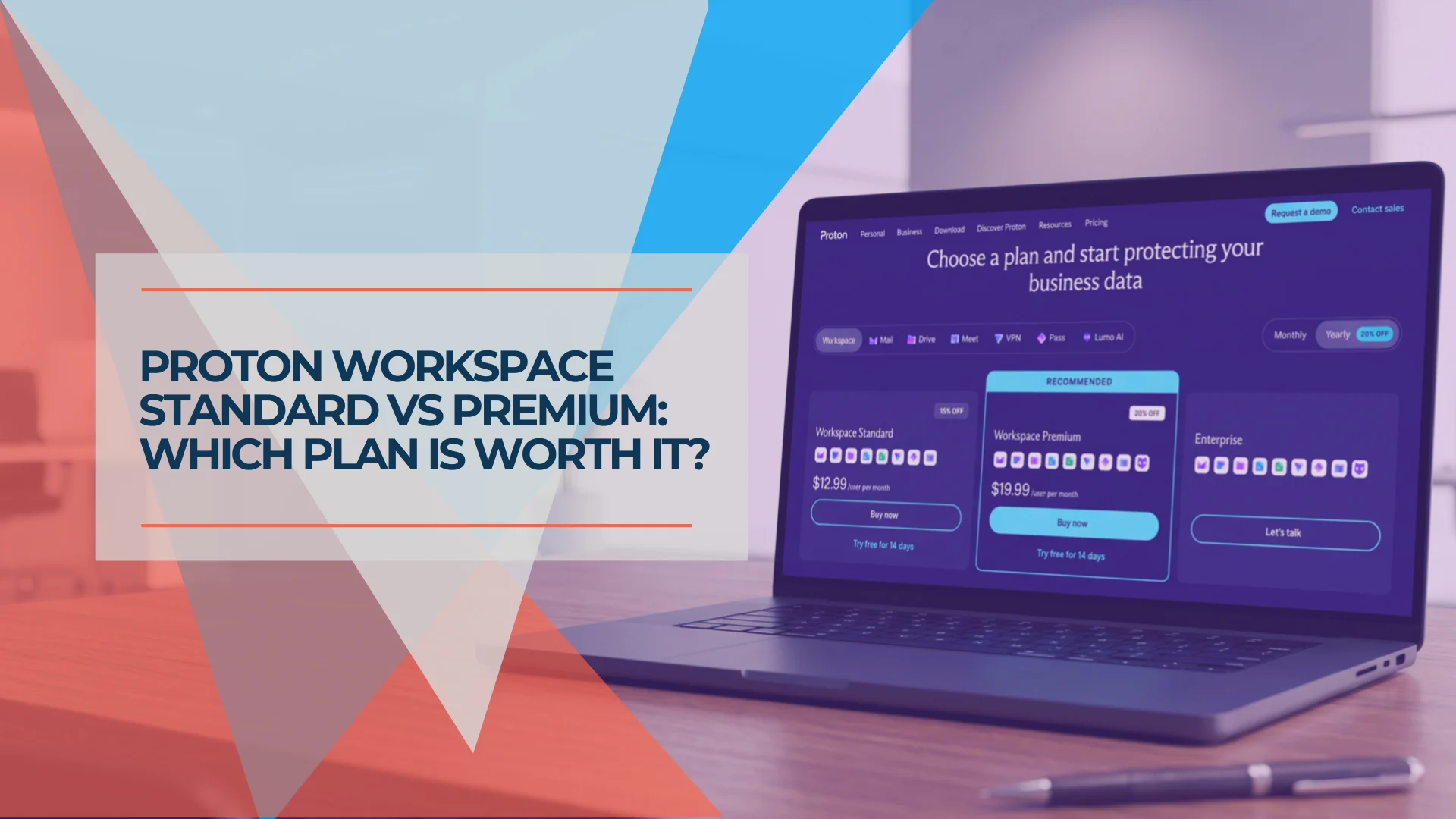
Proton Workspace Standard vs Premium (2026): What the Extra $7 Per User Buys
Proton Workspace Standard vs Premium compared: storage, email retention, Lumo AI, Meet limits and cost at 5, 10 and 25 users — and which offices need Premium.
11 min read
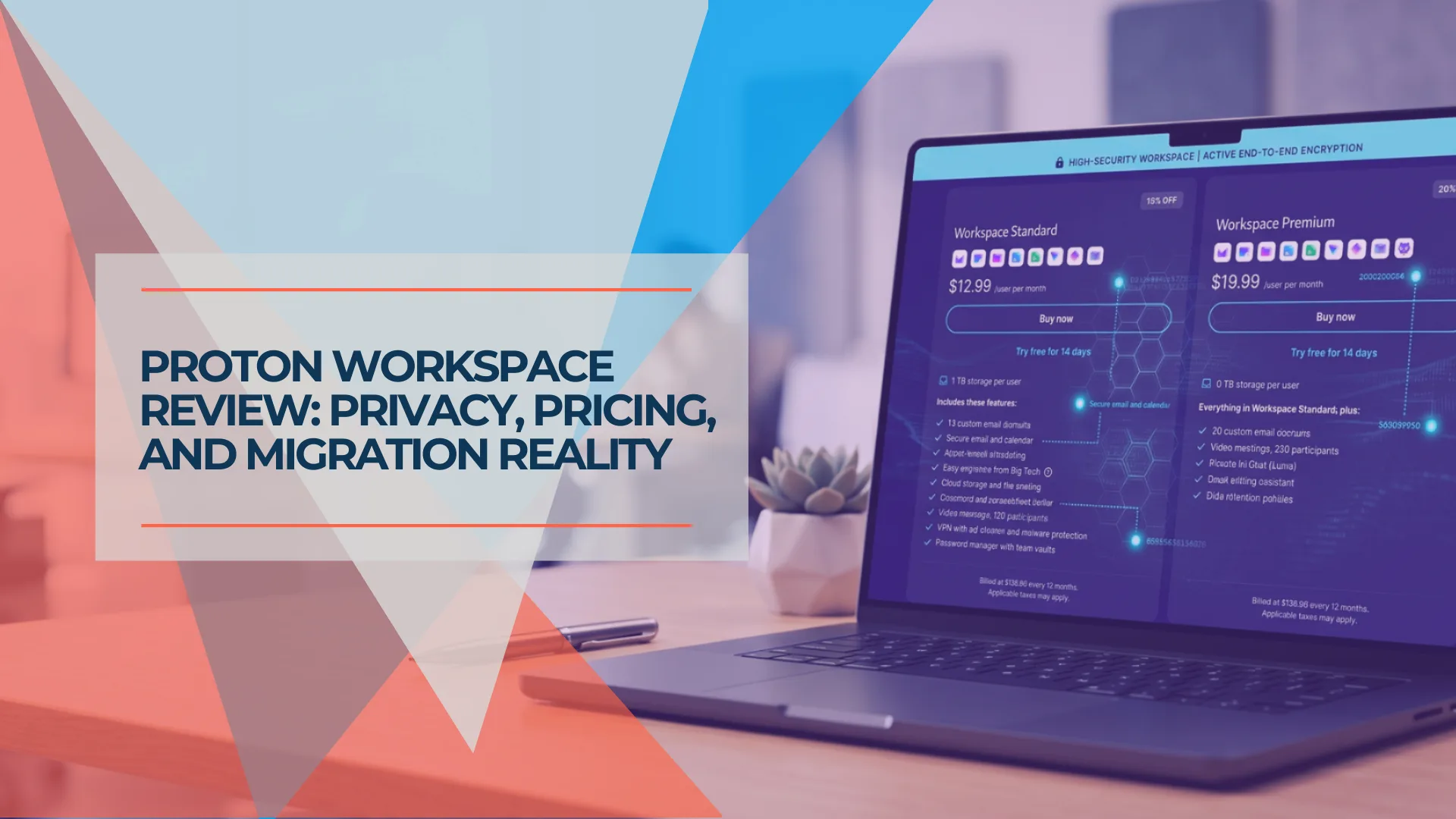
Proton Workspace Review 2026: Pricing, Tests & Limitations
We tested Proton Workspace's Mail, Drive, Docs, Sheets, Meet, and Lumo. See July 2026 pricing, limitations, migration risks, and a tier-by-tier Google Workspace comparison.
36 min read