

Proton Mail vs Tuta for a Small Business: Which Private Email Fits Your Team?
Compare Proton Mail and Tuta for a small business. See which works with Outlook, how shared inboxes and encryption differ, and what 3, 5 or 10 users cost.


When a small office moves to encrypted email, the encryption is rarely the hard part. On a five-person design studio's move from Microsoft 365 to Proton, the domain's mail routing changed quickly, while moving three years of email took longer. That experience shapes this comparison: mailbox history, shared addresses and the apps staff already use tend to decide how a switch goes more than the seat price does. The studio's full story is in our GoDaddy and Microsoft 365 to Proton case.
Proton Mail and Tuta, formerly Tutanota, both encrypt mail between their own users end to end, and both are European providers: Proton is Swiss and Tuta is German. They differ in how much of each message is encrypted by default, in which mail apps they connect to, and in how they handle shared inboxes and imported mail. This guide covers those differences for a team of 3 to 10 people.
Affiliate Disclosure: This article contains affiliate links. If you make a purchase through these links, we may earn a small commission at no extra cost to you. As an Amazon Associate, iFeelTech earns from qualifying purchases.
We’ve set up both Proton Mail and Tuta through our IT services work. We checked both providers’ pricing and plan details on 11 November 2026.
Quick verdict
Choose Proton Mail if your team needs to keep classic Outlook, Thunderbird or Apple Mail, or if scanners and business tools need to send mail through SMTP. Choose Tuta if your team can work in Tuta's own apps and wants end-to-end encrypted subject lines, a true shared mailbox and 50 GB per user at the entry tier. Both host email on your own domain.
Tuta vs Proton Mail at a glance
The table starts from what a team needs rather than from a feature list, because that is the order in which the decision usually comes up.
| If your team needs… | Proton Mail Essentials | Tuta Essential |
|---|---|---|
| Existing desktop mail apps | Bridge for classic Outlook on Windows, supported Outlook versions on Mac, Thunderbird and Apple Mail | Tuta apps. The Thunderbird add-on opens Tuta in a tab |
| A shared inbox for support@ | No shared mailbox listed. Workspace email groups distribute copies | Shared mailbox with shared folders and replies, priced as an extra user |
| Subject-line encryption | Encrypted at rest. Proton can access the subject | End-to-end encrypted between Tuta users |
| Email on your own domain | 3 custom domains and catch-all | 3 custom domains and catch-all |
| Migration and entry price | Easy Switch. 15 GB per user at $6.99 per month, billed yearly | Email import requires Unlimited. 50 GB per user at €6 per month, billed yearly |
If your team uses New Outlook for Windows, keep your current setup until staff can change clients, because neither provider connects to it. If a shared inbox or a mail archive matters, price that workflow before choosing an entry plan.
Seen from the team's side, the same differences look like this:
| Team profile | The better starting point |
|---|---|
| Works in classic Outlook, Thunderbird or Apple Mail all day | Proton Mail, through Bridge |
| Wants subject lines, calendar and contacts encrypted end to end by default | Tuta |
| Has a support@ inbox that two or more people answer | Tuta, which has a shared mailbox |
| Has scanners, copiers or a CRM that send as the business | Proton Mail, which lists SMTP submission |
| Is bringing years of mail into the new service | Proton Mail, through Easy Switch, unless the team buys Tuta Unlimited |
| Is starting on a fresh domain and is comfortable in a web or desktop app | Either. Tuta Essential costs less per seat and has more storage |
Who is behind each service
Proton is a Swiss company. Its mail follows the OpenPGP standard, which keeps subject lines in the message header so that Proton mail stays compatible with every other mail system. It sells Mail Essentials as the entry plan and Workspace plans that add Drive, Pass, VPN and Meet.
Tuta is a German company that stores its data on its own servers in Germany. It renamed itself from Tutanota in November 2023, and the service and apps are the same. Tuta builds its own encryption instead of using OpenPGP, which is how it can encrypt subject lines, and it says it has rolled out a post-quantum hybrid protocol, TutaCrypt, since March 2024.
Jurisdiction describes where each company is based and under which privacy law. Neither location makes a provider immune from lawful requests in its own country. Proton, for example, says in its threat model that a valid Swiss court order can compel it to disclose account metadata, though not message contents.
What Proton Mail and Tuta encrypt
Within each service, email bodies and attachments are encrypted end to end automatically. Tuta includes subject lines in that protection. Proton encrypts subject lines at rest, but its service can access them. Tuta can still see routing metadata such as sender and recipient addresses and the date, because other mail servers need that to deliver a message. Proton’s encryption documentation · Tuta’s encryption documentation
For outside recipients, ordinary mail to a Gmail or Outlook address is readable by the receiving provider. Both services let you send a password-protected message that the recipient opens in a browser. Share the password through a separate channel and test the reply workflow with a colleague. Proton also supports OpenPGP when the recipient has a compatible setup. Stored mail in each provider's own mailboxes is protected separately from how a message travels.
Calendars and contacts differ too. Proton protects calendar details such as titles and locations end to end, while event timing is available to Proton for features such as notifications. Proton Contacts uses zero-access encryption for fields such as phone numbers and notes. Display names and email addresses are encrypted at rest and remain accessible to Proton. Tuta encrypts its calendar and contact data end to end, including event times and contact addresses. For the wider set of encrypted calendar options, see our privacy-first productivity apps guide.
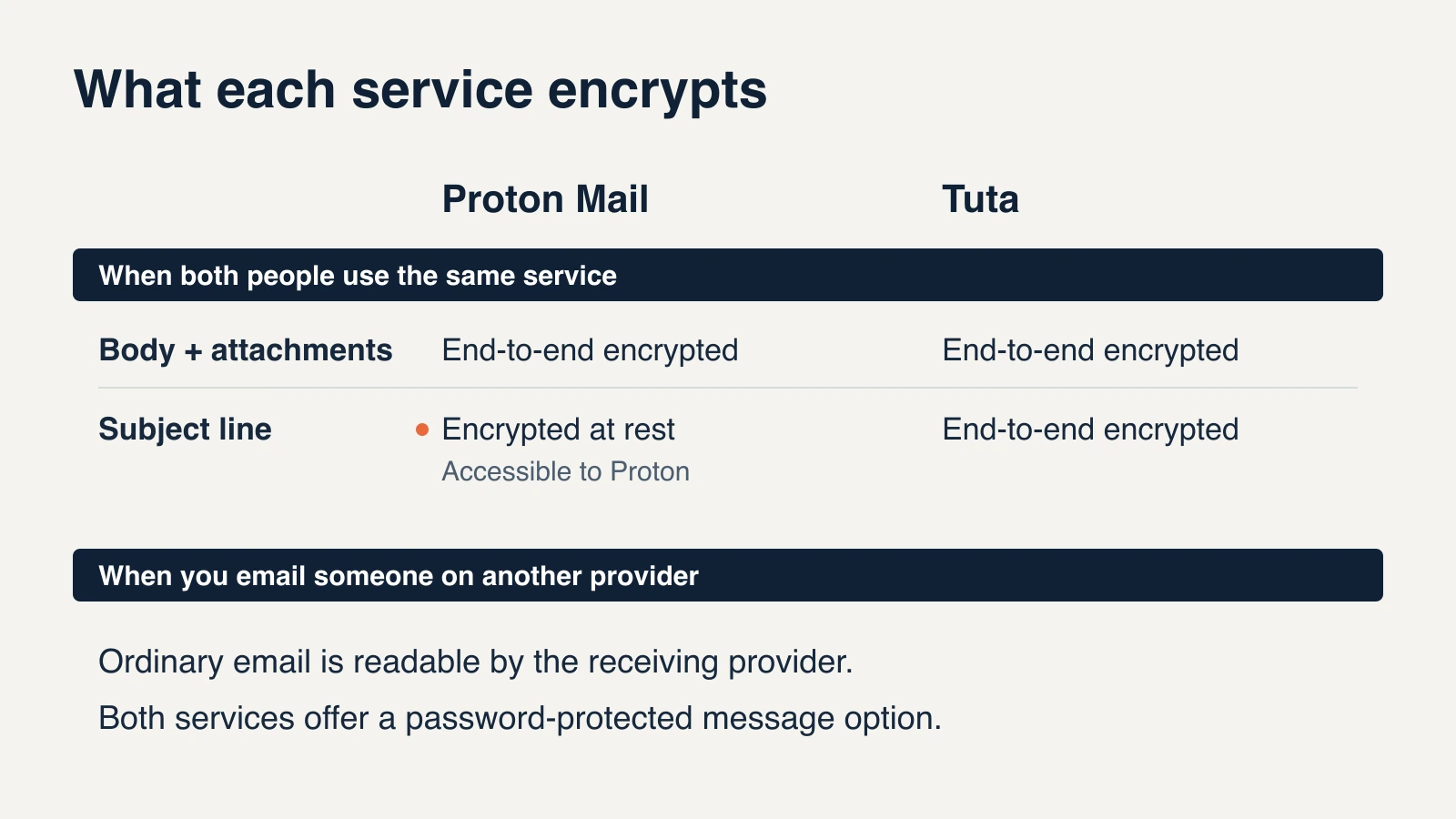
The subject line is the clearest encryption difference between the two. If subject lines in your office routinely carry client names or case details, that points to Tuta. If they carry routine business, the gap matters less than the desktop client question in the next section.
Outlook, Thunderbird and scan-to-email
Proton Mail fits teams that want to keep a supported desktop mail client. Mail Essentials includes Proton Mail Bridge, which runs on each computer and gives the local mail client an IMAP and SMTP connection. Proton lists classic Outlook for Windows and supported Outlook versions for Mac, Thunderbird and Apple Mail. Bridge handles mail. If staff use Outlook calendars, contacts or delegation, test those workflows separately. Bridge is one more application to install and support on each machine.
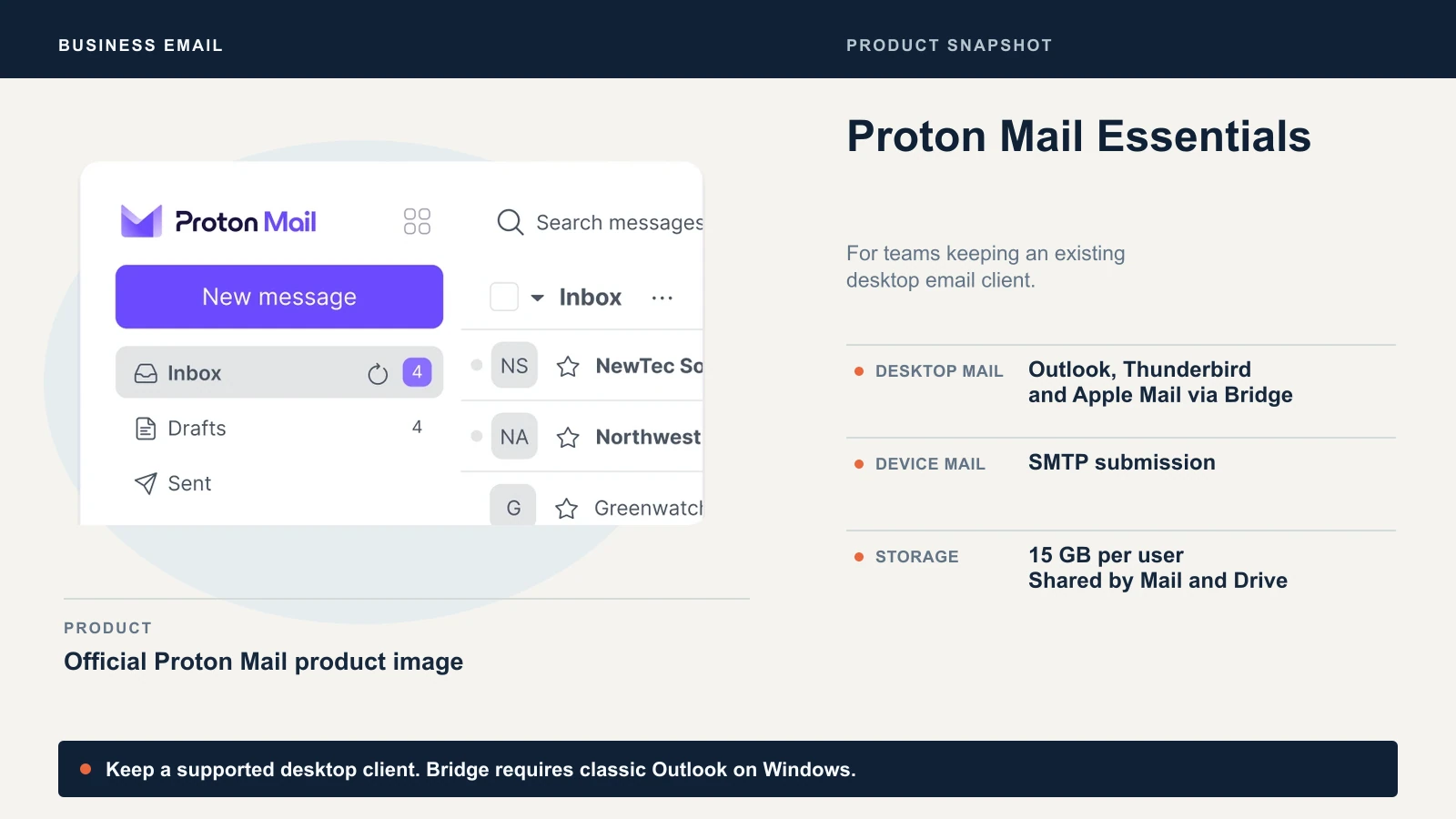
New Outlook for Windows syncs through Microsoft's cloud, while Bridge accepts connections from the computer where it runs. That makes the two incompatible, as Proton's Windows guide explains. Proton documents New Outlook for Mac separately, but recommends another client when reliability matters.
Tuta fits teams that can use its own mail apps. Tuta offers no standard IMAP, POP3 or SMTP access for mail clients, so Outlook and Apple Mail cannot connect to a Tuta mailbox. It provides web, desktop and mobile apps instead. Its Thunderbird add-on gives staff a shortcut to Tuta's web app inside Thunderbird. Tuta mail stays in that tab and does not sync into Thunderbird's regular inbox.
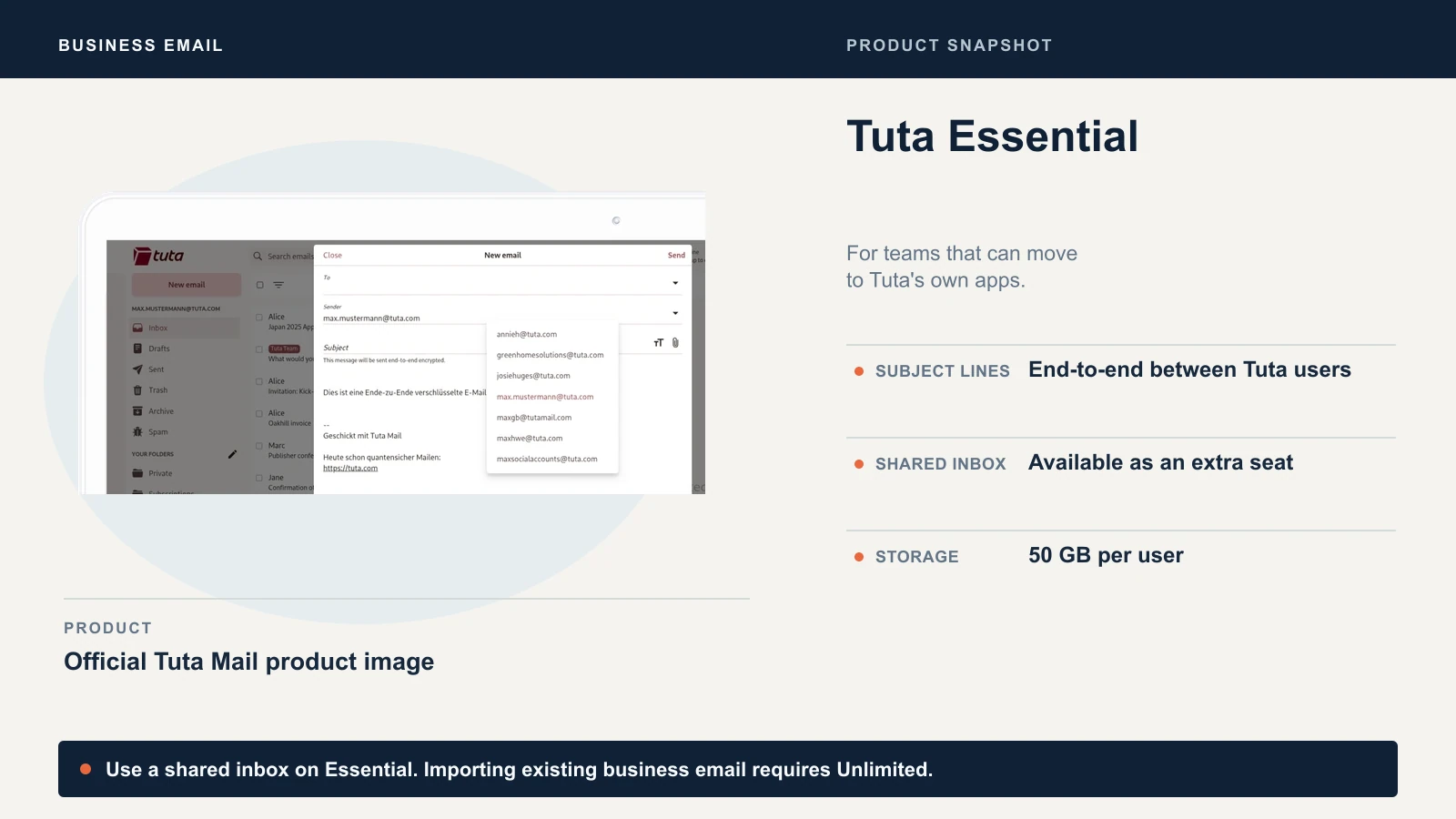
On phones, the two services are closer. Both have their own Android and iOS apps, and Bridge does not apply on mobile, so a phone user on either service opens that service's app. Ask each person which client they use today before deciding that the move is small. Someone who works in Outlook all day will notice the change more than someone who checks mail in a browser.
Scanners, CRMs and other senders need a separate check. Proton's SMTP submission uses a token for a custom-domain address. Proton lists port 587 with STARTTLS and suggests testing TLS if the device offers no STARTTLS option. Mail sent this way is not end-to-end encrypted. Tuta's Unlimited relay is an inbound integration for delivering a copy to a ticketing system or CRM. It requires an external mail provider and support activation, and the relayed messages are not end-to-end encrypted. For a copier, test the actual device against Proton's requirements or keep your existing relay. Our scan-to-email guide shows what these devices need from a mail provider.
Shared mailboxes, custom domains and admin access
| Proton Mail Essentials | Tuta Essential | Tuta Advanced | Tuta Unlimited | |
|---|---|---|---|---|
| Storage per user | 15 GB shared between Mail and Drive | 50 GB | 500 GB | 1,000 GB |
| Custom domains | 3 | 3 | 10 | Unlimited |
| Additional addresses | 10 addresses total per user | 15 extra per user | 30 extra per user | 30 extra per user |
| Shared mailbox | None listed | Extra paid seat | Extra paid seat | Extra paid seat |
| Import existing mail | Easy Switch | — | — | EML or MBOX in desktop app |
Tuta's extra-address figures are separate from its unlimited custom-domain aliases. An alias routes to an existing mailbox. A shared mailbox gives several people access to the same folders and lets them reply from the shared address using their own accounts. Proton's Workspace plans add email groups, which distribute copies to members. If two people need to see which customer emails have already been answered, a distribution group leaves each person with a separate copy.
Both providers offer organization administration and catch-all routing. Proton admins can access organization users' mail by default and can designate users as private. Tuta lists password and second-factor resets for organization admins, and says signing in as a user requires the user's password. Test access recovery and mailbox handover with a spare account before you set a policy for staff.
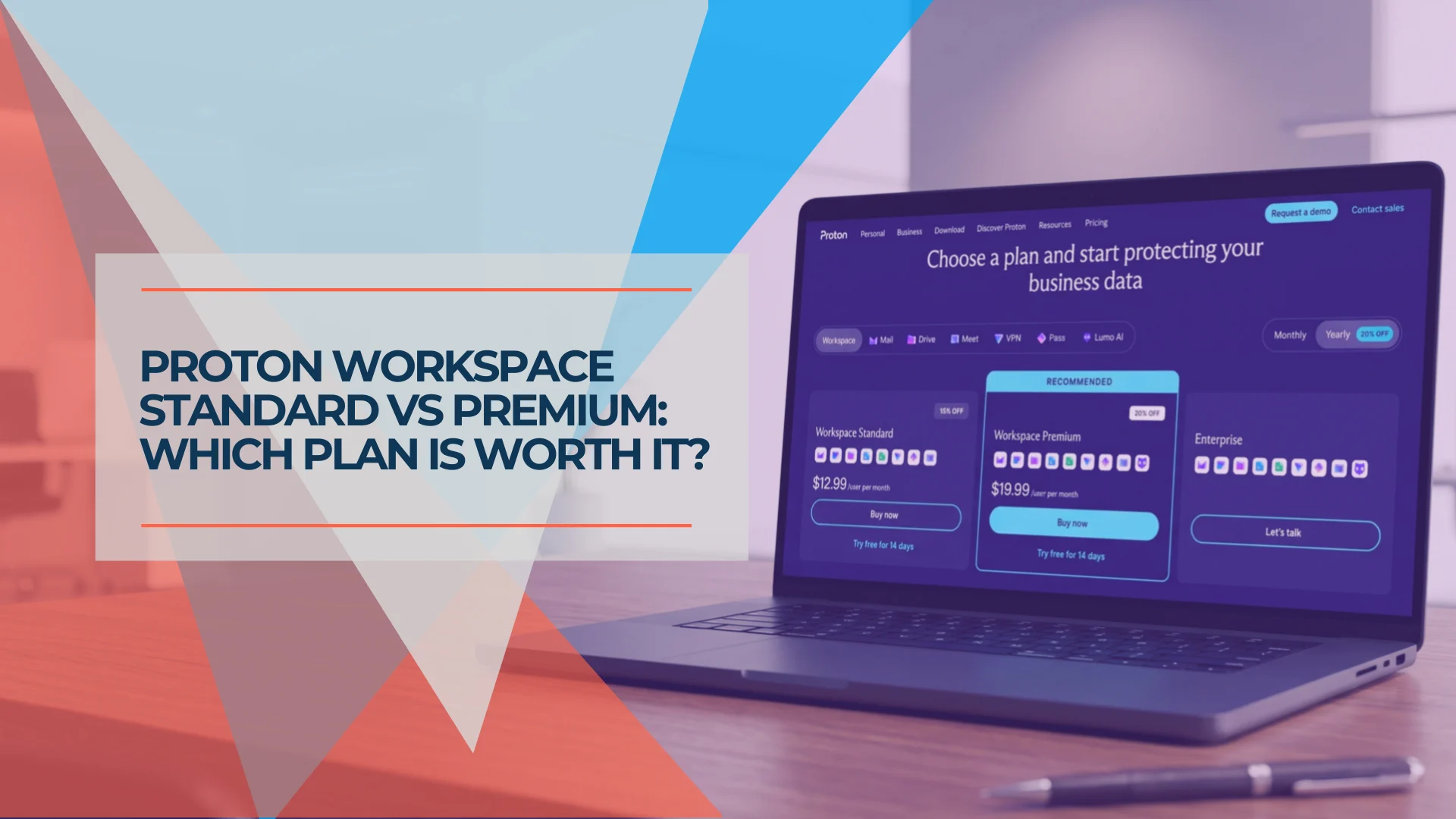
If your team also needs shared password vaults or a business VPN, compare Proton Workspace. Its Standard tier adds email groups, Sentinel and custom workspace branding, and Proton lists data retention policies on Premium. Our Mail for Business review covers where Mail Essentials stops, and the Standard vs Premium comparison covers the step up. Tuta reserves custom branding and email templates for Unlimited.
What it costs for 3, 5 and 10 users
Proton prices below are in US dollars and taxes may apply. Tuta lists euros before tax. Annual totals assume one paid seat per person. Compare in your checkout currency before ordering. Proton business pricing · Tuta business plans
| Billing or team size | Proton Mail Essentials | Tuta Essential | Tuta Advanced | Tuta Unlimited |
|---|---|---|---|---|
| Per user per month, billed yearly | $6.99 | €6.00 | €8.00 | €12.00 |
| Per user, billed monthly | $7.99 | €7.20 | €9.60 | €14.40 |
| 3 users, yearly total | $251.64 | €216 | €288 | €432 |
| 5 users, yearly total | $419.40 | €360 | €480 | €720 |
| 10 users, yearly total | $838.80 | €720 | €960 | €1,440 |
Five users and one shared inbox cost €432 per year on Tuta Essential before tax. If all five users also need to bring their old mail into Tuta, budget €864 per year for those six seats on Unlimited, before tax. Confirm the required plan term with Tuta if you are considering an upgrade for the import alone.
Moving your email in, and getting it out again
Proton documents organization-wide Easy Switch for Google Workspace and cloud-hosted Microsoft 365. It can move email, contacts and calendars. Microsoft 365 shared mailboxes are excluded, so inventory their addresses and archives separately. Proton also documents mail import over IMAP for other providers. The initial import in our design studio migration predated the Microsoft 365 business workflow, and our migration walkthrough covers the current sequence and rollback plan.
Tuta imports EML and MBOX in its desktop apps on Unlimited. Check what your old system can export and open a sample with folders and attachments before planning the rest of the move. For a fresh domain, or an office keeping old mail in a separate archive, Essential may cover everything the team needs.
For either service, set up the new users and addresses before redirecting incoming mail. Keep access to the old provider while you verify mail flow and imported history. Use the destination provider's MX, SPF, DKIM and DMARC instructions for your domain. Our Proton custom domain walkthrough and SPF, DKIM and DMARC explainer cover the records, and our business email setup guide is the place to start if the domain has never hosted mail.
Test export while you are piloting. Proton's export tool saves email as EML and metadata as JSON. Tuta offers full mailbox export in its desktop app and supports saving selected messages as EML or MSG. Keep exports secure since they contain readable messages.
What the first week looks like on each
Use this checklist to plan the setup and spot what your team should test before switching.
| First-week task | Proton Mail | Tuta |
|---|---|---|
| Add the domain | Verify with a TXT record, add SPF, three DKIM CNAME records and DMARC, then point MX at Proton | A setup wizard walks through the domain in four steps, according to Tuta |
| Add a second user | Add the user in the admin console. Users are non-private by default, so admins can access their mail | Create the user in the admin console. Tuta suggests at least two administrators |
| Desktop mail | Install Bridge on each computer that uses Outlook, Thunderbird or Apple Mail | Install Tuta's desktop app, or use the Thunderbird add-on tab |
| Phones | Proton's Android and iOS apps | Tuta's Android and iOS apps |
| Email an outside contact securely | Password-protected message, opened in a browser | Password-protected message, opened in a browser |
| Bring in old mail | Easy Switch or IMAP import | EML or MBOX import on Unlimited, in the desktop app |
Which one should your office choose
A few common situations point clearly in one direction:
- The office lives in classic Outlook or Apple Mail. Proton Mail, with Bridge installed and tested on each machine. If your office depends on Teams, SharePoint or Microsoft-specific workflows, read who should not switch to Proton Workspace first.
- A new three-person firm on a fresh domain. Tuta Essential costs €216 a year for three seats and includes 50 GB each. Proton Mail Essentials costs $251.64 and suits a firm that wants a desktop client or the wider Proton suite.
- A support@ inbox that two people answer. Tuta's shared mailbox fits better, at the price of an extra seat. On Proton, plan a separate shared-inbox workflow.
- A scanner, copier or CRM that sends as the business. Proton lists SMTP submission. Test the device before cancelling the old mail service.
- Years of mail to bring across. Proton's Easy Switch is the shorter route. Tuta needs Unlimited for the import, plus exported files.
If none of these describes your office, either service can work, and a short pilot answers the question for your own mail.
Run a two-person pilot before switching
- Try the apps staff will use. Connect one supported desktop client through Proton Bridge if needed. Test sending, search and notifications on the team's phones.
- Recreate one shared address. Have two users handle and reply to the same test thread. Check what each person can see in the inbox and sent folders.
- Send a password-protected message to an outside address. Ask the recipient to open it and reply. Try any copier or ticketing integration the team needs.
- Move a sample and export it again. Check folders, attachments and dates. Run the test on the plan you expect to buy.
Proton advertises a 14-day business trial. A free Tuta account lets you try its apps and password-protected email. Use a business plan to test a custom domain, shared mailbox or business mail import.
If you would like help running the pilot or the cutover, our cloud services team does this work for small offices across South Florida.
Related Resources
- Proton Mail for Business Review: what Mail Essentials includes, what it costs and where it stops.
- Microsoft 365 to Proton Workspace Migration: the cutover sequence, DNS records and rollback plan.
- Proton Mail Custom Domain Setup: the records and tests for your own domain on Proton.
- Business Email With Your Own Domain: starting business email on a domain you own.
- Proton Workspace Standard vs Premium: when the Workspace plans are worth the step up.
- Privacy-First Productivity Apps: the wider encrypted toolset, including Tuta Calendar.
Frequently Asked Questions
Related Articles
More from Business Software
Proton Mail for Business Review: Pricing, Migration, and Practical Tradeoffs
Proton Mail reviewed from client migrations: pricing, cost drivers, compatibility limits, and the identity audit to run before switching.
20 min read
Proton Workspace Standard vs Premium (2026): What the Extra $7 Per User Buys
Proton Workspace Standard vs Premium compared: storage, email retention, Lumo AI, Meet limits and cost at 5, 10 and 25 users — and which offices need Premium.
11 min read

Proton Workspace Review 2026: Pricing, Tests & Limitations
We tested Proton Workspace's Mail, Drive, Docs, Sheets, Meet, and Lumo. See July 2026 pricing, limitations, migration risks, and a tier-by-tier Google Workspace comparison.
36 min read