

Microsoft 365 to Proton Workspace Migration: A Small-Office Walkthrough (2026)
How to move a small office from Microsoft 365 to Proton Workspace: Easy Switch for Business, OneDrive files, DNS cutover and Microsoft 365 cleanup.


Moving a small office from Microsoft 365 to Proton Workspace has two halves that behave very differently. Mail, calendars and contacts now have a guided route. On 29 September 2026 Proton extended Easy Switch for Business to Microsoft 365, so an administrator can migrate accounts in one flow instead of mailbox by mailbox. Everything around the mailboxes still takes the time: files, shared mailboxes, identity dependencies, the DNS cutover and closing the Microsoft tenant.
This walkthrough follows the order we use for small offices, most recently a five-person design studio that moved from Microsoft 365 to Proton Workspace Standard and left Microsoft entirely. It covers what Easy Switch for Business moves, what stays behind, the identity and shared-mailbox decisions that are easy to miss, and how to close the Microsoft side without losing data.
Affiliate Disclosure: This article contains affiliate links. If you make a purchase through these links, we may earn a small commission at no extra cost to you. As an Amazon Associate, iFeelTech earns from qualifying purchases.
The short version
For an office of 3–15 people without Teams, SharePoint or Intune dependencies, this is a well-defined project. Mail, calendars and contacts move through Easy Switch for Business. Files move by download and upload. The MX change is a single step with a rollback path, provided Microsoft stays in place until the new setup is accepted.
If the office depends on Teams channels, SharePoint sites and workflows, heavy Excel or PowerPoint work, or Microsoft device management, settle that first. Our Proton Workspace vs Microsoft 365 comparison covers that decision; this article assumes it is made.
Does Easy Switch Support Microsoft 365 Organizations?
Yes, since 29 September 2026. Proton launched Easy Switch for Business on 17 June 2026 for Google Workspace and has now added Microsoft 365. Proton's guide describes the flow: a Proton admin signs in with a Microsoft 365 administrator account and grants the requested permissions, sets up the domain records, selects the accounts to migrate, shares one invitation link with the team, and finally points MX at Proton. Emails, contacts and calendars are selected by default. You can migrate the whole organization at once or start with a smaller batch and add the rest later.
Proton lists these limits:
- Shared mailboxes are not currently supported. They do not appear in the account list, so plan for them separately (see the shared-mailbox table below).
- Accounts must be cloud-hosted. On-premises Exchange accounts are not supported.
- You need a Microsoft 365 administrator. Proton states that a standard user account will not have the required permissions.
- Files are a separate job. Proton's guide covers mail, contacts and calendars; OneDrive and SharePoint content moves by download and upload (Step 4).
The tool is new, so treat the first batch as a pilot. The identity, file, DNS and cleanup work described below applies whichever way the mailboxes move.
Checked 29 September 2026 against Proton's Easy Switch for Business guide for Microsoft 365 and its June announcement.
Prerequisites
Have these in hand before day one
- A Microsoft 365 administrator account, plus a Proton admin account. Easy Switch for Business needs both (see Step 2).
- DNS host access for the domain, plus a saved copy of every current record — this is your rollback.
- Mailbox and file sizes for each user, from the Microsoft 365 admin center usage reports.
- Local staging space larger than the biggest OneDrive or SharePoint library you will move.
- Proton seats for every mailbox that needs its own login (see the shared-mailbox table).
- An independent backup destination for mailbox exports and files, so the migration is never the only copy. Our Microsoft 365 backup guide covers the options.
How Long Does a Microsoft 365 to Proton Migration Take?
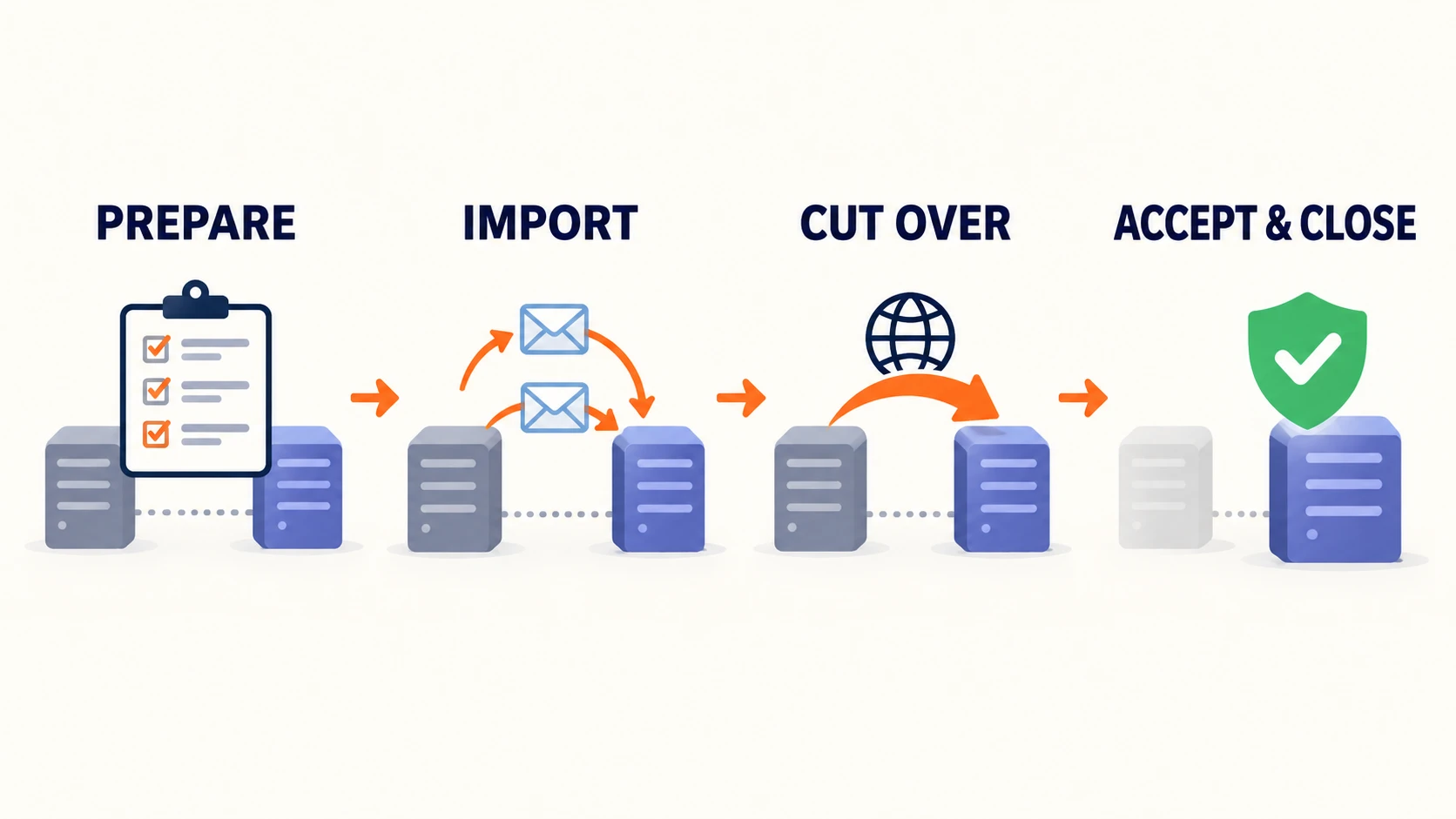
For a small office, plan on roughly a week from inventory to cutover, followed by a short acceptance period before Microsoft is closed. The sequence below is the one we follow.
| When | What happens |
|---|---|
| T-7 days | Inventory mailboxes, senders, files and identity dependencies. Buy Proton seats. Add and verify the domain in Proton. Publish Proton DKIM records. Save a copy of all DNS records. |
| T-5 to T-2 | Run Easy Switch for Business on a pilot batch and check it. Migrate the remaining accounts. Have each user activate their Proton account. Start file uploads. Document each user's Outlook rules, signatures and shared calendars. |
| T-1 day | Lower MX TTL. Confirm go/no-go criteria. Tell staff what changes tomorrow and how to sign in to Proton. |
| Cutover day | Change MX (Easy Switch's last step; the SPF, DKIM and DMARC records were published earlier, in the domain step). Sign users out of Microsoft mail apps. Repoint scanners and apps that send mail. Test inbound and outbound for every user. |
| T+1 | Sweep Microsoft mailboxes for mail that arrived during propagation (Proton says DNS sync and mail routing can each take up to 24 hours). Rebuild filters, signatures and calendar shares. Run the acceptance checklist with each user. |
| T+7 | If accepted, remove the domain from the Microsoft tenant and clean up Microsoft DNS records. Export anything still needed from Microsoft. |
| Cancellation | Cancel the subscription rather than deleting it, timed against the renewal date. Keep admin access until the data-retention period in your admin center ends. |
A five-person office can compress this into a few days; the order matters more than the duration. A printable, tickable version of this sequence is in the cutover runbook further down.
What to Inventory Before You Start
In our experience, the issues that come up during a small-office migration usually trace back to something that was not on the inventory.
List everything that sends mail as your domain. Scanners using SMTP, a website contact form, invoicing software, a CRM, a booking tool. Anything that authenticates to Microsoft's SMTP service stops working when the tenant closes, and anything that sends through a third-party service must stay in your SPF record. Our guide to business email landing in spam covers the authentication side.
List where files actually live. In the design studio's case the answer was several places — more than one cloud service plus local drives — which is common in creative offices. Each source is its own small migration.
Note who uses which apps. If anyone depends on macro-driven workbooks, pivot tables or PowerPoint, decide now whether they keep a standalone Microsoft 365 Apps licence. The studio did not need one; many offices do.
Shared mailboxes, lists and role addresses
Proton has no shared-mailbox object, and Easy Switch for Business does not migrate Microsoft 365 shared mailboxes. Proton Groups, available on Workspace plans with a custom domain, are distribution lists: mail sent to the group address is forwarded to each member. That is useful, but it is not a shared inbox with shared sent history and delegation. Decide each object's replacement before cutover:
| Microsoft object | Proton design | Tradeoff |
|---|---|---|
| Distribution list | Proton Group | Distribution only; each member gets a copy |
Low-volume role address (info@) | Additional address on one user, plus filters | One person owns the mailbox and its history |
Team-managed operational inbox (accounts@) | No direct equivalent. Use a Proton Group if each member receiving a copy is acceptable; otherwise assign a dedicated mailbox to one accountable owner, or keep a separate shared-inbox tool | No native delegation, shared inbox state or shared sent history; do not share one password among staff |
| Forward-only address | Group or forwarding | No shared message history |
Identity dependencies
Leaving Microsoft 365 also means leaving Microsoft Entra ID as the office's identity system. Check each of these before the tenant closes:
- "Sign in with Microsoft" on third-party apps. Any SaaS account that uses the work Microsoft account for sign-in needs a password or another sign-in method set first, or the user may lose access when the Microsoft account is disabled. Our Proton Mail for Business review includes the full pre-migration identity audit we run with clients.
- Windows devices joined to Entra ID or signed in with work accounts. Plan how each PC will be signed in afterwards, and export any BitLocker recovery keys stored in Entra before the tenant goes.
- Intune, Defender and Conditional Access, if used. Unenroll devices deliberately rather than letting policies lapse.
- Microsoft Authenticator entries tied to work accounts, which stop being useful after the move.
- Proton account security. Each user sets up two-factor authentication and a recovery method in Proton before cutover.
Proton's admin model is also worth explaining to staff. Organization users are non-private by default, which lets administrators access their mailboxes, and on Workspace Standard and Premium administrators can use "Sign in to a user" to reach a member's Drive files. Proton as a provider cannot read that content; your own administrators can. For continuity that is usually what a business wants, but it should be stated plainly, and any user set to private changes what an administrator can recover later.
Step 1: Set Up Proton Without Touching Mail Flow
Everything in this step happens while MX still points to Microsoft, so users notice nothing.
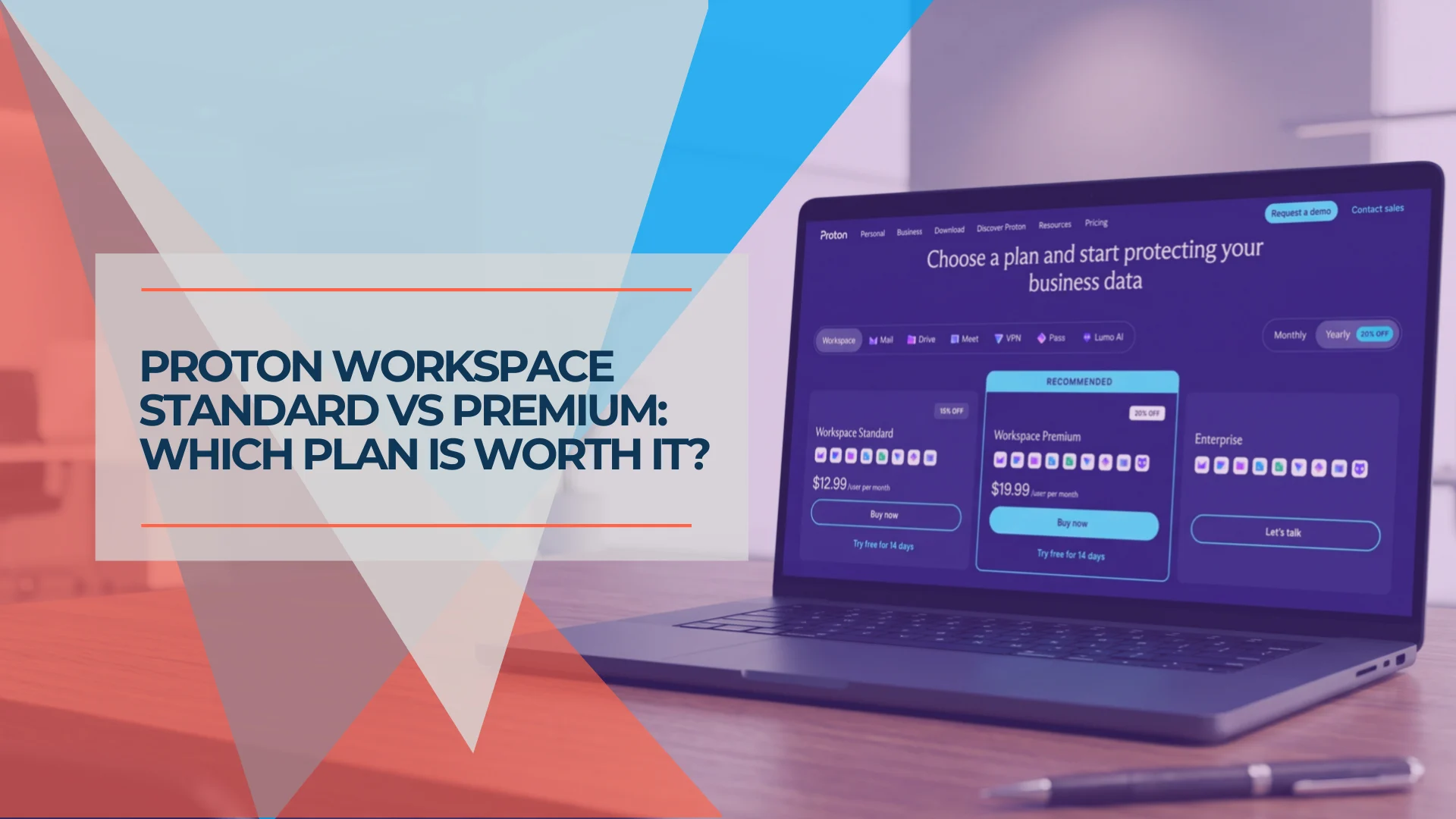
- Buy the plan and create the organization. The design studio went on Proton Workspace Standard: $12.99 per user per month on annual billing or $14.99 month-to-month, 1 TB per user. If you are deciding between Standard and Premium, our Standard vs Premium comparison covers retention rules, storage, and when the upgrade is worth it. For smaller or mail-only setups, our Proton plans guide explains where the other tiers fit.
- Add the domain in Proton and publish the verification TXT record (
protonmail-verification=…). It coexists with Microsoft's verification record. Our Proton custom domain setup guide explains each record and how to test it from outside. - Create the accounts Easy Switch will not create for you, such as replacements for shared mailboxes, plus the aliases and groups decided in the inventory. Easy Switch for Business lists your Microsoft 365 accounts for migration and hands you one invitation link for the team, so you do not need to create those users by hand first.
- Publish the three DKIM CNAME records (
protonmail._domainkey,protonmail2._domainkey,protonmail3._domainkey, targets copied from Proton's domain settings). They do not conflict with Microsoft'sselector1andselector2records. - Lower the TTL on your MX records to 300 seconds or your DNS host's minimum, at least a day before cutover.
Step 2: Run Easy Switch for Business
Open Easy Switch for Business from the Proton admin console and work through the flow:
- Choose the data. Emails, Contacts and Calendars are all selected by default; deselect any you do not want.
- Sign in to Microsoft with a Microsoft 365 administrator account and grant Proton the requested permissions.
- Set up the domain. The flow asks for the verification TXT record, the SPF record, three DKIM CNAME records (
protonmail._domainkey,protonmail2._domainkey,protonmail3._domainkey) and a DMARC record. Step 5 covers the DMARC decision. - Show mailbox sizes and pick accounts. To let Easy Switch display estimated mailbox sizes, open the Microsoft 365 admin center, go to Settings → Org Settings → Reports, and turn off Conceal user, group and site names in all reports. Then select the users and click Migrate. Start with a small batch — your own account and one other — before adding the rest.
- Onboard the team. Copy the invitation link and share it. Each person follows it, verifies their email address with a code and sets a Proton password. Proton notes that activation links stop working once the migration is final, so everyone should activate before you change MX.
- Update MX. Add the two MX records, click Confirm, then Save & exit. Proton says DNS sync can take up to 24 hours and mail routing up to 24 hours, and that after the MX change new messages stop arriving at Microsoft and the migration is final.
Microsoft describes granting consent on behalf of an organization as a sensitive operation, so review the publisher and the permissions Proton requests before approving. Proton's guide names a Microsoft 365 administrator as the account that signs in; the exact consent prompt can vary with your tenant's policies.
Contacts and calendars: check the pilot batch
Proton's Microsoft 365 guide lists Emails, Contacts and Calendars. Its older individual-account pages described Outlook contacts inconsistently, and in our July migration of an 8-person office contacts arrived through the per-mailbox flow. Confirm in the pilot batch that contacts and recurring meetings landed correctly. If contacts did not arrive, export them from Outlook to CSV and import them into Proton Contacts. For the calendar, check that events did not land in a separate calendar; the older per-mailbox import offered a merge option, and there is no merge tool afterwards.
When the per-mailbox import still applies
Proton's standard Easy Switch import for individual accounts remains available. It suits a single mailbox outside the organization migration, or a situation where the organization-wide tool does not fit. Proton states that it can run transfers from up to two different accounts at once, with only one transfer at a time from the same account.
Step 3: What Easy Switch Leaves Behind
Proton's guide does not list which Outlook features carry across. The items below did not survive the individual Outlook import; check on your pilot batch whether the organization-level tool behaves differently.
| Outlook feature | What happens | What to do |
|---|---|---|
| Inbox rules | Not converted | Rebuild as Proton filters; record each user's rules first |
| Color categories | Stripped on import | Recreate the important ones as labels |
| Follow-up flags | Arrive as starred messages; reminder dates are lost | Move date-driven follow-ups to calendar before migrating |
| Shared calendars and delegate access | Not migrated | Re-share in Proton Calendar after cutover |
| Subscribed internet calendars (ICS) | Not migrated | Re-add the subscription URLs |
| Non-standard contact fields | May be dropped | Check contacts with custom fields |
| Email signatures | Not migrated | Recreate in Proton settings |
| Microsoft 365 shared mailboxes | Not supported by Easy Switch for Business | Use the shared-mailbox table above; export what you need to keep |
Each item is small. Together they are an hour or two of work for a five-person office, and collecting screenshots of rules, signatures and calendar shares beforehand reduces support questions on the first day.
Step 4: Move the Files
Easy Switch for Business does not cover OneDrive or SharePoint files. The route from OneDrive and SharePoint is download, check, upload:
- Download in batches. Microsoft limits browser downloads to 10,000 files and 250 GB per file. Divide larger libraries into smaller, named batches rather than selecting everything at once.
- Unzip and check each batch on a staging drive, comparing file counts with the source.
- Upload through the Proton Drive desktop app by placing files in its folder, into a folder layout agreed before anyone starts. Agreeing the layout first prevents a second reorganisation later.
Files from other services and local drives follow the same staging pattern. Our Dropbox to encrypted cloud storage guide covers the Dropbox side.
What does not survive the file migration
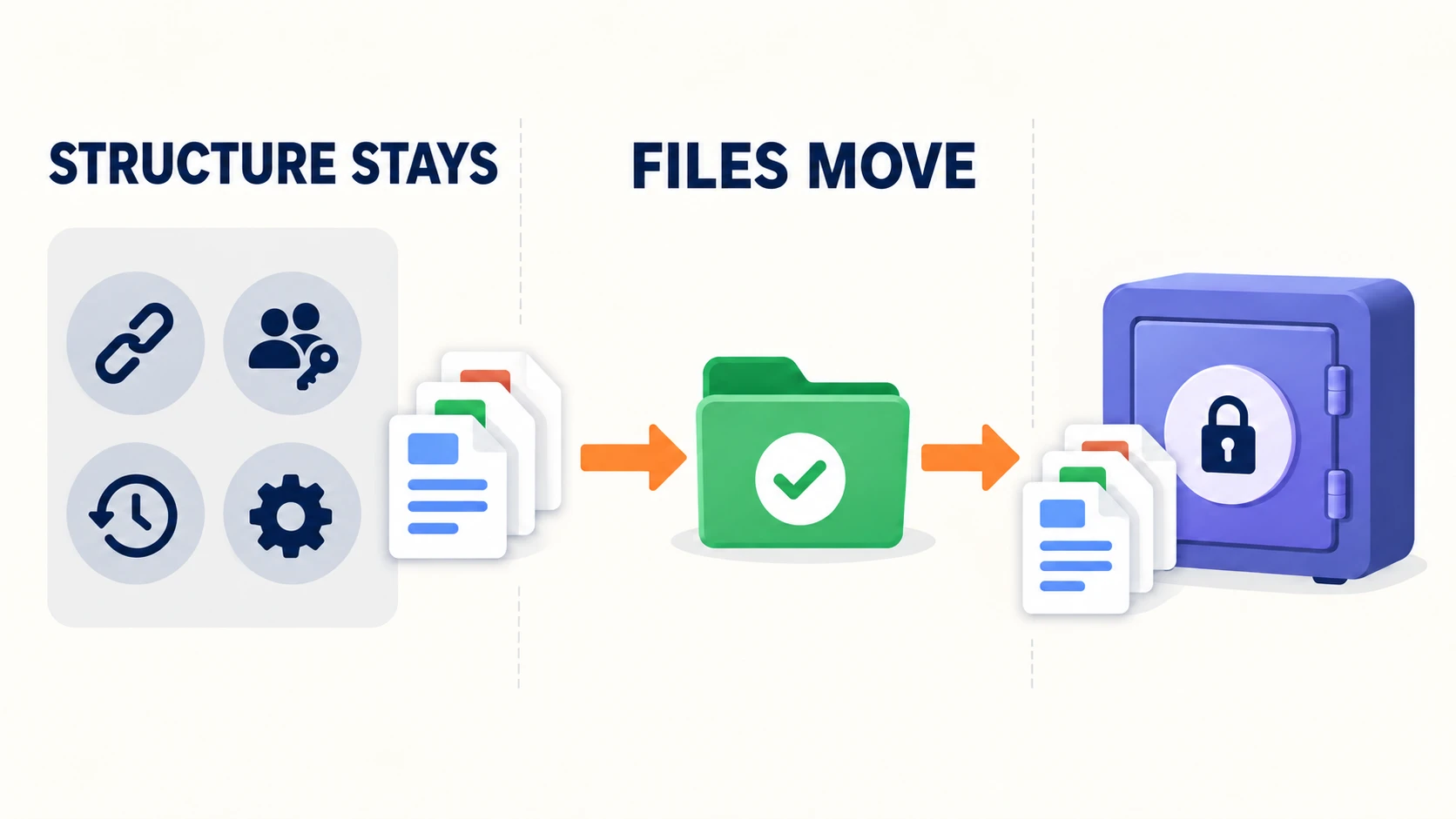
A file migration moves bytes. It does not move the Microsoft structure around them:
| Microsoft item | After migration |
|---|---|
| Sharing links and file/folder permissions | Not carried over; recreate shares in Proton Drive |
| Version history | Only the current version moves; old versions stay in Microsoft |
| Files in "Shared with me" | Owned by someone else; Microsoft does not allow downloading directly from the Shared view, so each owner moves their own files |
| OneNote notebooks | Not included in folder ZIP downloads, and Microsoft's web export does not support notebooks stored in OneDrive for work or school or SharePoint. Before closing the tenant, export the pages or sections you need to PDF, or copy the content into another notebook and check it independently |
| Files with sensitivity labels or IRM protection | Microsoft notes that encrypted files over 4 MB can be left out of ZIP downloads; download them individually |
| SharePoint lists, pages, metadata columns and workflows | No Proton equivalent; export list data to CSV and document workflows |
| Power Automate, Forms, Planner, Bookings | Rebuild elsewhere or retire; export results first |
| Teams chats, channel files and meeting recordings | Export what must be kept before the tenant closes |
Three things about Proton Drive are worth telling staff before they go looking for files:
- Search covers filenames, not file contents. Proton Drive search currently matches filenames only, and in the web app it returns files in My files; items under Shared with me do not appear in results. Clear folder and file naming matters more than it did on OneDrive.
- Word and Excel files remain usable. Proton Docs opens
.docxand exports to.docxor.pdf; Proton Sheets imports and exports.xlsx,.csvand.tsv. Opening a Word file in Docs creates a new Docs copy rather than changing the original. - Administrators can reach users' Drive files, as described in the identity section above.
Step 5: The DNS Cutover
Easy Switch for Business prompts for these records inside its flow (Step 2). The table below is the same set, for anyone setting them up by hand or checking the flow's work.
Go/no-go before changing MX
Change MX only when all of these are true:
- Every migration batch has finished and the pilot users have confirmed mail, calendar and contacts.
- Every user has activated their Proton account through the invitation link.
- Proton shows the domain verified and all three DKIM records valid.
- Every user can sign in to Proton and has two-factor authentication set up.
- The SPF record from the domain step is published, and every third-party sender from the inventory is still covered by it.
- A copy of the current Microsoft DNS records is saved.
- Staff know the cutover time and where to report problems.
The records
| Record | Change | Value |
|---|---|---|
| MX | Replace Microsoft's MX with Proton's two records | mail.protonmail.ch priority 10, mailsec.protonmail.ch priority 20 |
| SPF (TXT) | Published in the domain step, before MX. Proton says it lets your team send from both Proton and Microsoft during the migration. After acceptance, remove the old Microsoft include and keep other senders | Copy from Proton's domain settings |
| DKIM (CNAME) | Already published in Step 1 | protonmail, protonmail2, protonmail3 |
| Autodiscover (CNAME) | Remove the Microsoft record | Stops mail apps finding Exchange |
There must be only one SPF record for the domain.
DMARC needs a separate decision. Easy Switch's domain step includes a DMARC record. A domain should have only one, so if you already publish one, adjust it rather than adding a second. Proton recommends p=quarantine for most domains, and that is a sensible destination. During a migration, though, the safer sequence is:
- If a DMARC record exists, keep it and adjust it rather than replacing it. Do not weaken a policy that is already enforced.
- Add aggregate reporting (
rua=) if it is missing, so you can see what is passing. - Confirm SPF and DKIM alignment for Proton mail and every third-party sender first.
- If the domain has no DMARC record yet, start at
p=none, review the reports, then move toquarantine.
Our DMARC guide for small businesses covers the policy options, and the SPF, DKIM and DMARC explainer covers what each of the three records does. Our free Email Health Check reads your published SPF, DKIM and DMARC records from public DNS, so you can confirm the domain step took effect before and after cutover.
After the MX change, send test messages from outside accounts to each user, reply from Proton, and check that SPF, DKIM and DMARC pass in the headers. Proton notes that DNS changes can take minutes to hours depending on TTL, and that some platforms keep old DNS information for 1–3 days, so some senders will keep delivering to Microsoft for a while. Monitor both systems during that period.
The accepted-domain gap
While your domain is still an accepted domain in the Microsoft tenant, Exchange Online treats colleagues' addresses as local. Mail sent through Microsoft — from an Outlook app someone has not signed out of, a scanner still using Microsoft's SMTP relay, or an automated flow — to a coworker is delivered inside Microsoft and never reaches Proton, regardless of MX. Sign users out of Microsoft mail apps on cutover day and repoint devices immediately. The domain itself stays in the tenant only as long as you need a rollback option.
Rollback
Keeping Microsoft licensed and the domain in the tenant until acceptance is what makes rollback possible. If a significant problem appears, restore the saved MX, SPF and Autodiscover records; mail returns to Microsoft once DNS propagates. Anything delivered to Proton in the meantime has to be moved back by hand, so the earlier the decision, the smaller the cleanup. The Proton DKIM records can stay in place; they do not affect Microsoft.
Step 6: Accept, Then Close the Microsoft Side
Acceptance checklist for each user
- Receives mail from an external address and replies successfully.
- Folders, older messages and attachments are present.
- Calendar shows recurring meetings; shared calendars are re-shared.
- Contacts are complete.
- Filters and signature are rebuilt.
- Files are in the agreed Proton Drive folders and open correctly.
- Phone and desktop apps are signed in to Proton and signed out of Microsoft.
- Two-factor authentication and recovery are set up.
Before closing anything, check each Microsoft mailbox for messages that arrived during propagation, and move anything that matters. Meeting invitations accepted during that window are worth checking specifically.
Closing down Microsoft
- Remove the domain from the tenant. Microsoft blocks removal until nothing uses it: change users' sign-in names to the
.onmicrosoft.comdomain, remove the domain from shared mailboxes, groups, distribution lists and aliases, then remove it under Settings → Domains. Microsoft estimates about five minutes for a simple tenant and up to a day when many objects reference the domain. - Remove leftover Microsoft DNS records, such as the
selector1/selector2DKIM CNAMEs,enterpriseregistrationandenterpriseenrollmentCNAMEs, and Teams/Skype SRV records. - Cancel the subscription rather than deleting it. Do not assume a fixed timeline: Microsoft's lifecycle depends on how the subscription was purchased and ended. An annual subscription with recurring billing turned off enters Expired on its end date; a monthly subscription cancelled within the cancellation window skips Expired and moves straight to Disabled, where users lose access and only admins can reach data. Microsoft says remaining data may be deleted after 90 days and no later than 180 days after cancellation, and that explicitly deleting a subscription skips these stages and deletes SharePoint and OneDrive content immediately. Check the dates shown in your Microsoft 365 admin center before relying on them.
Keep the administrator account's access until the data period ends; it is the fallback if someone discovers a missing file in the first month. Our IT handover checklist is a useful final pass for documenting the new admin credentials, recovery codes and DNS host access.
Printable Cutover Runbook
The checklist below follows the sequence in this guide and puts the go/no-go checks, the rollback note and the cleanup steps in one place. Pick your cutover day to add dates to each phase, tick items off as you go, then print it or email it to yourself. If you are leaving Google Workspace instead, switch the source at the top; the Easy Switch steps are the same, with a few platform-specific items.
Which Offices Is This Migration Right For?
The move fits offices whose work runs through email, calendar and files rather than through the Microsoft ecosystem around them — design studios are a typical example, with creative-suite working files and email-led client communication. Workspace Standard also includes Proton VPN and Proton Pass, which matters when an office would otherwise pay for those separately. Microsoft 365 remains the better fit where Teams, SharePoint workflows, heavy Office use or Intune are central to how the office works. For the full feature and cost picture, see our Proton Workspace review. If you are not yet sure that a move is the right answer, our guide to fixing the setup before switching covers the assessment to run first.
Proton offers a 14-day free trial for new business customers (up to 10 users, on a new account created through the trial flow), followed by a 30-day money-back guarantee with a prorated refund once the paid subscription starts. That is enough time to run the pilot batch in Step 2 before committing the rest of the office.
If you would rather not run the migration yourself, iFeelTech scopes and handles Microsoft 365 to Proton moves for small offices, including DNS, mailbox imports, file transfer and Microsoft 365 cleanup.
Related Resources
- Fix the Setup or Switch? — The assessment and pilot criteria to complete before committing to a migration.
- Who Should Not Switch to Proton Workspace — Eight dependency checks (shared inboxes, Office files, Teams, sign-in, compliance) to run before you commit.
- Leaving GoDaddy and Microsoft 365 for Proton — A five-person studio's privacy-driven switch, with the SPF and cancellation checks.
- Proton Workspace vs Microsoft 365 — Costs at 5, 10 and 25 seats, feature gaps, and which businesses should switch.
- Google Workspace vs Proton Workspace — The same decision for offices on Google, where Easy Switch for Business has handled mailbox migration since June.
- Proton Mail for Business Review — Mail Essentials pricing and the identity audit to run before any cutover.
- Proton Drive vs Google Drive for Business — How encrypted storage changes search, sharing and admin access.
- DMARC for Small Businesses — Setting a DMARC policy after the cutover.
Frequently Asked Questions
Related Articles
More from Business Software
Microsoft 365 or Google Workspace: Fix the Setup or Switch?
Before leaving Microsoft 365 or Google Workspace, find out whether you have a setup problem or a platform problem, what to fix first, and when to switch.
21 min read
Microsoft 365 Alternative: Proton Workspace vs Microsoft 365 for Small Business
Microsoft 365 vs Proton Workspace compared from real migrations: 5/10/25-seat costs, privacy architecture, collaboration gaps, and which businesses should switch.
19 min read
Proton Workspace Standard vs Premium (2026): What the Extra $7 Per User Buys
Proton Workspace Standard vs Premium compared: storage, email retention, Lumo AI, Meet limits and cost at 5, 10 and 25 users — and which offices need Premium.
11 min read