

Microsoft 365 Alternative: Proton Workspace vs Microsoft 365 for Small Business
Microsoft 365 vs Proton Workspace compared from real migrations: 5/10/25-seat costs, privacy architecture, collaboration gaps, and which businesses should switch.

Microsoft 365 is still the default recommendation for many of the businesses we support. It is stable, familiar, and difficult to beat when a team depends on desktop Office, advanced Excel, SharePoint, Teams, or Intune.
But "default" is no longer the same as "only credible option."
Since Microsoft's July 2026 commercial price changes, we have received more questions from owners who are not merely looking for a cheaper office subscription. They want to know whether their email, files, meetings, passwords, VPN, and AI tools all need to remain inside Microsoft or Google—and whether a privacy-first provider outside the US Big Tech ecosystem can realistically run a small company.
We have migrated selected iFeelTech and client accounts to Proton Workspace, primarily for privacy. This comparison explains where that move worked, where Proton still falls short, and which businesses should not switch.
The 30-Second Verdict
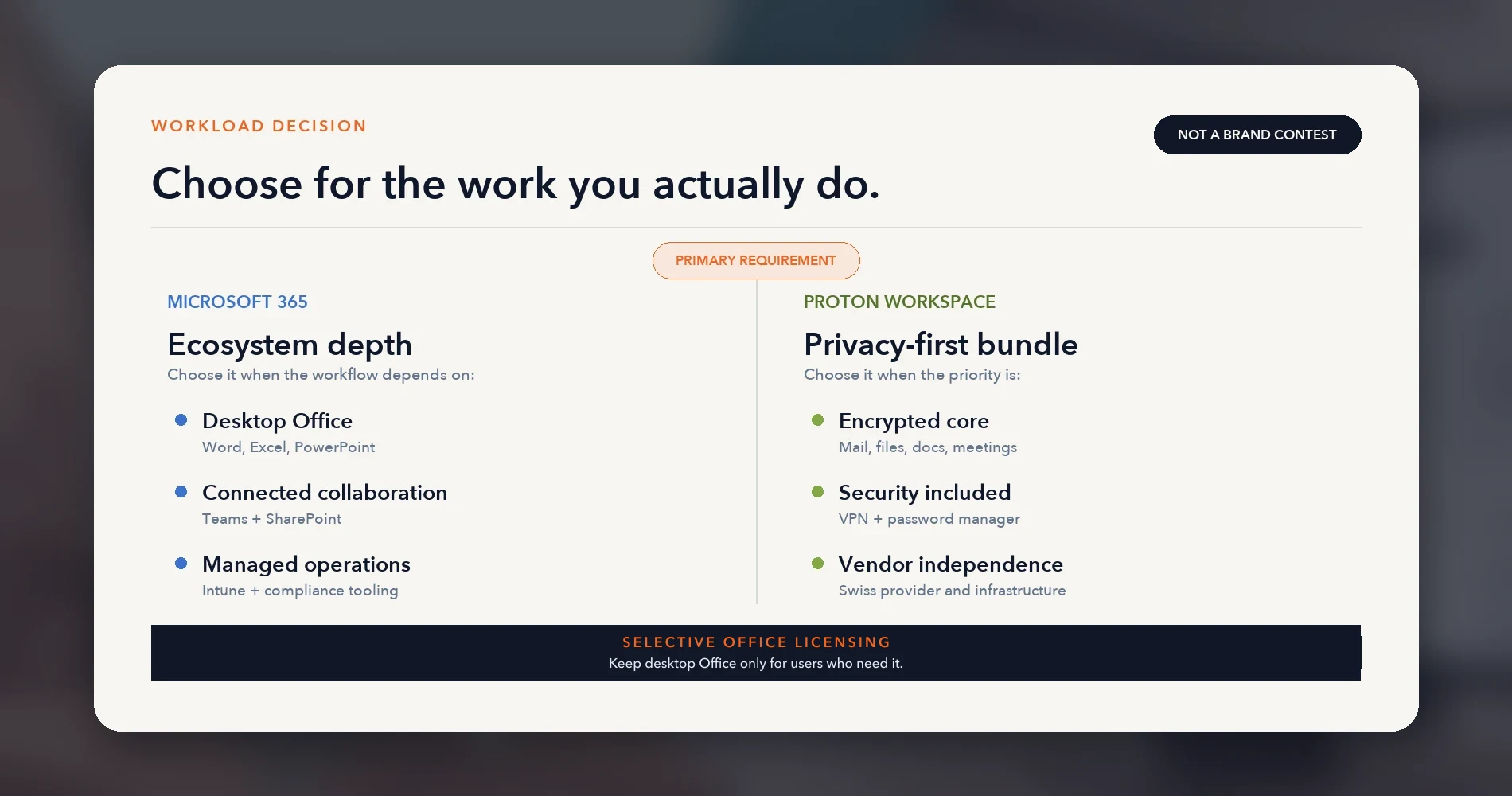
Choose Microsoft 365 when desktop Office apps, advanced Excel, PowerPoint, SharePoint, Teams integrations, Intune device management, Power Platform, or mature compliance administration are operational requirements.
Evaluate Proton Workspace when privacy architecture, vendor independence, encrypted communications and storage, and consolidation of email + VPN + password management matter more than ecosystem depth.
Use selective Office licensing when Proton is the single platform for email and files, but a few users still need desktop Word, Excel, or PowerPoint.
Affiliate Disclosure: This article contains affiliate links. If you make a purchase through these links, we may earn a small commission at no extra cost to you. As an Amazon Associate, iFeelTech earns from qualifying purchases.
Why Are Businesses Considering Alternatives to Microsoft 365?
Businesses are reconsidering Microsoft 365 because of higher prices, vendor concentration, and bundled security alternatives. If the frustration is with how the tenant is set up rather than the platform, our guide to whether to fix the setup or switch is the better starting point.
Price and Packaging Changes (July 1, 2026)
Microsoft raised commercial prices for two of its three business plans:
| Plan | Previous Price | New Price (July 1, 2026) | Change |
|---|---|---|---|
| Business Basic | $6.00/user/month | $7.00/user/month | +16% |
| Business Standard | $12.50/user/month | $14.00/user/month | +12% |
| Business Premium | $22.00/user/month | $22.00/user/month | No change |
Prices per user/month, annual commitment. Source: Microsoft's 2026 M365 packaging and pricing updates. Existing customers move to new pricing at renewal.
For a 15-person team on Business Standard, that is $22.50 more per month — $270/year. Price alone rarely justifies a migration, but renewals prompt platform reviews that were already overdue. For the full Microsoft plan decision after these changes, see our Microsoft 365 Business plan comparison.
Operational Concentration Risk
More business owners are asking whether email, files, meetings, passwords, and AI usage should all live inside a single provider. When one tenant holds an organization's entire operational footprint — email, file storage, collaboration, identity — the blast radius of any security incident, service outage, or policy change is proportionally larger.
This concern applies equally to Google Workspace. The underlying question is about digital sovereignty and business data control, not a specific claim against either platform.
Consolidating Security Subscriptions
Many businesses we support already pay separately for a VPN ($6–10/user/month), a password manager ($2–8/user/month), and their productivity suite. A single provider covering email, calendar, storage, documents, meetings, VPN, password management, and AI under one login has practical appeal beyond the privacy argument.
What Does Proton Workspace Replace in Microsoft 365?
Microsoft 365 and Proton Workspace overlap on core work tools but differ sharply in productivity depth and privacy architecture. The closest bundled SMB comparison is Microsoft 365 Business Standard ($14/user/month) versus Proton Workspace Standard ($12.99/user/month):
| Capability | Microsoft 365 Business Standard ($14/user/mo) | Proton Workspace Standard ($12.99/user/mo) |
|---|---|---|
| Email + custom domains | Outlook (100GB mailbox after summer 2026 rollout; some tenants may still show 50GB. Up to 5,000 accepted domains per tenant) | Proton Mail (E2EE, 15 custom domains, 20 addresses/user) |
| Calendar | Outlook Calendar | Proton Calendar (E2EE, appointment scheduling) |
| File storage | OneDrive (1TB/user) | Proton Drive (1TB/user, E2EE) |
| Documents | Word (desktop + web + mobile) | Proton Docs (web; opens .docx, .txt, .md, .html) |
| Spreadsheets | Excel (desktop + web, pivot tables, macros, VBA) | Proton Sheets (web, standard formulas, no pivot tables/macros) |
| Presentations | PowerPoint (desktop + web + mobile) | None — no presentation tool |
| Meetings/video | Teams (300 participants, cloud recording, transcription) | Proton Meet (100 participants Standard / 250 Premium, E2EE, local recording only) |
| Team chat | Microsoft Teams | None (organizations typically use Signal Messenger or Wire) |
| Password manager | Not included | Proton Pass (unlimited logins, 2FA, team vaults) |
| VPN | Not included | Proton VPN (10 connections/user, 140+ countries) |
| AI assistant | Copilot Chat (basic); Copilot Business add-on $21 list / ~$18 promo annual (checked July 2026) | Lumo (limited prompts on Standard; unlimited with advanced models on Premium at $19.99) |
| Desktop Office apps | Word, Excel, PowerPoint, Outlook (installable) | Not available |
| Device management | Not included (requires Premium at $22) | Not available |
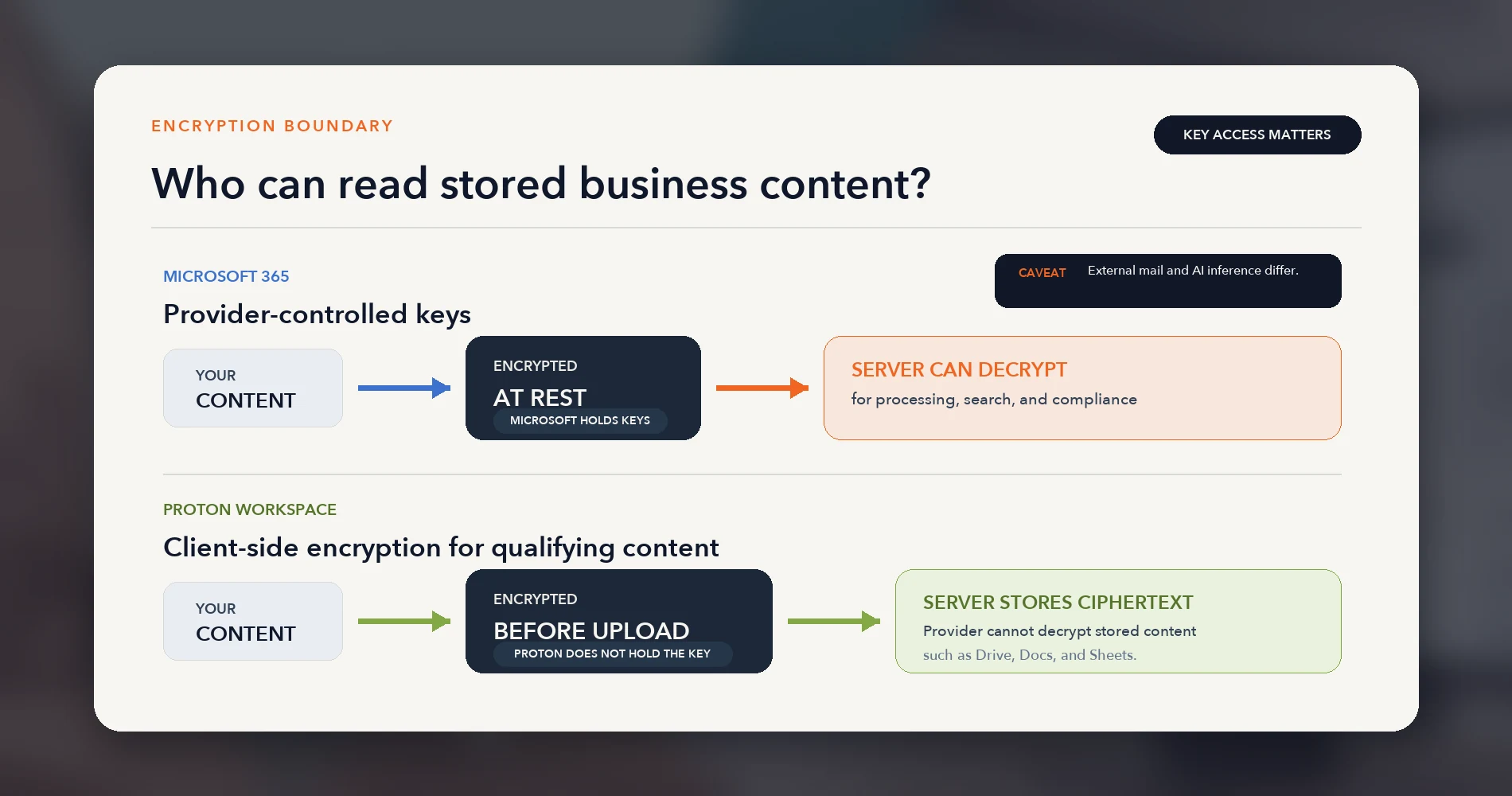
| Encryption model | Service-side encryption; Microsoft manages keys and can process content for search, compliance, and threat protection | End-to-end / zero-knowledge encryption; Proton documents it cannot access qualifying stored content |
| Offline editing | Full offline with sync | No documented native offline editing (July 2026) |
| Third-party integrations | Extensive (SharePoint, Power Platform, Graph API, marketplace) | Limited (SMTP relay, email forwarding to CRMs) |
| Admin controls | Full admin center, compliance tools, eDiscovery | User provisioning, role assignment, session revocation, audit logs, non-private mailbox access, Drive admin access. No granular RBAC, MDM, DLP, or Vault-equivalent eDiscovery |
Microsoft and Proton list prices rechecked September 29, 2026; other plan limits checked July 29, 2026. Microsoft pricing from microsoft.com. Proton pricing from proton.me/business/plans. Annual billing; prices exclude VAT/taxes and may vary by region.
The table reflects two design philosophies. Microsoft builds an ecosystem where everything connects — desktop apps, Teams, SharePoint, integrations, device management — and charges separately for security tools and advanced AI. Proton builds a privacy-first bundle where encryption is the default and security tools (VPN, password manager) are included — but the collaboration ecosystem is narrower.
How Much Does Proton Workspace Cost for 5, 10, or 25 Users?
Proton costs less only when it replaces security tools the business would otherwise purchase. Many organizations do not buy a separate VPN and password manager, while others require controls that exceed Proton's included configuration. If you have already decided on Proton and are choosing between tiers, see Proton Workspace Standard vs Premium. Two realistic Microsoft scenarios illustrate the range:
Scenario A: Microsoft 365 Standard + Small-Team Security Stack
Uses 1Password Teams Starter Pack ($19.95/month flat for up to 10 users) and NordLayer Lite (~$8/user/month).
| Component | 5 Users/mo | 10 Users/mo | 25 Users/mo |
|---|---|---|---|
| M365 Business Standard | $70.00 | $140.00 | $350.00 |
| NordLayer Lite (~$8/user) | $40.00 | $80.00 | $200.00 |
| 1Password (Starter ≤10 / Business $7.99 for 25) | $19.95 | $19.95 | $199.75 |
| Total | $129.95 | $239.95 | $749.75 |
Scenario B: Microsoft 365 Standard + Advanced-Admin Security Stack
Uses 1Password Business ($7.99/user/month) for full admin controls, SSO/SCIM, and vault policies.
| Component | 5 Users/mo | 10 Users/mo | 25 Users/mo |
|---|---|---|---|
| M365 Business Standard | $70.00 | $140.00 | $350.00 |
| NordLayer Lite (~$8/user) | $40.00 | $80.00 | $200.00 |
| 1Password Business ($7.99/user) | $39.95 | $79.90 | $199.75 |
| Total | $149.95 | $299.90 | $749.75 |
Proton Workspace Standard (VPN + Pass Included)
| Component | 5 Users/mo | 10 Users/mo | 25 Users/mo |
|---|---|---|---|
| Proton Workspace Standard | $64.95 | $129.90 | $324.75 |
| VPN | Included | Included | Included |
| Password manager | Included | Included | Included |
| Total | $64.95 | $129.90 | $324.75 |
Annual Savings Comparison
| Seats | M365 + Small-Team Stack | M365 + Advanced Stack | Proton | Savings vs Small-Team | Savings vs Advanced |
|---|---|---|---|---|---|
| 5 | $1,559 | $1,799 | $779 | $780/year | $1,020/year |
| 10 | $2,879 | $3,599 | $1,559 | $1,321/year | $2,040/year |
| 25 | $8,997 | $8,997 | $3,897 | $5,100/year | $5,100/year |
When Microsoft Remains the Better Value
These savings assume the organization would otherwise purchase a separate VPN and password manager. Microsoft is cheaper or equivalent when:
- You only need basic email and web apps: Microsoft Business Basic at $7/user/month costs less than Proton's $12.99.
- You need desktop Office apps: Microsoft 365 Apps for Business ($10/user/month) or retained Standard licenses must be added alongside Proton — reducing or eliminating the cost advantage.
- You need device management or endpoint security: Microsoft Business Premium at $22/user/month includes Intune and Defender. Adding equivalent tools to Proton costs $6–13/user/month extra.
- Your team does not currently pay for a separate VPN and password manager: Without those costs, Microsoft Standard at $14/user is only $1/user more than Proton.
Year-One Migration Labor
These comparisons cover recurring subscription costs only. A platform migration carries one-time costs: DNS changes, data transfer, user training, parallel-run period, and admin time. Based on our experience with 8–10 user mailbox migrations with moderate data volumes and no litigation-hold complexity, plan for 15–30 hours of IT/admin labor over 2–4 weeks. Factor this into year-one ROI calculations.
Cost comparison calculated July 29, 2026. NordLayer estimate based on published NordLayer Lite pricing (~$8/user/month, annual, 5-user minimum). 1Password Teams Starter Pack: $19.95/month flat for up to 10 users; 1Password Business: $7.99/user/month. Verify current rates at 1password.com/business-pricing and nordlayer.com/pricing. Prices exclude VAT/taxes.

Proton Workspace
Privacy-first business suite: encrypted email, calendar, 1TB Drive, Docs, Sheets, Meet, VPN, and password manager in one plan. 14-day free trial, 30-day money-back guarantee.
- End-to-end encrypted email and storage
- VPN + password manager included
- 1TB storage per user
- SOC 2 Type II and ISO 27001 certified
- 14-day free trial on all plans
*Price at time of publishing
How Do Proton and Microsoft 365 Protect Business Data?
Proton limits provider access to stored content; Microsoft favors searchable, centrally governed collaboration. Understanding the difference requires defining what each platform encrypts and where provider access exists.
Key Terms
- End-to-end encryption (E2EE): Content encrypted on the sender's device and decryptable only by the intended recipient. The provider cannot read it in transit or at rest.
- Zero-access encryption: Content stored so that even the provider's servers cannot decrypt it. The user holds the keys.
- Service-side encryption: Data encrypted at rest and in transit, but the provider manages keys and can process content for search, compliance, threat detection, and eDiscovery.
- Customer Key / Double Key Encryption (DKE): Microsoft's customer-managed encryption options, available on qualifying enterprise and Purview licenses — not included in Business Basic, Standard, or Premium plans.
What Proton Documents About Its Encryption
According to Proton's encryption documentation and zero-access architecture:
- Email between Proton users: End-to-end encrypted. Only sender and recipient hold keys.
- Email to/from external providers: Travels over standard TLS in transit. Stored with zero-access encryption once it reaches Proton — Proton documents that it cannot read stored content. Password-protected email adds E2EE for external recipients.
- Drive, Docs, Sheets: Files encrypted client-side before upload. Proton documents that it cannot read stored file contents.
- Calendar: Event details encrypted at rest. External invitations and public booking workflows necessarily expose scheduling information to recipients.
- Pass: Passwords and notes use zero-knowledge encryption.
- Meet: End-to-end encrypted using Messaging Layer Security (MLS) — documented as the default on all Workspace plans.
- Lumo AI: Prompts encrypted in transit; decrypted for inference on Proton-controlled servers; then erased. Stored chat history uses zero-access encryption. (Proton Lumo privacy)
Proton may still provide account metadata (creation date, login IPs if ordered retained, sender/recipient addresses) under valid Swiss legal process. See Proton's law-enforcement guidance and transparency report.
What Microsoft Encrypts
Microsoft 365 encrypts customer data at rest and in transit using service-managed keys. Microsoft's architecture permits server-side processing needed for full-text search, real-time collaboration, malware filtering, eDiscovery, compliance scanning, and Copilot features. This differs from Proton's provider-access model, but it does not mean Microsoft staff may casually inspect customer content — access is governed by Microsoft's data-access policies.
For qualifying enterprise customers (E5, Purview licenses), Microsoft offers Customer Key and Double Key Encryption. These are not available on Business Basic, Standard, or Premium — the plans most SMBs use.
Privacy Comparison by Workflow
| Workflow | Assessment | Notes |
|---|---|---|
| Internal team email | Proton advantage | E2EE by default between Proton users; Microsoft processes content with managed keys |
| Email to external clients | Partial Proton advantage | Zero-access storage on Proton; standard TLS in transit unless password-protected |
| File storage | Proton advantage | Client-side encryption before upload; Microsoft manages OneDrive keys |
| Real-time document collaboration | Proton advantage | E2EE collaboration in Docs/Sheets; Microsoft requires server-side content access for collaboration features |
| Video meetings | Proton advantage | MLS-based E2EE on all Workspace plans; Teams Business plans support E2EE for 1:1 calls only — E2EE meetings for up to 200 participants require Teams Premium |
| AI assistant prompts | Depends | Proton erases prompts post-inference; Microsoft Copilot processes within tenant under Microsoft's data policies |
| Full-text file/email search | Microsoft advantage | Microsoft provides centralized content search across its ecosystem. Proton Drive search is filename-based; Proton Mail supports client-side message-content search after a local index is enabled |
| eDiscovery and legal holds | Microsoft advantage | Purview tools require key access; Proton cannot search encrypted content on the customer's behalf |
| Admin account recovery | Depends | Both platforms allow admin access to non-private user accounts. Proton users marked "private" control their own keys; Microsoft admins can always reset passwords and access mailboxes |
Neither platform's encryption eliminates account takeover, endpoint compromise, phishing, malicious insiders, or misconfiguration. The choice is a threat-model decision: limit the provider's ability to access stored content (Proton) versus retain the provider's ability to centrally search, govern, and protect content (Microsoft).
Jurisdiction
Proton is a Swiss company with data centers in Switzerland, Germany, and Norway. Data requests from US or foreign authorities must go through Swiss legal channels (mutual legal assistance treaties). This represents a different legal process from a direct subpoena to a US-based provider — Proton's transparency report shows that Swiss authorities independently evaluate requests and that Proton complies with valid Swiss orders.
Swiss hosting may simplify the vendor-jurisdiction element of GDPR assessments, but compliance also involves contracts, subprocessors, retention, auditability, data-subject requests, and the customer's own configuration. Do not assume jurisdiction alone resolves compliance.
Microsoft 365 Is Stronger for Productivity, Management, and Compliance
Microsoft 365 leads when desktop Office, advanced collaboration, device control, or formal compliance workflows are required.
Desktop Office and Advanced Excel
Microsoft Word, Excel, and PowerPoint remain industry standards for document fidelity. Proton has no installable desktop office suite equivalent to Word, Excel, or PowerPoint (it does offer desktop apps for Drive and other services). Pivot tables, Power Query, VBA macros, and complex financial modeling require Excel — none exist in Proton Sheets. In our July 2026 testing, Proton Sheets handles standard formulas correctly (we confirmed SUM, IF, VLOOKUP, and XLOOKUP), but anything beyond moderate spreadsheet use requires Excel or Google Sheets.
Teams, SharePoint, and Workflow Integrations
Microsoft Teams integrates with SharePoint, OneDrive, Planner, Loop, and thousands of third-party applications through native connectors, the Microsoft Graph API, and Power Automate. Proton has no team chat, no equivalent to SharePoint document libraries, and minimal third-party integration (SMTP relay and email forwarding cover basic CRM connectivity).
Intune, Entra ID, and Defender
Microsoft 365 Business Premium ($22/user/month) includes endpoint device management (Intune Plan 1), identity and conditional access (Entra ID P1), endpoint detection and response (Defender for Business), and advanced email protection (Defender for Office 365 Plan 1). Proton offers none of these. Organizations that need managed devices, conditional access policies, or EDR must either stay on Microsoft or layer separate tools on top of Proton at additional cost.
Purview, Retention, eDiscovery, and Regulated Environments
Business Premium includes meaningful Purview capabilities: sensitivity labels, data loss prevention policies, retention policies, eDiscovery (Standard), and legal hold. These are not the full E5 Purview suite, but they cover the compliance foundations most SMBs need. Proton offers email-retention policies on Workspace Premium and admin access to non-private accounts, but has no legal-hold workflow, no DLP, and no unified eDiscovery search-and-review system.
Microsoft offers government-specific clouds (GCC, GCC High) and broader compliance programs for FedRAMP, CJIS, and similar requirements. Do not assume a standard Business Premium tenant meets FedRAMP or CJIS requirements — validate the required cloud, license, and configuration with Microsoft or your compliance advisor.
Proton Workspace Is Stronger for Privacy and Bundle Consolidation
Proton leads on provider-resistant encryption and bundled privacy tools, with a narrower productivity ecosystem.
Proton's clearest advantage is that email, storage, documents, meetings, passwords, and network access can be purchased in one privacy-focused bundle. Workspace Standard at $12.99/user/month (annual) includes 1TB storage per user, 15 custom domains, Meet for 100 participants, VPN with 10 connections per user across 140+ countries, Pass with unlimited logins and team vaults, and Lumo with limited prompts.
Its open-source applications, ISO 27001 certification, and SOC 2 Type II attestation (audited by Schellman, July 2025) strengthen the assurance story. These controls do not replace an organization's own endpoint security, backups, access governance, or compliance review.
Proton offers a Business Associate Agreement on request for organizations with HIPAA requirements. A BAA alone does not make an implementation compliant — retention policies, access controls, external email handling, audit procedures, and workforce training still require independent review. Confirm which services are covered in your executed agreement before storing PHI.
For a detailed product review including limitations we found during deployment, see our Proton Workspace review.
Proton Workspace Standard
$12.99/user/mo (annual)Mail, Calendar, Drive (1TB), Docs, Sheets, Meet (100 participants), VPN, Pass, and Lumo — under Swiss privacy protections.
What Does a Real Microsoft-to-Proton Migration Involve?
A Proton migration is manageable for email-led teams, but file transfer, training, and selective Office licensing add meaningful work.
We migrated an 8-person professional services consultancy from Microsoft 365 Business Standard (plus NordLayer VPN and 1Password) to Proton Workspace Standard. Here is what the migration involved. For the step-by-step process — tenant consent, per-mailbox imports, DNS records, rollback and closing the Microsoft side — see our Microsoft 365 to Proton Workspace migration guide.
Migration Summary
Previous environment: Microsoft 365 Business Standard ($14/user) + NordLayer (~$8/user) + 1Password Teams Starter ($19.95 flat) New environment: Proton Workspace Standard for all 8 users + Microsoft 365 Apps for Business ($10/user) retained for 2 users
| Component | Method | Timeline |
|---|---|---|
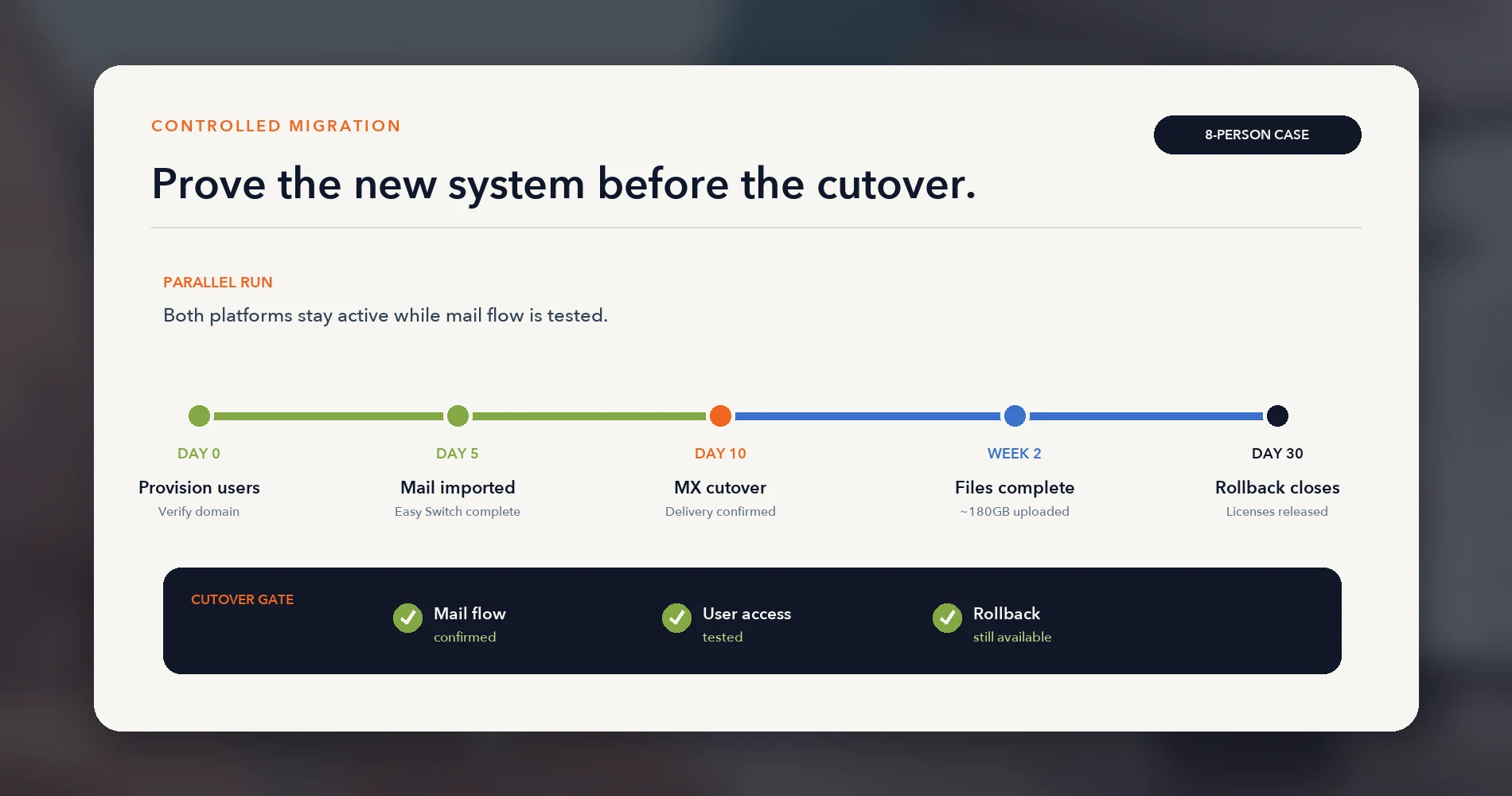
| Email (all 8 mailboxes) | Easy Switch (Outlook email + calendar import) | 5 days (ran in parallel) |
| Contacts | Easy Switch | Migrated with email |
| Files (~180GB across team) | Manual export → Proton Drive upload | 2 weeks |
| Passwords | 1Password export → Proton Pass import | 1 day |
| VPN | Removed NordLayer; configured Proton VPN | 1 day |
Tested July 2026, using the per-mailbox Outlook import. In our test, Easy Switch imported Outlook email and calendar, and contacts also arrived through the migration flow. Proton's general Easy Switch guide lists email and calendar for Outlook, while its Outlook migration guide describes emails, calendars, and contacts — test contacts during a pilot before relying on them.
Update, 29 September 2026: Proton has since extended Easy Switch for Business to Microsoft 365, so an administrator can now migrate accounts in one flow rather than mailbox by mailbox. See our step-by-step migration guide.
DNS and Domain Changes
- Provisioned all 8 user accounts in Proton before touching DNS
- Configured custom domain and verified ownership
- Ran both platforms in parallel for 10 days — Microsoft continued receiving mail via forwarding rules
- Switched MX records after confirming delivery in Proton
- Kept Microsoft licenses active for 30 days as rollback insurance
What Worked Immediately
- Email delivery and sending (including external recipients)
- Calendar sharing within the team
- Proton Pass autofill on all browsers and devices
- VPN connections for remote workers
- Basic document creation in Proton Docs
What Required Training
- Search behavior: Proton Drive's current search is filename-based and does not provide Microsoft-style global content search. We trained the team to use descriptive file naming and showed them Lumo Projects for content queries within up to 200 files.
- Sharing with external clients: The shareable-link workflow differs from OneDrive. Users learned when to use a link (no account needed) versus an invitation (requires free Proton account).
- Proton Bridge: Two team members who preferred Outlook as their email client set up Proton Bridge for IMAP/SMTP access.
What Could Not Be Replaced
- PowerPoint: The 2 team members who create client presentations retained Microsoft 365 Apps for Business ($10/user/month) — desktop Office apps without Exchange or Teams.
- Advanced Excel: One team member's financial model (macros, pivot tables) stayed in Excel, covered by the same Apps for Business license.
- Team chat: Proton has no equivalent. The team adopted Signal Messenger for internal messaging. Signal permits work use but offers no centralized administration, retention, or enterprise governance — organizations with compliance requirements for messaging should evaluate this limitation.
Reconciled Cost
| Item | Monthly Cost |
|---|---|
| Proton Workspace Standard × 8 users | $103.92 |
| Microsoft 365 Apps for Business × 2 users | $20.00 |
| New monthly total | $123.92 ($15.49/user) |
| Previous monthly total (M365 Standard × 8 + NordLayer × 8 + 1Password Starter) | ~$195.95 ($24.49/user) |
| Monthly savings | $72.03 |
| Annual savings | $864 |
The firm's Proton-hosted stored email and files now use Proton's documented zero-access encryption by default. The 2 users with retained Microsoft 365 Apps for Business licenses open desktop Office files locally — those files sync to Proton Drive in encrypted form when saved there. One-time migration labor: approximately 22 hours of IT/admin time over 3 weeks (DNS, data transfer, user training, parallel monitoring, rollback testing).
Who Should Choose Proton Workspace or Microsoft 365?
Choose Proton for privacy-led workflows and Microsoft for ecosystem depth; retain standalone Office apps only where necessary.
| Choose | When |
|---|---|
| Proton Workspace | Email-led team; limited Office complexity; provider-access risk is a documented organizational priority; team would otherwise purchase separate VPN and password management. |
| Microsoft 365 | Desktop Office, Teams, SharePoint, device management, eDiscovery, advanced Excel, presentations, or mature third-party integrations are required. |
| Proton + Office apps | The whole team uses Proton for email, calendars, and files, while selected users retain Microsoft 365 Apps for Business for desktop Office. |
Proton Fits Well
- Professional services consultancies (5–25 people) whose work is primarily email, files, and client meetings
- Legal-adjacent firms — evaluate after professional review of whether Proton's current controls satisfy your bar association's technology requirements
- Remote teams already buying VPN and password management separately — consolidation saves $10–17/user/month
- Privacy-focused organizations where limiting provider access to business communications is a documented requirement
Stay on Microsoft 365
- Teams dependent on PowerPoint, advanced Excel, or SharePoint — no Proton equivalent exists
- Organizations requiring Intune, Defender, or Entra ID — Proton offers no device management or endpoint security
- Businesses needing eDiscovery, legal hold, or DLP — Proton's compliance tooling is limited to email retention policies
- Teams relying on deep third-party integrations — Salesforce, HubSpot, and similar platforms integrate far more smoothly with Microsoft
Keep Office for Selected Users
- Use one system of record: Keep business email, calendars, and shared files on one platform. Microsoft accounts may remain solely to license desktop Office apps.
- License Office selectively: If Proton is the core workspace, retain Microsoft 365 Apps for Business ($10/user/month) only for users who need desktop Word, Excel, or PowerPoint. Those files sync to Proton Drive when saved there.
Final Recommendation: Choose by Workflow Requirements
Microsoft remains the more complete operating environment. Proton Workspace is a credible alternative for teams whose core work is email, files, meetings, credentials, and secure remote access — and whose collaboration requirements do not demand Microsoft's ecosystem depth.
Before migrating, identify requirements for PowerPoint, advanced Excel, Teams, SharePoint, device management, retention, and eDiscovery. If only a few users need desktop Office, retain standalone Office licenses for them. If the business depends on Teams, SharePoint, Microsoft identity, device management, or compliance workflows, remain on Microsoft 365.
The cost advantage exists when Proton replaces security tools (VPN, password manager) that the organization would otherwise purchase. Without those savings, the pricing difference between Microsoft Standard ($14) and Proton Standard ($12.99) is $1/user — not enough to justify a migration on economics alone. The decision rests on whether provider-resistant encryption of business communications and stored data is an operational priority worth the collaboration trade-offs.
Proton offers a 14-day free trial on all Workspace plans, plus a 30-day money-back guarantee after your paid subscription begins. If your organization needs help planning a migration from Microsoft 365, our team can scope the project for your team size and data volume.
Related Resources
-
Fix the Setup or Switch? — How to tell a setup problem from a platform problem before committing to a migration. These guides cover adjacent pricing, privacy, backup, and migration decisions.
-
Microsoft 365 to Proton Workspace Migration Guide — The full cutover sequence once the decision to switch is made.
-
Proton Workspace Review 2026 — Full product review with pricing, tests, and limitations we found during deployment.
-
Proton Unlimited vs Proton Business — If you haven't settled on Proton yet, this covers whether you need a business plan at all.
-
Microsoft 365 Business Plan Comparison — Current Microsoft pricing, the Standard vs. Premium decision, and Copilot add-on math.
-
Google Workspace vs Microsoft 365 — If you're evaluating both mainstream platforms before considering Proton.
-
Google Workspace vs Proton Workspace — The Google-side Proton decision with TCO calculations.
-
Business Data Privacy Guide — Framework for deciding whether your business has genuine exposure that justifies a platform migration.
-
Proton Pass Business Review — Detailed review of the bundled password manager.
-
Does Microsoft 365 Need Backup? — Why Microsoft's shared-responsibility model leaves data at risk regardless of plan choice.
Frequently Asked Questions
Related Articles
More from Business Software
Microsoft 365 or Google Workspace: Fix the Setup or Switch?
Before leaving Microsoft 365 or Google Workspace, find out whether you have a setup problem or a platform problem, what to fix first, and when to switch.
21 min read
Microsoft 365 to Proton Workspace Migration: A Small-Office Walkthrough (2026)
How to move a small office from Microsoft 365 to Proton Workspace: Easy Switch for Business, OneDrive files, DNS cutover and Microsoft 365 cleanup.
18 min read

Proton Workspace Standard vs Premium (2026): What the Extra $7 Per User Buys
Proton Workspace Standard vs Premium compared: storage, email retention, Lumo AI, Meet limits and cost at 5, 10 and 25 users — and which offices need Premium.
11 min read