

Who Should Not Switch to Proton Workspace (and What to Do Instead)
Considering Proton Workspace? Check shared inboxes, Office files, Teams, sign-in and compliance before leaving Microsoft 365 or Google Workspace.


Do not switch your whole office to Proton Workspace if a critical workflow still depends on Microsoft 365 or Google Workspace and you cannot demonstrate a working replacement. Shared inboxes, complex Office files, business-app integrations, device management and required compliance controls deserve more attention than the mailbox import.
Proton can be a good fit for a business that wants less provider access to stored content. Whether it can replace your workspace depends on what people do each day. This guide gives you eight checks, six common reasons to stay, and practical alternatives to a full migration.
Affiliate Disclosure: This article contains affiliate links. If you make a purchase through these links, we may earn a small commission at no extra cost to you. As an Amazon Associate, iFeelTech earns from qualifying purchases.
The decision in one minute
Stay for now if one essential requirement has no tested replacement. A required hold process or a workbook used to run payroll matters more than the total number of boxes you tick.
Consider a partial move if email privacy is the goal but files, identity or business processes still need Microsoft or Google.
Pilot a full switch if your work is mainly email, calendars and files, your important documents pass compatibility tests, and someone owns the migration and support work.
Capabilities and US list prices checked on 23 October 2026. This is a fit guide, not a new hands-on benchmark of every Proton app. Product limitations below are tied to current vendor documentation; the client experience is identified separately.
Start with dependencies, not headcount
An office with six people can be easy to move or deeply tied to its current platform. Count the systems that depend on the account, not just the mailboxes.
In a design-studio migration we handled, the scope was six mailboxes, group addresses such as info@ and sales@, and very little OneDrive data because most files lived on a local NAS. The GoDaddy DNS and MX change was quick. Importing three years of mail took longer: we started without the newly released Microsoft 365 Easy Switch workflow and lost time on that route.
That experience supports a limited conclusion: an email-led move can have a contained scope, while the import still depends on mailbox size and complexity. It does not tell us that a Teams-heavy office will be equally straightforward. The GoDaddy migration account explains the case in more detail.
The eight-question test
Answer for the work your office actually does. Each yes identifies a dependency to investigate, rather than a vote against Proton.
Fit test
Is this move right for your office?
Answer for how your office works today. Yes and Not sure identify items to investigate. One critical requirement can matter more than the total.
Does work depend on persistent Teams or Google Chat channels, connected apps or business calling?
An occasional video meeting is a different requirement.
Include permission groups and processes around shared files.
Do people depend on Excel macros, pivot tables or data connections, or build client decks in PowerPoint?
Think of the three workbooks you could not do without.
Distribution groups and a shared reply history are different requirements.
Does anyone rely on an Outlook add-in, or on a CRM or app that reads your mailbox?
Sidebars for CRM, e-signature or document management.
Do other apps use "Sign in with Microsoft" or "Sign in with Google" for access?
Accounting, CRM, project tools, customer portals.
Do devices depend on Intune, Microsoft Entra or Google endpoint management?
Windows sign-in and policies come from the same account.
Does a client, insurer or regulator require legal hold, DLP, eDiscovery or a named attestation?
Ask them for the exact control, not a summary.
8 questions left. Your result appears here when you finish.
A dependency checklist, not a validated score or migration approval. Required controls need separate sign-off.
How to use the result: zero dependencies means fewer obstacles to a pilot, not automatic approval. For each yes, name the task, its owner, the proposed replacement and a test that proves it works. Several yeses suggest a broader platform project. One unresolved critical dependency is enough to postpone a full switch. These are editorial planning guidelines, not a validated scoring system.
For Google Workspace, check Google Chat and Spaces, shared drives, Apps Script, Sheets automations, Google sign-in, endpoint management and Vault. They create similar categories of dependency, but their features and licences are not identical to Microsoft's. Our Google Workspace vs Proton comparison covers that decision.
Six reasons to stay
1. Teams is how the work gets done
Check: do staff depend on persistent channels, threaded conversations, integrated apps or business calling? An occasional video meeting is a different requirement.
Proton Meet provides end-to-end encrypted calls and meeting chat. Workspace Standard lists 100 participants; Premium lists 250. Paid hosts can record meetings locally. Those capabilities do not replace the ongoing channels and connected workflows an office may have built in Teams. Meet's setup guide and recording documentation explain what it does.
What to do instead: keep Teams if those workflows matter. If you replace it, test channels, guest access, meeting invitations, recording access and any phone requirements separately. Do not assume a new video-call link replaces the team's working history.
2. SharePoint runs a process, not just a folder
Check: look for lists, approvals, Power Automate flows, permission groups, shared links and documents that reference other files.
A file copy does not recreate those relationships in Proton Drive. Even a plain library needs checks for ownership, permissions and links. Proton's current Groups documentation says email groups cannot be used to share Drive files or calendars. A folder previously assigned to a department group therefore needs a different access-management process.
What to do instead: leave active SharePoint processes in place until each has a replacement. Pilot a representative folder with an external collaborator and test permissions, search, version history and recovery. Do not use “the files uploaded” as the acceptance test.
3. Spreadsheets and presentations carry the business
Check: choose your three most important workbooks, a client presentation and a document with demanding formatting. Test the actual files, including edits and export back to the format clients expect.
Proton Sheets documents import and export for .xlsx, .csv and .tsv, alongside formulas, charts and collaboration. That is useful compatibility, but it does not establish that an Excel workbook's VBA, Power Query connections, add-ins or pivot-table workflow will carry over. Its getting-started guide and import/export guide describe the supported workflow. Keep the current tool if a business-critical calculation or refresh cannot be reproduced.
Proton also acknowledges that it has no presentation app. Opening a Word file in Docs creates a separate Docs copy, so check formatting and the return trip to .docx. Proton's Docs import/export instructions also explain that locally synced Docs files are placeholders, not standalone editable documents. Test working without an internet connection rather than assuming Drive sync supplies offline Docs or Sheets editing.
What to do instead: keep desktop Office for the people who need it, or keep the existing suite if document exchange dominates the work. Include those licences in the cost calculation below.
4. People work out of shared inboxes and Outlook add-ins
Check: does support@ need common sent history, delegated access or a clear record of who replied? Does an Outlook add-in or hosted CRM read and update mail?
Proton's user/address model and email groups do not provide an Exchange-style shared mailbox. A group distributes messages to members; it does not create a common inbox and reply history. Proton's business FAQ explains address ownership, and its Microsoft migration guide explicitly excludes Microsoft 365 shared mailboxes from the import. Test both receiving and replying from every group address. If a group includes a non-Proton address, Proton says end-to-end encryption to that group is disabled.
For desktop mail, Bridge supports particular clients, including supported Outlook versions. New Outlook for Windows is incompatible with Bridge; New Outlook for Mac is a different case. Bridge runs locally and does not supply a hosted Exchange or Microsoft Graph mailbox integration for your CRM. An add-in's compatibility depends on how it connects, so test it rather than assuming all add-ins either work or fail.
Proton's SMTP submission lets applications and printers send mail using a custom-domain address. It does not let them retrieve received mail, and messages sent this way are not end-to-end encrypted.
What to do instead: keep the shared mailbox, or test a helpdesk that provides shared history and individual access. Forwarding to a third-party system gives that system access to the forwarded content; include it in the privacy decision. Sharing one password is not equivalent to delegated access with individual accountability.
5. Microsoft is your sign-in and device layer
Check: list business apps using Microsoft or Google sign-in, then check managed devices and account recovery. On Windows, start with Settings → Accounts → Access work or school and the administrator's device inventory.
Moving mail does not migrate identity. Deleting an account or tenant can remove access to connected apps; keeping the identity means planning its administration and any required licences. Proton Mail's Groups documentation currently says Mail does not support SSO or SCIM, while some Pass and VPN provisioning capabilities exist. That does not make Proton a replacement for Microsoft Entra or Intune.
What to do instead: retain the identity and device services you need, or migrate them as a separate project. Verify logins, recovery methods and device access before removing accounts. If you keep Microsoft services, include their real licence cost rather than assuming the Microsoft bill disappears when MX records change.
6. Someone outside the office specifies the controls
Check: get the actual requirement: preservation of deleted mail, a litigation hold process, content inspection, discovery searches, a particular audit report, or a contractual hosting condition.
Proton publishes ISO 27001 certification and a SOC 2 Type II attestation, and offers a HIPAA business associate agreement on request. Ask for the documents and check which services and periods they cover.
Workspace Premium's email retention rules can preserve messages even after a user deletes them. Admin access differs for private members. Retention is therefore a real capability, but it does not by itself establish an equivalent to your current legal-hold, DLP or eDiscovery process. We did not find a documented equivalent for that complete workflow in the material reviewed; obtain written confirmation for your requirement.
What to do instead: keep the existing system until the person responsible for the requirement accepts the replacement. Verify Microsoft's licensing too, rather than assuming Business Premium includes every hold or discovery feature. Encryption is not, by itself, proof of compliance or a reason that discovery tools are technically impossible.
You do not have to pick a side
A partial move is often worth evaluating before a full replacement.
Stay and improve the setup. If the immediate problem is phishing, poor account recovery or mail landing in spam, changing providers may not address it. Start with MFA, recovery procedures, access reviews and SPF, DKIM and DMARC. Our fix the setup or switch guide helps separate configuration problems from platform limits.
Move email only. You can route incoming domain mail to Proton while retaining Microsoft identities, files and licensed applications. This requires a deliberate mail-and-calendar design, especially if Microsoft apps continue sending mail or users schedule Teams meetings.
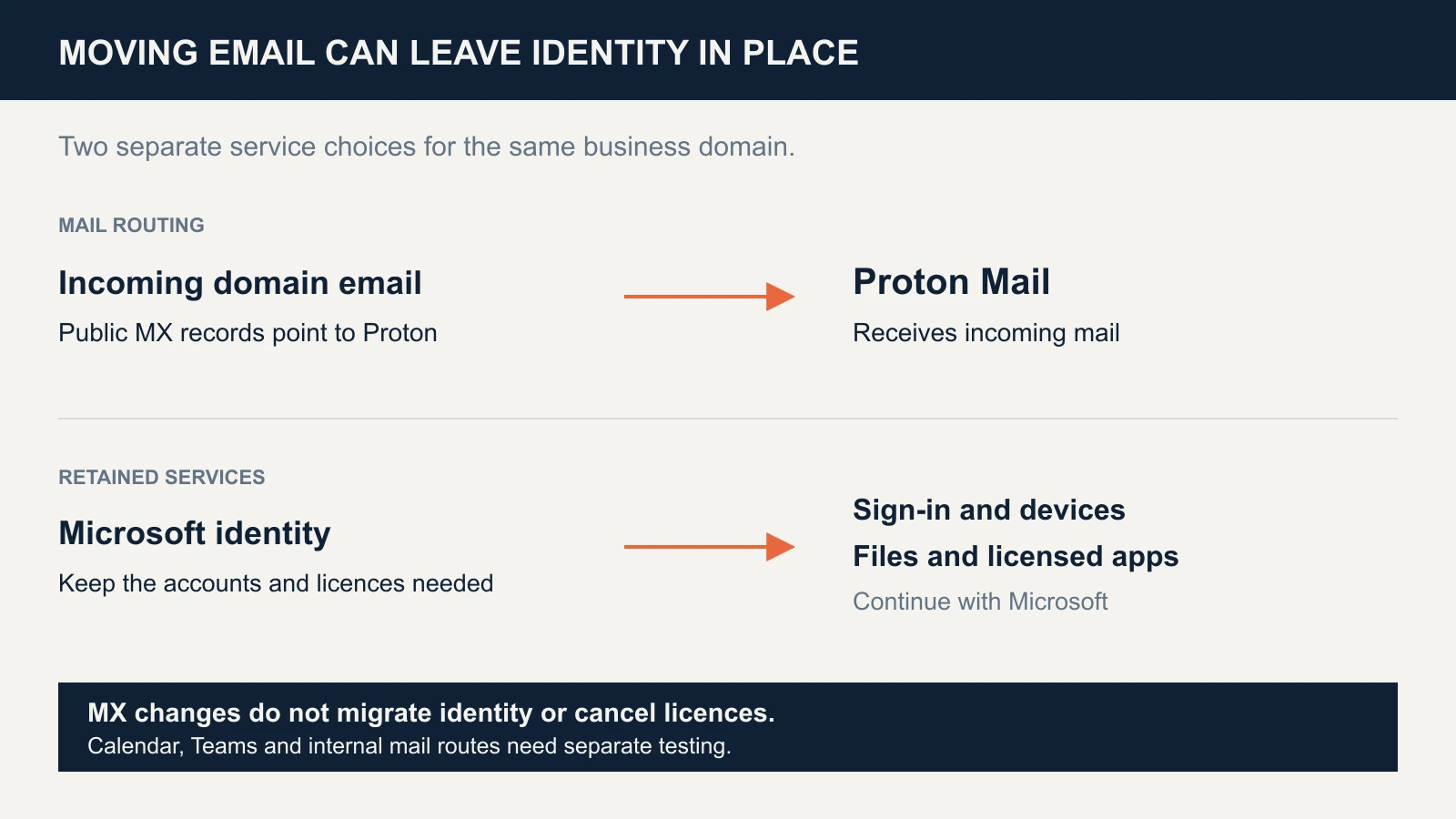
MX records control incoming routing, not every route used inside an existing Microsoft tenant. Microsoft documents coexistence routing and calendar configuration for a specific Teams Essentials setup; that is not a universal recipe for every Microsoft 365 plan. Test messages sent by retained Microsoft users and applications to migrated addresses, plus meeting creation, updates and cancellations. Do not leave both providers' MX records in place as a way to split users between them. The migration guide covers cutover planning.
Use Proton for a specific need. Evaluate Proton Pass for business or selected file sharing without committing the entire office. Keep clear rules about where the authoritative copy lives, who can access it and how it is recovered.
Define the privacy benefit precisely
Proton Mail protects stored message bodies and attachments with zero-access encryption. Messages between Proton users are end-to-end encrypted; ordinary external email is not automatically end-to-end encrypted. Subject lines and sender/recipient addresses are also outside that end-to-end protection. Moving mail does not remove copies held by correspondents or third-party apps. See Proton's encryption boundaries.
The cost check: what will you actually cancel?
Compare the bill you can remove with the bill you will add. A bundled VPN or password manager saves money only if it replaces an acceptable tool you currently pay for.
These examples use six users, US dollars, annual billing expressed monthly, before tax. They are subscription illustrations, not a quote or a claim about the studio's costs.
| Six-user scenario | Current monthly equivalent | After moving | Change |
|---|---|---|---|
| Microsoft 365 Business Standard with Teams → Proton Workspace Standard | $84.00 | $77.94 | $6.06 less |
| Same move, with two users retaining Apps for Business | $84.00 | $97.94 | $13.94 more |
| Business Standard without Teams → Proton Workspace Standard | $64.74 | $77.94 | $13.20 more |
The inputs are Proton Workspace Standard $12.99/user/month, Microsoft Business Standard with Teams $14, without Teams $10.79, and Apps for Business $10. Proton's plans and Microsoft's July 2026 pricing update support those figures. Microsoft says existing customers move to updated pricing at renewal; your reseller, region and contract can differ.
Add import work, overlap, training, support and any replacement helpdesk or device service. A $6.06 monthly saving is $72.72 a year for this six-user example, so subscription savings alone leave little room for migration costs. A privacy requirement can still justify the move; describe it as that decision. For the broader comparison, see Proton Workspace vs Microsoft 365.
If your answers say switch
Use Proton's advertised 14-day trial to test representative work. It is an evaluation window, not a promise that your migration will finish in two weeks.
- Inventory before importing. List users, aliases, groups, shared mailboxes, calendars, files, integrations and recovery owners. Record the requirements that would stop the move.
- Pilot away from production routing. Prefer a test domain or subdomain first. Import a copy of representative mail, then check older messages, attachments, folders, contacts and calendar events. Microsoft Easy Switch requires administrator access and cloud-hosted accounts; verify availability and exclusions in the current instructions.
- Have users do their normal work. Test mobile and desktop clients, document exports, external sharing, group-address replies and meetings with customers. Agree who signs off each task.
- Prepare the production cutover. Create every required receiving address, verify imports and authentication, record the old DNS settings and define rollback. Proton documents direct delivery between Proton-hosted addresses regardless of MX records, so test that path too. Unchanged public MX records do not guarantee that every mail path is unchanged.
- Keep the old service through verification. Check inbound and outbound delivery, retained Microsoft apps, new mail during the transition and recovery. Cancel only after the data and workflows you need are accounted for.
Our custom-domain setup guide covers the DNS records. If a required test fails, keep the current service or narrow the scope. That is a useful pilot result.
If you want help mapping the dependencies, contact iFeelTech. If the pilot demonstrates that Proton fits your work, you can explore the Workspace trial.
Related resources
- Microsoft 365 to Proton migration: import, routing and cutover planning.
- Google Workspace vs Proton Workspace: the decision for Google users.
- Workspace Standard vs Premium: plan selection after confirming fit.
Frequently Asked Questions
Related Articles
More from Cybersecurity

Leaving GoDaddy and Microsoft 365 for Proton: A Privacy-Driven Switch
What leaving GoDaddy-hosted Microsoft 365 for Proton involves: a five-person studio's case, privacy limits, SPF and cancellation checks, and who should stay.
12 min read

Google Password Manager for Business (2026): Limits & Best Fit
Can Google Password Manager work for a business? See its Workspace controls, sharing and audit limits, security tradeoffs, and when to switch.
14 min read

Vendor Risk Assessment for Small Businesses: A Practical 2026 Framework
Inventory, classify, and review your SaaS vendors with a two-axis risk matrix, worked example, and copyable 12-question questionnaire.
19 min read