

Best UniFi Outdoor Access Points (2026): U7 vs U6 — Buyer's Guide and Legacy Upgrades
Compare all current Wi-Fi 6 and Wi-Fi 7 UniFi outdoor access points—U7 Pro Outdoor, U7 Outdoor, U7 Mesh, U6 Mesh Pro, and U6 Mesh—with verified specs, current pricing, and a legacy UBNT upgrade path.

Affiliate Disclosure: This article contains affiliate links. If you make a purchase through these links, we may earn a small commission at no extra cost to you. As an Amazon Associate, iFeelTech earns from qualifying purchases.
Quick Verdict
Ubiquiti's current outdoor UniFi lineup includes several Wi-Fi 6 and Wi-Fi 7 models, from the compact U6 Mesh to the tri-band U7 Pro Outdoor with AFC-controlled 6 GHz. If you are replacing legacy UAP-Outdoor equipment or upgrading an older AC Mesh deployment, every current-generation model delivers better weather protection, higher throughput, and centralized management through UniFi Network. The right choice depends on whether you need 6 GHz spectrum, how much coverage area you require, and your PoE infrastructure.
- Best overall outdoor AP: U7 Pro Outdoor — tri-band WiFi 7 with 6 GHz/AFC, IPX6 (IP67 with cable-gland door kit), 2.5 GbE uplink
- Best value WiFi 7 outdoor: U7 Outdoor — dual-band WiFi 7 with directional/omni flexibility, IPX6, 2.5 GbE uplink, no 6 GHz
- Best compact WiFi 7: U7 Mesh — small form factor, IPX6 with outdoor mount, 2.5 GbE uplink, PoE (no PoE+ needed)
- Best budget WiFi 6 outdoor: U6 Mesh — mature WiFi 6, IPX5, 1 GbE uplink, standard PoE
Which UniFi Outdoor AP Should You Buy?
Prices checked August 10, 2026. The Ubiquiti US store is currently applying surcharges to some products; checkout prices may differ from base MSRP. Older models such as AC Mesh and Swiss Army Knife remain in the outdoor store category but currently show no restock date.
| U7 Pro Outdoor | U7 Outdoor | U7 Mesh | U6 Mesh Pro | U6 Mesh | |
|---|---|---|---|---|---|
| WiFi Standard | WiFi 7 | WiFi 7 | WiFi 7 | WiFi 6 | WiFi 6 |
| Bands | 2.4 / 5 / 6 GHz | 2.4 / 5 GHz | 2.4 / 5 GHz | 2.4 / 5 GHz | 2.4 / 5 GHz |
| MIMO | 2×2 all bands | 2×2 both bands | 2×2 both bands | 2×2 both bands | 4×4 5 GHz, 2×2 2.4 GHz |
| Spatial Streams | 6 | 4 | 4 | 4 | 6 |
| Aggregate Max PHY Rate | 10.8 Gbps | 5.0 Gbps | 5.0 Gbps | ~3.0 Gbps | 5.3 Gbps |
| Uplink | 2.5 GbE | 2.5 GbE | 2.5 GbE | 2× GbE (1 passthrough) | 1 GbE |
| Weatherproofing | IPX6; IP67 with door kit | IPX6 | IPX6 with outdoor mount | IPX6 | IPX5 |
| Coverage (directional) | 5,000 ft² | 5,000 ft² | — | — | — |
| Coverage (omni) | 1,750 ft² | 1,750 ft² | 1,500 ft² | 2,000 ft² | 1,500 ft² |
| Max Clients | 300+ | 250+ | 200+ | 250+ | 250+ |
| PoE | PoE+ (802.3at) | PoE+ (802.3at) | PoE (802.3af) | PoE (802.3af) | PoE (802.3af) |
| Max Power | 21W | 19W | 13W | 9W | 13W |
| Temp Range | −30 to 60°C | −30 to 60°C | −30 to 60°C | −30 to 60°C | −30 to 60°C |
| 6 GHz / AFC | Yes | No | No | No | No |
| External Antennas | Yes (2.4/5 GHz omni) | Yes (2.4/5 GHz omni) | No | No | No |
| US Store Price | $301 (surcharge) | $214 (surcharge) | $214 (surcharge) | $214 (surcharge) | $193 (surcharge) |
Specifications sourced from official Ubiquiti tech-specs pages: U7 Pro Outdoor · U7 Outdoor · U7 Mesh · U6 Mesh Pro · U6 Mesh · Current pricing
Quick guidance:
- Need outdoor 6 GHz or AFC? U7 Pro Outdoor is the only option.
- Want WiFi 7 without the 6 GHz premium? U7 Outdoor (directional/omni flexibility) or U7 Mesh (compact, standard PoE).
- Budget-conscious or replacing legacy gear? U6 Mesh is the most affordable current Wi-Fi 6 outdoor AP and runs on standard PoE. Older models like AC Mesh and Swiss Army Knife have lower list prices but are not currently available.
- Need a dedicated point-to-point link? None of these are bridge products. Use the UniFi Building Bridge (UBB) or another purpose-built bridge for building-to-building backhaul.
Upgrading from Legacy UBNT Outdoor APs
What Legacy Models Got Right — and Wrong
The original UAP-Outdoor (2012) and UAP-Outdoor+ (2013) were among Ubiquiti's earliest UniFi outdoor access points. They provided managed outdoor WiFi at a fraction of enterprise pricing and were configured through the browser-based UniFi Controller software — not command-line access, as is sometimes claimed. The controller supported off-site hosting and provided centralized management for multiple APs.
Key corrections about these legacy models:
- The UAP-Outdoor operated on 2.4 GHz only. The UAP-Outdoor5 was a separate single-band 5 GHz model. Neither was dual-band.
- The UAP-Outdoor+ was a 2.4 GHz, 2×2 MIMO, 300 Mbps device with 48V passive PoE and 802.3af support. Its official operating temperature range was −30°C to 65°C per the published datasheet.
- These products were outdoor managed WLAN access points, not WISP or point-to-multipoint bridge equipment. Ubiquiti's airMAX line (NanoStation, Rocket, etc.) served the WISP/PtMP market.
- The legacy documentation does not publish an IP65 rating for these models.
Introduced in the mid-2010s, the UAP-AC Mesh became a long-running Wi-Fi 5 successor for compact outdoor deployments. It brought 802.11ac, dual-band operation, and wireless mesh capability to the UniFi outdoor lineup and remains in Ubiquiti's current product catalog — it is not classified as Vintage or Legacy.
All legacy UAP-Outdoor and UAP-Outdoor+ models reached end-of-life on March 1, 2021. They no longer receive firmware updates, security patches, or new controller support. Organizations still running these devices should prioritize replacement — both for security and because modern client devices are held back by 802.11n limitations.
Legacy Replacements and Optional Wi-Fi 5 Upgrades
End-of-life models (no longer receiving updates):
| Legacy Model | Band | Recommended Replacement | Why |
|---|---|---|---|
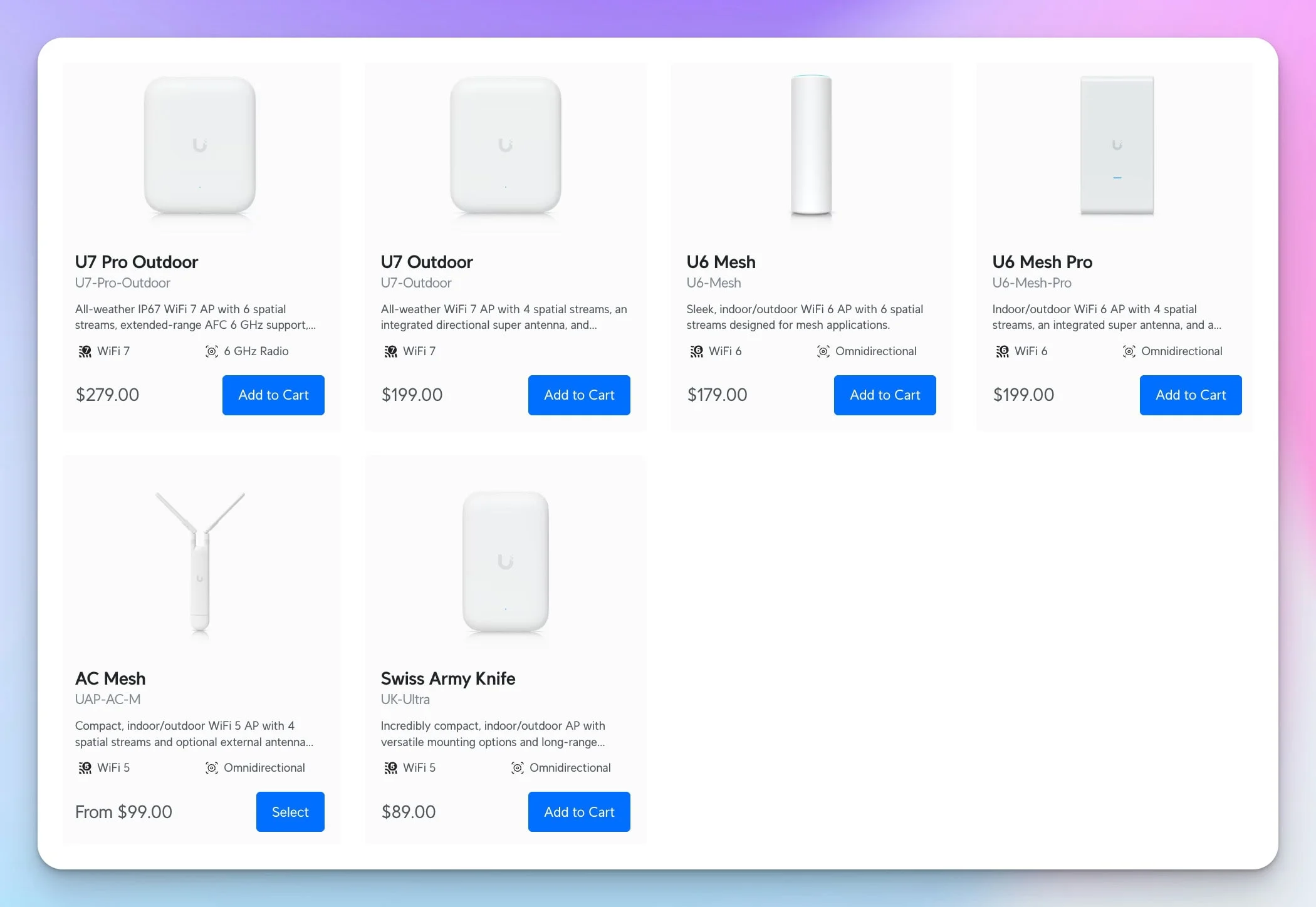
| UAP-Outdoor | 2.4 GHz | U6 Mesh or U7 Mesh | Adds dual-band Wi-Fi 6/7, current security support, and higher-capacity radios |
| UAP-Outdoor+ | 2.4 GHz | U6 Mesh or U7 Mesh | Adds dual-band Wi-Fi 6/7, current security support, and higher-capacity radios |
| UAP-Outdoor5 | 5 GHz | U7 Outdoor or U7 Pro Outdoor | Adds 2.4 GHz, WiFi 7, directional/omni flexibility |
Older but still supported (not EOL):
| Current Model | Band | Optional Upgrade | Why Upgrade |
|---|---|---|---|
| UAP-AC-M (AC Mesh) | 2.4/5 GHz | U7 Mesh | WiFi 7, 2.5 GbE uplink, IPX6 with outdoor mount |
| UAP-AC-M-PRO (AC Mesh Pro) | 2.4/5 GHz | U7 Outdoor or U7 Pro Outdoor | Higher capacity, directional coverage option, WiFi 7 |
AC Mesh and AC Mesh Pro are still supported by Ubiquiti and continue to receive firmware updates. Upgrading these is optional and depends on whether your deployment needs WiFi 7 capabilities, higher throughput, or 2.5 GbE backhaul.
Current UniFi Outdoor Access Point Lineup
U7 Pro Outdoor — Tri-Band WiFi 7 with 6 GHz/AFC
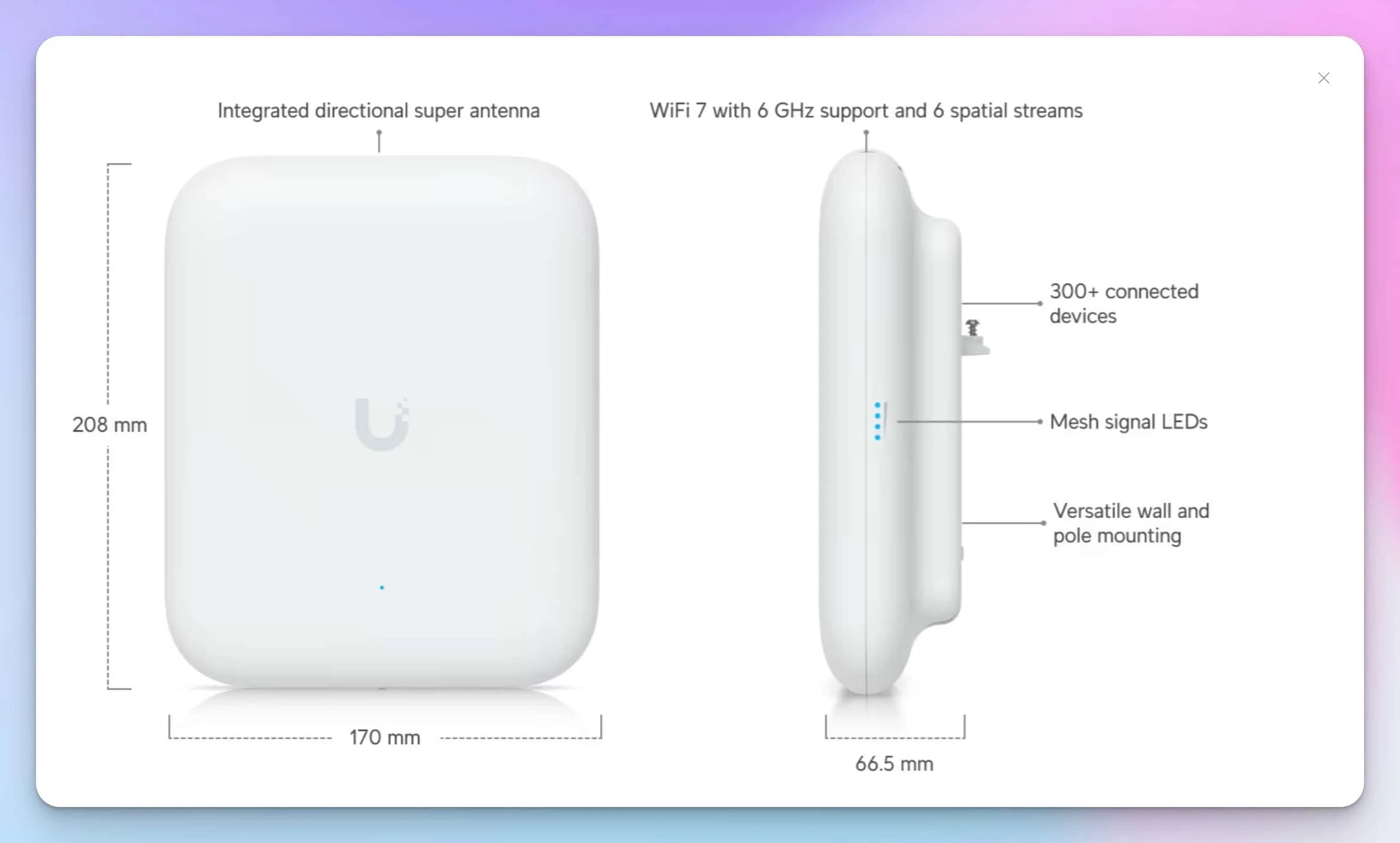
The UniFi U7 Pro Outdoor is Ubiquiti's top outdoor AP, and the only outdoor UniFi model with a 6 GHz radio. It operates across three bands (2.4, 5, and 6 GHz) with 2×2 MIMO on each, providing six spatial streams and an aggregate maximum PHY rate of 10.8 Gbps. Real-world throughput is substantially lower — the wired uplink is 2.5 GbE, client radios are typically 2×2, and protocol overhead reduces actual data transfer rates.
Weatherproofing: The U7 Pro Outdoor is rated IPX6 by default (protection against powerful water jets). It achieves IP67 (temporary immersion resistance) only when installed with the included cable-gland door kit.
Coverage: Ubiquiti publishes 5,000 ft² (465 m²) in directional mode using the integrated super antenna, and 1,750 ft² in omnidirectional mode using the included external omni antennas. The omni antennas cover 2.4 GHz and 5 GHz only — the 6 GHz radio remains directional regardless of antenna configuration.
Key specs: 2.5 GbE uplink, PoE+ (802.3at), 21W max consumption, −30°C to 60°C operating range, 300+ client association limit, published wind-load value of 74.6 N at 200 km/h (125 mph).
Pricing: $279 base MSRP; currently $301 at the US store with surcharge applied.
For more context on how the U7 Pro Outdoor compares with other WiFi 7 access points across Ubiquiti's indoor and outdoor ranges, see our WiFi 7 access points business guide.
U7 Pro Outdoor: When It Makes Sense
- Outdoor areas where 6 GHz spectrum provides less congested channels for latency-sensitive applications
- Parking lots, courtyards, or event spaces needing directional high-capacity coverage
- Deployments where AFC-controlled standard-power 6 GHz is required by design
- Sites that justify the price premium over the U7 Outdoor
The U7 Pro Outdoor is not a building-to-building bridge. For dedicated point-to-point links, use the UniFi Building Bridge (UBB) or another purpose-built solution.
UniFi 7 Innovations: U7 Pro Max | U7 Pro Wall | U7 Outdoor
U7 Outdoor — WiFi 7 Without the 6 GHz Premium
The U7 Outdoor delivers WiFi 7 across 2.4 and 5 GHz bands with 2×2 MIMO (four spatial streams) and an aggregate max PHY rate of approximately 5.0 Gbps. It uses the same general panel form factor and directional super antenna design as the U7 Pro Outdoor, providing the same 5,000 ft² directional coverage, 1,750 ft² omnidirectional coverage, and external omni antenna option — but without the 6 GHz radio.
Key specs: IPX6 weatherproofing, 2.5 GbE uplink, PoE+ (802.3at), 19W max, −30°C to 60°C, 250+ clients, published wind-load value of 74.6 N at 200 km/h (125 mph).
Pricing: Currently $214 at the US store (surcharge included).
Best for: Organizations that want WiFi 7 outdoor coverage with directional/omni antenna flexibility but don't need 6 GHz or AFC. At $87 less than the U7 Pro Outdoor (at current checkout prices), this is often the better value for outdoor deployments where 5 GHz congestion is manageable.
U7 Mesh — Compact WiFi 7 for Flexible Mounting
The U7 Mesh is a compact, stick-form-factor WiFi 7 AP designed for indoor/outdoor use. It provides 2×2 MIMO across 2.4 and 5 GHz (four spatial streams, ~5.0 Gbps aggregate max PHY rate) in a small enclosure with integrated directional and omnidirectional antennas.
Key specs: IPX6 when installed with the included outdoor mount, 2.5 GbE uplink, standard PoE (802.3af) — no PoE+ required, 13W max, −30°C to 60°C, 200+ clients, 1,500 ft² coverage.
Pricing: Currently $214 at the US store (surcharge included).
Best for: Adding WiFi 7 to locations where a larger directional AP is unnecessary. Its standard PoE requirement and low power draw make it easier to accommodate within existing PoE budgets.
U6 Mesh Pro — Extended Omni Coverage with Passthrough Port
The U6 Mesh Pro uses a high-gain integrated omnidirectional antenna, publishes 2,000 ft² of coverage, supports 250+ client associations, and includes a second GbE passthrough port. Its niche is extended omni coverage and passthrough connectivity, rather than greater spatial-stream capacity — it runs 2×2 MIMO on both bands (four spatial streams) compared to the U6 Mesh's 4×4 on 5 GHz. Its second GbE port can connect a nearby separately powered device; it does not supply PoE.
Key specs: IPX6 weatherproofing, 2× GbE RJ45 ports (one uplink, one passthrough), standard PoE (802.3af), includes PoE adapter, 9W max, −30°C to 60°C, aggregate max PHY rate of approximately 3.0 Gbps (2.4 Gbps at 5 GHz, 573.5 Mbps at 2.4 GHz).
Pricing: Currently $214 at the US store (surcharge included).
Best for: Locations needing wider omni coverage than the U6 Mesh provides, or where a GbE passthrough port is useful for connecting a nearby device (camera, intercom) without an additional switch.
U6 Mesh — Mature WiFi 6 at the Lowest Current Cost
The U6 Mesh provides outdoor WiFi 6 with 4×4 MIMO on 5 GHz and 2×2 on 2.4 GHz, delivering six spatial streams and an aggregate max PHY rate of 5.3 Gbps (4.8 Gbps at 5 GHz, 573.5 Mbps at 2.4 GHz).
Weatherproofing: IPX5 (protection against water jets from any direction). Ubiquiti specifies that full weatherproofing depends on installing the AP LED-side up with the included outdoor mount.
Key specs: 1 GbE uplink, standard PoE (802.3af), 13W max, −30°C to 60°C, 250+ clients, 1,500 ft² coverage.
Pricing: Currently $193 at the US store (surcharge included).
Best for: Budget-conscious deployments needing reliable outdoor WiFi 6 — surveillance camera backhaul, guest networks, parking lot coverage, outdoor POS terminals. The 1 GbE uplink is the main limitation; if your outdoor clients don't aggregate beyond ~940 Mbps, it won't be a bottleneck.
6 GHz Outdoor Operation, AFC, and Coverage Realities
6 GHz Requires AFC for Standard-Power Outdoor Use
In the United States, standard-power outdoor 6 GHz operation requires Automated Frequency Coordination (AFC). The FCC restricts low-power indoor (LPI) 6 GHz APs to indoor-only use — a low-power indoor AP mounted under an eave does not meet regulatory requirements for outdoor 6 GHz transmission. The U7 Pro Outdoor is the only current UniFi outdoor AP with AFC support. See Ubiquiti's AFC guidance for configuration details.
The 6 GHz band offers more available spectrum and is generally less congested than 2.4 and 5 GHz, which benefits high-density deployments and latency-sensitive applications. As adoption increases, 6 GHz congestion will grow, particularly in dense urban areas.
PHY Rates vs. Real Throughput
Aggregate maximum PHY rates (10.8 Gbps for U7 Pro Outdoor, 5.3 Gbps for U6 Mesh) represent theoretical radio-layer maximums under ideal conditions. Real-world factors reduce actual throughput:
- Wired uplink limits: The U7 Pro Outdoor's 2.5 GbE port caps wired throughput at ~2.35 Gbps. The U6 Mesh's 1 GbE port caps at ~940 Mbps.
- Client capability: Most client devices connect at 2×2 on a single band. A WiFi 7 laptop on a 160 MHz 5 GHz channel might negotiate ~2.4 Gbps PHY, with usable throughput around 1.2–1.5 Gbps.
- Environmental factors: Outdoor multipath, distance, interference, and client count all reduce performance from theoretical maximums.
Coverage Area Context
Ubiquiti's published coverage areas assume open-space line-of-sight conditions:
- U7 Pro Outdoor directional: 5,000 ft² (465 m²)
- U7 Pro Outdoor omni: 1,750 ft²
- U7 Outdoor directional: 5,000 ft² (465 m²)
- U7 Outdoor omni: 1,750 ft²
- U6 Mesh Pro omni: 2,000 ft² (185 m²)
- U6 Mesh / U7 Mesh omni: 1,500 ft² (140 m²)
Actual coverage varies with mounting height, obstructions, building materials, vegetation, and client device capabilities. A site survey with actual equipment provides more reliable coverage predictions than vendor specifications alone. Professional network design practices and proper site planning improve deployment outcomes.
PoE, Cabling, and Switch Selection
PoE Requirements Vary by Model
Not all modern UniFi outdoor APs require PoE+. Understanding per-model requirements prevents over-specifying switch infrastructure:
| Model | PoE Standard | Max Power | Notes |
|---|---|---|---|
| U7 Pro Outdoor | PoE+ (802.3at) | 21W | Requires PoE+ switch or injector |
| U7 Outdoor | PoE+ (802.3at) | 19W | Requires PoE+ switch or injector |
| U7 Mesh | PoE (802.3af) | 13W | Works with any standard PoE source |
| U6 Mesh Pro | PoE (802.3af) | 9W | Works with any standard PoE source; includes PoE adapter |
| U6 Mesh | PoE (802.3af) | 13W | Works with any standard PoE source; includes PoE adapter |
Cabling Considerations
Standard Ethernet specifications support PoE delivery to 100 meters (328 feet). For outdoor installations approaching this limit, higher-quality cable reduces resistive voltage loss. Cat6A is recommended for new runs, particularly for APs with 2.5 GbE uplinks. However, standards-compliant 2.5GBASE-T supports 100 meters over qualifying Cat5e — Cat5e is not inherently limited to 1 GbE.
For cable runs exceeding 100 meters or crossing between buildings, fiber infrastructure provides more reliable long-distance connectivity.
Switch Options
UniFi Switch Options by Deployment Scale
Small Deployments (1–3 outdoor APs): The UniFi Pro 8 PoE provides eight 1 GbE RJ45 ports (six PoE+, two PoE++) with a 120W total PoE budget and two 10G SFP+ uplinks. It delivers adequate PoE for 2–3 outdoor APs plus several indoor devices but limits each AP to 1 GbE wired throughput. For deployments needing multigigabit wired backhaul, the Flex 2.5G PoE provides eight 2.5 GbE PoE++ ports with up to 196W available PoE when powered by the separately sold 210W AC adapter ($214 for the switch plus approximately $79 for the adapter, both at current US store pricing). Without the adapter, the Flex 2.5G PoE can be powered via PoE+++ input but provides substantially lower PoE output (76W max). Note that the Flex 2.5G PoE is a Layer 2 switch, whereas the Pro 8 PoE is Layer 3 — consider this if you need inter-VLAN routing, DHCP server, or static routing at the switch level.
Medium Deployments (4–10 outdoor APs): The UniFi Pro Max 24 PoE provides a 400W PoE budget with (8) 2.5 GbE ports plus sixteen 1 GbE PoE+ ports, supporting campus-scale outdoor wireless with multigigabit backhaul on the 2.5 GbE ports.
Large Deployments (10+ outdoor APs): Multiple switches or enterprise switching with higher port density. Consider fiber distribution to remote switch locations for runs exceeding 100 meters.
For a broader perspective on selecting the right UniFi switching and gateway infrastructure to support your deployment, see our UniFi network sizing guide.
Installation, Weather Protection, and Surge Safety
Mounting and Placement
Mounting height depends on antenna pattern, required cell size, client location, obstructions, and local structural constraints. There is no universal "optimal" height. Lower mounting improves near-field performance but reduces coverage area. Higher mounting extends range but can create signal nulls directly beneath the AP. Antenna beam pattern documentation for each model should guide height selection.
All current UniFi outdoor APs include pole and wall mounting hardware. For exposed installations, use stainless steel fasteners to prevent corrosion. Ubiquiti publishes a wind-load value of 74.6 N at 200 km/h (125 mph) for the U7 Pro Outdoor and U7 Outdoor — this is below much of Category 4 hurricane force (130–156 mph per the NHC Saffir-Simpson scale). Do not assume the stock mounting hardware withstands hurricane-force winds without site-specific engineering for anchorage and structure.
Understanding IP Ratings
The IP (Ingress Protection) rating system defines protection against solids and liquids:
- IPX6 (U7 Pro Outdoor default, U7 Outdoor, U6 Mesh Pro, U7 Mesh with outdoor mount): Protection against powerful water jets. Suitable for exposed outdoor mounting.
- IP67 (U7 Pro Outdoor with cable-gland door kit): Adds complete dust protection and temporary immersion resistance to 1 meter depth.
- IPX5 (U6 Mesh): Protection against water jets from any direction. Ubiquiti specifies that the U6 Mesh should be installed LED-side up with the included outdoor mount for full weatherproofing.
Surge Protection
Outdoor network equipment is vulnerable to lightning-induced voltage surges on Ethernet cables. Ubiquiti recommends shielded outdoor cable and, for exposed installations, surge protectors near both the outdoor device and the building entry point. The ETH-SP-G2 protects against induced surges on copper runs but cannot prevent damage from direct lightning strikes.
Install surge protection according to Ubiquiti's instructions and local electrical code, bonding it to the building grounding system rather than creating a separate unbonded ground. For critical installations or structures that are the tallest point in their area, engage a qualified electrician or lightning protection specialist.
South Florida Coastal Considerations
Miami and South Florida installations face combined challenges: high UV exposure, humidity near 100%, salt spray, frequent lightning, and hurricane-season winds. Successful outdoor deployments in this region benefit from stainless steel hardware, scheduled maintenance to remove salt accumulation, surge protection on all outdoor Ethernet runs, and elevated mounting above potential flood zones. Maintenance frequency should increase in coastal environments — semi-annual inspection of cable seals, connectors, and mounting hardware helps catch issues before failures occur. For details on installation challenges specific to our region, see our UniFi installation challenges and solutions guide.
Case Study: Warehouse Startup Expands Test Operations Outdoors
Background
A technology startup operating from a 12,000 ft² warehouse contacted us when expanding production testing to outdoor areas. Two legacy UAP-Outdoor units installed in 2015 provided basic 2.4 GHz WiFi for an automated gate system. The expansion required reliable connectivity for automated test benches, inspection cameras, and data logging equipment across a 150-foot outdoor area. The legacy 802.11n APs couldn't deliver consistent throughput when more than two test stations operated simultaneously.
Solution
We deployed two U7 Pro Outdoor access points — one with directional coverage across the main testing area, one with omnidirectional coverage at the loading dock. New Cat6A cable runs replaced deteriorating Cat5e. A UniFi Pro 8 PoE switch handled PoE delivery (note: this switch provides 1 GbE data throughput, which was sufficient for this deployment's aggregated traffic but does not utilize the APs' 2.5 GbE capability). Ethernet surge protectors were installed at building entry and AP locations.
Implementation Details
- Timeline: Weekend installation to avoid disrupting weekday testing
- Hardware: (2) U7 Pro Outdoor, (1) Pro 8 PoE, surge protection, Cat6A cable runs
- Configuration: Dedicated VLAN for test equipment, separate guest network, QoS for real-time test control traffic
- Coverage area: ~18,000 ft² outdoor, including parking lot, loading dock, and expansion zones
- Mounting: Stainless steel hardware with articulating brackets and cable weatherproofing
Results
The upgrade delivered measurable improvements. The engineering team expanded from 2–3 concurrent test stations to 8 simultaneously — approximately a 3× increase in capacity. Network-related testing disruptions dropped to near-zero during business hours, and overnight automated test sequences ran without interruption. The team reported faster development iteration through parallel testing that was previously impossible.
Observed Improvements
These figures reflect our observations during the deployment period. Results will vary by environment, client devices, and traffic patterns.
- Reliability: Near-continuous uptime during business hours, compared to multiple weekly disruptions with legacy equipment
- Client capacity: 8 concurrent test stations versus 2–3 practical limit on legacy 802.11n APs
- Throughput: Sufficient bandwidth for simultaneous video inspection streams, sensor data logging, and cloud test orchestration
- Latency: Consistently met the test platform's sub-20ms requirement for real-time control loops
- Coverage: Consistent connectivity across the full testing area, eliminating previous dead zones
Cost
Total project investment: approximately $2,900, including hardware, professional installation, cable upgrades, and configuration.
| Item | Cost |
|---|---|
| (2) U7 Pro Outdoor | $558 (at $279 base MSRP) |
| (1) Pro 8 PoE | $329 |
| Surge protection and mounting hardware | $215 |
| Cat6A cable materials | $125 |
| Hardware subtotal | $1,227 |
| Professional installation and configuration | $1,673 |
| Total | $2,900 |
Note: Current US store prices include surcharges that would increase hardware costs. The U7 Pro Outdoor is currently $301 each at checkout.
Frequently Asked Questions
Which UniFi outdoor AP should I buy to replace a legacy UAP-Outdoor?
For a straightforward replacement, the U6 Mesh ($193 current US store price) provides dual-band WiFi 6 at the lowest currently available cost and runs on standard PoE. If you want WiFi 7 and a 2.5 GbE uplink, the U7 Mesh ($214) offers a similar compact form factor. For directional coverage across larger areas, the U7 Outdoor ($214) or U7 Pro Outdoor ($301) provide 5,000 ft² coverage with WiFi 7.
Do I need 6 GHz for outdoor WiFi?
Most outdoor deployments do not require 6 GHz. The 5 GHz band handles general coverage, surveillance backhaul, guest access, and POS connectivity well. 6 GHz (via the U7 Pro Outdoor with AFC) helps in environments with severe 5 GHz congestion, high client density, or applications that benefit from the additional spectrum — but it adds cost and complexity. The U7 Outdoor provides WiFi 7 benefits without 6 GHz at a lower price.
Can I use an indoor UniFi AP outdoors under an eave or covered area?
This is generally not recommended. Indoor APs lack published outdoor IP ratings and are not designed for outdoor temperature extremes, UV exposure, or moisture. More critically, indoor 6 GHz APs are classified as low-power indoor (LPI) devices by the FCC and cannot legally operate at outdoor standard-power levels — mounting one outside does not satisfy AFC requirements. Use a purpose-built outdoor model. For help choosing the right access point for your space, see our UniFi buyer's guide.
What switch do I need for UniFi outdoor APs?
It depends on how many APs you're powering and whether you need multigigabit backhaul. The Pro 8 PoE (8× 1 GbE, 120W, Layer 3) handles 2–3 outdoor APs with PoE delivery but limits each AP to 1 GbE throughput. For WiFi 7 APs with 2.5 GbE uplinks, the Flex 2.5G PoE (8× 2.5 GbE, up to 196W with AC adapter, Layer 2) or the Pro Max 24 PoE provide multigigabit ports. The U6 Mesh, U6 Mesh Pro, and U7 Mesh run on standard PoE (802.3af), so even basic PoE switches work.
How do I protect outdoor APs from lightning?
Install Ethernet surge protectors on outdoor cable runs at both the building entry point and near the AP. Use shielded outdoor-rated cable. Ground the surge protectors to the building's electrical grounding system. Surge protection handles induced voltages from nearby strikes but cannot protect against direct hits. For critical installations on tall or exposed structures, consult a qualified electrician about lightning protection per local electrical code. Ubiquiti's ETH-SP-G2 is designed for this purpose.
Next Steps
Upgrading legacy UBNT outdoor access points to modern UniFi models delivers better reliability, wireless performance, and centralized management. The current Wi-Fi 6 and Wi-Fi 7 outdoor lineup offers options across budgets and deployment scenarios, from the $193 U6 Mesh to the $301 U7 Pro Outdoor with tri-band WiFi 7 and AFC-controlled 6 GHz.
Successful outdoor deployments depend more on proper installation — site survey, weatherproof mounting, adequate PoE infrastructure, and surge protection — than on picking the most expensive AP. Properly installed mid-range equipment outperforms poorly installed premium hardware in the long run.
For South Florida businesses evaluating outdoor wireless upgrades, professional network design and installation services address the region-specific challenges of coastal deployment, including enhanced surge protection for high-frequency lightning areas and corrosion-resistant mounting for salt air environments.
Related Resources
- UniFi WiFi 7 Access Points Business Guide – Full WiFi 7 lineup comparison
- UniFi Buyer's Guide – Choosing the right UniFi hardware
- UniFi Network Design Guide – Professional infrastructure planning
- UniFi Network Sizing Guide – Scaling your deployment
- UniFi Network Blueprint Business Guide – Scalable architecture
- Cat6 vs Fiber Business Guide – Long-distance connectivity
- UniFi Installation Challenges and Solutions – Field deployment guidance
- NIST CSF 2.0 Cybersecurity Tools – Security frameworks
- UniFi Network Services – Professional installation
Related Articles
More from UniFi Networks
UniFi Device Bridge Review: Wireless PoE for Cameras & IoT Devices (2026)
Complete guide to the UniFi Device Bridge family (Base, Pro, Switch, IoT) for wireless PoE connectivity. Technical specs, model comparison, and real-world use cases for cameras, VoIP phones, and IoT devices.
11 min read
UniFi Protect vs. Reolink vs. TP-Link: Which Camera System Is Best for Your Business?
UniFi Protect, Reolink, and TP-Link (Tapo vs. VIGI) compared for small business use — current 2026 lineups, real 8-camera pricing, and iFeelTech's multi-year UniFi fleet reliability data.
20 min read
UniFi Dream Machine Beast Review 2026: Hands-On SMB Verdict
A hands-on UniFi Dream Machine Beast review from an SMB integrator: official specs, real deployment notes, 100W power draw, the no-PoE catch, and who the $1,499 gateway is actually for.
13 min read