Proton Pass Business Review 2026: Password Management & Secure Documentation for Small Business
Proton Pass Business review after 2+ years of implementation. Recurity Labs 2026 audit, CLI access, encrypted notes, pricing from $1.99/user/month, and full implementation guide.


Proton Pass Business is an end-to-end encrypted password manager from Swiss-based Proton AG, starting at $1.99/user/month, with zero-knowledge encryption covering all data including metadata. After two years of deploying it across small business technology projects in South Florida, we've found it works well not just for credential management but also as a lightweight secure project documentation tool.
This review covers security architecture, pricing, and practical implementation based on our direct experience using Proton Pass for network installations, office setups, and client information management.
Implementation Insight
Proton Pass works as a lightweight encrypted project documentation system, not just a password vault. The secure notes feature combined with vault sharing fills the gap between insecure note-taking apps and limited password managers. The Proton Pass CLI (Professional plan and above) adds programmatic credential access, making it useful for IT deployment workflows as well.
Affiliate Disclosure: This article contains affiliate links. If you make a purchase through these links, we may earn a small commission at no extra cost to you. As an Amazon Associate, iFeelTech earns from qualifying purchases.
Proton Pass Business
Swiss zero-knowledge encrypted password manager with built-in 2FA, secure notes for project documentation, and CLI for IT automation.
- AES-256-GCM with full metadata encryption
- Built-in 2FA authenticator (all plans)
- Swiss jurisdiction — GDPR & DPA protected
- Open-source, audited by Cure53 (2023) & Recurity Labs (2026)
*Price at time of publishing
Our 4.7/5 rating reflects security architecture, pricing competitiveness, practical usability across 2+ years of client deployments, and ecosystem value -- weighed against current limitations in admin reporting, third-party integrations, and feature maturity.
Quick Assessment
| Aspect | Details |
|---|---|
| Rating | 4.7/5 |
| Best For | Organizations prioritizing data privacy, Swiss legal protection, and secure project documentation |
| Price | $1.99–$4.49/user/month (annual billing) |
| Key Strength | Zero-knowledge encryption of passwords and metadata, with useful secure notes capability |
| Main Limitation | Newer market presence means some enterprise features are still under development |
Bottom Line: Proton Pass Business delivers strong password security with zero-knowledge encryption, SSO/SCIM, and SIEM integration at competitive pricing. Proton has completed SOC 2 Type II attestation and ISO 27001 certification at the company level. Proton's broader productivity suite makes it particularly valuable for organizations seeking a private alternative to Google Workspace. The encrypted notes feature adds a practical option for secure project documentation. To compare Proton Pass against 1Password, NordPass, and Bitwarden for small business deployment, see our Best Password Manager for Small Business comparison.
| Best plan for most small businesses | Pass Professional ($4.49/user/mo) |
| Best budget plan | Pass Essentials ($1.99/user/mo) |
| Best full-suite option | Workspace Standard ($12.99/user/mo) |
| Skip Proton Pass if | You need mature enterprise reporting, deep app integrations, or a full IT documentation platform |
What Changed in 2026
Since our last update, Proton Pass has undergone significant improvements that affect both security and day-to-day usability:
- Recurity Labs security audit (January -- April 2026): ISO 27001-certified firm Recurity Labs audited all Proton Pass clients -- browser extensions, mobile apps, desktop apps, and CLI -- finding the overall security posture "well above par" with no remote exploits or encryption bypasses.
- Proton Workspace launch (March 2026): The previous Business Suite was consolidated into Proton Workspace Standard ($12.99/user/month) and Workspace Premium ($19.99/user/month), bundling Pass Professional with Mail, Calendar, Drive, Docs, Sheets, Meet, VPN, and Lumo AI.
- Proton Meet: End-to-end encrypted video conferencing was added to Workspace plans. Proton's Meet pricing page lists up to 100 participants for Standard and 250 for Premium, with 24-hour meeting duration. (Proton's free Meet tier supports 50 participants for up to one hour, which may explain some conflicting references.)
- Lumo AI: Proton's AI assistant is now included with Workspace plans. Workspace Standard includes limited Lumo prompts according to Proton's plan comparison, while Workspace Premium is the better fit for teams that expect regular AI use. Chat histories are protected with zero-access encryption.
- CLI maturity: The Proton Pass CLI (launched November 2025) has been audited by Recurity Labs and is available on Professional and Workspace plans for deployment scripts, CI/CD pipelines, and secret rotation.
- Group sharing (Professional plan): Teams can now organize vault access by groups rather than individually managing per-user permissions.
- On the roadmap: Folder organization within vaults, biometric unlock for browser extensions, and SSH key signing for Git workflows are planned for spring/summer 2026 but have not shipped yet.
What Is Proton Pass Business?
Proton Pass Business is an end-to-end encrypted organizational password manager operated by Proton AG under Swiss DPA and GDPR protections, designed for organizations that need demonstrable privacy protection beyond what mainstream US-based providers offer. Unlike most competitors, Proton encrypts stored vault data and metadata, including usernames and URLs, not just passwords.
Key advantages: Swiss jurisdiction and end-to-end encryption provide stronger privacy protections than many US-based alternatives (though legal requests still follow applicable procedures), full metadata encryption, and native integration with Proton's productivity suite.
Core Capabilities
Password Management Fundamentals:
- Unlimited password, credit card, and secure note storage across all business tiers
- Browser extensions for Chrome, Firefox, Edge, and Safari
- Native mobile applications for iOS and Android with biometric unlock. Autofill works reliably in most business apps (Slack, Zoom, Microsoft Teams) and web portals; occasional manual paste is needed for apps with non-standard login forms
- Desktop applications for Windows, macOS, and Linux
- Automatic synchronization across all devices
Business-Specific Features:
- Up to 50 shared vaults per user with up to 10 people per vault (all paid business plans)
- Granular access controls per vault member (view, edit, manage permissions)
- Administrative dashboard for user management and policy enforcement
- Activity logging and audit trails for compliance requirements
- SCIM and SAML integration for identity provider synchronization (Okta, Microsoft Entra ID, OneLogin)
- Proton Pass CLI for programmatic credential access and IT automation (Professional and Workspace plans)
- Emergency Access: Designate up to 5 trusted contacts who can request access to your account after a configurable wait period (days to months), providing a recovery path if the primary account holder is unavailable
Integrated Security Tools:
- Built-in two-factor authentication (2FA) authenticator with automatic autofill
- Unlimited hide-my-email aliases for privacy protection
- Dark Web Monitoring scanning for compromised credentials (useful alongside a broader phishing awareness program)
- Proton Sentinel advanced account protection — combines AI with human-verified login review to detect and block account takeover attempts in real-time (Professional and Workspace plans)
- Password health monitoring and weak password alerts
- Passkey support for passwordless authentication
Why Businesses Need a Dedicated Password Manager in 2026
Most small businesses still rely on browser-saved passwords, shared spreadsheets, or informal credential sharing through email and messaging apps. That approach breaks down quickly as teams grow: employees reuse passwords across services, credentials are shared in plaintext, and when someone leaves the company, there is no reliable way to know what they still have access to.
A dedicated business password manager addresses these problems by centralizing credential storage behind encryption, giving administrators control over who can access what, and providing audit trails for compliance. With phishing attacks and credential stuffing on the rise, the cost of not using a proper password manager is increasingly difficult to justify — especially when options like Proton Pass start at $1.99/user/month.
Why Companies Need a Business Password Manager in 2026
What Features Does Proton Pass Business Offer?
Proton Pass Business provides encrypted vault sharing, native 2FA with autofill, and a CLI for IT automation (Professional and above), all protected by Swiss privacy standards.
- Secure Sharing: Share up to 50 vaults with up to 10 people per vault (including yourself); permissions (view, edit, manage) can be revoked instantly from the admin dashboard. Teams needing more than 50 shared vaults can contact Proton support.
- Identity Management: Create unlimited "hide-my-email" aliases to prevent spam, phishing, and cross-site tracking for your entire team.
- IT Automation (Professional and Workspace plans): The Proton Pass CLI allows developers to programmatically access credentials — streamlining deployment scripts, CI/CD pipelines, and infrastructure provisioning workflows. (Detailed in the CLI section below.)
- Pass Monitor: A dedicated admin dashboard to identify weak passwords, reused credentials, and accounts without 2FA across the organization. Admins can export audit logs for compliance reporting (HIPAA, SOC 2) and receive actionable breach monitoring alerts when credentials appear in Dark Web data leaks.
- Cross-Platform: Native apps for iOS, Android, Windows, macOS, and Linux, plus browser extensions for Chrome, Firefox, Edge, and Safari. All devices sync automatically.
- Passkey Support: Passwordless authentication via passkeys, reducing reliance on master passwords for supported services.
Beyond Passwords: Using Proton Pass for Secure Project Documentation
Proton Pass doubles as a lightweight encrypted documentation system by combining secure notes, file attachments (Professional plan and above, up to 100 MB per file), and vault sharing to store project credentials, configuration data, and deployment procedures in one zero-knowledge platform.
Real-World Implementation: IT Project Documentation
Every network installation, office setup, or cloud migration generates sensitive data that needs a secure home immediately — router credentials, WiFi passwords, vendor accounts, license keys, API tokens, configuration notes, and installation procedures.
Our Workflow: Security-First Documentation
Step 1: Create Project Vault
We create a dedicated Proton Pass vault for each new implementation before starting work. For example: "Miami Beach Office Network Installation – February 2026"
Step 2: Document as You Deploy
Every sensitive detail goes directly into encrypted notes within the vault:
- UniFi router admin credentials and local IP addresses
- ISP account information and static IP configurations
- WiFi network names, passwords, and VLAN configurations
- Email server settings and DNS records
- Cloud service API keys and integration credentials
- Vendor support phone numbers and account IDs
- Installation procedures and configuration decisions
Step 3: Share with Project Team
The vault is shared only with technicians working on that specific project. When the installation is complete, we adjust access permissions—keeping the vault available for future maintenance while removing temporary team members.
Step 4: Long-Term Secure Reference
Two years later, when troubleshooting network issues or performing upgrades, all critical information remains instantly accessible in its original secure location. No need to search through old emails or recreate lost passwords.
Why This Approach Works
Security by Default: Sensitive information is encrypted from the moment it's documented, not after project completion when organizing scattered notes.
Team Collaboration: Multiple technicians can access the same secure vault during implementation, reducing the need for unsafe credential sharing via email or messaging apps.
Knowledge Retention: When team members leave or transition to other projects, institutional knowledge remains securely documented rather than lost.
Compliance Documentation: For regulated industries requiring documentation of who accessed what and when, Proton Pass activity logs provide the necessary audit trails.
Client Confidence: When clients ask how we handle their sensitive information, being able to point to end-to-end encrypted documentation is more reassuring than screenshots of a shared Google Doc.
Notes Feature Implementation Details
Proton Pass notes support limited markdown formatting, allowing structured documentation with headers, lists, and code blocks. On the Professional plan and above, file attachments (up to 100 MB per file) let teams attach configuration exports, network diagrams, or vendor contracts directly to vault items. Even without attachments, comprehensive installation procedures -- including configuration scripts and troubleshooting steps -- fit comfortably within individual notes.
In our testing, each note supports sufficient capacity for detailed technical documentation including multi-page installation procedures. The search functionality works across all note content, making information retrieval fast even with hundreds of documented projects.
Implementation Tip
Create standardized note templates for common project types. For network installations, we use a template that includes sections for Network Equipment Credentials, ISP Information, WiFi Configuration, Security Camera Details, VoIP Setup, and Troubleshooting Contacts. This consistency improves team efficiency and ensures nothing is forgotten during documentation.
Use Cases Beyond IT Projects
The secure notes approach extends to numerous business scenarios:
- Client Onboarding: Store client-specific access credentials, account details, and communication preferences in dedicated vaults
- Vendor Management: Document vendor portal logins, support contacts, contract details, and escalation procedures
- Emergency Procedures: Maintain encrypted documentation of critical system access for disaster recovery scenarios
- Compliance Records: Store security assessment findings, penetration test results, and remediation documentation
- Development Projects: Securely document API keys, database credentials, staging environment access, and deployment procedures — keeping these out of code reduces credential harvesting risk
- CI/CD and Deployment Automation: Use the Proton Pass CLI to programmatically retrieve credentials during deployment scripts, replacing hardcoded secrets in code repositories
Proton Pass CLI: IT Automation for Credential Management
The Proton Pass CLI (launched November 2025) adds programmatic vault access for IT teams and developers. The CLI is available on Pass Professional, VPN and Pass Professional, and Workspace plans -- it is not included with Pass Essentials. It allows credential retrieval from the command line, enabling:
- Deployment scripts that pull database passwords, API keys, and service credentials directly from encrypted vaults instead of environment files
- Infrastructure provisioning workflows where credentials are injected at runtime rather than stored in plaintext configuration
- Automated secret rotation as part of scheduled maintenance procedures
The URI syntax makes retrieval intuitive. For example, to pull a router password into a deployment script:
# Retrieve stored credentials by vault and item name
pass-cli item view "pass://Miami-Beach-Office/UniFi-Router"

# Inject just the password field into a shell variable
DB_PASS=$(pass-cli item view "pass://Production-DB/Primary-Server/password")
For our IT documentation workflow, the CLI validates the approach we've been using for two years — credentials stored in Proton Pass are now accessible both through the GUI for manual reference and through the CLI for automated processes.
After two years of using Proton Pass primarily for this secure documentation workflow, we've found the platform's combination of encrypted storage, team collaboration, granular access controls, and now CLI automation addresses a gap that conventional password managers and note-taking tools leave unfilled.
Employee Mobile Experience
For non-technical employees, the day-to-day mobile experience is reliable across both platforms:
- iOS: Proton Pass integrates with Apple's autofill framework and prompts Face ID or Touch ID for each fill — functional, though slightly less seamless than iCloud Keychain, which prefills without an extra tap.
- Android: The app hooks into the native autofill API and behaves like a standard password suggestion, matching the experience employees expect from Google's built-in manager.
Autofill works reliably in major business apps (Slack, Zoom, Teams) and most web forms; the same 5–10% of non-standard login pages that trip up the browser extension also require manual paste on mobile. Offline access is available, though the initial vault unlock on a slow connection can take 10–20 seconds as the app decrypts locally cached data.
Is Proton Workspace Standard Worth the Upgrade?
Proton Workspace Standard costs $12.99 per user monthly and bundles Pass Professional with Proton Mail, Drive, Docs, Sheets, Meet, Calendar, and VPN — making it cost-effective for organizations replacing Google Workspace or Microsoft 365 entirely.
The launch of Proton Workspace Standard (March 2026) consolidated the previous Business Suite and added Proton Meet for end-to-end encrypted video conferencing. Per Proton's Meet pricing page, Workspace Standard supports meetings of up to 100 participants with 24-hour duration limits, screen sharing, local recording, and unlimited daily meetings — covering what remote teams would previously need a separate Zoom or Teams subscription to handle.
| Standalone Approach | Proton Workspace Standard |
|---|---|
| Separate vendor for email | Encrypted Proton Mail with password-protected emails |
| Third-party VPN required | Integrated Proton VPN (10 connections per user) |
| External cloud storage | Secure Proton Drive (1 TB per user) |
| Calendar via other providers | Encrypted Proton Calendar with meeting scheduling |
| Google Sheets / Excel Online | Proton Sheets (standard .xlsx support, end-to-end encrypted) |
| Google Docs / Word Online | Proton Docs (real-time collaboration, encrypted) |
| Video conferencing (Zoom/Teams) | Proton Meet (100 participants, 24-hour meetings, E2EE) |
| Multiple security policies | Unified security framework across all services |
| Standalone Approach | Typical Cost | Proton Workspace Standard |
|---|---|---|
| Business VPN | ~$8/user/mo | Included |
| Encrypted cloud storage | ~$10/user/mo | Included (1 TB) |
| Password manager | ~$4/user/mo | Included (Pass Professional) |
| Encrypted email | ~$8/user/mo | Included (Proton Mail) |
| Video conferencing | ~$10/user/mo | Included (Proton Meet) |
| Total | ~$40/user/mo | $12.99/user/mo |
Unified Admin: Manage user access for email, storage, passwords, video, and collaboration tools from a single control panel, simplifying onboarding and offboarding.
Lumo AI: Encrypted AI Included with Workspace
Proton Workspace Standard includes limited access to Lumo, Proton's AI assistant. Lumo stores chat histories with zero-access encryption -- meaning Proton cannot read your conversations and your data is never used for model training. In practice, teams can analyze PDFs, summarize meeting notes, and draft documents without routing confidential business content through an external AI provider.
Workspace Standard includes limited Lumo prompts per user with basic chat history. Workspace Premium ($19.99/user/month) is the better fit for teams that expect regular AI use, adding unlimited Lumo prompts, advanced model access, extended chat history, 3 TB storage, 250 meeting participants, and email data retention policies.
For a full breakdown of the workspace tiers, see our Proton Workspace Standard review.
Is Proton Pass Business Secure?
Proton Pass Business uses end-to-end encryption for all data, including metadata like URLs and usernames, ensuring zero-knowledge privacy where even Proton cannot access your information.
Unlike competitors that often leave metadata unencrypted, Proton secures every field. The platform operates under Swiss privacy laws (DPA) and GDPR, offering a different privacy and legal framework than many US-based providers, while still being subject to applicable legal processes. All cryptographic operations occur locally on user devices before data reaches Proton's servers.
Encryption Standards:
- AES-256-GCM encryption for all stored items, providing both confidentiality and authenticity verification
- bcrypt password hashing, which provides stronger resistance to GPU-accelerated brute-force attacks than the PBKDF2 implementations used by some competitors
- Hardened Secure Remote Password (SRP) protocol, limiting attackers to one password guess per attempt, even with network interception capabilities
- Per-vault encryption keys ensure shared vaults remain isolated from other organizational data
Independent Security Validation
Security is verified through two independent audits and major compliance certifications:
- Cure53 (2023): Assessed all Proton Pass mobile applications, browser extensions, and the underlying API. Their published report states that Proton's "extensive and thorough security assessment by Cure53 showcased their commitment to maintaining a high level of security."
- Recurity Labs (2026): Between January and April 2026, ISO 27001-certified security consultancy Recurity Labs audited Proton Pass browser extensions, mobile apps, desktop apps, and the CLI. The firm, with no financial ties to Proton, found the overall security posture to be "well above par," with no remote exploits or encryption bypasses identified.
- SOC 2 Type II (July 2025): Proton completed its first SOC 2 Type II attestation, conducted by Schellman. This is a company-level attestation covering Proton's operational security controls — not a Proton Pass-specific certification — confirming that those controls are both implemented and consistently followed in practice.
- ISO 27001 (May 2024): Certified information security management system.
Proton is GDPR-compliant under the Swiss Federal Act on Data Protection. Proton encrypts stored vault data and metadata, including usernames and URLs; some service-operational data, such as alias routing, may be handled differently so the service can function. For high-risk accounts, the Proton Sentinel feature adds human-verified login protection beyond standard 2FA.
NIST Framework Alignment
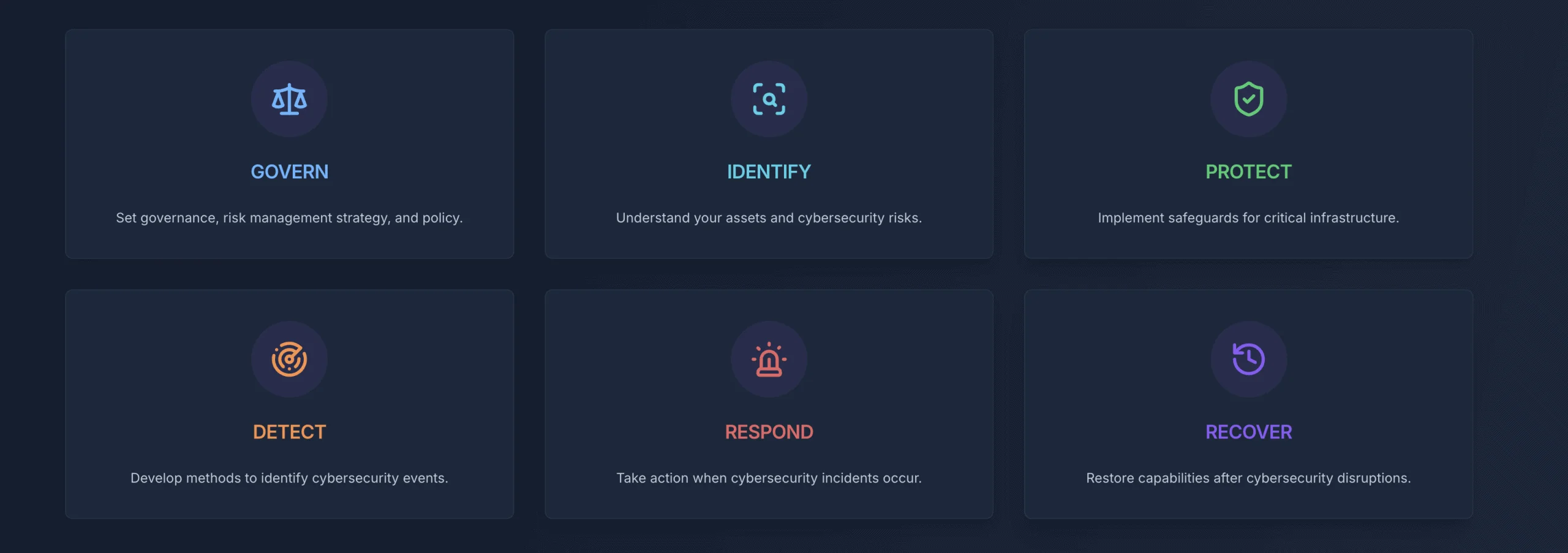
For organizations implementing NIST Cybersecurity Framework guidelines, Proton Pass maps to all six CSF 2.0 pillars: Govern (admin panel, policy enforcement, audit trails), Identify (password health dashboard, Dark Web Monitoring), Protect (E2EE, MFA, secure sharing, Proton Sentinel), Detect (activity monitoring, breach alerts), Respond (immediate access revocation, session termination), and Recover (emergency access, account recovery procedures). This alignment makes it straightforward to document Proton Pass within an existing NIST compliance framework.
Implementation Analysis
Requirements Assessment
Technical Prerequisites:
- Modern web browsers supporting current security standards (Chrome, Firefox, Edge, Safari)
- Mobile devices running iOS 12+ or Android 8+ for mobile applications
- Network connectivity for cloud-based synchronization
- Identity provider infrastructure for SCIM/SAML integration (Professional and Workspace plans)
Organizational Readiness:
- Clear password policy framework and security requirements documentation
- Employee training resources and user adoption strategy
- Administrative capacity for user management and policy enforcement
- Migration planning for existing password management solutions
Implementation Timeline
For most small businesses (10–50 users), deploying Proton Pass takes 2–3 weeks rather than months.
Week 1: Setup and Pilot
- Administrator account creation, organizational configuration, and security policy setup
- Identity provider integration (SCIM/SAML via Okta, Entra ID, or OneLogin) if required
- Password import from existing managers (1Password, LastPass, Bitwarden, and others) — import in batches of 200–300 items for large datasets
- Pilot deployment to 5–10 users for initial feedback on vault structure and autofill reliability
Week 2–3: Rollout and Optimization
- Organization-wide account provisioning and hands-on training sessions
- Vault structure finalization (client vaults, internal systems, vendor access, team resources)
- Policy enforcement activation: master password requirements, 2FA mandates, sharing restrictions
- Adoption tracking via admin dashboard, targeted support for low-engagement users, and refinement of vault organization based on real usage patterns
Implementation Checklist
Use this checklist to track your Proton Pass deployment:
- Create administrator account and configure organization settings
- Enable MFA for all admin accounts
- Configure recovery methods (recovery phrase, email, phone) for every user
- Decide on vault structure (by client, department, project, or security level)
- Create onboarding template with standard vault naming and note formats
- Pilot with 3-5 users and gather feedback on autofill reliability
- Import passwords in batches of 200-300 items from existing managers
- Review weak and reused passwords using Pass Monitor
- Set offboarding procedure (access revocation, credential rotation, account deletion)
- Document exceptions for applications where autofill requires manual paste
South Florida Implementation Note
For businesses in Miami-Dade and Broward counties, we provide hands-on Proton Pass deployment support, including on-site training, vault organization strategy, and integration with existing IT infrastructure. Our team has implemented Proton Pass for healthcare practices, legal firms, accounting offices, and technology companies throughout South Florida, addressing industry-specific compliance requirements including HIPAA and PCI-DSS documentation needs.
Common Implementation Challenges and Solutions
Challenge: Browser Extension Compatibility with Complex Login Forms
Problem: Some business applications use non-standard login forms or multi-step authentication that the Proton Pass browser extension doesn't autofill correctly.
Solution: For problematic systems, save credentials in Proton Pass but access them manually by opening the extension and copying credentials. Document these exceptions during implementation so team members know which systems require manual credential entry. In our experience, approximately 5-10% of business applications require manual credential access.
Challenge: Team Members Forgetting Master Passwords
Problem: Users accustomed to browser-saved passwords or staying permanently logged in struggle with remembering Proton Pass master passwords.
Solution: Implement a master password policy requiring passphrases (4-5 random words) rather than complex passwords, which are more secure and memorable. Consider requiring biometric unlock on mobile devices to reduce master password entry frequency. For account recovery options, see the Admin Recovery FAQ below.
Challenge: Vault Organization Complexity
Problem: Organizations struggle to determine optimal vault structure, leading to either too many vaults (confusing) or too few (insufficient access control).
Solution: Start with a simple organization: Client Vaults (one per major client), Internal Systems (company infrastructure), Vendor Access (external service accounts), and Team Resources (shared tools). Refine vault structure after 30-60 days based on actual usage patterns.
Challenge: Secure Notes Format Consistency
Problem: Different team members document information inconsistently, making notes difficult to use during troubleshooting.
Solution: Create standardized templates for everyday documentation needs. Save templates as example notes that team members can copy and customize. This consistency noticeably improves information retrieval efficiency.
Challenge: Migration Data Fidelity
Problem: Importing credentials from 1Password, LastPass, or other managers via CSV sounds straightforward, but the process has meaningful friction that IT teams should plan for. Rich item types in 1Password (SSH keys, software licenses, secure documents, API credentials) either become flat text entries or are lost entirely during CSV export. Note items lose all formatting and become plain-text dumps. Folder structures and tags do not map to Proton Pass vaults — everything imports into a single vault regardless of the original hierarchy. TOTP tokens and passkeys may not survive the CSV export/import cycle and often require manual re-enrollment.
Solution: Plan for a phased migration rather than a bulk cutover. Export and import in batches of 200–300 items to catch conversion issues early, and budget 1–2 hours of manual cleanup per 500 items for complex vaults. Re-enroll passkeys and TOTP secrets directly in Proton Pass rather than relying on CSV transfer.
| Source Manager | Key Migration Friction |
|---|---|
| 1Password | SSH keys, licenses, and secure documents become flat text or are lost; TOTP tokens and passkeys require manual re-enrollment; folder/tag hierarchy doesn't map to Proton vaults |
| LastPass | Secure notes lose all formatting; folder hierarchy doesn't map to vaults; shared folders require manual re-sharing after import |
| Bitwarden | Generally the cleanest migration; organizational collections don't translate to Proton vaults; custom fields may not transfer |
How Much Does Proton Pass Business Cost?
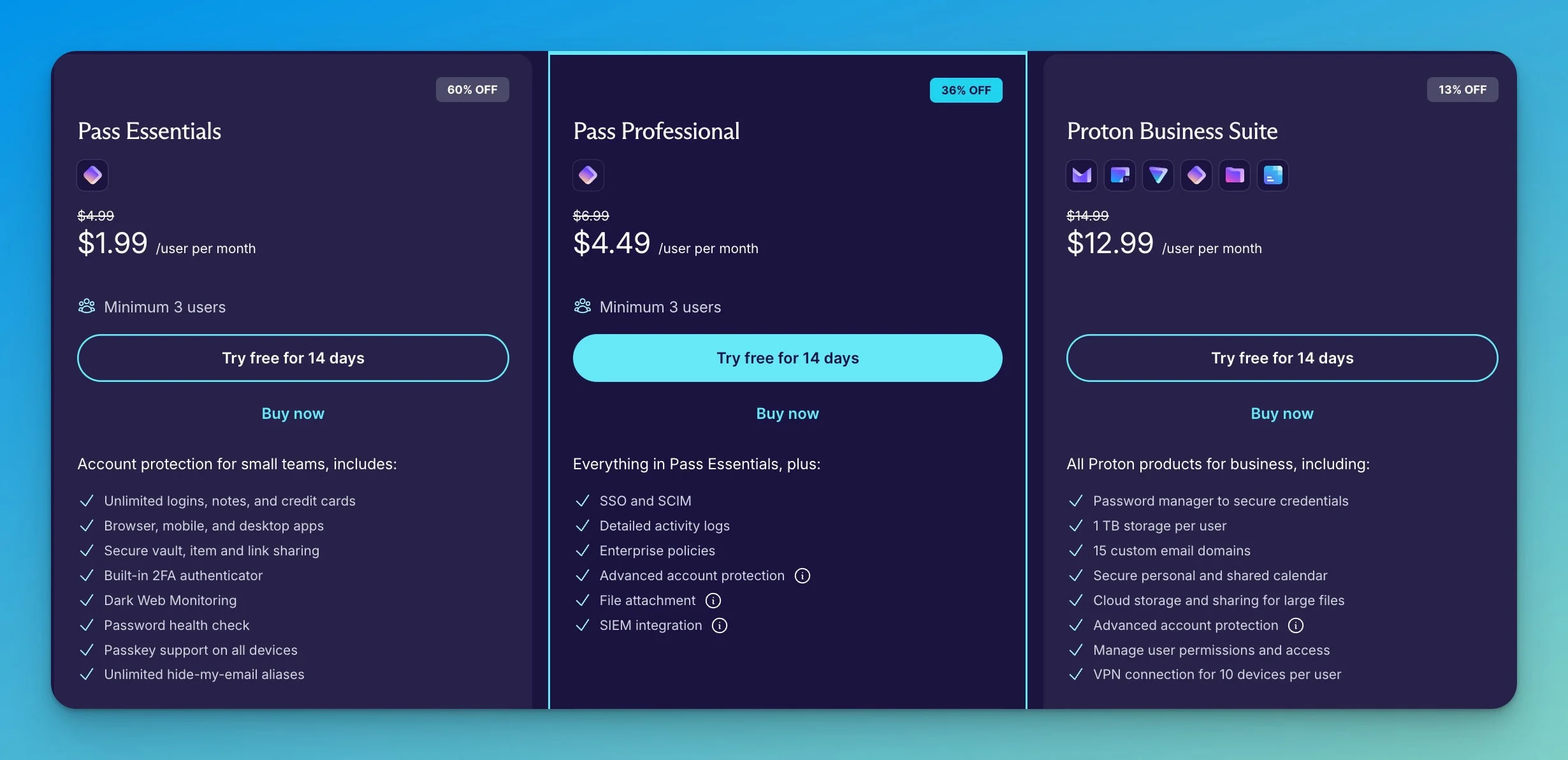
Pricing and plan features verified in June 2026. Proton pricing can vary by billing term, currency, taxes, promotions, and checkout region.
Proton Pass Business costs $1.99 per user/month for the Essentials plan and $4.49 per user/month for the Professional plan when billed annually.
- Pass Essentials ($1.99/user/mo): Unlimited vaults, unlimited devices, breach monitoring, built-in 2FA authenticator, unlimited hide-my-email aliases, passkey support, and basic reporting. Best for small teams needing core security. Monthly billing: $4.99/user/mo. Minimum 3 users. 14-day free trial.
- Pass Professional ($4.49/user/mo): Everything in Essentials plus SSO/SCIM integration (Okta, Microsoft Entra ID, OneLogin), advanced security policies, Proton Sentinel account protection, granular event logs, file attachments, SIEM integration, and priority support. Recommended for regulated industries. Monthly billing: $6.99/user/mo. Minimum 3 users. 14-day free trial.
- VPN and Pass Professional ($10.99/user/mo): Everything in Pass Professional plus Proton VPN Professional — highest-speed connections across 140 countries, dedicated server and IP option, ad-blocker, MDM support, and private gateways for network segmentation. The practical middle tier for organizations that need both credential management and enterprise VPN without migrating email or documents away from Google Workspace or Microsoft 365. Monthly billing: $14.99/user/mo. Minimum 3 users.
- Proton Workspace Standard ($12.99/user/mo): Bundles Pass Professional with encrypted Proton Mail (1 TB storage), Proton Calendar, Proton Drive (1 TB), Proton VPN (10 connections per user), Proton Sheets, Proton Docs, Proton Meet (100 participants, 24-hour meetings), and limited Lumo AI access. Monthly billing: $14.99/user/mo. Minimum 3 users. Existing Business Suite customers were automatically upgraded at no extra cost.
- Proton Workspace Premium ($19.99/user/mo): Everything in Workspace Standard plus 3 TB storage, 250 meeting participants, unlimited Lumo AI with advanced models, email data retention policies, and 20 custom email domains. Monthly billing: $24.99/user/mo. Minimum 3 users.
- Enterprise Plan: Custom pricing for organizations with 5,000+ users. Dedicated account management and implementation support. Contact sales for pricing.
Which Proton Pass Business Plan Should You Choose?
| If your team needs... | Choose | Why |
|---|---|---|
| Core password management and secure sharing | Pass Essentials ($1.99/user/mo) | Covers unlimited passwords, 2FA, aliases, passkeys, Dark Web Monitoring, and vault sharing for small teams without compliance requirements |
| SSO/SCIM, audit logs, CLI, SIEM, or file attachments | Pass Professional ($4.49/user/mo) | Required for identity provider integration, Proton Sentinel, compliance-grade activity logs, and programmatic credential access |
| Password management + enterprise VPN | VPN and Pass Professional ($10.99/user/mo) | Best for teams that need both credential management and VPN but want to keep their existing email and document providers |
| A full Google Workspace / Microsoft 365 replacement | Workspace Standard ($12.99/user/mo) | Bundles Pass Professional with encrypted email, calendar, drive, docs, sheets, video conferencing, and VPN under one admin panel |
| Lumo AI, more storage, retention policies | Workspace Premium ($19.99/user/mo) | Adds unlimited Lumo AI, 3 TB storage, 250 meeting participants, email data retention, and 20 custom domains |
Business Password Manager Pricing Comparison
| Provider | Business Tier | Price (annual billing) | Encryption | Open Source |
|---|---|---|---|---|
| Proton Pass Essentials | Entry | $1.99/user/mo | AES-256-GCM | Yes |
| Proton Pass Professional | Advanced | $4.49/user/mo | AES-256-GCM | Yes |
| NordPass Business | Entry | $3.59/user/mo* | XChaCha20 | No |
| Bitwarden Teams | Entry | $4/user/mo | AES-256 | Yes |
| 1Password Business | Standard | $8.99/user/mo | AES-256 | No |
NordPass pricing varies by billing term: approximately $3.99/user/month on 1-year billing, $3.59/user/month on 2-year billing. Promotional pricing may differ.
Total Cost of Ownership Analysis
Small Business (10 users)
- Pass Essentials: $238.80/year (75% less than 1Password Business at $959/year). Editor's note: For teams of exactly 10, 1Password offers a flat $239.40/year Teams Starter Pack, effectively matching Proton's entry-level cost.
- Pass Professional: $538.80/year (44% less than 1Password Business)
- Workspace Standard: $1,558.80/year (includes email, calendar, storage, VPN, Meet, Sheets, Docs, Lumo AI)
Medium Business (50 users)
- Pass Essentials: $1,194/year
- Pass Professional: $2,694/year
- Workspace Standard: $7,794/year
Large Organization (200 users)
- Pass Essentials: $4,776/year
- Pass Professional: $10,776/year
- Workspace Standard: $31,176/year
Organizations requiring only password management will find Pass Essentials and Pass Professional competitively priced against NordPass Business ($3.59-5.39/user/month), Bitwarden ($4-6/user/month), and 1Password Business ($8.99/user/month).
For comprehensive productivity platforms, see our detailed Proton Workspace Standard review, which examines the full integrated approach including email, calendar, storage, VPN, Meet, Sheets, Docs, and Lumo AI.
How Proton Pass Compares to Competitors
Proton Pass costs less than 1Password Business ($8.99/user/month) on a per-user basis, especially for teams above 10 users, while providing comparable zero-knowledge encryption and open-source transparency. Very small teams should also compare against 1Password's Teams Starter Pack, which offers flat pricing for up to 10 users.
For a broader look at the market, see our best business password managers roundup. For head-to-head comparisons, see our dedicated guides:
- Proton Pass vs Bitwarden — Two open-source password managers compared on encryption, self-hosting, CLI automation, and business pricing.
- Proton Pass vs 1Password — Swiss privacy vs polished UX. Pricing ($1.99 vs $8.99/user), Travel Mode, Extended Access Management, and ecosystem value.
- NordPass vs Proton Pass — Two European privacy-focused managers compared on XChaCha20 vs AES-256-GCM encryption, support, and admin features.
| Proton Pass | 1Password | Bitwarden | NordPass | |
|---|---|---|---|---|
| Business pricing | $1.99–$4.49/user/mo | $8.99/user/mo | $4–$6/user/mo | $3.59–$5.99/user/mo |
| Encryption | AES-256-GCM | AES-256 | AES-256 | XChaCha20 |
| Open source | Yes | No | Yes | No |
| Jurisdiction | Switzerland | USA/Canada | USA | Lithuania |
| Ecosystem | Full suite | Standalone | Standalone | Nord Security |
Real-World Use Case
Modeled Cost Scenario: Remote-First Technology Startup (35 employees)
The following example is modeled on our deployment experience with distributed teams. The cost figures are calculated from published pricing; the management time estimate (approximately 60%) reflects our observations across similar-sized deployments, not a controlled study.
Challenge: A rapidly growing startup with globally distributed team members needed comprehensive security tools, including password management, VPN, and secure communication. Managing multiple vendors and security policies created administrative overhead.
Solution: Proton Workspace Standard deployment provided unified password management, encrypted email, secure cloud storage, and VPN access under a single administrative framework. SCIM integration with the existing identity provider (Okta) automated user provisioning and deprovisioning.
Outcome: Consolidated security spending from $47/user/month (separate password manager, VPN, email, storage) to $12.99/user/month. The unified administrative dashboard reduced security management time by an estimated 60%. Calculated annual savings of approximately $14,294 with zero-knowledge encryption across all services.
Need Implementation Support?
Our team helps South Florida businesses implement secure password management and encrypted documentation systems as part of our cybersecurity services. We provide:
- Proton Pass deployment and vault organization strategy
- Password migration from existing systems
- Team training on secure documentation workflows
- Integration with your existing IT infrastructure
Schedule a free consultation to discuss your security requirements.
Our Recommendation
Ideal For:
Organizations Within or Considering Proton Ecosystem Businesses already using or evaluating Proton Mail, Drive, or VPN benefit most from Workspace Standard's unified approach, which integrates password management into existing workflows without adding another vendor.
Privacy-Conscious Organizations Companies handling sensitive information or operating in industries where client privacy is paramount (healthcare, legal, financial, journalism) benefit from zero-knowledge encryption and transparent security practices.
Regulatory Compliance Requirements Organizations requiring demonstrable compliance with GDPR, HIPAA, ISO 27001, or NIS2 find Proton's certifications, audit trails, and comprehensive documentation valuable for compliance demonstrations.
Budget-Aware Small Teams Small businesses (3-25 users) seeking strong security with SSO, audit logs, and compliance certifications without premium pricing find Pass Essentials at $1.99/user/month or Pass Professional at $4.49/user/month competitively priced. For more budget-friendly security stacks, see our guide to building a complete business software stack under $200/month.
Consider Alternatives If:
Maximum Feature Maturity Required Organizations requiring the most polished user interfaces, extensive third-party integrations, or mature enterprise features may find 1Password Business more suitable despite higher costs.
Standalone Password Management Preferred Teams not interested in Proton's broader ecosystem and requiring only password management may find Bitwarden or NordPass offer comparable features without ecosystem coupling.
Hands-On Enterprise Support Critical Proton provides priority email support on all business plans, with phone support available for smaller teams and customized onboarding for teams of 20+ users. However, support is not as hands-on as some enterprise competitors unless the team qualifies for onboarding assistance or larger-account support. Organizations requiring dedicated account management from day one may prefer competitors with more established enterprise support tiers.
A Balanced Perspective
Greatest Strengths
Transparent Security Architecture Open-source codebase, public security audits, and detailed security documentation provide a level of transparency that proprietary competitors typically don't offer.
Swiss Privacy Protection Operating under Swiss DPA and GDPR provides stronger privacy protections than many US-based alternatives, though legal requests still follow applicable procedures.
Ecosystem Integration Value For organizations adopting Proton Workspace Standard, the bundled productivity tools at $12.99/user/month consolidate multiple vendors into one privacy-focused platform (though it is not yet a feature-complete replacement for Google Workspace or Microsoft 365 in every workflow).
Competitive Pricing Structure Pass Essentials at $1.99/user/month and Pass Professional at $4.49/user/month offer strong security features at affordable pricing for small businesses.
Subscription-Aligned Privacy Model Proton's subscription model aligns more closely with privacy-focused positioning than ad-supported or data-monetized services.
Primary Limitations
Newer Market Presence While Proton has operated since 2014, Proton Pass launched more recently than established competitors like 1Password (2005) or LastPass (2008).
Feature Development Pace Certain advanced capabilities, such as folder organization within vaults and advanced autofill for complex forms, remain on the development roadmap. (The CLI has since addressed a previous gap in automation support.)
Admin Dashboard Gaps Day-to-day admin operations — adding users, revoking access, reviewing audit logs — are responsive; the zero-knowledge architecture operates client-side during decryption and does not slow down server-side management tasks. That said, the admin console provides only pre-built activity logs and Pass Monitor health scores. It lacks a custom report builder, so administrators cannot create filtered views or scheduled exports. There are no role-based dashboard views (all admins see the same interface), no granular per-vault usage analytics, and no automated compliance report generation for SOC 2 or HIPAA audits. SIEM integration (Splunk, Datadog) is restricted to the Professional tier. By comparison, 1Password Business offers Watchtower organizational dashboards, custom security policies, and direct Datadog/Splunk integrations at its standard tier.
Limited Third-Party Integrations Fewer direct integrations with business applications compared to more established competitors, though core SCIM/SAML capabilities address primary identity management needs. The ecosystem remains relatively closed compared to 1Password's browser extension API and Bitwarden's self-hosting flexibility.
Learning Curve for Ecosystem Organizations adopting the full Proton Workspace face larger change management requirements than standalone password manager deployments.
Where Proton Pass Is Not Enough
Proton Pass works well for lightweight encrypted project documentation, but it is not a replacement for dedicated documentation or IT management platforms. Organizations should look elsewhere when they need:
- Ticketing and workflow management -- Proton Pass has no ticketing system, approval workflows, or task tracking. Tools like IT Glue, Hudu, or Confluence serve those needs.
- Relationship mapping and asset dependencies -- There is no way to model infrastructure relationships, map client-to-device dependencies, or visualize network topology inside Proton Pass.
- Full compliance reporting -- While Proton Pass provides activity logs and SIEM integration (Professional tier), it does not generate automated SOC 2 or HIPAA audit reports. Compliance teams will still need dedicated GRC tooling.
- Large-scale document collaboration -- Secure notes are single-author entries without version history, inline commenting, or multi-user concurrent editing. For collaborative documentation at scale, a dedicated platform is more appropriate.
Known Limitations After Testing
Based on our two-plus years of deployment experience:
- Some complex login forms (approximately 5-10% of business applications) still require manual copy/paste rather than autofill
- Folder organization within vaults remains a roadmap feature as of June 2026
- Admin reporting is improving but less mature than 1Password's Watchtower organizational dashboards
- Proton Workspace is a strong privacy-focused alternative but not yet a feature-complete replacement for Google Workspace or Microsoft 365 in every workflow
- Secure notes are useful for structured project documentation but not a substitute for a full documentation platform
Bottom Line Assessment
Proton Pass Business provides strong password security with zero-knowledge encryption at competitive pricing. It works well for organizations prioritizing transparent security practices and regulatory compliance, backed by Proton's company-level SOC 2 Type II attestation and ISO 27001 certification.
For businesses already invested in or evaluating the Proton ecosystem — especially with the addition of Sheets and Docs — Pass Business is a natural extension that unifies security management across the entire stack. The open-source codebase and public security audits make it easier to verify the security claims independently.
Frequently Asked Questions About Proton Pass Business
Is Proton Pass Business worth it for small businesses?
Yes, Proton Pass Business is worth considering for small businesses that prioritize security and privacy, particularly at the $1.99/user/month Essentials tier or $4.49/user/month Professional tier. After two years of implementation, we've found the value extends beyond password management -- the encrypted notes feature provides secure project documentation that traditional tools don't offer. For teams above 10 users, per-user pricing is notably lower than 1Password Business ($8.99/user/month). Smaller teams should also compare 1Password's Teams Starter Pack, which offers flat pricing for up to 10 users.
How does Proton Pass compare to 1Password for business use?
Proton Pass Business emphasizes privacy through Swiss jurisdiction and zero-knowledge encryption of all metadata (not just passwords), while 1Password provides more mature features and third-party integrations. Proton Pass costs $1.99-$4.49/user/month versus 1Password's starting price of $8.99/user/month. For organizations prioritizing privacy and lower per-user costs, Proton Pass is worth considering. For teams requiring extensive integrations and a more polished interface, 1Password may justify the higher price.
Can Proton Pass handle secure notes for project documentation?
Yes, and this is a feature worth exploring. In our testing, each note supports generous capacity with limited markdown formatting, sufficient for comprehensive technical documentation. We use secure notes extensively for network installation details, configuration procedures, and client-specific information. The notes are end-to-end encrypted like passwords, searchable across all vaults, and shareable with team members.
Does Proton Pass work for HIPAA compliance?
Proton Pass supports HIPAA compliance when properly configured and covered by a signed Business Associate Agreement (BAA). The platform provides technical safeguards -- end-to-end encryption, audit trails, and access controls -- that help protect electronic health information (ePHI). However, HIPAA compliance is not automatic. Organizations must also implement administrative safeguards, conduct risk assessments, train users on proper PHI handling, and request a signed BAA from Proton by contacting legal@proton.me with the subject "HIPAA BAA." Proton's own BAA page states that its compliance statement does not replace a signed agreement.
HIPAA Compliance Reminder
HIPAA compliance requires more than encrypted software. Organizations must have a signed BAA with Proton, documented access policies, user training on PHI handling, regular audit reviews, and proper data retention and disposal procedures. Proton Pass provides the technical controls, but administrative and physical safeguards remain the organization's responsibility.
How long does Proton Pass implementation take?
Basic implementation takes 1-2 weeks for small teams (under 10 users), including admin setup, user training, and password import. Complete deployment with vault organization, policy configuration, and team adoption typically requires 4-6 weeks. Organizations with existing password managers can use import tools supporting 1Password, LastPass, Bitwarden, and other standard formats.
What happens to shared vaults when employees leave?
Administrators can immediately revoke user access to all vaults through the admin dashboard. When a user is deleted, shared vaults remain with the organization — only the user's Private vault is removed along with their account. The departing user instantly loses access to all shared data. Best practice includes rotating credentials for sensitive systems when team members depart. The activity logs document what each user accessed, supporting security reviews during offboarding.
What happens if an employee loses their master password?
For Proton Pass for Business, the easiest recovery path is to ask an organization admin to reset the account password. Proton's support documentation confirms that admins can reset a user's password and share the new credentials via a secure link. Beyond admin resets, Proton provides multiple self-service recovery methods:
- Recovery phrase: Each user should generate a recovery kit during onboarding and store it in a secure physical location or company safe.
- Recovery email or phone: Users can set up recovery contact methods in their account settings.
- Emergency Access: Paid users can designate up to 5 trusted contacts who can request access to the account after a configurable wait period -- providing an additional recovery path for critical accounts, including admin accounts.
If none of these methods are configured and the user cannot recover the password, the admin can delete and re-provision the account. In that case, the user's Private vault data will be lost, but shared vault data remains intact with the organization. Best practice: require every user to configure at least one recovery method during onboarding and store their recovery kit securely.
Can Proton Pass import passwords from other password managers?
Proton Pass supports importing from 1Password, LastPass, Bitwarden, Dashlane, Keeper, and other prominent password managers. The import process uses CSV files exported from your current password manager. We recommend importing in batches of 200-300 passwords for large datasets to avoid timeout issues.
Does Proton Pass work offline?
Yes, Proton Pass caches encrypted vault data locally, allowing read-only password access without internet connectivity. You can view and copy existing credentials offline, but creating or editing items requires a connection. Changes sync automatically when connectivity is restored. The mobile apps and browser extensions both support offline access. However, initial vault decryption after a fresh installation requires an internet connection.
How many vaults can you create in Proton Pass Business?
Pass Essentials and Pass Professional both allow up to 50 vaults per user, each shared with up to 10 people. This structure provides substantial flexibility for organizing passwords by client, project, department, or security level. Most small businesses use 5-15 vaults.
What's the difference between Proton Pass and Proton Workspace Standard?
Proton Pass (Essentials or Professional) provides password management only. Proton Workspace Standard ($12.99/user/month) includes Pass Professional plus encrypted email (1 TB storage), calendar, cloud storage (1 TB), VPN (10 connections per user), Proton Sheets, Proton Docs, and Proton Meet (100 participants, 24-hour meetings). For organizations seeking a complete private alternative to Google Workspace, Workspace Standard consolidates all productivity tools under one admin panel.
Can you try Proton Pass Business before purchasing?
Yes, all Proton Pass Business plans offer a 14-day free trial with full feature access and no credit card required. This provides adequate time to test the platform with real workflows, import existing passwords, configure vault structures, and train team members.
Is Proton Pass open source?
Proton Pass is fully open source, meaning the entire codebase is publicly available for independent security review. This transparency allows security researchers to verify encryption implementation rather than trust vendor claims. Both Cure53 (2023) and Recurity Labs (2026) have independently audited the codebase, with results published publicly.
Does Proton Pass have a CLI?
Yes, the Proton Pass CLI launched in November 2025 and is available on Pass Professional, VPN and Pass Professional, and Workspace plans (not Pass Essentials). It allows developers and IT administrators to programmatically access vault credentials from the command line. Use cases include pulling secrets into deployment scripts, injecting credentials during infrastructure provisioning, and automating secret rotation. The CLI works across Linux, macOS, and Windows, and respects the same vault permissions and access controls as the GUI apps. Recurity Labs audited the CLI as part of their January-April 2026 security assessment.
This review is based on two-plus years of hands-on implementation experience and current product offerings, pricing, and features as of June 2026. Information verified through Proton's official documentation, independent security audit reports (Cure53 2023, Recurity Labs 2026), and Proton's company-level certifications (SOC 2 Type II attestation, ISO 27001). The 4.7/5 rating reflects our assessment of security architecture, pricing competitiveness, practical usability across client deployments, and ecosystem value, weighed against current limitations in admin reporting, third-party integrations, and feature maturity.
Related Resources:
- Proton Pass vs Bitwarden 2026 — Head-to-head open-source comparison
- Proton Pass vs 1Password 2026 — Privacy vs polish for business teams
- NordPass vs Proton Pass 2026 — European password managers compared
- Best Cybersecurity Software for Small Business — Full security stack recommendations
- NIST CSF 2.0 Cybersecurity Tools Guide
- Proton Workspace Standard Review 2026
- Google Workspace vs Proton Workspace — Detailed platform comparison
- Tresorit vs Proton Drive for Business — Encrypted cloud storage compared
Related Articles
More from Business Software
Proton Workspace Review 2026: Pricing, Tests & Limitations
We tested Proton Workspace's Mail, Drive, Docs, Sheets, Meet, and Lumo. See July 2026 pricing, limitations, migration risks, and a tier-by-tier Google Workspace comparison.
36 min read
The Best Privacy-First Productivity Apps in 2026: Notes, Tasks, Email, and Calendar
Privacy-first productivity apps for 2026 — encrypted and local-first notes, tasks, email, and calendar, sorted by what's genuinely team-viable vs. solo-only.
19 min read
Microsoft 365 or Google Workspace: Fix the Setup or Switch?
Before leaving Microsoft 365 or Google Workspace, find out whether you have a setup problem or a platform problem, what to fix first, and when to switch.
21 min read