

Roll Out a Team Password Manager Without Lockouts
Roll out a small-business password manager safely. Choose the right plan, test recovery, migrate shared vaults and remove access when employees leave.

The import is not the hard part of a password manager rollout. The harder questions come afterwards: what happens when the person who set it up is unreachable, an employee forgets their master password, or someone leaves and nobody can say which logins they could open.
So the plan runs in a fixed order. Name two people who can recover accounts. Prove that recovery works with dummy data. Move one low-risk batch before any essential account. This guide takes a team of 3 to 20 people from browser vaults, spreadsheets or another manager into a business-owned system, with a short plan decision in the middle, a pilot, a staged cutover and an offboarding routine.
Affiliate Disclosure: This article contains affiliate links. If you make a purchase through these links, we may earn a small commission at no extra cost to you. As an Amazon Associate, iFeelTech earns from qualifying purchases.
The short answer
Choose the plan by the recovery and access controls you need, then prove those controls before you move anything real. For a small team that needs shared vaults and a way back in, 1Password Teams Starter is a credible, inexpensive start. Bitwarden Enterprise is the value pick when administrator account recovery is a hard requirement. Proton Pass Professional suits a team that prefers Proton and needs SSO, activity logs and policies. If you already run a properly configured business manager that passes the checks below, keep it.
How we put this together
Our approach reflects business deployment and support work for South Florida offices, checked against current vendor documentation on October 13, 2026. Recovery and migration behavior varies by plan, account type and version, so verify it on your chosen plan before cutover. The five-person Miami office, the ten-item batch and the pilot tables below are planning examples, not published test results. The interface panels are official vendor demonstrations, not our tenants.
Start with ownership, not importing passwords
A business vault belongs to the business. That is easy to overlook when one person created the account and holds the only administrator login.
Before you import a single record, settle four things:
- One accountable owner. The person with authority over billing and the account, usually the owner or office manager.
- Two recovery-capable operators. Each product has a different rule for who can recover whom. 1Password says you cannot recover your own account, so a second owner or administrator must exist. Bitwarden lets only an owner recover another owner. Do not assume "any admin" is enough.
- Named administrator access with MFA. Where the product supports it, operators use their own accounts with administrator rights, not a shared admin login.
- Emergency material stored outside the vault it unlocks. The 1Password Emergency Kit, recovery codes and identity-provider backup access belong in a place that does not depend on the manager working.
Tell employees two things in plain language. The business vault can be recovered by the operators, and their personal accounts stay personal. Where a bank or another service provides individual logins, keep individual logins. A shared vault is a way to share what must be shared, not a reason to share every login.
Choose the plan by recovery and access controls
Three controls drive the choice: who can recover an account, how people sign in, and how finely you can limit access. Price follows from those. A cheaper plan is not a feature-equivalent plan. If you are still comparing vendors more broadly, our business password manager comparison covers the wider field.
| Requirement | 1Password | Bitwarden | Proton Pass |
|---|---|---|---|
| Basic team sharing | Teams Starter | Teams | Essentials |
| Admin-assisted account recovery | Team recovery, also on Starter; authorized roles only | Enterprise; policy and enrollment required | Confirm your account type and data-recovery path; a generic feature label is not enough |
| Identity-provider sign-in | Business: Unlock with SSO | Enterprise: configured SSO mode | Professional: SSO |
| Automated provisioning | Business: directory integration | Teams and Enterprise: SCIM | Professional: SCIM |
| Granular administration | Business, when you need groups, reporting and finer controls | Enterprise, for advanced controls and policies | Professional, for business policies and logs |
SSO, SCIM and recovery do different jobs. SSO authenticates people, SCIM provisions and removes them, and recovery restores access when someone is locked out. Removing a person through your directory does not change a shared password at a downstream service.
What each plan costs
These are listed USD monthly equivalents on annual billing, checked October 13, 2026, before tax, support time and add-ons.
| Plan | Pricing basis | 3 people | 5 people | 10 people | 15 people |
|---|---|---|---|---|---|
| 1Password Teams Starter | $24.95 includes ten; $4.99 per additional seat | $24.95 | $24.95 | $24.95 | $49.90† |
| 1Password Business | $8.99 per person | $26.97 | $44.95 | $89.90 | $134.85 |
| Bitwarden Teams | $4 per person | $12 | $20 | $40 | $60 |
| Bitwarden Enterprise | $6 per person | $18 | $30 | $60 | $90 |
| Proton Pass Essentials | $1.99 per person; three-user minimum | $5.97 | $9.95 | $19.90 | $29.85 |
| Proton Pass Professional | $4.49 per person; three-user minimum | $13.47 | $22.45 | $44.90 | $67.35 |
† 1Password's pricing page allows up to ten additional Starter seats, so $24.95 + 5 × $4.99 = $49.90 a month for 15 people. Its support page still describes a ten-member limit. Confirm the extra seats at checkout before you buy for 11 to 20 people.
For five people, the annual totals are $299.40 for Starter, $539.40 for 1Password Business, $240 for Bitwarden Teams, $360 for Enterprise, $119.40 for Proton Essentials and $269.40 for Professional.
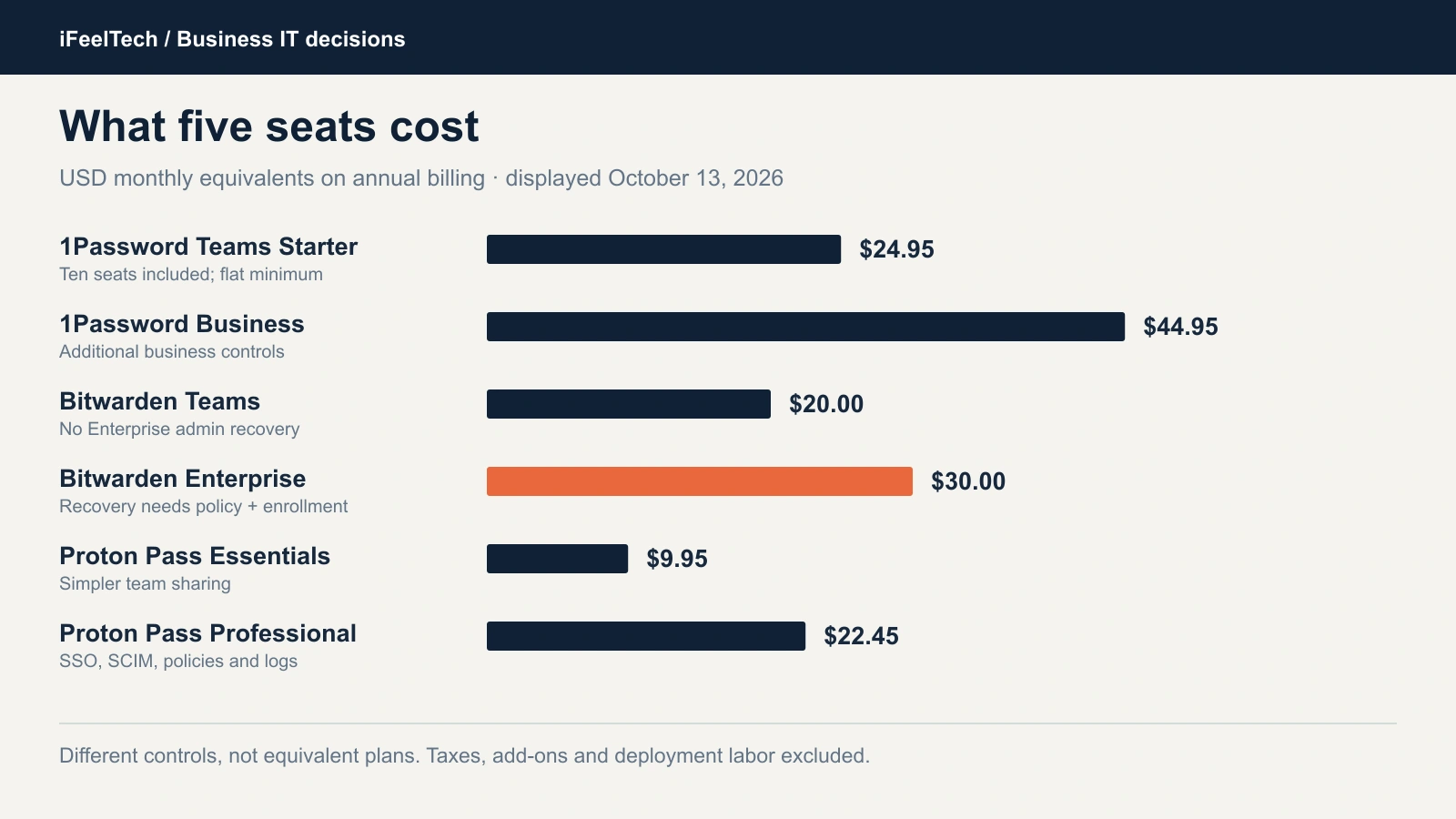
Listed USD rates on annual billing, checked October 13, 2026. The plans have different controls.
One trap: 1Password's pricing page leads with "$2.49 per user" for Starter. That is the flat $24.95 divided across ten seats. A three-person team pays $24.95, not $7.47, and a ten-person team pays the same $24.95.
1Password: Starter or Business, decided by controls
Choose Teams Starter when basic shared vaults and team recovery cover your requirements. Owners and administrators can recover accounts on Starter, so recovery alone is not a reason to pay for Business. Choose Business when you need custom groups, including a group whose only extra permission is recovering accounts, finer vault permissions, reports or identity-provider sign-in. Skip Business if none of those apply to a five-person office. Business is the managed-control example here, not a universal winner.
Start a 14-day 1Password Business trial, or read our 1Password Business review for the full evaluation.
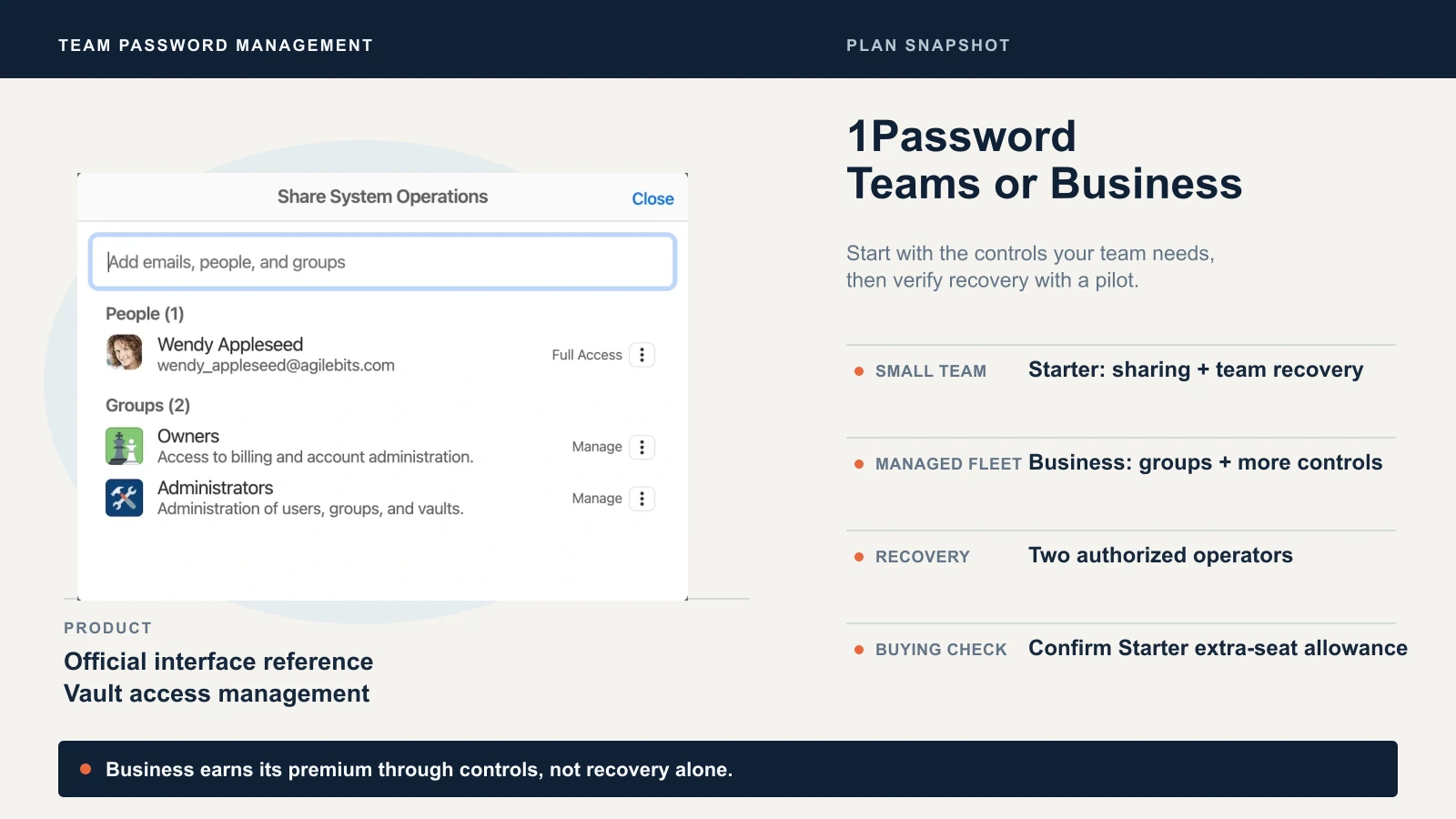
Official 1Password vendor demonstration.
Bitwarden: Enterprise when recovery is a requirement
Bitwarden Teams costs $2 less per person and includes shared collections, event logs and SCIM provisioning. It does not include account recovery or SSO. When administrator recovery is a requirement, Enterprise at $6 is the straightforward value candidate. It still needs work: turning on the recovery policy does not enroll people who joined earlier, so confirm every member is enrolled. We use the hosted service as the example. Self-hosting is an operational commitment, not a cheaper default for an office manager.
Bitwarden's business pricing opens Bitwarden directly, and we earn nothing from that link. See Bitwarden's account recovery documentation for the exact procedure, and our Proton Pass vs Bitwarden comparison for the wider match-up.
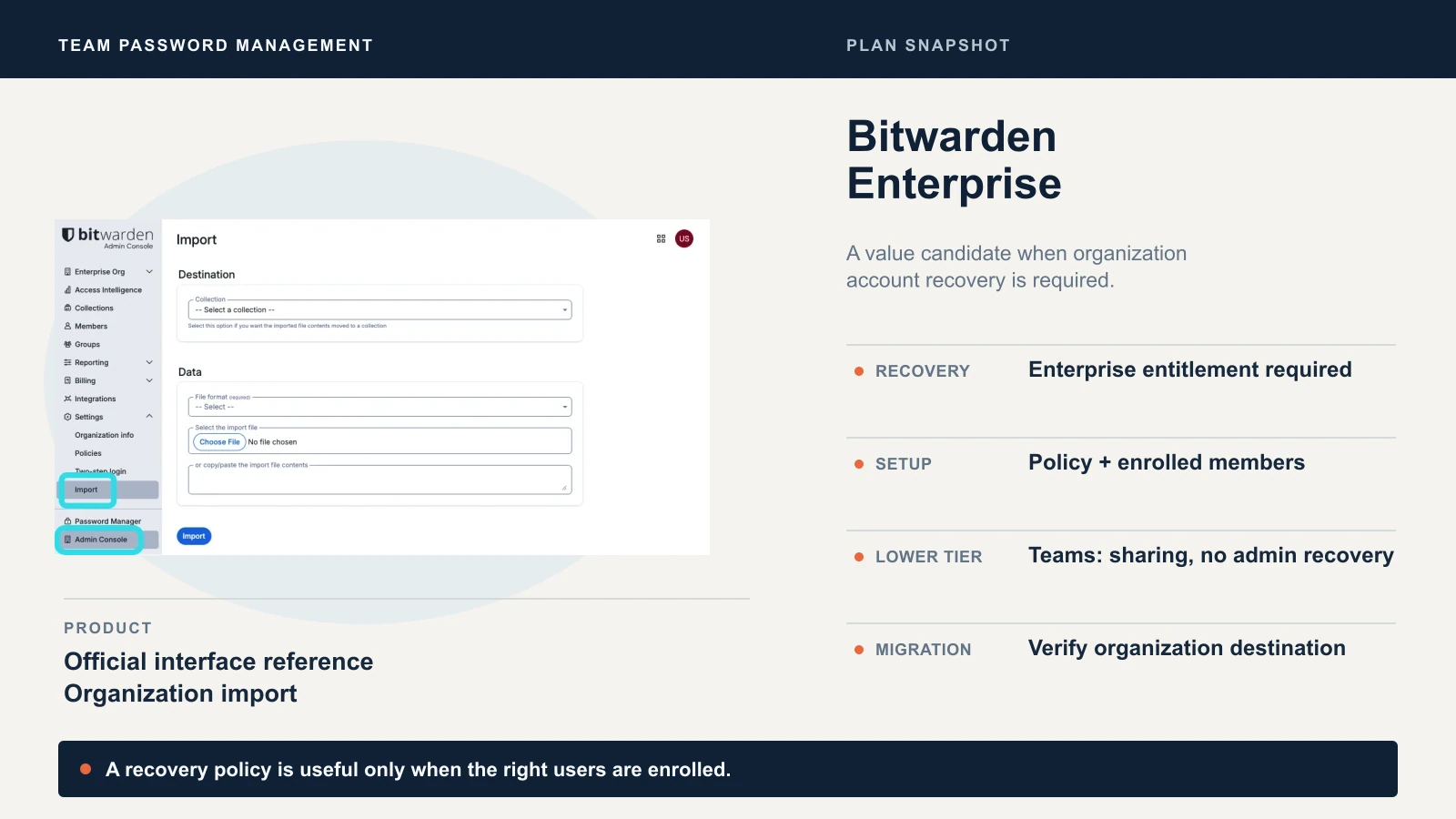
Official Bitwarden vendor demonstration.
Proton Pass: Professional for the managed rollout
Professional is worth piloting for a team that prefers Proton and needs SSO and SCIM, activity logs and policies. Essentials is a simpler sharing option, not the same control set. Both list at a three-user minimum, and these are dated displayed rates, so check billing and renewal terms at checkout.
The "account recovery" label deserves care. Proton separates resetting a login from unlocking encrypted data, and its support documentation says non-private members of a business organization cannot use personal recovery methods and contact their administrator instead. That is not a promise that every administrator can restore every user's encrypted data. An email password reset alone does not restore it. Prove your chosen account type in the pilot.
Start a Proton Pass business trial, and read our Proton Pass business review for the product detail.
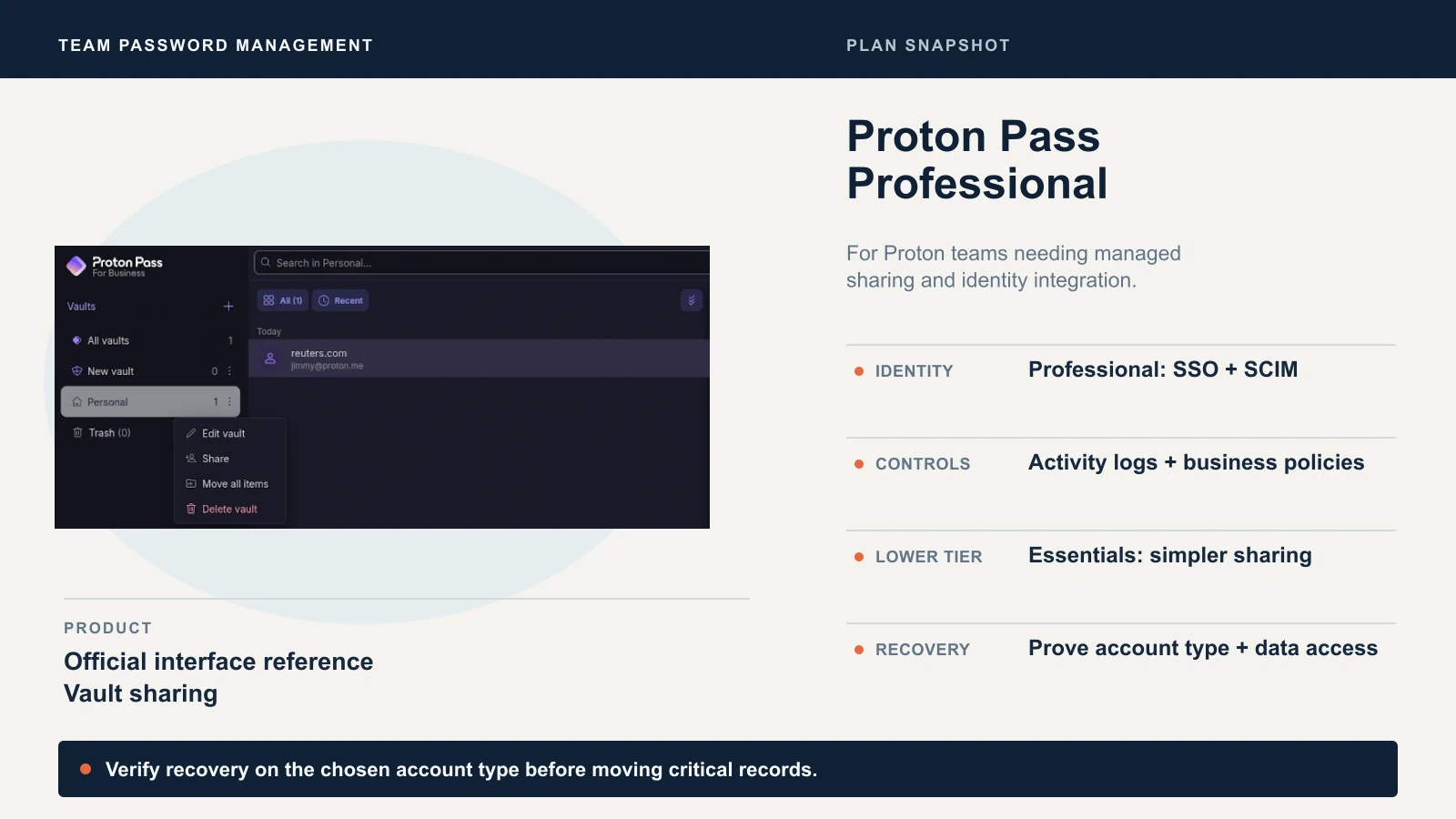
Official Proton vendor demonstration.
Already running a business manager? Keep it
If your current manager is configured properly and passes the acceptance checks below, do not migrate to follow this article. Keeper, NordPass and Dashlane's current Omnix Password Management are legitimate business options. We left them out of the worked examples to keep the focus, not because they are inferior or unsafe.
Build a pilot before moving real accounts
Recovery is rarely tested until it is needed. Test it with fictitious data first.
Your owner and backup recovery operator are already in place from the first step, so the pilot adds one thing: a disposable employee account. Fill a restricted Finance vault and an Office operations vault with dummy records, and have the operators run the checks against the disposable account. Use the Windows and Mac browsers and the phones your office actually uses, not whichever is convenient. Then run these checks.
| Check | Dummy-data exercise | Evidence required before rollout |
|---|---|---|
| Ownership | Create Office operations and restricted Finance vaults or collections | Business-owned records stay available to authorized staff |
| Least privilege | The employee opens Office operations but cannot open Finance | Correct result through individual and group membership |
| Recovery | Trigger the supported recovery procedure for the disposable employee | An authorized operator restores login and access to required data; enrollment prerequisites recorded |
| Backup and import | Move ten fictitious records of varied types | Reconciled count, fields and attachments; actual formats recorded |
| MFA and passkeys | Sign in on the usual devices; transfer or replace a demo passkey | Successful downstream login; separate MFA recovery material retained |
| Departure | Revoke the disposable membership and service sessions | The remaining team still works; known exposed shared secrets rotated |
| Emergency | Simulate an unavailable primary admin or identity provider | A documented independent route with the second operator |
Do not lock out a production administrator to manufacture a test. Record the plan, account type, client versions, operating systems, date, procedure and result in a private file. A pilot passes only on actual results, and a table of checks you intend to run is not a result.
Planning example: a five-person Miami office
Take an office with Windows laptops, one Mac and a mix of phones. Finance credentials go to two authorized people, and ordinary staff cannot open them. The first batch is ten fictional office-operations items, including one TOTP entry and one attachment. The pilot passes only when intended access works, unintended access fails, recovery succeeds and removing the disposable employee leaves the remaining team working.
Design business-owned vaults and collections
Organize by role, not by who happened to create the entry. Finance, Office operations and IT administration make a workable starting set for a small team. Each shared credential lives in one of them. This is also the practical answer to how to share passwords securely at work: through a business-owned vault with named access, not through chat, email or a spreadsheet.
Two rules matter more than the structure. A critical shared credential cannot live only in one employee's personal collection, because it leaves with them. And each person gets the least access the job needs. Check group grants and individual grants together, since the effective permission is the combination.
A note on "hide password" settings. 1Password's own permission enforcement documentation describes export and copy restrictions as client safeguards, so a determined person who can read a secret can extract it. Treat access as the control, and restrict who can open a vault rather than relying on what the interface hides.
Migrate one low-risk batch and reconcile it
Start with the inventory. List the item types in the source, who owns each one, and which are shared. A spreadsheet row, a browser-saved login and a TOTP seed need different handling, and you cannot reconcile what you never counted.
Use the vendor-supported import, or the vendor's own account-to-account move where one exists. 1Password, for example, documents moving work items from a family account into a business account. That is a different job from a cross-vendor import, so check which one you have. Then move one low-risk batch, the office-operations items, and reconcile it before touching Finance.
A login count is not proof. Spot-check URLs, usernames, passwords, notes, TOTP, attachments and passkeys. Stop immediately if you see duplicate imports or records landing in the wrong destination, such as a personal vault instead of the organization.
What survives depends on the format:
- Logins. Verify URL matching and multi-step autofill by signing in, not by counting rows.
- TOTP. Prove the code works at the service, and keep recovery material independently available.
- Attachments. Open the file. Bitwarden's ZIP export with attachments currently covers individual vaults, not every organization export, and an individual export does not include organization-owned records.
- Passkeys. Support is platform dependent. 1Password's desktop apps cannot export passkeys, while its iOS and Android apps can transfer them to apps that support Credential Exchange. Bitwarden's JSON export includes stored passkeys, but its CSV does not. If a transfer is unsupported, register a replacement while the old sign-in still works. Our passkey guide covers the adoption side.
- Shared records. Verify ownership and membership at the destination, not just the original creator's access.
- Emergency secrets. Do not store the only vault, identity-provider or email recovery material inside the vault it unlocks.
Protect exports and keep a bounded rollback path
A plaintext export puts every exported password in one readable file. 1Password's CSV and 1PUX exports are unencrypted, and Bitwarden's plain JSON and CSV are too.
Handle the file as a secret. Create it on a company-managed device, keep it in restricted local storage, and keep it out of cloud-sync folders, email and public conversion websites. A Downloads folder that syncs to the cloud counts as a cloud-sync folder. Delete temporary copies after acceptance, under your retention policy, and know the limit: deleting a file from an SSD does not guarantee every backup copy is gone.
Use a supported encrypted backup where one exists, but do not assume another vendor can read it. Bitwarden's encrypted JSON can be tied to the exporting account, or protected with a password, and an encrypted archive is not necessarily importable elsewhere.
Rollback needs a boundary. Keep the old system available until acceptance, then set an end date. During parallel operation, pick one authoritative system for edits and name the person who reconciles changes. If two vaults are edited at once, the same service can end up with two different passwords.
Prove recovery and offboarding, then expand
Run the recovery and deletion tests on the disposable employee account, not on real staff. Trigger recovery first, then remove the account, and confirm a remaining employee can still open the business records. On 1Password, recovery resets the person's two-factor authentication, so they must set it up again. A member who signs in with a password receives a new Secret Key and creates a new account password; a member who unlocks with SSO links their apps and browsers again instead.
Offboarding has two jobs. Revoking access stops future use of the manager. Rotation deals with what the person already knew.
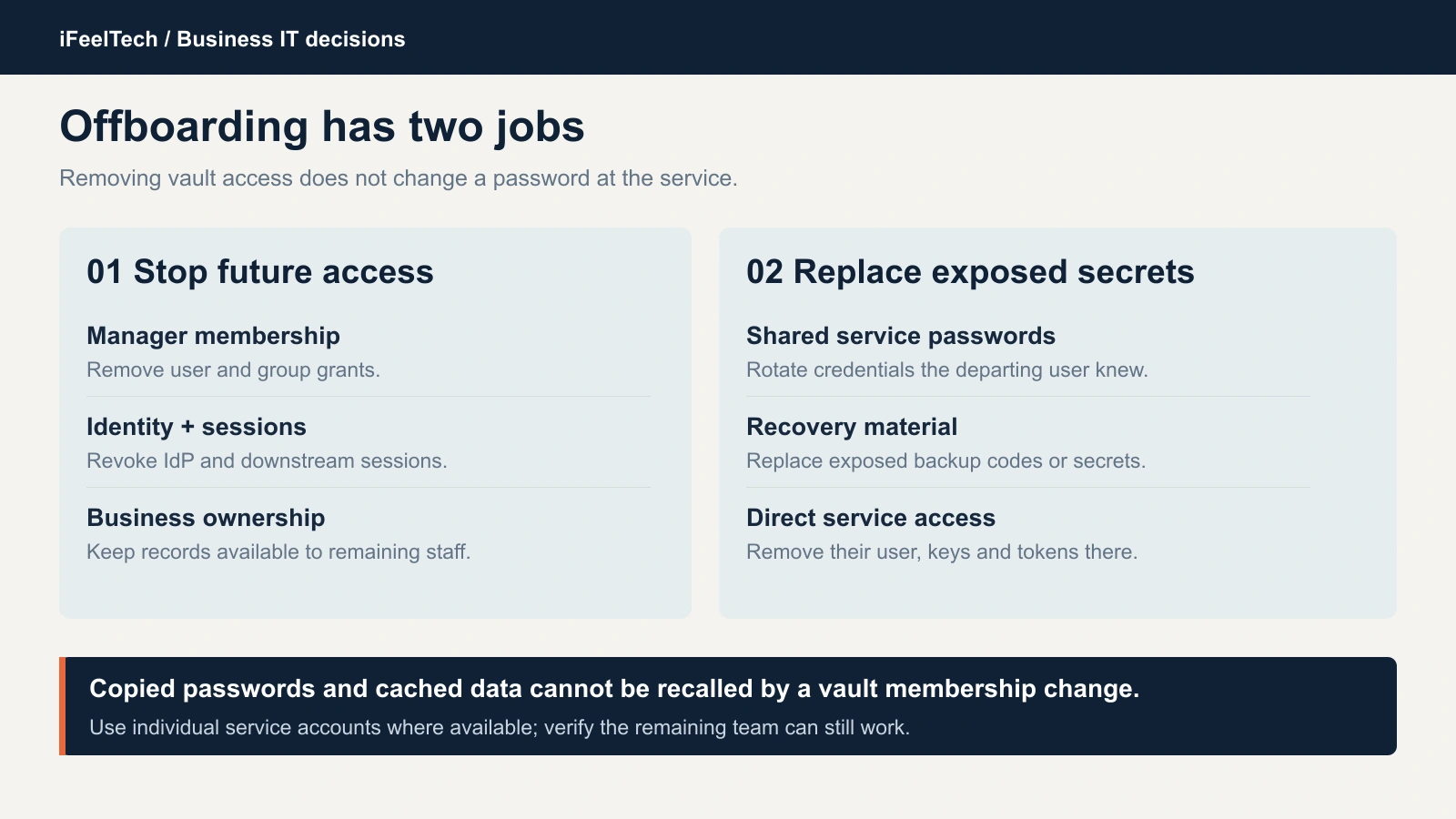
Removing manager membership and rotating exposed downstream credentials are separate tasks.
When someone leaves, remove their manager membership and group grants, revoke their identity-provider and downstream service sessions, and transfer ownership of any service registered to them. Rotate the shared credentials they could open, and reissue recovery codes that were exposed. Cached or copied credentials cannot be recalled by removing vault membership, which is why rotation matters. Our former employee access guide walks through the audit, and the IT handover checklist covers the same ownership questions when you change providers.
Expand by department only after the acceptance checks pass. Teach each group how to save, autofill and read the security reports, and add the manager to your new-employee onboarding checklist so later hires start in the business vault. Then put an access review on the calendar. Quarterly is a workable rhythm for a small team.
The bottom line
Unclear ownership and untested recovery can cause avoidable lockouts, and an offboarding step that stops at the vault leaves access behind. Name two recovery operators, prove recovery with dummy data, and move one low-risk batch before the essential accounts. Choose the cheapest plan whose controls match what you actually need, and keep a manager you already run if it passes the same checks.
Want help running the pilot?
Our managed IT services team can set up the pilot, run the recovery and offboarding tests, and carry out the cutover for South Florida offices.
Sources
- 1Password: pricing, account recovery, recovery planning and export.
- Bitwarden: pricing, account recovery and export.
- Proton Pass: business pricing, account recovery and administrator tools.
The cover is an editorial composition, not a photograph of a deployment.
Related Resources
- Passkeys and Your Password Manager — Why a password manager still matters as passkeys spread.
- Former Employee Access Security — Audit and revoke access when someone leaves.
- Small-Business IT Handover Checklist — Ownership and credentials when you change IT providers.
- Managed IT Services — Deployment and support across South Florida.
Frequently Asked Questions
Related Articles
More from Cybersecurity
1Password Business Review 2026: SSO, Admin Controls, Pricing, and Real-World Adoption
1Password Business review after dozens of SMB deployments: 4.5/5. Admin console, SSO, Watchtower, real costs at $8.99/user/month, and when the premium is worth it.
24 min read
1Password vs Built-in Managers: Complete 2026 Guide
Comprehensive comparison of 1Password Business vs Google Password Manager, Apple Passwords app, and Microsoft Edge. Decision framework, cost analysis, and implementation guide for small businesses.
11 min read
Are Free VPN Extensions Safe for Small Businesses? A July 2026 Check
Recent VPN incidents showed how extensions can expose passwords, AI conversations, and browser traffic. Learn how to audit extensions, build an allowlist, and protect your company.
11 min read