

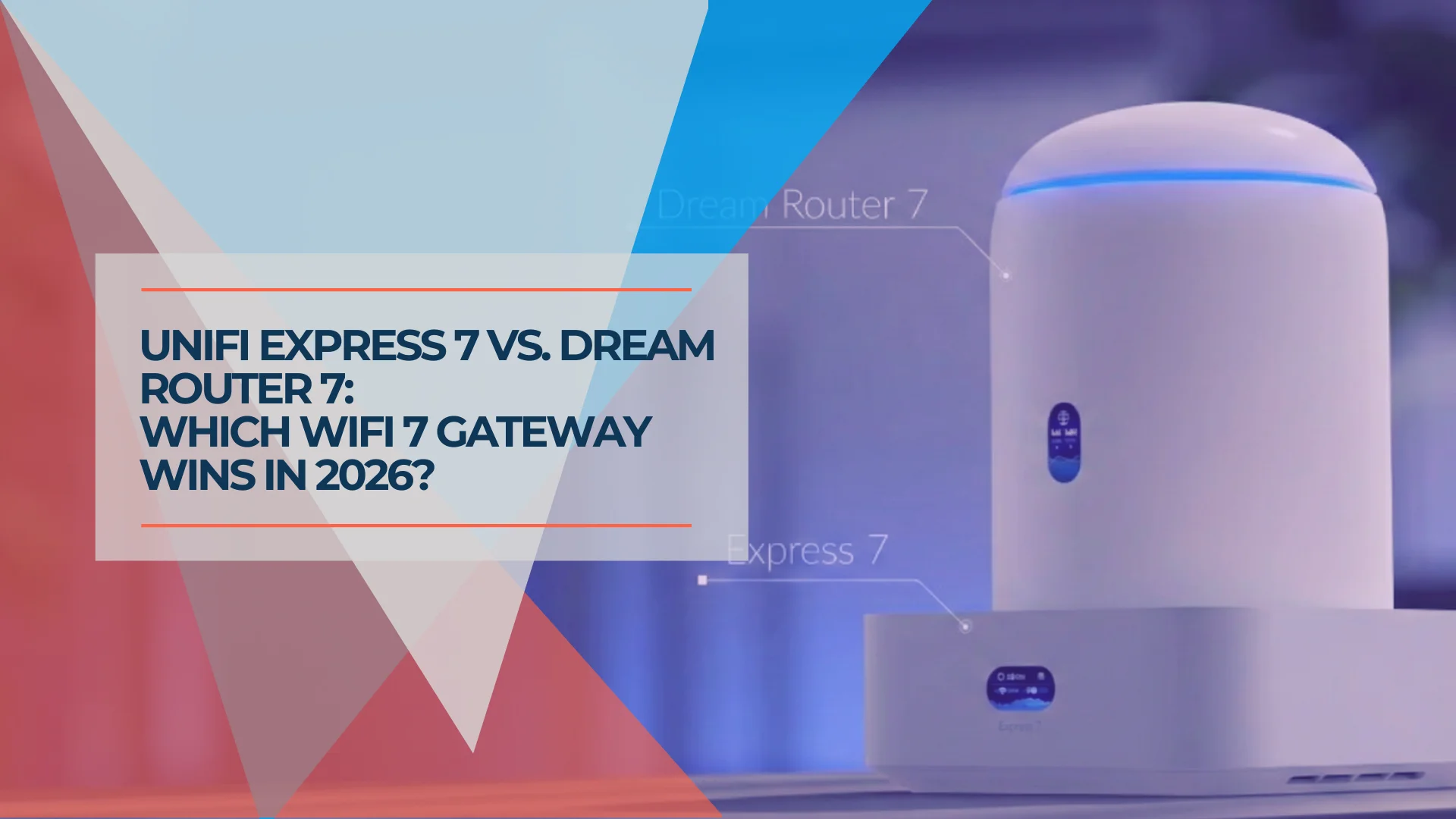
UniFi Express 7 vs Dream Router 7: Which Wi-Fi 7 Gateway Fits Your Network?
Compare the $199 UniFi Express 7 and $279 Dream Router 7. Specs, setup simplicity, port differences, and which Wi-Fi 7 gateway to buy for your small business or home office.

Affiliate Disclosure: This article contains affiliate links. If you make a purchase through these links, we may earn a small commission at no extra cost to you. As an Amazon Associate, iFeelTech earns from qualifying purchases.
Quick Decision
Buy the Express 7 if you need a compact Wi-Fi 7 gateway for a mostly wireless setup. Buy the Dream Router 7 if you need extra Ethernet ports, Protect cameras, dual-WAN failover, or a built-in PoE output.
Key Takeaway
The UniFi Express 7 ($199) and Dream Router 7 ($279) both use similar 2x2 tri-band Wi-Fi 7 radio specifications (BE11000, ~10.7 Gbps theoretical aggregate). Wireless performance is similar for most users, though the Dream Router 7 shows a small 5 GHz range advantage in third-party testing. The $80 difference comes down to ports and features: the Express 7 has 2 ports (1 WAN, 1 LAN) for wireless-first setups, while the Dream Router 7 offers 4 RJ45 ports plus an SFP+ WAN, built-in camera storage, dual-WAN failover, and the full UniFi application suite. With the 10G port used for WAN, downstream wired RJ45 ports top out at 2.5 GbE — neither device gives you separate dedicated 10G WAN and 10G LAN.
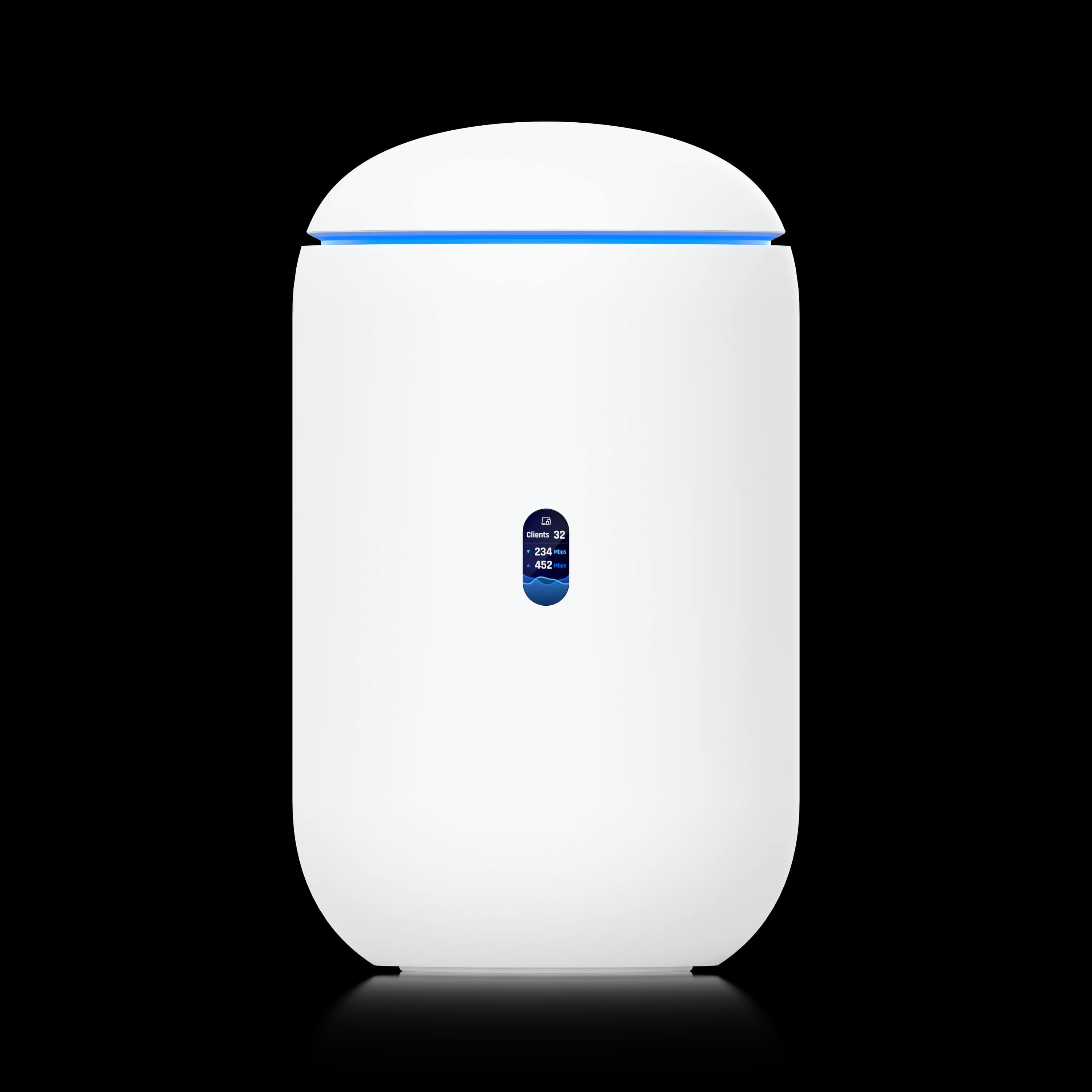
Dream Router 7
WiFi 7 gateway with 4 RJ45 + SFP+ WAN, built-in camera storage, dual-WAN failover, and the full UniFi application suite.
- 4 RJ45 total, 1 with PoE; SFP+ WAN
- Built-in Camera Storage
- Dual-WAN Failover
- Full App Suite
*Price at time of publishing
Where Do These Gateways Fit in UniFi's Lineup?
The Express 7 and Dream Router 7 are UniFi's entry-level WiFi 7 gateways, designed for small offices, home offices, and branch locations — not for rack-based deployments.
For larger networks with dedicated rack infrastructure, the UDM Pro or Pro Max lineup is the better fit. The Express 7 and Dream Router 7 serve smaller offices, branch sites extending a headquarters network, or home office setups using UniFi's Site-to-Site VPN or Magic SiteLink. For a full overview of every current gateway, see our gateway comparison guide.
UniFi Express 7 vs Dream Router 7 Comparison
Technical Specifications Comparison
The Dream Router 7 adds ports, PoE, storage, and the full UniFi app suite; Wi-Fi specs are similar on both devices.
| Specs | ||
|---|---|---|
| WiFi Standard | WiFi 7 (802.11be) Tri-band | WiFi 7 (802.11be) Tri-band |
| Max Throughput | BE11000 / ~10.7 Gbps aggregate | BE11000 / ~10.7 Gbps aggregate |
| WAN Ports | (1) 10 GbE RJ45 | (1) 10G SFP+ + (1) 2.5G RJ45 |
| LAN Ports | (1) 2.5 GbE | 3× 2.5GbE with RJ45 WAN, including 1 PoE; up to 4 with SFP+ as the only WAN |
| PoE Output | None | 15.4W / 802.3af (1 port) |
| Storage | None | 64GB microSD (expandable) |
| UniFi Apps | Network only | Full suite (Protect, Talk, Access, Connect) |
| Camera Support | None | 5× HD / 2× 2K / 1× 4K |
| IDS/IPS Throughput | 2.3 Gbps | 2.3 Gbps |
| Cooling | Quiet (no always-on fan) | Active fan |
| Power | 22W (USB-C) | 26W + PoE budget (internal PSU) |
| Form Factor | 117 × 117 × 42.5mm (443g) | Ø110 × 184mm tower (1,100g) |
| Mesh Capability | Yes — can be mesh AP | No — gateway only |
The Express 7 offers a minimalist 2-port layout (10G WAN, 2.5G LAN), while the Dream Router 7 provides four 2.5GbE RJ45 ports and one 10G SFP+ port. With an RJ45 port assigned to WAN, three RJ45 ports remain for LAN; one of those three supplies PoE. Using SFP+ as the only WAN can free the fourth RJ45 port for LAN.
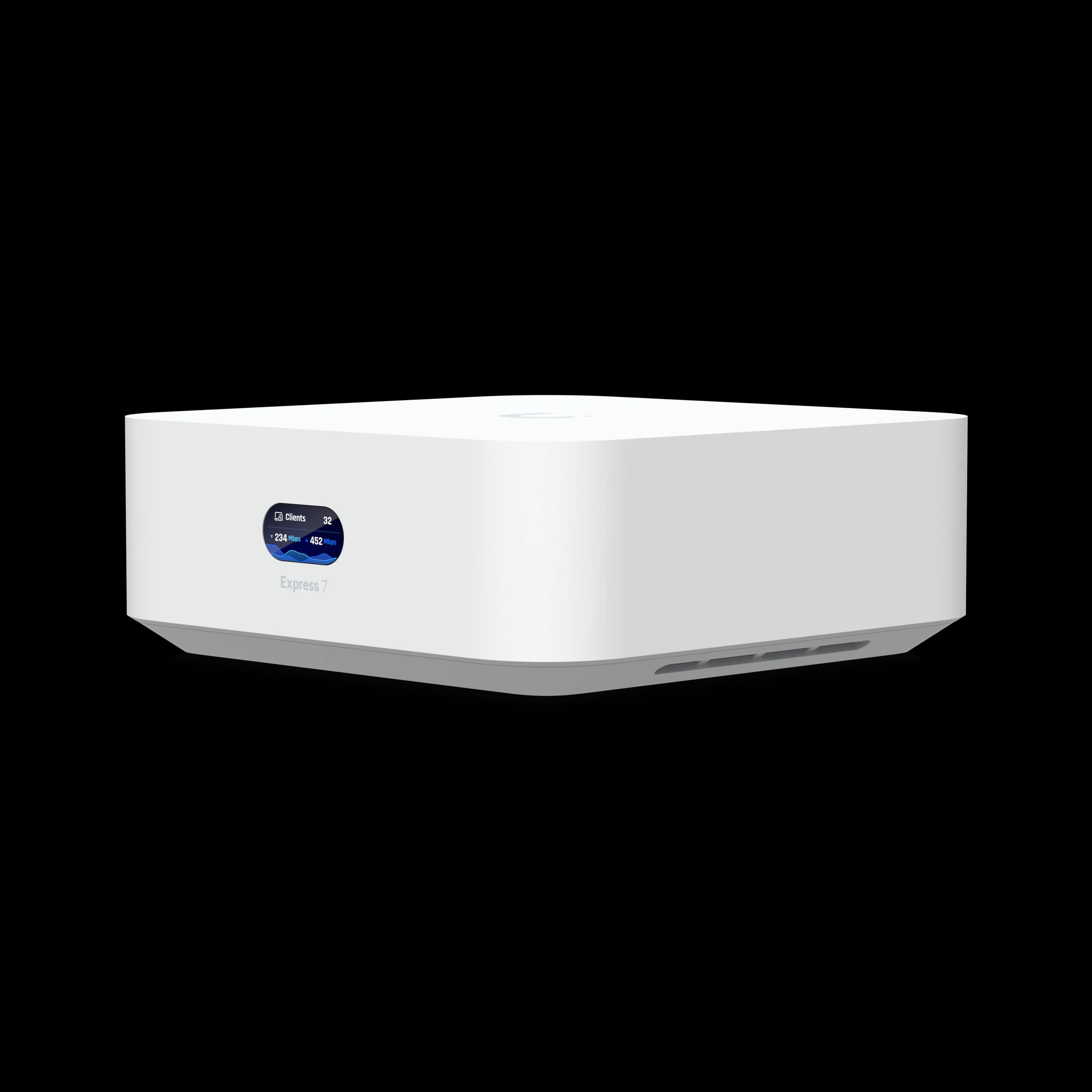
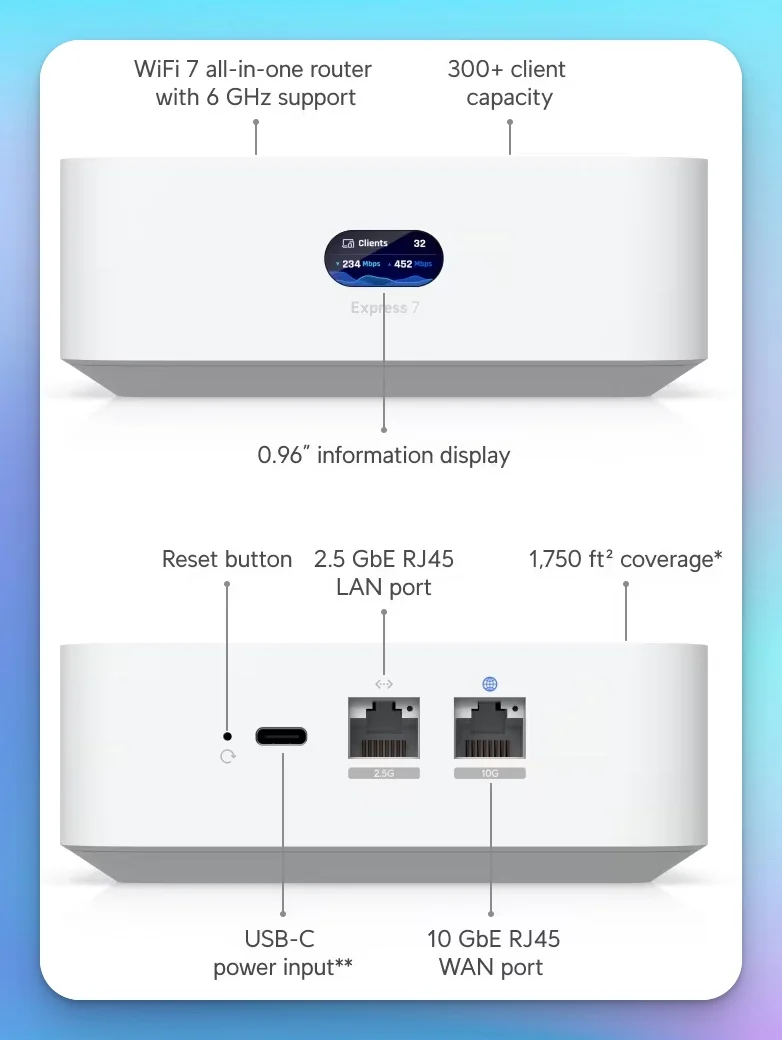 UniFi Express 7 — quiet compact design with a two-port layout
10G WAN ≠ 10G to Your Devices
With the 10G port used for WAN, downstream wired RJ45 ports top out at 2.5 GbE on both devices — neither gives you separate dedicated 10G WAN and 10G LAN. The UX7 uses a 10G RJ45 WAN port; the UDR7 uses a 10G SFP+ WAN port. The 10G WAN capacity serves aggregate bandwidth across all WiFi and wired clients combined. Additionally, enabling IDS/IPS caps routing throughput at approximately 2.3 Gbps on both devices.
The official Dream Router 7 port layout lists four RJ45 ports total, including the PoE port. LAN availability depends on the ports assigned to WAN.
Wired Connectivity: Express 7 vs. Dream Router 7
The Dream Router 7 is the better choice for wired networks, offering three 2.5G LAN ports when one RJ45 port is used for WAN, with PoE output on one of those LAN ports. The Express 7 requires an external switch for more than one wired device.
| Wired Device Count | UniFi Express 7 | Dream Router 7 |
|---|---|---|
| 0-1 devices (wireless-first) | ✅ Good fit | ⚠️ More than you need |
| 2-3 devices | ⚠️ Requires switch | ✅ Direct connection |
| 4+ devices | ⚠️ Requires switch | Depends on WAN assignments; use a switch when available LAN ports are insufficient |
| Need PoE camera/AP | ❌ Requires PoE injector | ✅ Powers 1 device (15.4W) |
- UniFi Express 7: Designed for wireless-first setups. Its single 2.5 GbE LAN port means you need a switch (like the USW-Lite-8-PoE) if you have hardwired desktops, printers, or a NAS.
- Dream Router 7: Acts as an all-in-one hub. Connect a PC, NAS, and printer directly to the three 2.5G LAN ports without an additional switch.
PoE Limitation
The Dream Router 7's single PoE port provides 15.4W (802.3af). This is enough to power a G5 Bullet camera or a VoIP phone, but it does not provide enough power for a U7 Pro Access Point (which requires ~21W / PoE+). If you need to power WiFi 7 APs, you'll need a PoE+ switch.
For businesses planning wired infrastructure, the Dream Router 7's additional ports can eliminate or postpone the need for a separate switch. For wireless-first environments, the Express 7's single LAN port works well when paired with a small switch. See our network cabling checklist for planning wired runs.
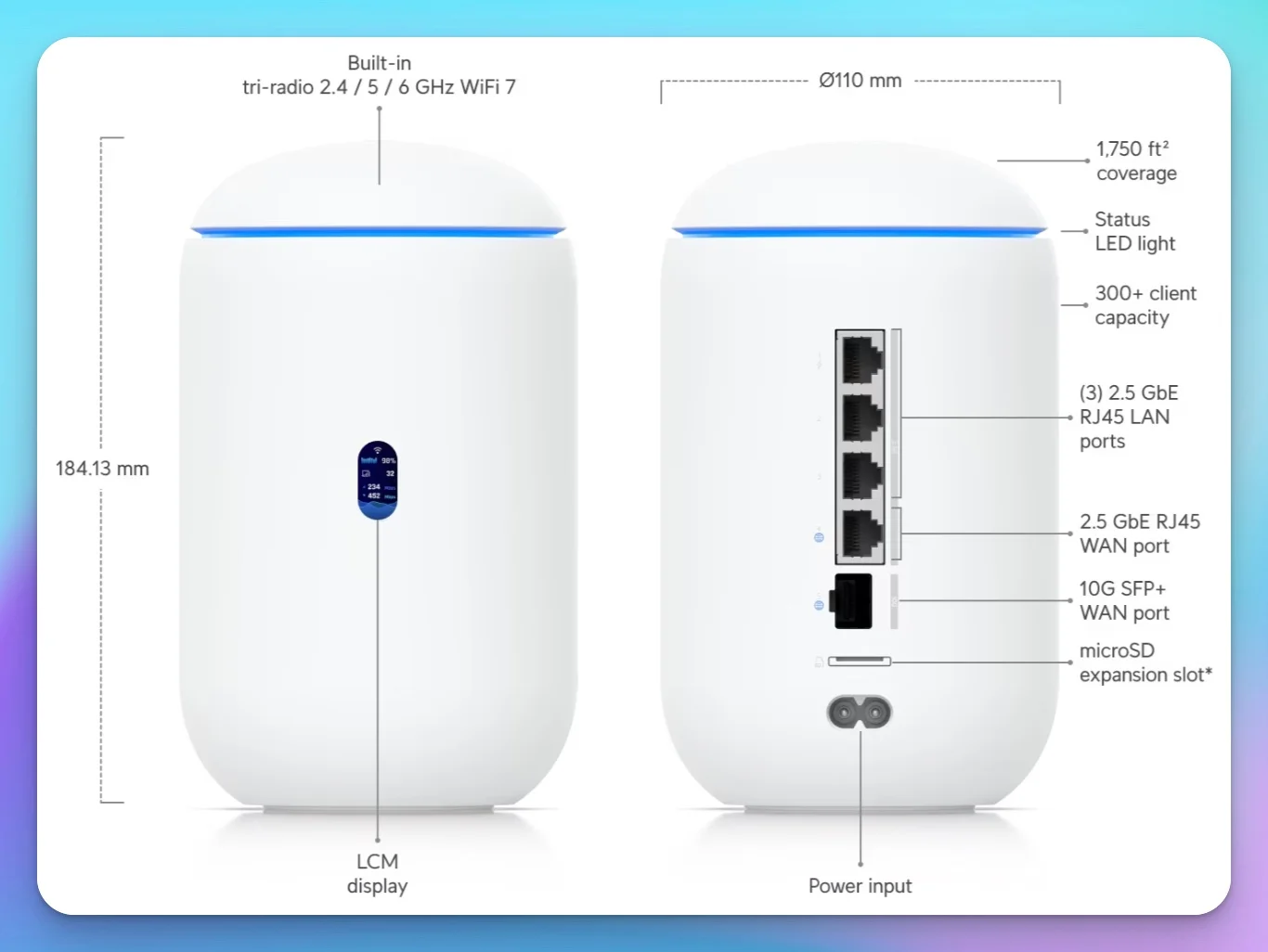 Dream Router 7 - Tower design with 4 RJ45 ports, SFP+ WAN, and active cooling
Which Gateway Is Easier to Set Up?
Both take about 5-10 minutes to configure via the UniFi app. The Express 7 has fewer decisions to make during setup because it only runs the Network application.
| Setup Step | UniFi Express 7 | Dream Router 7 | Simpler Option |
|---|---|---|---|
| Initial Setup | UniFi app, 5-10 minutes | UniFi app, 5-10 minutes | Tie |
| Port Planning | 2 ports (no planning needed) | 5 ports (requires WAN selection, port assignments) | UX7 ✅ |
| Application Selection | Network only (automatic) | Enable Protect/Talk/Access as needed | UX7 ✅ |
| Camera Integration | N/A | Protect app setup + camera adoption | UX7 ✅ |
| Physical Installation | Quiet compact design, flexible placement | Active fan, needs airflow clearance | UX7 ✅ |
| Dual-WAN Configuration | LTE Backup failover only | Full dual-WAN with failover + load balancing | UX7 ✅ |
| Storage Management | None | microSD capacity monitoring | UX7 ✅ |
The Dream Router 7 requires selecting which applications to enable (Protect, Talk, Access) during setup, adding a few extra steps. For a complete walkthrough of UniFi network deployment, see our small business network setup guide.
WiFi 7 Performance and Speed Benchmarks
Both gateways use similar 2x2 tri-band Wi-Fi 7 radio specifications, achieving real-world speeds between 800 Mbps and 1.6 Gbps on compatible clients.
Wireless performance is similar for most users. Both support 4K-QAM modulation, 320 MHz channel widths on 6 GHz, and Multi-Link Operation (MLO). Independent testing from RTINGS and user reports indicate:
- 6 GHz band: Approximately 2.1 Gbps in close-range testing with WiFi 7 clients
- 5 GHz range: The Dream Router 7 has a small range advantage in third-party testing, likely due to its larger tower chassis allowing better antenna separation
- Real-world speeds: 800 Mbps – 1.6 Gbps on devices like iPhone 16 Pro and recent Windows laptops with WiFi 7 radios
- Wired throughput: Both handle 2.5 Gbps connections well when IDS/IPS is disabled
- IDS/IPS cap: With security features enabled, both routers cap routing throughput at approximately 2.3 Gbps
For high-density environments that need more coverage, consider dedicated WiFi 7 access points like the U7 Pro paired with either gateway operating in router-only mode.
Do You Need Built-In Camera Storage?
If you plan to run even one UniFi Protect camera, the Dream Router 7 saves you from buying a separate NVR. If cameras aren't in your plans, the Express 7 avoids paying for storage you won't use.
| Your Camera Needs | UniFi Express 7 | Dream Router 7 |
|---|---|---|
| No cameras planned | ✅ Ideal choice | ⚠️ Paying for unused feature |
| 1-2 cameras | ⚠️ Requires separate ~$200 NVR | ✅ Built-in storage |
| 3-5 cameras | ⚠️ Requires UNVR Instant ($199) | ✅ Built-in, expandable microSD |
| 6+ cameras | ❌ Requires dedicated NVR | ⚠️ May need UNVR or UDM Pro Max |
Total cost analysis for a 3-camera deployment:
- Express 7 path: UX7 ($199) + UNVR Instant ($199) = $398 total
- Dream Router 7 path: UDR7 ($279) includes NVR for 1-5 cameras
- Savings with cameras: $119 by choosing Dream Router 7
The Dream Router 7 includes a pre-installed 64GB microSD card, suitable for light camera use or short retention periods. Actual recording time varies heavily by bitrate, codec, resolution, and whether you use continuous or motion-only recording — use Ubiquiti's storage calculator to estimate retention for your specific setup. The microSD slot supports expansion for extended retention.
For businesses planning any camera deployment, the Dream Router 7 is the more practical starting point. For wireless-only environments with no surveillance needs, the Express 7 keeps costs lower. For more on camera planning, see our UniFi Protect CCTV guide and Protect storage planning framework.
Which Gateway Fits Your Situation?
Scenario 1: Home Office / Freelancer (500-1,500 sq ft)
Typical setup: 5-15 wireless devices (laptops, phones, tablets), one UniFi switch or NAS for file storage, no security cameras.
Either gateway works well here. The Express 7 saves $80 and runs quietly in its compact form factor. The Dream Router 7 provides room to add cameras later without purchasing separate NVR hardware. WiFi performance is similar on both for video calls, file transfers, and productivity applications.
Scenario 2: Small Office (1,500-3,000 sq ft, 5-20 employees)
Typical setup: 20-50 wireless clients, 2-4 wired devices (server, NAS, printer, managed switch), VoIP desk phones, 1-3 security cameras monitoring entrances and common areas.
The Dream Router 7 is the better fit here with multiple LAN ports eliminating the need for an immediate switch purchase. The 15.4W PoE port powers one 802.3af UniFi camera or VoIP phone directly. UniFi Protect provides camera management without separate NVR hardware. The dual-WAN capability enables failover to cellular backup or secondary ISP. The Express 7 works too, but requires adding a PoE switch and separate NVR for cameras.
Scenario 3: Retail / Coffee Shop (High-Density Public WiFi)
Typical setup: 50+ rotating wireless clients, 2-3 security cameras (entrance, register, storage area), POS terminal, guest WiFi with bandwidth limits.
The Dream Router 7 fits better with built-in camera storage for loss prevention and security monitoring. UniFi's guest portal and bandwidth limiting features work on both gateways. The tri-band WiFi 7 configuration distributes traffic effectively as client density fluctuates.
Scenario 4: Mobile / RV / Remote Work Setup
Typical setup: 5-10 wireless devices, portable deployment requiring frequent moves, USB-C power preferred for flexibility.
The Express 7 is the better fit for portability. The compact 117mm form factor, 443g weight, quiet compact design, and USB-C power input make it more practical than the Dream Router 7's 1.1kg tower with internal power supply. The Express 7 can also function as a mesh access point when adopted into an existing UniFi network, providing seamless roaming between locations.
Does the Dream Router 7 Support Dual-WAN Failover?
Yes — the Dream Router 7 combines a 10G SFP+ port and a 2.5G RJ45 WAN port, enabling automatic failover and load balancing. The Express 7 lacks built-in dual-WAN and multi-WAN load balancing, though it does support additional internet failover with a UniFi LTE Backup device connected to the network. For full dual-WAN with two hardwired ISP connections, the Dream Router 7 is the better choice.
Typical business implementation:
- Primary WAN: Fiber internet via 10G SFP+ module (1-10 Gbps fiber service)
- Backup WAN: Cable modem, Starlink, or UniFi 5G Max via 2.5G RJ45 WAN port
- Automatic failover: UniFi Network Application monitors primary connection health and switches to backup WAN when primary fails
For businesses where internet downtime directly impacts revenue — online retail, SaaS companies, customer service centers — dual-WAN failover is a practical safeguard. The $80 price difference is modest in those environments, though the value depends on how often your primary connection goes down and whether you already have a backup ISP.
The Express 7's single WAN port serves environments where internet reliability comes from a single high-quality ISP (fiber with SLA) or where temporary outages don't significantly impact operations.
For detailed dual-WAN configuration, see our 5G failover setup guide.
What UniFi Applications Does Each Gateway Support?
The Express 7 runs only the UniFi Network application. The Dream Router 7 supports the full suite — Protect, Talk, Access, and Connect — from a single device.
| UniFi Application | Functionality | UX7 Support | UDR7 Support |
|---|---|---|---|
| Network | WiFi, routing, firewall, VLANs | ✅ Yes | ✅ Yes |
| Protect | Camera management, NVR, motion alerts | ❌ No | ✅ Yes |
| Talk | VoIP phone system, call routing | ❌ No | ✅ Yes |
| Access | Door locks, access control | ❌ No | ✅ Yes |
| Connect | Digital signage, A/V, lighting, EV charging | ❌ No | ✅ Yes |
When the full suite matters: Businesses planning cameras, door access control, or VoIP phones benefit from the Dream Router 7 running all applications from a single gateway. This eliminates the need for separate NVR hardware, a separate phone controller, or cloud-hosted access control subscriptions.
When Network-only is enough: Home offices, small teams focused on connectivity, or businesses using third-party camera systems (Axis, Hikvision) can run effectively with the Express 7's Network application. Adding cameras later requires a separate UNVR ($199+) but keeps the initial gateway cost lower.
What Does Each Gateway Cost Over 3-5 Years?
Both gateways share the same WiFi 7 wireless capabilities, so longevity is comparable. The total cost difference depends on whether you need cameras and additional hardware.
Scenario: Small office needing WiFi 7 + 3 cameras + VoIP phones
| Component | Express 7 Path | Dream Router 7 Path |
|---|---|---|
| Gateway | $199 (UX7) | $279 (UDR7) |
| NVR for cameras | $199 (UNVR Instant) | $0 (built-in 64GB) |
| PoE switch for cameras | $109 (UniFi Lite 8 PoE) | $0 (1 camera via PoE port) + $109 (for 2 additional cameras) |
| Total | $507 | $388 |
In this scenario, the Dream Router 7 consolidates NVR functionality and provides one PoE port, reducing the need for additional hardware. For multiple PoE cameras, the Dream Router 7 still needs a PoE switch; its savings come mainly from built-in Protect storage and one PoE output. If you're uncertain about cameras, the Express 7 lets you add camera infrastructure later with a separate NVR.
Both approaches to camera deployment work well; the choice depends on your planning certainty and whether you value flexibility or initial simplicity.
When Neither Gateway Is the Right Choice
The Express 7 and Dream Router 7 are Wi-Fi-integrated gateways designed for smaller deployments. If your requirements don't fit either device, consider these alternatives from Ubiquiti's current lineup:
- Cloud Gateway Fiber ($279): A wired-first desktop gateway with three 10G ports, 5 Gbps IDS/IPS routing, and NVMe storage — but no built-in Wi-Fi. Pair it with dedicated access points for a modular, higher-throughput deployment.
- Cloud Gateway Max ($199–$279) + dedicated U7 access point: Separates routing from wireless coverage. The UCG Max provides 2.3 Gbps IDS/IPS and optional NVMe storage for Protect, while a ceiling-mounted AP like the U7 Pro delivers better coverage than any gateway's built-in radio.
- UDM Pro / Pro Max: Rack-mounted gateways for offices that need higher IDS/IPS throughput, larger Protect deployments, or enterprise-grade redundancy.
If your deployment involves more than 50 devices, rack infrastructure, or high-throughput IPS requirements, these alternatives will serve you better than either desktop gateway.
Frequently Asked Questions
Can I upgrade from UniFi Express 7 to Dream Router 7 later?
Yes. Most UniFi Network settings can be migrated through backup and restore. Export your configuration, adopt the new Dream Router 7 as your gateway, and restore. Plan a short maintenance window and confirm app versions match before migrating.
Does the UniFi Express 7 support UniFi Protect cameras?
No. The Express 7 runs the UniFi Network application only. For camera support, you'd need a separate NVR like the UNVR Instant ($199) or a gateway like the Dream Router 7 or UDM Pro that includes built-in storage.
Is the Dream Router 7's fan noisy?
The Dream Router 7 uses active fan cooling. It operates quietly under normal loads, but the fan ramps up noticeably during high-traffic periods or when running multiple UniFi applications simultaneously. If this gateway will sit on your desk or in a bedroom, the Express 7's quiet compact design is a better fit for noise-sensitive environments.
Can I use the Dream Router 7 as a mesh access point?
No. The Dream Router 7 must function as the primary gateway in a UniFi network. The Express 7, however, can be adopted as a mesh access point in an existing UniFi network, making it more flexible for network expansion or branch office deployments.
What's the actual WiFi performance difference between these gateways?
Similar for most users. Both use similar 2x2 tri-band Wi-Fi 7 radio specifications (BE11000, ~10.7 Gbps theoretical aggregate). The Dream Router 7 has a small 5 GHz range advantage in third-party testing, but real-world WiFi speeds are comparable on both devices for typical use.
Do I need a UniFi switch with either gateway?
For the Express 7, its single LAN port means an external switch is needed for more than one wired LAN device. The Dream Router 7 has four 2.5GbE RJ45 ports total, including one PoE port, plus a 10G SFP+ port. With one RJ45 port assigned to WAN, three RJ45 ports remain for LAN and the PoE port is one of those three. Using SFP+ for the only WAN can free the fourth RJ45 port for LAN; extra WAN assignments reduce available LAN ports.
Which gateway handles faster internet better (5 Gbps fiber)?
Both gateways include 10 GbE WAN ports capable of handling multi-gigabit connections. However, both have a 2.3 Gbps IDS/IPS throughput limitation. If you enable intrusion prevention and content filtering on a 5 Gbps connection, throughput will cap at approximately 2.3 Gbps. Disable these features for full-speed operation.
Is the UniFi Express 7 better for travel or RV use?
Yes. The Express 7's compact form factor (117mm square, 443g), quiet compact design, USB-C power input, and lower power consumption (22W vs 26W) make it well-suited for portable deployments. The Dream Router 7 is a 1.1kg tower with an internal PSU, designed for permanent installation.
How fast is VPN throughput on these gateways?
Both gateways support WireGuard and OpenVPN for remote access. In our testing with a single WireGuard tunnel over a gigabit WAN connection, both gateways delivered adequate throughput for remote workers accessing files and internal applications. Performance varies depending on encryption overhead, client hardware, and WAN conditions. For higher VPN throughput, the UDM Pro Max handles WireGuard at over 1 Gbps.
Is the Express 7 faster to boot than the original UniFi Express?
Yes. The original UniFi Express (UX) was known for slow boot times (10+ minutes) and occasional UI lag. In our testing, the Express 7 boots significantly faster and the controller UI is noticeably more responsive, in line with the Dream Router 7. Both gateways now provide a smooth management experience through the UniFi Network Application.
Making Your Decision
From Our Deployments
In small-office UniFi deployments, we typically choose the Dream Router 7 when the client has wired devices, one or two cameras, or a backup internet connection. We choose the Express 7 when the site is wireless-first and already has a switch or separate camera system.
Choosing Between Them
Both are capable Wi-Fi 7 gateways with similar wireless performance. The choice is straightforward:
Go with the Express 7 ($199) if you prefer:
- Simpler setup with fewer configuration options
- Wireless-first environment (most devices on WiFi)
- Quiet, compact operation
- Lower initial cost
- Flexibility to add features later
Go with the Dream Router 7 ($279) if you want:
- More Ethernet ports without adding a switch
- Built-in camera storage (UniFi Protect)
- Dual-WAN for internet failover
- Full UniFi application suite
- Integrated PoE for one device
Can't decide? For a wireless-first home office, choose the Express 7. For a business site with wired devices or cameras, choose the Dream Router 7.
UniFi Express 7
$199Quiet, compact Wi-Fi 7 gateway with USB-C power for wireless-first setups. Can also serve as a mesh AP in existing UniFi networks.
The $80 difference between these gateways is modest in the context of network infrastructure. The Express 7 suits wireless-first environments where simplicity matters most. The Dream Router 7 is the better fit if you're planning cameras, need extra Ethernet ports, or want dual-WAN failover. The difference is primarily in wired connectivity and optional features — WiFi performance is similar for most users.
Don't Forget
Neither gateway includes PoE for multiple devices. If you're adding more than one PoE camera or access point, budget for a PoE switch regardless of which gateway you choose.
Need help planning your UniFi deployment? Our team provides network assessments and professional installation throughout South Florida. Contact us for a customized gateway recommendation based on your specific requirements.
For additional guidance, see our Dream Router 7 review, WiFi 7 AP buyer's guide, and small business network setup guide.
Related Articles
More from UniFi Networks
Which UniFi Gateway is Right for You? UDR7, UX7, or UCG Fiber
Compare the UniFi Dream Router 7 ($279), Express 7 ($199), and Cloud Gateway Fiber ($279+). Specs, use cases, and which compact gateway fits your network.
10 min read
UniFi Dream Machine Beast Review 2026: Hands-On SMB Verdict
A hands-on UniFi Dream Machine Beast review from an SMB integrator: official specs, real deployment notes, 100W power draw, the no-PoE catch, and who the $1,499 gateway is actually for.
13 min read
UniFi Dream Machine Beast vs UDM Pro Max: Which Gateway Is Right for Your Business?
UniFi Dream Machine Beast vs UDM Pro Max: specs comparison, real deployment scenarios, TCO analysis, and the four network profiles where the $1,499 Beast outperforms the $599 Pro Max.
14 min read