

Battery Backup for a Modem and Router: Business UPS Guide
Choose a battery backup for your modem and router. Compare six business UPS models by runtime at small loads, rack fit, circuit needs and monitoring.

A UPS can keep a modem, router and small switch online through a power cut, provided every device in the connection path is on battery and the model's runtime at your measured load covers the time you need. For a small office connection that draws about 80 watts, the manufacturers' published curves list 61 to 137 minutes at 100W for a new, fully charged battery across the six models below. Your measured load, battery age and temperature decide the real figure, and your ISP's own equipment still needs power. Start with your complete load and your target backup time, then choose between a compact tower and a short-depth rack unit, and check the circuit before you order.
Affiliate Disclosure: This article contains affiliate links. If you make a purchase through these links, we may earn a small commission at no extra cost to you. As an Amazon Associate, iFeelTech earns from qualifying purchases.
Quick Verdict
Small network rack on a standard outlet: the CyberPower CP1500PFCRM2U. It is 2U, 10.5 inches deep, has sine-wave battery output and a standard 5-15P plug.
A shelf, no rack: the CyberPower PR750LCD3C. It adds a built-in cloud monitoring port in a tower body.
Check first: your measured watts, your target backup time and your circuit. Four other models cover a lower-cost, higher-load, APC or larger-tower need.
How this guide was built
Specifications and runtimes come from the manufacturers' datasheets and runtime curves, plus an independent review of one exact model, checked October 10, 2026. We deploy UPS units like these in client installations. Runtimes below are the vendors' published figures for a new battery, so measure your own load and run a timed test before you rely on them.
What stays online, and what does not
Walk the path from the wall jack to a laptop and list every powered device the connection needs: the modem or ONT, the gateway or router, the switch if one sits in between, any access point that covers where you work, and any cellular or satellite failover device. Each of those needs battery power, or the connection depends on a wall outlet.
Two limits sit outside the UPS:
- Your ISP. A UPS powers your equipment. If the provider's network equipment loses power or fails, a powered router has nothing to connect to. Ask your provider what backup power its local equipment has. A second connection covers the gap; our guides to dual-WAN failover, Starlink for business failover and what to do when business internet goes down show how. Carrier-supplied cellular backup, such as the AT&T Business Fiber 5G failover gateway, also needs local power. The failover device belongs on the UPS too.
- The cloud. With the ISP down, the local network can keep running. Computers can still reach a local printer or file share over Wi-Fi if the gateway and access points have power. Cloud apps, hosted phone systems and email cannot work without the internet.
If your ONT sits far from your rack, it needs its own small UPS. Access points in another room either draw PoE from a switch on the UPS or need a UPS of their own.
Measure your load and pick a backup time
A UPS has two ratings that get confused. Watts is the real power the equipment draws. VA is volts times amps, and it is always equal to or higher than watts. Keep the load below both the UPS's watt rating and its VA rating, as APC's buying guide advises. Then check the runtime curve against the backup time you need. VA is not minutes.
- Measure each device while it is running. Use a plug-in power meter at the wall. A power adapter's label gives its rated output capacity, not the device's normal AC consumption. Measure the draw at the wall.
- Count PoE once. Access points, phones and cameras powered by a switch are already in the switch's AC input. Measure the switch at the wall, or use its power report only if it covers the whole switch and not just the PoE it delivers.
- Add separately powered devices, such as an ONT or standalone modem.
- Leave headroom below the UPS's watt and VA ratings for equipment you add later.
- Set a target time. Riding out a blink and shutting down cleanly is a different design from an hour of coverage.
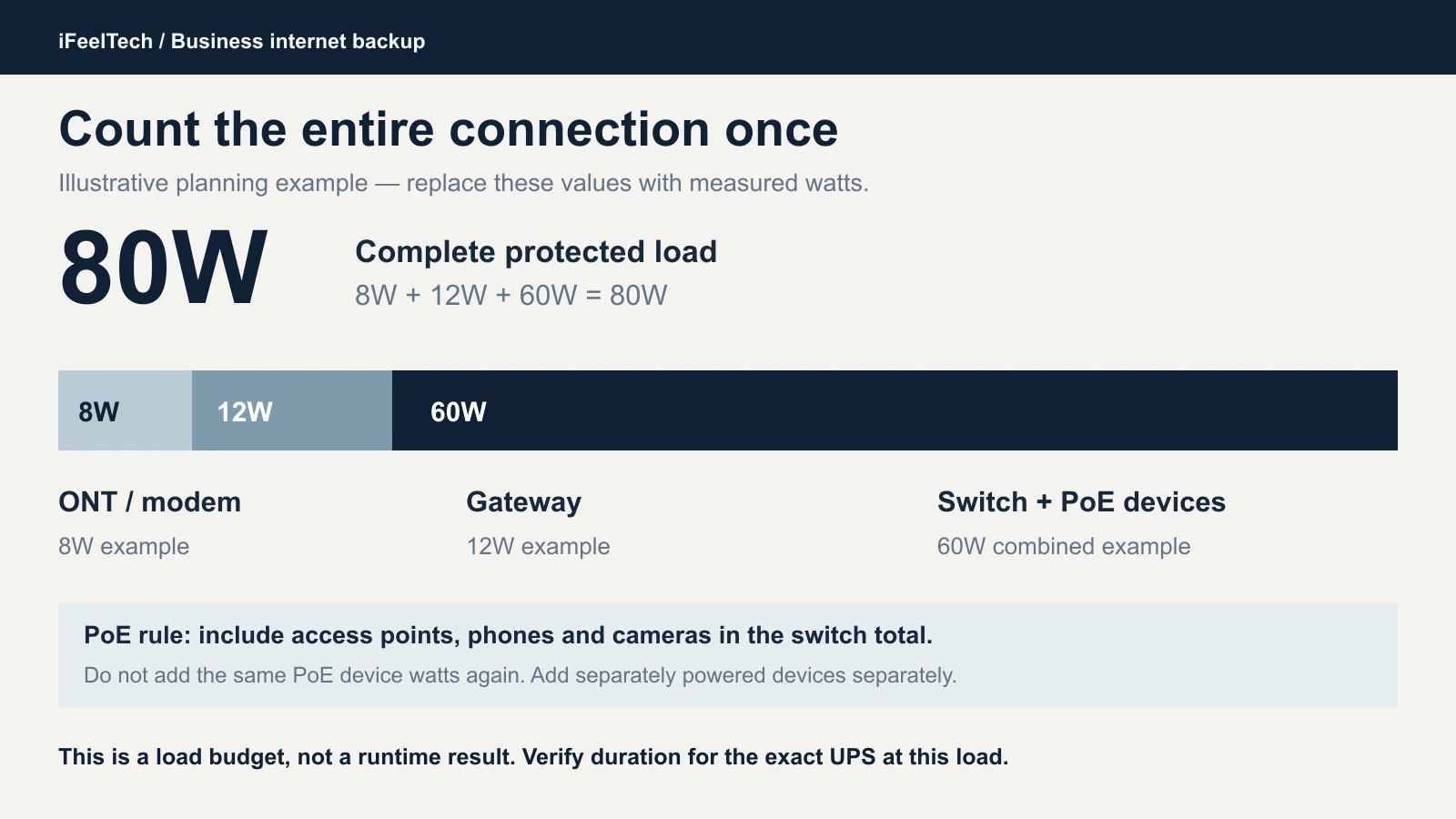
That 80W example is hypothetical: an 8W ONT, a 12W gateway and a 60W switch that already includes its PoE devices. Replace it with your measured numbers. For PoE sizing, see our Power over Ethernet guide.
How long each model runs at small loads
Manufacturers publish half-load and full-load minutes at hundreds of watts, which says little about a network closet. Their runtime curves go lower. These are the points for 50 to 300W, in minutes, for a new, fully charged battery:
| Model | 50W | 100W | 200W | 300W |
|---|---|---|---|---|
| CP1500PFCRM2U | — | 66.2 | 33.5 | 21.4 |
| PR750LCD3C | 144.2 | 61.2 | 28 | 15.6 |
| SMART1500LCD | — | 69 | 32 | 20 |
| CP2000PFCRM2U | — | 80.1 | 39.8 | 24.1 |
| SMC1500-2UC* | — | 124 | 60 | 37 |
| PR1500LCD | 229.8 | 137 | 65.7 | 38.8 |
Sources: CyberPower's runtime curves on each product page, Eaton's SMART1500LCD runtime chart and, for the APC (*), the runtime estimator on APC's SMC1500-2UC product page. The estimator accepts loads from 90W to 900W, and the 100W, 200W and 300W values here are its results, rounded to whole minutes. Some retailers list different SMC1500-2UC runtimes, so we use APC's own figures. A dash means the manufacturer's data has no point at that load (for the APC, 50W is below its 90W minimum). Eaton's chart also lists 87 minutes at 80W for the SMART1500LCD. These are estimates for new batteries, not our measurements.
A worked example. Take the 80W connection above and a 60-minute target. The table starts at 100W, which is 20W more than the example, so real runtimes should be longer than the 100W column. Every model lists 61 minutes or more at 100W, so all six are candidates for an 80W, 60-minute requirement. The smallest margin is thin: the PR750LCD3C's 61 minutes at 100W leaves little room for an ageing battery. Keep a reserve beyond your target and confirm it with a timed test at your actual load. If several candidates pass, fit, circuit, monitoring and battery service decide the choice.
Two things the table shows:
- VA does not predict runtime. The 1500VA PR1500LCD lists 137 minutes at 100W, while the 2000VA CP2000PFCRM2U lists 80. The PR1500LCD carries two 12V, 17Ah batteries (408 Wh nominal), against two 12V, 9Ah (216 Wh) in the CP1500PFCRM2U. Battery capacity drives the minutes, and the same load gets very different times from different units.
- Runtime is not a straight line. On the CP1500PFCRM2U, doubling the load from 100W to 200W halves the listed runtime (66.2 to 33.5 minutes). Doubling from 500W to 1000W cuts it by about 70% (10.2 to 3.1). Read the curve at your own wattage and do not extrapolate.
A few hours is possible at a very small load: the PR1500LCD lists about 3.8 hours (229.8 minutes) at 50W, and 137 minutes (over two hours) at 100W. None of the six lists four hours at 100W. If you need several hours at your real load, look for a model with supported extended batteries or a different documented power design. Compare the curves at your own wattage and not the VA label. A portable power station is one such design; our UPS vs power station comparison covers runtime, switchover time and NAS shutdown.
Which UPS fits your setup
| Your setup | Start with | Why | Watch for |
|---|---|---|---|
| ONT or modem and one router, on a shelf | PR750LCD3C | Tower form, built-in cloud port, 144 minutes at 50W | The cloud port and tower body set it apart, not extra runtime. Another tower can do the same job (see below). |
| Gateway, PoE switch and a few access points, small rack, standard outlet | CP1500PFCRM2U | 2U, 10.5 inches deep, sine-wave battery output, 66 minutes at 100W | Network card is extra. Inspect it on arrival. |
| Same rack, budget-first | SMART1500LCD | 69 minutes at 100W, AVR, eight backed outlets | PWM sine wave on battery, no network card, revision-dependent battery access |
| Heavier rack load and a 20A circuit | CP2000PFCRM2U | 1200W ceiling, 80 minutes at 100W | NEMA 5-20P input |
| APC standard, deeper rack | SMC1500-2UC | 124 minutes at 100W (APC's estimator), SmartConnect | 18.8 inches deep, 55.8 lb, no SmartSlot, paid cloud alerts |
| Longest runtime at a small load, tower | PR1500LCD | 137 minutes at 100W, 230 at 50W | 17 inches deep, 54 lb; confirm current 1500W revision |
Another tower to price. If you need a shelf unit and do not need cloud monitoring, CyberPower's CP1500PFCLCD is another option: a 1500VA/1000W tower with sine-wave output, a user-replaceable battery that is not hot-swappable, and a published 100 minutes at 50W and 66 at 100W. It is not on our shortlist, and we have not vetted a current Amazon offer. Our UniFi rack UPS guide covers it, and CyberPower's specification page lists its details. For a side-by-side with the APC BR1500MS2, see our APC vs CyberPower UPS comparison.
Six business UPS options and when to choose them
Each model has a spec card built on the manufacturer's photo. Five linked listings were new units sold by Amazon.com when checked on October 10, 2026. The APC listing used a third-party seller; see its separate buying note. Confirm the model, condition and seller at checkout, and check the live price on the listing.
CyberPower CP1500PFCRM2U: lead small-rack candidate
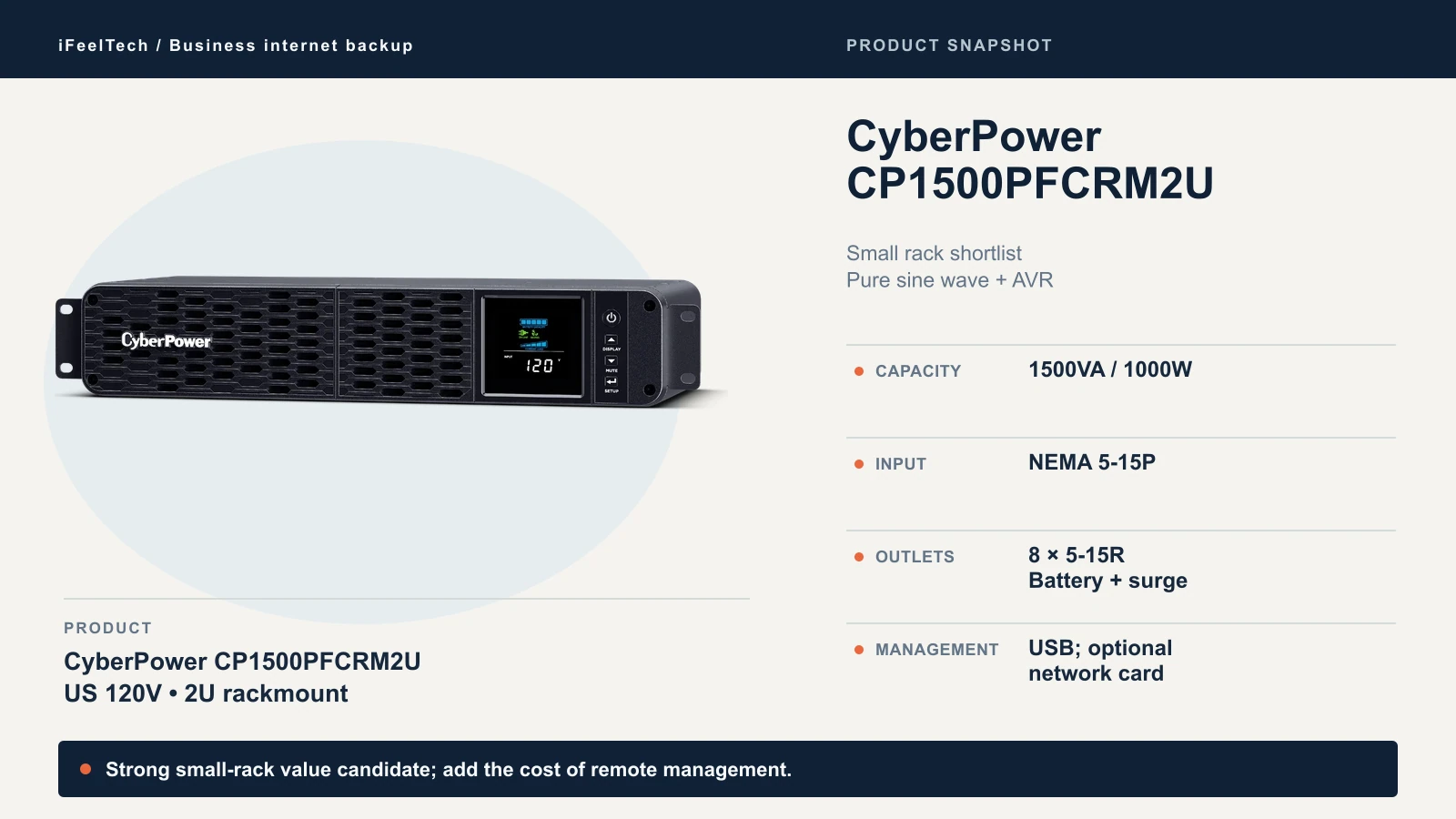
Our first choice for a small network rack on a standard outlet. It is a 1500VA/1000W line-interactive UPS, 2U tall and 10.5 inches deep, with sine-wave battery output, a 5-15P input and eight battery-backed outlets, two of them widely spaced for bulky adapters. The RB1290X2D battery is hot-swappable and user-replaceable. USB monitoring through PowerPanel Business is included, and a network card is an extra purchase.
Choose another model if its published runtime at your measured load does not meet your required duration, or if you want a built-in network interface.
Check the CP1500PFCRM2U on Amazon
CyberPower PR750LCD3C: compact business tower
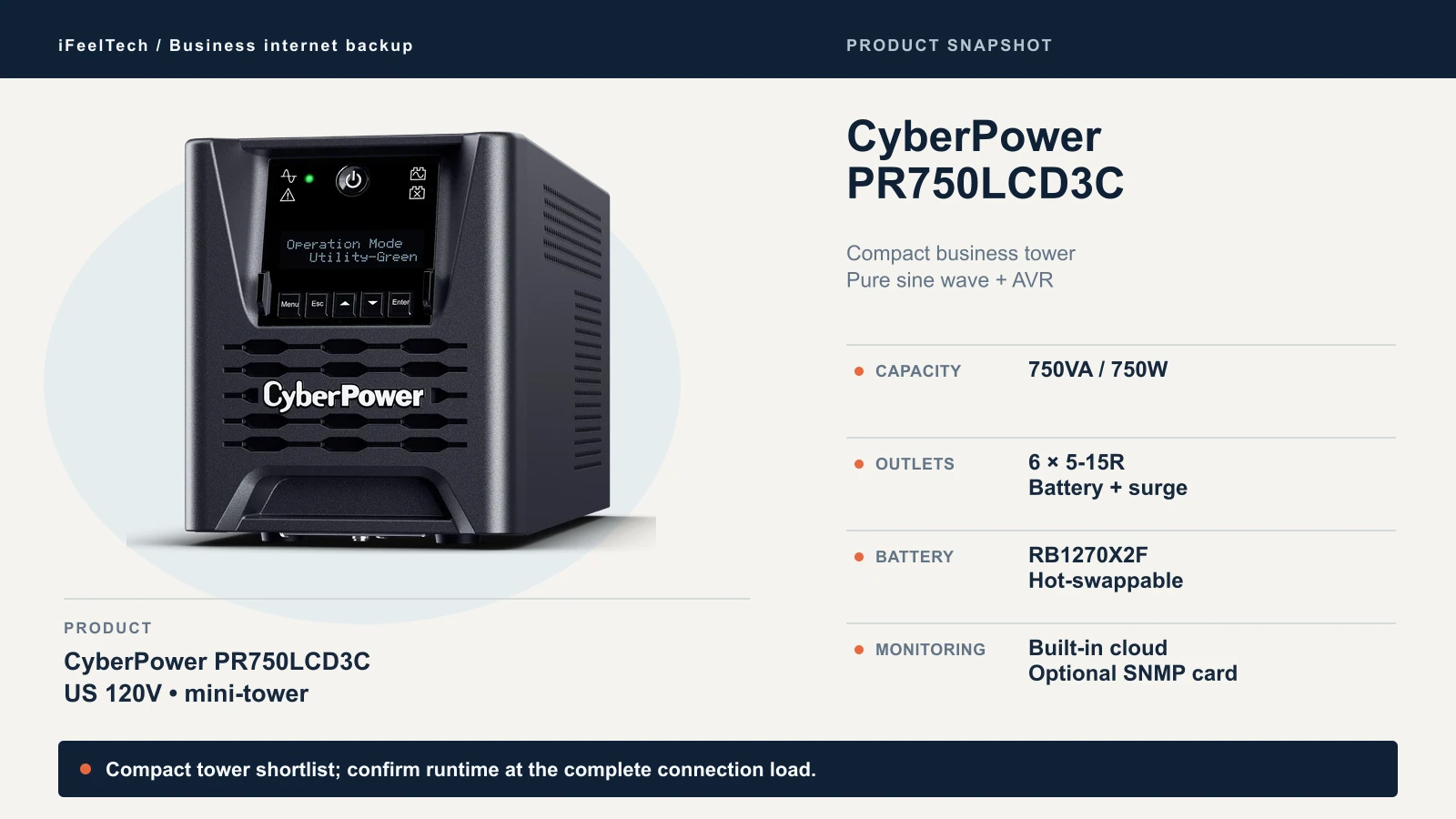
Use this one when the connection lives on a shelf or desk and there is no rack. The PR750LCD3C is a 750VA/750W tower with sine-wave output, AVR and six battery-backed outlets. At 14.2 inches deep and 26 pounds, it is a shelf unit. Its RB1270X2F battery is hot-swappable, which the CP1500PFCRM2U's is too, so battery service does not separate them. What does is the built-in RJ45 cloud port, which CyberPower's page documents, and the tower body. Local SNMP still needs the optional RMCARD205.
It runs 144 minutes at 50W and 61 at 100W, a little under the CP1500PFCRM2U at 100W. Cloud alerts are most useful at a site that is rarely staffed, which is where the built-in port helps. Check CyberPower's current PowerPanel Cloud terms before counting on it.
A simpler tower may offer better value if you do not need cloud monitoring.
Check the PR750LCD3C on Amazon
Eaton / Tripp Lite SMART1500LCD: qualified budget option
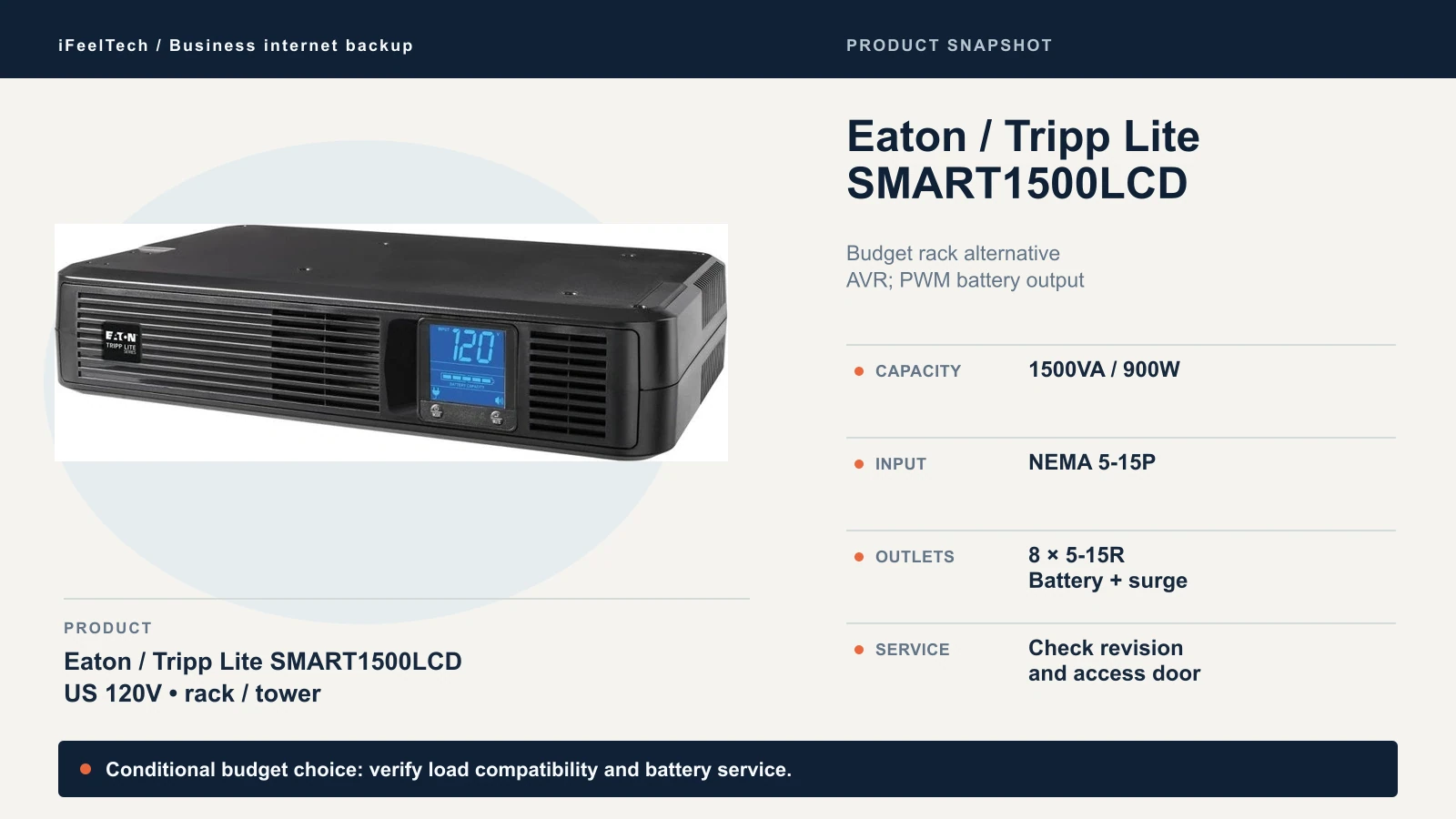
We keep this one because it reflects what we deploy and because it was the lowest-priced of the six on Amazon.com at our check. The SMART1500LCD is a 1500VA/900W rack/tower line-interactive UPS with AVR, eight battery-backed 5-15R outlets and a 5-15P input. It is 10.5 inches deep, and Eaton lists a 14-inch minimum rack depth.
Check these limits before you buy. Battery output is PWM sine wave, not pure sine wave. Eaton's generic product page is ambiguous, but the exact-model PDF separates line from battery output, so check your equipment and run a transfer test. Battery service depends on the revision: units with a battery access door use an RBC1500 cartridge, while for units without the door Eaton directs you to a technician. Confirm what you receive before you call it user-replaceable. Monitoring is USB, DB9 serial and contact closure, and Eaton lists network management cards as not supported.
Consider another model if your equipment needs pure sine wave or you want local SNMP.
Check the SMART1500LCD on Amazon
CyberPower CP2000PFCRM2U: conditional capacity upgrade
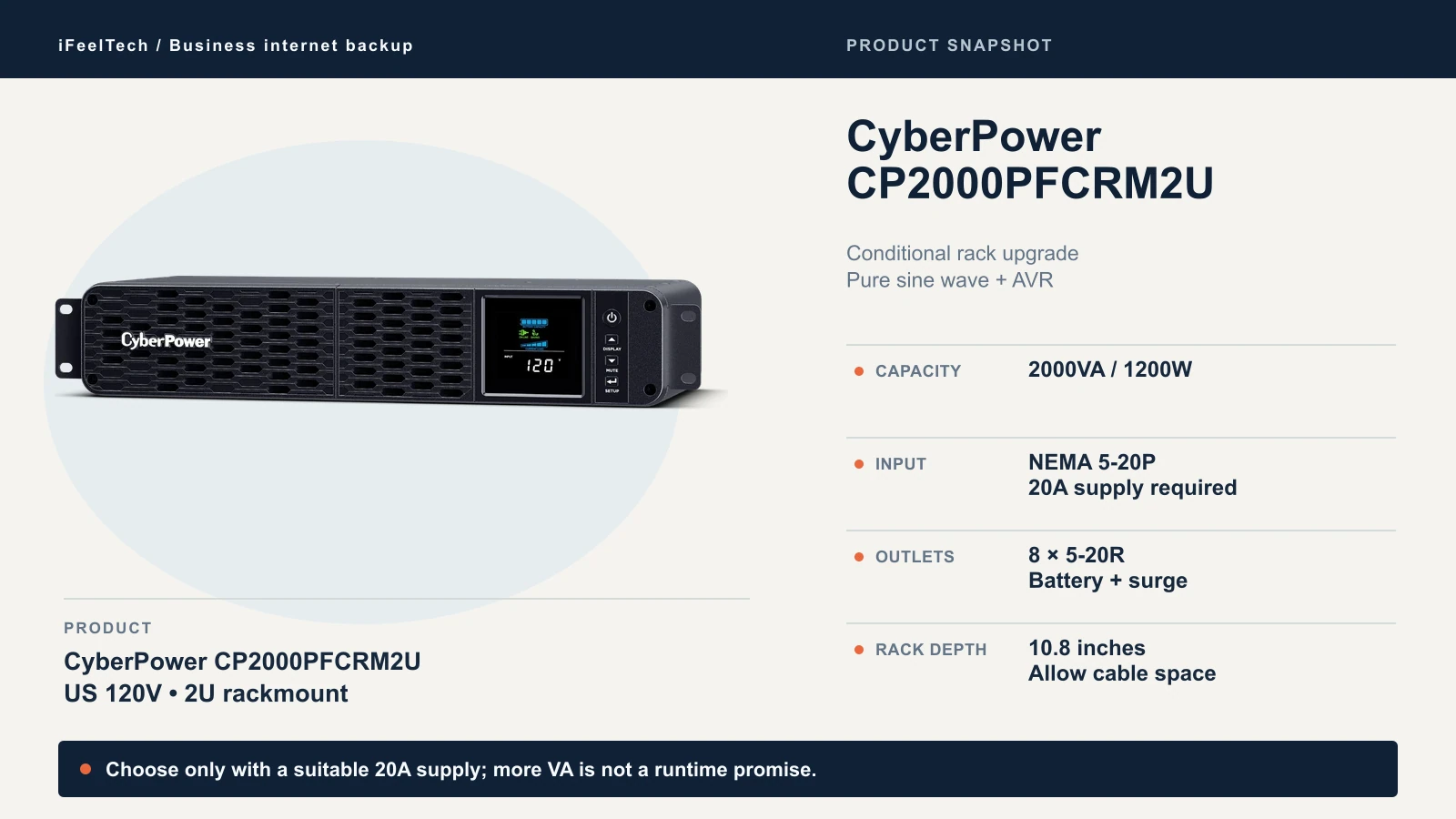
This model needs a NEMA 5-20P input and a suitable 20A circuit and receptacle. It does not plug into every office outlet. If you are not sure what is on the wall, have an electrician check before you order.
The CP2000PFCRM2U is a 2000VA/1200W 2U unit, 10.8 inches deep and 28.68 pounds, with sine-wave battery output, eight battery-backed 5-20R outlets and an RB1290X2G user-replaceable battery. Over the CP1500PFCRM2U you get a 1200W output ceiling and more minutes at the same load: 80.1 against 66.2 at 100W, and 9 minutes at 600W (2.2 at 1200W). That helps when the rack carries a larger switch and more gear. A gateway, small switch and a few access points do not need it.
Consider another model if your connection is small or the location has only a standard outlet.
Check the CP2000PFCRM2U on Amazon (20A circuit required)
APC SMC1500-2UC: APC option with distinct limits
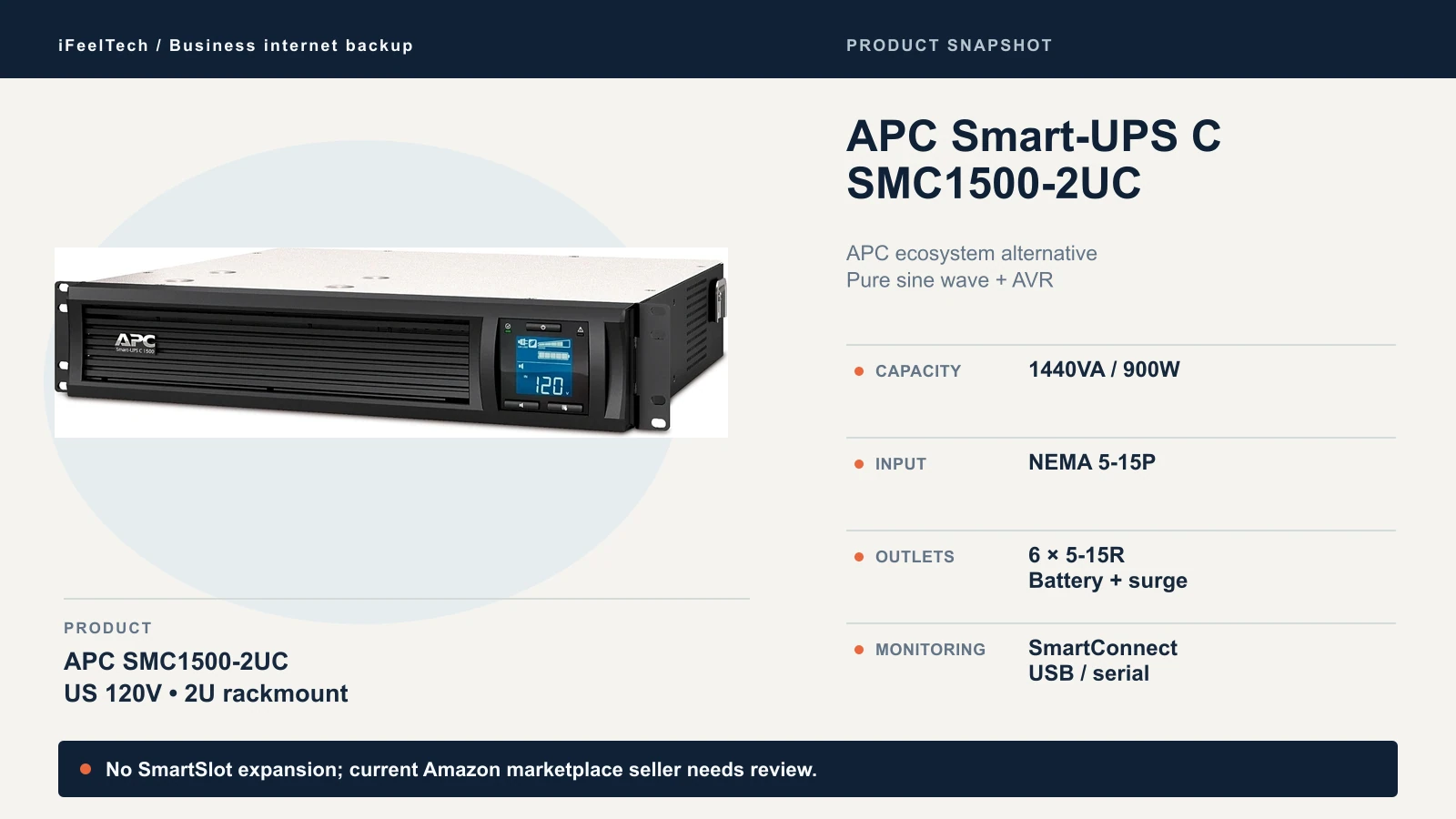
Choose the SMC1500-2UC if your office already standardizes on APC. The name says 1500VA, but the official rating is 1440VA/900W. It has sine-wave output, AVR, six battery-backed 5-15R outlets and a 5-15P input. Its user-replaceable battery is the APCRBC157 cartridge, and APC lists an estimated battery life of 4 to 6 years.
Four limits are worth noting. SmartConnect is cloud monitoring, not a SmartSlot SNMP card, and the datasheet lists zero free slots. It is 18.8 inches deep, deeper than the short-depth CyberPower units. It weighs 55.8 pounds, twice the CP1500PFCRM2U. And the datasheet warranty is 24 months, so confirm what the seller provides for your order.
Check the seller before you buy. When we looked, this listing was offered by third-party marketplace sellers and not by Amazon.com, and the seller can change. Confirm who sells and ships your unit, and ask for the warranty terms in writing. An APC authorized reseller is the safer route. The APC product page lists the current specifications.
Consider another model if your rack is shallow or you need local SNMP.
Check the SMC1500-2UC on Amazon
CyberPower PR1500LCD: larger tower
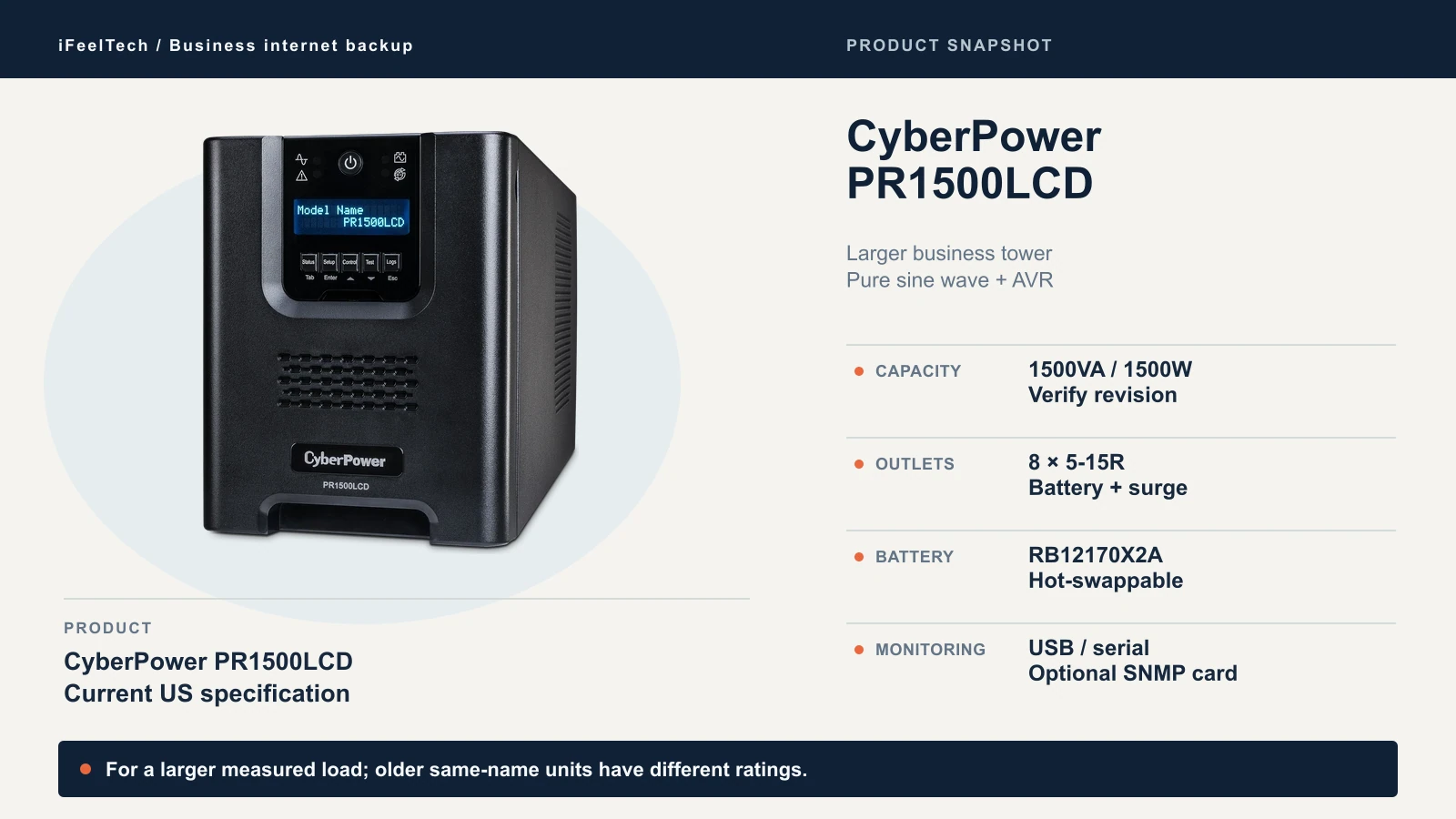
The PR1500LCD is for a tower installation that needs the longest runtime at a small load or carries more than a network closet. The current US model is rated 1500VA/1500W, with sine-wave output, AVR, eight battery-backed 5-15R outlets, an RB12170X2A hot-swap battery and an optional RMCARD205. It is a mini-tower, 17 inches deep and 54 pounds, and it lists 137 minutes at 100W and 229.8 at 50W.
Older material under the same name lists a 1050W rating. Make sure the unit you receive matches the current specification. A higher watt ceiling alone is not a runtime ranking, but this model's larger battery is.
Consider another model if a smaller unit already meets your required duration. At 17 inches deep and 54 pounds, it may be unnecessarily large for a modem and gateway.
Check the PR1500LCD on Amazon
Specifications side by side
| Model | VA / watts | Form | Input | Backed outlets | Battery output | Depth | Weight | Typical recharge |
|---|---|---|---|---|---|---|---|---|
| CP1500PFCRM2U | 1500VA / 1000W | 2U rack | 5-15P | 8 × 5-15R | Sine wave | 10.5 in | 26.8 lb | 8 hours |
| PR750LCD3C | 750VA / 750W | Tower | 5-15P | 6 × 5-15R | Sine wave | 14.2 in | 26 lb | 8 hours |
| SMART1500LCD | 1500VA / 900W | 2U rack/tower | 5-15P | 8 × 5-15R | PWM sine wave | 10.5 in (14 in rack depth) | 30 lb | Under 4.5 hours (10% to 90%) |
| CP2000PFCRM2U | 2000VA / 1200W | 2U rack | 5-20P | 8 × 5-20R | Sine wave | 10.8 in | 28.68 lb | 8 hours |
| SMC1500-2UC | 1440VA / 900W | 2U rack | 5-15P | 6 × 5-15R | Sine wave | 18.8 in | 55.8 lb | 3 hours |
| PR1500LCD | 1500VA / 1500W | Tower | 5-15P | 8 × 5-15R | Sine wave | 17 in | 54 lb | 3 hours (quick) / 8 hours (eco) |
Sources are the manufacturer pages and datasheets listed at the end. "Backed outlets" means battery-backed. Some units also have surge-only outlets that lose power in an outage, so plug only what must stay up into the battery outlets.
Check circuit, rack fit and battery service
Plug and circuit. Five of the six use a standard 5-15P plug. The CP2000PFCRM2U uses a 5-20P, which needs a matching 20A receptacle on a 20A circuit. That work belongs to an electrician and is not a simple wall-plate swap. Do not adapt, cut or substitute the plug.
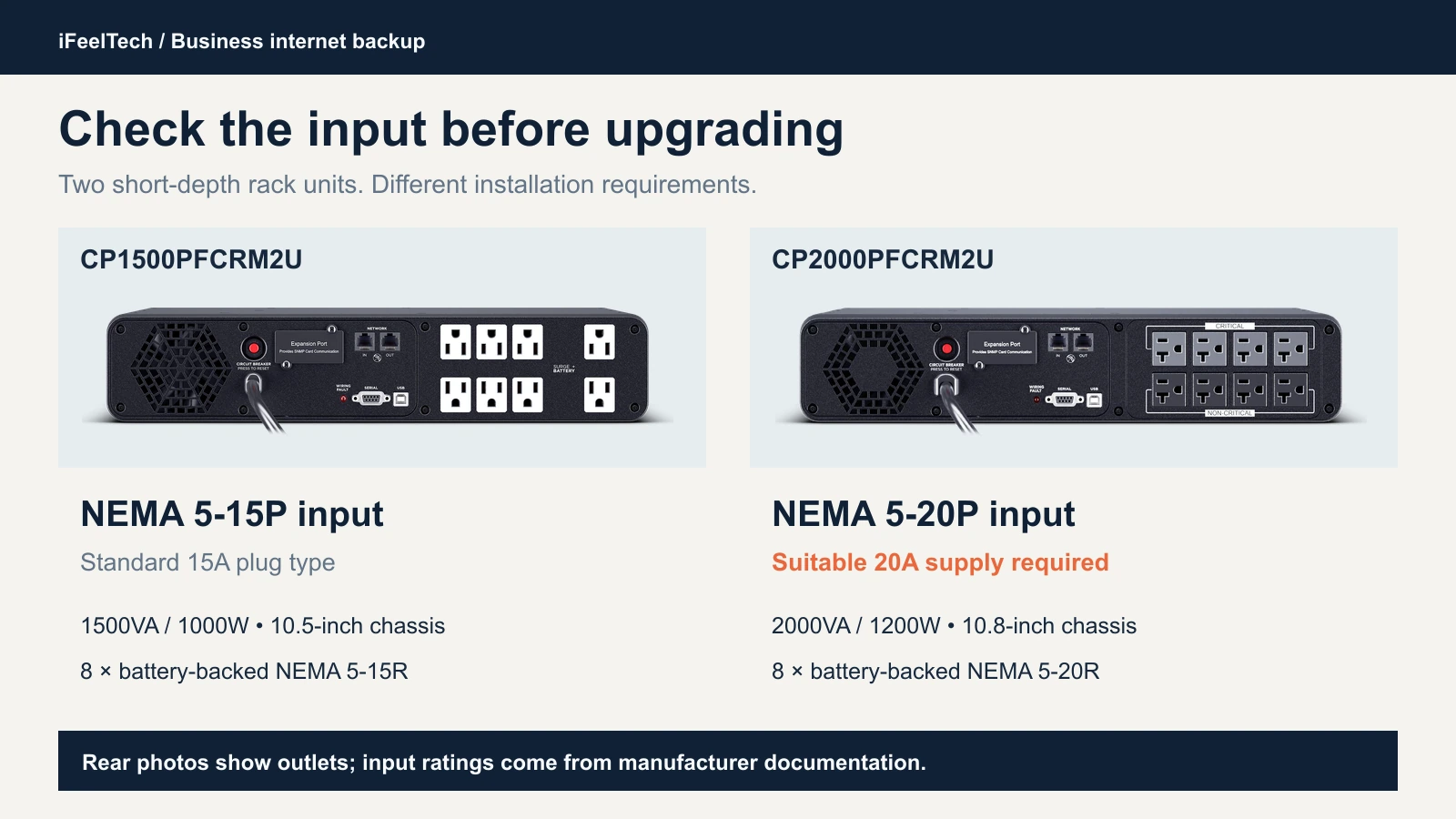
The photos show the rear outlets, not the input plug. Treat the printed input ratings, which come from the manufacturer's documents, as the reference.
Depth, not just height. A 2U unit is the same height whatever its depth: 10.5 inches for the CP1500PFCRM2U and SMART1500LCD, 10.8 for the CP2000PFCRM2U and 18.8 for the SMC1500-2UC. Eaton also lists a 14-inch minimum rack depth for the SMART1500LCD. Measure usable depth in your rack, then add room behind it for the power cord and cables.
Weight and mounting. The datasheets range from 26 to 55.8 pounds. Use each manufacturer's mounting hardware and follow your rack's load rating. Eaton documents 2-post, 2-post front-mount, 4-post and tower configurations for the SMART1500LCD. APC's datasheet lists the SMC1500-2UC as front-mounted, with a lower mounting preference, and not two-post mountable. We did not find the CP2000PFCRM2U's mounting details in the documents we read, so confirm them before you buy.
Airflow, noise and battery access. The SMART1500LCD uses a fan, and APC lists 45 dBA for the SMC1500-2UC. The other models publish no noise figure, so keep a rack unit away from desks. Leave room to reach the battery so you can service it without pulling the rack apart.
For deeper rack layout, UniFi gear and managed shutdown, our UPS guide for UniFi racks goes further than this one.
USB, cloud and SNMP monitoring
Without monitoring, battery deterioration or faults may go unnoticed. Three different services get lumped together:
- USB or serial connects the UPS to one computer, which runs shutdown software such as CyberPower's PowerPanel or Eaton's PowerAlert. It shuts that computer down cleanly, and the software can also send notifications: CyberPower documents email, SMS and instant-message alerts in PowerPanel Business. That computer must stay powered and online to send them, and you have to set it up.
- Cloud monitoring sends email or app alerts. CyberPower's PowerPanel Cloud does this, and the PR750LCD3C has the port built in, while the rack models use an optional card. APC's SmartConnect uses the SMC1500-2UC's Ethernet port. Check each vendor's current terms for any fees.
- SNMP is a local network protocol for management systems. CyberPower's units need the optional RMCARD205. The SMART1500LCD does not support it, and the SMC1500-2UC has no card slot.
SmartConnect needs a paid plan for alerts. APC lists Basic, Standard and Advanced plans. Newly registered devices start on a free Standard trial, and APC's support community says six months. After that, a device that is not on Standard or Advanced moves to Basic monitoring, and notifications are no longer sent.
Cloud alerts depend on connectivity. If the outage takes your internet down, a cloud alert cannot leave the building. During an ISP outage you still have the UPS's audible alarm and local logs, but do not assume a missed alert will be delivered later, because that depends on the vendor's service. Cloud monitoring helps most when the power fails but the ISP does not.
What it costs to own
Price the whole thing, not just the UPS:
| Model | Battery cartridge | Monitoring to price |
|---|---|---|
| CP1500PFCRM2U | RB1290X2D | Optional network card (RMCARD205 or a cloud card) |
| PR750LCD3C | RB1270X2F | Cloud port included; optional RMCARD205 for local SNMP |
| SMART1500LCD | RBC1500 on units with a battery door; technician service otherwise | USB/serial only |
| CP2000PFCRM2U | RB1290X2G | Optional network card; electrician only if the 20A circuit is missing |
| SMC1500-2UC | APCRBC157 | SmartConnect paid plan for notifications |
| PR1500LCD | RB12170X2A | Optional RMCARD205 |
Add replacement labor and any installation work. On Amazon.com on October 10, 2026, the SMART1500LCD had the lowest listing price of the six and the SMC1500-2UC the highest, with the other four between them. Prices change, so this guide does not print them. Network cards, subscriptions and replacement cartridges add to ownership cost and differ by model, so get those quotes before you decide.
Warranty terms differ. CyberPower lists three years of coverage including batteries, subject to its terms. Eaton lists a three-year limited US warranty. APC's datasheet says 24 months.
Install, test and maintain
Inspect the unit on delivery and return it if it is damaged. Follow the manufacturer's installation procedure for your model, then verify it in a maintenance window:
- Charge it first. Give the battery the initial charge time the manual specifies.
- Plug only network equipment into battery outlets. Keep printers, heaters and non-essential gear off them.
- Set up monitoring and confirm that a test alert reaches a person.
- Run the manufacturer's self-test. Use the front-panel or software test your model documents.
- Run a controlled transfer test with the full load connected, following the manufacturer's approved procedure. Confirm that the modem or ONT, gateway, switch and access points stay up, that a laptop on Wi-Fi keeps its connection, and that everything recovers when power returns.
- Test the duration separately. A transfer test shows that equipment survives the switch to battery. It does not show that you will get 30 or 60 minutes. If you have a duration target, run a monitored discharge test with a stopping point set beforehand, and recharge fully before relying on the unit again. Deep discharges use battery cycles, so do this at commissioning and not routinely.
- Record the model, serial number, battery install date, measured load, runtime result and test date.
Do not open the UPS chassis, because internal batteries can present a shock hazard even when the unit is disconnected. Replace user-serviceable batteries only by following the manufacturer's procedure, refer other internal service to a qualified technician, and do not improvise wiring.
Maintain it. Heat shortens lead-acid battery life, so keep the unit within the manufacturer's operating range (32 to 104 °F for the units here) and do not close it into an unventilated cabinet. Replace the battery when the unit reports it, on the manufacturer's schedule or sooner if tests show the runtime falling. APC's 4 to 6 years is an estimate, not a guaranteed interval. Label the installation date. Recycle old batteries through a battery recycler or the manufacturer's take-back option and not in household trash. After a full discharge, the unit needs its recharge time before it can cover another outage, which is up to 8 hours on several models here.
Name an owner who watches alerts and tracks battery age. Our IT handover checklist covers service records, and our annual office walk-through includes checking an existing battery.
Mini UPS for a router: when a DC battery backup is enough
Searches for "battery backup for router" also surface DC mini-UPS devices and portable power stations. We did not evaluate any. A DC mini-UPS typically outputs a fixed DC voltage, so the voltage, polarity, connector and current must match each device's power adapter, and it cannot run an AC-powered switch. Transfer behavior and vendor support differ by product, and DIY battery builds raise safety questions we do not cover. For a single ONT and router on matching DC adapters, a mini-UPS can be enough. With a switch and access points, an AC UPS from this guide is the simpler fit.
Sources
Manufacturer references checked October 10, 2026. Runtime and monitoring sources are linked where those figures and features are discussed.
- CyberPower CP1500PFCRM2U — Capacity, connections and battery service.
- CyberPower PR750LCD3C — Tower specifications and monitoring options.
- Eaton SMART1500LCD datasheet — Battery waveform and revision-dependent service.
- CyberPower CP2000PFCRM2U — Capacity, 20A input and rack dimensions.
- APC SMC1500-2UC US datasheet — Rating, mounting, monitoring and warranty.
- CyberPower PR1500LCD — Current US specifications and replacement battery.
Additional research: ServeTheHome's CP1500PFCRM2U review by Bryan Young (June 16, 2023). Its observations are independent of our deployments; its runtime figures are vendor estimates.
Product photographs come from the manufacturers. Amazon sellers and stock were checked October 10, 2026; confirm the current offer at checkout.
Related Resources
- Best UPS for UniFi Rack — Deeper rack, UniFi and managed-shutdown guidance for larger network racks.
- Starlink for Business: Failover Setup Guide — Keep a second connection ready for when your ISP goes down.
- What to Do When Your Business Internet Goes Down — A first-response checklist for outages.
- Dual-WAN Business Network Guide — Add a second internet connection so an ISP fault does not stop the office.
- AT&T Business Fiber 5G Failover — What built-in cellular backup covers, and why it still needs local power.
- Power over Ethernet Guide — Size PoE loads at the switch before totaling UPS watts.
- Miami Office Network Planning Guide — Plan UPS sizing, hurricane-season preparation and the rest of an office network build.
- Small-Business IT Handover Checklist — Record ownership, battery dates and service history.
- UniFi Network Installation in Miami — Business network design and installation, if you want help with the rack and cabling.
Frequently Asked Questions
Related Articles
More from Business Hardware
APC vs CyberPower UPS for a Small Office: How to Choose
APC or CyberPower for your office? Compare suitable UPS models by load, battery-backed outlets, runtime, replacement batteries and monitoring.
9 min read
Best UPS for UniFi Rack (2026): Protecting UDM Pro & Active PFC Gear
Compare UPS options for UniFi using verified battery capacity, manufacturer runtime figures, form factor, and shutdown support. Size protection to your measured load.
7 min read
RAID 0 vs 1 vs 5 vs 6 vs 10: Which Fits Your Business NAS?
What each RAID level does, how many drives can fail, how much space you keep, and why RAID is not a backup. Covers SHR, rebuilds and drive failures.
10 min read