

Business Internet Backup: AT&T Fiber 5G Failover vs. Comcast Connection Pro
AT&T Business Fiber offers built-in 5G backup on eligible 1 Gig+ plans. Compare documented limits, power needs, UniFi integration, and Comcast Connection Pro.

Affiliate Disclosure: This article contains affiliate links. If you make a purchase through these links, we may earn a small commission at no extra cost to you. As an Amazon Associate, iFeelTech earns from qualifying purchases.
AT&T advertises built-in 5G backup at no additional charge on eligible Business Fiber 1 Gig and higher plans, using the CGW452 converged gateway. Availability is limited by service address and coverage. It can provide a useful backup path, but it does not make every application or every outage scenario uninterrupted.
This guide was corrected against AT&T's current Business Fiber offer and backup FAQ and Comcast's Connection Pro documentation on October 3, 2026. The earlier deployment-count, speed, latency, failback-time, and UPS-runtime claims have been removed because supporting measurement records were not established for this review.
Key Takeaways
- Confirm AT&T backup eligibility, gateway model, and cellular coverage at the installation address.
- AT&T static IPs and AT&T VoIP service do not fail over to 5G backup. Third-party voice and VPN applications need separate testing.
- Cellular performance and recovery times vary; test required applications at your location.
- AT&T's backup battery is not included. Protect the complete equipment path for operation during a local power outage.
- Comcast Connection Pro and its newer Wireless Connect offer are distinct products. Compare the exact service being quoted.
How Does AT&T Business Fiber 5G Failover Work?
The CGW452 provides fiber service and automatic cellular backup within the gateway. AT&T says it switches to backup when fiber service is unavailable and returns to fiber when service is restored. Its FAQ also describes LTE fallback when 5G is unavailable.
The offer does not establish a universal failover time, minimum cellular speed, or preserved application session. Signal quality, network congestion, the gateway's placement, and the application affect the outcome. This backup feature is separate from a standalone Internet Air for Business subscription.
| Check | What to establish at the installation |
|---|---|
| Eligibility | Supported Business Fiber plan, address, and CGW452 gateway |
| Cellular connectivity | Available backup coverage and actual signal at the gateway |
| Performance | Required application behavior and bandwidth under representative load |
| Address-dependent services | Static-IP services and AT&T VoIP are not covered by backup |
| Power | Gateway and all required downstream devices remain powered |
How Does the Failback Work?
AT&T describes automatic return to fiber. It does not document a universal one-to-two-minute failback or a particular stabilization algorithm in the cited offer. Test outage and recovery in a scheduled window, record session interruptions, and establish how staff should recover any affected applications.
Does AT&T 5G Failover Support Static IPs?
No. AT&T's current FAQ says that static IPs do not fail over to 5G backup and that AT&T VoIP service does not fail over either. Services relying on the fiber static address need a separate continuity plan.
Third-party voice, outbound VPNs, cloud logins, and IP allowlists have their own requirements. Do not generalize AT&T's VoIP restriction to every third-party voice product, or promise that an outbound connection survives a change of WAN address.
What Is the Single-Carrier Risk?
Built-in fiber and cellular backup share AT&T as provider and use the same gateway. They can therefore have shared failure dependencies. The actual fiber route and cell-site backhaul at a particular address are not established by using two access technologies.
A second provider or separate gateway can reduce some shared dependencies. It does not prove separate conduits, backhaul, or power. See our dual-WAN planning guide.
How to Configure IP Passthrough for UniFi on the AT&T WNC-CGW452
A downstream UniFi gateway can manage the LAN, firewall, and VLANs while the AT&T gateway provides the upstream service. IP passthrough is not the same as physically bypassing AT&T's gateway, and it does not change the provider's backup limitations.
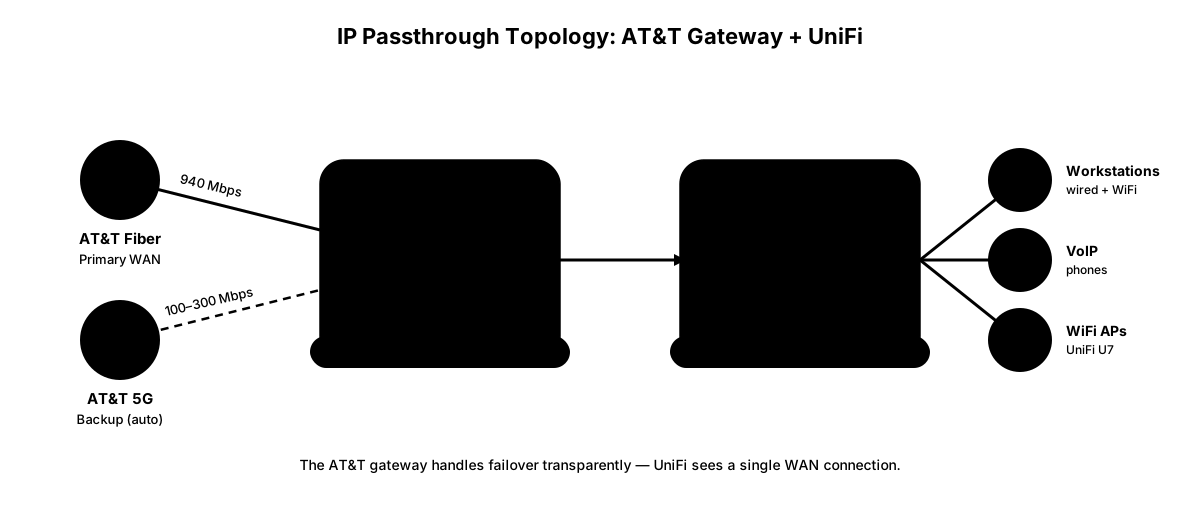
Use AT&T's current instructions for the exact gateway and firmware rather than assuming menu labels and cellular behavior are identical to another AT&T model. Before changing the configuration:
- Record the existing settings and arrange a maintenance window with local recovery access.
- Confirm the supported passthrough configuration with AT&T for this gateway, including the downstream WAN interface and addressing.
- Check that the upstream and UniFi LAN subnets do not conflict. Validate routing, NAT, and firewall behavior on fiber.
- Run a provider-supported controlled fiber outage test. Check the AT&T backup status and the downstream address and connectivity.
- Test voice, VPNs, cloud applications, and any address allowlists. Repeat after fiber recovery and document results.
The built-in radio is not a separately connected UniFi WAN2 interface. UniFi's routing policies cannot independently select between AT&T's fiber and built-in cellular paths as though they were two physical WAN inputs. A separate backup connected to WAN2 is a different design.
Get Help Planning and Testing Internet BackupPower the complete connectivity path
AT&T says backup power is not included. During a local power outage, the gateway needs power for cellular backup to function. Also protect required switches, access points, and other equipment. Check any separate upstream equipment required for the intended path.
A UPS's 1500 VA or 900 W rating does not establish eight to twelve hours of runtime. Measure the protected load, use the exact UPS runtime curve, allow for battery condition, and test the required outage duration. See our UPS guide, or our battery backup guide for a modem and router if you only need to cover a gateway and a small switch.
Comcast Business Connection Pro vs. AT&T 5G Failover
Comcast's current Connection Pro page advertises automatic 4G LTE backup with a compatible leased router and a backup battery advertised for up to 16 hours. That is a provider claim under its applicable conditions, not a guarantee for every installation or a battery for your entire LAN.
The same page introduces Wireless Connect, described as a newer backup option using dual cellular networks and WiFi hotspots. Do not merge its features with an older Connection Pro deployment.
| Question | AT&T built-in backup | Comcast Connection Pro |
|---|---|---|
| Service eligibility | Eligible Business Fiber 1 Gig+ plans, gateway and coverage requirements | Requires Comcast Business Internet and compatible leased router |
| Advertised backup access | 5G with documented LTE fallback | 4G LTE |
| Backup power | Battery backup not included | Provider advertises up to 16 hours for its backup system |
| Cost | Advertised as included on eligible plans | Obtain a current address-specific quote |
| Static-IP and voice continuity | AT&T says static IPs and AT&T VoIP do not fail over | Confirm in writing for the exact quoted product |
| Admin and network integration | Validate current gateway configuration | Confirm equipment, admin access, and supported network design |
The current product page does not establish a universal Verizon-only connection, 100 Mbps passthrough limit, $40 monthly fee, or inevitable failover failure. Reports from individual older installations need their hardware, date, and configuration before they can inform a current comparison. Comcast's published offer.
What Are the Limitations of Built-In Failover?
Provider-managed backup is an additional path, not a complete business-continuity plan. Shared gateway, carrier, local power, coverage, and application dependencies remain relevant. Test the failure scenarios that matter to your business rather than assuming every upstream outage produces identical behavior.
What About Starlink or Third-Party LTE Devices?
A separately connected cellular or satellite service may add a different provider and equipment path. Verify coverage or sky visibility, plan terms, installation constraints, power, routing, and required application behavior. Compare current address-specific costs rather than an old general price range.
Our 5G failover setup guide describes separate backup planning. Confirm the carrier compatibility of the exact hardware; a carrier-locked modem cannot automatically use any provider.
Is AT&T's Built-In Failover Right for Your Business?
Consider it when the service is available, the backup meets your tested workload, and its documented address and voice limitations are acceptable. Add a separate path where the tested results or shared dependencies do not meet the business's outage requirements.
Document which applications continue, which need reconnection, and which are unavailable during backup. Staff should have a recovery procedure rather than a promise that the network will handle every scenario automatically.
How Much Does AT&T 5G Failover Cost?
The backup itself is advertised as included on eligible 1 Gig and higher plans. When checked on October 3, AT&T's page displayed 1 Gig at $140/month, with an eligible wireless-bundle offer showing $90/month, before applicable taxes and fees and subject to its offer terms.
Those advertised prices are not a universal quote. Confirm address availability, required billing discounts, wireless eligibility, installation, equipment, and any offer duration at checkout. Do not assume an expired free-month promotion is still available. See AT&T's current prices and terms and our Business Fiber overview.
Check AT&T Business Fiber AvailabilityThe Bottom Line
AT&T offers an included cellular backup feature on eligible fiber plans, with clear restrictions for static IPs, AT&T VoIP, coverage, and power. Comcast offers provider-managed backup products with their own equipment and terms. Select between them using current written offers and a tested installation, rather than unsupported speed or reliability comparisons.
Contact iFeelTech for help planning and verifying the full backup path.
Frequently Asked Questions
Does AT&T Business Fiber's 5G failover cost extra?
AT&T advertises built-in 5G backup at no additional charge on eligible Business Fiber 1 Gig and higher plans. It requires the CGW452 gateway, coverage, and availability at the service address. Confirm the current offer and equipment with AT&T.
Will my UniFi gateway work with AT&T's built-in 5G failover?
A downstream UniFi gateway can be part of this design, but validate the current AT&T gateway configuration and actual fiber and cellular behavior. Test routing, NAT, VPNs, and application reconnection. IP passthrough does not make a static IP fail over or guarantee uninterrupted sessions.
What speeds can I expect during a failover to AT&T's 5G backup?
There is no universal speed or latency figure established here. Performance depends on coverage, congestion, gateway placement, and the backup radio connection, which may fall back to LTE. Measure it at your location under representative load.
Does AT&T 5G failover support static IPs?
No. AT&T states that static IPs do not fail over to its 5G backup. AT&T VoIP service also does not fail over. Separately test third-party voice, VPNs, and other applications; do not assume their sessions continue unchanged.
What's the main limitation of AT&T's built-in failover versus a separate cellular device?
The primary service and built-in backup share a carrier and gateway. A separate provider and device can reduce those shared dependencies, but different carriers do not establish physical route diversity or independence from local power failures.
How should I compare Comcast Connection Pro with AT&T backup?
Compare the current written offers and test the proposed installation. Comcast advertises Connection Pro with automatic 4G LTE backup and up to 16 hours of backup power, requiring compatible leased equipment. Confirm pricing, addressing, admin access, and application behavior; older user reports do not establish universal product limits.
Related Resources
Related Articles
More from Network Infrastructure
Dual WAN for Business: Why One Internet Connection Isn't Enough
Why a single ISP is a single point of failure, how to verify real route diversity, and which dual-WAN gateway and backup connection fit a rack network or a simple branch office.
19 min read

Best Business Internet Providers in 2026: Fiber, Cable, and 5G Compared
A practical comparison of the best business internet providers in 2026 — AT&T Fiber, Comcast Business, Verizon Fios, T-Mobile 5G, and Starlink. What the specs don't tell you.
24 min read

What to Do When Your Business Internet Goes Down
Business internet went down? This step-by-step guide helps you diagnose the outage fast, keep your team working, and minimize downtime and revenue loss.
16 min read