

Vendor Risk Assessment for Small Businesses: A Practical 2026 Framework
Inventory, classify, and review your SaaS vendors with a two-axis risk matrix, worked example, and copyable 12-question questionnaire.

On July 31, 2026, Amgen filed a Form 8-K with the SEC disclosing that patient data and proprietary information had been exfiltrated from cloud environments hosted by third-party providers. The company has a dedicated cybersecurity team and a formal incident response plan. As of August 2026, it still hasn't publicly identified the providers involved or the full scope of compromised data.
A 15-person business runs a comparable sprawl of SaaS tools — CRM, accounting, scheduling, file storage, marketing, HR — usually more than the owner would guess if asked to count. None of it has ever been tiered by what it could actually expose if one of those vendors suffered a security incident.
This isn't a compliance audit and it doesn't require a security background. It's a two-question framework — how sensitive is the data, how much access does the vendor have — that sorts your existing stack into three tiers in one sitting, plus a one-page questionnaire to run before you sign up for the next one.
What Amgen's Breach Reveals About a Problem Every Small Business Has
Amgen 8-K Disclosure — July 2026
On July 29, 2026, Amgen determined that a cybersecurity incident was material. On July 31, the company filed a Form 8-K disclosing that unauthorized activity had been identified in cloud environments hosted by third-party providers, and that proprietary data and patient protected health information had been exfiltrated. As of August 2026, Amgen has not publicly identified the specific cloud providers involved, the method of initial access, or the full scope of affected data. The investigation remains ongoing. (Source: SEC EDGAR)
The instinct is to file this under "big company problem." Amgen is a global pharmaceutical company with a dedicated cybersecurity team, a formal incident response plan, and the resources to engage forensic investigators immediately. Even with all of that, the company's 8-K disclosure leaves the root cause open — the filing describes unauthorized activity in third-party-hosted cloud environments, but whether the breach vector was on the providers' side, in Amgen's own configuration, or somewhere in between remains undetermined. The gap isn't just about expertise or budget. It's about visibility into what your vendors hold and how they hold it.
In many of the small-business environments we assess, few people maintain a current inventory of which vendors hold what data and how much access they actually have. When a security incident involves one of those vendors, the first question is the same one Amgen had to answer: what data was in that environment, and what was exposed?
For a small business, that question is harder to answer. You don't have a security team to even start asking it. You have a CRM that holds every customer email and phone number, an accounting platform with your bank credentials, an HR tool with employee Social Security numbers, a file storage service with client contracts — and if any one of those vendors suffers a breach tomorrow, you probably can't say in five minutes what they had access to or what data was at risk.
The 2026 Verizon Data Breach Investigations Report puts the trajectory in hard numbers: 48% of all confirmed breaches now involve a third party, up 60% from the prior year, which itself had already doubled. Third parties are now involved in nearly half of the breaches in Verizon's dataset — a share that has grown sharply in each of the last two reporting periods.
The good news: fixing the gap doesn't require a compliance department or a six-month project. It requires answering two questions about each vendor you use, which is what the rest of this article is built to do.
What "Vendor Risk" Actually Means for a Company With No Compliance Team
Vendor risk, stripped of jargon, covers two categories of exposure. The first is data-security risk: if a breach at a vendor reaches the data it holds for you, your business becomes part of the incident. The risk isn't that your CRM vendor will attack you — it's that when they get hacked, whatever of yours they were holding is part of the damage. The second is operational-dependency risk: if a vendor you rely on goes down, gets acquired, goes bankrupt, or loses a critical capability, your business operations stop until you find an alternative.
The Amgen incident illustrates the data-security side. Amgen's products, manufacturing, and financial reporting systems were unaffected — but data sitting in third-party cloud environments was exfiltrated. Whether the vector was a weakness on the providers' side or in Amgen's own access configuration is still under investigation, but the outcome is the same: data entrusted to a third party was compromised.
For a small business, the exposure paths are similar. Your accounting software holds your bank account numbers and client payment information. Your HR platform stores employee Social Security numbers and salary data. Your file storage service has client contracts, tax documents, and internal communications. Each of these vendors holds a slice of your most sensitive data, and each of them has its own security posture that you probably never evaluated before handing it over.
This is a different question from the one covered in our tech stack teardown guide. That article asks whether you're paying for tools you're not using and whether orphaned accounts still have access they shouldn't. It's about cost, usage, and access hygiene for your own stack. This article asks: if a vendor suffers a security incident or goes offline, what of yours is exposed or disrupted?
Both matter. They're companion exercises. If you haven't done the basic inventory and access cleanup from the tech stack audit, start there — it's faster and gives you the vendor list you'll need for the risk-tiering exercise below.
The Two-Axis Framework: Data Sensitivity × Access Level
Most enterprise guides to vendor risk assessment add axes until the framework requires a dedicated analyst to operate. A 15-person company needs two axes and one sitting.
Axis 1: Data Sensitivity — What kind of data does this vendor touch?
- Low: Public or non-sensitive data. Marketing content, published blog posts, publicly available business information. If this leaked, nothing of consequence changes.
- Medium: Internal business data. Revenue figures, project plans, internal communications, vendor contracts. Embarrassing if leaked, potentially costly, but not a regulatory or legal trigger.
- High: Regulated or personally identifiable data. Customer PII (names, emails, phone numbers, addresses), financial records (bank accounts, credit cards), employee data (SSNs, health information), HIPAA-covered data, client legal files. A breach here may trigger notification obligations depending on jurisdiction, data type, and applicable regulations — and carries real legal exposure regardless.
Axis 2: Access Level — How much access does the vendor actually have?
- Low: Read-only access to a narrow slice of non-critical data. A scheduling tool that sees calendar availability but not contact details. An analytics platform that reads aggregated or de-identified traffic data.
- Medium: Read-write access to business data, or API integration with a limited scope. A project management tool with access to file attachments. A CRM that syncs with your email. A read-only API connection to a single dataset.
- High: Admin-level access, broad API access to core systems, or the ability to export or bulk-delete data. An accounting platform with bank credentials. An HR tool that processes payroll. Any vendor with delegated directory privileges or identity-provider administration — where a compromise could cascade into other connected systems.
Cross these two axes to produce three tiers:
| Low Access | Medium Access | High Access | |
|---|---|---|---|
| Low Sensitivity | Low-Touch | Low-Touch | Standard |
| Medium Sensitivity | Low-Touch | Standard | Critical |
| High Sensitivity | Standard | Critical | Critical |
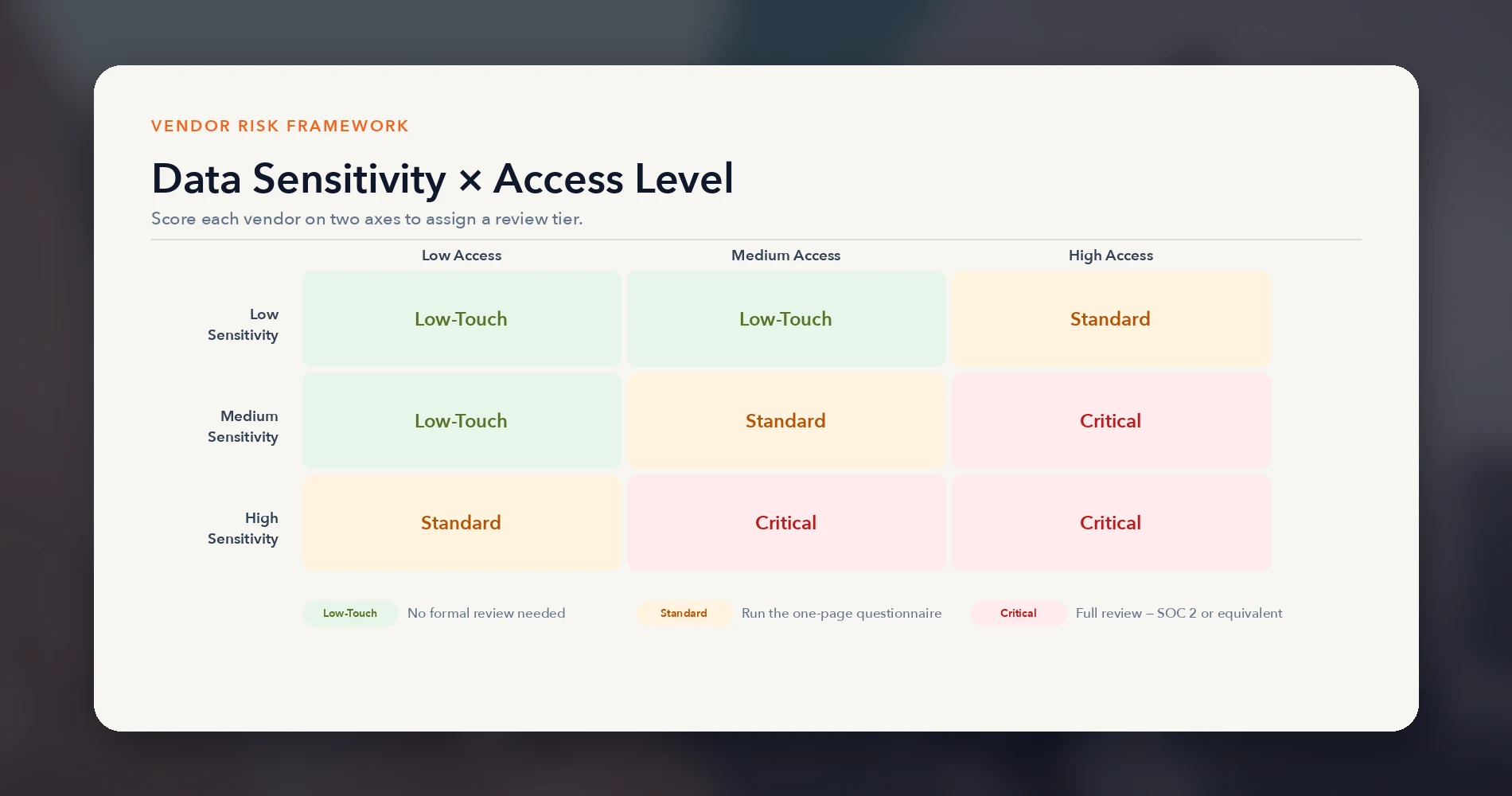
What each tier means for your review process:
- Low-Touch: No formal review needed. Keep the vendor in your inventory so you know it exists, but don't spend vetting time here. Examples: a design tool that accesses nothing sensitive, a public-facing analytics dashboard.
- Standard: Run the one-page questionnaire (Section 6) before signup or at next renewal. Ask about encryption, breach notification, and data handling. No SOC 2 required, but check their security page. Examples: a project management tool with file access, a marketing platform with customer email lists.
- Critical: Full review. Request a SOC 2 report or equivalent evidence. Review contract terms for breach notification timelines and data ownership. Limit the data and access you provide to the minimum the vendor actually needs. Examples: your accounting platform, HR/payroll tool, any vendor with admin access to your identity provider, any tool holding customer PII or health data.
The Operational-Criticality Override
The two-axis matrix handles data-security risk well, but it has one blind spot: a vendor that holds no sensitive data but whose outage would stop your business. Your identity provider, your payment processor, your scheduling or dispatch system, your phone system — these might score Low on data sensitivity but would shut down operations within hours if they went offline.
Add two override questions after scoring each vendor on the matrix:
- Could losing this vendor for 24–72 hours materially stop operations or revenue?
- Is this vendor subject to a specific legal, contractual, or client-imposed requirement?
A "yes" to either question elevates the vendor to at least Standard review — regardless of where it landed on the matrix. This keeps the framework simple (you're still answering just four questions per vendor) while preventing the most dangerous gap: the vendor nobody worried about because it didn't hold sensitive data, but whose downtime brought everything to a halt.
The discipline is still resisting the urge to add a third or fourth axis. Data sensitivity, access level, and two override questions capture the meaningful vendor risk for a small business without turning a one-sitting exercise into a quarter-long project.
For a deeper look at how data sensitivity categories map to your specific privacy obligations, see our business data privacy guide. And if you want to connect this two-axis framework to a formal risk framework, our NIST CSF guide for small businesses shows how these categories align with NIST's Identify and Protect functions.
Tiering Your Existing Stack in One Sitting
You have the framework. Now apply it to what you're already running.
Step 1: Pull your full vendor list. Don't do this from memory — you'll undercount significantly. Use one of these methods (the tech stack teardown guide walks through the full inventory process if you want more detail):
- Identity provider connected-apps report: If you use Google Workspace or Microsoft 365 with SSO, pull the list of third-party apps that have been granted access through your identity provider. This catches the OAuth-connected tools that people forget they authorized.
- Credit card and bank statements: Run 90 days of statements and search for recurring SaaS charges. This catches the tools that aren't connected via SSO but are still active and billing.
- Browser extension audit: Check installed browser extensions across company devices. Extensions often have broad page-access permissions that nobody reviewed at install time.
Cross-reference all three. The combined list is your strongest starting inventory — it won't catch every vendor (free tools, mobile apps, contractor services, and non-SaaS providers may require a separate pass), but it covers the majority of your SaaS exposure.
What We See in Client Onboardings
When we onboard a new client for a security assessment, the owner's estimate of how many SaaS tools the business uses is consistently lower than the actual count. The typical guess is five to eight. The actual count, pulled from identity provider logs and card statements, routinely lands considerably higher. Before our review, zero of those vendors had ever been formally risk-tiered, and a significant number had standing access to at least one sensitive data category — customer PII, financial records, or employee data — with no vetting at all.
Step 2: Score each vendor on both axes. For each vendor on your list, ask two questions:
- What's the most sensitive category of data this vendor can access? (Low / Medium / High)
- What level of access does this vendor have? (Low / Medium / High)
Plot each vendor on the matrix. Most vendors will land in Low-Touch or Standard. In our client work, we typically see three to six vendors land in the Critical tier — those are the ones that deserve your actual attention. Don't forget the override questions: a vendor that scores Low on both axes but whose downtime would halt operations still needs at least a Standard review.
Step 3: Focus your effort on Critical-tier vendors. This is where the one-sitting constraint earns its keep. Instead of trying to vet every vendor equally, you spend your limited time on the handful of vendors where a breach or outage would actually hurt.
A Worked Example: Five Common Vendor Types
Here's how the framework plays out against vendor categories most small businesses recognize:
| Vendor type | Data Sensitivity | Access Level | Override? | Tier |
|---|---|---|---|---|
| Accounting/payroll (e.g., QuickBooks, Gusto) | High — bank credentials, SSNs, financial records | High — read-write, export, API to banking | — | Critical |
| CRM (e.g., HubSpot, Pipedrive) | Medium to High — customer PII, deal history, emails | Medium — read-write, syncs with email/calendar | — | Standard or Critical (depends on PII scope) |
| Identity / productivity platform (e.g., Google Workspace, Microsoft 365) | High — email, files, calendar, contacts, directory and authentication data | High — controls access to connected systems | Also operationally critical | Critical |
| Project management (e.g., Monday.com, Asana) | Medium — internal plans, file attachments, client names | Medium — read-write, file uploads | — | Standard |
| Design / marketing (e.g., Canva, social media scheduler) | Low — public content, brand assets | Low — no access to sensitive systems | — | Low-Touch |
| Phone / VoIP (e.g., RingCentral, Nextiva) | Medium — phone numbers (PII), call logs, and voicemail; potentially High if calls are recorded or contain health, financial, or other sensitive information | Low — no access to sensitive systems | Yes — outage stops client communication | Standard (via override; some implementations may warrant Critical) |
The phone/VoIP system is the case the override catches — its Medium sensitivity and Low access would rate it Low-Touch on the matrix alone. But if the phones go down, clients can't reach you and inbound sales stop. The override elevates it to Standard, ensuring it gets a basic review. If your VoIP system records calls that contain regulated information, the data sensitivity may be High, which would make it Critical regardless of the override.
For a practical look at how AI tools — a category that frequently lands in the Critical tier because of the data people paste into them — should be evaluated, see our guide on whether ChatGPT is safe for business data.
How to Read a SOC 2 Report Without a Security Background
You've identified your Critical-tier vendors. At least one of them probably has a SOC 2 report available. The question is what to actually do with it.
A SOC 2 Type II report is an independent audit of a vendor's security controls, tested over a defined observation period (check the report's cover page for exact dates). It provides independent assurance that specific controls were suitably designed and operating effectively during that period — not a guarantee that the vendor is breach-proof, but the strongest standardized evidence available for evaluating a SaaS vendor's security posture. The report itself is a dense document — often 80 to 150 pages — written for auditors, not for the small-business owner requesting it.
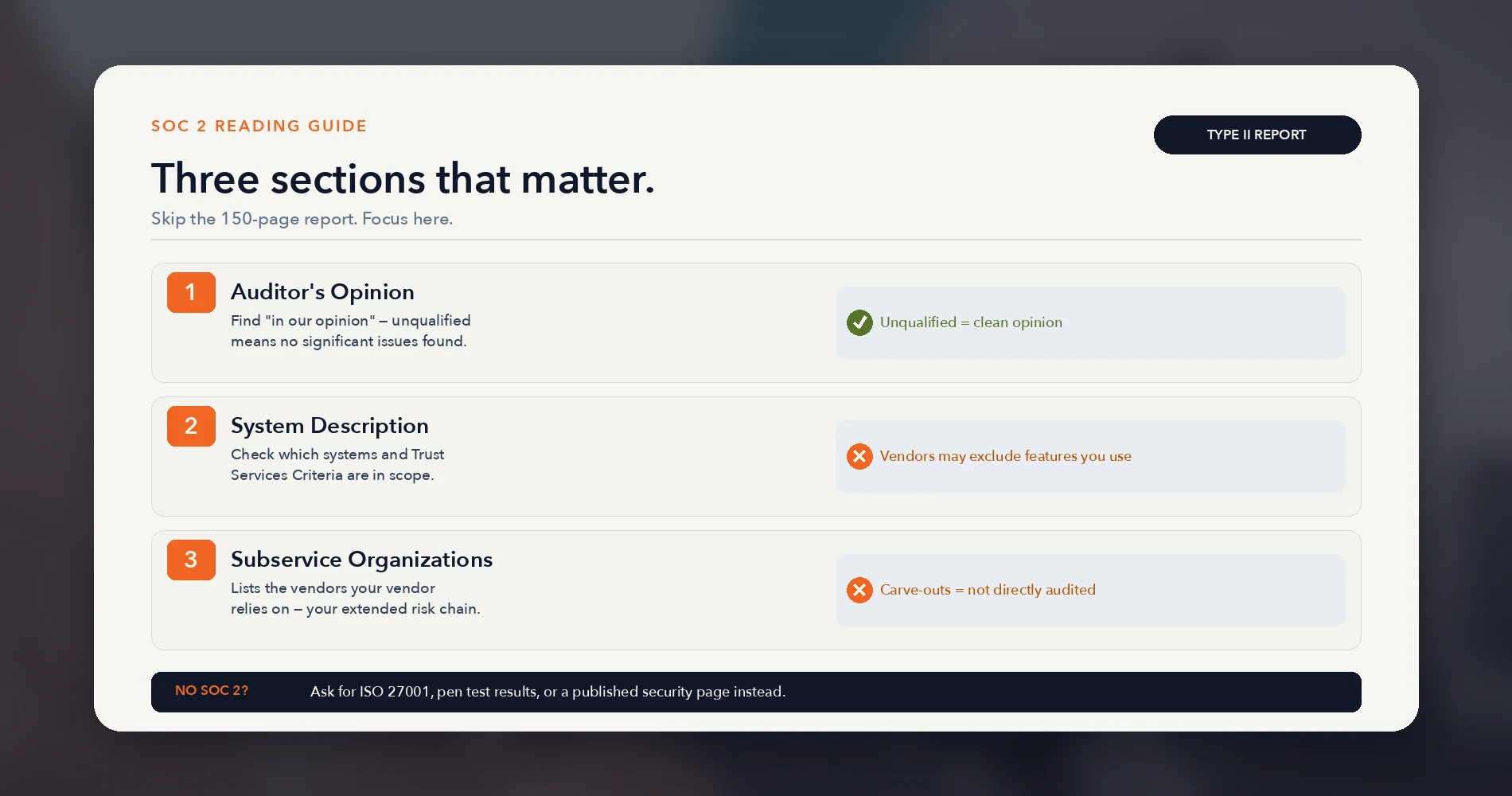
You don't need to read all of it. Focus on three sections:
1. The Independent Service Auditor's Report
Look for the section titled "Independent Service Auditor's Report" (sometimes labeled Section II, but numbering varies). This is the single most important page. Find the phrase "in our opinion" and read what follows:
- Unqualified opinion (sometimes called a "clean" opinion): The auditor found that the vendor's controls were suitably designed and operating effectively throughout the audit period. This is what you want to see.
- Qualified opinion: The auditor found that controls were effective except in specific areas, which will be described. Read the qualification carefully — it might be irrelevant to you (e.g., a physical security control at a facility you don't use), or it might be exactly the kind of thing you care about (e.g., access controls were not consistently enforced).
- Adverse opinion: Significant, pervasive control failures. This is rare in reports that vendors voluntarily share, but if you see one, it's a serious red flag.
- Disclaimer: The auditor couldn't reach a conclusion, usually because of insufficient evidence. Treat this the same as no report.
2. The System Description
Look for the section titled "Description of the System" or "System Description" (often Section III, but check the table of contents). Pay attention to what's included and what's excluded:
- Trust Services Criteria in scope: SOC 2 covers five categories (Security, Availability, Processing Integrity, Confidentiality, Privacy). Many reports only cover Security. If your concern is data privacy or availability, check whether those criteria were included. Note that Availability criteria evaluate the vendor's controls related to their availability commitments — they don't independently guarantee uptime or verify specific SLA numbers.
- Systems and boundaries: The report describes which of the vendor's systems were tested. Some vendors scope their SOC 2 to cover only part of their product — a vendor might get their core platform audited but exclude a newer feature or a specific integration that you actually use.
- Trust Services Criteria noted as "not applicable": Vendors can exclude criteria they claim don't apply to their service. Check whether any exclusion matters to your use case.
3. The Subservice Organizations List
This is the section most readers skip, and it often contains the most decision-relevant information. It lists the other vendors that your vendor relies on — cloud hosting providers, payment processors, data center operators, infrastructure services.
This is directly relevant to the Amgen scenario — the incident involved data in third-party cloud environments. If you're evaluating a SaaS vendor and their SOC 2 report lists multiple subservice organizations, those sub-vendors are part of your risk chain whether you've heard of them or not.
The report will note whether each subservice organization's controls were "carved out" (excluded from the audit — meaning the vendor is responsible for monitoring them separately) or "inclusive" (tested as part of this audit). Carve-outs are more common. They're not automatically a problem, but they mean the audit didn't directly test those third parties' controls. Also look for "Complementary Subservice Organization Controls" (CSOCs) — these are controls the vendor assumes its subservice providers have in place. If those assumptions aren't met, the vendor's own controls may not work as designed.
What if the vendor doesn't have a SOC 2?
Many smaller vendors don't. SOC 2 Type II audit fees typically range from $10,000 to $60,000 depending on scope and firm, with total first-year costs — including readiness work, tooling, penetration testing, and internal labor — potentially running considerably higher. It's not something a 10-person SaaS startup has lying around. That's not automatically disqualifying, but it changes what you ask for instead.
The strength of substitute evidence varies. Listed roughly from strongest to weakest:
- ISO 27001 certification with a defined scope relevant to your use case — an independently audited alternative, more common internationally
- A recent penetration test summary or independent security assessment from a named firm
- A published security page with specific, verifiable claims about encryption, access controls, and incident response — this is self-attestation, not independent verification, so weigh it accordingly
- Cyber liability insurance — shows the vendor has been underwritten against security incidents, but does not demonstrate that controls are effective
- Customer references from companies in your industry — useful context, not security evidence
For a Standard-tier vendor, a combination of these substitutes is reasonable. For a Critical-tier vendor with no SOC 2 and no independently verified evidence, you have a real decision to make — see the next section.
Many well-known SaaS vendors publish trust centers where you can request their SOC 2 report or review their security posture directly. 1Password, for example, maintains a public trust center with their SOC 2 report, penetration test results, and compliance documentation available on request. When evaluating your Critical-tier vendors, check whether they have a similar trust page before concluding they have no security evidence at all.
The One-Page Vendor Risk Questionnaire (Copy This Before Your Next Signup)
Vendor Risk Questionnaire — Send This Before Every New SaaS Signup
Data & Access
- What specific categories of our data will your service access, process, or store? (e.g., customer names/emails, financial records, employee data, internal documents)
- What is the minimum access level required for your service to function? (read-only / read-write / admin)
- Can we restrict the data your service accesses to only what's necessary? If so, how?
Security Controls
- Is our data encrypted at rest? What encryption standard? (e.g., AES-256) Who manages the encryption keys?
- Is our data encrypted in transit? (TLS 1.3 preferred; TLS 1.2 minimum)
- Do you enforce multi-factor authentication for your employees who access customer data?
- Do you have a SOC 2 Type II report? If yes, can you share it or a summary? If no, what independently verified security evidence can you provide? (ISO 27001, penetration test results, independent security assessment)
Incident Response
- What is your contractual breach notification commitment? Within how many hours of discovering an incident affecting our data will you notify us?
- Will you provide details on what data was accessed in a breach?
Data Ownership & Exit
- Who owns the data we store in your service?
- Can we export all our data in a standard format if we cancel?
- How long do you retain our data after the relationship ends? How is it deleted?
This is deliberately short. The goal is a questionnaire that actually gets sent — before the signup, not six months after. Enterprise vendor risk questionnaires run 50 to 200 questions and require a compliance analyst to interpret the responses. This one asks 12 questions, covers the decisions that actually matter, and can be answered by a vendor in a single email.
How to score the responses:
You're not generating a numerical risk score. You're making a binary decision: is this vendor acceptable for the tier of data and access we're giving them?
- Critical-tier vendor: You need substantive answers to all 12 questions. Evaluate the responses against the evidence available — a satisfactory answer backed by a SOC 2 report carries more weight than the same answer on a vendor's word alone. No independently verified evidence, combined with high-sensitivity data access, is a reason to limit what you share or look elsewhere.
- Standard-tier vendor: Questions 1–3 (data and access) and 8 (breach notification) are the minimum. The rest are good to know but not dealbreakers at this tier.
- Low-Touch vendor: Don't send the questionnaire. Keep them in your inventory and move on.
The questionnaire also integrates with our IT policy template library — add it to your vendor onboarding checklist so it becomes part of every new tool adoption, not a one-time project.
What to Do When a Vendor Fails the Tier Test
You've tiered your stack, identified your Critical-tier vendors, and found one with weak answers or no security evidence at all. The response should be proportionate, not a blanket cancellation.
Option 1: Limit the data you give them. This is often the fastest fix. A CRM doesn't need full customer Social Security numbers if it's only used for sales outreach — strip the data down to names, emails, and company information. A file storage service doesn't need access to your financial documents if you can store those in a separate, more secure location. This may lower the vendor's tier — replot it on the matrix after making the change, because depending on the remaining access level, it may still be Critical.
Option 2: Limit their access level. Switch admin access to read-write. Disable API integrations you're not actively using. Remove OAuth permissions for connected apps that were authorized once and forgotten. This may lower the vendor's tier — replot it on the matrix after making the change, because depending on the remaining data sensitivity, it may still be Critical.
Option 3: Negotiate specific contract terms. For vendors you can't easily replace, add explicit terms to your agreement:
- Contractual breach notification within a defined timeframe after discovery of an incident affecting your data — 24 to 72 hours is a reasonable target, though legal notification deadlines vary by jurisdiction and regulation
- Your right to a written incident report that identifies what data was affected
- Data deletion upon contract termination, with written confirmation
- Annual review of their security posture (a trigger to re-request their SOC 2 or equivalent)
Option 4: Find an alternative for the highest-sensitivity use case. If your current payroll provider has no security evidence and won't provide any, that's a Critical-tier vendor with a Critical-tier gap. Moving your payroll to a provider with a clean SOC 2 is a better use of time than trying to negotiate security improvements with a vendor that doesn't have the infrastructure to deliver them.
Option 5: Accept and document the risk consciously. Some vendors are genuinely hard to replace — an industry-specific tool with no competitor, a platform your entire team is trained on. If you've exhausted the options above and the vendor is still in the Critical tier with gaps, document the risk explicitly: what data they hold, what evidence is missing, what compensating controls you've put in place (limited access, encrypted data, contractual terms). Conscious acceptance of a documented risk is meaningfully different from the default state most businesses are in, which is unexamined exposure.
Related Resources
- Tech Stack Teardown: A Software Audit for Small Businesses — The companion exercise to vendor risk tiering: clean up costs, unused tools, and orphaned access before evaluating vendor security.
- Business Data Privacy Guide — A deeper look at data sensitivity categories and your obligations when handling customer PII, financial data, and health information.
- NIST CSF 2.0 Guide for Small Businesses — How to connect the two-axis framework to a formal risk management standard without enterprise overhead.
- What Happens When Your Business Gets Hacked: The Timeline — The incident response timeline this vendor risk framework is designed to make less likely.
- Best Cybersecurity Software for Small Business — The security tool stack that closes the gaps vendor risk tiering reveals.
- Is ChatGPT Safe for Business Data? — Vendor risk assessment applied to AI tools, a category that frequently lands in the Critical tier.
- IT Policy Templates for Small Business — Add the vendor risk questionnaire to your existing policy library and onboarding workflows.
Frequently Asked Questions
Related Articles
More from Cybersecurity
Protecting Company Files: Why Policy Comes Before Software
Small businesses cannot make company files impossible to copy, but they can reduce risk with policy, permissions, managed devices, DLP, logging, and disciplined offboarding.
18 min read
How to Set Up Automatic Updates on Every Device (Windows, Mac, iPhone, Android, Router)
Enable and verify automatic updates on Windows, macOS, iPhone, Android, routers, and NAS devices — a complete cross-platform guide for small businesses.
15 min read
NordVPN for Business Review (2026): NordVPN vs. NordLayer
Hands-on NordVPN review for business use in 2026. Speed benchmarks, security analysis, and honest assessment of when NordVPN suits a solo operator vs. when NordLayer is the right choice.
19 min read