

UniFi UNVR Instant Review (2026): The Best All-in-One NVR for Homes?
Complete review of the UniFi UNVR Instant NVR with integrated PoE switch. Perfect for residential homes and small businesses needing 4-6 cameras with professional-grade surveillance.


Key Takeaway
The UniFi UNVR Instant is a $199 all-in-one NVR with a built-in 6-port PoE switch and HDMI output. It supports up to 6 cameras at 4K and runs UniFi Protect locally — no subscription required. The $699 kit adds four G5 Turret Ultra cameras and a 1TB drive, making it a complete four-camera system out of the box.
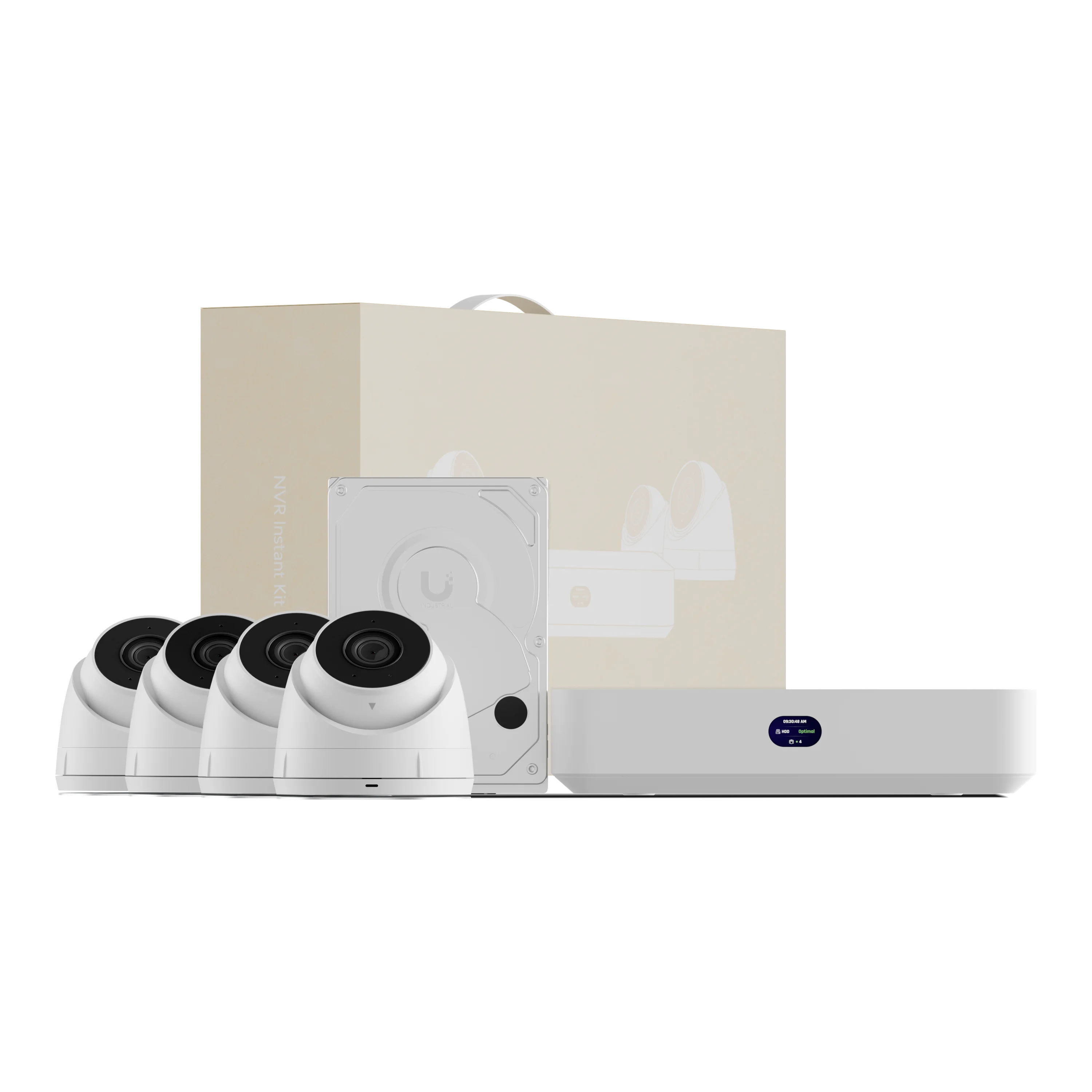
UniFi UNVR Instant Kit
Complete 4-camera system with built-in PoE switch and local storage.
- Includes 4× G5 Turret Ultra cameras
- 1TB surveillance drive pre-installed
- Native UniFi Protect with no subscription fees
- Built-in 6-port PoE switch with HDMI out
*Price at time of publishing
After installing UniFi Protect systems for residential and commercial clients, I often work with homeowners and small business owners who want professional-grade surveillance without building a multi-device stack. The UniFi UNVR Instant was designed for exactly that use case.
What you get: A compact NVR with a built-in 6-port PoE switch, a single 3.5" hard drive bay, and an HDMI port for local viewing. It runs UniFi Protect natively and supports up to 6 cameras at 4K, 8 at 2K, or 15 at Full HD — no separate switch, NVR, or cloud gateway required.
| Pros | Cons |
| All-in-one: NVR + PoE switch in one device | Single drive bay — no RAID redundancy |
| HDMI output for local viewing without a computer | 40W PoE budget limits high-power camera mixes |
| No monthly subscription fees | Six-camera ceiling |
| Supports drives up to 24TB | Requires an external router for DHCP |
| Works with any router, UniFi or not |
Why the UNVR Instant Exists
A standard UniFi Protect setup for four cameras typically requires three separate devices: a Cloud Gateway for routing, a PoE switch to power the cameras, and an NVR for storage. That's fine for larger deployments, but it's more hardware, more configuration, and more cost than a home or small office actually needs.
The UNVR Instant consolidates all three into one unit. Unlike the Cloud Key Gen2 Plus, which still needs a separate PoE switch, the UNVR Instant has the switch built in, along with an HDMI port for local viewing. The result is a single device you can plug into your router, connect your cameras to, and be done.
In practice, this means:
- Fewer devices to buy, configure, and maintain
- One power outlet instead of three
- A single interface for both camera management and local playback
- No ongoing subscription fees — footage stays on your local drive
Specs and Hardware
UniFi UNVR Instant Core Features
- Processor: Quad-core ARM Cortex-A55 @ 1.7 GHz with 4 GB RAM
- Camera Capacity: 6 cameras at 4K resolution, 8 cameras at 2K resolution, or 15 cameras at Full HD
- Integrated Switching: 6-port PoE — 40W total budget, 15.4W max per port (802.3af)
- Storage: Single 3.5" HDD bay (supports up to 24TB surveillance drives)
- Local Viewing: Integrated HDMI ViewPort for direct monitor connection
- Network Integration: Requires connection to a gateway or Layer 3 switch (any router with DHCP so cameras can receive an IP address)
- Form Factor: Compact fanless desktop unit
The single drive bay keeps the unit compact and affordable. You can install any 3.5" surveillance drive up to 24TB, which gives you plenty of headroom for extended retention depending on how many cameras you run and whether you record continuously or motion-only.
PoE Power Budget Consideration
While the UNVR Instant supports up to 6 cameras, be mindful of the 40W total PoE power budget. For 6-camera setups, use power-efficient models like the G5 Turret Ultra (approximately 5W each) rather than high-power cameras like the G6 Pro Bullet (up to 12W each). Exceeding the 40W limit will cause system instability.
Introducing UNVR Instant: An All-in-One Device Powered by UniFi Protect
Real-World Installation Applications
Residential Use
For a typical home — front door, driveway, backyard, side gate — four cameras covers most layouts, and the kit is sized exactly for that. You get local storage, no monthly fees, and the ability to pull up footage from your phone anywhere. If you already run a UniFi network, the UNVR Instant integrates directly with it through the UniFi Protect app, so cameras and Wi-Fi are managed from the same interface.
Small Business Use
For small businesses, the practical value of the UNVR Instant comes as much from the software as the hardware. A few real-world examples of how UniFi Protect features get used:
- Retail: Connect the HDMI output to a monitor at the checkout counter for a live camera feed. Staff can monitor the floor without opening an app.
- Restaurants: Grant the manager remote access through the UniFi Protect app so they can check in on kitchen and front-of-house cameras from their phone, even off-site.
- Professional offices: Set up motion-triggered alerts for after-hours activity and share specific camera views with individual staff members — UniFi Protect supports per-user access controls.
- Service businesses: Use scheduled recording to capture business hours only, reducing storage consumption without losing coverage when it matters.
All of this is managed from the same app, with no third-party software or additional subscriptions required.
UniFi UNVR Instant Kit Contents and Specs
The UniFi UNVR Instant Kit costs $699 and includes the NVR, four 2K cameras, and a 1TB drive.
UniFi UNVR Instant Kit Components
- (1) UniFi UNVR Instant with integrated 6-port PoE switch
- (4) G5 Turret Ultra cameras — 4MP (2K) resolution, AI detections, 30m IR night vision
- (1) 1TB surveillance-grade hard drive (pre-installed)
- Complete solution ready for immediate deployment
The kit takes the guesswork out of compatibility. The G5 Turret Ultra cameras deliver 4MP (2K) resolution, person and vehicle detection, and 30-meter IR night vision — solid performers for both indoor and outdoor use.
The included 1TB drive gives you roughly 30 days of motion-triggered recording for all four cameras. If you record continuously 24/7, expect closer to one week. The drive is easy to swap out — the bay accepts any 3.5" surveillance drive up to 24TB.
Compatible Cameras
The UNVR Instant works with the full UniFi Protect camera lineup, including the G6 series with AI detections. A few common options and their current prices:
- G6 Bullet ($199): 4K resolution with on-camera AI processing
- G5 Turret Ultra (~$99): 4MP (2K) resolution, the camera included in the kit
- G4 Bullet (~$79): 4MP, a solid budget option for basic coverage
Storage Upgrade Recommendations
If you plan to record continuously or want longer retention, upgrading the drive is straightforward. Stick to surveillance-grade drives — they're rated for 24/7 write cycles, whereas standard desktop drives are not and will wear out faster in an NVR.
Recommended options for the UNVR Instant's 3.5" bay:
- WD Purple (2TB–8TB): Purpose-built for surveillance, widely available, reliable for continuous recording
- Seagate SkyHawk (2TB–8TB): Optimized for NVR workloads with ImagePerfect firmware to minimize frame loss
- WD Purple Pro / Seagate SkyHawk AI (8TB–24TB): Best for maximum retention; the UNVR Instant supports up to 24TB in its single bay
For a four-camera setup recording motion-only at 2K, a 4TB drive provides roughly 60 days of retention — a practical upgrade for most homes and small businesses.
UniFi UNVR Instant Pricing
The UNVR Instant is available in two configurations:
| Specs | ||
|---|---|---|
| Cameras Included | None | 4× G5 Turret Ultra (2K) |
| Storage Included | None (BYO Drive) | 1TB Surveillance Drive |
| Max Camera Capacity | 6 (4K) / 15 (HD) | 6 (4K) / 15 (HD) |
| Integrated Switch | 6-port PoE (40W budget) | 6-port PoE (40W budget) |
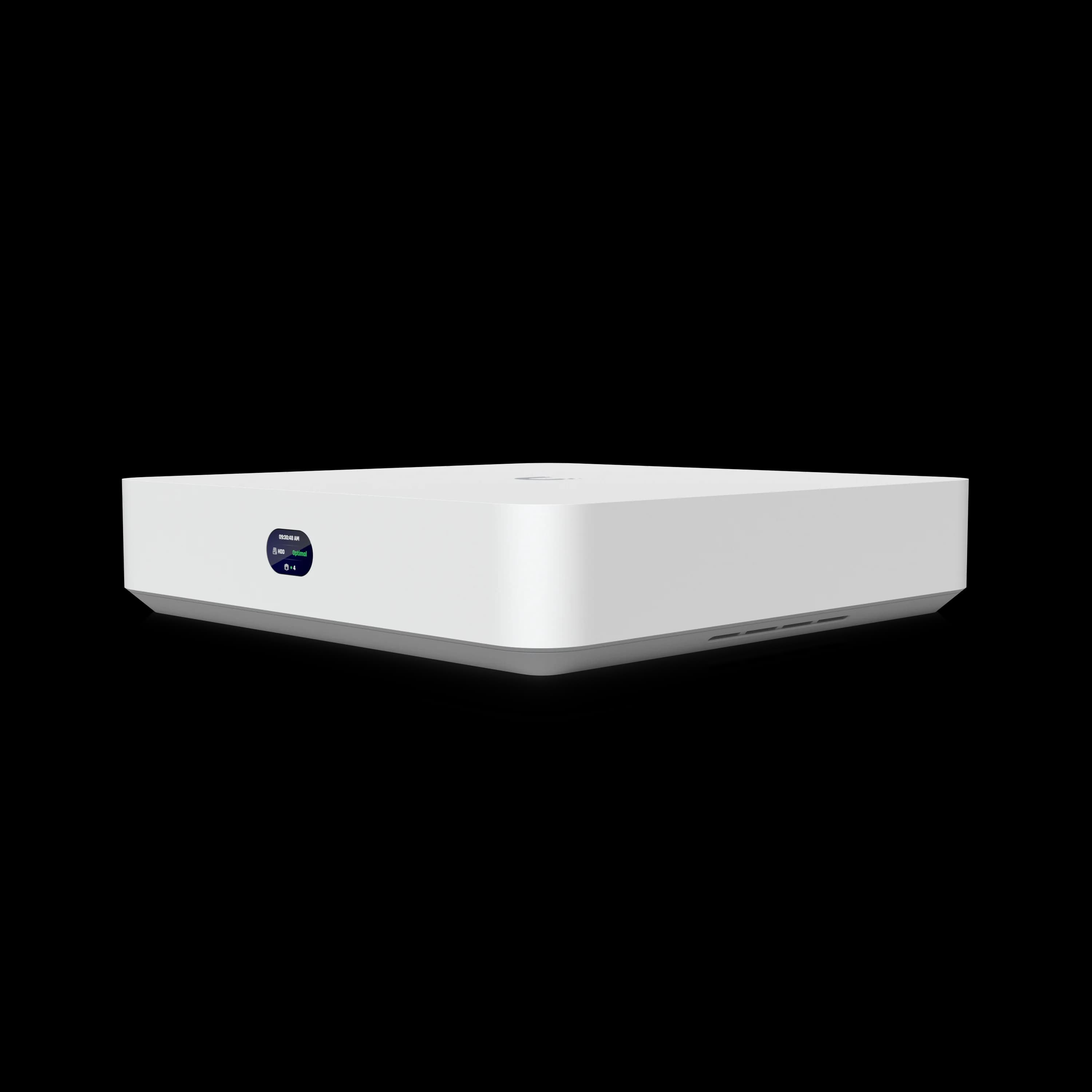
The kit represents strong value: buying the four G5 Turret Ultra cameras separately would cost roughly $400–$440, making the $699 bundle a meaningful discount over purchasing components individually. The standalone unit is the right choice if you already own compatible UniFi cameras or want to source your own.
Setup and Installation
How to Set Up the UNVR Instant
Initial setup takes under 15 minutes:
- Insert the hard drive into the 3.5" bay on the bottom of the unit (the kit comes with a 1TB drive pre-installed).
- Connect the UNVR Instant to your router or gateway via Ethernet on the WAN/uplink port so the device receives an IP address.
- Adopt the device in the UniFi Protect app — open the app on iOS or Android, follow the on-screen adoption flow, and your cameras will appear automatically once connected to the PoE ports.
What Are the Network Requirements for the UNVR Instant?
The UNVR Instant requires an external gateway or Layer 3 switch to assign IP addresses via DHCP.
While it functions as a standalone video recorder and PoE switch, the UNVR Instant lacks built-in routing. You must connect it to a third-party router, ISP modem, or a UniFi Cloud Gateway so your cameras can receive IP addresses. Using a complete UniFi network environment adds long-term benefits, such as VLAN segmentation and unified network management, but a basic non-UniFi router works perfectly for standard recording.
If you're already running a UniFi network, you'll get some additional benefits:
- Camera traffic can be isolated on a dedicated VLAN for added security
- Everything — cameras, Wi-Fi, and switches — is managed from the same UniFi dashboard
- The system scales cleanly if you add more UniFi hardware later
The unit itself is compact enough to sit on a shelf or in a utility closet. It needs one power outlet and one Ethernet cable to your router — that's the full physical footprint. The UNVR Instant is fanless, so it runs silently; it does generate some warmth under load, but nothing that requires ventilation beyond normal shelf placement.
Local Viewing via HDMI
The UNVR Instant has an HDMI port that connects directly to any monitor or TV, giving you a live camera view without needing a computer or phone. This is useful in a few specific situations:
- A reception desk or back office where staff want a dedicated security display
- A retail counter where the owner monitors the floor in real time
- A home setup where you want a dedicated screen for camera feeds
It's not a feature everyone will use, but for those who want always-on local visibility, it removes the need for a separate viewing workstation.
Is the UNVR Instant Right for You?
| Good fit | Not the right tool |
|---|---|
| 4–6 cameras at a home or small business | Need more than 6 cameras |
| Want local storage with no subscription | Need RAID or drive redundancy |
| Want HDMI output for a dedicated display | Prefer cloud-only management |
| Don't want to buy a separate PoE switch | Planning significant camera expansion |
| Any router works — UniFi or not | Need maximum uptime / enterprise reliability |
UniFi Protect Software
The UNVR Instant runs UniFi Protect natively, which means you get the full software experience:
- Remote viewing and playback from the iOS or Android app
- Motion alerts with person, vehicle, and animal detection (with compatible cameras)
- Email and push notifications for security events
- Per-user access controls — share specific cameras with staff without giving full admin access
- Integration with UniFi Access door control systems if you want to expand into access management
Remote access works through Ubiquiti's UI portal, so you can view cameras from anywhere without opening ports on your router or configuring a VPN. UniFi Protect receives regular software updates, so the feature set continues to improve over time without requiring new hardware. Traveling with a UniFi Travel Router bound to your home site via Teleport gives you the same access from a hotel room or client site as you'd have on your home network.
Introducing: UniFi Protect 6.1 | G6 Pro Bullet | SuperLink Environmental Sensor and PoE Siren
Scaling Beyond the UNVR Instant
The UNVR Instant is designed for installations up to six cameras, and that's a real ceiling. If your needs grow, here's what the path forward looks like:
- More cameras: Add a PoE switch and migrate to a standard UNVR, which supports up to 60 cameras
- More storage: The single bay is the main constraint — the UNVR (4-bay) or UNVR Pro are the natural upgrades
- Camera investments carry over: All UniFi Protect cameras work across the entire NVR lineup, so you won't need to replace cameras when you upgrade the recorder
Verdict
Our Rating: 4.4/5
The UNVR Instant is a well-executed product for a specific use case: homes and small businesses that need four to six cameras, want to avoid a monthly subscription, and don't need the complexity of a multi-device UniFi setup.
At $199 standalone or $699 as a complete kit, the pricing is reasonable. The kit in particular is good value — you're getting a capable four-camera system with local storage, remote access, and AI detections for less than most professional installations cost in hardware alone.
The limitations are real but clearly defined: one drive bay, no RAID, a 40W PoE budget, and a six-camera ceiling. If any of those are dealbreakers for your situation, the standard UNVR or UNVR Pro are the right step up. But for the target use case, this device does exactly what it promises.
Professional Installation Services
We install UniFi Protect systems for homes and businesses throughout South Florida. If you'd like help choosing the right configuration or want a professional installation, schedule a consultation and we'll walk through your specific setup.
Frequently Asked Questions
Does the UNVR Instant work as a standalone system?
Yes — it records locally and doesn't depend on cloud connectivity for basic operation. It does need a router or gateway on the network to assign IP addresses to the cameras, but that can be any router, including your ISP's modem-router.
What storage capacity does the system support?
The UNVR Instant accommodates a single 3.5" hard drive and includes a 1TB hard drive in the kit. The system supports up to 24TB surveillance-grade drives, allowing for extended retention periods based on your recording needs.
Can I use third-party cameras with the UNVR Instant?
UniFi Protect supports some third-party cameras via RTSP, but features like AI detections, two-way audio, and smart alerts are only available with native UniFi cameras. For the best experience, stick with UniFi cameras — the G5 Turret Ultra and G6 series are the most common choices.
How does this compare to the standard UNVR?
The standard UNVR is a rack-mountable unit with four drive bays (RAID support) and capacity for up to 60 Full HD or 18 4K cameras. The UNVR Instant trades that capacity for a much smaller footprint: one drive bay, a built-in PoE switch, and a six-camera ceiling. It's a different product for a different scale of installation.
Is this suitable for business installations?
Yes, for small businesses with four to six cameras. UniFi Protect includes user management, scheduled recording, and mobile access — enough for most small office or retail setups. If you need more cameras or drive redundancy, the UNVR Pro is the better fit.
What happens if I need to expand beyond 6 cameras?
You'd need to migrate to a standard UNVR or UNVR Pro, which support up to 60 cameras. The good news is that all your UniFi cameras carry over — you won't need to replace them, just the recorder.
For a breakdown of how the UNVR Instant fits into a wider UniFi storage architecture — including when to pair it with a UNAS for file storage and archiving — see Can UniFi Protect Use a NAS? UNAS vs UNVR Explained.
For comprehensive UniFi product guidance, explore our complete business networking resource center or learn about planning professional surveillance systems. Our security consultation services help businesses throughout South Florida implement optimal protection strategies.
Affiliate Disclosure: This article contains affiliate links. If you make a purchase through these links, we may earn a small commission at no extra cost to you. As an Amazon Associate, iFeelTech earns from qualifying purchases.
Related Articles
More from UniFi Networks
UniFi Protect vs. Synology Surveillance Station: A Complete 2026 Comparison
A detailed comparison of UniFi Protect and Synology Surveillance Station for small business and home security. We examine hardware, software, pricing, and real-world use cases to help you choose the right system.
11 min read
UniFi Protect Setup Guide 2026: Cameras, NVRs, Storage and Real Costs
Plan a UniFi Protect camera system with current 2026 NVR and camera choices, complete budgets, storage and PoE sizing, ONVIF support, installation steps and no-license-fee trade-offs.
23 min read

UniFi Protect vs. Reolink vs. TP-Link: Which Camera System Is Best for Your Business?
UniFi Protect, Reolink, and TP-Link (Tapo vs. VIGI) compared for small business use — current 2026 lineups, real 8-camera pricing, and iFeelTech's multi-year UniFi fleet reliability data.
19 min read