Small Business Technology Trends 2026: What's Working Right Now
Data-driven SMB technology trends based on 50+ real deployments. Multi-gig infrastructure, tech stack consolidation, simplified security, practical AI tools, and marketing fundamentals that deliver results in 2026.

Key Takeaway
Based on 50+ small business technology deployments across Miami-Dade and Broward counties, five priorities define successful SMB technology investments in 2026: multi-gig infrastructure, technology stack consolidation, simplified cybersecurity, practical AI adoption, and fundamentals-focused marketing.
Affiliate Disclosure: This article contains affiliate links. If you make a purchase through these links, we may earn a small commission at no extra cost to you. As an Amazon Associate, iFeelTech earns from qualifying purchases.
Our Methodology: Real-World Data Over Vendor Hype
This analysis draws from network deployments, security assessments, and technology consulting projects completed between April 2024 and May 2026. Our data covers businesses with 5 to 65 employees in healthcare, professional services, manufacturing, retail, and hospitality across Miami-Dade and Broward counties. Budget figures reflect actual project costs, not vendor list prices or theoretical ROI calculations.
The Five Technology Priorities Defining 2026
1. Why Multi-Gigabit Infrastructure Is the 2026 Business Standard
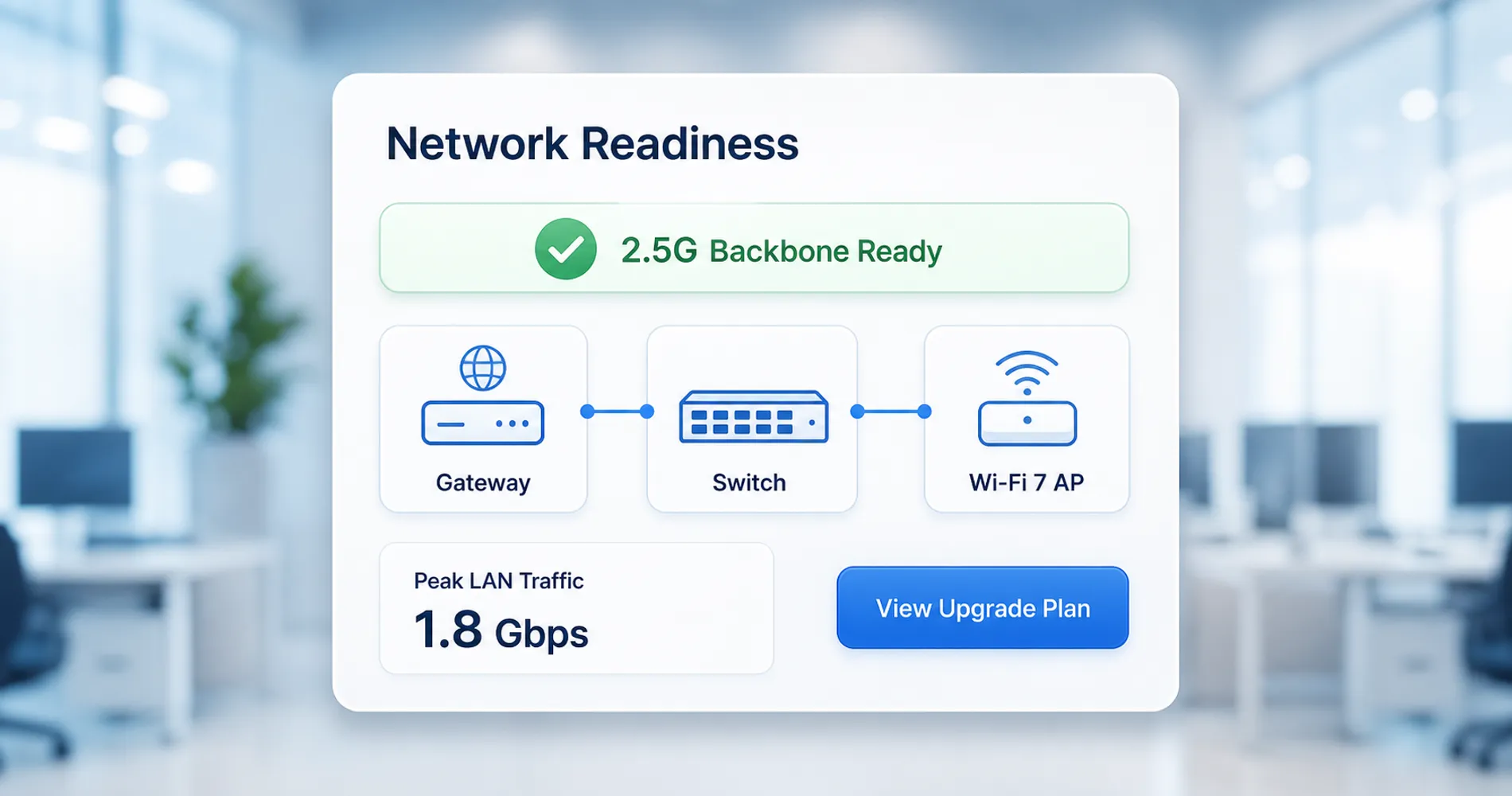
Multi-gigabit networking is present in 70% of small business network upgrades in 2026. It prevents critical internal bandwidth bottlenecks caused by Wi-Fi 7, cloud applications, and local AI workloads.
In early 2024, fewer than 20% of our clients requested multi-gig capability. By Q2 2026, the cost differential between standard gigabit and 2.5G infrastructure dropped below 15%, making it the default choice. The IEEE 802.3bz (NBASE-T) standard enables 2.5G and 5G speeds over existing Cat5e and Cat6 cabling, meaning most offices upgrade without rewiring. For a step-by-step implementation walkthrough, see our multi-gig network upgrade guide.
Modern UniFi network solutions, such as the UniFi UDM Pro MAX gateway ($599), UniFi Wi-Fi 7 access points (U7 Pro at $189, U7 Pro Max at $279), and the UniFi Pro Max 24 PoE switch ($799, with 8x 2.5G PoE++ ports and a 400W PoE budget), deliver a complete enterprise-grade multi-gig ecosystem at SMB price points. The switch is the piece most businesses overlook — without 2.5G switching, multi-gig APs and gateways cannot deliver their full throughput to connected devices. For budget-sensitive deployments, TP-Link Omada offers comparable 2.5G networking at 15–30% lower hardware cost, though with a narrower ecosystem that lacks integrated cameras and access control.
Key Implementation Data:
- Performance: Businesses report 35% to 50% faster local file transfers after multi-gig upgrades
- Hardware: 2.5G switching and PoE++ are now minimum specifications for new camera and AP deployments
- ROI: Productivity gains typically offset the upgrade cost within 12 to 18 months
- Local AI factor: On-premise AI workstations running Ollama or LM Studio generate significant LAN traffic for model inference, making multi-gig backhaul essential for offices adopting local AI tools
Budget Impact: Multi-Gig Infrastructure
Budget estimates below include both hardware and professional integration labor. Hardware typically accounts for 55–65% of the total, with integration labor (cabling, configuration, testing) making up the remainder. For help building a complete IT budget across all categories, see our small business IT budget planning guide.
- 15-person office: $3,200–4,800 total (hardware + labor)
- 25-person office: $5,500–8,200, including switching and cabling
- 50-person office: $12,000–18,000 comprehensive deployment
- Typical ROI: 12–18 months through productivity improvements
2. How Technology Stack Consolidation Reduces Software Costs
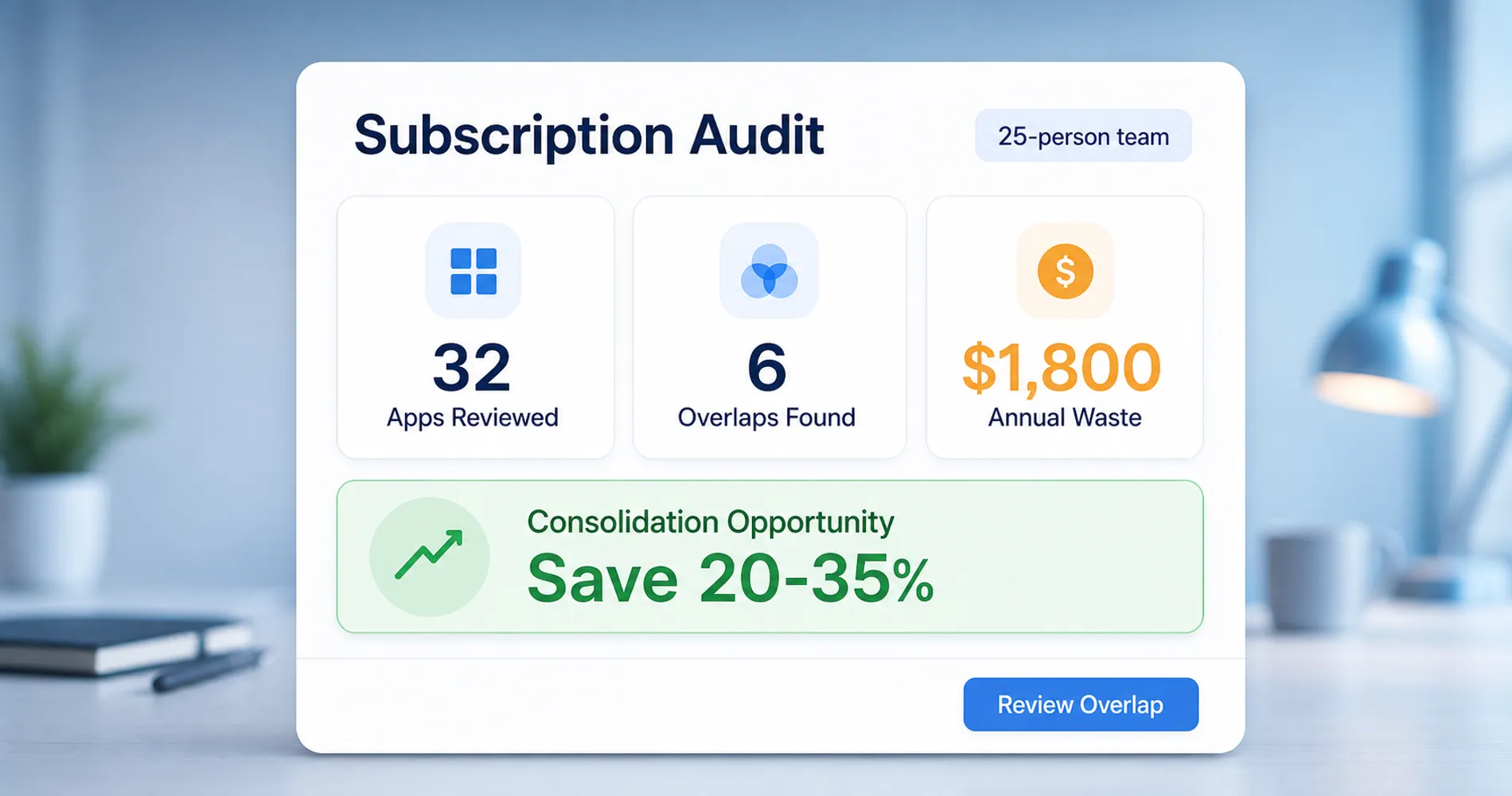
Consolidating software platforms reduces redundant business spending by an average of 20% to 35%. This streamlines operations and vendor management.
The average 25-person business manages 32 different software subscriptions, resulting in roughly $1,800 in annual redundant spending. Redundant software subscriptions account for up to 18% of IT waste in the SMBs we audit. Successful businesses in 2026 are standardizing on core ecosystems rather than continuing to add point solutions.
Platform Consolidation Patterns:
- Communication: Migrating entirely to Microsoft Teams or Slack to avoid fragmented internal chats
- Productivity: Eliminating environments that mix Microsoft 365 and Google Workspace. At comparable tiers, both platforms cost $7/$14/$22 per user per month in 2026. The deciding factor is workflow fit, not price. (Note: Microsoft announced a price increase effective July 1, 2026.)
- Security: Replacing piecemeal antivirus and VPN tools with unified, single-vendor platforms
- Business applications: All-in-one CRM/project management adoption over point solutions
Microsoft 365 vs Google Workspace: The #1 Consolidation Question
The most common stack consolidation question we hear is which productivity ecosystem to standardize on. As of 2026, the base licensing costs are nearly identical. The meaningful cost difference is AI integration: Google bundles Gemini into Workspace Business Standard at no extra charge ($14/user/month total), while Microsoft's Copilot add-on costs $30/user/month on top of the base plan ($42.50/user/month total). For a 25-person team, that AI cost gap is roughly $8,550/year.
Choose Microsoft 365 if your team relies on desktop Office apps (especially Excel with VBA/macros), deep SharePoint integration, or advanced compliance controls required in healthcare and legal. Choose Google Workspace for cloud-native, browser-first teams that prioritize real-time collaboration and want AI productivity features included in the base plan. For a detailed feature-by-feature comparison, see our Microsoft 365 vs Google Workspace guide.
Recommended Consolidation Approach:
- Audit all current software subscriptions and map overlapping functionality
- Identify your largest spend categories and consolidate those first
- Involve your team in platform selection to ensure adoption success
- Document current workflows before making changes to avoid disruption
- Execute migrations with proper change management and training
Budget Impact: Stack Consolidation
- Typical savings: 20–35% reduction in software costs
- 10-person business: $150–280/month savings
- 25-person business: $380–720/month savings
- Implementation cost: 20–40 hours internal time for migration management
- Break-even timeline: 2–4 months after implementation
3. Simplifying SMB Cybersecurity Posture in 2026
Simplified cybersecurity platforms reduce administrative overhead while improving threat defense. Automated tools achieve higher employee compliance than complex security stacks.
Complex security environments frequently lead to alert fatigue and tool abandonment. The most effective 2026 deployments rely on automation and consolidation rather than complex orchestration. Businesses with the best security outcomes use fewer tools, not more.
Practical Security Implementation:
- Authentication: Deploying enterprise-grade password managers like 1Password Business ensures comprehensive protection with zero friction
- Access: Zero-trust network access through tools like NordLayer replaces outdated legacy VPNs
- Communication: Strict email security protocols, including enforced DMARC policies (p=quarantine or p=reject), are now baseline requirements for cyber insurance compliance
- Endpoint protection: Endpoint Detection and Response (EDR) has replaced basic antivirus as the minimum standard required by insurers
- Backup: Immutable, off-site backups with documented, regular test restores are mandatory for policy renewal. For Windows-centric SMBs, a Synology NAS with immutable snapshots (Btrfs WORM) paired with Active Backup for Business provides license-free, ransomware-resilient backup with zero per-device fees. Veeam Backup & Replication offers a more feature-rich alternative for businesses with VMware or Hyper-V environments. Both satisfy the immutable backup requirements that cyber insurers now mandate.
Windows 10 End-of-Life: Current Status and Costs
Windows 10 reached end of support on October 14, 2025. Businesses still running it are either paying $61/device/year for Extended Security Updates (ESU) through Microsoft's paid program, or running vulnerable, unpatched systems. ESU pricing doubles annually ($122/device in Year 2, $244/device in Year 3) and is cumulative — skipping a year requires retroactive payment. For a 20-device office, that is $1,220 in Year 1 alone. Migration to Windows 11 is the more cost-effective path for most businesses.
Cyber Insurance Is Now Driving SMB Security Adoption
In 2026, cyber insurers operate more like security auditors than underwriters. Premiums are based on security maturity, not just company size. Carriers now require documented evidence of specific controls before issuing or renewing coverage:
- MFA everywhere (email, VPN, cloud platforms, admin accounts) — non-negotiable baseline
- EDR on all endpoints — basic antivirus is no longer accepted
- DMARC at enforcement level — monitoring-only (p=none) is insufficient
- Immutable backups with quarterly test restores (see our 3-2-1 backup rule guide for implementation details)
- Documented incident response plan and annual security awareness training
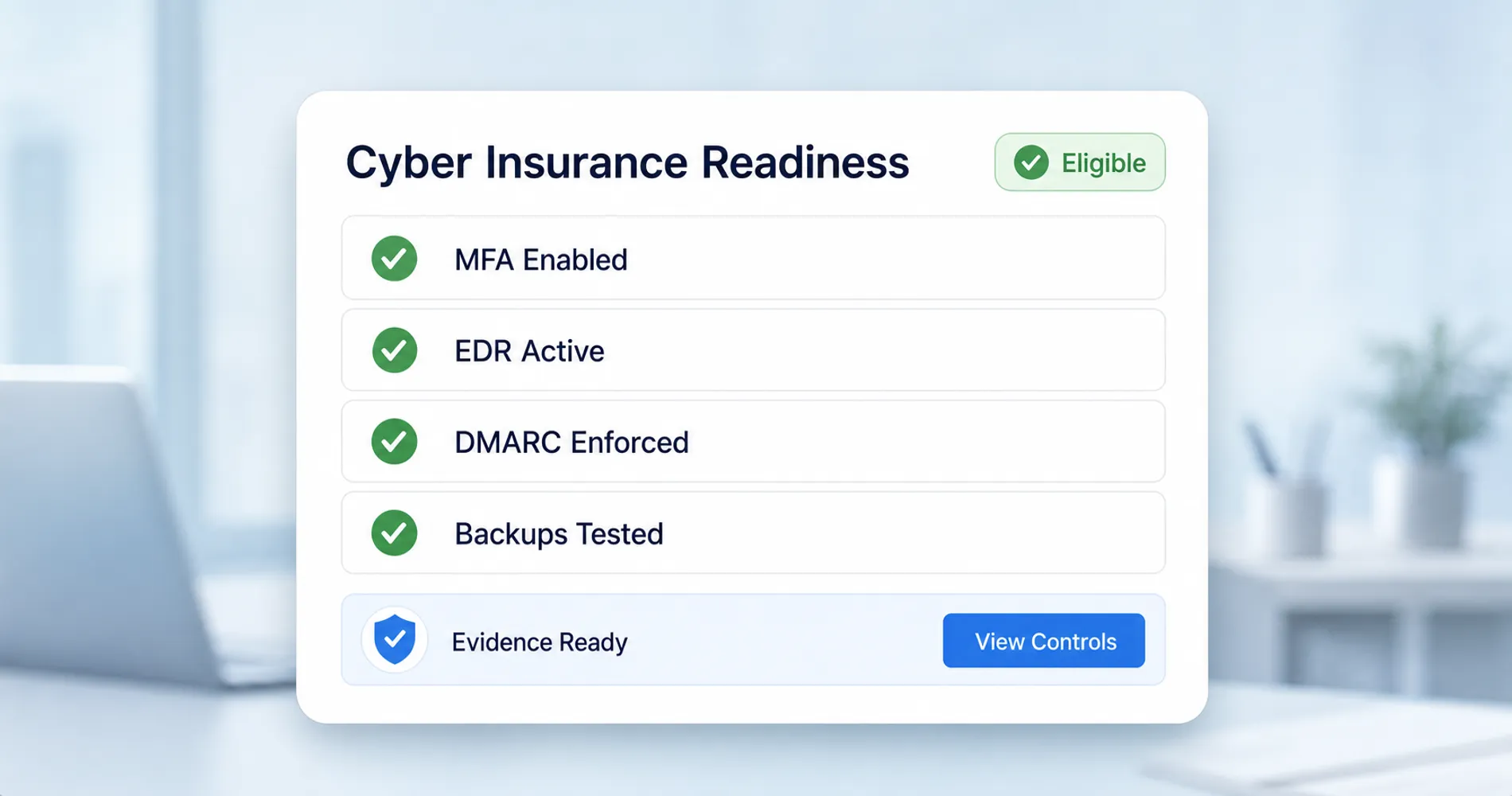
Businesses lacking these controls face premium increases of 25–100%, reduced coverage, or outright denial. Implementing zero-trust access, EDR, and enforced DMARC can reduce premiums by 15–30% combined. For a small business under $1M in revenue, typical annual cyber insurance premiums range from $1,200 to $2,400 for $1M in coverage — but only if these controls are in place.
Avoid These Mistakes
- Avoid security tool sprawl — fewer, well-managed tools consistently outperform complex stacks
- Prioritize solutions with high automation and low maintenance requirements
- Choose tools your team will actually use rather than the most comprehensive options
- Do not self-attest security controls without documentation — insurers now require screenshots, audit logs, and third-party verification
Budget Impact: Simplified Security
- Comprehensive coverage: $120–350 per employee annually
- 10-person business: $100–290/month total security spend
- 25-person business: $250–730/month for complete protection
- Typical security incident cost avoided: $25,000–150,000
- Cyber insurance premium (under $1M revenue): $100–200/month for $1M coverage
4. What Practical AI Tools Are SMBs Actually Using in 2026
Practical AI tools are delivering measurable productivity gains for organized businesses in 2026. The gap between AI hype and real adoption is closing — but only for companies with documented processes.
The AI adoption pattern we observe differs significantly from vendor predictions. Businesses with organized, documented processes gain substantial value from AI tools. Those with chaotic workflows see minimal benefit and often abandon AI initiatives. The lesson remains: organize your processes before automating. AI amplifies existing efficiency — it does not create organization where none exists.
For example, video teams with defined workflows can reliably use an AI video editor or tools to add subtitles to video, turning AI into a consistent production asset rather than an experiment.
AI Tools Delivering Results Right Now:
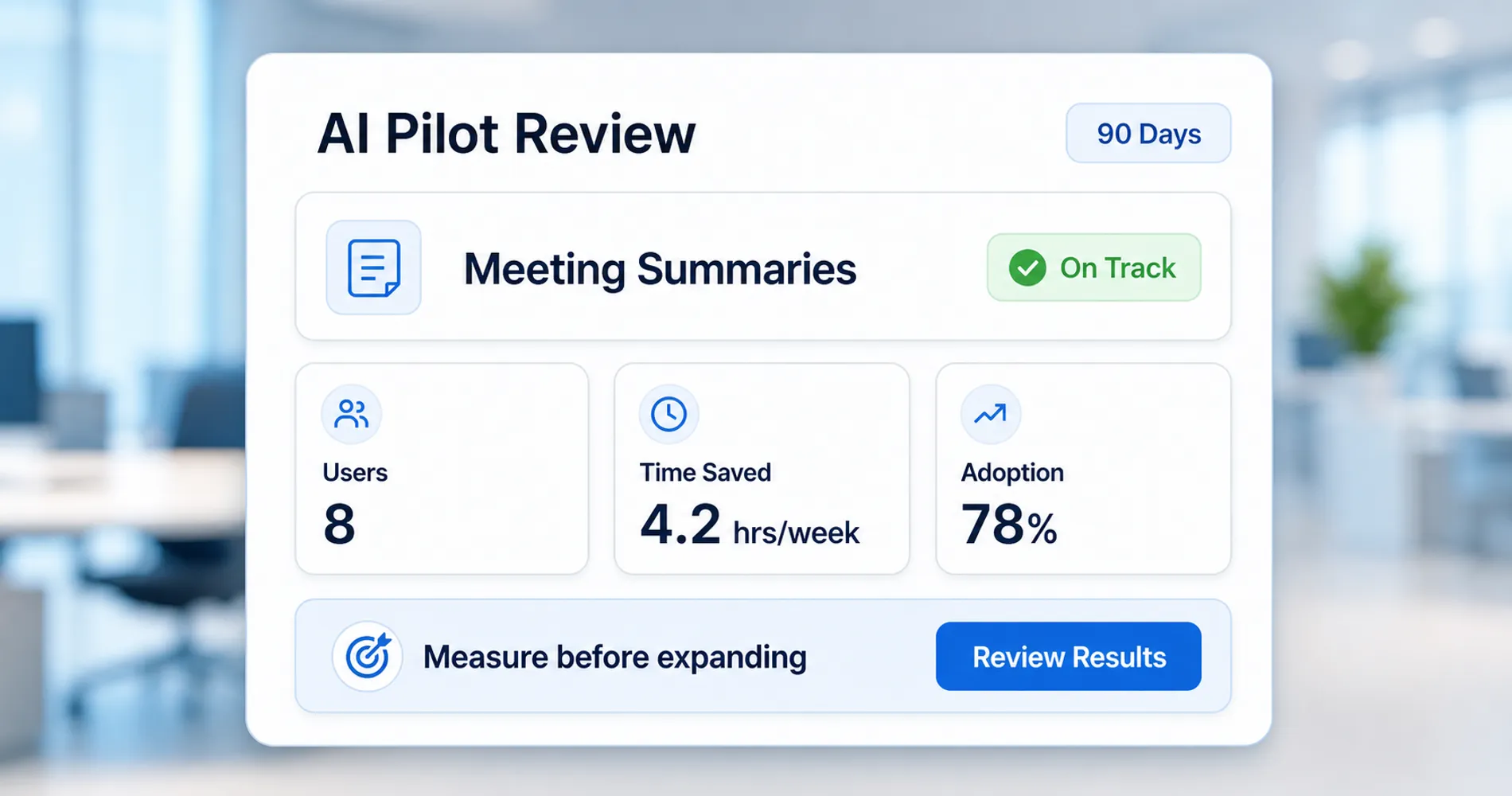
- Microsoft 365 Copilot ($30/user/month add-on) drafts emails, summarizes meetings, and generates documents inside Outlook, Word, Excel, and Teams. Effective adoption requires clean SharePoint/OneDrive permissions and a phased rollout — pilot with 30–50% of staff who are heavy document and meeting users, measure for 90 days, then expand or trim. Actual adoption rates remain low industry-wide; success depends entirely on data readiness and training.
- Google Gemini (included in Workspace Business Standard at $14/user/month) provides similar AI capabilities with no additional licensing cost, making it the lower-TCO option for cloud-native teams.
- Local AI agents using Ollama or LM Studio run open-source models on local hardware, eliminating API costs and keeping sensitive data on-premise. For Windows environments, workstations like the Dell Precision or Lenovo ThinkStation equipped with NVIDIA RTX series GPUs (24GB+ VRAM) handle 30B+ parameter models for document processing, internal knowledge bases, and workflow automation. Apple Silicon Macs with unified memory offer a quieter, lower-power alternative. For deeper guidance on building or buying the right hardware, see our local AI server guide and private cloud hardware guide. This approach is increasingly practical for regulated industries (healthcare, legal, finance) where data residency matters.
- Content and media automation for teams with defined workflows, including AI-assisted video editing, subtitle generation, and marketing content creation.
Why Local AI Matters for Infrastructure Planning:
On-premise AI processing shifts bandwidth demand from WAN (internet) to LAN (local network). A workstation running a 30B-parameter model for document processing generates significant internal network traffic for model inference and file retrieval. This directly ties the AI adoption trend back to the multi-gig infrastructure priority: offices deploying local AI tools need 2.5G or faster internal networking to avoid LAN bottlenecks.
AI Implementation Approach:
- Document your most repetitive business processes before evaluating any AI tool
- Begin with one clearly defined use case where success can be measured objectively
- For Microsoft 365 Copilot: audit and clean SharePoint/OneDrive permissions first — Copilot sees everything the user can see
- Master that application before expanding to additional workflows
- Measure ROI at 90 days and decide whether to expand, trim, or pivot
What to Avoid
- Do not license 100% of staff for Copilot on day one — pilot with your heaviest document and meeting users first
- Do not implement AI in chaotic or poorly documented processes
- Resist vendor pressure to adopt AI before your business is organizationally ready
- Expect a 15–25% short-term productivity dip during the adoption phase before gains materialize
Budget Impact: Practical AI Integration
- Microsoft 365 Copilot: $30/user/month (add-on to Business Standard or Premium)
- Google Gemini: Included in Workspace Business Standard ($14/user/month total)
- Local AI hardware: $1,000–$3,000 one-time for a capable GPU workstation, $0 recurring
- Implementation time: 3–6 months for first meaningful deployment
- Training investment: 8–15 hours per user for effective adoption
- Expected productivity gains: 15–25% in automated processes (after the initial adoption dip)
5. Why Digital Marketing Fundamentals Outperform Complex Funnels
Owned media and direct customer relationships deliver higher ROI than platform-dependent marketing strategies. Small businesses investing in fundamentals are outperforming those chasing trends.
The constant changes in social media algorithms, search engine policies, and digital advertising platforms are driving businesses back to marketing fundamentals: owned media, direct customer relationships, and authentic local presence. This is not a retreat — it is a strategic reallocation toward assets businesses actually control.
What Delivers Results in 2026:
- Website performance: Fast, well-optimized websites consistently outperform complex funnels. With AI-powered search engines (Google AI Overviews, Perplexity) extracting structured answers directly, clear page structure and authoritative content matter more than ever.
- Email marketing: Provides the best ROI for most small businesses. List building and automation are the primary marketing technology focus.
- Local SEO: Drives higher-quality leads than broad digital advertising for service-based businesses
- Customer reviews: Authentic review systems carry more weight than paid advertising and directly influence local search rankings
- Social media simplification: Fewer platforms with deeper engagement, rather than trying to maintain presence everywhere
Budget Impact: Marketing Technology Optimization
- Core marketing stack: $250–1,000/month depending on business size
- Website performance tools: $80–250/month
- Email and automation: $40–180/month
- Local SEO tools: $80–350/month
- Expected ROI: 300–500% for well-optimized fundamentals
Investment Priority Matrix for 2026
Not every technology investment offers equal returns. Based on our client implementation data, here is how to prioritize technology spending for maximum business impact:
| Priority Level | Technology Category | ROI Timeline | Implementation Risk |
|---|---|---|---|
| Must-Have | Multi-gig network infrastructure | 12–18 months | Low |
| Must-Have | Email security (DMARC at enforcement) | Immediate | Medium |
| Must-Have | Windows 10 migration to Windows 11 | Immediate | Medium |
| High Priority | Cyber insurance readiness (MFA, EDR, backups) | Immediate | Medium |
| High Priority | Technology stack consolidation | 3–6 months | Medium |
| High Priority | Password manager deployment | Immediate | Low |
| Medium Priority | Website performance optimization | 6–12 months | Low |
| Medium Priority | Practical AI tool adoption (Copilot/Gemini pilot) | 6–18 months | High |
| Medium Priority | Remote work tech debt replacement | 3–6 months | Medium |
| Lower Priority | Advanced marketing automation | 12+ months | High |
Investment Planning
2026 SMB Technology Priority Matrix
Select a technology category to see its ROI timeline, implementation risk, and recommended first step.
Select a technology category above to see its priority context and recommended first step.
Action Planning Framework
Successful technology implementation requires structured planning and realistic timelines. Based on our client success patterns, here is a practical framework for 2026 technology investments:
Now (Q2 2026): Foundation and Immediate Priorities
- Cyber insurance readiness: Deploy MFA on all systems, upgrade to EDR, implement DMARC at enforcement level, verify backup recoverability. Document everything — insurers require proof, not self-attestation.
- Windows 10 migration: Audit remaining Windows 10 devices and begin migration to Windows 11. ESU costs $61/device/year and doubles annually.
- Subscription audit: Catalog all software subscriptions, identify overlaps and unused services. Map overlapping functionality before canceling.
- Network assessment: Evaluate current infrastructure capacity and plan a multi-gig upgrade path.
- Replace pandemic-era tech debt: Identify temporary remote work solutions still running (consumer routers, personal VPNs, makeshift collaboration tools) and replace with permanent hybrid infrastructure.
Q3 2026: Implementation Phase
- Technology consolidation: Execute platform migrations (M365 or Google Workspace standardization) with proper change management
- Infrastructure deployment: Complete multi-gig network upgrades, prioritizing gateway and core switches first
- AI pilot programs: Begin small-scale AI tool testing — pilot Copilot or Gemini with 30–50% of staff on defined use cases
- Security platform consolidation: Replace piecemeal security tools with unified, single-vendor platforms
Q4 2026: Optimization and Scaling
- AI measurement: Review 90-day pilot data and decide whether to expand, trim, or pivot AI licensing
- Performance monitoring: Measure consolidation savings and infrastructure ROI against projections
- Training investment: Focus on user adoption and process refinement for all new platforms
- 2027 planning: Assess what worked and build next year's technology roadmap based on data
The Remote Work Tech Debt Problem
Many businesses are still running on temporary remote solutions implemented during 2020–2021. Consumer-grade routers serving as office gateways, personal VPN accounts substituting for business access, fragmented chat apps, and home NAS devices holding company data — these interim solutions were never designed for long-term use.
For most businesses, the cost of maintaining these workarounds now exceeds the cost of proper replacement. Cyber insurance underwriters are also flagging improvised IT setups as risk factors during renewal, adding urgency to the transition.
Common tech debt to retire:
- Consumer routers → business-grade gateways with VLAN support and IDS/IPS
- Personal VPNs → zero-trust network access (NordLayer, Cloudflare Access)
- Fragmented chat (WhatsApp, personal Slack) → unified Teams or Slack workspace
- Unmanaged endpoints → MDM-enrolled, EDR-protected devices
- Local file shares on personal drives → cloud-synced, permission-controlled storage
2026 Considerations: Variables to Watch
Several developments are actively shaping small business technology decisions:
Regulatory Developments
- AI regulation: Formal requirements for AI tool disclosure and data handling are emerging, particularly in healthcare and finance sectors. Local AI processing simplifies compliance by keeping sensitive data on-premise.
- Cybersecurity compliance: Enhanced security standards for businesses handling customer data are tightening, driven in part by cyber insurance requirements.
Technology Development Factors
- Local AI maturity: On-premise AI tools (Ollama, LM Studio) are becoming accessible enough for office IT managers to deploy without dedicated AI engineers, shifting AI adoption economics for SMBs.
- Satellite internet: Business satellite services are approaching cost parity with fiber in underserved areas, expanding connectivity options for rural and suburban offices.
- Edge computing: Local processing power is reducing cloud dependency and shifting infrastructure investment priorities toward internal network capacity.
Economic Environment Considerations
- Microsoft 365 price increase (July 1, 2026): Business Basic rises from $6 to $7/user/month, Business Standard from $12.50 to $14/user/month. Factor this into renewal budgeting and consolidation decisions.
- Interest rate conditions: Financing costs continue to impact technology investment decisions. Phased multi-gig deployments spread costs over 6–12 months.
- Energy costs: GPU-equipped AI workstations draw 300–600W under load, making energy efficiency a factor in local AI adoption decisions.
Getting Started: Your Next Steps
Technology planning can feel overwhelming, but success comes from methodical implementation rather than trying to address everything simultaneously. Start with an honest assessment of your current state.
- Audit your current software subscriptions and identify overlap
- Assess your network infrastructure capacity — is your switching still 1G?
- Review your cybersecurity fundamentals against current cyber insurance requirements
- Inventory any remaining Windows 10 devices and plan migration timelines
- Identify pandemic-era "temporary" solutions still running in production
- Document your most repetitive business processes (prerequisite for AI adoption)
- Evaluate your website performance and local search presence
Frequently Asked Questions
When should small businesses prioritize multi-gig upgrades?
Upgrade to multi-gig infrastructure when your local network experiences peak congestion, when deploying Wi-Fi 7 access points, or when planning office renovations. The hardware cost differential between 1G and 2.5G is now under 15%, and most offices can upgrade over existing Cat5e/Cat6 cabling without rewiring. Businesses deploying local AI tools or bandwidth-heavy applications like 4K video conferencing should upgrade immediately.
How do I know if my business needs technology stack consolidation?
Consolidate if you manage more than 30 software subscriptions, if employees are confused about which tools to use, if data is siloed across platforms, or if software costs exceed 12–18% of operational expenses. The average 25-person business has $1,800/year in redundant subscription spending. Consolidation typically saves 20–35%.
What cybersecurity controls does my business need for cyber insurance in 2026?
MFA on all systems, EDR on all endpoints, DMARC at enforcement level (p=quarantine or p=reject), immutable off-site backups with test restores, and a documented incident response plan. These are mandatory requirements for most carriers. Businesses without them face premium increases of 25–100%, reduced coverage limits, or denial of coverage.
Should my business use Microsoft 365 Copilot or Google Gemini?
Both deliver real productivity gains, but the economics differ. Google Gemini is included in Workspace Business Standard ($14/user/month). Microsoft Copilot is a $30/user/month add-on on top of M365 licensing ($42.50/user/month total). Choose Microsoft if you depend on desktop Office apps, Excel macros, or advanced compliance features. Choose Google if your team works primarily in the browser and you want AI without additional per-user fees.
Is it too late to migrate off Windows 10?
No, but delaying increases cost. Windows 10 ESU costs $61/device in Year 1, $122 in Year 2, and $244 in Year 3 — and the fees are cumulative. For a 20-device office, that is $1,220 in Year 1 alone, growing to $8,540 over three years. Migration to Windows 11 is the more cost-effective path for most businesses.
How can Miami businesses prepare for hurricane season with their technology investments?
Prioritize cloud-based backups with geographically distributed storage, implement remote access solutions for extended work-from-home capabilities, and install uninterruptible power supplies for critical network equipment. Storm-resistant network installation practices reduce recovery time. Our local experience includes hurricane-hardened installations designed for South Florida conditions.
Key Takeaways for Small Business Technology Planning
Final Recommendation
The 2026 technology landscape favors businesses that focus on fundamentals over speculative investments. Multi-gig infrastructure, simplified security (driven by cyber insurance requirements), platform consolidation, realistic AI adoption, and marketing basics deliver better returns than complex solutions that require significant organizational change to implement.
Choose technologies that grow with your business rather than solutions you hope to grow into. The businesses seeing the best results in 2026 are implementing technology thoughtfully, matching investments to actual business processes and user capabilities.
The most sophisticated tools provide no value if they are too complex to implement effectively or maintain consistently. Plan incrementally, measure results objectively, and focus on solutions that solve real business problems.
Technology should enhance your existing strengths, not attempt to compensate for operational weaknesses. Start with what matters most to your specific operation — cyber insurance readiness, Windows 10 migration, network capacity, subscription waste — and build systematically from there.
Related Articles
More from IT Guides
When to Stop Managing IT Yourself: A Small-Business Decision Guide
When should a small business outsource IT? Compare five support models, nine warning signs, current costs, and the minimum safe DIY baseline.
11 min read
How to Manage Windows 11 PCs in a Google Workspace Business
Stop OneDrive folder conflicts, keep Chrome as the default, and manage Microsoft account prompts on Windows 11 business PCs.
14 min read
Windows 10 Still Running? Here's What to Do Now (2026)
The Windows 10 deadline passed in October 2025. If you're still running it, here's what ESU costs, what it covers, and when to upgrade or replace instead.
13 min read