

Building a Private AI Server for Business: 2026 Hardware Guide
Run AI models locally without sending client data to the cloud. Compare Mac Studio vs custom PC builds for law firms and medical practices prioritizing data privacy.

Affiliate Disclosure: This article contains affiliate links. If you make a purchase through these links, we may earn a small commission at no extra cost to you. As an Amazon Associate, iFeelTech earns from qualifying purchases.
Data Privacy Consideration
For law firms managing attorney-client privilege and medical practices following HIPAA requirements, using public AI services can create compliance concerns. Local AI infrastructure keeps sensitive data on your own hardware.
When you submit a document to a cloud-based LLM, you trust a third party's data handling policies with confidential information. For law firms, healthcare providers, and financial services, this creates a compliance concern worth addressing.
The alternative: running AI models on your own hardware.
An on-premise AI server runs models like Llama 4, Mistral, or Qwen entirely offline—no data leaves your office network. This guide covers two practical hardware paths: the Apple Mac Studio for straightforward deployment, and custom PCs with NVIDIA RTX 5090 GPUs for maximum performance. We'll compare specs, real-world benchmarks, and total cost of ownership to help you make an informed decision.
Why Should Businesses Build Local AI Servers?
Local AI servers keep sensitive data entirely on-premises, ensuring strict compliance with HIPAA and attorney-client privilege.
Public cloud AI services present legitimate privacy risks for law firms and healthcare providers. Submitting confidential documents to third-party LLMs often violates data handling policies. By building an on-premise server, organizations run models like Llama 4 completely offline.
Data Privacy and Compliance
With local infrastructure, your queries and documents never leave your network. This provides verifiable privacy—disconnect from the internet and the AI still works. For firms handling PII, trade secrets, or regulated data, this level of control matters.
Predictable Costs
Enterprise AI subscriptions typically cost $30-50 per user monthly. For a 20-person firm, that's $7,200-$12,000 annually. A capable local server represents a one-time capital expense that pays for itself within 12-18 months, with no per-token charges or usage limits. Under IRS Section 179, US small businesses can often deduct the full purchase price of qualifying equipment in the first tax year—making a $10,000 server investment significantly more attractive on the balance sheet.
Consistent Performance
Cloud services experience latency during peak usage periods. A dedicated local server provides consistent response times, which matters for real-time document analysis or internal chatbots handling client inquiries.
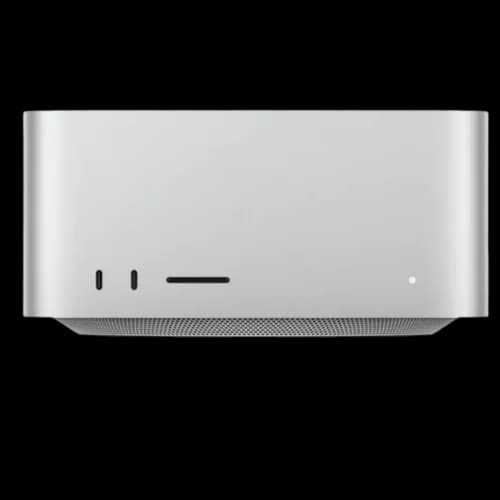
Option 1: Apple Mac Studio
For most small to mid-sized professional offices, the Mac Studio offers the most practical path to local AI. The key advantage is unified memory architecture—and understanding how it works explains why.
How Does Apple Unified Memory Benefit AI Models?
Apple's unified memory allows the CPU and GPU to share RAM, enabling Macs to load high-density AI models that would require multiple expensive PC GPUs.
Traditional PCs separate CPU memory (RAM) from GPU memory (VRAM). AI models primarily run in VRAM, and if a model exceeds available VRAM, performance drops significantly or the model won't load at all.
Apple's unified memory pools CPU and GPU memory together. A Mac Studio with 192GB or more of unified memory loads large AI models that would require expensive multi-GPU setups on a PC—at a fraction of the noise and power consumption.
Current Mac Studio Options (February 2026)
Apple updated the Mac Studio in March 2025. The lineup skips M4 Ultra entirely (the M4 Max chip lacks the UltraFusion connector required for an Ultra variant), pairing the newer M4 Max with the previous-generation M3 Ultra:
Mac Studio with M4 Max (Starting at $1,999)
- Up to 128GB unified memory
- 16-core CPU, up to 40-core GPU
- 546 GB/s memory bandwidth (40-core GPU config)
- Thunderbolt 5 connectivity
- Handles 30B parameter models effectively
Mac Studio with M3 Ultra (Starting at $3,999)
- Up to 512GB unified memory
- Up to 32-core CPU, 80-core GPU
- 819 GB/s memory bandwidth
- Thunderbolt 5 connectivity
- Handles 70B+ parameter models comfortably
Note: Apple is expected to release a Mac Studio with M5 Max and M5 Ultra chips in mid-2026, which should bring improved performance while maintaining current memory options.
Recommended Configuration for AI Workloads
For practical local AI deployment:
- Chip: M3 Ultra (for large 70B models) or M4 Max (for 30B models and under)
- Memory: 192GB minimum for 70B models; 128GB sufficient for 30B models
- Storage: 2TB SSD minimum (model files are large; a 70B model at Q4 quantization is approximately 40GB)
Advantages:
- Near-silent operation suitable for office environments
- Simple setup—install Ollama and begin working
- macOS security features and ecosystem integration
- Strong resale value
- Low power consumption (under 300W for the entire system)
Limitations:
- Slower inference speed compared to RTX 5090 GPUs (see benchmarks below)
- Non-upgradable after purchase
- Higher cost per GB of memory than PC builds
Suited For
Professional offices wanting a quiet, low-maintenance solution. The Mac Studio works well for firms that prioritize simplicity over raw performance.
Need Help Choosing?
Not sure which configuration fits your firm? We help law practices and medical offices assess AI hardware needs and handle deployment.
Option 2: Custom PC with NVIDIA RTX 5090
For organizations needing maximum inference speed or planning to fine-tune models on proprietary data, a custom PC with NVIDIA's latest GPUs provides the strongest raw performance. The trade-off is complexity—and it starts with understanding VRAM.
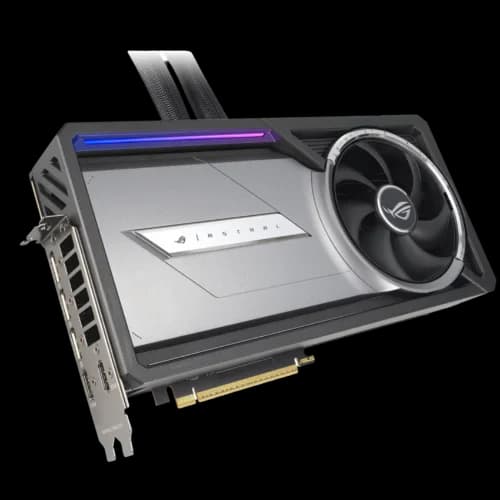
Dual NVIDIA RTX 5090 Custom PC
The ultimate local AI workstation for high throughput and fine-tuning. Up to 80 t/s inference speed.
- 64GB GDDR7 VRAM via Tensor Parallelism
- Up to 80 t/s inference speed for 30B models
- Capable of fine-tuning & training custom models
- Twice as fast as a Mac Studio M3 Ultra
*Price at time of publishing
How Much VRAM Do You Need for Local AI?
You need at least 32GB of VRAM for mid-size 30-billion parameter models and 64GB of VRAM for advanced 70-billion parameter models.
AI inference speed and model capacity depend almost entirely on available VRAM. The RTX 5090, launched January 2025, provides 32GB of GDDR7 memory with 1,792 GB/s bandwidth—a significant leap over the previous generation's 24GB GDDR6X.
Unlike standard business laptops with integrated graphics, a dedicated AI workstation prioritizes VRAM:
- 16GB VRAM: Adequate for smaller coding assistants and 7B parameter models
- 32GB VRAM (single RTX 5090): Runs 30B parameter models effectively
- 64GB VRAM (dual RTX 5090s): Handles 70B parameter models with headroom for large context windows
For organizations planning to analyze hundreds of legal documents simultaneously, a dual-GPU setup (64GB total via tensor parallelism) is required to prevent memory bottlenecking.
Recommended Build Specifications
Custom AI Workstation Bill of Materials (February 2026)
| Component | Recommendation | Approximate Cost |
|---|---|---|
| GPU | 1-2x NVIDIA RTX 5090 (32GB each) | $2,800-$6,000 |
| CPU | AMD Threadripper 7960X or Intel Xeon W5-3435X | $1,500-$2,000 |
| RAM | 128GB DDR5 ECC | $400-$600 |
| Storage | 4TB NVMe (Samsung 990 Pro) | $350 |
| NAS (optional) | Synology DS1823xs+ for document archives | $2,200 |
| Power Supply | 1600W 80+ Titanium (ATX 3.1) | $400 |
| Case/Cooling | Full tower with adequate airflow | $300 |
| Total (without NAS) | $5,750-$9,650 |
Note: RTX 5090 street prices as of February 2026 range from $2,800-$3,000 per card—approximately 40% above the $1,999 MSRP—due to AI demand and GDDR7 supply constraints. Plan budgets accordingly.
Advantages:
- Fastest consumer inference speeds available (Blackwell architecture)
- Upgradable—add more VRAM as needs grow
- Capable of fine-tuning and training custom models
- Broad software compatibility (CUDA ecosystem)
- Dual RTX 5090s deliver inference performance comparable to enterprise-grade NVIDIA H100 GPUs at a fraction of the cost
Limitations:
- Considerable noise and heat output (requires a dedicated server space)
- More complex initial setup and ongoing maintenance
- Higher power consumption (see TCO comparison below)
Suited For
Technical teams with existing server infrastructure, or organizations planning to train custom models on their document archives.
Total Cost of Ownership: Beyond the Sticker Price
Hardware cost is only one part of the budget. A dual-RTX 5090 workstation draws up to 1,600W under full AI inference load—requiring a dedicated 20A electrical circuit (standard 15A office outlets will trip breakers). Over a year of regular use (8 hours/day), electricity adds $500-$700 at average US commercial rates ($0.13/kWh).
Factor in HVAC load to cool a machine generating 5,000+ BTU/hr of heat, and annual operating costs reach $800-$1,200 beyond the initial hardware investment. The system also requires a server closet or dedicated room—the noise level is not suitable for an open office.
By contrast, a Mac Studio M3 Ultra draws under 300W at peak, runs silently on a standard outlet, and generates negligible heat. Annual electricity cost: under $100.
3-Year Total Cost of Ownership: Custom PC vs Mac Studio
| Cost Factor | Dual RTX 5090 PC | Mac Studio M3 Ultra |
|---|---|---|
| Peak power draw | ~1,600W | ~300W |
| Annual electricity (8hr/day) | $500-$700 | ~$85 |
| Cooling/HVAC impact | Significant | Negligible |
| Dedicated circuit required | Yes (20A) | No |
| Noise level | Server room required | Office-quiet |
| Estimated 3-year TCO | $11,000-$13,000 | $6,500-$7,000 |
TCO includes hardware purchase, electricity, and estimated cooling overhead. Mac Studio pricing based on M3 Ultra with 192GB unified memory (~$5,800 configured).
How Fast Is Local AI? Performance Benchmarks
Local hardware won't match cloud inference speeds, but modern systems deliver practical performance for business applications. The critical metric is tokens per second (t/s)—roughly equivalent to words generated per second.
2026 Local AI Server Performance Comparison (Tokens Per Second)
| Hardware | 70B Model (Q4) | 30B Model (Q4) | Approx. Cost |
|---|---|---|---|
| Mac Studio M3 Ultra (192GB) | ~16 t/s | ~35 t/s | ~$5,800 |
| Mac Studio M4 Max (128GB) | N/A (insufficient for 70B) | ~30 t/s | ~$3,500 |
| Single RTX 5090 (32GB) | ~28 t/s | ~55 t/s | ~$5,800 build |
| Dual RTX 5090 (64GB) | ~50 t/s | ~80 t/s | ~$8,600 build |
Benchmarks use Q4_K quantization with Ollama. Actual speeds vary by model, context length, and prompt complexity. Sources: hardware-corner.net, MacRumors community benchmarks (2025).
For context, comfortable reading speed is about 4 tokens per second. The Mac Studio M3 Ultra at ~16 t/s for a 70B model generates text roughly 4x faster than a person reads—more than adequate for document summarization, contract review, and internal Q&A.
The RTX 5090's speed advantage becomes meaningful in high-throughput scenarios: multiple simultaneous users, batch document processing, or chatbot interactions where response latency directly affects workflow. For a single-user setup, both platforms feel responsive.
What Software Do You Need for Local AI?
Once hardware is configured, mature open-source tooling handles model management and user interfaces. Mac Studio users run macOS natively. For the custom PC route, Linux (Ubuntu 22.04 LTS or newer) is the preferred operating system—it provides native Docker support, first-class CUDA drivers, and better stability for multi-GPU inference than Windows.
Ollama (Model Runtime)
Ollama handles model management and inference. It works on Mac, Windows, and Linux, supporting most popular open-weight models including Llama 4, Mistral, Qwen, and DeepSeek:
# Run Llama 4 Scout (109B MoE, 17B active — fits in 12GB VRAM)
ollama run llama4:scout

# Run Llama 4 Maverick (400B MoE, 17B active — needs 32GB+ VRAM)
ollama run llama4:maverick
Ollama runs locally with no account required and no data sent externally.
Open WebUI (User Interface)
For non-technical users, Open WebUI provides a ChatGPT-style browser interface with conversation history, document upload for RAG, user accounts with access controls, and model switching. This allows staff to use local AI without command-line interaction.
Document Search (RAG)
For firms wanting to query their own document archives, tools like AnythingLLM index local files and enable questions like: "What were the key terms in the Anderson contract from March 2024?"
Llama 4: A Shift in Local AI Capability
Llama 4 Scout delivers near-70B quality with only 17B active parameters, running on as little as 12GB of VRAM. Its 10-million-token context window can hold entire codebases or years of legal documents, reducing the need for RAG pipelines in many use cases. For very large document archives that exceed available memory, RAG remains the more practical approach.
How Should You Store AI Models and Documents?
AI models need fast storage for loading, while document archives need reliable capacity. A two-tier approach balances speed and cost.
Tiered Storage Recommendation
-
Primary (NVMe SSD): Store AI models and vector databases on fast NVMe drives. The Samsung 990 Pro 4TB offers excellent sustained read/write speeds for model loading and retrieval.
-
Archive (NAS): Keep document archives on a network-attached storage device. The Synology DS1823xs+ provides enterprise reliability with expansion options, built-in backup tools, and Synology Drive for file sync across your team.
-
Backups: Don't overlook backing up your vector databases and any fine-tuned model weights. Re-embedding 100,000 legal PDFs after a drive failure consumes significant compute time. Synology's Active Backup for Business or a scheduled rsync to a secondary NAS protects this investment.
For help choosing the right NAS, see our Best NAS for Small Business comparison and Synology Business Guide. For AI-optimized storage with all-flash NAS options and 10GbE networking, see our companion guide: Building a Private Cloud for Local AI.
Which Should You Choose? Mac Studio vs Custom PC
Both paths lead to capable local AI infrastructure. Use this guide to match hardware to your specific requirements:
Hardware Recommendation by Priority
| Your Priority | Recommendation |
|---|---|
| Quiet office operation, minimal IT overhead | Mac Studio M3 Ultra |
| Maximum inference speed, multiple simultaneous users | Dual RTX 5090 Custom PC |
| Budget under $4,000, models up to 30B | Mac Studio M4 Max (128GB) |
| Budget $4,000-$6,000, 70B model capability | Mac Studio M3 Ultra (192GB) |
| Budget $6,000-$10,000, fastest 70B performance | Dual RTX 5090 Custom PC |
| Fine-tuning models on your own data | Custom PC (CUDA required) |
| No in-house IT team | Mac Studio (simpler setup and maintenance) |
| Existing server room infrastructure | Custom PC (leverages dedicated space and circuits) |
Hardware & TCO Comparison
| Specs | |||
|---|---|---|---|
| Memory / VRAM | 128GB Unified | 192GB Unified | 64GB GDDR7 |
| Tokens/Sec (30B) | ~30 t/s | ~35 t/s | ~80 t/s |
| Estimated TCO (3yr) | ~$3,680 | ~$6,055 | ~$10,700 |
| Best For | Small offices / 30B models | Professional offices / 70B models | Fine-tuning / High throughput |
| IT Complexity | Low (Plug & Play) | Low (Plug & Play) | High (Requires maintenance) |
For organizations planning to build a full private AI cloud with dedicated storage and 10GbE networking, our companion guide covers three complete build tiers from $1,700 to $15,000+: Building a Private Cloud for Local AI: The Small Business Hardware Guide.
Summary
Mac Studio suits most professional offices prioritizing quiet operation, simple setup, and minimal ongoing maintenance. Start with an M3 Ultra configuration (192GB memory) for a balance of capability and cost.
Custom PC suits technical teams needing maximum speed, planning to fine-tune models, or with existing server room infrastructure where noise and power aren't concerns.
Getting Started
Choosing and configuring AI hardware involves balancing performance, budget, compliance requirements, and your team's technical capabilities. If you'd like guidance tailored to your firm's specific needs—or prefer to have the deployment handled professionally—we're happy to help.
Related Resources
- Building a Private Cloud for Local AI — Complete three-tier hardware guide with networking and storage
- Best NAS for Small Business — NAS comparison for document storage
- IT Server Room Setup Guide — Planning a dedicated server space
- Best Business Laptops — Mobile workstations for on-the-go work
- Best Small Business Servers — Server options for growing teams
- Small Business Security Compliance Guide — HIPAA and data handling compliance
Frequently Asked Questions
Related Articles
More from Business Hardware
What Is AI NAS? Understanding Smart Storage for Business in 2026
AI NAS features face recognition, photo tagging, and local LLMs — but not all AI NAS is the same. Here's what the three types mean, and which one (if any) you actually need.
13 min read
Local AI Server Hardware Guide for Small Business (2026)
Size a private AI server by model, VRAM, context, and users. Researched August 2026 configurations with specifications and prices checked August 10, 2026.
22 min read

Best Wi-Fi 7 Access Points for Small Business (2026)
Compare the best Wi-Fi 7 access points for small businesses, including real AP, switch, cabling, controller, and five-year licensing costs.
26 min read