

Proton Unlimited vs Proton Business: Which Plan Is Right in 2026?
Compare Proton Unlimited, Duo, Family and Proton Workspace pricing, storage, domains, admin controls and retention to choose the right plan in 2026.

If you are paying for Proton Unlimited and running a business from it, the question is whether a business plan would give you anything you are currently missing.
For one person, usually not — Unlimited already supports 3 custom domains and 15 email addresses. For two people, Duo is often the answer. For up to six, Family is worth pricing before anything labelled business. Workspace earns its price when you need administrative, continuity and compliance control over the accounts — not simply when your headcount grows.
That distinction is what most comparisons miss, because they line the plans up by price per year and stop there.
Affiliate Disclosure: This article contains affiliate links. If you make a purchase through these links, we may earn a small commission at no extra cost to you. As an Amazon Associate, iFeelTech earns from qualifying purchases.
At a Glance
| Plan | Users | Annual price | Storage | Domains | Separate accounts | Business admin | Retention rules |
|---|---|---|---|---|---|---|---|
| Mail Plus | 1 | $47.88 | 15 GB | 1 | No | No | No |
| Unlimited | 1 | $119.88 | 500 GB | 3 | No | No | No |
| Duo | 2 | $179.88 | 2 TB shared | 3 | Yes | Limited | No |
| Family | Up to 6 | $287.88 | 3 TB shared | 3 | Yes | Limited | No |
| Workspace Standard | Per user | $155.88/user | 1 TB/user | 15 | Yes | Yes | No |
| Workspace Premium | Per user | $239.88/user | 3 TB/user | 20 | Yes | Yes | Yes (email) |
Annual-commitment pricing in USD, checked 3 September 2026. Proton prices its individual and business plans at dollar/euro parity, so these figures also apply in EUR. Month-to-month rates are higher — see the costs section. Taxes and regional pricing may vary.
Addresses Are Not Users
This is the most common misreading of Proton's plan pages, and it changes the whole decision.
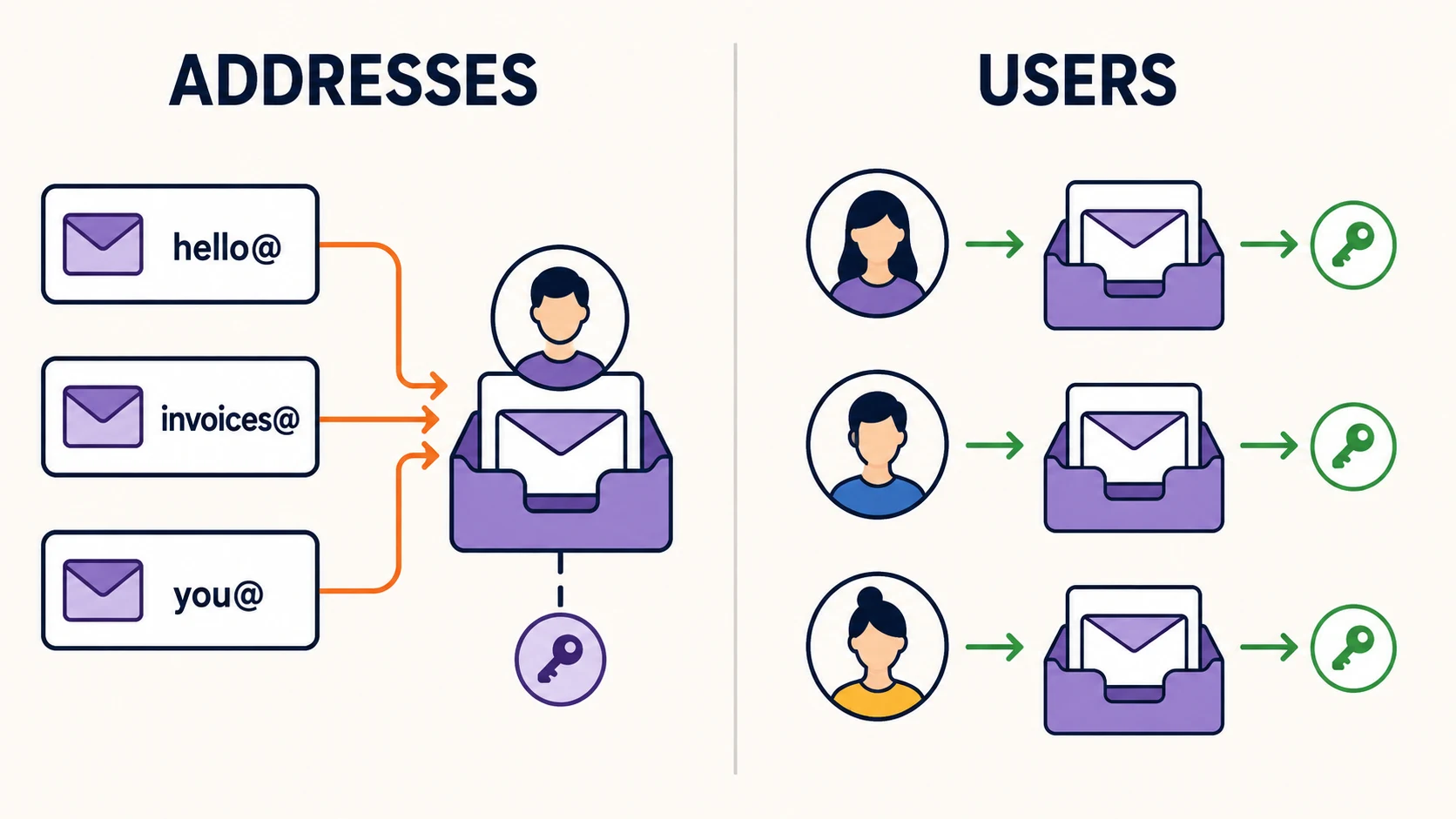
Unlimited's 15 email addresses are additional identities on one account with one mailbox. They let you receive mail at hello@, invoices@ and you@ across up to three domains — all landing in your inbox, all managed by you. They do not create logins for other people.
A second person needs a second user account. That is what Duo, Family and the Workspace plans provide. Separate ownership and access — rather than the raw address count — is the structural difference that matters here.
Catch-all is not a business feature
Catch-all email — receiving everything sent to your domain regardless of the address — is available on Mail Plus, Unlimited, Duo and Family, not only on business plans. It follows custom-domain support rather than the business tier, so it should not factor into an upgrade decision.
When Unlimited Is Enough
Proton Unlimited is $12.99/month, or $119.88 annually — the equivalent of $9.99/month. For that you get 500 GB shared across Mail and Drive, up to 15 email addresses, 3 custom domains, Proton VPN on 10 simultaneous devices, Proton Pass with 50 vaults, Proton Wallet and Proton Sentinel.
For a consultant, freelancer, solo practitioner or one-person agency, that is a complete professional setup. Three domains covers three businesses if you have them.
If you do not need the VPN, password manager or the storage, Mail Plus is $4.99/month ($47.88 annually) with 15 GB, 10 addresses and one custom domain — the cheapest direct Proton plan that supports custom-domain email. Our Proton custom domain setup guide shows the DNS records involved and how to test them.
A solo user may still prefer Workspace Standard for its 15-domain allowance, 1 TB of storage, Proton Sheets, expanded Meet capabilities or business support — but those are specific requirements rather than an automatic reason to upgrade.
Duo and Family: Multi-User Without Employee Administration
Search this question and you will find people comparing a one-user plan directly against a business subscription, as though nothing sits between. Two things do.
Proton Duo covers two users at $19.99/month or $179.88 annually, with 2 TB shared storage, 30 email addresses and 3 custom domains, and adds Proton Scribe.
Proton Family covers up to six users at $29.99/month or $287.88 annually, with 3 TB shared storage, 90 email addresses and 3 custom domains.
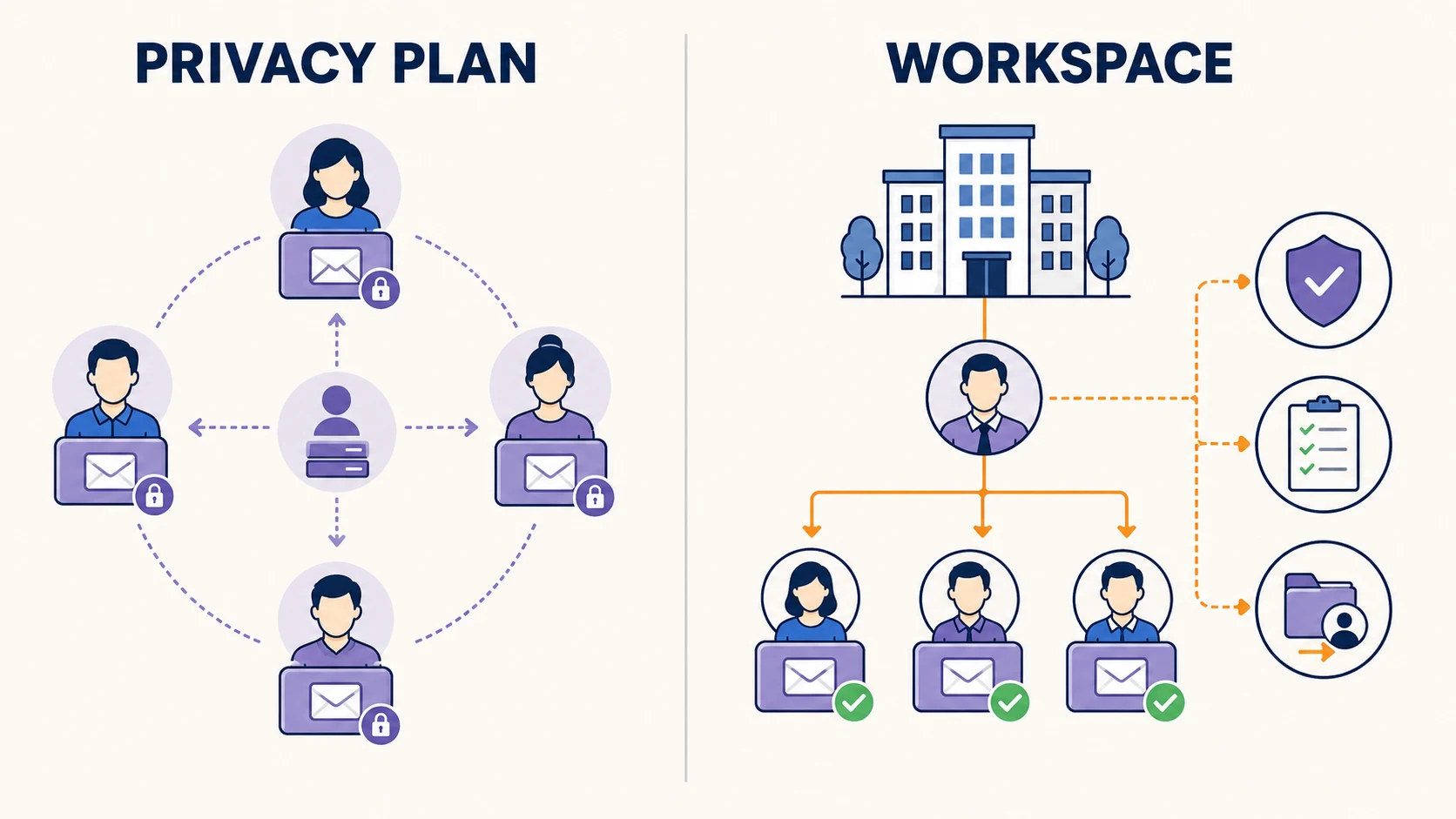
Both create genuine separate accounts with their own logins and mailboxes, and both have a primary administrator who can allocate storage and assign custom-domain addresses. What neither provides is employer-style governance — the security policies, audit trail, team vaults and managed offboarding a business eventually needs.
For two founders, or three to six partners or relatives who trust each other and do not need employee administration, Family at $287.88/year is worth pricing seriously against six Workspace seats.
The practical framing
Duo and Family are privacy plans for multiple people. Workspace is a governance plan for an organization. Both models are legitimate. The question is whether you need to manage the other accounts or merely provide them.
When Workspace Administration Becomes Necessary
Four capabilities arrive with a business plan, and they are administrative rather than functional:
The organization provisions accounts. An administrator creates and assigns them, so the account is provisioned and managed through the organization from the start rather than a personal subscription used for work.
Administrators can manage non-private users, including changing their passwords and accessing their mailboxes. More on the private/non-private distinction below, because it matters.
Security policy, audit and team vaults apply across the organization rather than per person.
Domain scale. Workspace Standard supports up to 15 custom domains and Premium up to 20, against 3 on the individual plans.
Proton states that creating an organization on a business plan requires adding at least one additional user. Billing is per user per month with no long-term contract, and if these four capabilities describe what you are missing, Proton's Workspace tiers are where they start.
Private vs Non-Private Users
This is the detail that determines what administrative control actually means, and it is rarely explained.
By default, organization users are non-private. Proton states that administrators can access the mailboxes of non-private users and change their passwords.
A user can be set to private. An administrator cannot reverse that choice unilaterally or access the private user's mailbox. The administrator can request that the user enable administrator access; only if the user accepts do they become non-private and accessible.
Configure this deliberately
Whether your administrators can reach a mailbox is decided by how each user is configured, not by the plan alone. If organizational access matters for continuity, decide your private/non-private policy when you provision accounts — an administrator cannot reverse a private setting without the user's consent.
Offboarding and Retention
This is where an individual-plan setup most often fails a business, and where the business plan's benefit needs stating precisely rather than generously.
On Unlimited, Duo or Family, an account belongs to the person who holds it. There is no organizational route to its contents.
On Workspace, an administrator can manage non-private users and access their mailboxes during a handover. Two important qualifications:
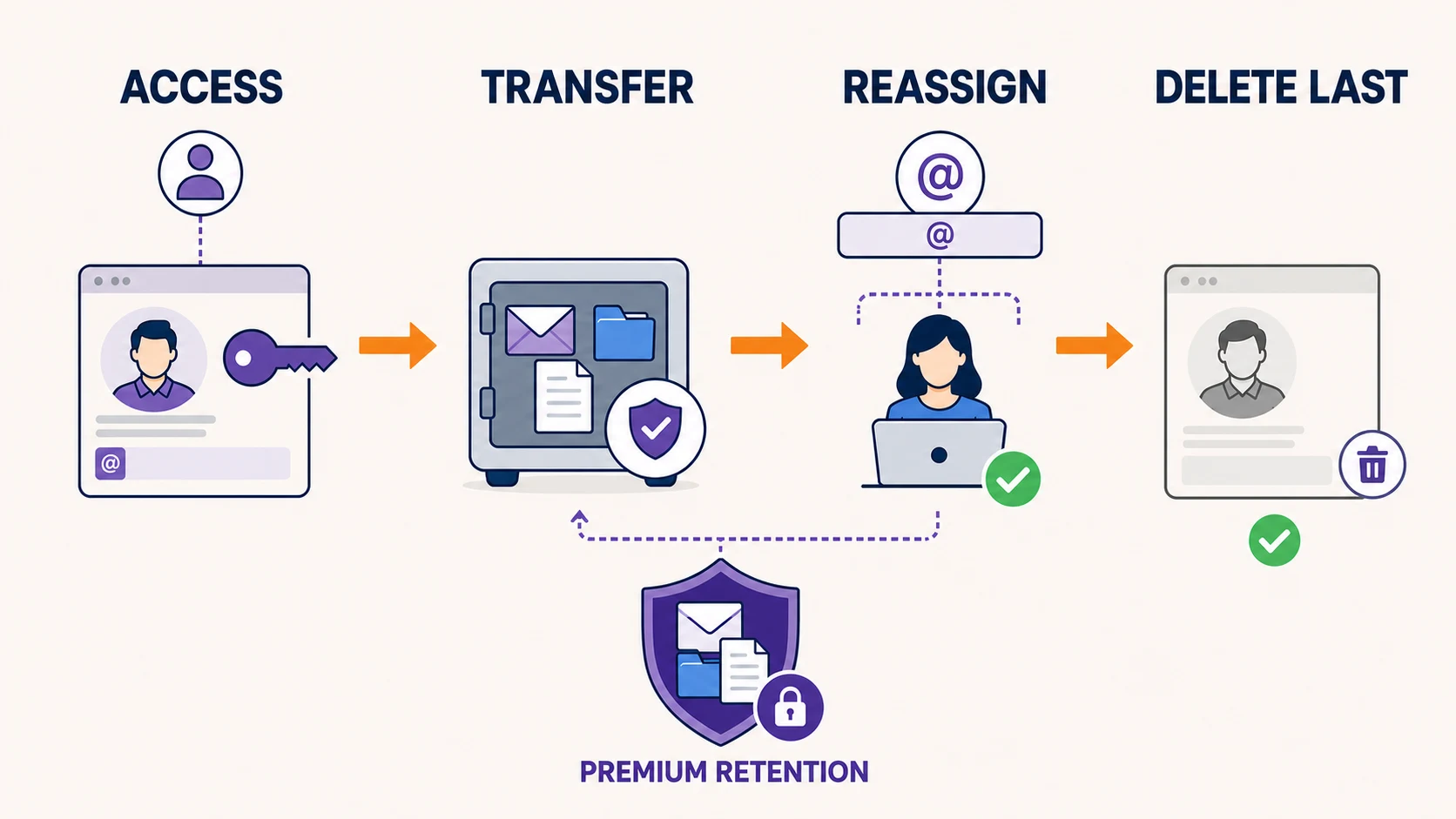
Deleting a user is destructive. Proton states that removing a user permanently deletes that user's account, email address and all data on the account. Offboarding means transferring what you need and reassigning the address before removing the account — not the other way around.
Guaranteed preservation requires Premium. Workspace Premium adds email data-retention policies that can preserve messages even when a user deletes them. Standard does not include this. Note also that retention preserves a private user's messages without making them viewable by an administrator.
Standard supports a managed handover for non-private users. Premium becomes necessary when messages must remain preserved even if the user deletes them, or when formal retention policies apply — not simply "a business plan" in the abstract.
What It Costs
Workspace Standard is $12.99 per user per month on annual billing, or $14.99 month-to-month. Premium is $19.99 annually, or $24.99 month-to-month.
| Situation | Plan | Annual cost |
|---|---|---|
| One person | Unlimited | $119.88 |
| Two people, no employee admin | Duo | $179.88 |
| Three to six, no employee admin | Family | $287.88 |
| Two, organization-controlled | Workspace Standard ×2 | $311.76 (annual) / $359.76 (monthly) |
| Small team, organization-controlled | Workspace Standard | $155.88/user |
| Enforceable email retention needed | Workspace Premium | $239.88/user |
Prices checked 3 September 2026. Taxes and regional pricing may vary.
The pattern worth noticing: stacking individual subscriptions stops being cheaper quickly and never produces the administrative layer. But Family up to six users is genuinely competitive, so the jump to Workspace should be a decision about control, not a default.
Upgrading an Existing Unlimited Account
Moving from an individual plan to a business plan keeps you within Proton — this is not a migration between providers, and your mail, contacts and calendar are not being rebuilt.
One thing to plan for: reassigning a custom-domain address to a new user does not move your historical mail into that user's mailbox. Mail stays with the account that received it. If you intend a specific address to sit with a specific new user going forward, work out where the existing history should live before you make the change.
Because the exact path depends on how your account and domains were originally set up, confirm your specific case with Proton support before changing a live business mailbox — particularly if you are running several domains.
Which Plan Fits
| Your situation | Plan |
|---|---|
| One person, branded email, no staff | Unlimited (or Mail Plus if you need less) |
| Two people, separate mailboxes, mutual trust | Duo |
| Three to six people, no employer-style administration | Evaluate Family before Workspace |
| Any team needing organization-controlled accounts, policy, audit or managed offboarding | Workspace Standard |
| Any organization needing enforceable email preservation | Workspace Premium |
Standard vs Premium
Standard provides 1 TB per user, up to 15 custom domains and 100-participant Meet. Premium raises storage to 3 TB per user and domains to 20, and adds unlimited Lumo prompts with advanced models, 250-participant Meet, Proton Scribe and email data-retention policies. For the full feature-by-feature breakdown, cost tables at 5/10/25 users, and what we chose for two client deployments, see Proton Workspace Standard vs Premium.
Those retention policies cover email. They are not an equivalent to Google Vault's retention, legal hold, search and export across supported data. If you have formal eDiscovery obligations, evaluate that gap directly.
For the full tier-by-tier breakdown, see our Proton Workspace review.
The Summary
Much of the advice on this question treats the business plan as the mature choice and Unlimited as a starter tier. In our view that costs solo operators and small partnerships money they did not need to spend.
Unlimited with three custom domains is a legitimate professional setup. Duo and Family are legitimate multi-user setups. What Workspace sells is administrative, continuity and compliance control — the organization managing the account lifecycle, administering non-private users and applying retention policies. Buy that when you need it.
Sources and Method
Plan specifications and pricing were checked against Proton's own documentation on 3 September 2026. Individual-plan figures come from Proton plans explained; business pricing and limits from the Proton Workspace announcement and business plan comparison. Administrative behaviour is documented in private users in Proton organizations, the Proton for Business FAQ, creating an organization and retention policies.
Pricing changes frequently and varies by region and currency. Confirm current rates on Proton's site before purchasing. Where this article makes a recommendation rather than stating a documented fact, it is labelled as our view.
Related Resources
- Proton Workspace Review 2026 — Tier-by-tier breakdown of Standard and Premium, pricing and limitations.
- Google Workspace vs Proton Workspace — If you are choosing between platforms rather than plans.
- Proton Mail for Business Review — Migration detail and compatibility considerations.
- Proton Drive vs Google Drive for Business — The storage side of the same decision.
Frequently Asked Questions
Related Articles
More from Business Software
Google Workspace vs Proton Workspace: Which Is Right for Your Business?
Side-by-side comparison of Google Workspace and Proton Workspace covering price, privacy, and features. Includes TCO for 10 seats and a decision framework for switching.
24 min read

Google Workspace Business Starter vs Standard: When Is the Upgrade Worth It?
Business Starter or Standard? We break down the real differences — Meet recording, storage math, and the 5 signals that tell you it's time to upgrade.
11 min read

Best Cloud Storage for Small Business 2026: OneDrive, Google Drive & When to Go Beyond
Most small businesses already have the right cloud storage — they're just not using it well. Here's when to stick with OneDrive or Google Drive, and when specialized tools earn their keep.
7 min read