

AI Acceptable Use Policy for Small Business (With Template)
Copy a practical AI acceptable use policy for a small business, plus data rules, an approved-tools register, scenarios and a one-week rollout.

There is a good chance someone on your team is already using AI. Census Bureau data from the Business Trends and Outlook Survey put overall business AI use at between 17% and 20% between December 2025 and May 2026, with adoption concentrated in larger and knowledge-intensive firms — so this is not yet universal, and the honest position is that you do not know until you ask. In the client audits we run, the usual finding is not zero. It is one person drafting emails in a chatbot, a meeting assistant quietly joining calls, and someone who found a spreadsheet tool that saved them an afternoon. In most cases nobody asked, because there was nothing to ask.
The useful response is not a ban and not a warning email. It is a short policy that tells people which tasks are approved, which account to use, and when a human has to check the work before it is published, sent or acted on. That is what this guide produces — the policy itself, a register to track approved tools, three worked scenarios, and a rollout that fits in a week.
Who this is for, and who needs more
This fits a 5-to-50-person business whose people use AI through chat interfaces, assistants built into software they already license, and the occasional meeting or note-taking tool.
You need more than this if you handle regulated data (health, legal, financial), if a client contract sets specific confidentiality or subprocessor terms, or if you are deploying agents that hold standing permissions to act in your systems. Each of those is covered at the end.
The AI acceptable use policy template
A short employee policy. Fill in the bracketed fields and delete the guidance notes.
Editable copies: policy template (DOCX) and approved-tools register (CSV). No email required.
AI ACCEPTABLE USE POLICY — [Company Name]
Owner: [Name, role]   Version: [1.0]
Effective: [Date]     Next scheduled review: [Date]

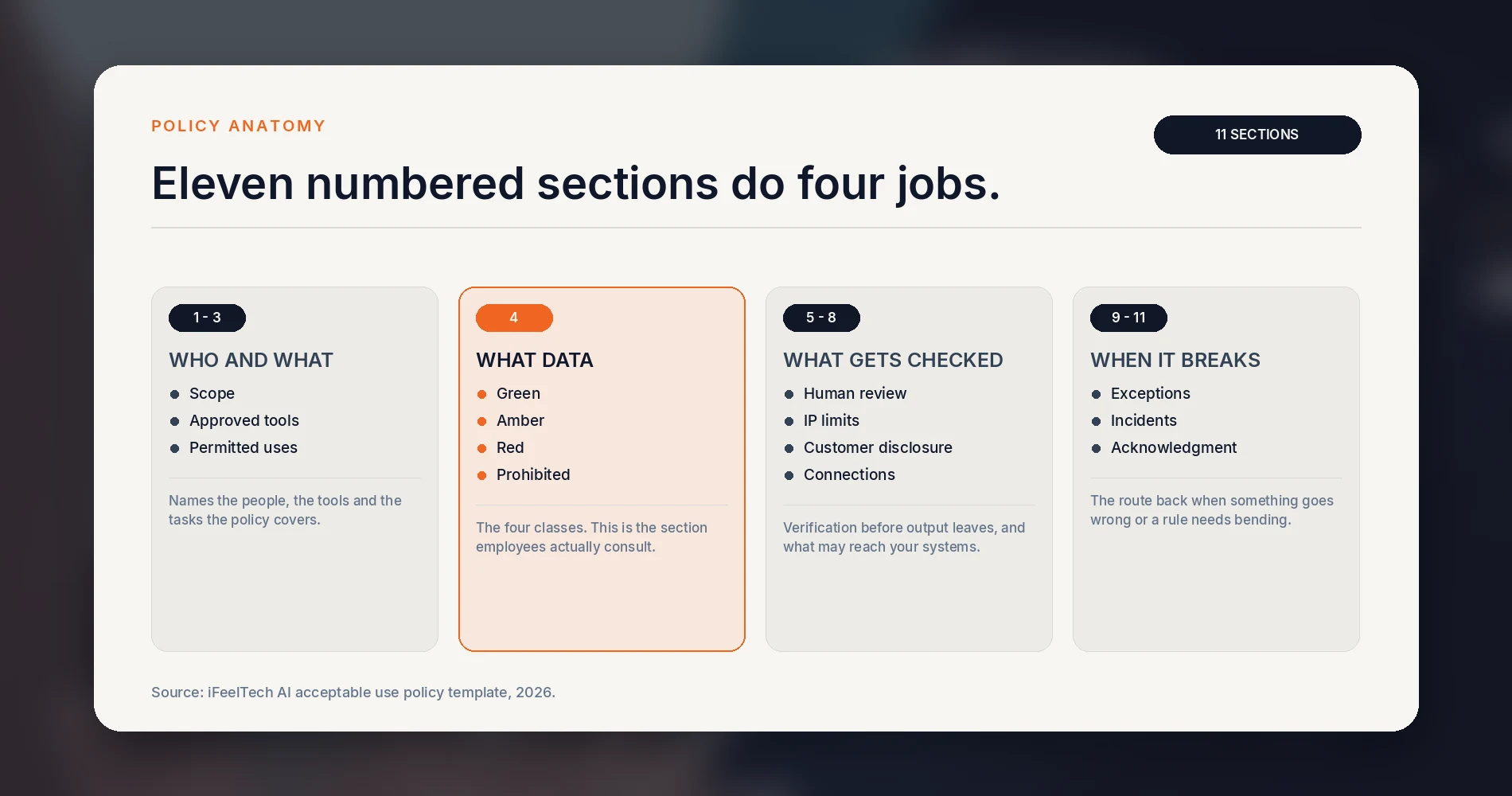
1. SCOPE
   Covers employees and contractors doing work for [Company]. Covers
   standalone AI tools, AI features inside software we already use,
   browser extensions, transcription and meeting tools, and agents
   that can act in our systems. Does not replace client contract
   terms or any regulation that applies to your work.

2. APPROVED TOOLS AND ACCOUNTS
   Approved for company work: [tool, plan, and the account to use]
   Everyone uses their own named, company-managed seat. Do not share
   an individual account. Personal accounts are not approved for
   company work, including free tiers.
   Requesting a new tool: [who to ask, expected turnaround]

3. PERMITTED USES
   Approved without further permission: [e.g. drafting, summarizing
   public material, brainstorming, code assistance on internal tools]

4. DATA RULES
   GREEN      — may be entered into an approved tool using your
                company-managed account, without separate task
                approval: public and non-sensitive material.
   AMBER      — requires an approved tool and company-managed
                account. The data type must be allowed in the
                approved-tools register; otherwise obtain written
                approval from [name]: internal documents,
                unpublished plans, non-identifying client work.
   RED        — requires written approval from [name] before
                entering: [client-identifying records, financial or
                personnel data, health or legal records, material
                governed by an NDA]
   PROHIBITED — never entered into any AI tool, with or without
                approval: passwords, MFA codes, API keys, access
                tokens, session cookies, private keys.

5. HUMAN REVIEW AND VERIFICATION
   The following must be checked by a named person before it is
   published, sent or acted on: [client-facing text, any number or
   calculation, legal or financial claims, code that touches
   production, hiring and personnel decisions]
   Verify facts, quotations, citations and calculations against the
   primary source — not against a second AI answer.
   AI does not make the final decision on: [list]

6. INTELLECTUAL PROPERTY
   Do not use AI to reproduce protected work, imitate third-party
   logos or branding, or closely mimic a living artist's distinctive
   style. Check the commercial-use terms of the tool before output
   goes into paid work. For creative assets that matter to the
   business, record what a person contributed.

7. TELLING CUSTOMERS
   Disclose AI involvement when: [e.g. a customer is interacting with
   an automated agent rather than a person; a deliverable is
   substantially AI-generated; a client contract requires it].

8. CONNECTIONS AND ACTIONS
   Connecting an AI tool to email, files, calendar, the CRM or any
   company system requires approval from [name] before it is
   connected. This includes browser extensions, meeting bots and
   anything that can take an action on your behalf.

9. EXCEPTIONS
   [Name] may approve an exception. It is recorded in the register
   with the reason and an expiry date. Exceptions do not carry over.

10. WHEN SOMETHING GOES WRONG
    Stop using the tool and prevent further disclosure. Do not alter
    or delete anything before [name] has assessed it. Report the
    tool, account, data involved, time and affected systems the same
    day. Prompt reporting is expected and is treated as the correct
    action; how any individual matter is handled depends on the
    circumstances.

11. ACKNOWLEDGMENT
    I have read version [x] of this policy and completed the
    walkthrough.  Name / Date: ______________________
The colors are company rules you are setting, not legal classifications. Choose the boundary that matches your client contracts, and write the actual data types into the RED list rather than leaving it abstract — "client tax returns" is enforceable, "sensitive information" is not.
Shadow AI: find out what the team already uses
Do this before you publish anything, and run it as an inventory rather than an investigation. Ask each person, in writing, four questions:
- Which work tasks do you use AI for?
- Which tools, and under which account — company or personal?
- Any browser extensions, meeting assistants or note-takers?
- Has any of it been connected to email, files or the calendar?
Say clearly how the answers will be treated. A workable formulation: this inventory is an amnesty for previously undisclosed good-faith use, except where a legal obligation, deliberate misconduct or an active security incident prevents that. Going forward, prompt reporting is expected and taken into account. That is a commitment a business can keep, unlike blanket immunity, and being specific about it up front is what makes the answers accurate.
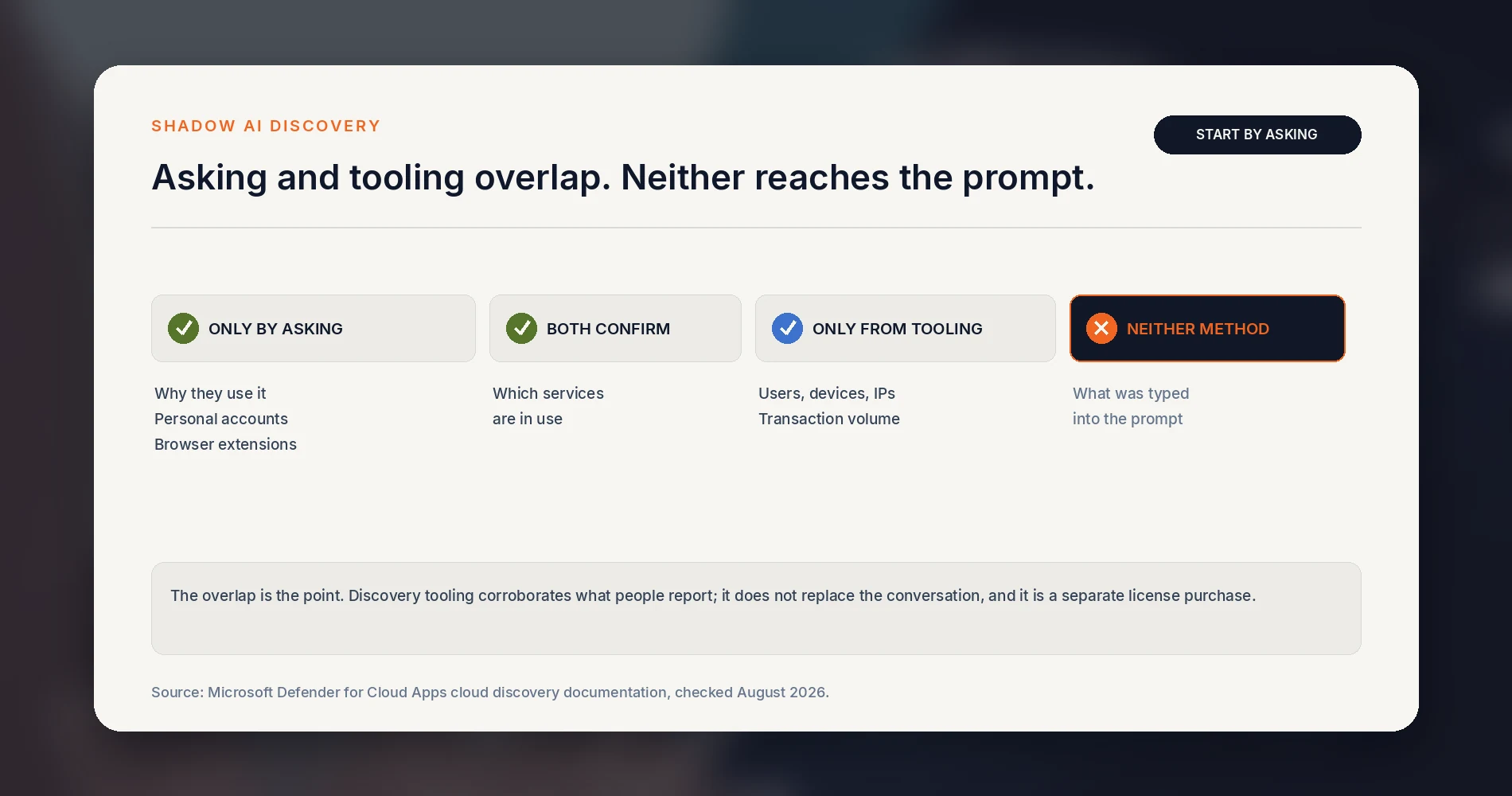
For a small team, begin with the candid inventory. Logs and SaaS-discovery tooling can corroborate it, but neither gives the full picture alone. Cloud Discovery can identify services, users, devices and usage patterns; it does not reconstruct the content of prompts. Microsoft's documentation states that for each discovered app, Cloud Discovery surfaces the associated users, IP addresses, devices and transactions and assesses app risk without an endpoint agent. It is also a separate purchase — Microsoft Defender for Cloud Apps is not part of Microsoft 365 Business Premium and arrives with the Microsoft Defender Suite add-on (checked August 2026; Microsoft's packaging changes, so verify against your own tenant). Our software audit guide covers the wider subscription inventory this fits into.
Classify the work, not the vendor
Most policies fail because they try to rank tools. Tools change every quarter; the work does not. Classify what the person is doing.
| Class | The work | The rule |
|---|---|---|
| Green | Public material, generic drafting, brainstorming, learning | Approved tool and company account; no additional task approval required. |
| Amber | Internal documents, unpublished plans, de-identified client work | Approved tool and named company seat. The data type must be allowed in the register, or written approval first. Human review before it leaves. |
| Red | Client-identifying records, financial or personnel data, health or legal records, material under an NDA | Written approval first, or not at all. |
| Prohibited | Passwords, MFA codes, API keys, access tokens, session cookies, private keys | Never, with or without approval. |
Amber is the class that does the most work. It gives people a legitimate route for the task they were going to attempt anyway; a policy offering only "allowed" and "forbidden" tends to push that middle case into a personal account. Keeping the classes distinct also keeps the Red list short enough to be taken seriously, since a policy that treats a blog draft and a client tax return identically is easy for everyone to ignore.
Prohibited sits apart from Red on purpose. Credentials are not a matter of approval: entering a password or an API key into an AI interface takes it outside its intended secrets-management boundary. If that happens, rotate or revoke the credential rather than trying to approve the disclosure afterward.
Can I use AI for this? Six questions
Put this where people work — the wiki, the intranet page, the pinned message.
- Is the tool and the account approved, and am I signed in to my own company seat?
- Is the data I am about to enter Green or Amber?
- Is the task permitted, or does it need approval?
- Does a human need to verify the output before it goes anywhere?
- Is the tool connected to email, files, the calendar or anything that can act?
- Would I be comfortable if the client saw exactly what I pasted?
If any answer is unclear, stop and ask the policy owner. Asking is usually faster than remediating an avoidable mistake.
Approve the account, not just the tool
"ChatGPT is approved" is not a decision anyone can act on. The unit of approval is tool plus plan plus account, and the register below is the second artifact.
| Tool | Plan | Account owner | Approved tasks | Data allowed | Connections | Controls in place | Terms checked | Cost | Review date |
|---|---|---|---|---|---|---|---|---|---|
| General assistant | Team tier | Dana (owner) | Drafting, summarizing public material, research | Green, Amber | None | Named seats, SSO, admin console | 2026-08-31 | Per seat, monthly | 2027-02-28 |
| Meeting notetaker | Business tier | Priya (delivery) | Internal meetings only | Green | Calendar, meeting audio | Named seats, consent announcement required | 2026-08-31 | Per seat, monthly | 2026-11-30 |
The two rows above are an illustration, not a recommendation — the downloadable CSV is empty and ready to fill.
Two columns do the heavy lifting. Connections records what the tool can reach — a chatbot with no access to your systems is a different risk from a meeting bot sitting in every client call. Terms checked records the date someone actually read the current terms for that plan, because vendor terms move and a policy citing last year's reading is worse than one that admits it needs a re-check.
Treat training, retention, human review access, connected-app disclosure and administrative controls as five separate questions. A vendor commitment on one does not answer the others. OpenAI's developer documentation states that API data is not used to train models by default and sets out retention windows for abuse-monitoring logs — and that page covers the API, not the ChatGPT plans your team is signed in to. Our ChatGPT business data guide covers the product-specific detail.
What to ask before approving a tool
Ten questions, answered once per tool, in the register:
- Is there a data processing agreement — and, if the tool will handle PHI for a HIPAA-covered entity or business associate, will the vendor sign an appropriate BAA?
- Who are the subprocessors, and where does the data go?
- Is our data used for training, and can that be turned off on this plan?
- What is retained, for how long, and can we request deletion?
- Does the plan give us admin controls over users and settings?
- Does it support MFA, and SSO if we use it?
- Are there audit logs we can actually read?
- Where is the data stored?
- What can it connect to, and what permissions does each connection take?
- Will the vendor notify us of an incident, and how quickly?
One seat per person
Give each person a named, company-managed seat. Do not share an individual AI account: it removes individual accountability, breaks the audit trail at the moment you need to know who submitted what, complicates MFA and offboarding, and may breach the vendor's seat terms. Where a vendor explicitly supports a genuine service or shared account, that credential belongs in the company vault with named access and an accountable owner rather than in a chat thread — 1Password Business and Proton Pass Business both handle this. A vault is credential control, not AI governance; it decides who can sign in, not what they paste once they have.
Name who checks the work
The review rule addresses the failure that shows up most often in practice: an inaccurate answer reaching a client because it read as confident.
Assign it by output type rather than by person:
- Client-facing text — reviewed by whoever would have written it.
- Facts, quotations and citations — checked against the primary source. A cited case, statistic or study that nobody opened is a common way for an error to pass review.
- Numbers and calculations — checked against the source data, not against a second AI answer.
- Legal or financial claims — reviewed by the person who carries the consequence.
- Anything that acts — code touching production, an email that sends itself, a booking that gets made. Approval before execution.
And write down where AI does not decide: hiring and personnel outcomes, client terminations, anything with a regulatory dimension. This is not only good practice. The FTC, EEOC, CFPB and DOJ Civil Rights Division have stated jointly that existing legal authorities apply to automated systems, so an anti-discrimination obligation does not lapse because a tool produced the recommendation.
Intellectual property
Two rules cover most cases. Do not use AI to reproduce protected work, imitate third-party logos or branding, or closely mimic a living artist's distinctive style; and check the commercial-use terms of the plan you are on before output goes into paid work.
The third rule matters for anything you want to own. The U.S. Copyright Office's report on the copyrightability of AI outputs reaffirms that copyright requires human authorship, and concludes that generative AI output is protectable only where a human determined sufficient expressive elements. Where that threshold is met, it is the human-authored elements that carry protection, not the AI-generated material alongside them. For a campaign asset or any other work where copyright ownership matters, keep a record of what the person actually contributed. Logos raise separate trademark questions and are worth handling with counsel rather than a policy line.
When an AI tool is connected to your systems
A chatbot that only sees what you paste is one risk. A tool that reads your email, your files or the open web and can then take actions is a different one, and it is worth naming explicitly in the policy.
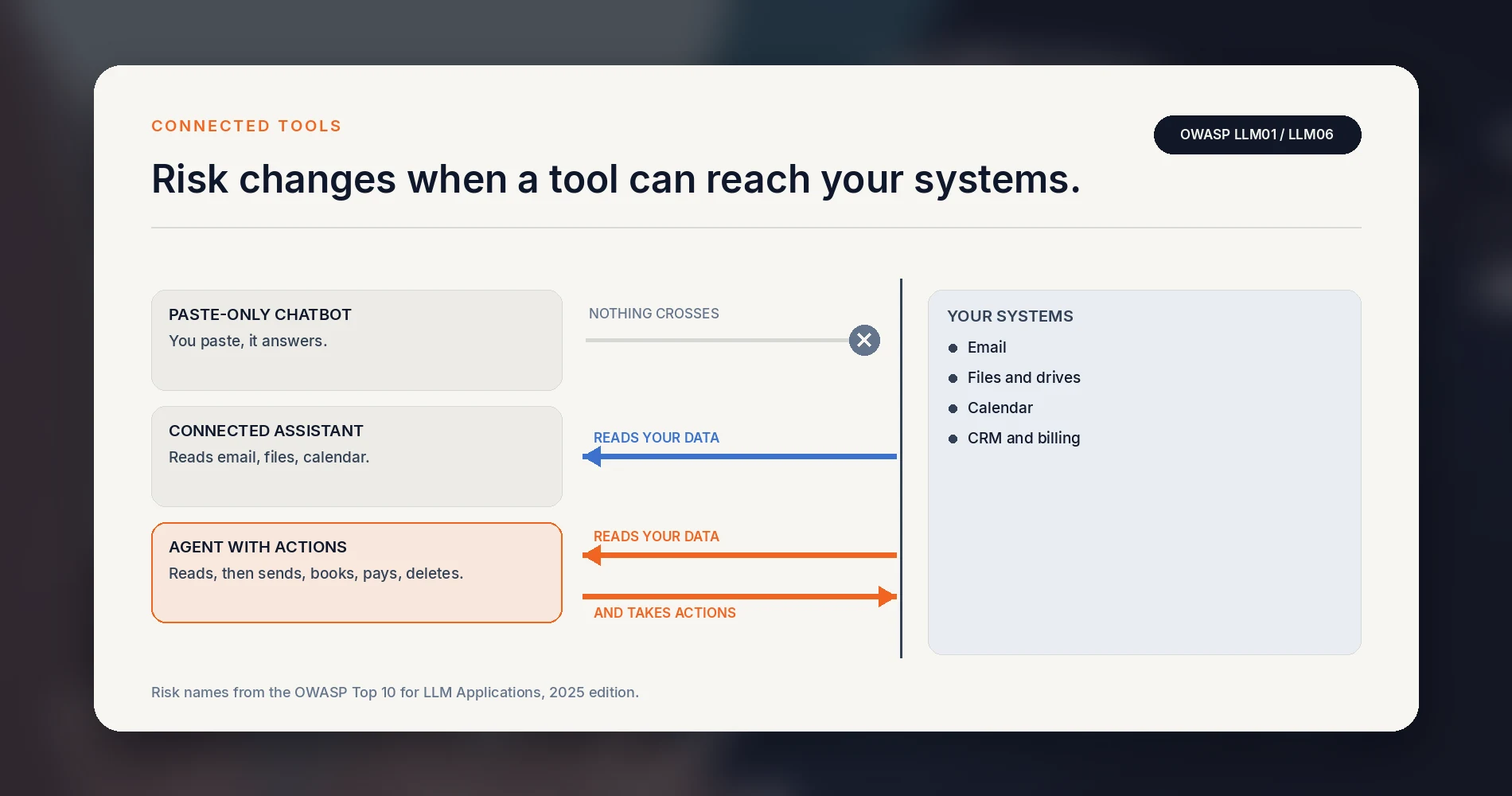
Two failure modes from the OWASP Top 10 for LLM Applications apply directly to small businesses. Prompt injection (LLM01) is instructions hidden in content the tool reads — an email, a web page, a document — that redirect what it does. Excessive agency (LLM06) is granting a tool more permission or autonomy than the task requires, which widens what a mistaken or injected instruction can reach.
The practical control is scope. Approve connections one at a time, grant the narrowest permission that does the job, keep a human approval step in front of anything that sends, pays, deletes or publishes, and review the grants when you review the register.
AI incident reporting: what to do after a mistake
Plan for the possibility that someone enters restricted data into an unapproved tool. The sequence matters, because tidying up first can remove the evidence needed to assess what happened.
AI incident response
Five steps, in this order
The sequence matters more than the speed. Tidying up first removes the evidence needed to assess what happened.
- 1
Contain
Stop and contain
Stop using the tool and prevent further disclosure.
- 2
Preserve
Change nothing
Do not alter or delete anything before the incident owner assesses it.
- 3
Revoke
Cut continuing access
If the tool holds an integration or a token, disconnect or revoke it.
- 4
Report
Tell the named contact
The tool, account, data category, time and affected systems.
- 5
Hand off
The owner takes it
Contacts the vendor, requests deletion where appropriate, reviews logs, and determines any notification duty.
Prompt reporting is expected and is treated as the correct action.
Route AI incidents through the security or privacy process you already have, adding the AI-specific containment steps above for prompts, uploaded files, recordings, integrations and agent permissions. Do not invent a universal notification deadline — reporting obligations depend on the data, your contracts and your jurisdiction.
AI acceptable use policy examples: three scenarios
Use these in the rollout meeting. They are more useful than reading the policy aloud, because the disagreements surface immediately.
Scenario 1 — Marketing copy for the website. A team member drafts a launch announcement using a chatbot, with no client names and nothing unpublished. Green. No separate task approval is required, but normal editorial review still applies: check factual claims, quotations, dates, pricing and brand language before publication. Treating this as a high-risk activity is one of the quicker ways for a policy to lose credibility.
Scenario 2 — A client's financial spreadsheet. Someone wants help finding an error in a client's year-end figures and uploads the file. Red. Client-identifying financial data may be restricted by the engagement letter, by a confidentiality duty or by applicable regulation. A de-identified or synthetic extract can work instead, provided the remaining fields cannot reasonably identify the client and the contract permits the use — and for most structural questions, dummy numbers in the same shape answer it just as well.
Scenario 3 — A meeting assistant on client calls. A note-taker bot joins calls, records them and stores transcripts in its own cloud. This is the scenario teams most often misjudge. It combines a standing connection, a recording and a third-party data store, and it may capture people who have not knowingly consented. It needs approval, a register entry, and a decision about which meetings it may join.
Recording consent is jurisdictional
Recording rules vary by state and country, and interstate or international calls can involve different consent requirements, with no single rule about which one applies. Florida generally requires the prior consent of all parties to a protected communication under section 934.03. For South Florida businesses, obtaining clear consent from every participant is the safest operational default.
Our guide to AI agents with standing permissions covers the wider category scenario three belongs to.
Roll it out in a week
- Day 1 — Owner approves the policy and fills the register with what already exists.
- Day 2 — Send the inventory questions with the amnesty wording. Set a two-day return.
- Day 3–4 — Fill the register from the responses. Approve, replace or decline each tool, with a reason next to each decision.
- Day 5 — 30-minute walkthrough. Not a reading of the policy: teach what these tools are bad at, how to verify a citation or a number, what the data classes mean in your work, and the six questions. Run the three scenarios.
- Day 5 — Publish the policy where people work, not as an email attachment. Record who acknowledged which version, and book the review.
That walkthrough has the longest shelf life. Teach employees what these tools get wrong, how to verify citations and numbers, how your data classes apply to their work, and when to stop and ask for approval.
Review triggers, not just a calendar date. Review the policy and the register after an incident, when a vendor materially changes its terms, when a new integration or agent is connected, when a regulated use case appears, and on a material legal change — as well as on the scheduled date.
Seven days gets you a policy people know about and a register that reflects reality. It does not by itself establish compliance with any regulation or contract, and it should not be presented that way.
When this is not enough
Three situations need more than a short policy:
Regulated or contractually restricted data. Healthcare, legal, financial services, or a client contract with specific confidentiality or subprocessor terms. The contract governs, and the policy has to match it. Where a vendor will handle protected health information on behalf of a covered entity or business associate, HHS guidance is that a compliant business associate agreement and appropriate safeguards are generally required. Do not assume a vendor's standard self-service terms include an appropriate BAA — verify the applicable plan and agreement before sharing PHI.
Agents with standing permissions. A tool that holds ongoing access to your systems and can take actions is a different governance problem from a person typing into a chat window. It is covered separately in the AI agent access policy guide.
Microsoft Copilot on your own files. Copilot grounds its answers in data users already have permission to access, which makes years of accumulated over-sharing suddenly discoverable. Microsoft's own deployment guidance puts remediating oversharing first. Run the SharePoint permissions audit before enabling Copilot across your existing files, not after.
If privacy requirements are driving the conversation, local AI is worth investigating on the merits — our local AI server guide covers the hardware and the honest running costs. Most privacy and security requirements are technology-neutral: they specify safeguards and outcomes rather than an on-premises server. Local deployment can reduce some third-party exposure; it does not establish compliance by itself, and it deserves the same register entry as anything else.
This is the policy we hand to South Florida clients who want their teams using AI without a repeated debate about what is allowed. Fill in the eleven sections, run the three scenarios with the team, and set the review triggers before you need them.
Related Resources
- Is ChatGPT Safe for Business Data? — Product and account-level detail on what happens to what you type.
- AI Agent Access Policy for Small Business — Governance for tools that hold standing permissions and take actions.
- Small Business IT Policy Templates — The wider policy set this one sits alongside.
- Tech Stack Teardown: Software Audit — Finding every subscription and account already in use.
- SharePoint Permissions Audit Before Copilot — Required before enabling Copilot across your existing files.
- Stop Employees Taking Company Files — The broader data-control problem behind the Red list.
Frequently Asked Questions
Related Articles
More from Business Software
Microsoft 365 or Google Workspace: Fix the Setup or Switch?
Before leaving Microsoft 365 or Google Workspace, find out whether you have a setup problem or a platform problem, what to fix first, and when to switch.
21 min read
Microsoft 365 to Proton Workspace Migration: A Small-Office Walkthrough (2026)
How to move a small office from Microsoft 365 to Proton Workspace: Easy Switch for Business, OneDrive files, DNS cutover and Microsoft 365 cleanup.
18 min read
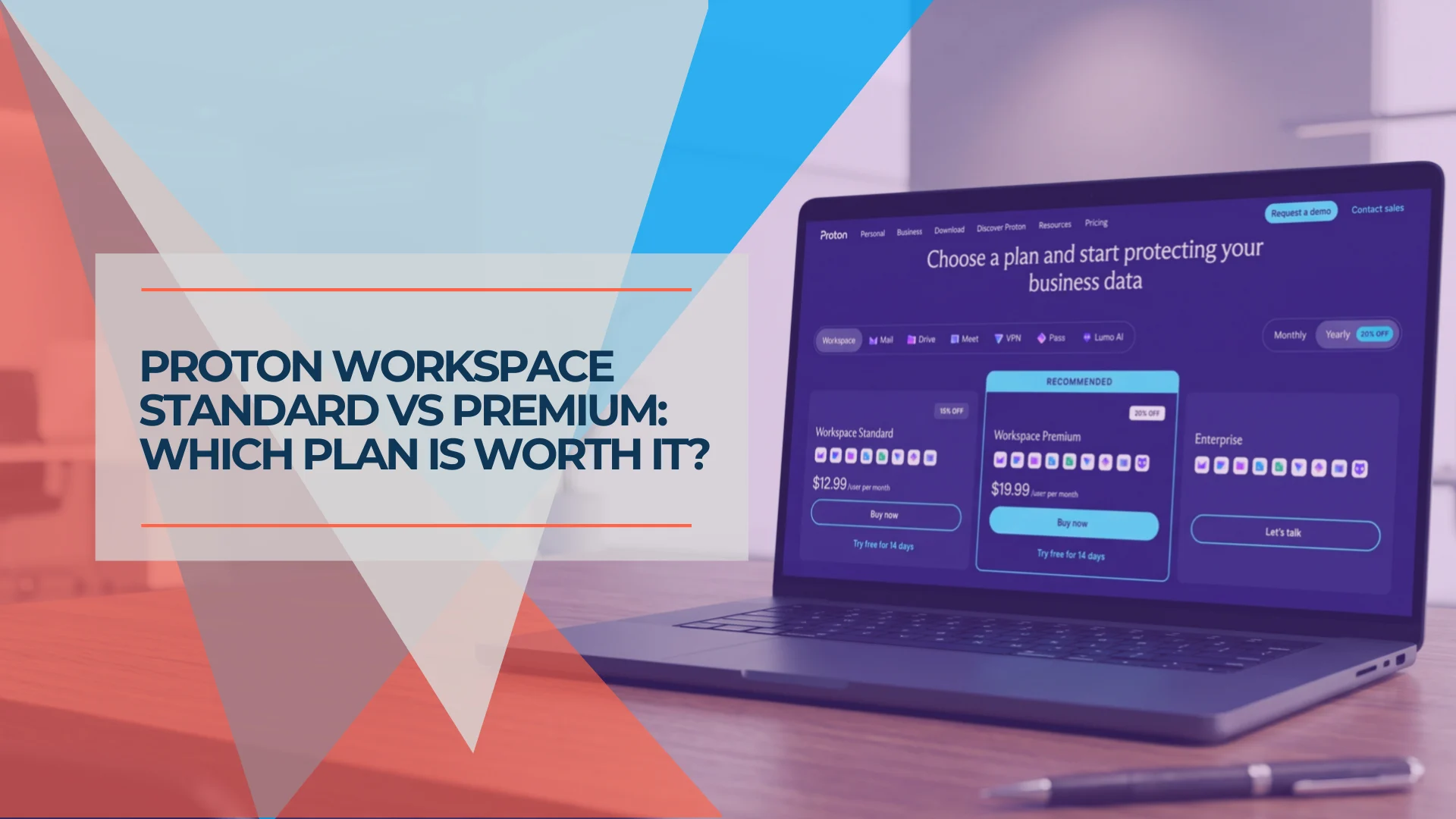
Proton Workspace Standard vs Premium (2026): What the Extra $7 Per User Buys
Proton Workspace Standard vs Premium compared: storage, email retention, Lumo AI, Meet limits and cost at 5, 10 and 25 users — and which offices need Premium.
11 min read