

Who Manages Your AI Agents? A Practical Access Policy for Small Businesses Without a Security Team
Only 14.4% of organizations have full security approval for their AI agent fleet. Build a one-page policy outline and a monthly audit habit for offices with no dedicated security staff.

When iFeelTech runs a security review for a new client, one of the first things we check is the connected-apps list buried in their Microsoft 365 or Google Workspace admin console — the third-party tools an employee clicked "Allow" for at some point and never thought about again. In 2026, that list increasingly includes AI agents: a Zapier flow that reads invoices, a Copilot or Claude connector wired into QuickBooks, a scheduling assistant with standing access to the shared calendar and email. Almost none of these went through an approval process, because in a 15-person office, there usually isn't one.
Gravitee's 2026 State of AI Agent Security report, surveying over 900 executives and practitioners, found that only 14.4% of organizations had full IT and security approval for their entire agent fleet. That survey was weighted toward mid-sized and large organizations, so it doesn't establish the rate for small businesses directly. The governance gap it documents is consistent with what we see in smaller offices. Most small businesses don't have anyone whose job it is to close that gap. This is what that job actually looks like, done in about an afternoon — and kept up in about fifteen minutes a month after that.
Affiliate Disclosure: This article contains affiliate links. If you make a purchase through these links, we may earn a small commission at no extra cost to you. As an Amazon Associate, iFeelTech earns from qualifying purchases.
Why This Falls Through the Cracks in a Small Office
Small teams lose track of agents because employees can grant access before anyone reviews the permissions.
The governance gap around AI agents isn't a failure of awareness. Most business owners know, at least in the abstract, that connecting a tool to their email or financial systems creates some risk. The problem is structural: there was never a moment where someone had to formally approve the connection.
An employee signs up for an AI scheduling assistant and clicks "Sign in with Google" — which might only grant identity access, but then the app immediately requests calendar, email, and contacts access in a second OAuth consent screen that the employee clicks through just as quickly. A project manager connects a Zapier automation to the shared inbox to sort incoming requests. Someone on the finance team authorizes a Copilot agent to summarize invoices in QuickBooks. Each of these involves a real OAuth consent screen with real permissions — and each one was approved by the person who happened to need the tool that day, not by someone evaluating the risk.
In a company with a dedicated IT security team, these consent grants get reviewed. In a 15-person office, they accumulate. The national AI policy conversation is advancing, and enterprise AI governance frameworks from consulting firms and cloud providers are thorough — but both assume an organizational structure most small businesses don't have: a CISO, or at least a security-minded IT department, running periodic access reviews. Those frameworks are not wrong. They're just written for an office with dedicated security staff, not one where IT is one contractor handling three other responsibilities.
That structural gap is where this article lives. What a practical, one-afternoon version of AI agent governance looks like when there's no security team to hand it to.
What Actually Counts as an "AI Agent" Here
For this policy, an AI agent is any tool with persistent permission to read data or act in another business system.
Before you can govern something, you need to know what you're governing. Not every AI tool in your business needs the same treatment, and over-applying this framework wastes the limited attention a small office has for this kind of task.
Standing-access agents are the focus of this article. These are tools that maintain ongoing permission to read, write, or act on your systems without asking you each time. Examples:
- A Copilot Studio agent configured to pull data from SharePoint and draft client communications
- A Zapier or Make automation that reads incoming invoices and updates your accounting software
- An AI scheduling assistant with standing access to your team's calendar and email
- Claude or ChatGPT integrations that connect to your business tools through APIs or OAuth
Simple chat tools — someone opening ChatGPT in a browser and pasting text into it — carry different risks (mostly around what data employees are sharing), which we cover in our guide on whether ChatGPT is safe for business data. Those risks are real, but they don't require the permission-governance framework this article describes.
The quick self-check: Look at your tools and ask — does this tool hold a persistent authorization to read or write to my business systems? If yes, it's an agent for purposes of this policy. If it only works while someone is actively typing into it and doesn't hold a standing API or OAuth connection to your other systems, it's a chat tool. (Note: a chat tool may still retain the content you paste into it — that's a data-handling risk, but it's different from the persistent access risk this policy addresses.)
The Three Questions That Matter More Than a Long Policy Document
Check what the agent can read, what it can change or send, and what harm could result if it fails.
Enterprise governance frameworks run dozens of pages and address threat models most small businesses will never encounter. You don't need that. You need three questions that cut through the complexity and give you an honest answer about whether a specific AI agent's access is appropriate.
1. What can it read?
Check the permissions the agent was granted during setup. Can it see your email? Your files? Your financial records? Customer data? The gap between "what the marketing page says it needs" and "what the OAuth consent screen actually requested" is often significant. A meeting notetaker that says it "joins your calls" might also have read access to your entire calendar, contact list, and email.
2. What can it send, post, or pay?
Read-only access carries risk. Write access is a different category entirely. An AI agent that can read invoices is one thing. An AI agent that can send payments, post messages on your behalf, or modify records in your accounting software is a system with high-impact authority that needs explicit, documented approval.
3. What happens if it's wrong?
Assume the agent or one of its integrations can fail. The question is what the potential business impact looks like. An agent that misfiles a document creates a minor inconvenience. An agent that sends an incorrect payment, emails a client with wrong information, or modifies financial records creates a real business problem. The answer to this question determines how much oversight an agent needs — not whether the vendor's marketing page calls it "reliable."
These three questions aren't a policy document. They're the triage framework that tells you which agents need attention first and how much scrutiny each one deserves. The next section turns that triage into a structured, repeatable system.
A Traffic-Light Framework for Agent Permissions
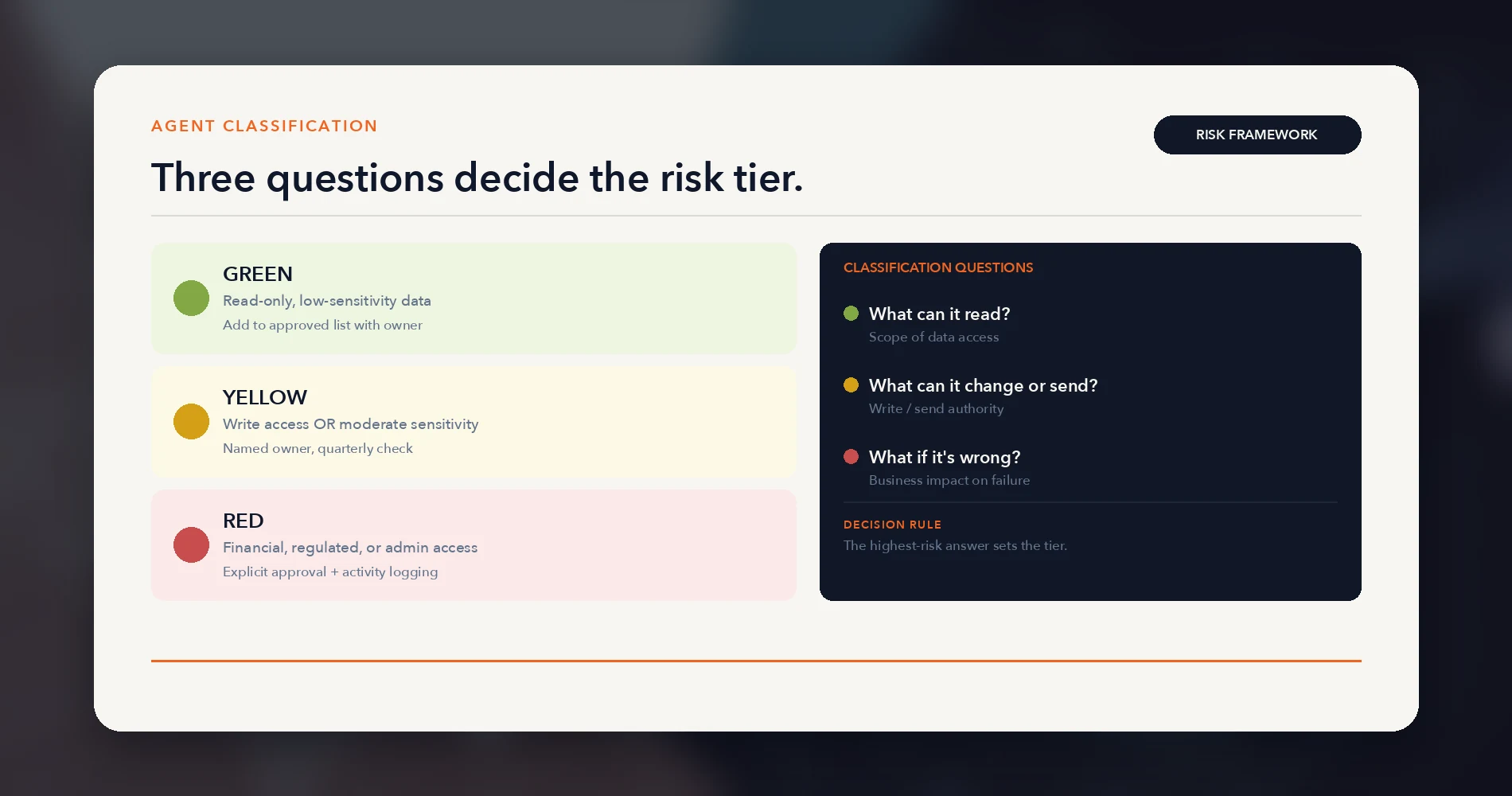
Use three risk tiers to match approval, logging, and review requirements to each agent's potential impact.
This is the framework we use when evaluating a client's tool stack during a security review, adapted for a business owner who doesn't have a security background. The principle is simple: categorize every AI agent by the risk its permissions create, then apply oversight proportional to that risk.
| Level | Access type | Examples | What's required |
|---|---|---|---|
| 🟢 Green | Read-only, low-sensitivity data | AI tool limited to published website content; chatbot trained only on a public FAQ; read-only access to low-sensitivity internal documentation | Add to your approved list with a named owner. Verify the scopes match the stated purpose. Review annually or when permissions change. |
| 🟡 Yellow | Write access OR moderate-sensitivity data | Meeting notetaker with calendar + email access; Zapier flow that creates tasks or updates a CRM; AI assistant that drafts (but doesn't send) emails | Needs a named owner — one person who knows this tool exists, what it can access, and checks on it quarterly. |
| 🔴 Red | Financial authority, sensitive/regulated data, broad admin access, or high-privilege credentials | Agent that sends payments or invoices; automation with access to payroll, health records, or employee data; tool with broad write or delete permissions across systems | Requires explicit approval before connecting, activity logging where available, and monthly review of what it did. |
A monthly review is a governance check, not a real-time safeguard. Red-tier agents should also have approval gates before high-impact actions, transaction limits where the platform supports them, and immediate review after any changes or incidents.
How to Use This Table
Walk through your current tool list right now. For each AI agent or automation, ask the three questions from the previous section and assign a color:
Example 1: A Zapier automation that reads incoming Gmail invoices and logs line items in a Google Sheet. It reads email (sensitive) and writes to a spreadsheet (low risk). The email read access makes this yellow, not green. It needs a named owner and quarterly review — specifically, checking that the Zap is still doing what it was built to do and that the email access is still scoped to the right label or filter.
Example 2: A Copilot Studio agent configured to pull client data from SharePoint and draft summary reports. It has broad access to client records that may contain sensitive or high-volume personal data. That scope makes it red even without write access. Bulk read access to client files, health data, legal documents, or payroll carries serious risk regardless of whether the agent can write. If it can also share or email those documents, that compounds the exposure. Red classification here means explicit approval, activity logging, and monthly review.
Example 3: An AI meeting assistant (Otter, Fireflies, or similar) with access to your calendar and conference calls. It reads your calendar (who you meet with), records conversations, and stores transcripts. Calendar access alone is yellow. If it also holds broad email scopes (read all mail, not just calendar invites) or can send summaries to external participants without human confirmation, that pushes it to red. Check the actual OAuth scopes granted — they're often broader than the tool's stated purpose.
A Pattern We See in Client Reviews
In our security onboarding reviews — covering several dozen South Florida small offices over the past two years — the typical 10–30 person business has between three and eight tools that qualify as standing-access agents. Most owners expect one or two. The gap is usually filled by automations an employee set up months ago and integrations that came bundled with a software subscription. Your number may differ, but the surprise rarely goes in the direction of fewer.
Writing the One-Page Policy
Each agent needs a recorded owner, purpose, permissions, safeguards, and review date.
You've categorized your tools. Now you need a document that captures what you decided and who owns it going forward. This doesn't need to be long, lawyerly, or formatted like an enterprise security policy. It needs to exist, be specific, and be reviewed.
Your AI Agent Access Policy — Template Outline
Section 1: Approved Tools List List every AI agent and automation currently connected to your systems, with its traffic-light classification (green, yellow, or red) and the date it was last reviewed.
Section 2: Off-Limits Data Name the data categories that no AI agent should ever have access to without explicit owner/principal approval:
- Client personally identifiable information (PII) beyond what the tool strictly needs
- Financial credentials (bank login, payment processing keys)
- Employee payroll or HR records
- Any data subject to regulatory requirements (HIPAA, PCI, etc.)
Section 3: Who Approves New Connections Name one person — and a backup. Not a role — a name. "The office manager" is better than "the designated security contact." If that person is you, the business owner, write your name and designate someone who can act when you're unavailable. No new persistent connection should be enabled before it has an owner and an inventory entry, regardless of risk tier. Yellow and red tools require this person's sign-off before connecting.
Section 4: Review Cadence
- Monthly: 15-minute connected-apps check (see next section)
- Quarterly: Review this policy document itself — are the classifications still accurate? Has anything changed?
- Annually: Full review including whether any green tools should be reclassified based on expanded permissions or changed vendor terms
This is a practical starting point for most small offices. If your business handles health records (HIPAA), payment card data (PCI DSS), or financial data covered by the FTC Safeguards Rule, a one-page policy may not satisfy your regulatory obligations — but it's the right foundation before bringing in compliance-specific documentation.
This template complements the broader IT policy library we maintain in our small business IT policy templates bundle. If your office doesn't have basic IT policies in place yet, start there — the AI agent access policy is a specialized layer on top of general IT governance, not a replacement for it.
The Monthly 15-Minute Audit
Review connected apps monthly, after permission changes, and whenever an owner leaves or an incident occurs.
The policy only works if someone actually looks at it. This is the part most governance guides skip — they tell you to "conduct regular reviews" without specifying what that means in practice. Here's the exact process, designed to fit in 15 minutes once a month.
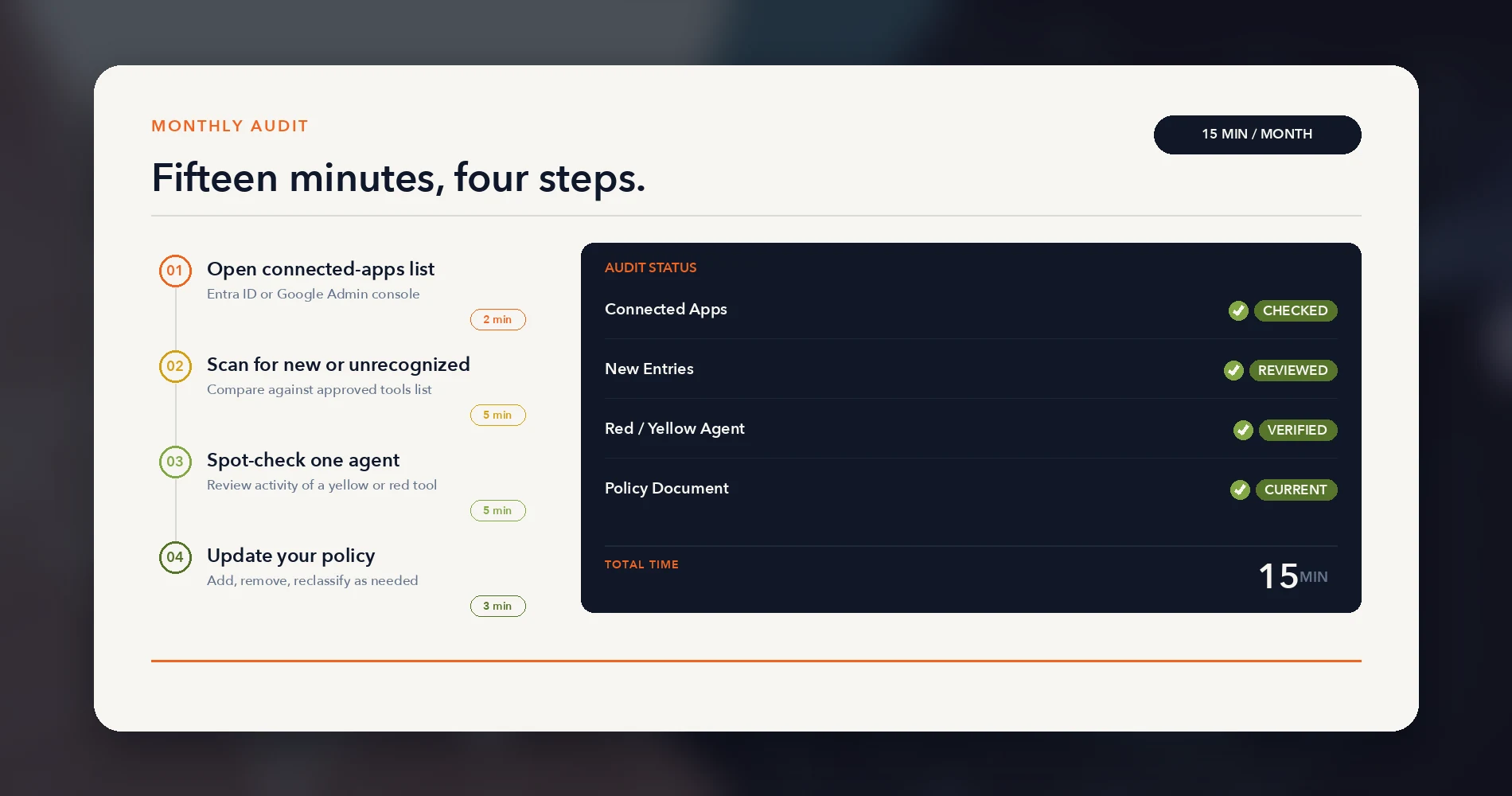
Step 1: Open Your Connected-Apps List (2 minutes)
Microsoft 365: Sign in to the Microsoft Entra admin center. Navigate to Entra ID → Enterprise applications → All applications. Set the application type filter to "All Applications" to include third-party and multitenant apps. This list includes service principals (Microsoft first-party apps, managed identities, and third-party integrations) — not just AI agents. You'll need at least Cloud Application Administrator role. Focus on third-party entries you don't recognize.
Google Workspace: Open the Google Admin console. Go to Menu → Security → Access and data control → API controls. Click Manage Third-Party App Access. Switch to the Accessed apps tab to see everything that has actually touched your data, not just the apps you've explicitly configured. Note that app access data can take 24–48 hours to appear, so you're seeing a slightly delayed picture.
Neither console captures everything. API keys managed inside a vendor's platform, browser extensions, desktop agent permissions, or integrations running under an employee's personal account won't appear here. These consoles cover OAuth and service-principal activity — the most common pattern for AI agent connections, but not the only one.
Step 2: Scan for Anything New or Unrecognized (5 minutes)
Compare the list to your approved tools document. You're looking for three things:
- New entries — anything that wasn't there last month. Who authorized it? What permissions does it have? Classify it using the traffic-light framework and add it to your policy document.
- Unrecognized entries — anything you can't identify. This is more common than you'd expect. Third-party tools sometimes register under their developer name rather than their product name. Before revoking: check the publisher name and scopes, ask the team if anyone recognizes it, and note any recent activity. If no one claims it and it has meaningful permissions, revoke it. Record the change, notify affected owners, and retain enough information to restore the connection if it proves business-critical.
- Stale entries — tools that no one has used in months but still have active permissions. Revoke access and remove them from your approved list. Dormant OAuth grants are the same risk category as former employee accounts that were never deprovisioned — they're access that exists for no current business reason.
Step 3: Spot-Check One Yellow or Red Agent (5 minutes)
Pick one tool from your yellow or red list each month and look at what it actually did. The depth of review depends on the platform:
- Microsoft Copilot Studio agents log interactions to the Purview Unified Audit Log. In the Microsoft Purview portal, go to Solutions → Audit and filter for
CopilotInteractionevents. The records include metadata, agent identity, and accessed resources — though full transcript content requires DSPM for AI, and some channels are excluded. Prerequisites and licensing apply; verify logging is active for your tenant. - Zapier provides an audit log for Team and Enterprise plans, tracking account and workflow configuration changes (Zap creation, modification, ownership). Team plans retain 6 months; Enterprise retains 12. But the audit log tracks who changed what — not what each Zap run actually did. For that, you need Zap run history, which is separate. Zapier guarantees up to 60 days of run data and displays at most 10,000 runs; Enterprise accounts can shorten retention to 7–30 days.
- Make offers audit logs on Enterprise plans, primarily covering administrative and configuration events — scenario creation, connection updates, role changes, and credential access. Individual scenario execution history is separate and accessible through the scenario dashboard.
- Claude (Enterprise tier) has a Compliance API with an Activity Feed that retains event metadata for six years; chat, file, and project content follows your organization's retention policy. The self-service audit log export covers the previous 180 days as a CSV download — a narrower window. For Cowork, coverage depends on session type: remote sessions (web, mobile, cloud) are captured through the Compliance API, while local desktop sessions are not — Anthropic streams those via OpenTelemetry on Team and Enterprise plans for operational monitoring.
Platform details verified August 5, 2026. Admin paths and retention periods change — re-verify if reading this later.
Not every platform logs agent activity equally. If your highest-risk agent is on a platform with limited logging, that's important information — it means you're trusting the tool more than you can verify, and it should factor into whether you keep it connected.
Step 4: Update Your Policy Document (3 minutes)
Add any new entries, remove anything revoked, and update review dates. If you found something that should change its traffic-light classification, change it now and note why. The policy should reflect reality, not last quarter's assumptions.
Where to Store API Keys and Agent Credentials
If any of your AI agents authenticate via API keys or service-account tokens rather than OAuth, those credentials need to live in a managed password or secrets system — not in a shared spreadsheet or a Slack message from six months ago. 1Password Business is one option we use with clients: its service accounts support vault-level access controls and usage reports that show what each credential accessed and when. Whatever tool you use, the audit trail matters when a key needs to be rotated or an integration gets decommissioned.
The monthly audit builds on the same principles as a broader network security audit — the difference is scope and time investment. If your office isn't doing any form of regular security review, the connected-apps check described here is a manageable starting point.
When to Bring in Outside Help
Get specialist help when agents handle regulated data, move money, chain actions across systems, or behave unexpectedly.
Most businesses reading this article can complete the traffic-light exercise, write the one-page policy, and run the monthly audit on their own. That's the point — this is designed for offices without dedicated security staff.
But there are situations where a one-page policy isn't enough:
Multiple interconnected systems with agent access. If your AI agents aren't just reading data but are chained together — one agent feeds another, which triggers a third — the potential impact of a misconfigured permission multiplies. A Zapier automation that reads invoices and feeds a Copilot agent that drafts payment confirmations that get auto-sent from a shared mailbox is a pipeline, not a single tool. Pipelines need architecture review, not just access classification.
Regulated data. If your business handles health records (HIPAA), payment card data (PCI DSS), or financial data with compliance requirements, the access policy needs to satisfy regulatory standards that go beyond the framework described here. A traffic-light table won't pass a compliance audit — but it's the right starting point before bringing in someone who can map it to regulatory requirements.
An agent has already done something unexpected. If an AI agent sent a wrong payment, emailed incorrect information to a client, or accessed data it shouldn't have, the right response isn't to just revoke its access and move on. That's an incident that deserves a root-cause review — what permissions made it possible, and what structural change prevents it from recurring.
For offices that need to go deeper — configuring identity platforms like Microsoft Entra ID, implementing Google Cloud IAM policies, or setting up enterprise-grade logging — our AI agent security playbook covers the technical implementation in detail. That playbook is written for organizations with IT staff capable of configuring identity infrastructure. This article is the plain-English foundation that most of iFeelTech's client base needs first.
If you're reading this and realizing your setup is more complex than what a one-page policy outline can cover, that's useful information. A conversation with an IT consultant who understands your specific tool stack can help confirm that permissions, logging, and recovery controls are appropriate for your risk level.
Frequently Asked Questions
These answers cover policy scope, discovery limits, ownership, and review frequency.
Does a small business really need a formal AI agent policy?
If any AI tool in your business has access to email, financial software, or customer data — a Copilot connector, a Zapier automation, a Claude or ChatGPT integration — yes. The policy doesn't need to be long or legal; a one-page document with a named owner and a review date is enough for most small offices.
What's the difference between an AI use policy and an AI agent access policy?
An AI use policy typically covers what employees are allowed to type into a chat tool. An AI agent access policy covers what happens when a tool has standing permission to read your data or take actions on its own — send an email, post a payment, update a record — without a human approving each action in real time. Agents need the tighter, permission-based treatment.
How do I find out what AI agents already have access to my systems?
Start with the connected-apps or authorized-applications list in your Microsoft 365 (Entra ID > Enterprise applications) or Google Workspace (Admin console > Security > Access and data control > API controls) admin panel. These show OAuth-authorized third-party tools including AI agents and automations. They won't capture API keys managed inside another vendor's platform, browser extensions, or integrations running under personal accounts — but they cover the most common AI agent connection pattern.
Who should be responsible for reviewing AI agent access in a small company with no IT department?
It should be one named person — often the owner or office manager, not necessarily a technical role — who owns a 15-minute monthly check of the connected-apps list and a quarterly review of the policy itself. The point isn't technical expertise; it's that someone, specifically, owns the task.
Related Resources
These resources expand the policy into broader identity, security, and offboarding controls.
- AI Agent & Service Account Security for SMBs: 2026 Comprehensive Playbook — The technical deep-dive for organizations ready to implement Entra ID, Google Cloud IAM, and Okta-based agent security.
- AI Acceptable Use Policy for Small Business — the everyday-use policy this one sits on top of: approved tools, data classes and human review for people prompting AI directly.
- Free Small Business IT Policy Templates — The broader IT policy library this article's AI agent access policy complements.
- The 7-Step Network Security Audit — The quarterly security audit that puts the monthly agent-access check in a broader context.
- How to Audit and Revoke Former Employee Access Securely — The access revocation process that applies equally to dormant agent permissions and departed staff.
- Is ChatGPT Safe for Business? — Covers the data-sharing risks of chat-based AI tools, distinct from the standing-access agent risks addressed here.
- The White House AI Framework for Small Business — Regulatory context for the broader AI governance conversation.
Related Articles
More from Cybersecurity
AI Agent & Service Account Security for SMBs: 2026 Comprehensive Playbook
Complete SMB playbook for securing AI agents and service accounts. Governance frameworks, platform comparisons (Entra ID, Google Cloud IAM, Okta), and step-by-step implementation guide.
16 min read
Is ChatGPT Safe for Business? What Every SMB Owner Should Know Before Sharing Company Data
Is ChatGPT safe for business data? A practical SMB guide: free vs. enterprise tiers, four data categories, and a one-page policy template.
17 min read

A 10-Step Secrets Hygiene Checklist for SMB Development & Operations Teams
With data breaches now costing U.S. businesses $10.22 million on average and secrets sprawl accelerating 25% annually, this comprehensive 10-step checklist helps SMB dev/ops teams implement robust credential security and protect against AI-driven threats.
20 min read