Protecting Company Files: Why Policy Comes Before Software
Small businesses cannot make company files impossible to copy, but they can reduce risk with policy, permissions, managed devices, DLP, logging, and disciplined offboarding.

Many small business owners assume file protection is a software problem. They want IT to install a tool that stops employees from copying files, emailing documents to themselves, uploading data to personal cloud storage, or taking sensitive information when they leave.
The reality is more complicated. In the small and midsize business (SMB) space, file protection is usually a mix of policy, permissions, monitoring, device management, and management discipline. Without those pieces in place, even expensive security tools can create a false sense of control. This guide explains why protecting company files is harder than it looks, why policy and management buy-in have to come first, and where technology fits realistically.
The plain-English answer
No tool can make company files impossible to copy if employees need to use them. A realistic SMB plan reduces risk with written rules, least-privilege access, managed devices, cloud sharing controls, audit logs, and disciplined offboarding — with DLP software added later, once those basics are in place.
Key Takeaways
- File protection is a business policy problem that technology can support — not a single product that delivers total control
- If an employee can open a file, they can usually copy, screenshot, photograph, print, forward, or recreate it; the goal is risk reduction, not perfection
- The most common mistake is treating file security as IT-only, asking IT to enforce rules that were never written down
- Small businesses can realistically control permissions, least-privilege access, managed devices, USB rules, MFA, cloud storage rules, and audit logging
- Data loss prevention (DLP) software needs planning, tuning, and management support; Microsoft and Google both position it as a configured program, not a switch
- A realistic SMB roadmap starts with organizing files and writing rules, then secures the basics, adds visibility, and only later evaluates advanced controls
Can Technology Stop Employees From Taking Company Files?
Not completely. Technology can reduce the risk and improve visibility, but it cannot make useful files impossible to copy.
If an employee needs to open a file to do their job, they can often find some way to copy it. They can save a second copy, take a screenshot, photograph the screen with a phone, print it, forward it, or recreate the information from memory. Each of those paths sits outside whatever single tool a business hoped would solve the problem. A control that blocks one channel rarely closes the others, and the more access someone needs to do legitimate work, the more of these paths stay open by necessity.
This is why "stop people from taking files" is the wrong frame. The achievable goal is risk reduction, visibility, and accountability: make unauthorized access harder, make risky behavior easier to see, and create a clear record when the rules are broken. That is a realistic target on an SMB budget. What it is not is a guarantee — and any plan that promises one is worth a second look.
Why File Protection Starts With Policy, Not Software
IT can only enforce rules that management has already defined.
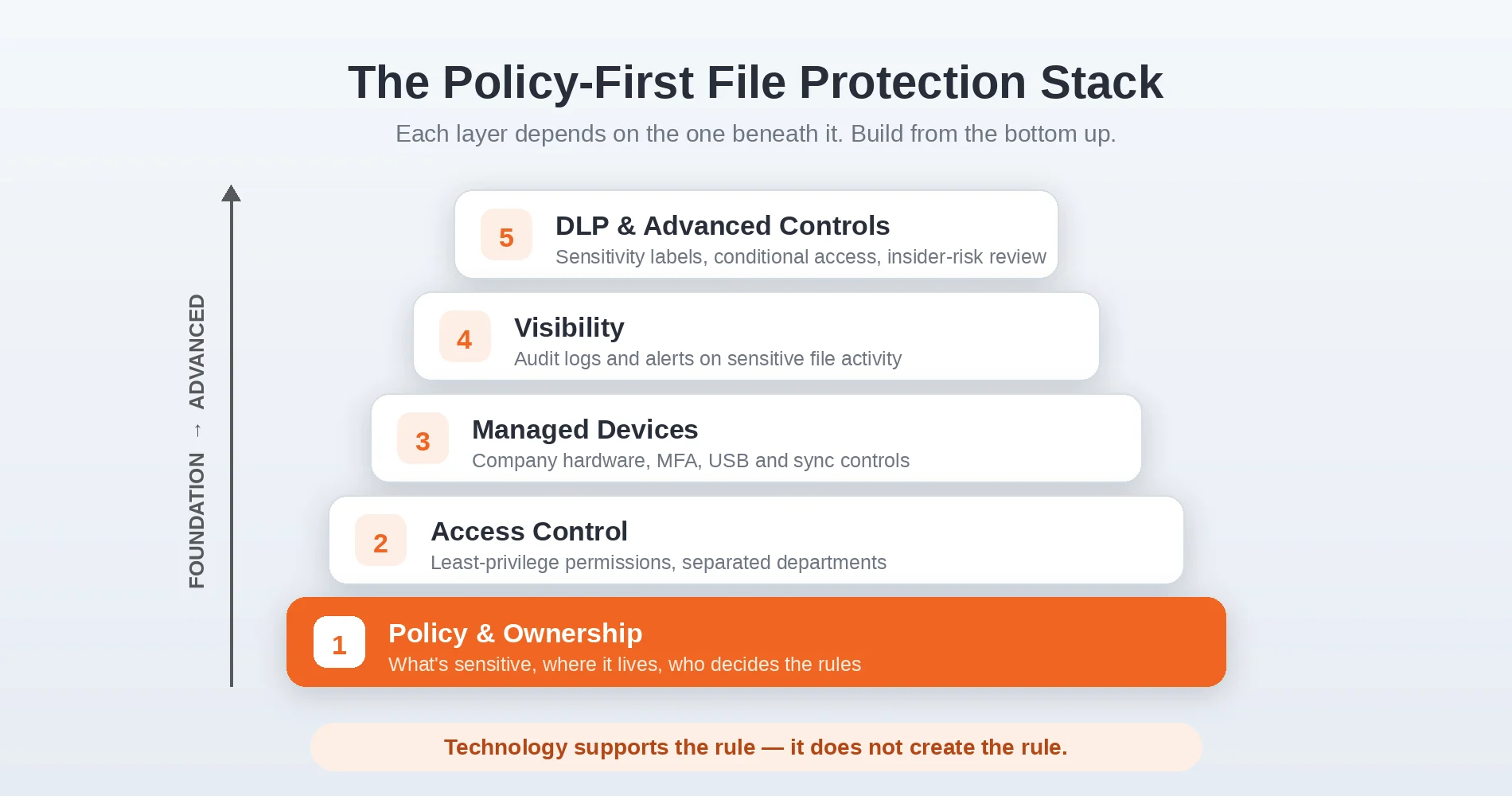
Business owners frequently skip the policy layer entirely. They describe the outcome they want — employees shouldn't be able to walk away with client lists or designs — and hand it to IT as a technical task. But IT can only enforce rules that exist. If the business has never defined who owns the files, who is allowed to access what, where work documents are supposed to live, or what happens when someone breaks the rules, then there is nothing concrete to enforce. The technical team ends up guessing at policy, and the result is brittle and inconsistent.
The policy layer is not paperwork for its own sake. It is the foundation that makes every technical control coherent. This is the same logic behind the NIST Cybersecurity Framework 2.0, which in 2024 added "Govern" as a function sitting alongside Identify, Protect, Detect, Respond, and Recover — governance and policy come first, then the controls follow. In practice that means a written acceptable use policy, clear handbook language, confidentiality agreements where appropriate, explicit file ownership rules, defined onboarding and offboarding expectations, manager approval for sensitive access, and stated consequences for misuse. Our small business IT policy templates cover the documents most SMBs are missing, and our look at why IT recommendations get ignored explains why management buy-in matters as much as the technology itself.
Policy before enforcement
Technology supports the rule; it does not create the rule. Before IT can build a clean technical solution, management has to answer a few basic questions: Who owns the files? Who should have access? Where are employees allowed to store work documents? What happens when someone breaks the rules? Who approves exceptions? How much friction can the business tolerate? Until those are answered, any tool is enforcing assumptions.
What Can Small Businesses Realistically Control?
SMBs can control access, devices, sharing paths, logging, and offboarding — controls that make misuse harder without promising perfection.
A short list of practical, affordable controls closes most of the easy paths. None of them is a wall, and each works best alongside the policy layer above, but together they move a business from "anyone can do anything" to "access is deliberate and observable." The principle underneath most of them is least privilege — a point the FTC's Protecting Personal Information guide makes plainly when it tells businesses to limit access to data to employees with a "need to know."
- Proper folder permissions. Most SMBs accumulate years of informal sharing. Cleaning up who can see what is the single highest-value step, and it costs nothing but time.
- Least-privilege access. Give each person access to what their role requires, not everything by default. This limits how much any single account can reach.
- Separate access for sensitive departments. Finance, HR, and design files don't need to live in the same open share as everyday documents.
- Managed company devices. Controls are far more effective on hardware the business owns and manages than on personal phones or laptops.
- USB storage restrictions. On managed Windows devices, Microsoft Intune and Defender for Endpoint device control can limit or block removable storage to close an obvious copy channel.
- MFA and identity controls. Multi-factor authentication and a central identity provider make accounts harder to misuse and easier to revoke.
- Cloud storage rules. Define which platforms are approved and how files may be shared, then configure those platforms to match.
- Blocking personal sync tools where appropriate. Preventing personal Dropbox or Google Drive sync on managed devices removes a quiet way for company data to leave.
- Audit logs for sensitive files. Logging access to your most sensitive folders turns invisible activity into a reviewable record.
- Alerts for unusual downloads or sharing. Notifications on bulk downloads or external sharing give you early visibility, not just hindsight.
The honest framing is that each control helps with one part of the problem and leaves others open. The table below makes that trade-off explicit:
| Control | What it helps with | What it does not solve | SMB effort |
|---|---|---|---|
| Folder permissions | Limits who can open files | Copying by authorized users | Low/medium |
| Managed devices | Applies policy consistently | Little effect on BYOD | Medium |
| USB restrictions | Reduces removable-drive copying | Screenshots, phone photos | Medium |
| Cloud sharing rules | Limits external sharing | Needs admin review and training | Medium |
| Audit logs | Shows access and sharing activity | Does not prevent misuse | Low/medium |
| DLP | Detects and blocks sensitive data movement | Needs tuning and policy support | High |
Control Explorer
What Each File-Protection Control Does — and Doesn't — Solve
No single control makes files leak-proof. Select one to see what it covers, what it leaves open, and the effort it takes on an SMB budget.
Select a control above to see what it covers, what it leaves open, and the effort it takes. The goal is risk reduction, not perfection.
For the broader picture, our small business security assessment guide walks through evaluating your whole stack, and the new employee IT onboarding checklist and former employee access guide cover the two moments where access risk is highest.
What we usually see in SMB environments
In the field, the largest file-risk gaps tend to cluster in three places: old shared folders that no one has reviewed in years, unmanaged personal devices holding company data, and incomplete offboarding. Advanced tools help later, but fixing these three usually produces the biggest first improvement for the least money.
Why Personal Devices Make File Protection Harder
Controls work best on devices the business owns or manages.
Bring-your-own-device (BYOD) is where most SMB file controls weaken. On a personal laptop or phone, the business usually cannot restrict USB storage, block personal cloud sync, or remove company data the way it can on a managed device. If an employee downloads a client spreadsheet to their own computer, the file is now outside the controls entirely.
There are practical ways to narrow this gap without taking over someone's personal hardware. Mobile device management (MDM) with a selective wipe lets the business remove only its own data. App containerization keeps company files inside managed apps rather than the device's general storage. And the simplest control of all is a written rule that company files stay inside approved, browser-based or managed apps and are not downloaded to unmanaged devices. For most small teams, keeping data in managed sessions rather than on local drives is the highest-value BYOD decision. Our guide to keeping company data controlled in Windows 11, Google Workspace, and OneDrive covers the configuration side of this in more detail.
What Does DLP Software Actually Do — and Why Is It Hard for SMBs?
DLP can detect and block risky data movement, but it needs planning, tuning, and management support.
In plain English, DLP watches for sensitive information — credit card numbers, client records, files tagged as confidential — and applies a rule when that information is shared, copied, uploaded, emailed, or moved outside approved systems. Depending on the platform, it can warn the user, alert an administrator, block the action, or log the event for review. On paper it sounds like exactly the tool owners ask for. In practice, this is the widest gap between expectation and reality, which makes it the educational centerpiece of this topic.
Microsoft's own Learn about data loss prevention documentation frames DLP as something you plan, deploy, and continuously tune by acting on the activity it reports — not a switch you flip once. Here is why small businesses tend to struggle with it, even when the technology itself is capable:
- It requires the right licensing. Meaningful DLP usually sits in higher tiers. Google offers Drive DLP only in its Enterprise, Frontline, Education, and Enterprise Essentials Plus editions — not core Business plans — and Microsoft's SMB path generally means Microsoft 365 Business Premium plus a Purview add-on, depending on the capabilities you need.
- It needs careful configuration. Rules have to match how your business actually handles data, which assumes you already know that.
- It creates false positives. Overly broad rules flag legitimate work, and every false alarm erodes trust in the system.
- It can interrupt normal work. A block at the wrong moment stops a real task, and employees route around tools that get in their way.
- It needs ongoing tuning. DLP is not set-and-forget; rules drift out of date as the business changes.
- It works best when files are already classified and organized. DLP enforces structure; it does not create it. Messy storage produces messy results.
- It requires management support when users complain. The first time DLP blocks an executive's file, someone has to back the policy, or the rules get loosened until they mean little.
None of this makes DLP a bad technology. It makes DLP a poor first move for most small businesses. It rewards organizations that have already defined what is sensitive, cleaned up where data lives, and built the discipline to stand behind a policy. Reach that point and DLP adds real value. Skip those steps and it tends to become an expensive source of friction that often gets switched off.
What If We Use Microsoft 365 or Google Workspace?
Both platforms include data-protection tools, but the meaningful controls sit in specific editions and add-ons rather than the base Business plans.
This is not a product comparison — the point is to set expectations about where the controls live. In a Microsoft environment, file protection typically draws on Intune for device management, Defender for Endpoint for USB and endpoint controls, and Purview for DLP, Endpoint DLP, and sensitivity labels, with conditional access governing who connects from where. In a Google Workspace environment, the day-to-day controls are Drive sharing settings, shared drives, admin audit logs, and context-aware access — but Drive DLP itself is limited to Enterprise, Frontline, Education, and Enterprise Essentials Plus editions. For many SMB Microsoft environments, advanced DLP and labeling usually require Microsoft 365 Business Premium plus a Purview add-on. The practical takeaway for an SMB is to confirm which edition you actually have before assuming a control is available, because the gap between "our platform supports DLP" and "our plan includes DLP" is where many projects stall.
How AI Tools Create a New File-Sharing Risk
AI tools add another place where employees may paste or upload sensitive company data.
This is a 2026-specific gap worth naming. Employees increasingly paste client data, contracts, source files, spreadsheets, or internal notes into AI assistants to summarize, rewrite, or analyze them. From a file-protection standpoint, that is another channel where company information can leave approved systems — often through a personal account that IT has no visibility into. Microsoft's Purview DLP documentation now addresses data movement to unmanaged AI apps for exactly this reason.
The realistic response mirrors the rest of this guide: decide which AI tools are approved, document what may and may not be pasted into them, and prefer enterprise versions that keep data inside your tenant over personal accounts. For a deeper look at the underlying question, our guide on whether ChatGPT is safe for business data walks through the trade-offs. The control here is mostly policy and awareness — technology can help, but a clear rule does most of the work.
Why Enterprise File Protection Is Difficult on an SMB Budget
Advanced controls require licensing, administration, and management discipline that most small businesses are not yet set up to carry.
This is the most common pattern we see in the field: an owner asks for the kind of locked-down control they've read about at large companies, without the budget, staffing, or process those controls assume. Enterprise data protection is not just a license. It is dedicated administration, a data classification program, an exception-handling process, and the management willingness to enforce rules consistently. Buying the tool without the surrounding program tends to produce cost and complaints rather than protection.
A realistic SMB plan almost always starts with the basics, because they deliver most of the risk reduction for a fraction of the effort:
- Clean up permissions so access reflects current roles
- Centralize file storage so data isn't scattered across personal drives and laptops
- Remove local file sprawl and duplicate copies
- Manage endpoints so controls actually apply
- Disable the obvious risky channels, such as personal sync on company devices
- Monitor the genuinely sensitive areas rather than everything
- Improve offboarding so access ends when employment does
- Document the rules so they can be enforced and explained
Advanced DLP, sensitivity labels, and similar controls can come later, once the business truly needs them and is mature enough to support them. Our small business IT budget planning guide and the article on when to stop doing IT yourself both speak to right-sizing investment for where a business actually is, rather than where a brochure suggests it should be.
Where Does Your Business Sit Today?
A short maturity ladder helps owners place their business honestly before deciding what to buy next.
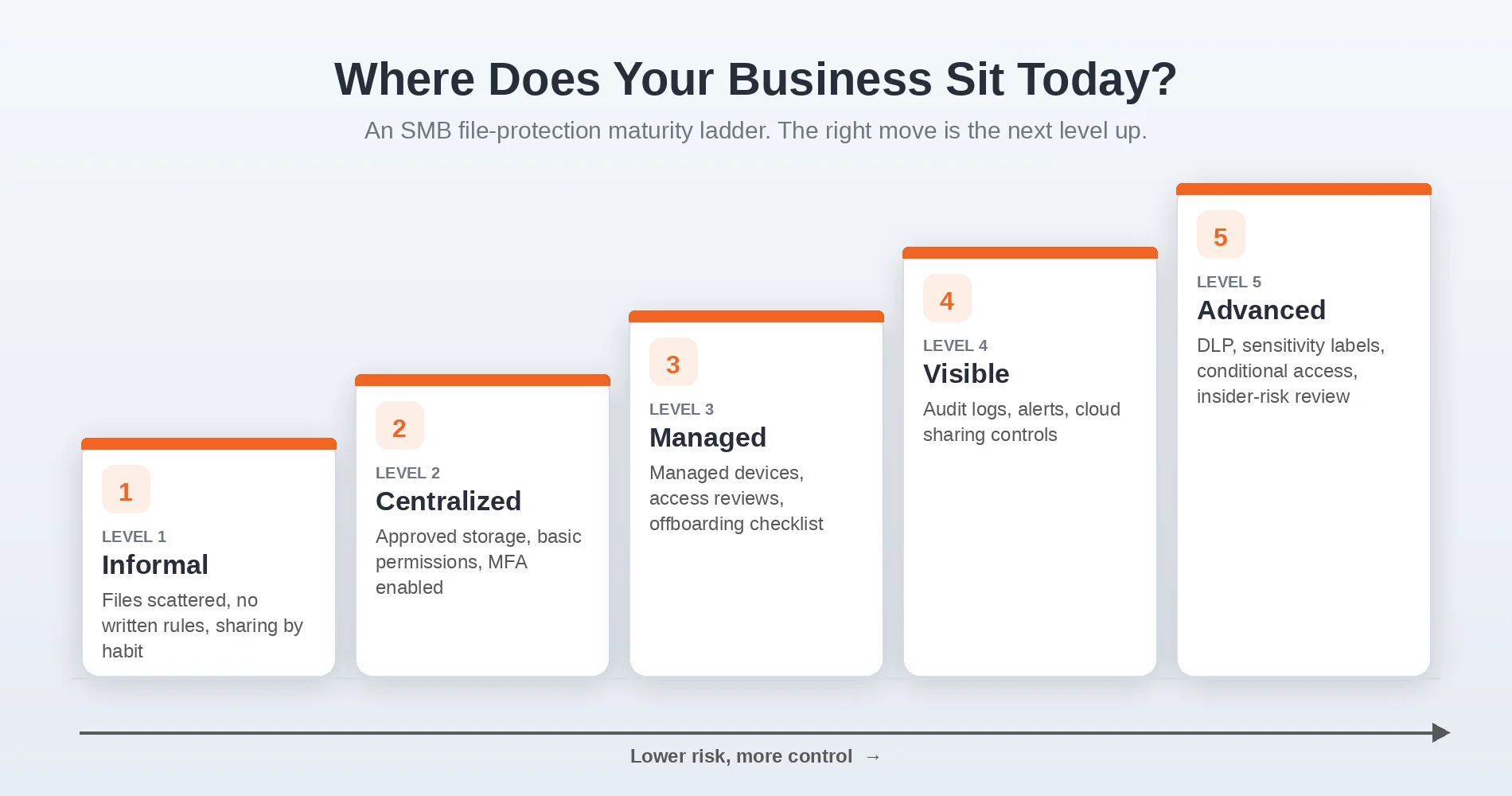
Most file-protection projects go wrong by jumping ahead of where the business actually is. These five levels give you a way to locate yourself and pick the next realistic step rather than the most advanced one:
- Level 1 — Informal. Files scattered across desktops and drives, no written rules, sharing by habit.
- Level 2 — Centralized. Files consolidated into approved storage, basic permissions in place, MFA enabled.
- Level 3 — Managed. Company-managed devices, regular access reviews, and a real offboarding checklist.
- Level 4 — Visible. Audit logs, alerts, and cloud sharing controls on sensitive areas.
- Level 5 — Advanced. DLP, sensitivity labels, conditional access, and insider-risk review.
The right move is almost always the next level up, not a leap to Level 5. A business at Level 1 gets far more protection from reaching Level 2 or 3 than from buying DLP it cannot yet support.
What Rules Should You Define Before Buying Tools?
Define your sensitive data, approved storage, sharing rules, exceptions, and enforcement owner before configuring anything.
This is the practical framework, and none of it requires software. Work through these questions with management before IT configures anything:
- What data is sensitive? Client lists, pricing, designs, contracts, financials — name it specifically.
- Where should that data live? One approved, centralized location per category, not wherever it happens to land.
- Who is allowed to access it? Defined by role, on a least-privilege basis.
- How may it be shared? Internal only, with named external parties, never by personal email — make it explicit.
- What tools are approved? The sanctioned platforms for storage, sharing, and collaboration.
- What is prohibited? Personal cloud accounts, unmanaged USB drives, forwarding to personal email — whatever you intend to enforce.
- How are exceptions approved? A real path for legitimate edge cases, with a named approver.
- What happens during employee exit? A defined offboarding sequence that revokes access promptly.
- What monitoring is acceptable? What you log and review, communicated transparently to staff.
- Who owns enforcement? A specific person responsible for the rules, not "IT" in the abstract.
Answer these, and IT has something clean to build against. Skip them, and you are asking technology to invent your policy for you.
Monitoring is a legal and HR decision, not just an IT one
Logging, monitoring, and any employee investigation should be reviewed with management, HR, and legal counsel before you turn it on. Workplace monitoring rules vary by location and industry, and the goal is transparent security enforcement that staff are aware of — not hidden surveillance. Document what you monitor and why, and disclose it.
A Practical File Protection Roadmap for SMBs
Start with files and policies, then add device controls, logging, and advanced tools in that order.
The sequence matters as much as the steps. Each phase makes the next one work better, and most businesses see the largest risk reduction in the first two phases, well before any advanced spending.
Phase 1 — Get organized. Centralize files into approved locations, clean up permissions, remove unused accounts, and identify which data is actually sensitive. This phase alone closes a large share of everyday exposure. Our guide to organizing business files covers the practical version: one designated home per client or project, a named owner for each area, and a pilot migration you can reverse.
Phase 2 — Write the rules. Create simple, readable policies for file storage, sharing, device use, personal cloud apps, AI tools, and employee offboarding. Keep them short enough that people will actually follow them.
Phase 3 — Secure the basics. Turn on MFA, move to managed devices, deploy endpoint protection, apply USB controls, and schedule regular access reviews. Our breach prevention guide details this layer.
Phase 4 — Add visibility. Enable audit logging, alerts, and reporting for sensitive file activity so risky behavior becomes observable rather than invisible.
Phase 5 — Consider advanced controls. Evaluate DLP, sensitivity labels, conditional access, or virtual desktop options — only when the business process is mature enough to support them. If you're already in the Microsoft 365 ecosystem, our SharePoint permissions audit before Copilot is a useful reference for getting structure right before turning on advanced features.
Not sure where your file risk actually is?
Before buying DLP software, start with a review of permissions, cloud storage, device management, and offboarding. That review tells you which phase you're actually in — and usually surfaces a few quick fixes worth more than any new tool. Talk to iFeelTech about a file protection review.
What Should Business Owners Not Expect?
IT cannot make file misuse impossible while employees still need file access.
It's worth being direct here, calmly. No tool, configuration, or budget will make a business's files theft-proof while employees still need to use them. Be cautious with any plan that promises total control — phrases like "total control" or "guaranteed protection" describe a state that does not exist in a working business where people open files every day.
What you can reasonably expect is meaningful. You can expect that access is deliberate rather than universal, that the obvious copy and upload channels are closed on managed devices, that activity in your sensitive areas is logged, that unusual behavior generates an alert, and that when someone does break the rules, you have a documented record rather than a guess. That combination lowers the odds of a problem and puts you in a defensible position if one happens. For most small businesses, that is the right outcome to aim for.
How iFeelTech Helps SMBs Protect Company Files
iFeelTech helps SMBs protect files with practical policy, access, device, and visibility controls — not the most expensive tool first.
Our role is to translate the goal an owner cares about — keeping sensitive company data better organized and better protected — into a right-sized plan the team can actually live with. In practice that means reviewing who has access to what, tightening folder permissions, centralizing and cleaning up cloud storage, putting managed devices and MFA in place, writing the policies that make enforcement possible, and fixing the onboarding and offboarding steps where access risk concentrates. Advanced controls like DLP enter the conversation only when the underlying process is ready to support them.
The goal throughout is to reduce risk without creating a system employees cannot work with. Security that gets in the way of legitimate work tends to get bypassed, so we aim for controls that are strong enough to matter and practical enough to last.
Get a Free File Protection ReviewNo obligation — we'll review your file access, cloud storage, endpoint security, and offboarding procedures, and give you a right-sized plan to better organize and protect sensitive company data.
Frequently Asked Questions
Can I stop employees from copying or taking company files?
You can make it harder, more visible, and more accountable — but not impossible. If an employee needs to open a file to do their job, they can usually find some way to copy, screenshot, photograph, forward, or recreate it. The realistic goal is risk reduction: tighten who has access, close obvious ways data can leave, log sensitive activity, and create a clear record when rules are broken. Treating file protection as a single product that delivers total control sets the wrong expectation.
Do I need DLP software for my small business?
Most small businesses get more value first from cleaning up permissions, centralizing file storage, managing devices, and enabling MFA than from buying data loss prevention (DLP) software. Microsoft's own guidance describes DLP as something you plan, deploy, and continuously tune, and Google offers Drive DLP only in its Enterprise, Frontline, Education, and Enterprise Essentials Plus editions — not core Business plans. DLP also works best once files are already classified and organized, which makes it a reasonable later step rather than a first purchase.
Can IT block USB drives, downloads, and personal email?
Yes, to a degree. On managed company devices, tools like Microsoft Intune and Defender for Endpoint can restrict USB storage, control which cloud sync tools are allowed, and apply policies that discourage uploading company data to personal accounts. These controls genuinely reduce risk. They are most effective on devices the business owns and manages, and weaker on personal phones or unmanaged computers, which is why device management and clear storage rules matter as much as the technical block itself.
What should a small business do first to protect company files?
Start with the questions only management can answer: what data is sensitive, where it should live, who is allowed to access it, how it may be shared, and what happens when someone breaks the rules. Then clean up folder permissions, centralize storage, enable MFA, manage company devices, and improve offboarding. Written policy and access control come before any advanced tooling, because technology enforces rules — it cannot create rules that were never defined.
Do personal devices make file protection harder?
Yes. File controls work best on devices the business owns or manages. On a personal laptop or phone (BYOD), the business usually cannot restrict USB storage, block personal cloud sync, or wipe company data unless it uses mobile device management, app containerization, or a written rule that prohibits downloading company files to unmanaged hardware. For many small businesses, the most practical BYOD control is keeping company files inside managed apps and browser sessions rather than letting them land on the local device.
Is the goal to make file theft impossible?
No, and promising that sets up a false sense of security. The right goal is to make unauthorized access harder, make risky behavior visible, and produce a clear record when rules are broken. That combination reduces the likelihood of a problem and gives you a documented position if one occurs — which is a realistic and defensible outcome for a small business budget.
Related Resources
- Small Business IT Policy Templates — The acceptable use, access, and offboarding documents that turn good intentions into enforceable rules.
- New Employee IT Onboarding & Security Checklist — Provision access correctly from day one so file risk is contained before it starts.
- How to Audit and Revoke Former Employee Access — Closing the offboarding gap, the most common point where company files leave the business.
- Small Business Security Assessment Guide — A structured way to find the access, storage, and device gaps in your current setup.
- Cut Your Breach Risk in 90 Days — The broader plan: MFA, patching, access management, and incident response for SMBs.
- When to Stop Doing IT Yourself — How to tell when file protection and security have outgrown a DIY approach.
Related Articles
More from Cybersecurity
Vendor Risk Assessment for Small Businesses: A Practical 2026 Framework
Inventory, classify, and review your SaaS vendors with a two-axis risk matrix, worked example, and copyable 12-question questionnaire.
19 min read
How to Set Up Automatic Updates on Every Device (Windows, Mac, iPhone, Android, Router)
Enable and verify automatic updates on Windows, macOS, iPhone, Android, routers, and NAS devices — a complete cross-platform guide for small businesses.
15 min read
NordVPN for Business Review (2026): NordVPN vs. NordLayer
Hands-on NordVPN review for business use in 2026. Speed benchmarks, security analysis, and honest assessment of when NordVPN suits a solo operator vs. when NordLayer is the right choice.
19 min read