

pfSense vs UniFi Dream Machine Pro: 2026 Comparison Guide
Updated 2026 comparison: pfSense (Netgate 4200/6100) vs UDM Pro/Pro Max. Vendor-published throughput, current pricing, Shadow Mode vs CARP, VPN support, and which firewall fits your business.

Affiliate Disclosure: This article contains affiliate links. If you make a purchase through these links, we may earn a small commission at no extra cost to you. As an Amazon Associate, iFeelTech earns from qualifying purchases.
Is pfSense or UniFi Dream Machine Better for 2026?
Verdict: Use UDM Pro/Max for Ease of Use
For most small businesses, the UDM Pro Max is the better fit: 5 Gbps IDS/IPS throughput, integrated NVR, and no annual software fees. Choose pfSense (Netgate) if you need its package ecosystem (Snort/Suricata, pfBlockerNG, HAProxy), HTTPS inspection, detailed logging and diagnostics, or non-UniFi hardware integration.
As of October 2026, the gap has narrowed. Ubiquiti lists high availability (Shadow Mode), WireGuard VPN, OSPF and BGP on both the UDM Pro ($379 list, $417 with surcharge) and the Pro Max ($599 list, $660 with surcharge). pfSense (specifically Netgate appliances like the 4200/6100) still offers more granular control, with detailed firewall rules, a package system (such as pfBlockerNG and FRR), and diagnostics that UniFi does not match.
The choice depends on your technical requirements and operational preferences. UniFi excels in ease of deployment and integrated surveillance, while pfSense provides superior flexibility for complex routing scenarios and SSL/TLS inspection capabilities.
For additional context, see our UniFi Business Network Guide or Gateway Comparison.
How Do UDM Pro Specs Compare to Netgate Appliances?
Winner: UniFi for Price-to-Performance
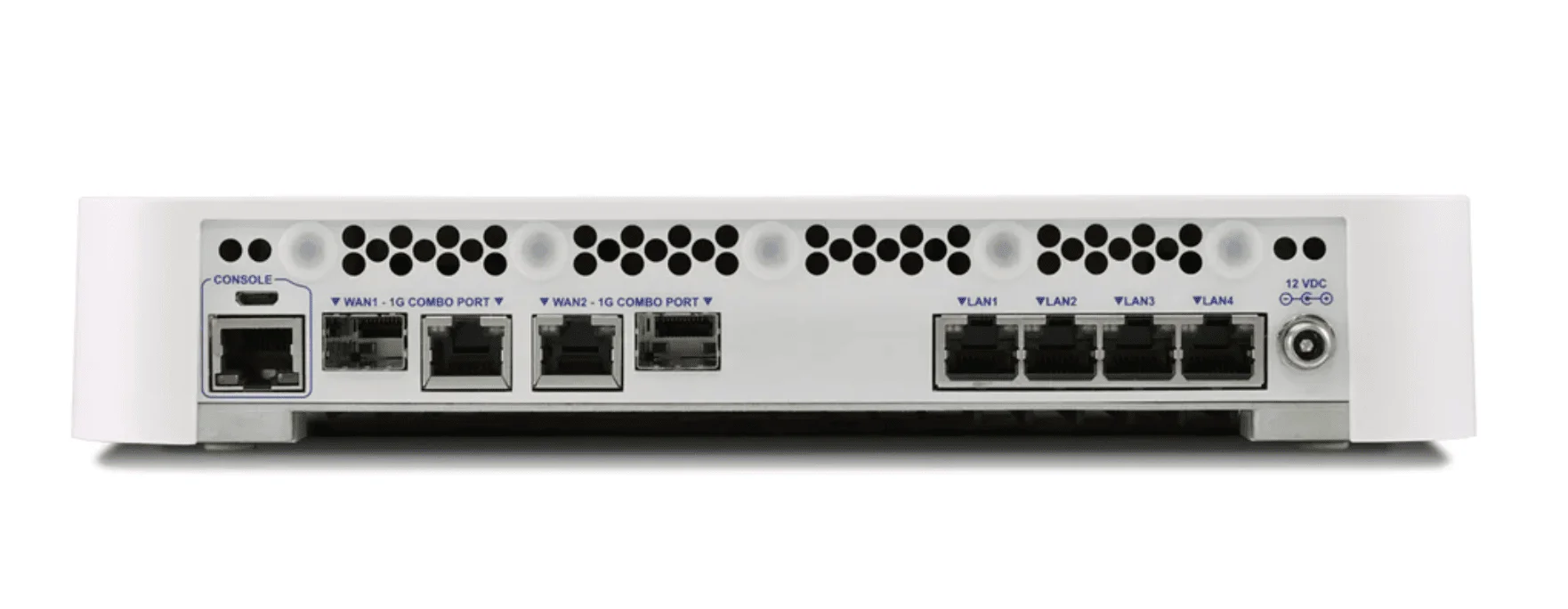
The UDM Pro ($379) lists 3.5 Gbps IDS/IPS throughput, and the UDM Pro Max ($599) lists 5 Gbps. Netgate does not publish IDS/IPS throughput; its firewall figures (no IPS) are 3.21 Gbps IMIX on the Netgate 4200 (from $829) and 2.73 Gbps IMIX on the Netgate 6100 (from $1,499). Because the two vendors publish different tests, the figures are not directly comparable. DIY pfSense builds can be cheaper but lack Netgate hardware support.
The raw hardware comparison often favors Ubiquiti in terms of throughput-per-dollar.
2026 Hardware Lineup
UniFi Dream Machine Series:
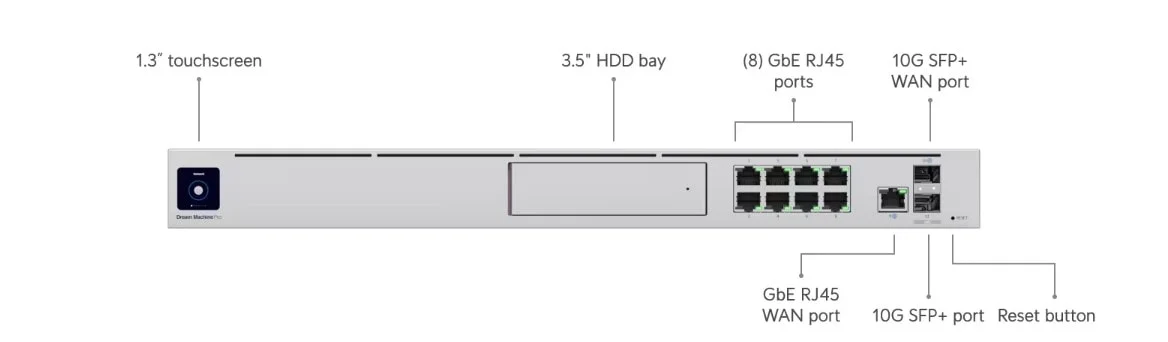
- UDM Pro ($379): Rack-mountable 1U. Lists 3.5 Gbps IDS/IPS throughput, 8 GbE LAN ports plus a GbE WAN port and 2x 10G SFP+, and one 3.5" NVR drive bay. List price; the Ubiquiti store shows $417 with surcharge.
- UDM Pro Max ($599): Lists 5 Gbps IDS/IPS throughput, adds a 2.5GbE port (8x GbE, 1x 2.5GbE, 2x 10G SFP+), and has two drive bays for RAID storage. List price; the Ubiquiti store shows $660 with surcharge. Read our full review.
- Cloud Gateway Max ($199): Compact option with five 2.5GbE ports, 2.3 Gbps IPS, and selectable NVMe NVR storage (up to 2 TB), but no HDD bays. Starting price; the store shows $219 with surcharge. Choose UDM Pro Max over UCG-Max if you need a rackmount form factor, HDD bays for surveillance, or 10G SFP+ ports.
Netgate pfSense Appliances:
- Netgate 4200 (from $829): Fanless desktop appliance with four 2.5GbE ports. Netgate lists L3 forwarding at 8.75 Gbps (iPerf3) and 9.28 Gbps (IMIX), and firewall throughput at 8.61 Gbps (iPerf3) and 3.21 Gbps (IMIX) with 10k ACLs. IDS/IPS packages (Suricata/Snort) add load; Netgate publishes no IPS figure. View at Netgate.
- Netgate 6100 (from $1,499): Fanless desktop appliance (wall-mount option) with two 10G SFP+ ports, four 2.5GbE ports and two 1G combo ports. Netgate lists firewall throughput at 9.93 Gbps (iPerf3) and 2.73 Gbps (IMIX) with 10k ACLs. It uses an older Atom C3558 CPU than the 4200, and the 4200 lists higher IMIX firewall and IPsec figures. View at Netgate.
Hardware Comparison Table
| Model | Price (list / starting) | Form Factor | IDS/IPS Throughput (vendor-listed) | Firewall Throughput (iPerf3 / IMIX) | Ports | NVR Support |
|---|---|---|---|---|---|---|
| UDM Pro | $379 | 1U Rack | 3.5 Gbps | Not published | 9x GbE (1 WAN default), 2x 10G SFP+ | Yes (1 bay) |
| UDM Pro Max | $599 | 1U Rack | 5 Gbps | Not published | 8x GbE, 1x 2.5GbE, 2x 10G SFP+ | Yes (2 bays) |
| Netgate 4200 | From $829 | Desktop | Not published | 8.61 / 3.21 Gbps | 4x 2.5GbE (unswitched) | No |
| Netgate 6100 | From $1,499 | Desktop | Not published | 9.93 / 2.73 Gbps | 2x 10G SFP+, 4x 2.5GbE, 2x 1G combo | No |
Prices and specs from the Ubiquiti store and tech specs pages and Netgate's appliance page, read October 23, 2026. Ubiquiti prices are list prices; the store adds a surcharge ($417 and $660 shown for the UDM Pro and Pro Max). IDS/IPS and firewall throughput are different tests and should not be compared directly.
DIY pfSense Option
The UDM series requires Ubiquiti hardware. pfSense allows you to bring your own hardware (BYOH), meaning you can repurpose an old Dell OptiPlex with a 4-port NIC (roughly $200-$400 on the used market, an estimate). DIY builds run pfSense CE for free, or pfSense Plus with a software subscription (from $129/year with TAC Lite support), and may require significant time investment for troubleshooting.
Ready to build your network? Explore UniFi Gateways or browse Netgate appliances.
Pro Tip: Port Flexibility
Netgate 6100 vs UDM Pro Max Port Density:
The Netgate 6100 offers unswitched, assignable ports - Netgate lists flexible WAN/LAN assignment and multi-WAN with load balancing. The UDM Pro Max also supports multi-WAN: Ubiquiti lists up to 8 WAN ports, with a 10G SFP+ and a 2.5GbE port as the defaults. The difference is mostly in configuration style: pfSense exposes every interface for manual assignment, while UniFi uses guided settings.
Is UniFi OS Easier to Use Than pfSense Plus?
Answer: Yes, Significantly
UniFi uses a graphical "Single Pane of Glass" dashboard ideal for visual management and quick changes. pfSense uses a text-heavy, tabbed interface that exposes every variable, requiring networking knowledge to navigate safely.
UniFi OS: Set and Forget
UniFi OS is designed for "set and forget" network management:
- Visual Dashboard: VLANs are created in seconds and automatically tagged across all connected UniFi switches and APs. The interface is visual, showing topology maps and client icons.
- Simplified Configuration: Common tasks like port forwarding, VPN setup, and firewall rules use guided wizards with dropdown menus.
- Integrated Ecosystem: Seamlessly manages UniFi switches, access points, and security cameras from a single interface.
- Limitation: "Hiding the complexity" means you cannot tweak specific kernel parameters or access the full JSON configuration file easily. UniFi gateways do support OSPF and BGP, but with fewer options than a full routing suite.
- Logging: UniFi provides traffic flows and firewall policy hit counters, but pfSense's per-rule logging and diagnostics (such as packet capture) are more granular.
pfSense Plus: Pure Utility
pfSense Plus offers maximum control for network engineers:
- Package System: Install packages like Snort (IDS), Squid (Proxy), HAProxy (Load Balancing), and pfBlockerNG (DNS filtering) directly from the web interface.
- Granular Control: Create firewall rules based on specific packet headers, FQDN aliases, or GeoIP blocking. Configure advanced NAT scenarios (one-to-one, outbound, port forwarding) with precision.
- Routing Protocols: The FRR package adds BGP, OSPFv2 and OSPFv3 for more advanced routing scenarios.
- Learning Curve: The text-heavy interface requires understanding of networking fundamentals. Misconfiguration can lock you out of the system.
Interface Comparison
| Feature | UniFi OS | pfSense Plus |
|---|---|---|
| Setup Time (author's estimate) | 15-30 minutes | 1-3 hours |
| VLAN Creation | Visual drag-and-drop | Manual interface assignment |
| Firewall Rules | Zone-based policies and templates | Full per-interface rule control with aliases |
| VPN Setup | Wizard-based | Manual configuration |
| Package Add-ons | None (UniFi applications only) | Many (Snort, Suricata, pfBlockerNG, HAProxy, FRR) |
| Topology View | Real-time visual map | Text-based status pages |
Does pfSense Have Monthly Fees?
Answer: Generally, No
pfSense CE (Community Edition) is free for any hardware. pfSense Plus is included with Netgate appliances (with TAC Lite support for the life of the appliance); on your own hardware it requires a software subscription starting at $129/year. UniFi OS has no software licensing fee for core functionality.
UniFi Cost Breakdown
- Hardware Cost: Fixed ($379–$599 list for UDM Pro/Max; $417–$660 with the store surcharge)
- Software Cost: $0 for core UniFi OS
- Optional Costs: An optional paid CyberSecure subscription expands the IPS signature set.
- Hidden Costs: You must use UniFi Access Points and Switches to get the full benefit of the dashboard. A complete small office setup depends on how many APs and switches you need.
- NVR Savings: The UDM Pro/Pro Max replaces a separate NVR (UniFi's UNVR is $299 and UNVR Pro $499 list), which pfSense cannot do.
pfSense Cost Breakdown
- Hardware Cost: Variable ($0 to $1,500+)
- DIY build - $200-$400 (used PC + NIC, estimate)
- Netgate 4200 - from $829
- Netgate 6100 - from $1,499
- Software Cost: $0 (CE on DIY), $129/year (pfSense Plus with TAC Lite on DIY), or included with Netgate hardware (Plus with TAC Lite)
- Hidden Costs: "Time." Configuring VLANs, rules, and VPNs on pfSense takes longer than on UniFi (the author's estimate from typical deployments). TAC Pro support is $399/year.
Total Cost of Ownership (3 Years)
| Scenario | UniFi | pfSense (Netgate) | pfSense (DIY) |
|---|---|---|---|
| Hardware | $599 list (UDM Pro Max) | $829 (Netgate 4200, from) | $300 (used PC, estimate) |
| Software | $0 | $0 (pfSense Plus included) | $0 (CE) or $129/yr (Plus) |
| Support | No paid plan required | TAC Lite included; TAC Pro $399/yr optional | Community (CE) or TAC Lite with Plus |
| Admin Time (estimate) | ~5 hrs/year | ~15 hrs/year | ~20 hrs/year |
| 3-Year Total (hardware and subscriptions) | $599 | $829-$2,026 | $300-$687 |
Where to Buy
UniFi:
- UDM Pro - Ubiquiti Store
- UDM Pro Max - Ubiquiti Store
- Cloud Gateway Max - Ubiquiti Store
- All UniFi Gateways
pfSense:
- Netgate Store - Official hardware with pfSense Plus included
- pfSense CE Download - Free Community Edition for DIY builds
Shadow Mode vs CARP: High Availability in 2026
High availability (HA) ensures network uptime by automatically failing over to a backup device if the primary fails.
UniFi Shadow Mode (2025+)
Introduced with the UDM Pro Max in April 2024, Shadow Mode runs two identical gateways in active-passive HA. Ubiquiti lists it for the UDM Pro Max, UDM Pro, UDM-SE, EFG and UXG-Enterprise:
- Setup: Guided configuration; the shadow unit must start in factory-default state and configuration sync can take up to 15 minutes
- Failover Time: Ubiquiti says the shadow can take over "in a manner of seconds" and shares firewall connection state so client connections are not dropped; no specific figure is published
- Sync: VRRP handles failover, and the pair shares firewall and connection state tables
- Limitations: Requires two units of the same model ($1,198 for two UDM Pro Max at list price), a dedicated HA port, and UniFi OS 4.0.6 or newer; after a hardware failure the shadow must be promoted manually and a replacement configured
pfSense CARP (Common Address Redundancy Protocol)
pfSense has offered CARP for over a decade:
- Setup: Manual configuration of virtual IPs and sync interfaces
- Failover Time: Netgate's documentation describes CARP heartbeats at about one per second at default settings and does not publish a failover time
- Sync: XML-RPC configuration sync + pfsync for state table replication
- Flexibility: Works with any two compatible pfSense devices
- Maturity: Battle-tested in enterprise environments
Verdict
For Mission-Critical Networks: pfSense CARP has a longer track record, works with any two compatible pfSense devices, and replicates state with pfsync. Both approaches fail over in seconds, and neither vendor publishes a guaranteed failover time.
For Simplicity: UniFi Shadow Mode is easier to configure, with shared connection state, making it viable for most business environments that can use two identical gateways.
SSL/TLS Inspection: Enterprise Security Gap
For enterprise environments requiring deep packet inspection of encrypted traffic, there's a significant capability gap.
pfSense SSL Inspection
pfSense can perform TLS/SSL inspection using packages like Squid with SSL Bump:
- Capability: Decrypt, inspect, and re-encrypt HTTPS traffic
- Use Cases: Content filtering, malware detection in encrypted streams, compliance monitoring
- Complexity: Requires certificate management, proxy configuration, and client trust store updates
- Performance Impact: Decrypting HTTPS adds significant CPU load and can reduce throughput noticeably
UniFi SSL Inspection
UniFi offers SSL traffic deep inspection only on its Enterprise gateways:
- Supported gateways: Ubiquiti lists the Enterprise Firewall Core, Enterprise Fortress Gateway and UXG-Enterprise; the UDM Pro and Pro Max are not listed
- Requirements and limits: Clients need the inspection certificate installed, and Ubiquiti lists a maximum of 10,000 concurrent sessions (5,000 or fewer recommended)
- Impact: Businesses that need encrypted traffic inspection on a UDM Pro or Pro Max must deploy additional infrastructure or step up to an Enterprise gateway
Verdict
If your business requires SSL/TLS inspection for compliance (HIPAA, PCI-DSS) or advanced threat detection, among the UDM Pro/Pro Max and Netgate appliances compared here, pfSense is the option that supports it (UniFi's UDM Pro and Pro Max do not list SSL inspection).
Need compliance-ready network security? Contact us for pfSense deployment or explore UniFi for standard business needs.
VPN Support and Published Throughput
Both platforms support WireGuard. Ubiquiti lists WireGuard, OpenVPN, IPsec and L2TP on the UDM Pro Max.
Published VPN Throughput
| Device | IPsec Throughput (iPerf3 / IMIX) | Source |
|---|---|---|
| UDM Pro / Pro Max | Not published | Ubiquiti lists protocols, not VPN throughput |
| Netgate 4200 | 3.20 / 1.05 Gbps (AES-GCM-128 w/VAES) | Netgate appliance page |
| Netgate 6100 | 1.77 / 0.55 Gbps (AES-GCM-128 w/QAT) | Netgate appliance page |
Key Findings
- Netgate publishes IPsec figures only; Ubiquiti publishes none for the UDM Pro or Pro Max, so size UniFi VPNs by testing
- On Netgate's own figures, the 4200 is faster for IPsec than the 6100 and costs less
- Mobile Clients: Both platforms support WireGuard clients on iOS and Android
VPN Recommendation
For small remote-access VPNs, either platform is generally adequate. For site-to-site VPNs that need a published throughput figure, Netgate's listed IPsec numbers (3.20 Gbps iPerf3 on the 4200) give you something to plan against; for UniFi, test with your own traffic.
Need VPN setup assistance? Our team can configure WireGuard or IPsec for your business. Get a network assessment.
Surveillance Integration: UniFi's Hidden Advantage
One often-overlooked advantage of the UDM Pro series is built-in NVR functionality via UniFi Protect.
UDM Pro as NVR
- Storage: 1x 3.5" NVR drive bay
- Camera Support: Ubiquiti lists up to 24 HD, 14 2K or 8 4K managed cameras
- Cost Savings: Eliminates the need for a separate NVR (UNVR is $299 list, UNVR Pro $499)
- Integration: Cameras appear in the same dashboard as network devices
- Mobile App: UniFi Protect app for iOS/Android with push notifications
Learn more about UniFi Protect
UDM Pro Max as NVR
- Storage: 2x 3.5" drive bays (RAID-1 support for redundancy)
- Camera Support: Ubiquiti lists up to 50 HD, 25 2K or 15 4K managed cameras, plus a built-in 128 GB SSD
- AI Features: Protect smart detections depend on the camera model and optional AI hardware (such as the AI Port or AI Key)
Explore UniFi Cameras | View NVR Hardware
pfSense Surveillance
pfSense cannot function as an NVR. You must purchase a separate device:
- UniFi NVR: UNVR $299 and UNVR Pro $499 list (the store shows $329 and $549 with surcharge); newer G2 models are $699 and up
- Synology NAS or dedicated PC: pricing varies widely (planning estimate $400-$800)
Total System Cost Comparison
Scenario: Small office with 10 cameras + firewall
| Component | UniFi Solution | pfSense Solution |
|---|---|---|
| Firewall | UDM Pro Max - $599 list | Netgate 4200 - from $829 |
| NVR | Included | UniFi UNVR - $299 list |
| Storage | 2x 8TB - $300 (estimate) | 2x 8TB - $300 (estimate) |
| Total | $899 | $1,428 |
Savings with UniFi: $529 (37% less), before store surcharges and drive-price changes
Decision Matrix: Which Firewall is Right for You?
Use this decision matrix to determine the best fit for your needs:
Choose UniFi Dream Machine If:
- ✅ You want a "set and forget" network appliance
- ✅ You need integrated surveillance (UniFi Protect)
- ✅ Your team has limited networking expertise
- ✅ You're building a new network with UniFi switches/APs
- ✅ Budget is $400-$600 for the firewall
- ✅ You need 3-5 Gbps IDS/IPS throughput
- ✅ You don't require SSL/TLS inspection or detailed firewall logs
Choose pfSense (Netgate) If:
- ✅ You want fully assignable interfaces and deeper routing control (FRR for BGP/OSPF)
- ✅ You want to install custom packages (Snort, pfBlockerNG, HAProxy)
- ✅ You have existing non-UniFi network hardware
- ✅ You want HA across any two compatible devices (CARP) rather than two identical gateways
- ✅ You have in-house networking expertise
- ✅ You require granular firewall rule control and detailed logging
- ✅ You must perform SSL/TLS inspection for compliance or security
Choose pfSense (DIY) If:
- ✅ Budget is under $300
- ✅ You enjoy building and tinkering
- ✅ You have spare PC hardware
- ✅ You are fine with community support (or a $129/year pfSense Plus subscription)
- ✅ You're comfortable with Linux/BSD systems and pfSense CE limitations
Final Verdict: UniFi Wins for Most Users in 2026
2026 Recommendation
The UDM Pro Max ($599 list) is the better fit for most small businesses and home labs. It lists 5 Gbps IDS/IPS throughput, integrated NVR, Shadow Mode HA, and WireGuard VPN in a user-friendly package with no software licensing fee.
Choose pfSense if you need custom packages, HTTPS inspection, or detailed logging and diagnostics. For those scenarios, the Netgate 4200 (from $829) is the better-value starting point; the 6100 (from $1,499) adds 10G SFP+ ports.
Key Takeaways
- Price-to-Performance: UniFi offers lower hardware costs and included NVR functionality
- Ease of Use: UniFi's visual dashboard is significantly faster to configure than pfSense
- Advanced Features: pfSense leads in routing protocols, SSL inspection, and package extensibility
- High Availability: pfSense CARP works across any two compatible devices; UniFi Shadow Mode is easier to set up but needs two identical gateways
- VPN: Both platforms support WireGuard; only Netgate publishes IPsec throughput
- Logging & Inspection: pfSense provides more detailed logging and SSL/TLS inspection; UniFi offers inspection only on Enterprise gateways
- Total Cost: UniFi saves roughly $500 when surveillance is included (at list prices)
Platform Selection Guide
The UDM Pro Max suits businesses prioritizing ease of use, integrated surveillance, and straightforward network management. It delivers strong performance with minimal configuration overhead.
A Netgate appliance (or another pfSense platform) is the better fit for:
- SSL/TLS inspection requirements (compliance, security)
- Deeper routing control (BGP, OSPF via FRR)
- Fully assignable interfaces for multi-WAN scenarios
- Environments needing detailed firewall logging
- Custom package requirements (pfBlockerNG, Snort, HAProxy)
For businesses deploying UniFi infrastructure, iFeelTech provides professional installation and configuration services.
Ready to upgrade your network? Choose your path below:
Frequently Asked Questions
What's the difference between UDM Pro and UDM Pro Max in 2026?
The UDM Pro Max lists 5 Gbps IDS/IPS throughput (vs 3.5 Gbps), adds a 2.5GbE port (8x GbE, 1x 2.5GbE and 2x 10G SFP+, vs 9x GbE and 2x 10G SFP+), supports more managed devices and cameras (200+ devices and 50 HD cameras vs 100+ and 24), and has 2 drive bays for RAID (vs 1). It costs $599 list vs $379 for the UDM Pro ($660 vs $417 with surcharge). For most businesses, the Pro Max is worth the $220 list-price premium for future-proofing.
Does UniFi Shadow Mode work as well as pfSense CARP?
Both fail over in seconds, and neither vendor publishes a guaranteed failover time. Ubiquiti says Shadow Mode shares firewall connection state so client connections are not dropped, but it needs two identical gateways and manual promotion after a hardware failure. pfSense CARP has a longer track record and works with any two compatible devices. Shadow Mode is easier to configure and viable for most business environments.
Can I run UniFi Protect cameras with a pfSense firewall?
Yes, but you'll need a separate UniFi NVR (UNVR $299 or UNVR Pro $499 list) or compatible NAS. The UDM Pro/Max includes NVR functionality, saving that cost. This is one of UniFi's biggest advantages over pfSense.
Explore UniFi Cameras | View NVR Options
Which has better WireGuard VPN performance?
Neither vendor publishes WireGuard throughput. Netgate lists IPsec throughput of 3.20 Gbps (iPerf3) on the 4200 and 1.77 Gbps on the 6100; Ubiquiti publishes no VPN throughput for the UDM Pro or Pro Max. For small remote-access VPNs, either platform is generally adequate.
Should I buy Netgate 4200 or 6100 for pfSense?
Choose the Netgate 4200 (from $829) for four 2.5GbE ports and Netgate's higher listed IMIX firewall (3.21 Gbps) and IPsec (1.05 Gbps IMIX) figures. Choose the Netgate 6100 (from $1,499) if you need its two 10G SFP+ ports. Both are desktop appliances.
Can I install pfSense on a DIY build in 2026?
Yes, but with limitations. pfSense CE (Community Edition) is free for DIY builds on compatible x86 hardware. A used Dell OptiPlex with a 4-port Intel NIC costs roughly $200-$400 (an estimate). pfSense Plus is not free on DIY hardware: it comes with Netgate appliances, or on your own hardware with a software subscription starting at $129/year (TAC Lite). Otherwise DIY users run pfSense CE.
Does pfSense support 2.5G or 10G networking?
Yes. Netgate appliances include 10G SFP+ ports (6100) or 2.5G ports (4200). pfSense supports multi-gig networking, but you'll need compatible NICs on DIY builds. UniFi's UDM Pro Max has 8x GbE, one 2.5GbE port and two 10G SFP+ ports.
Are there subscription fees for pfSense or UniFi?
No required subscription for UniFi OS core functionality. pfSense Plus is included with Netgate hardware (with TAC Lite support); on your own hardware it costs from $129/year. Optional: Netgate TAC Pro support ($399/year) or UniFi's CyberSecure subscription for an expanded IPS signature set.
Can UniFi handle BGP or OSPF routing?
Yes. Ubiquiti lists OSPF and BGP on the UDM Pro and Pro Max. pfSense adds them through the FRR package (BGP, OSPFv2, OSPFv3), which is generally the more flexible choice if you need ISP peering or complex routing policy.
Does UniFi support SSL/TLS inspection?
Not on the UDM Pro or Pro Max, as far as Ubiquiti's documentation shows. Ubiquiti lists SSL traffic deep inspection only for its Enterprise gateways (EF Core, EFG, UXG-Enterprise), with a 10,000 concurrent-session limit. pfSense can perform SSL/TLS inspection using the Squid package, though it requires certificate management and adds CPU load. If your business requires encrypted traffic inspection for compliance (HIPAA, PCI-DSS) or advanced threat detection, pfSense or a UniFi Enterprise gateway is needed.
What's the difference between UDM Pro Max and Cloud Gateway Max?
The Cloud Gateway Max (from $199) is a compact option with five 2.5GbE ports and full UniFi OS, with selectable NVMe NVR storage but no HDD bays. Choose the UDM Pro Max ($599) if you need rackmount form factor, HDD bays for UniFi Protect surveillance, 10G SFP+ ports, or higher client capacity (2,000+ vs 300+). For smaller offices without large surveillance storage, the UCG-Max is more cost-effective.
Compare: Cloud Gateway Max vs UDM Pro Max
Why choose Netgate 6100 over UDM Pro Max?
The Netgate 6100 offers flexible port assignment - any port can be configured as WAN or LAN - plus two 10G SFP+ ports. The UDM Pro Max also supports multi-WAN (up to 8 WAN ports per Ubiquiti), with a 10G SFP+ and a 2.5GbE port as defaults. Choose the 6100 if you need fully assignable interfaces, SSL/TLS inspection, or FRR-based routing. The 4200 is the lower-cost Netgate option. The UDM Pro Max wins on ease of use and integrated surveillance.
Which is better for a 50-person office?
The UDM Pro Max is ideal for most 50-person offices due to ease of use, integrated surveillance, and sufficient throughput (5 Gbps IDS/IPS). Choose pfSense if you require SSL/TLS inspection for compliance, detailed firewall logging, in-house networking expertise, or custom packages for advanced security.
Additional Resources
Official Documentation
- pfSense Official Documentation - Complete pfSense Plus configuration guide
- Netgate Hardware Specifications - Official Netgate appliance specs
- UniFi Dream Machine Documentation - Official UniFi setup guides
- UniFi OS Release Notes - Latest firmware updates and features
Community Resources
- r/pfSense Subreddit - Active pfSense community
- Netgate Forum - Official pfSense support forum
- r/Ubiquiti Subreddit - UniFi community discussions
- UniFi Community Forums - Official Ubiquiti forums
Video Tutorials
- Lawrence Systems (YouTube) - pfSense tutorials and reviews
- Crosstalk Solutions (YouTube) - UniFi setup guides
Related Resources
UniFi Articles
- UniFi Gateway Alternatives: Hybrid Stack Guide – Firewalla, Meraki, Omada, and hybrid setup with UniFi switches/APs
- UniFi Cloud Gateway Fiber Review – Desktop 10G alternative to the rackmount UDM Pro with 5 Gbps IDS/IPS
- UniFi Dream Machine Pro Max Review – Detailed UDM Pro Max analysis
- UniFi Gateway Comparison Guide – Compare Dream Router 7, Express 7, and Cloud Gateways
- UniFi Business Network Guide – Complete business setup walkthrough
- UniFi Protect CCTV Guide – Surveillance system setup
- UniFi U6/U7 WiFi Access Points Review – WiFi 6 and WiFi 7 comparison
- Future-Proof Office Network with UniFi – Long-term planning guide
Services
- UniFi Network Services – Professional installation and configuration
- Contact for Network Assessment – Free consultation
Product Links
- Shop UniFi Gateways – Browse all gateway options
- Shop UniFi Cameras – Surveillance equipment
- Shop UniFi Switches – Network switches
Related Articles
More from UniFi Networks
UniFi Protect vs. Reolink vs. TP-Link: Which Camera System Is Best for Your Business?
UniFi Protect, Reolink, and TP-Link (Tapo vs. VIGI) compared for small business use — current 2026 lineups, real 8-camera pricing, and iFeelTech's multi-year UniFi fleet reliability data.
20 min read
UniFi Dream Machine Beast Review 2026: Hands-On SMB Verdict
A hands-on UniFi Dream Machine Beast review from an SMB integrator: official specs, real deployment notes, 100W power draw, the no-PoE catch, and who the $1,499 gateway is actually for.
13 min read
We Ran 538 Ubiquiti Devices for 4 Years. Here's What Actually Failed.
Real fleet data: 538 UniFi devices tracked over 4 years. 0.74% replacement rate, 99.99% core uptime, and five incident post-mortems from commercial sites.
15 min read