

UniFi Travel Router Review (July 2026): Six-Month Verdict, Speeds and Teleport
Six-month UniFi Travel Router review covering hotel Wi-Fi performance, Teleport VPN, standalone use, power-bank runtime and UTR alternatives.

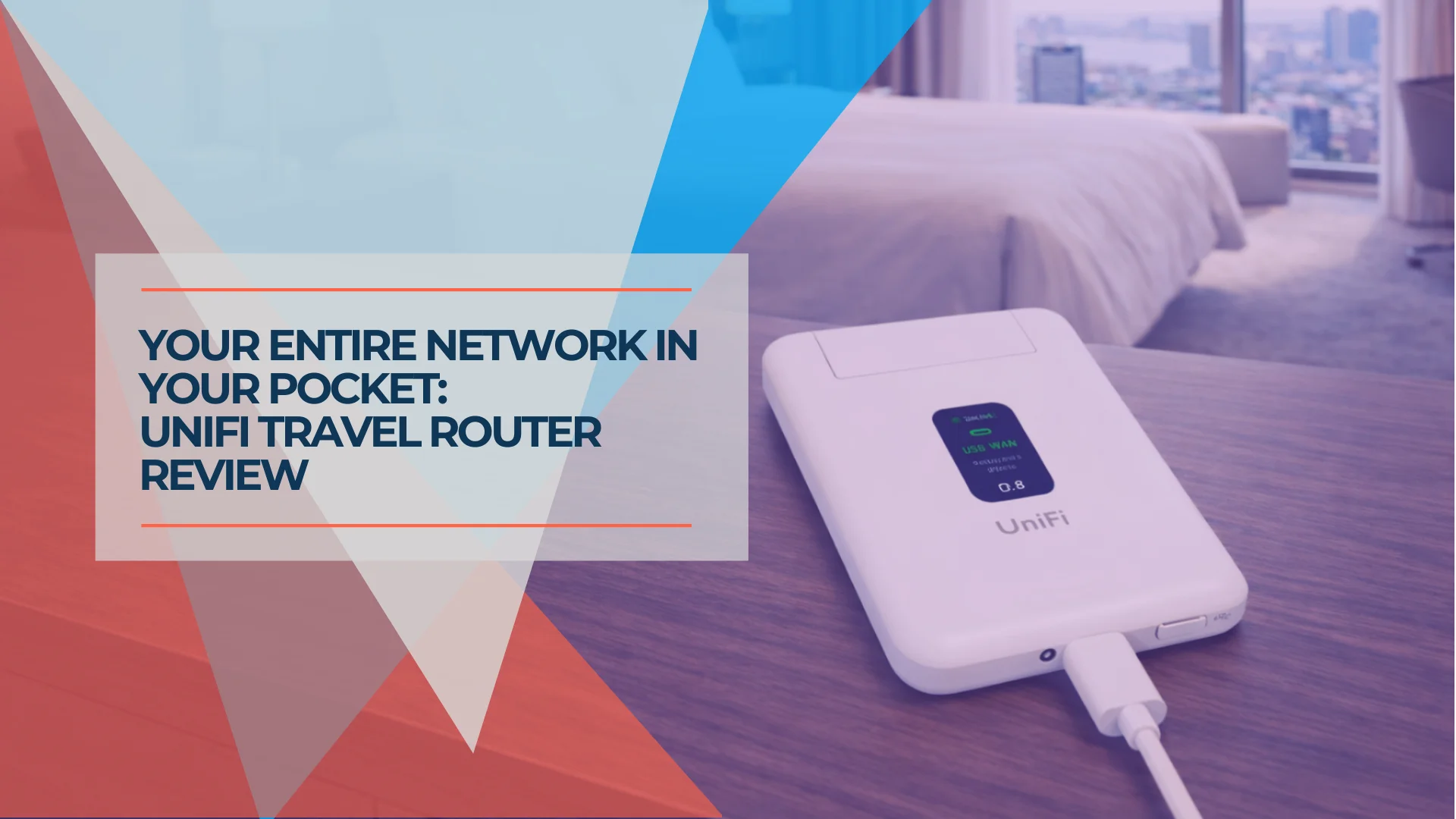
Key Takeaway
Rating: 4.0/5 overall (4.2 for existing UniFi users · 3.4 for standalone users)
At $79 and 89 grams, the UniFi Travel Router is a low-cost dedicated way to extend a UniFi network to a hotel room, job site, or temporary office. Its Teleport tunnel, SSID cloning, and gateway-level VPN are genuinely useful — provided you already run a compatible UniFi Cloud Gateway at headquarters. Without one, the UTR becomes a basic Wi-Fi 5 travel router managed entirely through a mobile app, and newer standalone alternatives offer faster radios and deeper local controls.
- Buy it if: You run UniFi at headquarters and want one-tap Teleport, SSID cloning, and gateway-level VPN without per-device clients
- Skip it if: You have no UniFi infrastructure and want Wi-Fi 6/7, a local web UI, or 2.5GbE — consider the GL.iNet Beryl AX or Slate 7 instead
- Price: $79 USD
- Main limitation: Wi-Fi 5 radios and moderate WISP throughput (typically low hundreds of Mbps) mean the UTR itself can become the bottleneck on fast uplinks
Affiliate Disclosure: This article contains affiliate links. If you make a purchase through these links, we may earn a small commission at no extra cost to you. As an Amazon Associate, iFeelTech earns from qualifying purchases.
Introduction
We published a comprehensive guide on using the UniFi Express 7 as a travel router for field teams and remote professionals in December 2025. We'd been deploying the Express 7 with clients who needed secure, portable connectivity without the limitations of consumer travel routers. It worked — but it required workarounds because it was never designed specifically for travel scenarios.
Four days after our Express 7 guide was published, Ubiquiti announced a dedicated UniFi Travel Router. Priced at $79, it is a purpose-built device engineered specifically for the portable gateway role we'd been improvising with other hardware.
This article is an expert technical assessment informed by official specifications, independent testing from reviewers including Dong Knows Tech, NAS Compares, and Techno Tim, and iFeeltech's broader UniFi deployment experience. Where we cite specific measurements or test results, we attribute the source. Updated in July 2026 to reflect roughly six months of firmware updates, accumulated field reports, and current pricing.
UniFi Travel Router Review
What Changed After Six Months of Updates
The UTR launched in late December 2025 with a restricted feature set. Over the following six months, firmware updates have addressed several of the early limitations. This section draws primarily on NAS Compares' six-month follow-up review, which tested the device over an extended period across flights, trains, hotels, and temporary workspaces.
WireGuard and OpenVPN client support. At launch, Teleport was the primary practical remote-access option. Subsequent firmware made WireGuard and OpenVPN client support broadly available, giving the UTR more flexibility for non-UniFi VPN endpoints.
Additional network creation and LAN-port assignment. The UTR can now create and manage more than one network, allowing separation between work and personal devices. The LAN port can be assigned to a specific network rather than acting as a simple pass-through.
Improved captive-portal and reconnection behavior. Public Wi-Fi login handling has become more consistent. The UTR is faster at presenting captive portal pages and better at reconnecting to previously used networks without repeated manual setup.
Continued dependence on mobile-app management. There is still no web-based management interface. For quick setup, the mobile app is adequate, but users accustomed to full UniFi dashboards will find the configuration surface limited — especially when troubleshooting or making multiple changes at once.
Basic client controls. Connected devices can be viewed, renamed, checked for basic usage, and blocked. Deeper controls for traffic priority, device grouping, or detailed usage history are not available.
Mixed reports around long-duration Teleport sessions. Short remote-access sessions generally work well, but some users have reported stability issues — including dropouts and reboots — during sustained longer sessions. This may depend on traffic type, the remote UniFi setup, and how much bandwidth is being pushed through the device.
Elevated operating temperature. NAS Compares measured approximately 44–45°C during light wired operation and 55–56°C with two lightly active clients. These temperatures are not automatically a fault, but they are higher than expected for a device that may sit in a bag, pocket, or poorly ventilated space — especially in warm climates.
First Impressions: The Device Itself
Physically, the UniFi Travel Router is a white rectangular device roughly the size of a deck of cards. At 89 grams (about 3 ounces), it fits easily in a laptop bag, travel case, or jacket pocket.
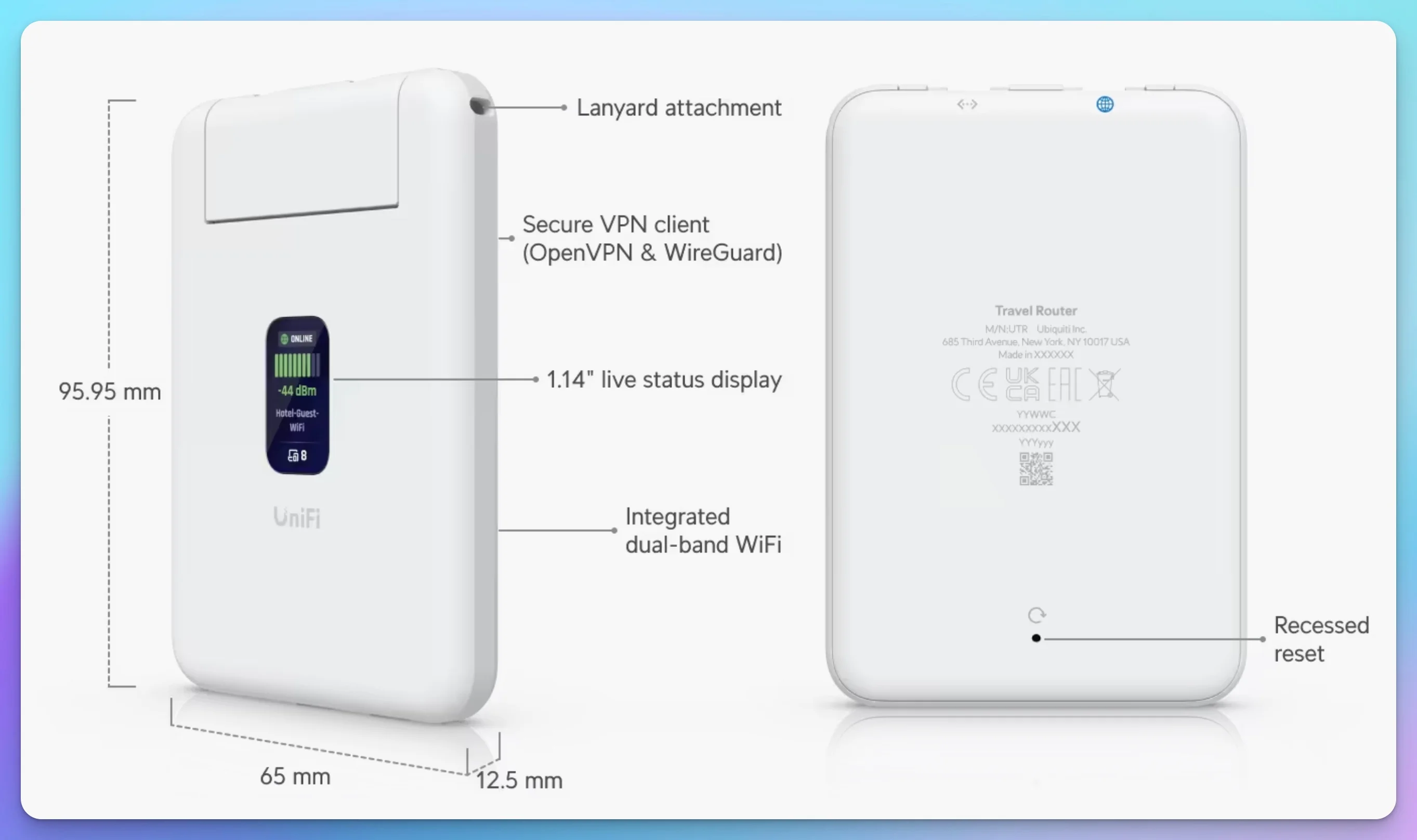
The industrial design is clean and functional. There are no external antennas to snag or break, no prominent LED array. The front panel features a 1.14-inch status display that shows connectivity information, uplink status, and connected clients. This display isn't touch-sensitive—all configuration happens through the UniFi mobile app—but it provides quick visual confirmation that everything is working.
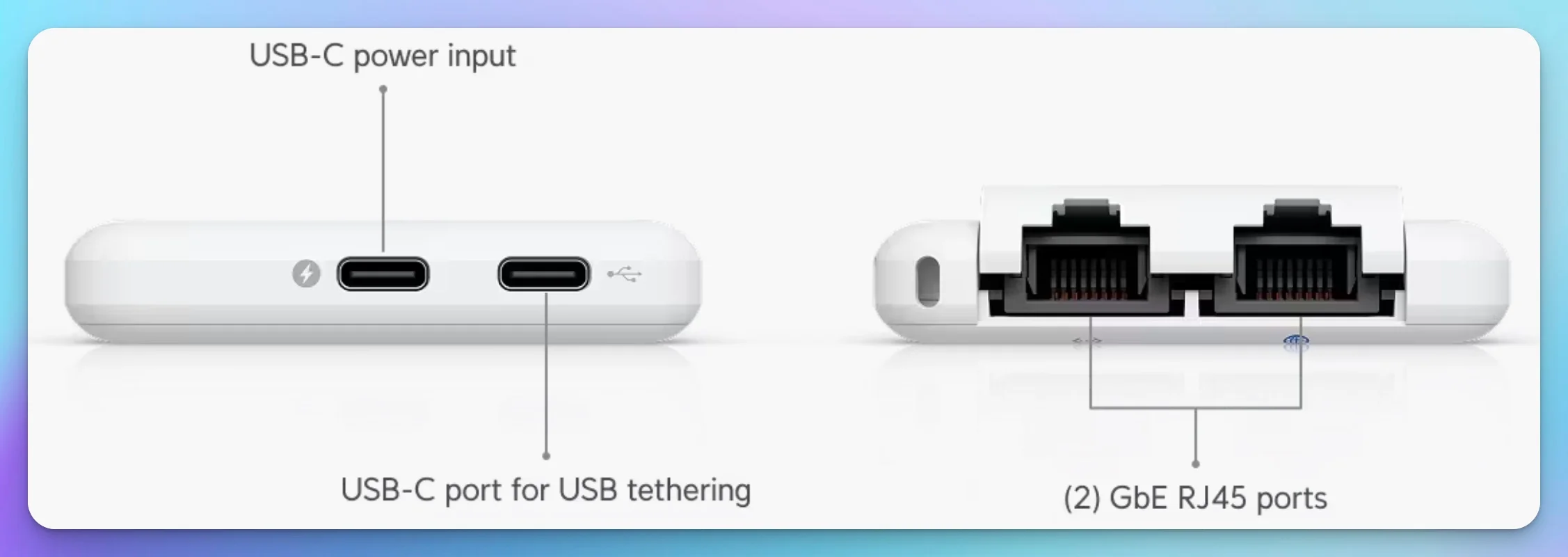
The port arrangement is practical for travel use. Two USB-C ports sit on one edge: one for power (5V/2A, 5W maximum), one for smartphone tethering when you need to use cellular as your uplink. A small door conceals two Gigabit Ethernet ports on another edge—one for WAN when you have wired internet access, one for connecting a single wired device.
What's in the Box
- UniFi Travel Router (UTR)
- Short USB-C cable
- Quick start documentation
- Not included: Power adapter — use an existing USB-C charger, laptop port, or power bank
What's noteworthy is what Ubiquiti omitted: no built-in battery and no power adapter. You supply your own USB-C power source — charger, laptop port, or power bank.
Hardware Specifications and Connectivity
The Travel Router isn't packed with every feature, and that's intentional. It's designed around a narrow set of travel-gateway functions.
| Specification | Value |
|---|---|
| Wi-Fi Standard | Wi-Fi 5 (802.11ac) |
| 5 GHz Radio | 2x2 MIMO, up to 866 Mbps |
| 2.4 GHz Radio | 2x2 MIMO, up to 300 Mbps |
| Max TX Power | 13 dBm (2.4 GHz), 15 dBm (5 GHz) |
| Ethernet Ports | 2x Gigabit RJ45 (WAN + LAN) |
| USB-C Ports | 2 (power + tethering) |
| Power | 5W max (5V/2A USB-C) |
| Weight | 89g (3.1 oz) |
| Dimensions | 95.95 x 65 x 12.5 mm |
| Display | 1.14-inch status screen |
On power, the Travel Router is genuinely efficient. It draws minimal power, which means USB-C portable power banks can keep it running for hours. Unlike some travel devices that require 30W+ USB Power Delivery, the Travel Router is designed to work in real-world portable scenarios.
What the Travel Router Doesn't Do
The Travel Router is purpose-built for internet gateway functions. It doesn't host UniFi Protect (cameras), UniFi Talk (phones), or Access (door locks). It's a network gateway, not an all-in-one controller. This is exactly the right design choice for a portable device.
Is Wi-Fi 5 a Dealbreaker in 2026?
Usually not — but it depends on your uplink speed and how many devices you connect.
This is the objection every reviewer raises, and it's worth addressing directly rather than glossing over it. Dong Knows Tech titled its review "Excellent Design Meets Dated Wi-Fi." Mark Lipford wrote that "the lack of Wi-Fi 6 or 6E feels especially limiting at this price point in 2026." NAS Compares measured real-world uplink throughput around 150 Mbps in its testing and noted the class "can feel limited compared with newer Wi-Fi 6 and Wi-Fi 7 options."
Those observations are accurate, and they matter less than they sound in many travel scenarios. On slower or heavily shared hotel networks, the external connection may remain the bottleneck — and in that situation, a Wi-Fi 6 or Wi-Fi 7 radio on the travel router adds no measurable benefit. On fast Ethernet or strong 5G uplinks, however, the UTR's Wi-Fi 5 radio can become the limiting factor.
Where Wi-Fi 5 does cost you something: if you're tethering to a modern 5G phone with a strong signal, or connecting to a venue's high-capacity Ethernet, a faster local radio could theoretically pass through more bandwidth to your devices. For that specific scenario — fast uplink, multiple devices doing simultaneous heavy transfers — the Express 7 or a Wi-Fi 6/7 alternative like GL.iNet's Beryl AX or Slate 7 will outperform the UTR. For a laptop and a phone on typical hotel or conference Wi-Fi, the difference may be less noticeable during ordinary use.
The trade-off likely contributes to the UTR's low 5W power envelope. A faster radio would draw more power, generate more heat, and shorten power-bank runtime — meaningful downsides for a device whose entire purpose is being small, cool, and battery-friendly. That said, Wi-Fi 5 becomes a more meaningful limitation with fast Ethernet uplinks, strong 5G tethering, multiple simultaneous clients, or large local transfers. Newer competitors offer Wi-Fi 6 or Wi-Fi 7, 2.5GbE, and faster VPN processing. The UTR's advantage is ecosystem integration and low power use, not raw throughput.
The Setup Process: From Box to Connected
One of the most important aspects of a travel device is how quickly you can get operational. The setup workflow is straightforward.
The setup follows a logical four-step process: Claim → Uplink → Bind → SSID.
You start by claiming the device through the UniFi mobile app. A UniFi account is recommended for cloud management, but the device supports standalone operation if you prefer to keep it local. Once claimed, you configure your uplink—this is how the Travel Router connects to the internet:
| Uplink Type | Best For |
|---|---|
| Ethernet | Hotels with wired connections, fastest and most reliable |
| Wi-Fi (WISP mode) | Hotels with Wi-Fi only, most common scenario |
| USB Tethering | Using smartphone 5G/LTE when no other internet available |
The next step is binding. This is where the Travel Router connects back to your home or business network using UniFi Teleport. Note: This step is optional. If you don't have a UniFi network at home, you can skip binding and use the UTR as a standard standalone travel router. If you do bind it, the UTR becomes an extension of your existing UniFi network, allowing connected devices to reach permitted headquarters resources through the Teleport tunnel.
Finally, you configure your broadcast SSID—the WiFi network name your team connects to. Unlike the typical hotel WiFi situation where guests get an open network, here you control security, encryption, and access.
Initial setup normally takes several minutes once the device is updated. A first-time firmware update can make the process longer — independent reviews report the update alone adding roughly ten minutes.
Quick Setup Checklist
- Power the UTR via USB-C
- Open UniFi mobile app and claim the device
- Configure uplink (Ethernet, Wi-Fi, or USB tethering)
- Bind to your existing UniFi site via Teleport (optional for standalone use)
- Confirm SSID settings (auto-cloned from home network)
- Handle captive portal if required
- Connect your devices to the familiar SSID
Performance by Uplink Type
Performance varies significantly depending on the uplink method, VPN state, and number of connected clients. The figures below draw on independent testing rather than theoretical radio rates.
Wi-Fi Uplink (WISP mode): In WISP mode, the UTR may use the same radio to communicate with the hotel network and serve local clients. That introduces a meaningful throughput penalty — not merely negligible overhead. Independent testing by Dong Knows Tech generally placed Wi-Fi uplink throughput in the low hundreds of megabits per second rather than near the router's theoretical radio rates. Results depend on signal quality, channel conditions, distance from the source AP, and whether the same radio is serving both the uplink and local clients.
Wired WAN Performance: When connected via Ethernet, the Gigabit ports remove the 100 Mbps interface limitation found on older travel routers. However, the UTR should not be treated as a near-line-rate Gigabit router. Independent results generally fall in the mid-hundreds of megabits per second, depending on the traffic path and VPN configuration. Dong Knows Tech measured approximately 300–600 Mbps depending on test path and VPN state. If your venue has available Ethernet, this is still the optimal configuration.
USB Phone Tethering: If you're at a venue with no internet access, you can tether the Travel Router to your phone's hotspot via USB. Performance depends on the phone, cellular service, cable, and tethering implementation. Under favorable 5G conditions, USB tethering may be faster than the available hotel connection.
Client Capacity: Ubiquiti does not publish a client-capacity rating. In practical terms, the UTR is best treated as a personal or small-group router rather than a high-density access point.
About Captive Portals
Captive portals (the login screens you see on hotel and venue WiFi) require interaction through the UniFi mobile app. When the Travel Router connects to WiFi that requires acceptance of terms, you'll complete that login through the app, and then all devices on your Travel Router share that single authentication. Captive portals remain a common complication for travel routers, although handling varies between manufacturers and networks.
Performance scales with your uplink quality, but the UTR's processor, radio design, shared wireless uplink, and VPN workload all affect achievable throughput. A 50 Mbps hotel connection will typically pass through without issue; a fast Ethernet or 5G uplink may be constrained by the device itself.
UniFi Teleport: Your Home Network Goes With You
The real power of the Travel Router comes from UniFi Teleport integration. This is where a portable WiFi device becomes an extension of your actual infrastructure.
When you bind the Travel Router to your home site using Teleport, you create an encrypted tunnel between the UTR and your headquarters gateway. Unlike traditional VPN solutions where devices need to run VPN clients, the encryption happens at the gateway level. Your team connects to the Travel Router's Wi-Fi, and when Teleport is active, traffic assigned to the tunnel is encrypted between the UTR and the bound UniFi gateway.
This means your team can access file servers, internal applications, VoIP systems, and other resources hosted at your main office. They don't need to manage separate VPN clients on their devices. They don't need to remember to "turn on VPN." They connect to the WiFi network, and they're automatically secured and integrated into your corporate network.
The Teleport tunnel is designed to recover when the uplink changes. If you switch from hotel Wi-Fi to Ethernet, or move from one venue to another, the tunnel reconnects automatically, although a brief interruption may occur. Long-duration Teleport sessions have received mixed stability reports in independent testing.
| Challenge | How Teleport Solves It |
|---|---|
| Different VPN apps per device | All connected devices use the same tunnel automatically |
| Devices that can't run VPN | Streaming sticks, IoT devices route through UTR's tunnel |
| Per-device VPN configuration | The tunnel is established on the UTR; applications may still require their own sign-in |
| Familiar network settings | Binding provides familiar Wi-Fi settings and a gateway-level tunnel |
Teleport vs. Traditional VPN
Traditional VPN requires installing and configuring a client app on each device—and some devices (smart TVs, older printers, specialized equipment) can't run VPN software at all. Teleport operates at the gateway level. Connect to the UTR's Wi-Fi, and your traffic automatically tunnels through to headquarters. Zero client-side configuration.
Teleport Requirements
Teleport requires a compatible UniFi Cloud Gateway or Next-Gen Gateway at headquarters (such as the Dream Machine, Dream Machine SE, Dream Router 7, or Cloud Gateway Max). Access to headquarters networks depends on the firewall, routing, and segmentation policies configured at the destination site. See our UniFi gateway comparison guide for help choosing.
Subnet Overlap Warning
Ensure that the UTR's local subnet does not overlap with the headquarters network or the network supplying its internet connection. Overlapping address ranges can interfere with routing, DNS, and access to internal resources.
For more on secure remote access approaches, see our business VPN guide for mobile teams.
Camera Integration: Advanced Temporary Deployment
Use Case: Remote Camera via Teleport
In Techno Tim's demonstration, an already-adopted G6 Instant connected through the UTR and recorded events to a UNVR at the remote UniFi site. This is an advanced temporary deployment, not a routine or guaranteed surveillance architecture.
How it works:
- Set up the UTR at the remote location and connect it to available internet
- Connect a UniFi camera — the G6 Instant is Wi-Fi enabled and USB-C powered, making it practical for portable use
- Via Teleport, the camera communicates with your UNVR or console back at headquarters
- View live and recorded footage through the UniFi Protect app
Important caveats:
- The G6 Instant is a 4K camera with variable traffic depending on configuration and scene activity. Sustained camera upload places a heavier load on the Teleport tunnel than typical web traffic.
- A sufficiently capable USB power bank can run both devices temporarily, but test the complete setup before field deployment. Camera bitrate, infrared use, recording activity, and uplink conditions can materially affect runtime.
- Test upload capacity, power stability, and long-duration Teleport behavior before relying on this for anything critical.
For permanent or semi-permanent camera installations, see our UniFi Protect CCTV guide.
Use Cases
| Scenario | How the UTR helps |
|---|---|
| Field service | Secure access to work orders and internal systems at client sites, isolated from the client's guest Wi-Fi |
| Mobile remote work | Familiar SSID and gateway-level VPN from hotel rooms, coworking spaces, or client offices |
| Trade shows and events | Booth-level secure Wi-Fi for team access to CRM, order entry, and internal tools |
| Temporary offices | Cost-effective Teleport extension of the headquarters network to a short-term location |
Security: Gateway-Level VPN and Network Isolation
The UTR provides meaningful security benefits over connecting directly to hotel or venue Wi-Fi, but it is not a substitute for endpoint security or network segmentation.
Gateway-Level VPN: Rather than relying on individual devices to maintain VPN connections — which users might disable, forget to enable, or misconfigure — when Teleport is enabled, the UTR can route connected devices through the tunnel according to the configured network and routing policy. There's no VPN client to install and no credentials to enter on each device. Gateway-level enforcement reduces reliance on per-device VPN clients.
Unmanaged or contractor devices should use a separate SSID or network with least-privilege firewall rules. A gateway-level VPN protects traffic in transit, but it does not replace endpoint security, device compliance, or network segmentation. Users can also bypass the UTR entirely by connecting directly to cellular or another Wi-Fi network.
Isolation from Untrusted Networks: When you connect to hotel Wi-Fi through the UTR, your devices never directly touch that network. They connect to the travel router's SSID, and the UTR handles communication with the external network. This creates a boundary between your devices and the outside world.
Encryption: When Teleport is active, traffic assigned to the tunnel is encrypted between the UTR and the bound UniFi gateway. Even if someone is monitoring the hotel's network, they see encrypted packets destined for your gateway — not readable content or individual device traffic.
Important limitation: The UTR does not include IDS/IPS capabilities. The Express 7 and larger UniFi gateways provide intrusion detection and prevention; the UTR relies on its VPN tunnel and network isolation for protection.
Security Without Per-Device Clients
The key benefit is reducing reliance on individual VPN clients. Devices that remain connected to the configured UTR network use its routing policy. For field teams, this is more consistent than asking each user to manage their own VPN — but it is not absolute enforcement, and it does not make untrusted endpoints safe.
Power and Portability: The Real-World Advantage
The Travel Router is genuinely portable — it runs for hours on a standard USB-C power bank without extra hardware.
Power Consumption: The device is rated at 5W maximum (5V/2A USB-C). Actual draw varies with connected clients, uplink type, and VPN activity.
Ubiquiti publishes a 5W maximum consumption figure but not a typical average draw. Plan on several hours of operation and test the exact power bank, uplink method, client load, and VPN configuration you intend to use.
Dual USB-C Design: The separate power and tethering ports matter for deployment. You can power the UTR from a battery pack while simultaneously using your phone as a 5G/LTE uplink — both via USB-C connections. The tethering connection can provide limited power to the phone, but it should not be treated as a substitute for a dedicated phone charger during sustained 5G use.
Form Factor: The all-in-one design—no external antennas, no separate battery—means fewer things to track and configure. It fits in a laptop bag with cables, sits easily on a hotel desk or conference table, and doesn't require dedicated carrying cases.
Field Deployment Kit
For remote work, consider packing:
- UniFi Travel Router (89 g)
- 10,000+ mAh power bank
- USB-C cable for power
- USB-C cable for phone tethering (if needed)
- Short Ethernet cable (for wired uplink when available)
Exact kit weight depends on the specific power bank and cables chosen.
For applications requiring cellular backup, see our 5G failover setup guide which covers multi-WAN configurations for business continuity.
Pros and Cons
What Works Well
- $79 price point — Strong value for UniFi ecosystem integration
- UniFi integration — Mobile-app management, site binding, and familiar SSID settings
- Teleport integration — Gateway-level VPN without per-device clients
- Compact form factor — 89 grams, genuinely pocketable
- Low power draw — USB-C power bank operation is practical
- Captive portal handling — The UTR handles portal authentication for the shared uplink in many hotel and venue networks
- WireGuard/OpenVPN client — Standalone VPN support without Teleport
Limitations to Consider
- Teleport requires UniFi gateway at HQ — SSID cloning and Teleport won't work without compatible UniFi infrastructure
- Standalone mode is basic — Settings managed via mobile app only, more limited than OpenWrt-based competitors
- Wi-Fi 5 only — Becomes a bottleneck on fast uplinks or with multiple simultaneous clients
- Moderate WISP throughput — Independent tests typically show low hundreds of Mbps, not near theoretical radio rates
- No 2.5GbE — Gigabit interfaces only
- Single LAN port — Need an external switch for multiple wired connections
- No internal battery — Requires external power source at all times
- No built-in cellular — USB phone tethering works, but performance and reliability depend on the phone, carrier, cable, and signal
- Mobile app only — No web UI for detailed configuration
- Reported heat — Independent testing measured elevated temperatures under sustained use
- No IDS/IPS — Unlike the Express 7 and larger gateways
The UTR offers its clearest advantage to organizations already running a compatible UniFi gateway. At $79, it is a strong choice for existing UniFi users who want Teleport and SSID cloning without per-device VPN clients. Businesses without UniFi should compare its mobile-only management and Wi-Fi 5 hardware against newer standalone travel routers before choosing it.
Do You Need a Cloud Gateway?
The UTR works standalone, but Teleport — the secure tunnel back to headquarters — requires a UniFi Cloud Gateway at home or the office.
| Feature | Standalone Mode | Integrated (Teleport) |
|---|---|---|
| WiFi & Routing | ✅ Available | ✅ Available |
| Manual VPN | ✅ WireGuard/OpenVPN Client | ✅ Available |
| Teleport VPN | ❌ Not Available | ✅ One-click tunnel |
| SSID Cloning | ❌ Not Available | ✅ Auto-inherits home WiFi |
| UniFi Account | Optional | Required |
If you're already running UniFi at your main office, you're set for the full experience. If not, your infrastructure options for a headquarter gateway are straightforward:
| Gateway | Price | Best For |
|---|---|---|
| Dream Router 7 | $279 | Small offices, modern Wi-Fi 7 |
| Cloud Gateway Max (NS) | From $199 | Higher throughput, compact and fanless (NS = no storage; bundled storage configs cost more) |
| Dream Machine Pro Max | $599 | Larger rack deployments requiring higher routing capacity and integrated Protect storage; pair with a separate PoE switch |
For a broader comparison of UniFi gateway options, see our UniFi gateway comparison guide.
UTR vs. Express 7 vs. GL.iNet: Which Travel Router Do You Need?
Choose the $79 UTR if you run UniFi and want Teleport; the Express 7 for demanding fieldwork; a GL.iNet router if you have no UniFi at all.
The UniFi Travel Router occupies a specific niche in the market, and the right choice depends less on budget than on what's already running at your headquarters.
| Device | Price | Wi-Fi | Best for |
|---|---|---|---|
| UniFi Travel Router | $79 | Wi-Fi 5, 1GbE | Teams already on UniFi who want one-click Teleport and SSID cloning |
| UniFi Express 7 | $199 | Wi-Fi 7, 10GbE WAN | Field teams needing IDS/IPS, Site Magic SD-WAN, or a primary gateway when infrastructure is minimal |
| GL.iNet Beryl AX (GL-MT3000) | $99 | Wi-Fi 6, 2.5GbE | Standalone use with no UniFi at HQ; OpenWrt flexibility and a local web UI |
| GL.iNet Slate 7 (GL-BE3600) | $170 | Wi-Fi 7, 2.5GbE | Standalone use where a faster local radio matters more than UniFi integration |
Consumer travel routers like GL.iNet's Beryl AX ($99) and Slate 7 ($170) offer OpenWrt flexibility and a full local web interface, which some power users prefer for strictly standalone operation — no UniFi account required. They also provide newer radios, 2.5GbE, and faster VPN processing. However, they lack the "bound" integration that makes Teleport and SSID cloning automatic. If you don't have UniFi at headquarters, a GL.iNet device gives you more configuration control and better hardware specifications. If you do have UniFi, the Travel Router's one-tap integration is the clearer win, and its $79 price remains the lowest entry point in the comparison.
The Express 7, which we detailed in our dedicated Express 7 vs. UTR guide, is still the right call for teams needing multi-purpose capability. It handles more demanding networking tasks, supports Wi-Fi 7 and a 10GbE WAN port, and can act as a primary gateway when infrastructure is minimal. But at $199 and a larger form factor, it's overkill for pure travel-router use, where the $79 Travel Router covers the basic travel-router role at lower cost and power draw.
Another option is to use individual VPN clients on each device, which puts the burden on end users, reduces security consistency, and complicates management.
Final Verdict
Rating: 4.0/5 overall (4.2 for existing UniFi users · 3.4 for standalone users)
The UniFi Travel Router serves two distinct audiences unevenly. For existing UniFi users, the $79 price, automatic Teleport integration, and SSID cloning make it a strong choice — a dedicated device for a job that previously required improvisation with the Express 7 or manual VPN clients. For standalone users without UniFi infrastructure, the UTR is a compact and affordable travel router with WireGuard and OpenVPN support, but its Wi-Fi 5 hardware, mobile-only management, and moderate throughput put it behind newer GL.iNet and other OpenWrt-based alternatives that offer faster radios, 2.5GbE, and deeper local controls.
The UTR's meaningful limitations — Wi-Fi 5, no 2.5GbE, no battery, no integrated cellular, mobile-only management, basic client controls, and mixed reports during long-duration Teleport sessions — prevent it from being a near-perfect product. It is a well-executed first-generation travel router within its ecosystem, with room to improve in future hardware revisions.
Deployment Checklist
- Confirm you have a compatible UniFi Cloud Gateway at headquarters (or decide to use standalone mode)
- Purchase one UTR for evaluation — test it in your typical travel scenarios
- Verify Teleport connectivity, captive portal handling, and VPN performance at actual field locations
- If deploying cameras, test upload capacity, power stability, and long-duration Teleport behavior first
- If you want Teleport but do not currently run UniFi, consider the total cost of adding a compatible headquarters gateway before choosing the UTR
Need help designing a mobile network strategy for your field operations? Contact our team.
Additional Resources
For businesses building out their UniFi infrastructure or evaluating network options:
- UniFi Business Network Guide — Comprehensive overview of building with UniFi
- UniFi Gateway Comparison Guide — Choosing the right gateway for your needs
- Small Business Network Setup Guide — Fundamentals of business networking
- UniFi Protect CCTV Guide — Complete camera and surveillance planning
About This Review
This is an expert technical assessment — not a hands-on lab review. It is based on Ubiquiti's published specifications, firmware release notes, independent testing by Dong Knows Tech, NAS Compares, and Techno Tim, community field reports, and iFeeltech's experience deploying UniFi solutions for field teams and small businesses. Where specific measurements are cited, the source is named. Updated July 2026 with current pricing and six months of accumulated firmware and field data. iFeeltech maintains editorial independence — our assessments reflect professional judgment, not vendor relationships.
Frequently Asked Questions
Related Articles
More from UniFi Networks
UniFi Gateway Comparison Guide 2026: All 11 Models Ranked
Complete UniFi gateway comparison covering all 11 current models — from Cloud Gateway Ultra ($129) to Dream Machine Beast ($1,499) and Enterprise Fortress Gateway ($1,999). Exact device counts, throughput thresholds, and storage economics.
26 min read

We Ran 538 Ubiquiti Devices for 4 Years. Here's What Actually Failed.
Real fleet data: 538 UniFi devices tracked over 4 years. 0.74% replacement rate, 99.99% core uptime, and five incident post-mortems from commercial sites.
15 min read

UniFi Small Office Setup: Professional Office Case Study
How we designed and installed a complete UniFi network for a 7-person professional office — WiFi 7, cameras, and door access in one system. Includes floor plan, priced BOM, and VLAN config.
19 min read