

Starlink Business vs Fiber Internet: Complete 2026 Business Comparison
Comprehensive comparison of Starlink Business vs AT&T Fiber and Comcast Business for Miami businesses. Real-world experience, pricing analysis, and recommendations.

Affiliate Disclosure: This article contains affiliate links. If you make a purchase through these links, we may earn a small commission at no extra cost to you. As an Amazon Associate, iFeelTech earns from qualifying purchases.
Key Takeaway
After installing Starlink for multiple Miami businesses, our experience shows that wired internet (AT&T Fiber or Comcast Business) consistently outperforms Starlink for speed, latency, and reliability. Starlink excels as a backup connection or in rural areas where traditional options aren't available, but it shouldn't replace fiber or cable as your primary business internet when those services are accessible.
- Upload speed is the critical bottleneck: Starlink's 10-20 Mbps upload severely limits Zoom/Teams calls, cloud backups, and file sharing for offices with 10+ employees
- Wired connections (fiber/cable) deliver superior speed and significantly lower latency for business applications
- Starlink Business Local Priority plans run $55-$530/month (month-to-month, US list prices), with hardware starting at $349
- Miami's hurricane season creates unique reliability considerations for both satellite and traditional connections
- 5G business internet often provides better value than Starlink in areas with unreliable cable service
Understanding the Starlink Business Reality
Starlink has generated significant attention in the business community, and we've fielded numerous inquiries from Miami businesses interested in satellite internet. The impressive satellite technology has created genuine interest in wireless internet alternatives. However, after installing and evaluating Starlink Business for several clients, our real-world experience reveals important considerations that business owners need to understand before investing.
While Starlink is a proven technology, the key decision factor for Miami businesses is whether it outperforms available alternatives. For most businesses with access to fiber or cable internet, wired connections deliver superior performance due to the physics of data transmission and the maturity of terrestrial infrastructure in urban and suburban markets.
Our Installation Experience: What We've Learned
We've installed Starlink for businesses in scenarios ranging from backup connections to primary service in areas with problematic cable infrastructure. These installations have provided valuable insights into where Starlink excels and falls short compared to traditional business internet options in Miami.
Understanding proper network infrastructure and installation best practices is crucial, whether you're deploying Starlink or traditional business internet, as the internal network configuration significantly impacts performance regardless of your internet source.
Installation Snapshot: Mixed Results
Our experience with Starlink installations has revealed a consistent pattern. When businesses have access to reliable AT&T Fiber or Comcast Business cable, Starlink cannot compete on the metrics that matter most for business operations: consistent low latency, symmetrical speeds for fiber, and predictable performance during peak business hours.
However, Starlink has proven valuable in two specific scenarios: as a failover backup connection for business continuity planning, and in locations where cable service experiences frequent interruptions or fiber isn't available. In these cases, Starlink provides connectivity that wouldn't otherwise exist at business-grade performance levels.
If you're uncertain which internet solution best fits your Miami business location, schedule a consultation with our team to assess your specific requirements, verify provider availability, and design an optimal connectivity strategy, including backup planning.
Starlink Setup | Everything You Need To Know
Starlink Business: 2026 Pricing and Plans
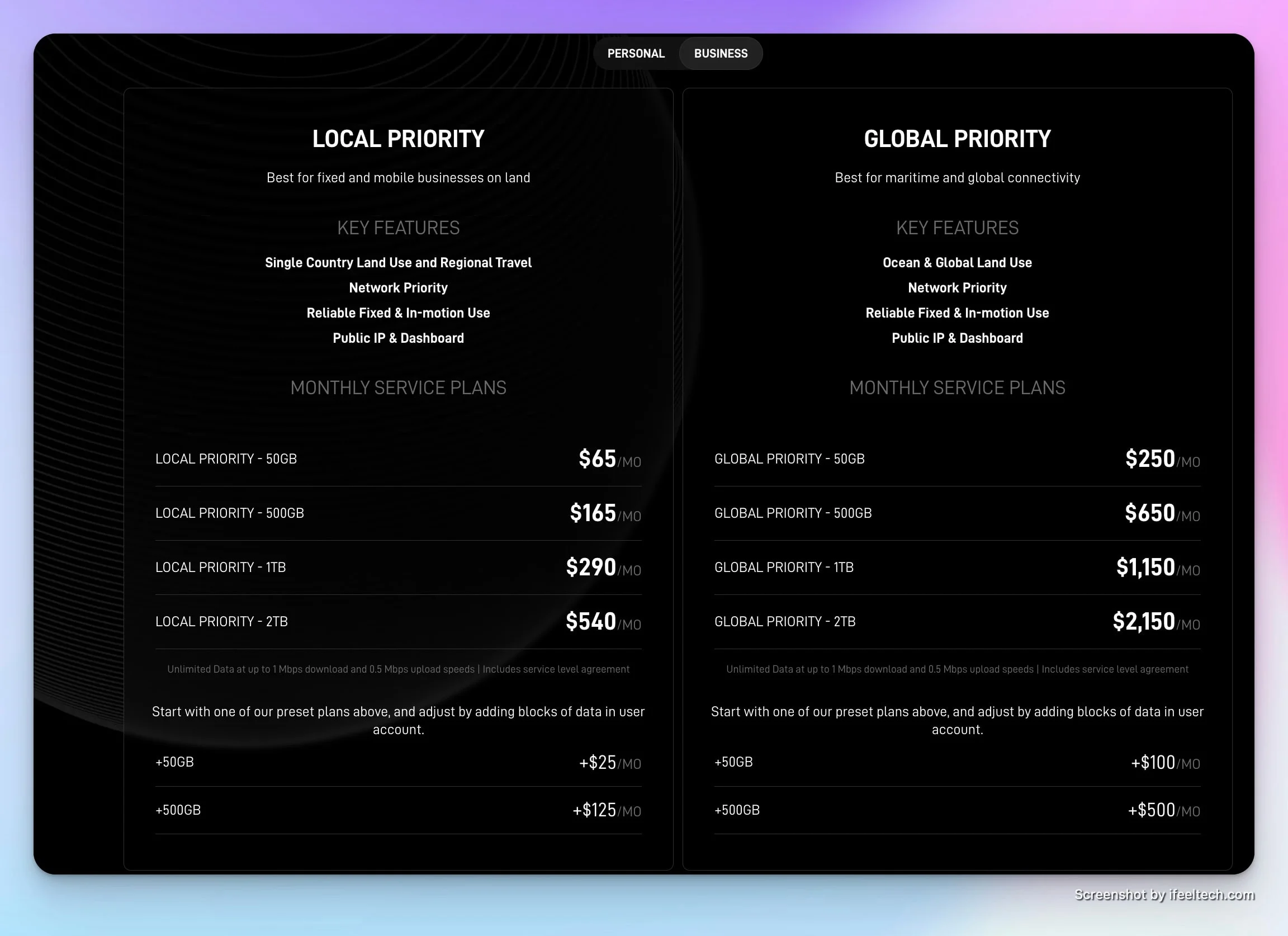
Starlink Business uses a Priority data structure with two main categories: Local Priority for businesses operating within a single country or regional travel, and Global Priority for maritime or international operations. Understanding this structure is essential for accurate budget planning and avoiding unexpected overages.
Current Starlink Business Pricing Structure
Local Priority Plans (Single Country/Regional Travel)
Prices from Starlink's US business plans page, checked October 13, 2026. Plans are month-to-month.
Local Priority 50GB: $55/month
- 50GB priority data allocation
- Starlink's page describes it as best for backup connectivity and small businesses
Local Priority 500GB: $155/month
- 500GB priority data allocation
- Starlink suggests it for small businesses with below-average bandwidth needs (about 2-4 users)
Local Priority 1TB: $280/month
- 1TB (1,000GB) priority data allocation
- Starlink suggests it for small and midsize businesses with average needs (about 5-10 users)
Local Priority 2TB: $530/month
- 2TB (2,000GB) priority data allocation
- Starlink suggests it for midsize businesses with above-average needs (about 10-20 users)
On every Local Priority plan:
- Network priority, a public IP address, 24/7 prioritized support, and a service level agreement
- After priority data is used, service continues at up to 1 Mbps download and 0.5 Mbps upload; Starlink does not charge overage fees
- Extra priority data is added in blocks: +50GB for $25/month or +500GB for $125/month
- Speeds are commonly reported at roughly 40-220 Mbps download and 10-20 Mbps upload, with latency of 25-60 ms. Starlink publishes only maximum speeds and says they are not guaranteed, so treat these as typical figures rather than commitments. (Starlink states the Performance Kit is capable of 400+ Mbps download.)
Global Priority Plans (Maritime/Worldwide)
- Global Priority 50GB: $250/month
- Global Priority 500GB: $650/month
- Global Priority 1TB: $1,150/month
- Global Priority 2TB: $2,150/month
Note: Global Priority plans are designed for maritime and international operations. Miami-based businesses typically use Local Priority plans unless traveling internationally or operating vessels. Additional data blocks: +50GB for $100/month or +500GB for $500/month.
Equipment Costs and Upfront Investment
Beyond monthly service fees, Starlink Business requires substantial upfront equipment investment, which significantly impacts the first-year total cost of ownership.
| Equipment Type | Cost | Best For |
|---|---|---|
| Standard Kit | From $349 (price on Starlink's business page) | Basic installations, temporary setups |
| Performance Kit | About $1,999 (launch-time press reports; confirm at checkout) | Worth considering for permanent Miami installs: Starlink rates it for winds above 170 mph, IP68/IP69K, with a mount of your choice |
Understanding Data Caps and Throttling
Starlink Business Priority plans include a set amount of priority data. Once it is used, service continues at up to 1 Mbps download, which significantly impacts business operations. Starlink does not charge overage fees, but extra priority data can be added in blocks (+50GB for $25/month, +500GB for $125/month). Estimating your monthly data consumption before selecting a tier is essential. Starlink's own sizing guidance points to the 500GB tier for roughly 2-4 users, 1TB for 5-10 users, and 2TB for 10-20 users; offices that run heavy cloud backup or camera uploads may need more.
First-Year Cost Analysis
Understanding the total first-year investment provides a clearer comparison with traditional ISPs. Note that equipment costs are one-time, while AT&T and Comcast include a gateway or equipment with their plans. Totals use Starlink's list prices; shipping and electricity are rough estimates. Use our business internet requirements calculator to estimate your specific bandwidth needs based on employee count and usage patterns.
| Expense Category | Local 500GB | Local 1TB | Local 2TB |
|---|---|---|---|
| Equipment (Standard / Performance Kit) | $349 / ~$1,999 | $349 / ~$1,999 | $349 / ~$1,999 |
| Monthly Service (12 months) | $1,860 | $3,360 | $6,360 |
| Shipping & Setup | ~$50 | ~$50 | ~$50 |
| Estimated Electricity (50-75W) | ~$100 | ~$100 | ~$100 |
| First-Year Total | $2,359 / $4,009 | $3,859 / $5,509 | $6,859 / $8,509 |
Miami Business Internet: Direct Cost Comparison
This table compares the actual costs and performance specifications you can expect from each provider in Miami, based on our installation experience with dozens of local businesses. To see which wired and wireless providers report business service near your own address, use our Miami business internet map:
| Provider & Plan | Download / Upload | Monthly Cost | Setup Cost | Data Cap |
|---|---|---|---|---|
| AT&T Fiber 1 GIG | 1000/1000 Mbps | $140/mo (online price, no annual contract) | Installation fee ($99 value) waived when ordering online | None |
| Comcast Business Gigabit Extra | Up to 1,250 Mbps down; upload varies* | From $150/mo (1-year pricing with autopay) | Equipment included | None |
| Starlink Local Priority 1TB | 40-220 / 10-20 Mbps (typical) | $280/mo | $349+ equipment | 1TB priority data, then up to 1 Mbps |
| Starlink Local Priority 2TB | 40-220 / 10-20 Mbps (typical) | $530/mo | $349+ equipment | 2TB priority data, then up to 1 Mbps |
| T-Mobile 5G Business | Varies by location | $35/mo (5-year price guarantee; taxes and fees extra) | Wi-Fi 7 gateway included | Unlimited** |
*Comcast upload speeds vary by plan and location. Comcast's network management policy lists upload speeds from up to 25 Mbps to up to 300 Mbps on its cable network. Comcast prices shown are 1-year pricing with a $10/month paperless and autopay discount; a 5-year price lock is available at a higher monthly rate (see below).
**T-Mobile states there is no hard cap; above 1.2TB per month, speeds may be reduced during congestion.
Miami Traditional ISP Options: AT&T Fiber and Comcast Business
Miami businesses primarily choose between two established providers for wired internet service. Understanding their current offerings, pricing, and availability helps create an accurate comparison against Starlink Business. For a comprehensive overview of all Miami business internet options, see our complete Miami business internet guide.
AT&T Business Fiber: The Speed Leader
Over the past three years, AT&T has significantly expanded fiber availability across Miami-Dade County. Where available, AT&T Business Fiber delivers exceptional value with symmetrical speeds and competitive pricing. For a full breakdown of AT&T's current plans, real-world speeds, and installation timelines, see our AT&T Business Fiber review.
AT&T Business Fiber Plans (Miami 2026)
Online prices from AT&T's Business Fiber page, checked October 13, 2026. Plus taxes and fees. No annual contract and no data caps. Installation fee ($99 value) is waived when ordering online.
Business Fiber 300: $60/month ($40/month bundled with an eligible AT&T Business wireless plan)
- 300 Mbps symmetrical (same upload/download)
- Suitable for 5-10 employees
Business Fiber 500: $100/month ($60/month bundled)
- 500 Mbps symmetrical
- Handles 10-25 employees comfortably
Business Fiber 1 Gig: $140/month ($90/month bundled)
- 1,000 Mbps symmetrical
- Includes built-in 5G wireless backup (does not work during a power loss; coverage varies)
- Supports 25-50+ employees
Business Fiber 2 Gig: $185/month ($135/month bundled)
- 2,000 Mbps symmetrical
- Includes built-in 5G wireless backup
- High-bandwidth operations
Business Fiber 5 Gig: $285/month ($235/month bundled), available in select areas
- 5,000 Mbps symmetrical (single-device wired maximum 4.7 Gbps, per AT&T)
- Includes built-in 5G wireless backup
Bundle Discount: Savings are available with a qualifying AT&T Business wireless plan, as shown above
Our consistent experience with AT&T Fiber installations shows reliable performance, true symmetrical speeds that benefit businesses with significant upload requirements, and latency typically under 10ms — critical for VoIP phone systems, video conferencing, and cloud application responsiveness.
Comcast Business: Widespread Availability
Comcast has broad business network coverage in Miami, making its service available at many addresses where AT&T Fiber isn't yet available. Upload speeds depend on the plan and local infrastructure.
Comcast Business Plans (Miami 2026)
Prices from Comcast Business's small business internet page, checked October 13, 2026. These are 1-year prices that include a $10/month discount for paperless billing and autopay; taxes and fees extra. Equipment and foundational SecurityEdge security are listed as included. No data caps.
Standard: Starting at $70/month
- Up to 300 Mbps download; upload varies by location
Performance: Starting at $100/month
- Up to 500 Mbps download
- Suitable for most small businesses
Gigabit Extra: Starting at $150/month
- Up to 1.25 Gbps download
- Premium tier for high-bandwidth operations
2 Gigabit: Starting at $180/month
- Up to 2 Gbps download
5-year price lock: Comcast offers a 5-year price lock guarantee on qualifying packages. It requires a 1-year contract, and the locked monthly rates listed are higher: $110 (Standard), $140 (Performance), $190 (Gigabit Extra) and $220 (2 Gigabit). Comcast lists $10/month savings for each qualifying add-on, up to $30/month.
The key Comcast advantage is availability — if AT&T Fiber isn't at your address yet, Comcast Business is widely available across Miami-Dade County; confirm at your exact address. Upload speeds vary significantly by plan and location.
Performance Comparison: Real-World Business Usage
Raw speed specifications tell only part of the story. Business internet performance depends on consistency, latency, and reliability under actual working conditions. Our installation experience across Miami provides insight into how these services perform when your team depends on them.
Quick Comparison Table (2026)
| Feature | Starlink Business | AT&T Business Fiber | Comcast Business |
|---|---|---|---|
| Download Speed | 40 - 220 Mbps (typical; up to 400+ on Performance Kit) | 300 Mbps - 5 Gbps | 300 Mbps - 2 Gbps |
| Upload Speed | 10 - 20 Mbps (typical) | Symmetrical (Matches Download) | Varies: up to 25 to up to 300 Mbps by location |
| Latency | 25 - 60 ms | 1 - 10 ms | 5 - 20 ms |
| Monthly Cost | $55 - $530 | $60 - $285 | $70 - $220 |
| Upfront Cost | $349+ (Hardware) | $0 (installation waived online; $99 value) | Confirm at order |
| Data Caps | Priority data limit (then up to 1 Mbps) | None | None |
| Support | 24/7 prioritized support on Priority plans (app/portal) | 24/7 customer support | 24/7 customer service |
Latency: The Hidden Performance Factor
Latency measures the time data takes to travel from your business to its destination. Lower latency creates more responsive experiences for VoIP calls, video conferences, cloud applications, and remote desktop sessions.
Typical Latency by Provider (Miami)
AT&T Fiber: 1-10ms
- Exceptional responsiveness for all business applications
- Ideal for VoIP phone systems
- Best choice for remote desktop and terminal services
Comcast Business: 5-20ms
- Excellent for most business applications
- Works well for video conferencing and VoIP
- Minimal noticeable difference from fiber for typical usage
Starlink Business: 25-60ms
- Acceptable for most applications, but noticeably higher
- VoIP calls may experience occasional quality variations
- Gaming and real-time applications show measurable lag
T-Mobile 5G Business: 20-40ms
- Suitable for general business use
- Variable based on network congestion
- Usually better than Starlink in urban areas
The 15-50ms latency difference between fiber/cable and Starlink might seem minor, but it compounds during interactive sessions. Video conference participants on Starlink often experience slight delays in conversation flow, making natural dialogue more difficult than the near-instantaneous response of fiber connections.
Upload Speed: The Business Differentiator
Many businesses focus exclusively on download speeds, but upload performance determines how effectively your team can share files, conduct video conferences, back up data to the cloud, and collaborate on shared documents.
| Service Type | Upload Speed | Best For |
|---|---|---|
| AT&T Fiber | Symmetrical (matches download) | Architecture firms, video production, heavy cloud usage |
| Comcast Business (higher-upload areas) | Up to 300 Mbps | Most businesses with regular cloud application usage |
| Comcast Business (other areas) | From about 25 Mbps | Basic business operations, email, web browsing |
| Starlink Business | 10-20 Mbps | Rural areas without alternatives |
Starlink's limited upload speed creates bottlenecks for businesses that regularly upload large files, conduct multi-party video conferences, or synchronize substantial data to cloud storage. A 1GB file upload takes roughly 27 seconds on a 300 Mbps symmetrical fiber plan (about 8 seconds at 1 Gbps), compared with roughly 7-14 minutes at 10-20 Mbps on Starlink Business (theoretical times, before overhead) — a significant productivity difference that compounds across daily operations.
Weather Reliability in Miami
Miami's frequent thunderstorms and hurricane season create unique considerations for satellite internet reliability. Our real-world monitoring during Florida's wet season reveals important performance patterns.
Starlink Weather Performance
Light to Moderate Rain: Minimal impact
- Service continues normally during typical afternoon showers
- No noticeable speed reduction
- Business operations unaffected
Heavy Thunderstorms: Noticeable degradation
- 20-40% speed reduction during intense rainfall
- Occasional brief interruptions (30-60 seconds)
- Service resumes quickly as storm cells pass
Hurricane Conditions: Equipment protection required
- The Standard Kit should be brought indoors ahead of hurricane-force winds (Starlink rates the Performance Kit for winds above 170 mph)
- Service unavailable during sustained high winds
- Resumes immediately when equipment is reinstalled after storm
AT&T Fiber and Comcast Business cable services continue functioning during heavy rain without performance degradation. However, they depend on electrical infrastructure that hurricane-force winds can damage, potentially creating multi-day outages during major storms. Starlink's advantage during hurricane recovery is immediate service availability once power returns, while cable infrastructure may require repair work before service restoration.
Data Caps and Overage Costs
Starlink Business plans include a fixed amount of priority data, after which speeds fall to up to 1 Mbps, which is an important consideration for business use. Understanding typical business data consumption helps with accurate budget planning and tier selection. Our business internet requirements calculator can help you estimate your monthly data usage based on your specific business activities.
Typical Business Data Consumption
| Business Activity | Rough planning estimate (monthly) | Notes |
|---|---|---|
| 5 employees, basic office work | 500-800 GB | Email, web browsing, basic cloud apps |
| 10 employees, moderate cloud usage | 1.5-2.5 TB | Office 365, video conferencing, file sync |
| 15 employees, heavy cloud usage | 3-5 TB | CAD/design software, large file transfers |
| Continuous video monitoring/recording | 5-10+ TB | Security cameras uploading to cloud |
The usage figures above are rough planning estimates, not measurements. Starlink's own sizing guidance is about 2-4 users on the 500GB tier, 5-10 users on 1TB, and 10-20 users on 2TB. Additional priority data costs $25/month per 50GB or $125/month per 500GB, which works out to roughly $0.25-$0.50 per GB.
AT&T Fiber and Comcast Business do not impose data caps regardless of consumption. Businesses can use 10TB, 20TB, or more monthly without additional charges or throttling, which provides more predictable budgeting for growing businesses with expanding cloud infrastructure requirements.
When Starlink Makes Sense for Business
Despite our general recommendation favoring fiber or cable for Miami businesses, specific scenarios exist where Starlink provides genuine value or becomes the optimal choice.
Primary Use Case: Backup Connectivity
Starlink as Business Continuity Solution
Businesses that cannot tolerate internet downtime benefit from Starlink as an automatic failover backup. This configuration uses AT&T Fiber or Comcast Business as the primary connection with Starlink providing immediate failover during outages.
- Critical operations continue during cable infrastructure problems
- Hurricane recovery time reduced from days to minutes
- Diversified infrastructure protects against single-point failures
- Most cost-effective Starlink business use case
For this scenario, consider the 50GB or 500GB Local Priority tier for emergency operations; Starlink positions the 50GB plan for backup connectivity. When comparing network infrastructure options, understanding the broader landscape of enterprise networking equipment helps contextualize the total technology investment required for reliable business connectivity with proper failover capabilities.
Rural and Remote Locations
Starlink transforms connectivity options from dial-up or DSL speeds to broadband performance for businesses beyond Miami's urban and suburban core, where AT&T Fiber and Comcast Business don't reach.
Agricultural and Rural Operations
Miami-Dade's agricultural areas, particularly western Homestead and rural regions beyond Kendall, often lack fiber or cable service. For these locations, Starlink may be the only practical business-grade internet option. The 40-220 Mbps speeds that seem limited compared to urban fiber represent a transformative improvement over the previously available 10-25 Mbps DSL connections (or no service at all).
Temporary and Mobile Operations
Construction sites, temporary offices, outdoor events, and mobile operations benefit from Starlink's portability and rapid deployment. Self-installation of a basic setup can take under an hour, compared with the days to weeks typical for scheduling a traditional ISP installation.
- Construction project offices that relocate periodically
- Outdoor events requiring temporary connectivity
- Emergency response operations
- Marine and vessel-based businesses (using Global Priority plans)
Alternative: T-Mobile 5G Business Internet
Before committing to Starlink in areas with unreliable cable service, consider T-Mobile 5G Business Internet as a middle-ground option. T-Mobile lists it at $35/month with a five-year price guarantee, with unlimited data (no hard cap) and a Wi-Fi 7 gateway included.
T-Mobile 5G Business: Quick Overview
Pricing: $35/month, with T-Mobile's five-year price guarantee (taxes and fees extra; see T-Mobile's terms)
- Unlimited data with no hard cap; above 1.2TB per month, speeds may be reduced during congestion
- Business-grade Wi-Fi 7 gateway included
- Static IP available as an upgrade; self-setup or professional installation
Performance:
- Delivered over the 5G cellular network; speeds vary by location and are not guaranteed
- Typical latency is often cited at 20-40ms (not a T-Mobile commitment)
Best For:
- Areas with unreliable or unavailable wired service
- Businesses within strong T-Mobile coverage areas
- Budget-conscious businesses needing unlimited data
- Backup connectivity at a fraction of Starlink's cost
T-Mobile's signal strength varies dramatically by location. Before assuming Starlink is your only wireless option, request a T-Mobile 5G Business trial to test actual performance at your address. In neighborhoods with strong T-Mobile coverage, 5G Business can perform comparably to Starlink at a fraction of the monthly cost; test at your address.
Installation Considerations
Professional installation determines whether your internet service performs optimally or creates ongoing frustration. Both Starlink and traditional ISPs require proper setup, but the approaches differ significantly.
Starlink Installation: DIY vs Professional
Starlink markets itself as user-installable, and temporary setups for basic use require minimal technical knowledge. However, permanent business installations demand professional expertise for optimal results.
DIY Installation (30-60 minutes)
- Suitable for temporary setups and ground-level placement
- Starlink app guides placement for clear sky view
- Basic connectivity established quickly
- Limited weather protection and cable management
Professional Business Installation (3-4 hours)
- Proper roof mounting with weatherproof attachments
- Professional cable routing through building envelope
- Surge protection installation for Miami lightning conditions
- Network integration with existing infrastructure
- Multi-WAN router configuration for failover capability
- Optimal dish placement accounting for obstructions
Miami's building codes, insurance requirements, and hurricane exposure make professional installation highly recommended for permanent business deployment. Improper roof penetrations create leak risks, while inadequate mounting can result in hurricane damage or complete dish loss during storm events.
Traditional ISP Installation
AT&T Fiber and Comcast Business provide professional installation as standard service. Technicians handle all equipment placement, configure business-grade routers, run necessary cabling, and verify performance before completion.
Typical Installation Timeline:
- Service order to installation: 5-14 days
- Installation time: 2-4 hours
- Technician handles all setup and testing
- Equipment included in monthly service fee
Network Integration Requirements
Regardless of your internet choice, internal network infrastructure determines whether you can fully utilize the connection speed you're paying for. Many businesses focus exclusively on internet service selection while neglecting the internal network configuration that enables performance.
Critical Network Components
- Router Capability: Your business router must support the internet speed tier you purchase
- Switch Infrastructure: Internal network switches should provide gigabit connectivity to workstations
- WiFi Coverage: Wireless access points must support modern standards for multi-device environments
- Cable Quality: Cat6 or better cabling for gigabit speeds throughout the office
Businesses with remote employees or mobile teams should also consider their remote access security strategy, as satellite internet's variable latency can impact VPN performance differently than traditional wired connections.
Ongoing Maintenance and Support
Internet service reliability depends on both the provider's infrastructure and proper equipment maintenance. Understanding support differences helps set realistic expectations.
Customer Support Model Comparison
The way you get help when issues arise differs significantly between Starlink and traditional ISPs — a critical consideration for businesses that cannot afford extended downtime.
Starlink Business Support
Support Method: App and web portal
- Starlink states that Priority plans include 24/7 prioritized support
- Submit requests through the Starlink app or account portal
- We have not confirmed whether a direct phone line is offered; check Starlink's current support options
- Troubleshooting is primarily self-service through the app
Common Maintenance:
- Obstruction Checks: Verify clear sky view, trim vegetation as needed
- Dish Cleaning: Remove debris, dust, and accumulated grime that reduces signal quality
- Cable Inspection: Check for damage, especially after storms
- Performance Monitoring: Track speeds and latency for degradation patterns
AT&T Fiber & Comcast Business Support
Support Method: 24/7 customer support (AT&T and Comcast both advertise it)
- Phone access to support teams
- Technician visits for on-site repairs
- Faster resolution for infrastructure issues
- Provider owns and maintains the physical network
Typical Response Times:
- Response times: vary by provider, plan and location; check each provider's service terms
- Performance issues: remote diagnostics, followed by an on-site visit if needed
For businesses where internet downtime directly impacts revenue or operations, the traditional ISP support model with phone access and technician visits often proves more valuable than Starlink's app-based approach.
Contract Terms and Financial Structure
The financial commitment structure differs significantly between Starlink and traditional ISPs, affecting both cash flow and long-term flexibility.
Starlink Business: Month-to-Month with High CapEx
Starlink Financial Model
Contract: Month-to-month, cancel anytime
- No long-term commitment required
- Full flexibility to pause or cancel service
- Can switch between data tiers monthly
Upfront Investment: From $349 (Standard Kit); about $1,999 for the Performance Kit (press-reported)
- One-time sunk cost for satellite dish
- Equipment is yours to keep
- High initial capital expenditure
Monthly Operating Cost: $55 - $530
- Variable based on data tier selection
- No overage fees; after priority data is used, speeds drop to up to 1 Mbps unless you add data blocks
Traditional ISPs: Contracts with Low/Zero CapEx
AT&T Fiber & Comcast Business Financial Model
Contract: AT&T Business Fiber has no annual contract; Comcast's 5-year price lock requires a 1-year contract
- Check each provider's terms for early termination fees
- Predictable monthly costs
Upfront Investment: $0 with AT&T when ordering online (the $99 installation fee is waived)
- Minimal or zero upfront costs
- Equipment included with both providers
- Low initial capital requirement
Monthly Operating Cost: $60 - $285 (AT&T) and $70 - $220 (Comcast)
- Fixed monthly rate
- No overage charges or data caps
- Easier to budget and forecast
The key difference: Starlink requires an upfront hardware purchase ($349 for the Standard Kit, about $1,999 for the Performance Kit) but is month-to-month. AT&T Business Fiber is also sold without an annual contract, while Comcast's 5-year price lock requires a 1-year contract. Before committing to a multi-year ISP agreement, review the key contract provisions covered in the business internet SLA guide.
Static IP Addresses and Business Features
Static IP Availability
Starlink Business:
- Priority plans include a public IPv4 address, which Starlink states is dynamically assigned (DHCP); IPv6 is supported by default
- If you need a fixed address for servers or VPN endpoints, confirm options with Starlink first
AT&T Fiber & Comcast Business:
- Static IP addresses are generally available as a paid add-on; pricing varies by plan, so confirm with the provider
- Essential for hosting servers, security systems, or VPN endpoints
For businesses requiring static IPs for servers, security cameras, or remote access systems, traditional ISPs generally offer simpler static IP options.
Miami-Specific Recommendations
Based on our experience deploying internet solutions across Miami-Dade County, we have made location-specific recommendations that account for infrastructure availability, weather considerations, and local connectivity patterns.
By Miami Location Type
Downtown/Brickell/Coral Gables
Best Choice: AT&T Fiber (widely available, excellent performance)
Alternative: Comcast Business (universal availability)
Starlink Role: Backup only if business continuity is critical
Why: Both AT&T and Comcast have mature, reliable infrastructure with competitive pricing. Starlink cannot match the performance or value in these areas.
Miami Beach/Coastal Areas
Best Choice: Breezeline, Comcast Business, AT&T Fiber (expanding)
Hurricane Consideration: Starlink backup is more valuable near the coast
Starlink Role: Considered as backup for hurricane resilience
Why: Coastal businesses face higher hurricane risk. Despite the higher cost, Starlink's rapid recovery after power restoration makes it valuable for business continuity planning.
West Miami-Dade/Suburban
Best Choice: Check AT&T Fiber first, Comcast Business if unavailable
Alternative: T-Mobile 5G Business ($35/month) if good signal
Starlink Role: Primary if wired options unreliable, backup otherwise
Why: Infrastructure quality varies significantly. Test T-Mobile 5G before committing to Starlink if cable service has reliability issues.
Rural/Agricultural Areas
Best Choice: Starlink Business (often only viable option)
Alternative: T-Mobile 5G if coverage reaches location
Fiber/Cable: Check availability, but expect limited options
Why: Starlink may be the only way to achieve business-grade speeds beyond the urban core. The cost premium is justified when the alternative is 10 Mbps DSL or no service at all.
Essential Equipment for Professional Internet Infrastructure
Whether you choose Starlink, AT&T Fiber, or Comcast Business, proper network equipment and power protection are essential for reliable business operations. Based on our installation experience, these components matter most for business internet infrastructure.
Network Failover and Management
Multi-WAN Routing for Backup Connectivity
If you're using Starlink as a backup connection (which we recommend for most Miami businesses with access to wired internet), you need routing equipment that can automatically failover between primary and backup connections. The UniFi Cloud Gateway Ultra provides business-grade automatic failover between multiple internet connections, ensuring your operations continue seamlessly if your primary connection fails.
For larger businesses or those requiring higher throughput, the UniFi Cloud Gateway Max has 2.5 GbE ports, 2.3 Gbps IDS/IPS throughput (per Ubiquiti's tech specs) and supports multi-WAN load balancing across internet sources.
Power Protection
UPS Systems for Miami's Power Challenges
Miami's frequent thunderstorms and occasional power disruptions make Uninterruptible Power Supply (UPS) systems essential for protecting your internet equipment and maintaining connectivity during brief outages. For Starlink installations specifically, power protection is critical because the satellite dish and router draw power continuously.
We recommend the APC Smart-UPS 2200VA for businesses running both primary internet equipment and network infrastructure. Runtime depends on the connected load, so check the manufacturer's runtime chart against your equipment's wattage; the unit also includes automatic voltage regulation to help with power fluctuations.
For smaller installations or home offices, the CyberPower CP1500 offers good value; runtime depends on the connected load, so check the manufacturer's runtime chart for your router, modem, and dish.
Professional Installation Services
While Starlink markets itself as DIY-installable, permanent business installations require professional mounting, proper cable routing, surge protection, network integration, and failover configuration. For Miami businesses, hurricane-resistant mounting and weatherproofing are particularly important.
Frequently Asked Questions
Can Starlink replace cable internet for my business?
Technically, yes, but we don't recommend it if you have access to reliable AT&T Fiber or Comcast Business cable. Wired connections deliver superior speed, lower latency, and more consistent performance for most business applications. Starlink works best as a backup or in locations without wired options.
How does Starlink perform during Miami thunderstorms?
Starlink continues working without issues during light to moderate rain. Heavy thunderstorms cause 20-40% speed reduction and occasional brief interruptions lasting 30-60 seconds. Service typically resumes quickly as storm cells pass. This weather sensitivity makes it less reliable than fiber or cable for businesses that cannot tolerate interruptions.
Is Starlink worth $280/month (1TB tier) when T-Mobile 5G costs $35/month?
Not for most businesses in areas with good T-Mobile coverage. T-Mobile 5G Business can deliver comparable speeds in strong-coverage areas, typically with lower latency, unlimited data without a hard cap, and costs about one-eighth as much at list price ($35 vs. $280 per month). Starlink makes sense over 5G only in rural areas beyond cell tower range or when you need the portability features that satellite provides.
Can I use Starlink as my primary internet during hurricane season?
Yes, but with important caveats. Starlink continues functioning during storms if the dish isn't physically damaged, and service resumes immediately when power returns. However, you must protect the equipment by bringing it indoors during hurricane-force winds. We recommend using Starlink as backup rather than primary — maintain wired service for daily operations and switch to Starlink only during infrastructure damage.
What happens when I exceed my Starlink Business data allowance?
After exceeding your priority data allocation (ranging from 50GB to 2TB for Local Priority plans), service continues at up to 1 Mbps download and 0.5 Mbps upload, which makes the connection impractical for most business operations. Starlink does not charge overage fees, but you can add priority data in blocks (+50GB for $25/month or +500GB for $125/month) or wait until the next billing cycle. Estimate your monthly usage before selecting a tier; Starlink suggests about 2-4 users for 500GB, 5-10 users for 1TB, and 10-20 users for 2TB.
How long does Starlink Business installation take?
Self-installation for temporary setup takes 30-60 minutes. Professional permanent installation for business use (including proper roof mounting, cable routing, surge protection, and network integration) typically requires 3-4 hours. Allow extra time for optimal dish placement if your location has obstruction challenges. Traditional ISP installation (AT&T Fiber or Comcast Business) takes 2-4 hours and includes professional equipment setup.
Can I get AT&T Fiber at my Miami business address?
AT&T Fiber availability varies significantly across Miami-Dade County. Visit att.com/business and enter your exact address to check serviceability. Coverage has expanded substantially over the past three years, but some areas still await fiber deployment. If AT&T Fiber isn't available, Comcast Business maintains the most extensive network coverage across Miami and serves as the primary alternative.
Is Starlink good enough for VoIP phone systems?
Starlink's 25-60ms latency is acceptable for VoIP but not ideal. Traditional fiber (5-10ms) or cable (10-20ms) provides better voice quality and reliability. Businesses heavily dependent on phone systems should choose wired connections. If Starlink is your only option, it will work for VoIP, but expect occasional quality degradation during weather events or network congestion.
Conclusion: Making the Right Choice for Your Business
Our Final Recommendation
After installing internet solutions for dozens of Miami businesses and specifically testing Starlink Business in various scenarios, our recommendation is straightforward: choose wired internet (AT&T Fiber or Comcast Business) whenever it's available and reliable at your location. Fiber or cable's superior speed, lower latency, consistent performance, and often lower cost make it the clear choice for most businesses.
Starlink represents a remarkable technological achievement and serves critical needs in rural areas where wired infrastructure doesn't reach. For businesses beyond traditional infrastructure, Starlink transforms connectivity possibilities. Additionally, Starlink provides valuable backup connectivity for business continuity planning, which is particularly important for Miami businesses concerned about hurricane-related infrastructure damage.
For urban and suburban businesses with access to modern fiber or cable infrastructure, the 25-60ms latency, variable speeds during peak hours, weather sensitivity, priority-data limits, and higher total cost make Starlink less suitable than AT&T Fiber or Comcast Business for daily business operations.
Consider T-Mobile 5G Business as a middle ground — it costs significantly less than Starlink ($35/month with a five-year price guarantee, vs. $280+ monthly for a Starlink 1TB plan), can perform comparably in areas with strong coverage, and includes unlimited data with no hard cap (speeds may be reduced above 1.2TB during congestion). For businesses in areas with unreliable cable but good cell coverage, 5G often represents the best wireless alternative.
Your Action Plan
- Check AT&T Fiber availability at your address first
- If fiber is unavailable, evaluate Comcast Business's availability and service quality
- If cable service is unreliable, test T-Mobile 5G signal strength
- Consider Starlink only if the above options don't meet requirements
- For hurricane preparedness, add Starlink as backup to primary wired connection
Need help selecting the right internet solution for your Miami business? Our team has installed and optimized internet connectivity for businesses throughout Miami-Dade County. We'll evaluate your location, assess available options, and recommend the solution that best fits your operational requirements and budget.
Related Resources
- Best Business Internet Providers Guide 2026 — Full side-by-side comparison of AT&T Fiber, Comcast, Verizon Fios, T-Mobile 5G, and Starlink with pricing and use-case guidance.
- UniFi vs Meraki WiFi 7: Business Cost Comparison – Enterprise networking comparison
- VPN vs Zero Trust for Small Business – Remote access security
- Network Cabling Checklist – Infrastructure planning
- UniFi Business Network Guide – Complete network solutions
- 10 Gigabit Ethernet Guide – High-speed networking
- What to Do When Business Internet Goes Down – Outage response and failover triage
Related Articles
More from Network Infrastructure

Best Business Internet Providers in 2026: Fiber, Cable, and 5G Compared
A practical comparison of the best business internet providers in 2026 — AT&T Fiber, Comcast Business, Verizon Fios, T-Mobile 5G, and Starlink. What the specs don't tell you.
24 min read
Starlink for Business: The Complete Failover Setup Guide (2026)
How to set up Starlink as a business internet failover with UniFi — including CGNAT fixes, plan selection, dual-WAN configuration, and testing before you need it.
16 min read
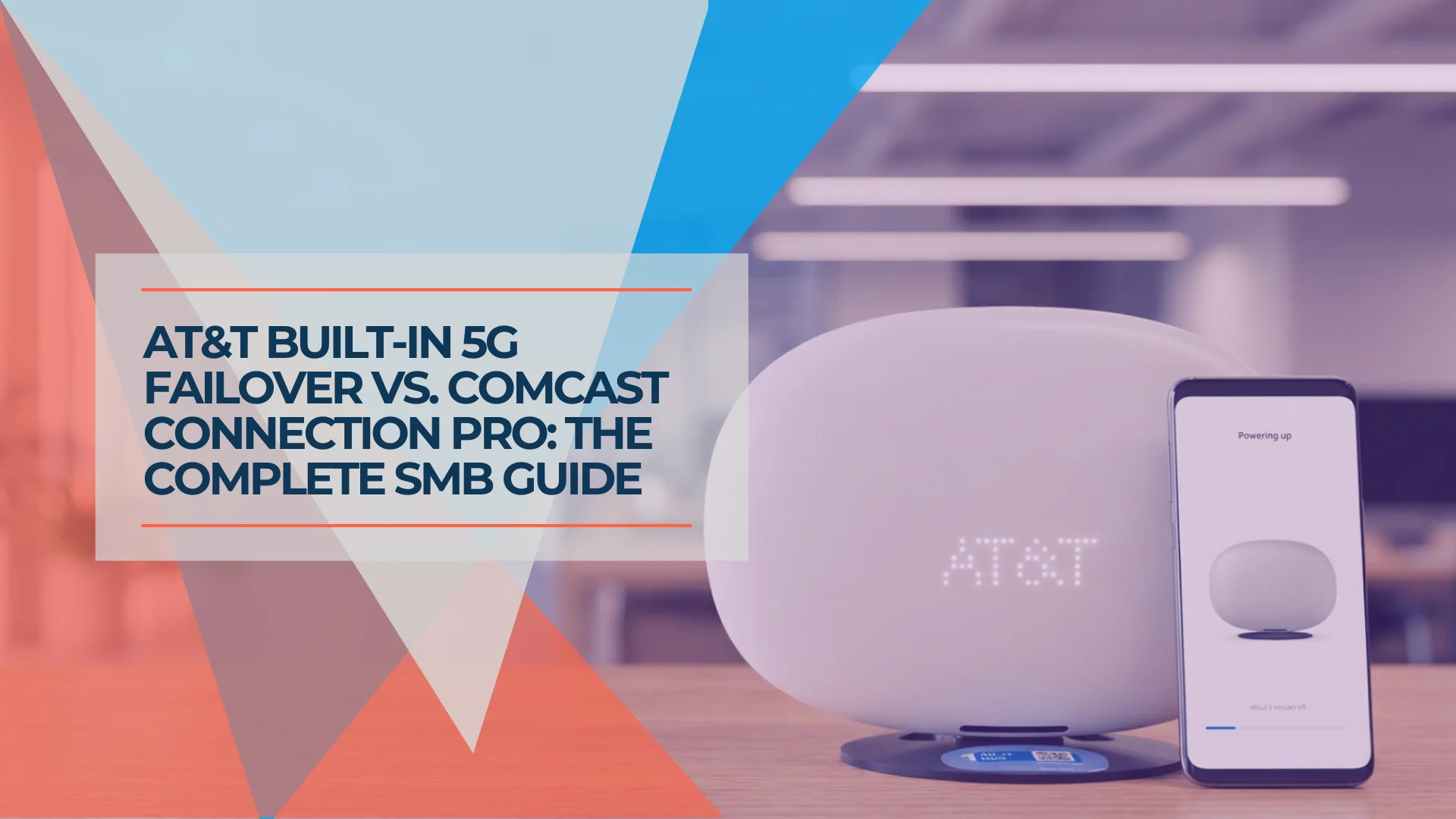
Business Internet Backup: AT&T Fiber 5G Failover vs. Comcast Connection Pro
AT&T Business Fiber offers built-in 5G backup on eligible 1 Gig+ plans. Compare documented limits, power needs, UniFi integration, and Comcast Connection Pro.
8 min read